What This Article Is For
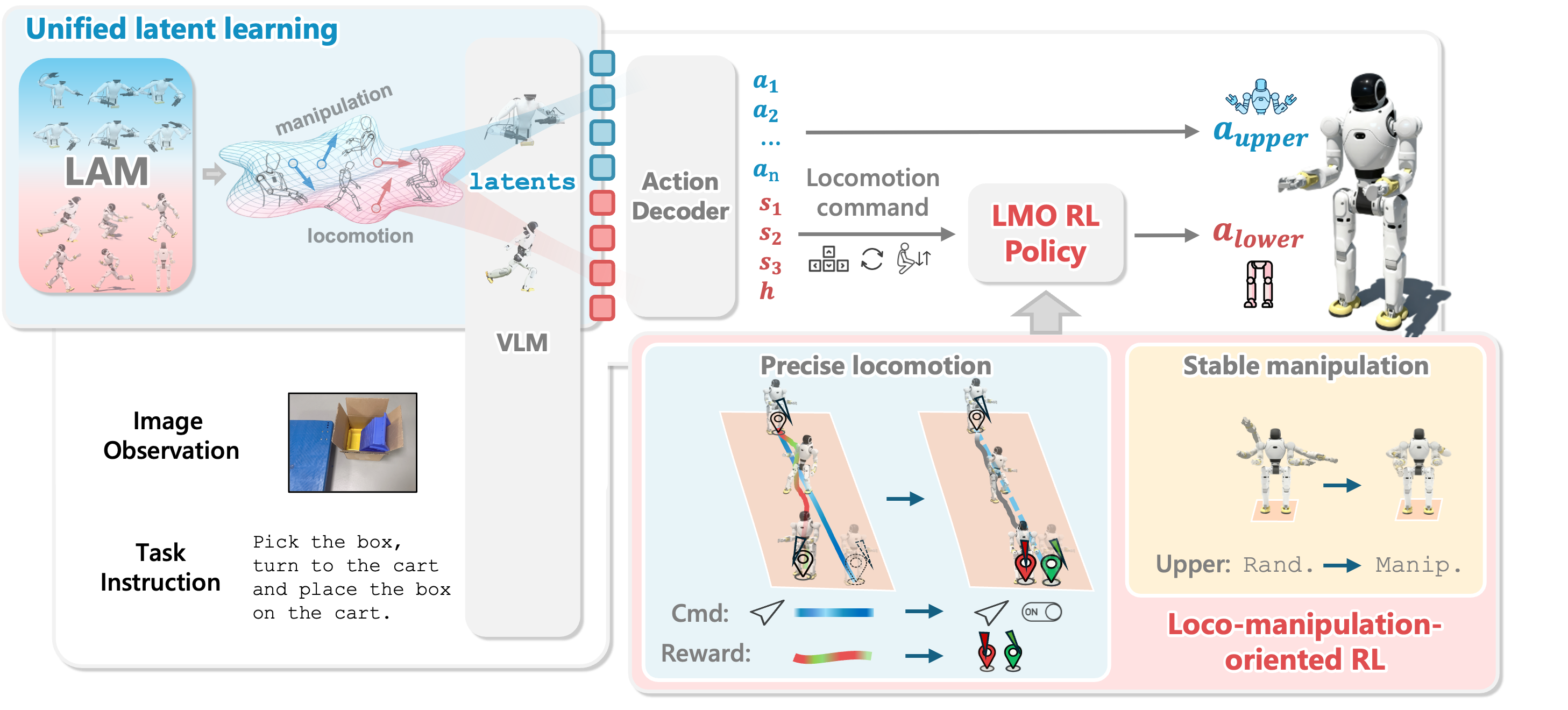
Article 1 mapped the WholeBodyVLA pipeline: egocentric video feeds LAMs, the VLA predicts latent actions, a lightweight decoder turns latents into robot commands, and the LMO keeps lower-body locomotion stable. Article 2 focused on action-free video for the manipulation LAM and locomotion LAM. Article 3 moves to a different data source: motion datasets and motion capture files that already contain skeleton or body-model information, but still need to be retargeted to the destination robot before they are useful for imitation, motion priors, RL tracking, or whole-body-controller evaluation.
Retargeting sounds simple: "take human motion and map it to the robot." In humanoids, it is full of traps. Human limb proportions differ from robot proportions. Robots have joint limits, foot geometry, waist joints, arm DoFs, hands, actuators, and mass distributions that do not match a human body. A kick, squat, jump, or box-pickup sequence may look valid in SMPL, but when forced onto Unitree H1 or G1 it can create foot sliding, ground penetration, floating bodies, self-intersection, or root translations that no longer match contact. These artifacts are not just visual defects. They become reference-trajectory defects that the downstream policy must imitate or compensate for with reward shaping and domain randomization.
This article follows two concrete open-source retargeting paths:
- The H2O/OmniH2O path in
human2humanoid: AMASS in SMPL+H format, H1 shape fitting withscripts/data_process/grad_fit_h1_shape.py, motion retargeting withscripts/data_process/grad_fit_h1.py, visualization withscripts/vis/vis_motion.py, and the pre-filteredamass_phc_filtered.pklmotion file. - The GMR path: multi-format retargeting through
scripts/smplx_to_robot.py,scripts/bvh_to_robot.py,scripts/fbx_offline_to_robot.py,scripts/optitrack_to_robot.py, PICO streaming, readableik_match_table1configs, and robot IDs such asunitree_g1,unitree_h1, andagibot_a2.
If you are reading the series in order, revisit Mapping the WholeBodyVLA Pipeline and Egocentric Video and LAMs. This article also prepares the ground for Teleoperation Fine-Tuning, because retargeted motion is useful, but real-robot data is still needed to ground latents and validate control. Outside this series, the WholeBodyVLA ICLR 2026 analysis and WholebodyVLA open-source guide give broader context.
Where Retargeting Fits in the Data Pipeline
Retargeting does not replace LAM video data, and it does not replace teleoperation. It serves another layer: whole-body motion with explicit body pose or skeleton structure. In a WholeBodyVLA-style system or a whole-body-control stack, retargeted data usually serves four roles.
| Goal | Input data | Desired output | Risk if retargeting is poor |
|---|---|---|---|
| Motion prior | AMASS, LAFAN1, BVH, FBX, SMPL-X | Plausible robot motion for pretraining or regularization | The policy learns sliding feet, floating bodies, or unnatural joints |
| RL tracking | Robot-specific retargeted trajectories | Reference qpos/root pose for imitation | Rewards fight bad references instead of teaching skills |
| Evaluation | Diverse motion clips | Stress tests for the controller | The benchmark measures retargeting errors instead of controller errors |
| Teleop bootstrap | Human motion or online MoCap | Temporary targets for robot viewing/control | Latency and IK artifacts reduce operator trust |
Article 2 dealt with video that can be action-free. Retargeting is the opposite: we often have 3D pose or skeletons, but we do not yet have valid actions for the robot embodiment. The core problem is the embodiment gap: preserve the intent, contact, body direction, hand/foot placement, and physical feasibility of the source motion while respecting the target robot.
A beginner rule:
If the VLA needs to learn visual latent actions:
    collect egocentric video for LAM training

If the low-level humanoid policy needs whole-body references for walking, turning, squatting, kicking, or jumping:
    use retargeted motion

If the real robot must solve object tasks:
    collect teleoperation and log state/action/command streams
Path 1: H2O/OmniH2O With AMASS SMPL+H
The human2humanoid repository is the official implementation for H2O and OmniH2O. The H2O project page describes a pipeline that retargets SMPL body motion to a humanoid, removes infeasible motions with a privileged imitation policy, and trains a robust real-time humanoid motion imitator for teleoperation. The OmniH2O project page highlights large-scale human-motion retargeting and augmentation, then distills a deployable sim-to-real policy from a privileged teacher. In short, H2O/OmniH2O treat retargeting as the front end of a learning-control system, not just as a visualization utility.
The README uses Unitree H1 as the running example. The retargeting process has three main steps:
- Write the H1 forward kinematics in
human2humanoid/phc/phc/utils/torch_h1_humanoid_batch.py. - Fit an SMPL shape that matches the H1 kinematics using
human2humanoid/scripts/data_process/grad_fit_h1_shape.py. - Retarget AMASS by matching keypoints between the fitted SMPL shape and H1 using
human2humanoid/scripts/data_process/grad_fit_h1.py.
This path is clear about the PHC-style logic: first adjust the human body model so its proportions better match the robot skeleton, then optimize the robot root pose and joints so robot keypoints follow SMPL-derived targets. The GMR paper later describes PHC in similar terms: fit body shape to the robot skeleton, use SMPL to compute target joint positions over time, and use gradient descent through forward kinematics to reduce robot-to-target position error.
Preparing AMASS and SMPL for H2O
The README asks for AMASS in SMPL + H G format under:
human2humanoid/
  data/
    AMASS/
      AMASS_Complete/
        ACCAD.tar.bz2
        BMLhandball.tar.bz2
        BMLmovi.tar.bz2
        CMU.tar.bz2
        ...
Then extract the archives:
cd human2humanoid/data/AMASS/AMASS_Complete
for file in *.tar.bz2; do
    tar -xvjf "$file"
done
You also need the SMPL model in pkl format, renamed as:
human2humanoid/
  data/
    smpl/
      SMPL_FEMALE.pkl
      SMPL_MALE.pkl
      SMPL_NEUTRAL.pkl
This is easy to confuse with GMR. H2O uses AMASS in SMPL + H G format. GMR's SMPL-X path explicitly tells users to download raw AMASS SMPL-X data and not SMPL+H data. The repositories implement different pipelines, so do not mix their download instructions.
Step A: Fit H1 Shape With grad_fit_h1_shape.py
After preparing the data, run:
cd human2humanoid
python scripts/data_process/grad_fit_h1_shape.py
The README expects:
human2humanoid/
  data/
    h1/
      shape_optimized_v1.pkl
This file is the bridge between the SMPL body and the H1 kinematic skeleton. If you skip shape fitting, the retargeter may try to force the robot to follow a source body with very different proportions: shoulders too wide or narrow, legs too long or short, pelvis height mismatched, and so on. That makes the following motion optimization more likely to produce artifacts.
For beginners, think of grad_fit_h1_shape.py as selecting an SMPL body shape that resembles H1's proportions. It does not retarget every AMASS clip. It prepares a better body-model template for the motion pass.
A quick checklist before moving on:
[ ] SMPL files are correctly named and placed.
[ ] AMASS is extracted into dataset folders, not only archived files.
[ ] `shape_optimized_v1.pkl` exists under `data/h1/`.
[ ] The target robot is H1; for another robot, you need matching FK and scripts.
Step B: Retarget AMASS With grad_fit_h1.py
After shape fitting, run:
cd human2humanoid
python scripts/data_process/grad_fit_h1.py
The README shows the script processing a large number of motions, with example logs such as 15886 Motions to process. This is not a real-time command. It is offline batch conversion: read AMASS motion, compute keypoint targets through the fitted SMPL shape, and optimize robot root/joint values for each sequence. Because it uses gradient descent through forward kinematics, it can be slow, but the output is a robot-specific motion dataset suitable for training.
Afterward, inspect the result:
python scripts/vis/vis_motion.py
Visualization is not optional if you care about data quality. Do not trust loss alone. Check clips from several categories: walking, turning, kicking, jumping, bending, arm swings, punching, and contact-heavy motions. Look for:
| Artifact | Visual sign | Training consequence |
|---|---|---|
| Foot sliding | The foot glides when it should be planted | The policy learns bad contact |
| Floating | The robot hovers above the floor | Root height references are wrong |
| Ground penetration | Feet or knees pass through the floor | Tracking and contact rewards conflict |
| Self-intersection | Arms pass through the torso, legs cross unrealistically | Motion is physically infeasible |
| Joint-limit clamp | Jerky posture, joints stuck at limits | The policy learns extreme actions |
If your downstream target is WholeBodyVLA/LMO, prioritize motions that resemble loco-manipulation: approaching objects, turning, squatting, picking, pushing, holding, kicking light objects, or changing stance while the upper body acts. Not every visually impressive AMASS clip is useful for a lab robot.
Using amass_phc_filtered.pkl
The human2humanoid README provides a retargeted and feasibility-filtered motion file: amass_phc_filtered.pkl. It belongs at:
human2humanoid/
  legged_gym/
    resources/
      motions/
        h1/
          amass_phc_filtered.pkl
When training or playing a policy, override the motion file:
python legged_gym/scripts/train_hydra.py \
  --config-name=config_teleop \
  task=h1:teleop \
  motion.motion_file=resources/motions/h1/amass_phc_filtered.pkl
This is a practical option if you want to reproduce the H2O/OmniH2O path before retargeting the full AMASS dataset yourself. But treat it as an H1-specific dataset from a specific pipeline, not as a universal humanoid dataset. If your target robot is G1, Agibot A2, Fourier, Booster, or a custom robot, do not copy an H1 file and assume the joint/action representation is valid.
Path 2: GMR With SMPL-X, BVH, FBX, PICO, and OptiTrack
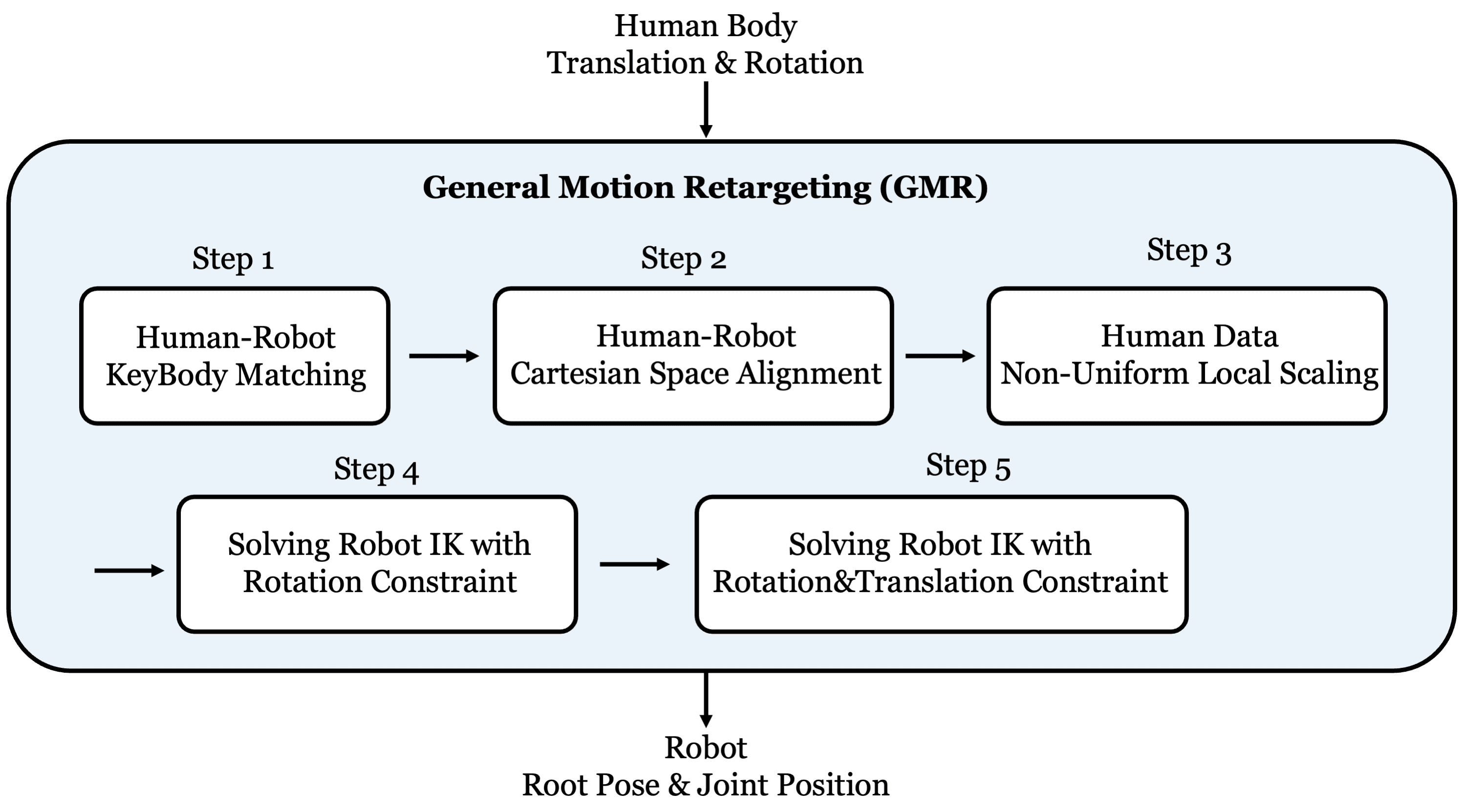
GMR stands for General Motion Retargeting. Its goal is broader: a general retargeter that runs in real time on CPU and supports multiple robots and motion formats. The README lists SMPL-X from AMASS/OMOMO, BVH from LAFAN1/Nokov, FBX from OptiTrack, PICO streaming through XRoboToolkit, and OptiTrack online streaming. The "Retargeting Matters" paper argues that retargeting artifacts such as foot sliding, ground penetration, and self-intersection reduce policy robustness, especially on dynamic or long sequences. GMR addresses this through multi-objective IK and more careful source-motion scaling.
GMR is a good fit when you want one tool for trying many robots quickly:
| Need | Main script | Data format | Use case |
|---|---|---|---|
| Convert AMASS/OMOMO SMPL-X | scripts/smplx_to_robot.py |
SMPL-X file | Offline dataset or single clip |
| Convert LAFAN1/Nokov BVH | scripts/bvh_to_robot.py |
.bvh |
Common MoCap skeleton files |
| Convert OptiTrack FBX offline | scripts/fbx_offline_to_robot.py |
.fbx extracted to .pkl |
Studio MoCap file export |
| Stream OptiTrack in real time | scripts/optitrack_to_robot.py |
Network stream from Motive | Online preview or teleop prototype |
| Stream PICO/TWIST2 | teleop.sh or TWIST2 scripts |
XRoboToolkit/PICO | Portable whole-body teleoperation |
GMR also lets you switch robots with --robot <robot_name>. The README lists unitree_g1 with 29 DoF, unitree_h1 with 19 DoF, unitree_h1_2, unitree_g1_with_hands, and many other robots. agibot_a2 also appears in the supported-robots table, but many format columns are still TBD in the README at the time checked. That distinction matters: a robot ID appearing in the table does not always mean every format has been tuned.
Installing GMR and Preparing Data
The README says GMR is tested on Ubuntu 22.04/20.04. The minimal setup is:
conda create -n gmr python=3.10 -y
conda activate gmr
pip install -e .
For SMPL-X, place body models here:
assets/
  body_models/
    smplx/
      SMPLX_NEUTRAL.pkl
      SMPLX_FEMALE.pkl
      SMPLX_MALE.pkl
The README also notes that after installing SMPL-X, if you use pkl files, change ext in smplx/body_models.py from npz to pkl. This is exactly the kind of beginner trap that can waste hours: the script and path may be correct, but the loader is searching for another extension.
For AMASS in GMR, download raw SMPL-X data. For LAFAN1, download raw .bvh files. For OptiTrack FBX, run the FBX extraction step before retargeting. For online OptiTrack, you need the IP address of the Motive server and the GMR client.
Offline SMPL-X to Robot
Retarget one SMPL-X motion:
python scripts/smplx_to_robot.py \
  --smplx_file <path_to_smplx_data> \
  --robot unitree_g1 \
  --save_path retargeting_data/g1/motion_0001.pkl \
  --rate_limit
By default, the README says you should see the retargeted robot motion in a MuJoCo window. To record a video:
python scripts/smplx_to_robot.py \
  --smplx_file <path_to_smplx_data> \
  --robot unitree_g1 \
  --save_path retargeting_data/g1/motion_0001.pkl \
  --rate_limit \
  --record_video \
  --video_path videos/motion_0001.mp4
--rate_limit keeps playback at the source human-motion rate. If you remove it, the retargeter can run as fast as possible, which is useful for batch conversion but not for checking real-time playback behavior.
Retarget a folder:
python scripts/smplx_to_robot_dataset.py \
  --src_folder <path_to_dir_of_smplx_data> \
  --tgt_folder retargeting_data/unitree_g1 \
  --robot unitree_g1
Batch mode usually does not open a visualizer. Add a QA step afterward with scripts/vis_robot_motion.py or the dataset viewer.
Offline BVH to Robot
BVH is common for LAFAN1, Nokov, Xsens, and many MoCap tools. For LAFAN1/Nokov with the main BVH script:
python scripts/bvh_to_robot.py \
  --bvh_file <path_to_bvh_data> \
  --robot unitree_g1 \
  --save_path retargeting_data/g1/lafan1_walk.pkl \
  --rate_limit \
  --format lafan1
The README says --format specifies the BVH format, with lafan1 and nokov supported. Do not ignore this argument when skeleton naming differs. A BVH file is not just numbers. It includes hierarchy, joint names, channel order, and unit conventions. If the parser interprets axes or scale incorrectly, the robot may rotate 90 degrees off or take absurdly long steps.
For a BVH dataset:
python scripts/bvh_to_robot_dataset.py \
  --src_folder <path_to_dir_of_bvh_data> \
  --tgt_folder retargeting_data/unitree_g1_lafan1 \
  --robot unitree_g1
Offline FBX and Online OptiTrack
For offline OptiTrack FBX, GMR requires extracting motion data first with poselib/fbx_importer.py:
cd third_party
python poselib/fbx_importer.py \
  --input <path_to_fbx_file.fbx> \
  --output <path_to_save_motion_data.pkl> \
  --root-joint <root_joint_name> \
  --fps <fps>
Then retarget the extracted .pkl:
conda activate gmr
python scripts/fbx_offline_to_robot.py \
  --motion_file <path_to_saved_motion_data.pkl> \
  --robot unitree_g1 \
  --save_path retargeting_data/g1/opti_motion.pkl \
  --rate_limit
For online OptiTrack, the README describes a two-computer setup: one server running Motive and one client running GMR. After configuring streaming in Motive and identifying both IP addresses:
python scripts/optitrack_to_robot.py \
  --server_ip <server_ip> \
  --client_ip <client_ip> \
  --use_multicast False \
  --robot unitree_g1
If the setup is correct, you should see the retargeted robot motion in a MuJoCo window. Treat this as a real-time IK/retargeting preview first, not as a safe controller for the physical robot. Real hardware still needs command filtering, joint-limit enforcement, balance control, and emergency stop behavior.
PICO Streaming and the Real-Time Choice
The GMR README includes PICO Streaming to Robot for TWIST2. This path uses XRoboToolkit/PICO. It requires installing the PICO SDK on the headset, installing xrobotoolkit-pc-service on the PC, building the Python SDK, and then running a teleoperation script such as:
bash teleop.sh
The expected result is retargeted robot motion in a MuJoCo window. From a system-design perspective, PICO/OptiTrack online streaming is very different from offline dataset conversion:
| Criterion | Offline conversion | Real-time retargeting |
|---|---|---|
| Input | AMASS, SMPL-X, BVH, FBX files | Stream from PICO, OptiTrack, Xsens |
| Output | .pkl motion dataset |
Per-frame robot qpos/motion |
| Strength | Batchable, easy to QA, good for RL data | Interactive, useful for teleop prototypes |
| Weakness | Does not test operator-in-the-loop behavior | Needs latency, dropout, and safety handling |
| WholeBodyVLA use | Motion priors, LMO/RL tracking, evaluation | Demonstration capture, whole-body target preview |
If you are building a first dataset, start offline. Offline conversion lets you inspect, filter, split, compute statistics, and catch artifacts before the real robot is involved. Once offline retargeting is stable, real-time retargeting can help collect demonstrations or speed up teleoperation.
Understanding ik_match_table1 in GMR
The technical center of GMR is in IK configs such as general_motion_retargeting/ik_configs/smplx_to_g1.json and bvh_lafan1_to_g1.json. A config contains fields like:
{
  "robot_root_name": "pelvis",
  "human_root_name": "pelvis",
  "ground_height": 0.0,
  "human_height_assumption": 1.8,
  "use_ik_match_table1": true,
  "use_ik_match_table2": true,
  "human_scale_table": {
    "pelvis": 0.9,
    "left_shoulder": 0.8,
    "left_wrist": 0.8
  },
  "ik_match_table1": {
    "pelvis": ["pelvis", 100, 10, [0.0, 0.0, 0.0], [0.5, -0.5, -0.5, -0.5]]
  }
}
GMR's DOC.md explains each ik_match_table1 entry in this order:
"robot_body_name": [
  "human_body_name",
  position_weight,
  rotation_weight,
  position_offset_xyz,
  rotation_offset_quaternion_wxyz
]
For example, in smplx_to_g1.json, the robot pelvis maps to the human pelvis with position weight 100 and rotation weight 10. left_toe_link maps to left_foot with high position weight. In bvh_lafan1_to_g1.json, torso_link maps to Spine2 with high rotation weight in the first stage, while ik_match_table2 increases position weights for the pelvis, ankles, wrists, or other key links depending on the config. The two-table structure lets the solver perform coarse alignment first and fine alignment second.
In plain language:
ik_match_table1:
    establish global posture, body direction, shoulder/hip/leg orientation

ik_match_table2:
    refine root, feet, wrists, and important end-effectors
When adding a new robot, URDF or MuJoCo XML is not enough. You must decide which robot body corresponds to which human body, which weights matter, which local-axis offsets are needed, and which scaling factors are reasonable. That is the real retargeting work.
Understanding Robot IDs: unitree_g1, unitree_h1, agibot_a2
In GMR, --robot is not a free-form label. It is a key that maps to a robot model and IK configs. Important IDs include:
| Robot ID | Meaning in the GMR README | Practical note |
|---|---|---|
unitree_g1 |
Unitree G1, 29 DoF: legs 2x6, waist 3, arms 2x7 | Broadly supported: SMPL-X, BVH, FBX, Nokov, PICO |
unitree_g1_with_hands |
G1 with hands, 43 DoF | Useful for hand tasks, but the config is more complex |
unitree_h1 |
Unitree H1, 19 DoF: legs 2x5, waist 1, arms 2x4 | SMPL-X is listed; related to H2O/H1 but not the same pipeline |
unitree_h1_2 |
Unitree H1-2, 27 DoF | The README includes a jumping demo |
agibot_a2 |
AgiBot A2 | Listed in the table, but many format columns are TBD when checked |
If a robot ID appears in the table but the format column says TBD, do not assume the pipeline is production-ready. Check the files under assets/, the configs under general_motion_retargeting/ik_configs/, and run a short motion before promising support. For a new robot, a good mesh is not enough; you need joint names, body names, actuator order, quaternion convention, ground height, and scale.
Choosing H2O/OmniH2O or GMR
These paths are not mutually exclusive. Choose by goal.
| Question | H2O/OmniH2O AMASS SMPL+H | GMR |
|---|---|---|
| Main target robot | Unitree H1 in the H2O pipeline | Many robots: G1, H1, H1-2, Booster, Fourier, Kuavo, and more |
| Main input | AMASS SMPL + H G |
SMPL-X, BVH, FBX, PICO, OptiTrack |
| Processing style | Offline PHC-style batch gradient fitting | Multi-objective IK, real-time CPU demos |
| Strongest use | Reproducing H2O/OmniH2O and using the filtered H1 dataset | Comparing robots/formats quickly, prototyping real-time teleop |
| Watch out for | Slow conversion, H1 specificity, need for feasibility filtering | IK-config tuning and format-support status |
If you want to reproduce H2O/OmniH2O on H1, follow the human2humanoid README. If you have a G1, want to try LAFAN1 BVH, have OptiTrack FBX files, or want PICO streaming, GMR is usually more convenient. If you are building WholeBodyVLA for your own robot, use GMR as a framework for understanding IK configuration, but still QA every motion and add a safety layer before touching real hardware.
QA Before Training
A minimal QA pipeline can look like this:
def qa_retargeted_motion(motion):
    metrics = {}
    metrics["min_height"] = compute_min_body_height(motion)
    metrics["foot_sliding"] = estimate_foot_sliding_during_contact(motion)
    metrics["joint_limit_margin"] = min_joint_limit_margin(motion)
    metrics["self_collision_proxy"] = check_link_distance_proxy(motion)
    metrics["root_speed_spikes"] = detect_root_velocity_spikes(motion)
    return metrics
And the manifest should preserve provenance:
motion_id: lafan1_dance_subject2_0007
source_format: bvh
source_dataset: LAFAN1
retargeter: gmr
robot: unitree_g1
ik_config: bvh_lafan1_to_g1.json
rate_limit_used: true
qa:
  visual_status: keep
  foot_sliding: low
  penetration: none
  notes: "arms acceptable, left turn slightly stiff"
split: train
Do not train directly on every batch output. Split motions into keep, maybe, and drop. maybe clips are useful for debugging configs, but they should not enter the first training set. For WholeBodyVLA, tag primitives as well:
walk_forward, turn_left, turn_right, sidestep, squat, reach, carry, push, kick, dance, jump
Later, when evaluating an LMO or decoder, you can identify which group fails instead of only seeing an aggregate success rate drop.
Conclusion
Retargeting sits between action-free video and real-robot teleoperation. H2O/OmniH2O gives a specific AMASS SMPL+H path: fit H1 shape, retarget AMASS through gradient fitting, visualize the result, and use amass_phc_filtered.pkl when you want a filtered starting point. GMR gives a broader retargeter: SMPL-X, BVH, FBX, OptiTrack, PICO, many robot IDs, and readable IK configs that you can inspect and tune.
The most important beginner lesson is this: retargeting is not a one-time file conversion command. It is a data pipeline with assumptions, configs, QA, and splits. Good retargeted motion makes RL tracking and whole-body control easier. Bad retargeted motion pushes the burden into reward design, domain randomization, and sim-to-real tuning. With humanoids, reference-trajectory quality often determines whether you are training a skill or training a policy to repair data defects.
Main Technical Sources
- LeCAR-Lab human2humanoid README
- H2O project page
- OmniH2O project page
- YanjieZe GMR README
- Retargeting Matters: General Motion Retargeting for Humanoid Motion Tracking
- GMR IK config documentation