What This Article Is For
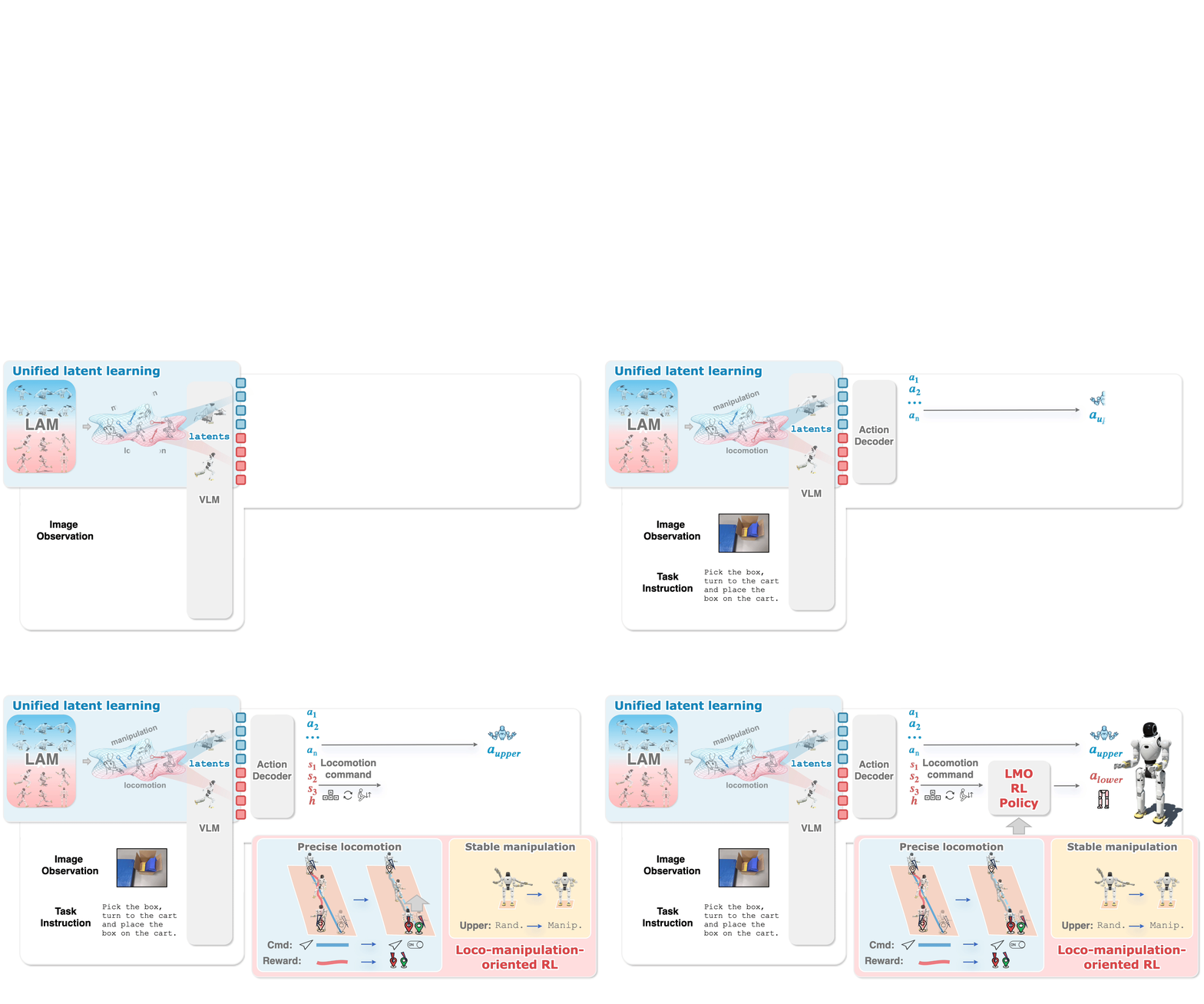
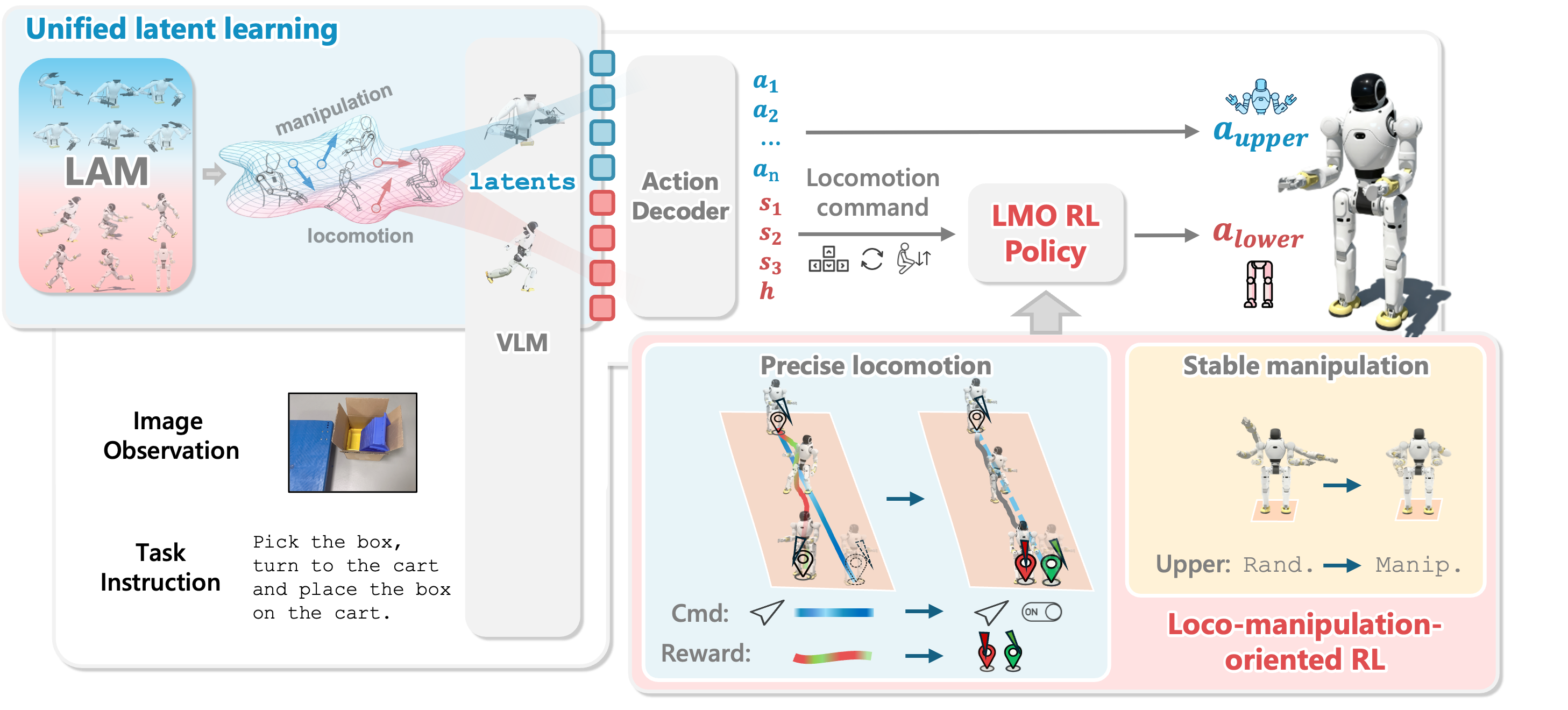
Article 1 mapped the WholeBodyVLA pipeline: egocentric images and language enter the VLA; two Latent Action Models (LAMs) provide discrete latent supervision; a lightweight decoder emits robot-level commands at about 10 Hz; and the LMO policy executes locomotion at 50 Hz. Article 2 asks a more practical question: if you do not yet have a Motion Capture studio, and you cannot teleoperate a humanoid for hundreds of hours, what data can you collect first?
The answer from WholeBodyVLA is useful for small labs: at the latent pretraining stage, the locomotion LAM can learn from egocentric videos without action labels. The paper describes a low-cost data recipe: one operator, one head-mounted monocular camera, humanoid-relevant motion primitives such as advancing, turning, and squatting, plus goal-directed motion toward potential manipulation or contact targets. The manipulation LAM is trained separately on real-robot manipulation data, in the paper using AgiBot World, while the locomotion LAM uses self-collected egocentric locomotion videos.
This article turns that recipe into a capture protocol a beginner can follow. It does not replace teleoperation; that stage is covered separately in article 4. But it lets you build a clean video corpus early, with the right viewpoint, primitives, metadata, and quality checks, so the model can learn a locomotion vocabulary before you spend expensive robot time.
For broader research context, see our WholeBodyVLA ICLR 2026 analysis and WholebodyVLA architecture guide. This article is the first concrete data step: turning the paper's action-free recipe into a capture workflow you can audit.
Why Action-Free Ego Video?
In robot learning, video is usually not the expensive part. The expensive part is action-aligned trajectory data: joint targets, gripper commands, base commands, contact state, robot state, and synchronized timestamps. Collecting that data requires the robot, teleoperation hardware, control software, safety supervision, scene resets, and many failed attempts. For humanoid loco-manipulation, the cost is even higher because the robot must walk, balance, and use its arms at the same time.
WholeBodyVLA uses latent action learning to reduce this bottleneck. A LAM observes two consecutive frames and learns a discrete code describing the visual change from the earlier frame to the later frame. That code is not a true motor command, but it can act as a pseudo-action label for VLA pretraining. When a head-mounted video shows a person walking toward a table, turning toward a cart, lowering their body to reach a box, or stopping near a handle, the LAM can learn visual changes corresponding to "advance," "turn," "squat," and "stop near the target."
The key caveat is that "action-free" does not mean "any video is fine." The paper stresses that the locomotion data should be manipulation-aware locomotion. The operator should not wander randomly. They should move in ways that establish preconditions for manipulation: approach the object to be picked, rotate to face a contact target, squat to reach a low container, sidestep to align before placing an object, or stop in front of a handle. This makes the video directly useful for loco-manipulation learning rather than just teaching the model that the scene moves when the camera moves.
Separate the Locomotion LAM and Manipulation LAM
WholeBodyVLA does not train one shared LAM over all videos. The paper explains that manipulation and locomotion videos generate very different visual patterns. In manipulation clips, the camera is often almost static; the important changes happen around hands, grippers, objects, and contact points. In egocentric locomotion clips, the camera moves continuously; the whole scene shifts because the head or body is advancing, turning, sidestepping, or squatting. If a single LAM is trained naively on both sources, it can learn conflicting attention behavior: sometimes it should focus locally on hands and objects, while at other times it should attend to the whole scene to understand ego-motion.
Your dataset should therefore have two buckets from the beginning:
| Bucket | Primary data | What it teaches | Avoid mixing in |
|---|---|---|---|
| Locomotion LAM | Egocentric video while the person or robot moves through the scene | Advance, retreat, sidestep, turn, squat, stop near target | Clips that only show tabletop hand motion |
| Manipulation LAM | Object manipulation video, preferably from robot data or a robot dataset | Grasp, lift, place, push, pull, contact affordance | Long walking clips without clear manipulation |
| Teleop fine-tuning | Trajectories with robot state and real commands | Ground latents into joint targets and locomotion commands | Action-free video without synchronized actions |
This article focuses on the locomotion LAM bucket. The capture protocol still needs to be manipulation-aware. The goal is not to make a walking dataset for sports analysis. The goal is to capture how a body approaches useful manipulation poses.
Minimum Equipment
The WholeBodyVLA paper describes a locomotion data pipeline that only needs a single operator with a head-mounted monocular camera, avoiding expensive MoCap or teleoperation for this pretraining stage. In a small lab, you can start with a very simple setup:
| Component | Practical minimum | Notes |
|---|---|---|
| Camera | Action camera, phone on a head strap, or lightweight RGB camera | Prioritize stable video and an eye-level viewpoint |
| Mount | Head strap, helmet mount, or head-level adapter | Head-mounted is closer to a humanoid head camera than chest-mounted |
| Video format | 1080p at 30 fps is a reasonable start | 60 fps helps with faster motion but increases storage |
| Audio | Optional | Useful for spoken instructions, but consider privacy |
| Time sync | System clock or clap marker at the start of clips | Useful later when joining metadata and scene logs |
| Scene props | Table, shelf, box, basket, cart, handle, objects to pick | Choose objects with clear contact meaning |
You do not need RGB-D for the locomotion LAM recipe. If you have a RealSense-style camera, it can be useful, but do not let hardware requirements block the first data collection pass. For beginner workflows, the important parts are temporal order, a viewpoint similar to a robot head camera, and task-relevant motion.
Motion Primitives to Capture
WholeBodyVLA highlights core loco-manipulation primitives such as advancing, turning, and squatting. The appendix further describes task suites combining forward and backward walking, lateral stepping, in-place turning, and squatting with single-arm or dual-arm manipulation. Your protocol should cover at least these groups:
| Primitive | Example clip | What a good clip shows | Common mistake |
|---|---|---|---|
| Advance | Walk from a doorway to a table with a box | Target grows larger, path is clear, final stop is near the workspace | Operator moves too fast or stops too far away |
| Backward | Step away from a table after placement | Context remains visible, motion is controlled | Long backward walking in an empty scene |
| Lateral step | Sidestep to align with a basket or carton | Target shifts laterally, then ends near the center of view | Sidestep without a visible target |
| Turn | Rotate in place to face a cart or shelf | Heading changes clearly, target ends centered | Operator both turns and advances too much |
| Squat | Lower the body to reach a low container | Camera height lowers, low target becomes easier to reach | Squat is not tied to any object |
| Approach-to-contact | Move toward a handle, box, shelf edge, or tabletop | Operator stops at arm-reachable distance | Operator simply passes by the target |
Each clip does not need to contain only one primitive. Real loco-manipulation is sequential: approach the table, sidestep to align, squat, make a small turn, and stop. In the first data pass, collect both single-primitive clips and short sequences. Single clips help you debug whether the LAM can distinguish the basic motions; sequences help the VLA learn task context.
A minimal two-hour collection plan can look like this:
Scene A: table + box + basket on the floor
  20 clips approaching the table from 3 distances
  20 clips sidestepping left/right to align with the basket
  20 clips squatting in front of the basket
  20 clips: advance -> sidestep -> squat -> stop

Scene B: shelf + cart with handle
  20 clips turning left/right to face the handle
  20 clips approaching the handle and stopping within reach
  20 clips of short simulated pushing motion, no heavy force required
  20 clips: advance -> turn -> approach handle

Scene C: low box or floor-level object
  20 squat clips from multiple approach angles
  20 clips stepping backward after a squat
  20 clips changing heading and then squatting
Those numbers are only a starting point for pipeline testing. The WholeBodyVLA experiments used about 300 hours of collected egocentric locomotion video, so a serious training run should expand across scenes, operators, layouts, lighting conditions, and target types.
Goal-Directed Motion Toward Contact Targets
The most important part of the recipe is goal-directed execution. The operator should move toward targets that could become manipulation or contact targets. In other words, every locomotion clip should answer the question: "After stopping here, what could a humanoid do with its hands?"
Good targets include:
| Contact target | Why it is useful |
|---|---|
| Table edge or tabletop | The robot must stop at a workable distance before pick/place |
| Basket, carton, or low box | Combines approach, lateral alignment, and squat |
| Cart handle | Combines turning, bimanual placement, and forward push |
| Door or drawer handle | Requires precise orientation before manipulation |
| Multi-level shelf | Requires height and distance adjustment |
| Object on the floor | Requires squatting while keeping the target in view |
Weak clips look like this:
Walking around the room without stopping near a target.
Rotating the camera by moving the neck or hand instead of rotating the body.
Squatting in empty space.
Running through the scene so the object appears only briefly.
Capturing from a handheld camera much lower than head level.
When you add manual labels, avoid generic labels like walk. Record the relation to the target: approach_table, align_to_basket, turn_to_cart_handle, squat_to_low_box. The LAM does not need these labels for frame reconstruction training, but good metadata helps filtering, failure analysis, validation split design, and later VLA instruction generation.
A Concrete Capture Protocol
The following protocol is detailed enough to hand to a new data collector.
1. Prepare the Scene
Choose a small area with stable lighting and limited foot traffic. Place three to five contact targets: a table, a box on the table, a basket on the floor, a cart or object with a handle, and a shelf. Mark several start positions on the floor with tape: near, medium, far; left offset, right offset; and headings rotated 30-60 degrees from the target.
The aim is controlled variation. If every clip starts from the same pose, the model will overfit. If the scene changes too much on day one, debugging becomes difficult. Start structured, then add diversity.
2. Mount the Camera and Check the Field of View
The camera should sit near eye level and point slightly downward, so it can see low targets and the approximate hand workspace. If the angle is too high, the video shows mostly walls and shelves. If it is too low, the data behaves more like chest-camera video than head-camera video. Before recording a full batch, walk through one sequence and check:
Is the target centered when the operator stops?
Are the tabletop, basket, or handle recognizable?
During a squat, does the low target stay in view?
Is the video stable enough to avoid constant motion blur?
Are file timestamps and clip IDs ordered correctly?
If your camera has stabilization, use it moderately. Excessive stabilization may remove some ego-motion cues, but severe shake makes reconstruction much harder. A LAM needs real camera motion, not unusable blur.
3. Attach an Instruction to Every Clip
Each clip should have a short intent. You can speak it at the beginning, show it to the operator on a phone, or store it in a CSV file. For example:
clip_id,instruction,start_pose,target,primitive_sequence
A_001,"go to the table and stop within reach",far_center,table_edge,advance
A_014,"sidestep right to align with the basket",near_left,basket,lateral_right
B_008,"turn left to face the cart handle",near_angle_right,cart_handle,turn_left
C_022,"squat to reach the low box",near_center,low_box,squat
Instructions do not need to be long. They do need to match the video. If the instruction says "turn to the cart" but the operator walks straight to the table, you create noisy metadata that will hurt downstream filtering and evaluation.
4. Record Short Clips With Clear Starts and Stops
Single-primitive clips can be 3-12 seconds long. Short sequences can be 10-30 seconds. Begin when the camera is stable. End after the operator has stopped for one or two seconds at the final pose. That final pause matters: loco-manipulation requires not only reaching the target, but reaching a stable stance where manipulation is possible.
A simple single-primitive format:
0.0-1.0 s: stand still at the start pose
1.0-5.0 s: execute the main primitive
5.0-7.0 s: stop with the target within manipulation range
A short sequence format:
0.0-1.0 s: stand still
1.0-5.0 s: advance
5.0-8.0 s: turn or sidestep
8.0-11.0 s: squat or align
11.0-13.0 s: hold a stable final stance near the target
5. Write Metadata During the Session
Do not rely on memory after the session. Create manifest.csv or manifest.jsonl as you record. A minimal schema:
{
  "clip_id": "B_008",
  "video_path": "raw/session_2026_06_10/B_008.mp4",
  "scene_id": "shelf_cart_lab",
  "operator_id": "op_03",
  "camera_mount": "head",
  "camera_model": "action_cam_1080p30",
  "instruction": "turn left to face the cart handle",
  "target": "cart_handle",
  "primitive_sequence": ["turn_left", "stop"],
  "start_pose_bucket": "near_angle_right",
  "quality": "unchecked"
}
You do not need exact 6D pose labels at this stage. You do need enough metadata to filter clips later: keep only squat clips, remove shaky clips, split by scene, or test whether the model has overfit to one operator.
Data Quality Rules
A good capture protocol defines not only what to record, but also what to reject. Action-free videos are especially easy to pollute because there is no action label to validate. Use a concrete checklist:
| Criterion | Pass | Fail |
|---|---|---|
| Temporal continuity | Clip is continuous, with no jump cuts | Heavy frame drops or cuts in the middle |
| Viewpoint | Head-mounted egocentric view | Handheld shake or camera far below eye level |
| Target visibility | Target is visible before the final stop | Target is occluded or only appears for an instant |
| Primitive clarity | Main motion is recognizable | Motion mixes advance, turn, and squat without clear intent |
| Final stance | 1-2 seconds of stable stop | Clip ends while the camera is still moving wildly |
| Manipulation relevance | Stop is within reach or at a contact point | Walking unrelated to any manipulation target |
| Privacy and safety | No bystander faces, unsafe areas, or risky collisions | Sensitive environment or unsafe path |
Use three QA labels: keep, maybe, and drop. Do not try to save every clip. Bad clips can push the LAM codebook toward camera shake, blur, lighting changes, or irrelevant movement rather than useful locomotion semantics.
Split the Dataset to Avoid Leakage
Beginners often split train and validation clips randomly. That can leak the same scene, operator, target, and route into both sets. The validation loss looks good, but the model may fail when the room, camera, or operator changes.
Better split options:
| Split | How to define it | Purpose |
|---|---|---|
| Train | Most clips across most scenes and operators | Learn the main primitive vocabulary |
| In-scene validation | Same scenes, different clips | Debug reconstruction and latent quality |
| Held-out scene validation | Reserve one room or layout | Test visual generalization |
| Held-out operator validation | Reserve one operator | Test gait and head-motion bias |
| Stress set | Different lighting, low/high targets, offset paths | Find failures before scaling |
If you only have one lab room, create held-out layouts: move the table, change box color, swap the basket, or alter start distances. WholeBodyVLA evaluates generalization under changed start poses, objects, layouts, and appearance; your locomotion dataset should follow the same spirit.
Minimal Preprocessing Before LAM Training
A LAM learns from consecutive frames, so preprocessing must preserve time. Do not shuffle individual frames. Do not crop so aggressively that the target disappears. A light pipeline:
def preprocess_clip(video):
    frames = decode_video(video, fps=10)  # or sample from 30 fps down to 10 fps
    frames = trim_static_intro_outro(frames, keep_final_stop=True)
    frames = resize_short_side(frames, 256)
    frames = center_or_letterbox_crop(frames, size=224)
    pairs = [(frames[i], frames[i + 1]) for i in range(len(frames) - 1)]
    return pairs
The sampling rate depends on the model and compute budget. If sampling is too sparse, frame-to-frame change becomes too large. If it is too dense, many pairs are almost identical. Since the WholeBodyVLA VLA backbone operates at about 10 Hz during deployment, thinking about video around 10 fps is a reasonable starting point. Still, you should test several rates and measure reconstruction or relative reconstruction gain instead of choosing by intuition.
Keep metadata next to processed frames:
processed/
  frames/
    B_008/
      000000.jpg
      000001.jpg
  pairs.jsonl
  manifest.jsonl
  qa_report.csv
Do Not Start With MoCap If the Goal Is the LAM
Motion Capture can be valuable for retargeting, imitation, whole-body motion priors, and evaluation. But if the immediate goal is to train a locomotion LAM following the WholeBodyVLA action-free recipe, MoCap is not the first requirement. The LAM needs structured visual change from egocentric video; it does not require a 3D skeleton for every frame.
A practical comparison:
| Data collection path | Cost | Best stage | Risk |
|---|---|---|---|
| Head-mounted monocular video | Low | Locomotion LAM pretraining | Needs strong QA to avoid noisy clips |
| Robot manipulation dataset | Medium to high if self-collected, low if open | Manipulation LAM | Domain gap from your target robot |
| Real-robot teleoperation | High | Decoder grounding and fine-tuning | Consumes robot time and expert operators |
| Whole-body MoCap | Very high | Retargeting, motion prior, evaluation | Does not automatically provide ego visual latents |
The practical rule is simple: on day one, record good ego video before building a MoCap-heavy pipeline. Once the LAM pipeline works, decide where MoCap actually helps: retargeting, reward design, or benchmarking. This matches the spirit of the paper: use low-cost action-free video to scale pretraining, then use targeted teleoperation to ground latents into the real robot.
Capture-Day Checklist
[ ] Scene has clear manipulation targets: table, basket, box, handle, shelf.
[ ] Camera is head-mounted, and low targets remain visible during squats.
[ ] Primitive list covers advance, backward, lateral, turn, squat, approach-to-contact.
[ ] Every clip has an instruction or intent metadata.
[ ] Every clip starts and ends with 1-2 seconds of stillness.
[ ] Manifest records clip_id, scene_id, operator_id, target, and primitive.
[ ] QA labels are defined: keep/maybe/drop.
[ ] Validation has a held-out scene, layout, or operator.
[ ] No private or unsafe areas are recorded.
Conclusion
Ego video for a locomotion LAM is cheap, but it is not casual data. To stay close to WholeBodyVLA, keep three principles: action-free videos must still be temporally clean; locomotion must be manipulation-aware, meaning the operator advances, turns, sidesteps, and squats toward contact targets; and the locomotion LAM should be separated from the manipulation LAM because the two video types create different visual learning problems.
Done well, this dataset lets the VLA learn latent concepts for advancing, turning, aligning, and lowering the body before you collect large amounts of real-robot trajectory data. That is the practical value of the recipe: it does not remove teleoperation, but it reduces how much expensive teleoperation you need and gives fine-tuning a better prior.
Main Technical Sources
- WholeBodyVLA paper on arXiv
- WholeBodyVLA project page
- WholeBodyVLA GitHub README
- AgiBot World GitHub