What This Article Is For
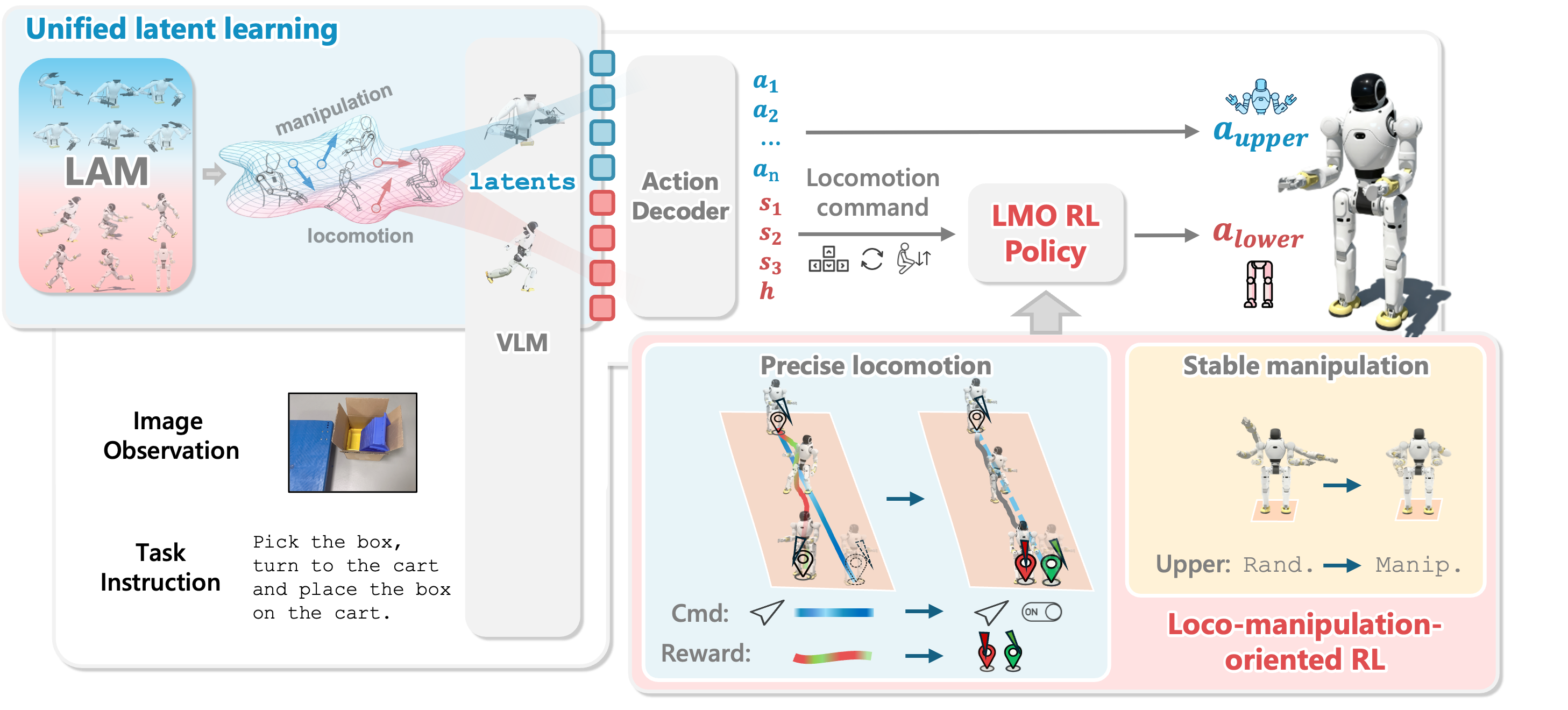
The first five articles moved from the WholeBodyVLA pipeline map to egocentric video, humanoid retargeting, whole-body teleoperation, and tracker/LMO RL training. Article 6 is the deployment gate before touching a real Unitree G1. This is not the most glamorous part of the stack, but it is where a team decides whether it will lose an afternoon debugging or risk damaging hardware.
If you have not followed the earlier pieces, revisit Mapping the WholeBodyVLA Pipeline, Humanoid Retargeting, Teleoperation Fine-Tuning, and Training Trackers and LMO RL. Outside this series, the robotics sim-to-real pipeline and GROOT N1 data collection on G1 are useful background.
We will build the checklist from two real repositories:
| Repository | Key files and commands | Role in the checklist |
|---|---|---|
| TWIST | assets/twist_general_motion_tracker.pt, server_high_level_motion_lib.py, server_low_level_g1_sim.py, server_low_level_g1_real.py --net |
A full path from JIT checkpoint, Redis motion server, MuJoCo low-level sim, and real G1 deployment |
| GMT | sim2sim.py --robot g1 --motion walk_stand.pkl, view_motion.py --motion walk_stand.pkl |
A lightweight evaluator for viewing motions and testing tracking in MuJoCo before using a heavier deployment stack |
The central idea is simple: sim-to-real is not one final command. It is a chain of gates. A motion should pass file validation, kinematic visualization, policy simulation, Redis integration, checkpoint checks, and network checks before it is allowed near physical hardware.
motion.pkl
  -> view_motion.py
  -> sim2sim.py
  -> TWIST high-level motion server
  -> TWIST low-level MuJoCo sim
  -> network dry-run
  -> G1 in hoist / damping / supervised deployment
Why Validate in Layers?
A beginner often asks: "If the repository already provides a checkpoint, why not run server_low_level_g1_real.py directly?" Because humanoid failures are rarely polite. A small mismatch in joint order, action scale, quaternion frame, observation size, or network interface can become a leg jerk, a falling torso, or a controller reading stale commands from Redis.
TWIST states that it provides a trained student checkpoint at assets/twist_general_motion_tracker.pt that can be used directly for deployment. But the same README separates the system into two layers: a high-level controller that sends motion targets and a low-level controller that runs the RL policy. The recommended path starts the low-level simulation first so the robot can stand still, then starts the high-level motion server through Redis. For the real robot, the README asks the operator to connect G1 and the laptop through Ethernet, set the laptop IP to 192.168.123.222 with netmask 255.255.255.0, ping the robot at 192.168.123.164, enter dev mode with L2+R2, confirm damping state, and then run the low-level real server with --net.
GMT is lighter. Its README says the codebase supports MuJoCo motion tracking simulation on Unitree G1 and provides a pretrained checkpoint plus example motions. The two commands that matter for this article are:
python sim2sim.py --robot g1 --motion walk_stand.pkl
python view_motion.py --motion walk_stand.pkl
This makes GMT a useful pre-filter. view_motion.py lets you inspect the kinematic reference: does the robot penetrate the floor, do feet slide unrealistically, does root height jump? sim2sim.py closes the loop in MuJoCo: the motion must not only look valid, it must be trackable by a policy.
Checklist 0: Assign Responsibility to Each Layer
Before running any command, separate the system into responsibilities. WholeBodyVLA uses several layers:
| Layer | Input | Output | Common failure |
|---|---|---|---|
| Motion file | .pkl from retargeting or a dataset |
root pose, joint pose, velocity | Wrong robot, wrong FPS, missing keys, mismatched joint order |
| High-level motion server | time-indexed motion frames | action_mimic_g1 in Redis |
Redis is not running, wrong published shape, motion ends without reset |
| Low-level policy | mimic obs + proprioception + history | target joint/action | Checkpoint is not TorchScript, observation dimension mismatch, wrong device |
| MuJoCo sim | action target | simulated robot state | XML does not match policy, actuator order is wrong, gains are too aggressive |
| Real G1 | target joint through SDK | physical motion | wrong network interface, robot not in dev mode, no safe hoist |
A good checklist does not only ask "did the command run?" It asks "what did this command prove?" If view_motion.py runs, you know the motion file is readable and the geometry is plausible. If sim2sim.py runs, you know the GMT policy can track that motion in MuJoCo. If server_low_level_g1_sim.py can stand after Redis is warmed, you know the TWIST low-level controller, JIT checkpoint, and Redis path are minimally connected. If G1 responds to ping, you only know IP routing is correct; you do not yet know deployment is safe.
Checklist 1: Validate Environment and Dependencies
TWIST uses Python 3.8, Isaac Gym, RSL-RL, Legged Gym, MuJoCo, redis[hiredis], mujoco-python-viewer, pytorch-kinematics, and unitree_sdk2_python for sim-to-real. GMT also uses Python 3.8, PyTorch, NumPy 1.23.0, MuJoCo, and visualization dependencies. One beginner trap is that the same .pkl motion may have been generated under a different NumPy environment. TWIST even has a Q&A entry about a potential NumPy mismatch between TWIST and GMR.
I prefer two conda environments instead of forcing everything into one:
# Lightweight environment for viewing and filtering motions with GMT
conda create -n gmt python=3.8
conda activate gmt
pip install torch torchvision torchaudio
pip install "numpy==1.23.0" pydelatin tqdm opencv-python ipdb imageio[ffmpeg] mujoco mujoco-python-viewer scipy matplotlib
# Heavier environment for TWIST deployment
conda create -n twist python=3.8
conda activate twist
pip install "numpy==1.23.0" pydelatin wandb tqdm opencv-python ipdb pyfqmr flask dill gdown hydra-core imageio[ffmpeg] mujoco mujoco-python-viewer isaacgym-stubs pytorch-kinematics rich termcolor
pip install redis[hiredis]
For real hardware, add Unitree SDK:
git clone https://github.com/unitreerobotics/unitree_sdk2_python.git
cd unitree_sdk2_python
pip3 install -e .
In your checklist, dependency validation should not stop at "pip install completed." Record the actual checks:
| Item | Check | Pass condition |
|---|---|---|
| Python | python --version |
Python 3.8 when the repo expects it |
| Torch | python -c "import torch; print(torch.__version__)" |
imports on the planned device |
| MuJoCo | python -c "import mujoco; print(mujoco.__version__)" |
imports without error |
| Redis | redis-server --daemonize yes then redis-cli ping |
returns PONG |
| Unitree SDK | import it or run an SDK example | only required for the real step |
Do not optimize too early. The goal is a repeatable environment. If a command runs today but nobody can identify the environment tomorrow, you do not have a deployment pipeline yet.
Checklist 2: Validate Motion Files with GMT
Motion files hide many failures. A .pkl can load successfully and still be unsuitable for G1: root height can be too low, feet can penetrate the ground, arm joints can exceed limits, or yaw velocity can be too aggressive. The first step should be kinematic viewing.
In GMT:
python view_motion.py --motion walk_stand.pkl
For a different motion, use another file from GMT's motions folder or a motion you retargeted:
python view_motion.py --motion your_motion.pkl
Inspect at least five things:
| Check | Healthy sign | Failure sign |
|---|---|---|
| Root height | pelvis does not jump unexpectedly | body falls through floor or pops upward |
| Foot contact | feet touch the ground plausibly | feet penetrate the ground or slide sideways continuously |
| Joint range | arms and legs stay anatomically plausible | elbows or knees flip, joints vibrate |
| Heading | yaw changes smoothly | robot snaps 180 degrees |
| Loop/reset | motion ends without a hard jerk | final frame snaps to default too aggressively |
Then run sim2sim:
python sim2sim.py --robot g1 --motion walk_stand.pkl
For another motion:
python sim2sim.py --robot g1 --motion your_motion.pkl
sim2sim.py is harder than view_motion.py. The kinematic viewer only replays the reference pose. Sim2sim asks a dynamic robot to track that reference. If a motion looks fine in the viewer but cannot be tracked, likely causes include excessive speed, infeasible contact, root velocity outside the leg controller's range, or joint targets outside the policy distribution.
Keep a simple validation table:
| Motion | view_motion.py |
sim2sim.py |
Decision |
|---|---|---|---|
walk_stand.pkl |
pass | pass | use as smoke test |
door_push.pkl |
pass | fails during turn | cut the clip or retarget again |
kick_fast.pkl |
foot penetrates floor | do not run | reject |
Beginners should start with simple walk, stand, and mild squat motions. Do not begin with fast kicks, running, sharp turns, or long two-arm manipulation. Good sim-to-real is controlled difficulty escalation.
Checklist 3: Validate JIT/PT Checkpoints
TWIST provides assets/twist_general_motion_tracker.pt as a trained student checkpoint. The README also exports a student policy to JIT with:
bash to_jit.sh 0927_twist_rlbcstu
The example output is a *-jit.pt file under a traced directory. The important detail is that deployment scripts such as server_low_level_g1_sim.py and server_low_level_g1_real.py load the policy with torch.jit.load. Therefore, the file must be TorchScript/JIT, not merely a training checkpoint containing a state_dict.
Minimum smoke test:
python - <<'PY'
import torch
path = "assets/twist_general_motion_tracker.pt"
policy = torch.jit.load(path, map_location="cpu")
policy.eval()
print(type(policy))
PY
If this fails, do not proceed to MuJoCo and absolutely do not proceed to G1. Check the path, whether the file downloaded fully, and whether you are accidentally using an untraced training checkpoint.
Then record basic metadata:
ls -lh assets/twist_general_motion_tracker.pt
sha256sum assets/twist_general_motion_tracker.pt
You do not need a public "official" hash if the repo does not provide one, but your team needs an internal hash so everyone knows they are deploying the same file. On physical robots, "I think it was the same checkpoint" is not good enough.
Checklist 4: Warm Redis and Run TWIST Low-Level Sim
In TWIST, the high-level motion server and low-level controller communicate through Redis. The high-level server reads a .pkl motion, builds mimic observations, and publishes keys such as action_mimic_g1. The low-level controller reads mimic observations plus proprioception, runs the policy, and sends targets to MuJoCo or the real robot.
Start Redis first:
redis-server --daemonize yes
redis-cli ping
Warm Redis with the high-level motion server:
cd deploy_real
python server_high_level_motion_lib.py --motion_file PATH/TO/YOUR/MOTION/FILE
The TWIST README notes that the first low-level simulation run needs Redis to be warmed by the high-level motion server. Then run the low-level simulation server:
python server_low_level_g1_sim.py --policy_path ../assets/twist_general_motion_tracker.pt
The initial goal is not walking. The README explains that this starts a simulation running only the low-level controller because TWIST separates high-level control from the low-level RL policy. The first expected result is that the robot can stand still.
After the low-level sim is open, run the high-level server with visualization:
python server_high_level_motion_lib.py --motion_file PATH/TO/YOUR/MOTION/FILE --vis
The correct validation flow is:
- Redis returns
PONG. - The high-level server publishes mimic observations and does not crash inside
MotionLib. - The low-level sim loads
twist_general_motion_tracker.pt. - MuJoCo shows G1 without XML errors.
- The robot stands when no active motion is being streamed.
- The robot tracks motion once the high-level server publishes.
- When the high-level server stops, the target returns to default smoothly enough.
If the low-level sim says it cannot read action_mimic_g1, do not rewrite the policy. That is usually Redis or a high-level server problem. If the policy loads but the observation dimension mismatches, check whether your checkpoint and scripts come from the same repository version. If the simulated robot shakes violently on a simple motion, inspect XML, action scale, stiffness/damping, and actuator order.
Checklist 5: Dry-Run the G1 Network
Only after the motion and low-level simulation pass should you move to the robot network. TWIST describes the G1 sim-to-real path as: power on the robot, connect laptop and robot with Ethernet, set the laptop interface to IP 192.168.123.222 and netmask 255.255.255.0, ping 192.168.123.164, use the G1 remote to enter dev mode with L2+R2, confirm the joints are in damping state, and run the low-level real server with --net.
On Linux, assuming the interface is enp3s0:
ip link show
sudo ip addr flush dev enp3s0
sudo ip addr add 192.168.123.222/24 dev enp3s0
sudo ip link set enp3s0 up
ping 192.168.123.164
Network checklist:
| Item | Command/action | Pass condition |
|---|---|---|
| Correct interface | ip link show |
see the Ethernet port connected to G1 |
| Laptop IP | ip addr show enp3s0 |
contains 192.168.123.222/24 |
| Robot reachable | ping 192.168.123.164 |
stable latency, no packet loss |
| Dev mode | remote L2+R2 |
joints enter damping state |
| Supervision | physical check | robot is hoisted or has a safe test area |
Do not run the real server with the robot standing freely on the first attempt. The Unitree deployment notes in the TWIST repository describe starting in a hoisted state, entering zero-torque or damping behavior, moving toward default position, and only then progressing to motion control. For a research controller, always have an operator with the remote, a stop procedure, and free space around the robot.
Checklist 6: Run server_low_level_g1_real.py --net
When every previous gate has passed, the TWIST real command looks like this:
cd deploy_real
python server_low_level_g1_real.py \
  --policy_path ../assets/twist_general_motion_tracker.pt \
  --net enp3s0
Inside the real script, the controller creates G1RealWorldEnv(net=net, config=...), loads the policy with torch.jit.load, reads robot state, publishes proprioception into Redis, reads action_mimic_g1, concatenates observation history, runs the policy, clips the action, and sends joint targets to the robot. In other words, the real server does not generate motion by itself. It needs the high-level server to publish mimic observations, just like in simulation.
After the low-level real server is holding safely, stream the motion:
python server_high_level_motion_lib.py --motion_file PATH/TO/YOUR/MOTION/FILE --vis
The order matters. Starting low-level first gives the robot a controller that is reading proprioception and ready to act. The high-level server then changes the target. If you stream the high-level motion too early, the motion may already be in the middle of the clip when the low-level policy starts reading. For the first real attempt, use a short, slow motion with a standing segment at the beginning.
Stop rules:
| Situation | Action |
|---|---|
| Redis cannot be read | stop the real server and return to simulation |
| joints jerk when entering default | stop with the remote/select or your lab's safety procedure |
| ping is unstable | do not deploy |
| robot keeps leaning | stop, inspect root motion and foot contact |
| action saturates frequently | return to scale/policy/motion validation |
No blog post replaces a lab safety protocol. If you have never deployed a low-level controller on G1, treat the real command as a supervised hardware operation, not a solo coding exercise.
Checklist 7: Log Every Trial
A sim-to-real attempt without logs teaches almost nothing. You do not need a complex telemetry stack on day one, but you need enough information to reproduce the attempt:
date:
operator:
robot:
repo commit/tag:
conda env:
policy path:
policy hash:
motion path:
motion duration:
network interface:
robot IP:
result:
failure frame/time:
notes:
For WholeBodyVLA, this log also helps dataset triage. A failed demo can still be useful if you know whether the cause was infeasible motion, network jitter, a wrong checkpoint, or hardware setup. A "successful" demo with unknown checkpoint and motion provenance should not be promoted into the main dataset.
A Printable Checklist
| Gate | Question | Pass/Fail |
|---|---|---|
| File | Does the .pkl load, and is it for the right robot and FPS? |
|
| Viewer | Does view_motion.py avoid floor penetration and strange joints? |
|
| GMT sim2sim | Does sim2sim.py --robot g1 --motion ... track it? |
|
| Checkpoint | Can torch.jit.load load the .pt file? |
|
| Redis | Does redis-cli ping return PONG? |
|
| TWIST high-level | Does it publish action_mimic_g1 without crashing? |
|
| TWIST low-level sim | Does G1 stand and then track in MuJoCo? | |
| Network | Is the laptop at 192.168.123.222/24, and can it ping 192.168.123.164? |
|
| Hardware state | Is G1 hoisted/safe, in dev mode, and in damping state? | |
| Real dry-run | Does the low-level real server load policy without SDK errors? | |
| Real motion | Is the motion slow, supervised, and logged? |
Conclusion
Sim-to-real for WholeBodyVLA is not "train and deploy." It is controlled risk reduction. GMT gives you a lightweight evaluator for motion viewing and MuJoCo tracking. TWIST gives you a more realistic deployment path: JIT checkpoint, Redis high-level motion server, low-level MuJoCo simulation, and finally a low-level real server through the Unitree G1 network interface.
If every motion passes view_motion.py, sim2sim.py, Redis warmup, server_low_level_g1_sim.py, checkpoint validation, IP checks, and only then reaches server_low_level_g1_real.py --net, you remove many cold failures before the physical robot carries load. The final article in this series moves from "it runs" to "it can be evaluated": tracking metrics, stability metrics, task success, and WholeBodyVLA data quality.