In part 1, we treated 3D assets and terrain as metric input data. In part 2, Blender rendered the conditioning frame, camera parameters, and depth, then Kling generated a 2D human-object interaction video. Part 3 covers the hardest stage of the manipulation branch: reconstructing 4D HOI from that video.
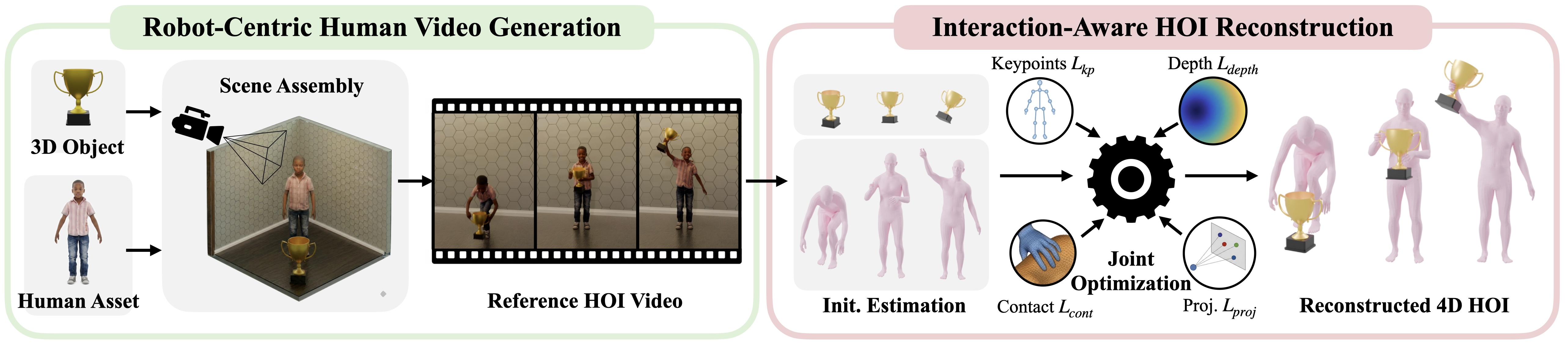
"4D" simply means 3D over time. The output is not one human mesh in one frame. It is a sequence of human pose, hand pose, object pose, and contact information per frame. The GRAIL reconstruction docs describe this stage as recovering full human-object interaction: SMPL-X body pose, MANO hand pose, and a 6-DoF object trajectory. In robotics terms, the pipeline has to answer the questions that downstream training needs: where is the person, where do the hands touch, how does the object translate and rotate, when does contact begin, and is the result clean enough to retarget to a Unitree G1?
GRAIL has an advantage over unconstrained in-the-wild reconstruction pipelines because it does not start from an unknown internet video. NVIDIA's project page emphasizes that GRAIL starts from a fully specified 3D configuration: object geometry, camera parameters, metric scale, environment depth, and a robot-proportioned character are known before video generation. recon_4dhoi uses that privileged context to reduce ambiguity in scale, camera geometry, and object shape.
Technical sources used for this walkthrough:
- GRAIL project page
- GRAIL GitHub README
- 4D HOI Reconstruction docs
- recon_4dhoi.py
- manip_smplx.yaml
- SAM2, MoGe, FoundationPose, WiLoR, ScenePic, PyTorch3D
Series Roadmap
- 3D Assets and Terrain for GRAIL: asset generation, object prompts, sharding, and downstream file contracts.
- 2D HOI Videos with Blender and Kling: conditioning renders, camera/depth output, and video foundation model generation.
- 4D HOI Reconstruction: GEM, SAM2, MoGe: human pose, object tracking, optimization, filtering, and visualization.
- Static Terrain Locomotion: curb, slope, and stairs for scene-centric motion.
- Retargeting Trajectories to Unitree G1: converting human/object trajectories into robot targets.
- Training and Data Export: packaging demonstrations, training trackers/policies, and preparing sim-to-real data.
For broader context on whole-body policies, see NVIDIA GR00T/SONIC for whole-body VLA and LeRobot v0.5 with humanoid G1. Those articles explain why clean motion data with objects and contact matters more than a visually impressive video.
What You Will Learn
By the end of this article, you should understand the six-stage grail.pipelines.recon_4dhoi stack, know the smoke-test command, know where the outputs land, know how to inspect hoi_data/hoi_data.pkl, recon_result.mp4, and recon_comparison.mp4, and know how to tune the important fields in configs/recon_4dhoi/manip_smplx.yaml: opt_stage_specs.init_opt, contact_opt, filter_object_motion: dynamic_only, and pipeline.is_static_obj.
The basic manipulation command is:
python -m grail.pipelines.recon_4dhoi \
  --dataset ComAsset \
  --category cordless_drill \
  --results_dir results
To run one specific video:
python -m grail.pipelines.recon_4dhoi \
  --video_id ComAsset/cordless_drill/<video_name> \
  --results_dir results
If human pose, mask/depth preprocessing, and object pose are already done, and you only want to rerun optimization after changing the config:
python -m grail.pipelines.recon_4dhoi \
  --dataset ComAsset \
  --category cordless_drill \
  --results_dir results \
  --skip_step1 \
  --skip_step2 \
  --skip_step3
Run these commands from the root of the GRAIL repository, not from the blog project. You also need the environment and checkpoints. The official README uses Docker, installs Blender and local extras, then runs bash scripts/setup/download_checkpoints.sh to download GEM-SMPL/GEM-SOMA/FoundationPose weights.
The Six-Stage Map
recon_4dhoi is a stack of multiple models and post-processing components. A common beginner mistake is to treat it as one end-to-end model. In practice, each stage produces cache files for the next stage:
| # | Stage | Main tool | Input | Downstream output |
|---|---|---|---|---|
| 1 | Human pose | GEM-SMPL or GEM-SOMA, WiLoR | RGB video | Human pose .npz, body and hand keypoints |
| 2 | Preprocess | SAM2, MoGe, camera/depth cache | Video, first-frame masks, camera | Per-frame human/object masks, depth/point cloud |
| 3 | Object pose | FoundationPose | RGB, object mask, OBJ mesh | Per-frame 6-DoF object pose |
| 4 | HOI optimization | HOIOptimizer |
Human pose, object pose, mesh, depth, masks | Raw hoi_data.pkl |
| 5 | Filtering and post-processing | Thresholds, contact/motion checks | Raw hoi_data.pkl |
_valid folder, mesh data, comparison videos |
| 6 | Visualization | PyTorch3D, ScenePic | Filtered HOI | Overlay MP4, top view, interactive HTML |
The GRAIL docs give useful timing references on an L40S: human pose takes about 45 seconds per video, SAM2 plus MoGe preprocessing about 36 seconds, FoundationPose about 40 seconds, and HOI optimization is the heavy part at roughly 9-10 minutes per video. These are not guarantees, but they tell you where caching and sharding matter most.
Stage 1: GEM-SMPL and WiLoR for Human Pose
Stage 1 calls run_human_pose_est. With the default manip_smplx.yaml, human_model.body_model is g1_smplx. This tells the pipeline that the output should use the G1-aligned SMPL-X body model rather than a generic body model.
GEM is NVIDIA's human motion model for monocular video. The GEM-X model card describes GEM as estimating 3D body pose from RGB video, including global motion trajectory and local body kinematics. In GRAIL, the reconstruction docs state that this stage uses GEM-SMPL for the body and WiLoR for the hands, fused per frame. WiLoR is an in-the-wild 3D hand localization and reconstruction model; its paper and repo emphasize real-time hand localization and MANO-based 3D reconstruction. For manipulation, hands are not a cosmetic detail. If the wrist, fingers, or hand keypoints drift, the optimizer may force contact in the wrong place.
The main stage-1 outputs usually live under:
results/generation/hmr_smplx/
results/generation/hmr_smplx_cache/
The code saves both motion_global and motion_incam. A simple mental model is:
motion_incam: pose in camera coordinates, useful for reprojection and keypoint tracking.motion_global: pose with a global trajectory, required for 4D motion over time.- keypoint cache: useful for debugging whether hands and feet follow the video.
A common failure mode is starting from a Kling video where the person is cropped or the hands are hidden, then expecting reconstruction to recover everything. If stage 1 does not produce stable keypoints, later stages cannot magically repair it. If recon_result.mp4 shows the skeleton drifting away from the person from the beginning, go back to the 2D video or the conditioning render from part 2.
Stage 2: SAM2 Mask Tracking and MoGe Depth
Stage 2 does two things: mask tracking and depth estimation. In the code, preprocess_masks starts from the first-frame object and human masks, then tracks them across the video. SAM2 is a good fit because Meta introduced it as a unified segmentation model for images and videos that can segment objects and follow them through frames. In GRAIL, SAM2 turns RGB video into two practical signals: object pixels and human pixels.
After masks, the pipeline estimates depth. GRAIL uses MoGe for monocular geometry estimation when depth needs to be inferred from images or video. MoGe is Microsoft's open-domain monocular geometry project. In this pipeline, depth is not used alone; it is combined with camera intrinsics, masks, and object meshes to provide geometric constraints for the optimizer.
Important cache files:
results/generation/4dhoi_recon_cache/masks/<video_id>.npz
results/generation/4dhoi_recon_cache/depth/<video_id>.pt
With --verbose, the pipeline can export mask and depth debug artifacts. Turn it on when adding a new object, when the object is heavily occluded, or when the generated video lets the hand cover the object for many frames. Mask errors are usually visible immediately: the object mask jumps to the hand, disappears for a few frames, or includes background. Depth errors can be harder to see, but they usually pull the object or human along the z axis.
Use this checklist:
| Symptom | Common cause | Action |
|---|---|---|
| Object mask disappears after contact | Occlusion, object too small | Render closer, increase object size, choose a clearer video |
| Human mask absorbs the object | Similar color or too much body-object overlap | Check first-frame masks, reduce occlusion in video prompt |
| Object floats or sinks in depth | Monocular depth lacks a strong anchor | Use GT depth if available, inspect camera/depth from part 2 |
| Cache ignores your edited video | --skip_done reused old cache |
Delete the relevant cache or disable --skip_done |
Stage 3: FoundationPose for 6-DoF Object Tracking
Stage 3 runs FoundationPose to track the object pose. FoundationPose is NVIDIA's model for 6D pose estimation and tracking of novel objects, including a model-based setup when a CAD mesh is available. GRAIL has object meshes from part 1, so object tracking does not need to infer category shape from scratch.
6-DoF means three translation degrees and three rotation degrees. For robot manipulation, this signal is central. If the drill is lifted but the tracker keeps it on the table, downstream policies learn the wrong object motion. If rotation around the object's long axis flips, grasp and contact may stop matching the visual interaction.
Stage 3 reads the mesh from:
results/generation/mesh/<dataset>/<category>/*.obj
and writes poses to:
results/generation/foundation_pose_output/<video_id>/pose_estimation_output/poses_in_cam.pkl
In manip_smplx.yaml:
obj_pose_tracking:
  foundation_pose_debug: 2
  crop_image: false
  interpolation_factor: 1
foundation_pose_debug: 2 keeps a useful debug level. crop_image: false means the pipeline does not crop the image before tracking; keeping the full frame is reasonable when the GRAIL render is clean. interpolation_factor: 1 means no additional frame interpolation.
The field you must understand is static versus dynamic:
pipeline:
  is_static_obj: false
For manipulation and pickup, the object is expected to move, so is_static_obj: false lets FoundationPose track it. For terrain or sitting, the object or scene is often static; locomotion configs use static-object mode and may bypass FoundationPose. If you set this incorrectly, stage 5 will either reject the result or keep the wrong kind of result.
Stage 4: Multi-Stage HOIOptimizer
This is the reconstruction core. The first three stages provide separate estimates: human pose, masks/depth, and object pose. HOIOptimizer turns them into a more consistent HOI trajectory by optimizing several variables together.
Here is a shortened version of the config:
optimization:
  opt_stage_specs:
    init_opt:
      opt_vars:
        human_trans_global: { lr: 0.003 }
        human_trans_res: { lr: 0.003 }
        human_pose_res: { lr: 0.0001 }
        obj_t_res: { lr: 0.003 }
        obj_R_res: { lr: 0.0001 }
      niter: 400
      loss_cfg:
        keypoint_tracking: { weight: 0.3, beta: 0.1 }
        human_smoothness: { weight: 30.0, beta: 0.1 }
        human_pose_reg: { weight: 100.0 }
        human_foot_contact: { weight: 10.0 }
        obj_smoothness: { weight: 50.0 }
        depth_pointcloud:
          weight: 100.0
          num_gt_samples: 3000
          trim_pct: 0.2
          depth_tol: 0.02
    contact_opt:
      niter: 200
      loss_cfg:
        contact:
          weight: 30000.0
          depth_only: true
          max_contact_dist: 0.15
init_opt pulls the human, object, and depth signals into a plausible shared coordinate system. It should not be too aggressive with pose residuals, because if the human pose is bent too much just to fit the object, the motion becomes unnatural. The main losses are:
| Loss | Meaning |
|---|---|
keypoint_tracking |
Keeps the rendered pose aligned with 2D video keypoints |
human_smoothness |
Reduces frame-to-frame human jitter |
human_pose_reg |
Keeps pose close to the prior |
human_foot_contact |
Encourages plausible foot-ground behavior |
verts_tracking |
Uses vertex/mask alignment to fit the image |
obj_smoothness |
Reduces object trajectory jumps |
depth_pointcloud |
Uses depth/point cloud constraints to reduce z-scale errors |
contact_opt runs after contact labels are available. The GRAIL docs note that stage 4 uses OpenAI vision calls inside grail/core/contact_label.py to detect contact joints by interval, with gpt-4o as the default model. The point is not to let an LLM control a robot. It helps label when and where contact likely occurs, and the optimizer then uses a contact loss to bring the relevant body or hand points close to the object during plausible intervals.
When should you tune init_opt?
| Symptom | Tuning hint |
|---|---|
| Human drifts from the video but object is stable | Slightly increase keypoint_tracking, but inspect stage 1 first |
| Human motion jitters | Increase human_smoothness, but not excessively |
| Object jumps frame to frame | Increase obj_smoothness, inspect FoundationPose |
| Object is wrong in depth | Inspect depth first; increase depth_pointcloud only if masks/depth are reliable |
When should you tune contact_opt?
| Symptom | Tuning hint |
|---|---|
| Hand approaches the object but never touches | Slightly increase contact weight or max_contact_dist |
| Hand is pulled through the object | Reduce contact weight, inspect penetration/filtering |
| Contact starts at the wrong time | Rerun contact labeling or inspect the video prompt |
| Object follows the hand before contact | Check obj_precontact_reg and contact intervals |
Beginner rule: do not change every weight at once. Pick one video, rerun stage 4, compare recon_comparison.mp4, then adjust again.
Stage 5: Filtering and Post-Processing
Optimization can produce a trajectory that looks superficially plausible but is not useful for training. Stage 5 filters results. The GRAIL docs list the main quality checks: human-position error, mask alignment, keypoint tracking, contact penalty, penetration, and motion magnitude.
In manip_smplx.yaml:
filtering:
  camera_trans_thr: 0.1
  object_mask_tol: 0.5
  total_mask_tol: 0.3
  human_static_thr: 0.01
  min_frames: null
  filter_object_motion: "dynamic_only"
  object_static_thr: 0.02
filter_object_motion: dynamic_only is important. This article covers manipulation and pickup, so the pipeline should reject reconstructions where the object barely moves. If the video only shows a person standing near a drill, or FoundationPose fails and the object trajectory stays static, that result is not useful for a manipulation policy. In contrast, for terrain locomotion in part 4, a static object or static terrain is correct; locomotion configs use static_only.
When a result passes filtering, the pipeline packages it as:
results/generation/4dhoi_recon_smplx_valid/<dataset>/<category>/<video_id>/
  hoi_data/
    hoi_data.pkl
  mesh_data/
    model.obj
    model.mtl
    ...
  result_vis/
    input.mp4
    recon_result.mp4
    recon_result_top_view.mp4
    recon_comparison.mp4
    recon_result.html
If a result fails, you will usually see an invalid marker in the raw output folder. Do not simply delete the marker to force data into training. Filtering failures usually have a cause: poor masks, wrong human pose, static object motion, physically implausible contact, or a too-short interaction.
Stage 6: ScenePic and PyTorch3D Visualization
Visualization is not decorative. It is the fastest way to decide whether a trajectory is worth retargeting. The GRAIL docs state that visualization uses PyTorch3D top-down and side-by-side renders, plus a ScenePic HTML viewer. PyTorch3D provides 3D rendering and differentiable rendering components in the PyTorch/CUDA ecosystem. ScenePic is a lightweight 3D visualization library that exports HTML, so you can inspect the result in a browser without opening Blender.
Open these three files after each run:
| File | What to inspect |
|---|---|
result_vis/recon_result.mp4 |
Whether the human/object meshes follow the input video |
result_vis/recon_comparison.mp4 |
Side-by-side input versus reconstruction |
result_vis/recon_result.html |
3D contact, penetration, and depth errors from free camera views |
recon_result_top_view.mp4 is especially helpful for errors hidden by the camera view. A reconstruction can look correct in 2D while being wrong in depth: from the original camera it looks fine, from the top view the hand may be 30 cm away from the object. This is why GRAIL uses camera/depth/mesh context instead of fitting only a 2D silhouette.
Inspecting hoi_data/hoi_data.pkl
hoi_data.pkl is the main artifact. It is a Python pickle file, so do not open it in a text editor. Use a small script:
import pickle
from pathlib import Path

path = Path("results/generation/4dhoi_recon_smplx_valid/ComAsset/cordless_drill/<video_id>/hoi_data/hoi_data.pkl")

with path.open("rb") as f:
    hoi = pickle.load(f)

print(hoi.keys())
print(hoi["human_data"].keys())
print(hoi["object_data"].keys())
print(hoi["meta"].keys())

poses = hoi["human_data"]["poses"]
obj_pose = hoi["object_data"]["object_poses"]
print("num frames:", poses.shape[0])
print("human poses:", poses.shape)
print("object poses:", obj_pose.shape)
Exact key names may change with code versions, but the usual structure is:
human_data: pose, translation, body parameters, keypoints, or joints.object_data: object pose or trajectory per frame.meta: paths to mesh, raw object pose file, mask cache, and render config.contact: contact labels or post-processed contact points, when available.
You are looking for three things:
- The frame count is reasonable, non-empty, and not unexpectedly short.
- Human and object arrays share the same time dimension.
meta.obj_path,masks_cache_file, andrender_config_filepoint to the correct artifacts for this video.
If hoi_data.pkl passes these checks but visualization looks wrong, trust the visualization. A good dataset is inspectable and explainable, not merely a pickle with the expected keys.
Tuning manip_smplx.yaml
New users should remember four fields:
| Field | Default role | When to change it |
|---|---|---|
optimization.opt_stage_specs.init_opt |
Initial alignment optimization | When caches are good but alignment is still off |
optimization.opt_stage_specs.contact_opt |
Contact-aware optimization | When hands and object are close but contact is wrong |
filtering.filter_object_motion |
dynamic_only |
Keeps manipulation data focused on moving objects |
pipeline.is_static_obj |
false |
Set true only for terrain or static-object scenes |
For normal dynamic manipulation:
filtering:
  filter_object_motion: "dynamic_only"
  object_static_thr: 0.02

pipeline:
  is_static_obj: false
For a deliberate static-object debug run:
python -m grail.pipelines.recon_4dhoi \
  --dataset ComAsset \
  --category cordless_drill \
  --results_dir results \
  --is_static_obj
Do not use static mode for real pickup data. It can help debug masks and depth, but it will not produce the dynamic object trajectory needed for manipulation.
A Practical Debug Order
Do not start by raising loss weights. Debug artifacts in order:
- Open the input video under
results/generation/videos_kling. - Inspect stage-1 body/keypoint caches if the human drifts.
- Inspect mask
.npzor debug masks if the object disappears. - Inspect
poses_in_cam.pklthrough FoundationPose visualization if object pose is wrong. - Rerun stage 4 after changing
init_optorcontact_opt. - Loosen filters only after you understand why filtering failed.
- Open
recon_comparison.mp4andrecon_result.htmlbefore sending data to retargeting.
For larger batches, shard the run:
python -m grail.pipelines.recon_4dhoi \
  --dataset ComAsset \
  --results_dir results \
  --job_chunk_idx 0 \
  --num_job_chunks 8
The GRAIL docs state that a typical 8-chunk run can cover about 24 videos in roughly 35 minutes of wall-clock time. The important idea is caching: once stages 1-3 are stable, you can iterate on stages 4-5 much faster than rerunning the full pipeline.
Conclusion
grail.pipelines.recon_4dhoi does more than reconstruct a video. It bridges video foundation model output and robot-usable motion data. GEM-SMPL/WiLoR provide the human and hand priors. SAM2/MoGe turn RGB into masks and depth. FoundationPose tracks the known object mesh in 6-DoF. HOIOptimizer combines these signals into a contact-aware trajectory. Filtering rejects weak results. ScenePic/PyTorch3D lets you inspect the reconstruction before retargeting.
The practical lesson is simple: trust artifacts more than logs. hoi_data.pkl contains the data, but recon_result.mp4, recon_comparison.mp4, and recon_result.html tell you whether that data is worth using. Once reconstruction is stable, part 5 will convert the human/object trajectory to Unitree G1, and part 6 will package the motion for training and export.