Trong bài 5, chúng ta đã biến reconstruction SMPL-X/object thành motion library cho Unitree G1: robot/, objects/, object_usd/, meta/, và với object đa dạng thì có thêm bps/. Bài cuối của series đi nốt phần vòng đời nâng cao: đưa motion library đó vào imports/SONIC, train task-general tracker bằng train_agent_trl.py, đọc đúng các release config, đánh giá kết quả theo số liệu trong paper, rồi export các rollout thành dataset mới có thể preview trên web.
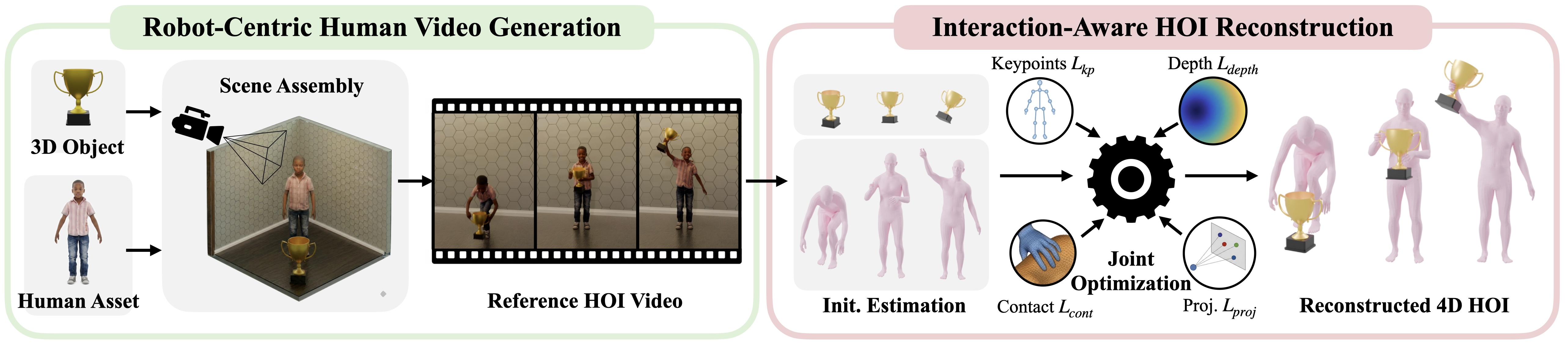
Điểm quan trọng của bài này: GRAIL không chỉ là pipeline sinh video hoặc retarget motion. GRAIL là một vòng lặp dữ liệu. Bạn tạo asset, sinh 2D HOI, khôi phục 4D, retarget sang G1, train tracker, chạy evaluation, giữ lại rollout thành công, merge thành motion library sạch hơn, rồi dùng nó cho sweep tiếp theo hoặc public dataset. Nếu chưa đọc các bước trước, nên xem lại bài 3 về tái dựng 4D HOI và bài 4 về terrain tĩnh. Với bối cảnh rộng hơn về whole-body controller, xem thêm SONIC cho humanoid whole-body VLA và GR00T VisualSim2Real trên G1.
Nguồn kỹ thuật chính dùng trong bài:
- GRAIL project page
- GRAIL GitHub README
- GRAIL Task General Tracking docs
- GRAIL Data Export docs
- GRAIL Data Visualization docs
- GRAIL Web Visualizer docs
- GRAIL paper trên arXiv
- GR00T-WholeBodyControl configuration guide
Roadmap series
- Tạo asset 3D và terrain cho GRAIL: object, terrain, scale và format asset.
- Sinh 2D HOI từ scene 3D: Blender, camera, depth và video foundation model.
- Khôi phục 4D HOI có metric scale: pose người, object tracking, optimization và filter.
- Locomotion trên terrain tĩnh: curb, slope, stairs và sitting.
- Retarget trajectory sang Unitree G1: SMPL-X/object sang motion library G1.
- Train SONIC, export và đánh giá GRAIL: bài hiện tại.
Mục tiêu của bài
Sau bài này, bạn sẽ biết:
imports/SONICnằm ở đâu trong vai trò của GRAIL và vì sao lệnh train phải chạy từ thư mục đó.- Cách chọn release config cho
pnp_table,pnp_ground,advanced_manip_tablevàscene/terrain_tracking. - Cách dùng Hydra overrides cho
motion_lib_cfg.motion_file,object_motion_file,object_usd_path,bps_dirvàterrain_motion_dir. - Vì sao Table 1 của paper báo HOI tracking SR 88.9%, còn Table 2 báo task-general tracking SR 81.4%.
- Cách nối kết quả real Unitree G1 84% pickup và 90% stair climbing với pipeline training/export.
- Cách dùng
select_top_checkpoints,batch_render_replay,export_successful_rollouts,merge_exportsvàgrail.web_visualizer.generate_manifest.
Bức tranh vòng đời
Từ góc nhìn beginner, hãy tách pipeline thành hai thế giới. Thế giới thứ nhất là "dữ liệu tham chiếu": GRAIL tạo motion library từ reconstruction và retargeting. Thế giới thứ hai là "policy tracking": SONIC học cách biến reference motion thành action ổn định trong Isaac Lab. Khi policy tracking chạy tốt, ta lại export các rollout thành công về motion library mới.
| Giai đoạn | Thư mục/script chính | Input | Output | Câu hỏi kiểm tra |
|---|---|---|---|---|
| Retarget | grail/retargeting |
4dhoi_recon_valid |
data/motion_lib/<name>_ha |
Robot/object/meta có đủ file không? |
| Train tracker | imports/SONIC/train_agent_trl.py |
Motion library + config Hydra | logs_rl/.../last.pt |
SR, object error, MPJPE có tăng/giảm đúng hướng không? |
| Evaluate/shard | SONIC eval workflow hoặc scheduler riêng | Checkpoint + dataset | metrics_eval.json, *.trajectory.pkl |
Rollout nào thành công? |
| Render/export | grail.visualization, grail.data_export |
Trajectory pkl | robot/, objects/, object_usd/, vis/*.mp4 |
Dataset mới có replay được không? |
| Web preview | grail.web_visualizer.generate_manifest |
Motion library + vis/ |
Static site | Người review có lọc/xem motion nhanh được không? |
Một lỗi thường gặp là xem training như điểm kết thúc. Trong GRAIL, training chỉ là một stage trong vòng đời dữ liệu. Checkpoint tốt giúp bạn tạo rollout robot-action đã qua physics. Export rollout thành công giúp dataset downstream sạch hơn reconstruction gốc, vì những motion không track được đã bị loại khỏi vòng dữ liệu.
Chuẩn bị layout cho imports/SONIC
Tài liệu GRAIL nói rõ training implementation nằm trong cây vendored imports/SONIC. Các lệnh train được viết với giả định bạn đã:
conda activate sonic
export HYDRA_FULL_ERROR=1
export PYTHONUNBUFFERED=1
cd imports/SONIC
Lý do phải cd imports/SONIC: nhiều path trong config và model bundle được resolve tương đối từ thư mục SONIC, không phải từ root GRAIL. Ví dụ checkpoint reference nằm dưới models/pnp_table/last.pt, models/pnp_ground/last.pt, hoặc models/terrain_stairs/last.pt. Nếu bạn chạy từ root repo nhưng dùng path tương đối như tài liệu, Hydra có thể đọc sai checkpoint hoặc không tìm thấy asset.
Motion library sau bài 5 thường có dạng:
data/motion_lib/pickup_table_ha/
  robot/
  objects/
  object_usd/
  meta/

data/motion_lib/pickup_table/
  bps/
Khi chạy trong imports/SONIC, hãy dùng path mà process hiện tại nhìn thấy. Nếu repo mount cùng root, có thể dùng path tuyệt đối để tránh nhầm:
export DATA_DIR=/workspace/grail/data/motion_lib/pickup_table_ha
export BPS_DIR=/workspace/grail/data/motion_lib/pickup_table/bps
Nếu bạn đặt DATA_DIR trỏ vào bản chưa có hand action, training pickup có thể thiếu hand_action_left, hand_action_right hoặc contact labels. Với manipulation, bản _ha là lựa chọn mặc định. Với terrain, dữ liệu thường được retarget bằng --zero_out_wrist và không nhất thiết cần hand action; config terrain đọc terrain USD và motion theo layout riêng.
Release configs trong SONIC
Các config GRAIL-specific nằm dưới:
imports/SONIC/gear_sonic/config/exp/manager/universal_token/
  hoi/
    pnp_table.yaml
    pnp_ground.yaml
    advanced_manip_table.yaml
    advanced_manip_ground.yaml
  scene/
    terrain_tracking.yaml
Bài này tập trung vào bốn config người đọc thường chạm trước: pnp_table, pnp_ground, advanced_manip_table và scene/terrain_tracking. Tài liệu còn liệt kê advanced_manip_ground; nếu dataset của bạn là manipulation từ mặt đất, nó là biến thể tương ứng.
| Config | Dùng cho | Dữ liệu cần có | Override bắt buộc |
|---|---|---|---|
manager/universal_token/hoi/pnp_table |
Pick-up object từ bàn | robot/, objects/, object_usd/, bps/ |
motion_file, object_motion_file, object_usd_path, bps_dir |
manager/universal_token/hoi/pnp_ground |
Pick-up object từ sàn | Tương tự pnp_table, nhưng motion squat/reach thấp hơn |
Tương tự |
manager/universal_token/hoi/advanced_manip_table |
Carry, push, reposition, thao tác tabletop phức tạp | Object trajectory và contact đáng tin | Tương tự |
manager/universal_token/scene/terrain_tracking |
Stairs, curb, slope, sitting/scene | robot/, objects/, object_usd/ hoặc terrain root |
motion_file, object_motion_file, terrain_motion_dir |
SONIC dùng Hydra. Dòng +exp=... chọn experiment config. Dòng ++a.b.c=value ép override một key nested. Đây là chi tiết nhỏ nhưng quan trọng: dùng + cho config group, dùng ++ cho giá trị đã tồn tại hoặc cần ép tạo ở cấu hình đã compose.
Smoke test trước khi train lớn
Trước khi chạy 8 GPU, hãy chạy smoke test với 4 env và vài iteration. Mục tiêu không phải đạt SR cao; mục tiêu là kiểm tra Isaac Lab khởi động, motion loader đọc được file, object USD được spawn, BPS shape hợp lệ, và reward không báo thiếu contact label.
conda activate sonic
export HYDRA_FULL_ERROR=1
export PYTHONUNBUFFERED=1
export WANDB_MODE=offline

cd imports/SONIC

export DATA_DIR=/workspace/grail/data/motion_lib/pickup_table_ha
export BPS_DIR=/workspace/grail/data/motion_lib/pickup_table/bps

python -u train_agent_trl.py \
  +exp=manager/universal_token/hoi/pnp_table \
  num_envs=4 headless=True \
  ++algo.config.num_learning_iterations=3 \
  ++manager_env.config.gpu_collision_stack_size_exp=28 \
  ++manager_env.commands.motion.motion_lib_cfg.motion_file=${DATA_DIR}/robot \
  ++manager_env.commands.motion.motion_lib_cfg.object_motion_file=${DATA_DIR}/objects \
  ++manager_env.config.object_usd_path=${DATA_DIR}/object_usd \
  ++manager_env.commands.motion.motion_lib_cfg.bps_dir=${BPS_DIR}
Nếu smoke test lỗi ngay ở loader, đừng tăng GPU. Hãy kiểm tra:
find ${DATA_DIR}/robot -name "*.pkl" | wc -l
find ${DATA_DIR}/objects -name "*.pkl" | wc -l
find ${DATA_DIR}/object_usd -name "*.usd" | wc -l
find ${BPS_DIR} -name "*.npy" | wc -l
Với pickup/manipulation, số robot/*.pkl và objects/*.pkl nên cùng bậc. object_usd/ có thể ít hơn nếu nhiều motion dùng chung object, nhưng không được rỗng. bps/ cần có _basis.npy và embedding cho các object shape được dùng.
Train pick-up và manipulation
Khi smoke test ổn, launch chính thức có thể dùng accelerate. Tài liệu GRAIL đưa mẫu một node, 8 GPU, num_envs=2048. Với beginner, nên hiểu num_envs là tổng số môi trường song song trong launch đó; batch càng lớn càng tốn VRAM và CPU/GPU scheduling.
conda activate sonic
export HYDRA_FULL_ERROR=1
export PYTHONUNBUFFERED=1

cd imports/SONIC

export HYDRA_CONFIG=manager/universal_token/hoi/pnp_table
export DATA_DIR=/workspace/grail/data/motion_lib/pickup_table_ha
export BPS_DIR=/workspace/grail/data/motion_lib/pickup_table/bps

accelerate launch --num_processes=8 train_agent_trl.py \
  +exp=${HYDRA_CONFIG} \
  num_envs=2048 headless=True \
  ++manager_env.commands.motion.motion_lib_cfg.motion_file=${DATA_DIR}/robot \
  ++manager_env.commands.motion.motion_lib_cfg.object_motion_file=${DATA_DIR}/objects \
  ++manager_env.config.object_usd_path=${DATA_DIR}/object_usd \
  ++manager_env.commands.motion.motion_lib_cfg.bps_dir=${BPS_DIR}
Đổi HYDRA_CONFIG để chạy biến thể khác:
# Pick-up từ sàn
export HYDRA_CONFIG=manager/universal_token/hoi/pnp_ground

# Advanced manipulation trên bàn
export HYDRA_CONFIG=manager/universal_token/hoi/advanced_manip_table
Nếu fine-tune từ reference bundle đã download, thêm ++resume=True, ++checkpoint=... và experiment_dir=...:
python -u train_agent_trl.py \
  +exp=manager/universal_token/hoi/pnp_table \
  num_envs=2048 headless=True \
  ++resume=True \
  ++checkpoint=models/pnp_table/last.pt \
  experiment_dir=${FINETUNE_DIR} \
  ++algo.config.num_learning_iterations=10000 \
  ++manager_env.commands.motion.motion_lib_cfg.motion_file=${DATA_DIR}/robot \
  ++manager_env.commands.motion.motion_lib_cfg.object_motion_file=${DATA_DIR}/objects \
  ++manager_env.config.object_usd_path=${DATA_DIR}/object_usd \
  ++manager_env.commands.motion.motion_lib_cfg.bps_dir=${BPS_DIR}
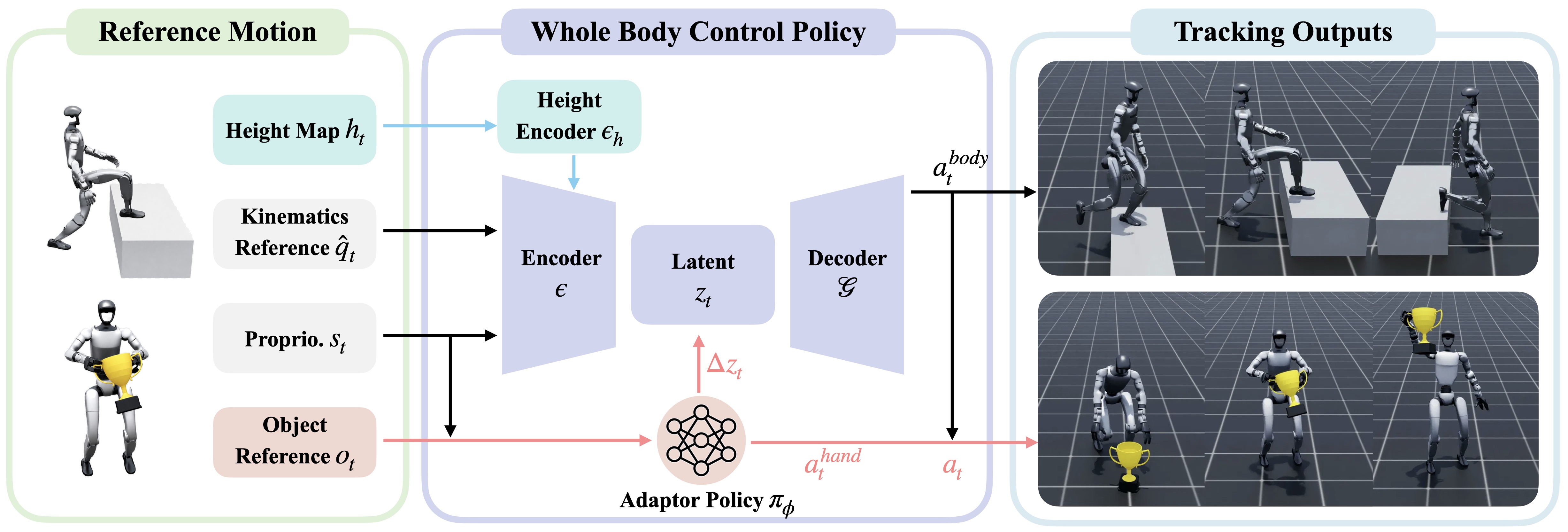
Về mặt paper, đây là nơi GRAIL chuyển từ "motion tham chiếu" sang "task-general tracking policy". Object-aware adaptor không thay toàn bộ SONIC. Nó modulate latent token và phát hand action, trong khi giữ lại prior locomotion của controller pretrained. Ablation trong Table 2 cho thấy nếu bỏ SONIC hoặc bỏ adaptor, success rate giảm mạnh. Nói đơn giản: bám pose toàn thân tốt chưa đủ để nhặt đồ; policy còn phải hiểu object ở đâu, hình dạng thế nào, lúc nào cần đóng tay, và deviation object nên bị phạt ra sao.
Train terrain-aware tracking
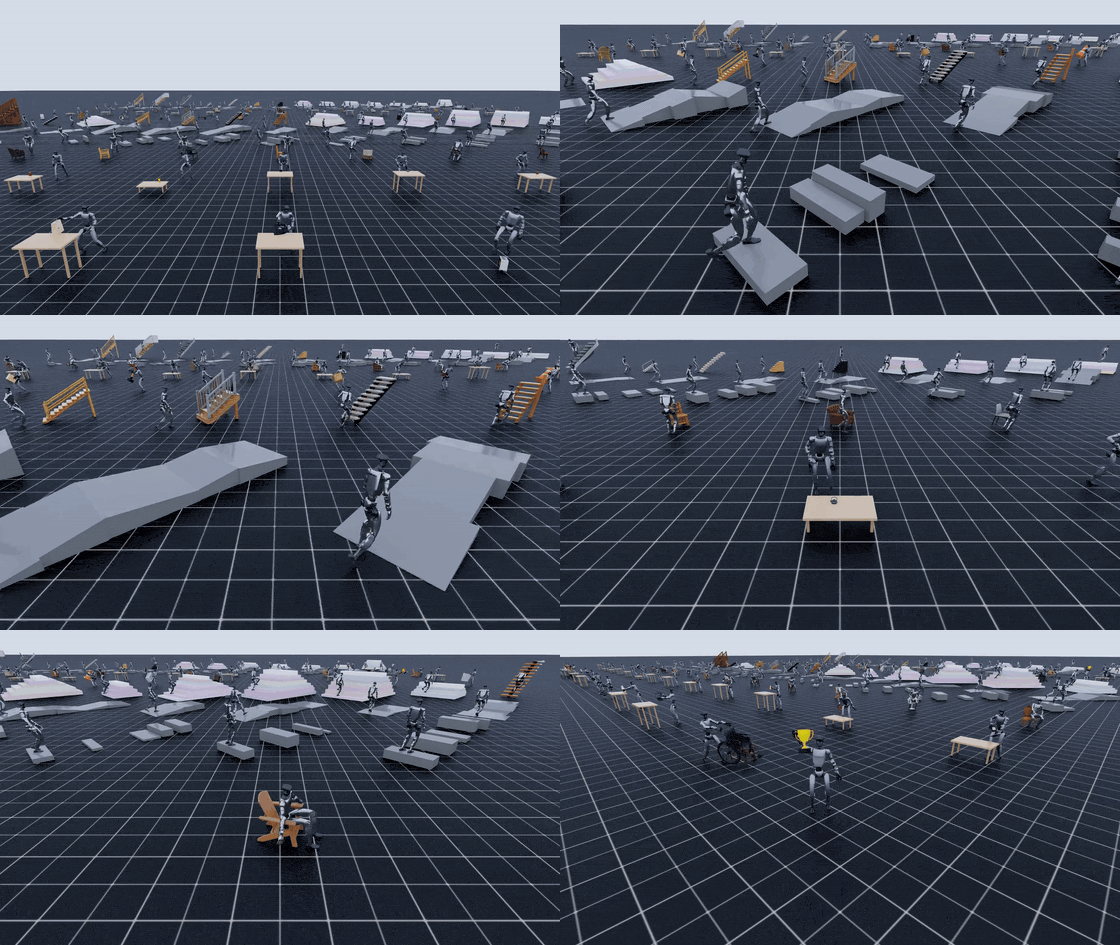
Terrain dùng config khác vì bài toán không phải grasp object nhỏ mà là scene-aware control. Paper mô tả scene-aware tracker fine-tune controller cùng height-map encoder để đi qua curb, slope, stairs hoặc tương tác với chair. Config release là:
conda activate sonic
export HYDRA_FULL_ERROR=1
export PYTHONUNBUFFERED=1

cd imports/SONIC

export DATA_DIR=/workspace/grail/data/motion_lib/terrain_stairs

python -u train_agent_trl.py \
  +exp=manager/universal_token/scene/terrain_tracking \
  num_envs=4096 headless=True \
  ++manager_env.commands.motion.motion_lib_cfg.motion_file=${DATA_DIR}/robot \
  ++manager_env.commands.motion.motion_lib_cfg.object_motion_file=${DATA_DIR}/objects \
  ++manager_env.config.terrain_motion_dir=${DATA_DIR}
Nếu dataset không có flat_placeholder.usd, truyền thêm:
++manager_env.config.flat_usd_path=/workspace/grail/assets/flat_placeholder.usd
Terrain config có các override riêng như flat_motion_dir, flat_usd_path, flat_to_terrain_ratio. flat_to_terrain_ratio=0 nghĩa là tất cả env là terrain. Nếu bạn mix flat-ground motion để giữ prior đi bộ, tăng ratio theo nhu cầu. Trong log, tài liệu gợi ý tìm các chuỗi như [TerrainAutoDiscover], [PerRankUSD], [PerRankMotion] để xác nhận mỗi GPU nhận đúng cặp motion/USD.
Đọc output training
Mỗi run ghi dưới dạng:
logs_rl/TRL_G1_Track/manager/<config_path>/<exp_name>-<timestamp>/
  config.yaml
  model_step_NNNNNN.pt
  last.pt
  meta.yaml
  events.out.tfevents.*
config.yaml là file đầu tiên nên archive. Nó là resolved Hydra config, tức là đã chứa mọi override cuối cùng. Khi một run cho kết quả tốt, đừng chỉ giữ last.pt; giữ cả config.yaml, motion library version, BPS version, commit hoặc image container nếu có. Với GRAIL, reproducibility nằm ở cả dữ liệu lẫn controller.
Nối số liệu paper với code path
Paper báo GRAIL tạo hơn 20,000 sequence trên bốn nhóm: pick-up, whole-body manipulation, sitting và terrain traversal. Đây không phải con số training command đơn lẻ; nó là scale của pipeline dữ liệu từ asset-conditioned generation tới retarget/tracking.
| Kết quả trong paper | Ý nghĩa | Code path liên quan |
|---|---|---|
| Hơn 20,000 sequences | Quy mô dữ liệu GRAIL sinh ra từ object assets và terrain configs | grail.pipelines.*, grail.retargeting.*, data/motion_lib/* |
| Table 1 HOI tracking SR 88.9% | Motion 4D HOI của GRAIL dễ track hơn baseline trong physics | Reconstruction + retarget + per-motion tracking evaluation |
| Table 2 task-general tracking SR 81.4% | Policy task-general full đạt SR cao hơn HDMI/ResMimic và ablations | imports/SONIC/train_agent_trl.py, object-aware adaptor |
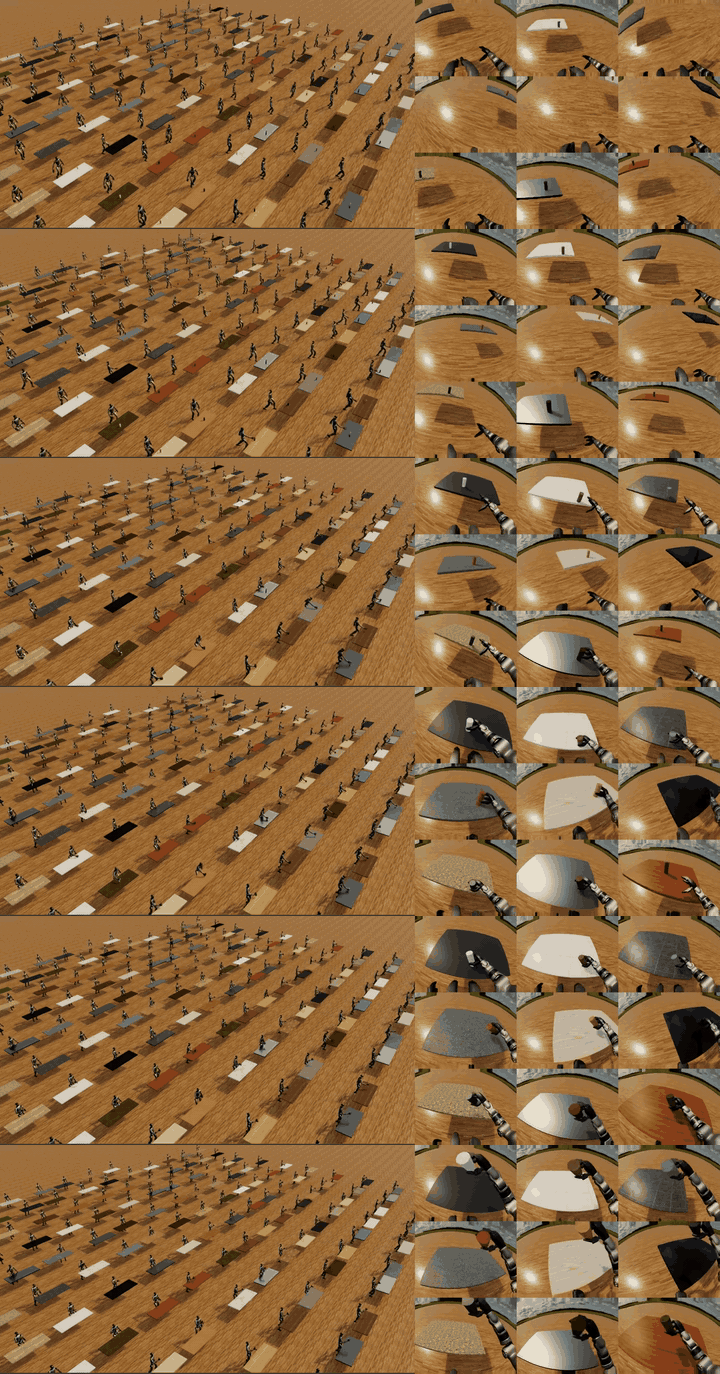
| Real G1 pickup 84% | Visual policy trained từ GRAIL-generated data pickup thành công ngoài đời | Egocentric sim-to-real policy sau tracker |
| Real G1 stair climbing 90% | Terrain policy chuyển sang robot thật tốt | scene/terrain_tracking + visual policy stair |
Table 1 và Table 2 đo hai thứ khác nhau. Table 1 hỏi: "trajectory sinh ra có đủ tốt để physics tracker bám không?" Vì vậy nó phản ánh chất lượng generation/reconstruction/retargeting. Table 2 hỏi: "một policy task-general học trên nhiều trajectory có làm được cả family task không?" Vì vậy nó phản ánh khả năng amortize controller adaptation. Nếu Table 1 cao nhưng Table 2 thấp, dữ liệu từng motion có thể ổn nhưng policy family chưa học được object/scene variation. Nếu Table 1 thấp, đừng kỳ vọng Table 2 cứu được tất cả vì input reference đã nhiều lỗi.
Export rollout thành công
Sau khi có run tốt, GRAIL cung cấp pipeline export cluster-agnostic. Tài liệu mô tả flow:
W&B sweep
  -> select_top_checkpoints
  -> shard eval tạo metrics_eval.json và *.trajectory.pkl
  -> batch_render_replay tạo vis/*.mp4
  -> export_successful_rollouts tạo robot/objects/object_usd
  -> merge_exports tạo merged motion library
Stage 0 chọn checkpoint tốt nhất:
conda activate sonic

python -m grail.data_export.select_top_checkpoints \
  --sweep <wandb_sweep_id> \
  --k 5
Nếu không dùng sweep mà group W&B, dùng --group <wandb_group_id>. Output của bước này là danh sách checkpoint đáng evaluate sâu. Bản thân script không train policy; nó chỉ rank checkpoint theo eval success rate đã log.
Sau evaluation theo shard, bạn sẽ có mỗi shard gồm metrics_eval.json và các file *.trajectory.pkl. Lúc này có hai việc song song về mặt logic: render để review bằng mắt, và export những rollout thành công thành dữ liệu.
python -m grail.visualization.batch_render_replay \
  --input_shard logs_rl/<exp>/phase1_eval/shard_0 \
  --output_dir logs_rl/<exp>/exported/step_010000/shard_0/vis

python -m grail.data_export.export_successful_rollouts \
  --eval_dir logs_rl/<exp>/phase1_eval/shard_0 \
  --source_motion_lib ${DATA_DIR} \
  --output_dir logs_rl/<exp>/exported/step_010000/shard_0
Tên flag có thể thay đổi theo bản release, nhưng contract dữ liệu không đổi: renderer đọc trajectory để tạo MP4 kinematic replay; exporter đọc metrics để giữ rollout thành công, convert trajectory thành robot/*.pkl, objects/*.pkl, và copy object_usd/*.usd từ source motion library. Nếu source motion library mất USD, export sẽ thiếu asset để replay hoặc train tiếp.
Khi mọi shard đã export xong, merge:
python -m grail.data_export.merge_exports \
  --input_root logs_rl/<exp>/exported/step_010000 \
  --output_dir logs_rl/<exp>/exported/step_010000/merged
Kết quả merged/ nên có layout giống motion library:
merged/
  robot/
  objects/
  object_usd/
  meta/
  vis/
Đây là dữ liệu đã qua một lớp kiểm tra physics/policy. Bạn có thể dùng nó để bootstrap sweep mới, huấn luyện visual policy, hoặc đóng gói thành release dataset.
Preview bằng web visualizer
MP4 trong vis/ hữu ích, nhưng mở từng file rất chậm khi dataset có hàng nghìn motion. grail.web_visualizer.generate_manifest tạo static site tự chứa: index.html, main.js, style.css, manifest.json, và symlink/copy tới video.
python -m grail.web_visualizer.generate_manifest \
  --motion_lib logs_rl/<exp>/exported/step_010000/merged \
  --output out/viz/grail_pickup_step_010000
Serve local:
cd out/viz/grail_pickup_step_010000
python -m http.server 8000
Manifest chỉ copy các meta key allowlist như object_name, table_pos, table_quat, table_size, cùng số frame và đường dẫn video. Cách này giúp schema ổn định dù meta/*.pkl nội bộ thay đổi. Với người review dataset, web visualizer quan trọng hơn dashboard metric: metric nói SR, nhưng video cho thấy policy nâng object thật hay chỉ chạm nhẹ rồi được tính pass do threshold quá dễ.
Checklist debug nhanh
| Triệu chứng | Nguyên nhân thường gặp | Cách xử lý |
|---|---|---|
no contact label found |
Retarget output thiếu contact points/hand action | Chạy lại process.sh với --include_contact_points |
| Object không spawn | object_usd_path sai hoặc USD không được copy |
Dùng path tuyệt đối, kiểm tra find object_usd -name "*.usd" |
| BPS lỗi shape/key | bps_dir không khớp object set |
Chạy lại compute_bps trên motion lib gốc |
| Terrain chỉ load flat | Thiếu terrain_motion_dir hoặc placeholder USD |
Kiểm tra log [TerrainAutoDiscover] |
| Eval SR cao nhưng video xấu | Threshold metric chưa bắt lỗi contact/visual | Render replay và review sample thủ công |
| Merge thiếu motion | Một số shard export rỗng hoặc sai root | Kiểm tra từng shard trước khi merge_exports |
Kết luận
Bài 6 khép lại series bằng phần hay bị bỏ qua nhất: lifecycle sau retargeting. Dữ liệu GRAIL chỉ thực sự có giá trị khi nó đi qua policy tracking, evaluation và export. imports/SONIC/train_agent_trl.py là điểm giao giữa motion library và controller. Các release config pnp_table, pnp_ground, advanced_manip_table và terrain_tracking giúp bạn không phải tự ráp toàn bộ PPO/observation/reward từ đầu; phần bạn phải làm đúng là layout dữ liệu và Hydra overrides.
Khi đọc paper, hãy nối từng con số với stage cụ thể. Hơn 20,000 sequence là quy mô pipeline. 88.9% ở Table 1 nói về chất lượng HOI có thể track. 81.4% ở Table 2 nói về task-general tracking. 84% pickup và 90% stair climbing là kiểm chứng sim-to-real trên Unitree G1. Cuối cùng, select_top_checkpoints, batch_render_replay, export_successful_rollouts, merge_exports và generate_manifest biến kết quả đó thành vòng dữ liệu có thể kiểm tra, chia sẻ và train tiếp.