In part 5, we converted SMPL-X/object reconstructions into a Unitree G1 motion library: robot/, objects/, object_usd/, meta/, and, for multi-object datasets, bps/. This final article covers the advanced lifecycle step that turns those files into policy-ready and dataset-ready artifacts: training task-general trackers in imports/SONIC with train_agent_trl.py, selecting the correct release configs, reading the paper metrics through code paths, exporting successful rollouts, and previewing the result in a static web viewer.
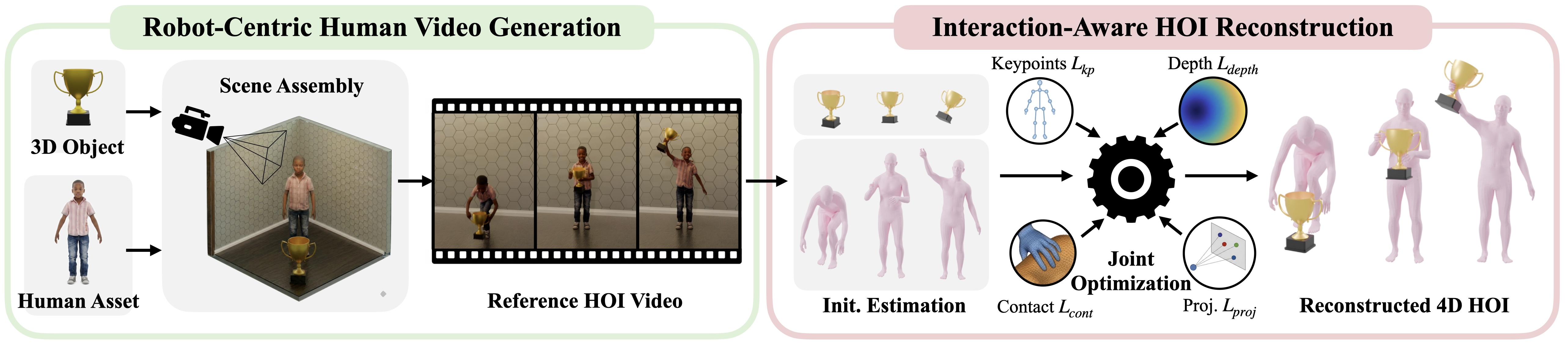
The important shift is this: GRAIL is not only a video-generation or retargeting pipeline. It is a data lifecycle. You create assets, generate 2D HOI videos, reconstruct metric 4D motion, retarget to G1, train trackers, evaluate rollouts, keep the successful ones, merge them into a cleaner motion library, and then use that library for the next sweep or a public dataset. If you need the previous context, revisit part 3 on 4D HOI reconstruction and part 4 on static terrain locomotion. For broader controller context, see SONIC for humanoid whole-body VLA and GR00T VisualSim2Real on G1.
Technical sources used in this walkthrough:
- GRAIL project page
- GRAIL GitHub README
- GRAIL Task General Tracking docs
- GRAIL Data Export docs
- GRAIL Data Visualization docs
- GRAIL Web Visualizer docs
- GRAIL paper on arXiv
- GR00T-WholeBodyControl configuration guide
Series Roadmap
- 3D Assets and Terrain for GRAIL: object assets, terrain, scale, and file contracts.
- 2D HOI Videos from 3D Scenes: Blender, cameras, depth, and video foundation models.
- Metric 4D HOI Reconstruction: human pose, object tracking, optimization, and filtering.
- Static Terrain Locomotion: curbs, slopes, stairs, and sitting.
- Retargeting Trajectories to Unitree G1: SMPL-X/object motion to a G1 motion library.
- Train SONIC, Export, and Evaluate GRAIL: this article.
What You Will Learn
By the end, you should know:
- What role
imports/SONICplays in GRAIL, and why training commands are run from that directory. - How to choose release configs for
pnp_table,pnp_ground,advanced_manip_table, andscene/terrain_tracking. - How to pass Hydra overrides for
motion_lib_cfg.motion_file,object_motion_file,object_usd_path,bps_dir, andterrain_motion_dir. - Why the paper reports 88.9% HOI tracking SR in Table 1 and 81.4% task-general tracking SR in Table 2.
- How the real Unitree G1 results, 84% pick-up and 90% stair climbing, connect to the training and export pipeline.
- How to use
select_top_checkpoints,batch_render_replay,export_successful_rollouts,merge_exports, andgrail.web_visualizer.generate_manifest.
Lifecycle Map
For beginners, split the pipeline into two worlds. The first is reference data: GRAIL creates a motion library through reconstruction and retargeting. The second is policy tracking: SONIC learns how to turn reference motion into stable actions in Isaac Lab. When a tracker performs well, you export its successful physics rollouts back into a new motion library.
| Stage | Main directory or script | Input | Output | Sanity check |
|---|---|---|---|---|
| Retarget | grail/retargeting |
4dhoi_recon_valid |
data/motion_lib/<name>_ha |
Do robot/object/meta files line up? |
| Train tracker | imports/SONIC/train_agent_trl.py |
Motion library + Hydra config | logs_rl/.../last.pt |
Are SR, object error, and MPJPE moving in the right direction? |
| Evaluate/shard | SONIC eval workflow or your scheduler | Checkpoint + dataset | metrics_eval.json, *.trajectory.pkl |
Which rollouts succeeded? |
| Render/export | grail.visualization, grail.data_export |
Trajectory pkl files | robot/, objects/, object_usd/, vis/*.mp4 |
Can the exported data replay cleanly? |
| Web preview | grail.web_visualizer.generate_manifest |
Motion library + vis/ |
Static site | Can reviewers filter and inspect motions quickly? |
A common mistake is treating training as the endpoint. In GRAIL, training is one stage in a data loop. A good checkpoint produces robot-action rollouts that have already passed through physics. Exporting successful rollouts gives downstream training a cleaner dataset, because references that cannot be tracked have been filtered out of the loop.
Preparing the imports/SONIC Layout
The GRAIL docs explicitly place the training implementation in the vendored imports/SONIC tree. The commands assume:
conda activate sonic
export HYDRA_FULL_ERROR=1
export PYTHONUNBUFFERED=1
cd imports/SONIC
The cd imports/SONIC detail matters. Several model and config paths are resolved relative to SONIC, not the GRAIL repository root. Reference checkpoints such as models/pnp_table/last.pt, models/pnp_ground/last.pt, and models/terrain_stairs/last.pt are expected to be found from that working directory. If you run from the root while copying commands verbatim, Hydra may compose the config correctly but fail to locate data or checkpoint paths.
After part 5, a manipulation motion library usually looks like:
data/motion_lib/pickup_table_ha/
  robot/
  objects/
  object_usd/
  meta/

data/motion_lib/pickup_table/
  bps/
When running inside imports/SONIC, use paths visible from that process. Absolute paths are the least ambiguous:
export DATA_DIR=/workspace/grail/data/motion_lib/pickup_table_ha
export BPS_DIR=/workspace/grail/data/motion_lib/pickup_table/bps
If DATA_DIR points to the version without hand actions, pick-up training may miss hand_action_left, hand_action_right, or contact labels. For manipulation, the _ha version is the default. For terrain, data is often retargeted with --zero_out_wrist; it does not necessarily need hand actions because the scene-aware tracker focuses on body motion, terrain geometry, and foot placement.
SONIC Release Configs
The GRAIL-specific release configs live under:
imports/SONIC/gear_sonic/config/exp/manager/universal_token/
  hoi/
    pnp_table.yaml
    pnp_ground.yaml
    advanced_manip_table.yaml
    advanced_manip_ground.yaml
  scene/
    terrain_tracking.yaml
This article focuses on the four configs most readers will touch first: pnp_table, pnp_ground, advanced_manip_table, and scene/terrain_tracking. The docs also list advanced_manip_ground; use it when your advanced manipulation data starts from ground-level objects.
| Config | Use case | Required data | Required overrides |
|---|---|---|---|
manager/universal_token/hoi/pnp_table |
Pick up objects from a table | robot/, objects/, object_usd/, bps/ |
motion_file, object_motion_file, object_usd_path, bps_dir |
manager/universal_token/hoi/pnp_ground |
Pick up objects from the floor | Same as pnp_table, but with lower squat/reach motions |
Same |
manager/universal_token/hoi/advanced_manip_table |
Carry, push, reposition, and more complex tabletop manipulation | Reliable object trajectories and contacts | Same |
manager/universal_token/scene/terrain_tracking |
Stairs, curbs, slopes, sitting, and scene interaction | robot/, objects/, object_usd/ or terrain root |
motion_file, object_motion_file, terrain_motion_dir |
SONIC uses Hydra. The +exp=... argument selects the experiment config. The ++a.b.c=value syntax force-overrides a nested key after config composition. That distinction is small but practical: use + for the experiment config group, and ++ for concrete runtime paths or values.
Run a Smoke Test First
Before launching across eight GPUs, run a tiny smoke test with four environments and a few iterations. The goal is not high success rate. The goal is to verify that Isaac Lab starts, the motion loader can read files, object USD assets spawn, BPS vectors are available, and rewards are not missing contact labels.
conda activate sonic
export HYDRA_FULL_ERROR=1
export PYTHONUNBUFFERED=1
export WANDB_MODE=offline

cd imports/SONIC

export DATA_DIR=/workspace/grail/data/motion_lib/pickup_table_ha
export BPS_DIR=/workspace/grail/data/motion_lib/pickup_table/bps

python -u train_agent_trl.py \
  +exp=manager/universal_token/hoi/pnp_table \
  num_envs=4 headless=True \
  ++algo.config.num_learning_iterations=3 \
  ++manager_env.config.gpu_collision_stack_size_exp=28 \
  ++manager_env.commands.motion.motion_lib_cfg.motion_file=${DATA_DIR}/robot \
  ++manager_env.commands.motion.motion_lib_cfg.object_motion_file=${DATA_DIR}/objects \
  ++manager_env.config.object_usd_path=${DATA_DIR}/object_usd \
  ++manager_env.commands.motion.motion_lib_cfg.bps_dir=${BPS_DIR}
If the smoke test fails in the loader, do not scale up yet. Check counts first:
find ${DATA_DIR}/robot -name "*.pkl" | wc -l
find ${DATA_DIR}/objects -name "*.pkl" | wc -l
find ${DATA_DIR}/object_usd -name "*.usd" | wc -l
find ${BPS_DIR} -name "*.npy" | wc -l
For pick-up and manipulation, robot/*.pkl and objects/*.pkl should be roughly aligned. object_usd/ may have fewer files if many motions share the same object asset, but it cannot be empty. bps/ should include _basis.npy and embeddings for the object shapes used by the dataset.
Train Pick-Up and Manipulation
Once the smoke test is clean, the official launch shape can use accelerate. The GRAIL docs show a single-node, eight-GPU pattern with num_envs=2048. For a beginner, read num_envs as the number of parallel simulation environments in the launch. More environments improve throughput but also increase GPU memory, CPU scheduling pressure, and failure blast radius.
conda activate sonic
export HYDRA_FULL_ERROR=1
export PYTHONUNBUFFERED=1

cd imports/SONIC

export HYDRA_CONFIG=manager/universal_token/hoi/pnp_table
export DATA_DIR=/workspace/grail/data/motion_lib/pickup_table_ha
export BPS_DIR=/workspace/grail/data/motion_lib/pickup_table/bps

accelerate launch --num_processes=8 train_agent_trl.py \
  +exp=${HYDRA_CONFIG} \
  num_envs=2048 headless=True \
  ++manager_env.commands.motion.motion_lib_cfg.motion_file=${DATA_DIR}/robot \
  ++manager_env.commands.motion.motion_lib_cfg.object_motion_file=${DATA_DIR}/objects \
  ++manager_env.config.object_usd_path=${DATA_DIR}/object_usd \
  ++manager_env.commands.motion.motion_lib_cfg.bps_dir=${BPS_DIR}
Change only HYDRA_CONFIG for nearby variants:
# Pick-up from the floor
export HYDRA_CONFIG=manager/universal_token/hoi/pnp_ground

# Advanced tabletop manipulation
export HYDRA_CONFIG=manager/universal_token/hoi/advanced_manip_table
To fine-tune from a released reference bundle, add ++resume=True, ++checkpoint=..., and experiment_dir=...:
python -u train_agent_trl.py \
  +exp=manager/universal_token/hoi/pnp_table \
  num_envs=2048 headless=True \
  ++resume=True \
  ++checkpoint=models/pnp_table/last.pt \
  experiment_dir=${FINETUNE_DIR} \
  ++algo.config.num_learning_iterations=10000 \
  ++manager_env.commands.motion.motion_lib_cfg.motion_file=${DATA_DIR}/robot \
  ++manager_env.commands.motion.motion_lib_cfg.object_motion_file=${DATA_DIR}/objects \
  ++manager_env.config.object_usd_path=${DATA_DIR}/object_usd \
  ++manager_env.commands.motion.motion_lib_cfg.bps_dir=${BPS_DIR}
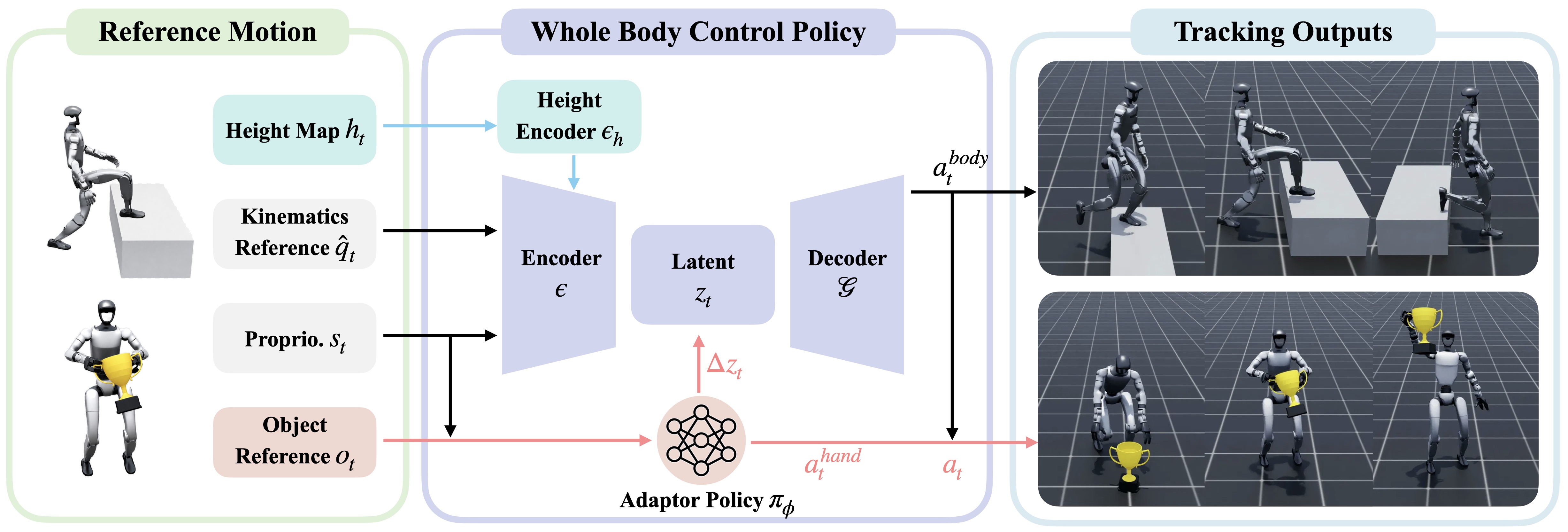
This is where GRAIL moves from reference motion to task-general tracking. The object-aware adaptor does not replace all of SONIC. It modulates the latent token space and emits hand actions while preserving the pretrained locomotion prior. The ablation in Table 2 explains why this matters: removing SONIC or removing the adaptor sharply reduces success. In plain terms, whole-body pose tracking alone is not enough for object interaction. The policy also needs object pose, shape cues, contact timing, hand closure, and object deviation rewards.
Train Terrain-Aware Tracking
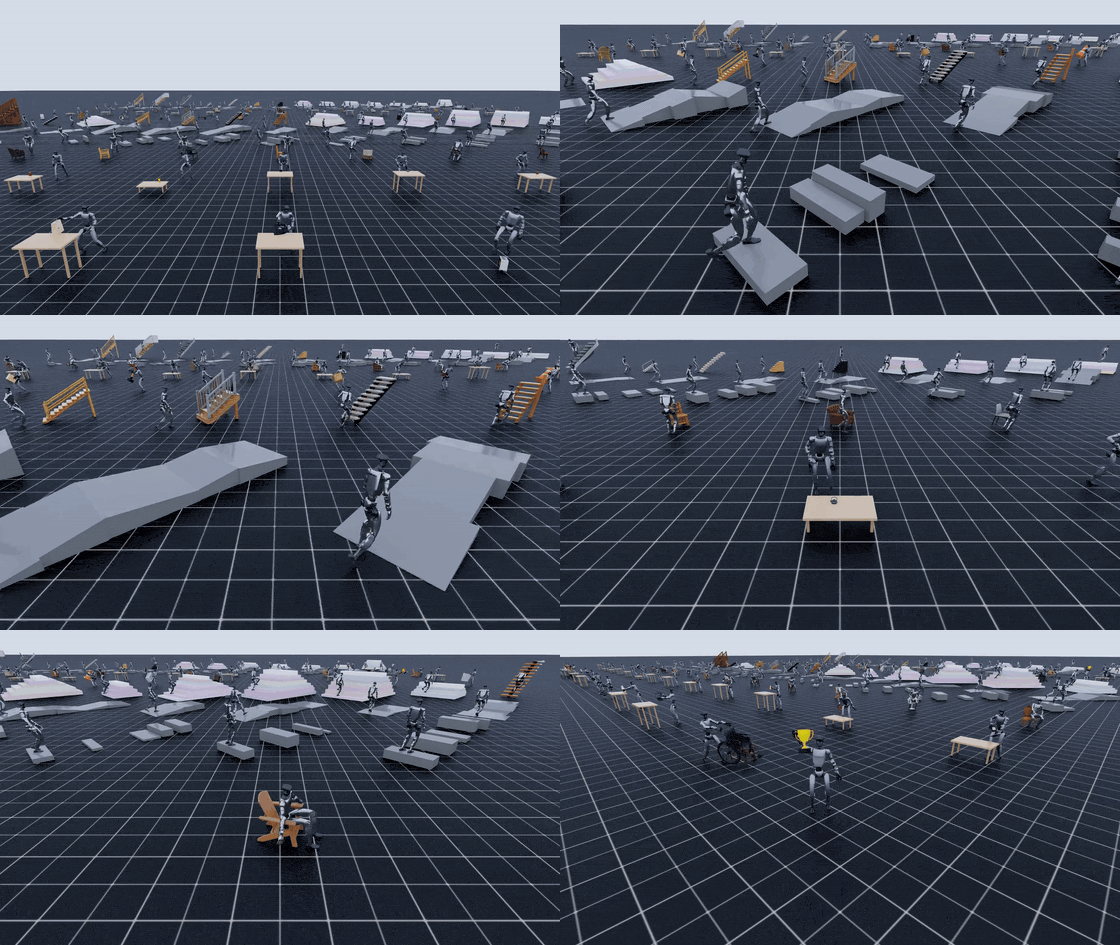
Terrain uses a different config because the task is not grasping a small object. It is scene-aware whole-body control. The paper describes a scene-aware tracker that fine-tunes the controller with a height-map encoder for curbs, slopes, stairs, and chair interactions. The release config is:
conda activate sonic
export HYDRA_FULL_ERROR=1
export PYTHONUNBUFFERED=1

cd imports/SONIC

export DATA_DIR=/workspace/grail/data/motion_lib/terrain_stairs

python -u train_agent_trl.py \
  +exp=manager/universal_token/scene/terrain_tracking \
  num_envs=4096 headless=True \
  ++manager_env.commands.motion.motion_lib_cfg.motion_file=${DATA_DIR}/robot \
  ++manager_env.commands.motion.motion_lib_cfg.object_motion_file=${DATA_DIR}/objects \
  ++manager_env.config.terrain_motion_dir=${DATA_DIR}
If your dataset root does not include flat_placeholder.usd, pass:
++manager_env.config.flat_usd_path=/workspace/grail/assets/flat_placeholder.usd
Terrain has its own useful overrides, including flat_motion_dir, flat_usd_path, and flat_to_terrain_ratio. flat_to_terrain_ratio=0 means every environment is a terrain environment. If you want to preserve some flat-ground walking prior during fine-tuning, mix in flat motions and tune the ratio. The docs recommend checking log markers such as [TerrainAutoDiscover], [PerRankUSD], and [PerRankMotion] to confirm the dataset slicer has assigned the intended motion/USD pairs to each GPU.
Read Training Outputs
Each run writes a checkpoint directory like:
logs_rl/TRL_G1_Track/manager/<config_path>/<exp_name>-<timestamp>/
  config.yaml
  model_step_NNNNNN.pt
  last.pt
  meta.yaml
  events.out.tfevents.*
The first file to preserve is config.yaml. It is the resolved Hydra config, which means it contains the final values after every override. When a run performs well, do not keep only last.pt; keep config.yaml, the exact motion library version, the BPS version, and the container or environment version if available. In GRAIL, reproducibility belongs to both the data and the controller.
Map Paper Metrics to Code Paths
The GRAIL paper reports more than 20,000 generated sequences across pick-up, whole-body manipulation, sitting, and terrain traversal. That number is not the output of one training command. It is the scale of the complete asset-conditioned pipeline, from generation through retargeting and tracking.
| Paper result | What it means | Related code path |
|---|---|---|
| Over 20,000 sequences | Dataset scale produced by object assets and terrain configs | grail.pipelines.*, grail.retargeting.*, data/motion_lib/* |
| Table 1 HOI tracking SR 88.9% | GRAIL 4D HOI motions are more physically trackable than baselines | Reconstruction + retarget + per-motion tracking evaluation |
| Table 2 task-general tracking SR 81.4% | The full task-general policy outperforms HDMI, ResMimic, and ablations | imports/SONIC/train_agent_trl.py, object-aware adaptor |
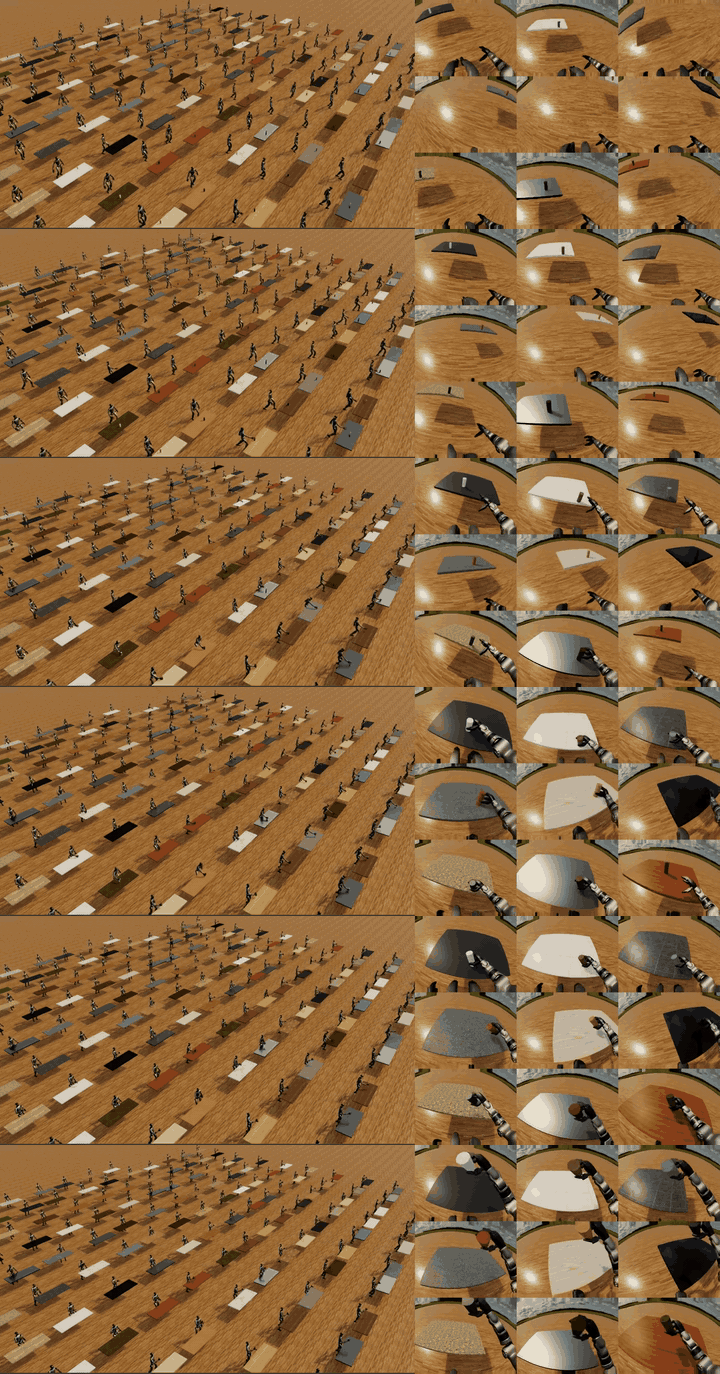
| Real G1 pick-up 84% | A visual policy trained from GRAIL-generated data succeeds on real pick-up | Egocentric sim-to-real policy after tracker training |
| Real G1 stair climbing 90% | Terrain data and scene-aware tracking transfer to the real robot | scene/terrain_tracking + stair visual policy |
Table 1 and Table 2 measure different things. Table 1 asks: "Are the generated trajectories good enough for a physics tracker to follow?" It mostly reflects generation, reconstruction, retargeting, and reference quality. Table 2 asks: "Can one task-general policy learn a family of related trajectories?" It reflects amortized controller adaptation across object or scene variation. If Table 1 is high but Table 2 is low, individual motions may be valid but the family policy is not yet learning the variation. If Table 1 is low, Table 2 cannot reliably fix the problem because the references themselves are already weak.
Export Successful Rollouts
After you have a good run, GRAIL provides a cluster-agnostic export pipeline. The documented flow is:
W&B sweep
  -> select_top_checkpoints
  -> sharded eval creates metrics_eval.json and *.trajectory.pkl
  -> batch_render_replay creates vis/*.mp4
  -> export_successful_rollouts creates robot/objects/object_usd
  -> merge_exports creates one merged motion library
Stage 0 selects top checkpoints:
conda activate sonic

python -m grail.data_export.select_top_checkpoints \
  --sweep <wandb_sweep_id> \
  --k 5
If your runs are grouped by a W&B group instead of a sweep, use --group <wandb_group_id>. This script does not train a policy; it ranks checkpoints by the reported evaluation success rate and gives you the candidates worth evaluating more deeply.
After sharded evaluation, each shard should contain metrics_eval.json and *.trajectory.pkl. At that point, there are two logical jobs: render videos for human review, and export successful trajectories into motion-library data.
python -m grail.visualization.batch_render_replay \
  --input_shard logs_rl/<exp>/phase1_eval/shard_0 \
  --output_dir logs_rl/<exp>/exported/step_010000/shard_0/vis

python -m grail.data_export.export_successful_rollouts \
  --eval_dir logs_rl/<exp>/phase1_eval/shard_0 \
  --source_motion_lib ${DATA_DIR} \
  --output_dir logs_rl/<exp>/exported/step_010000/shard_0
Exact flags can evolve with the release, but the data contract is stable. The renderer reads trajectory files and produces kinematic-replay MP4s. The exporter reads metrics, keeps successful rollouts, converts trajectory data into robot/*.pkl and objects/*.pkl, and copies object_usd/*.usd from the source motion library. If the source library is missing USD assets, the exported data will not replay or train cleanly.
When all shards are exported, merge them:
python -m grail.data_export.merge_exports \
  --input_root logs_rl/<exp>/exported/step_010000 \
  --output_dir logs_rl/<exp>/exported/step_010000/merged
The resulting merged/ directory should look like a motion library:
merged/
  robot/
  objects/
  object_usd/
  meta/
  vis/
This is data that has passed through a physics/policy filter. You can use it to bootstrap another sweep, train an egocentric visual policy, or package a dataset release.
Preview with the Web Visualizer
MP4 files under vis/ are useful, but opening them one by one is slow when a library has hundreds or thousands of motions. grail.web_visualizer.generate_manifest creates a static site with index.html, main.js, style.css, manifest.json, and symlinks or copies to the replay videos.
python -m grail.web_visualizer.generate_manifest \
  --motion_lib logs_rl/<exp>/exported/step_010000/merged \
  --output out/viz/grail_pickup_step_010000
Serve it locally:
cd out/viz/grail_pickup_step_010000
python -m http.server 8000
The manifest copies only allowlisted metadata such as object_name, table_pos, table_quat, and table_size, plus frame count and video path. That keeps the schema stable even as internal meta/*.pkl files grow new fields. For dataset review, the web viewer is often more valuable than a metric dashboard. Metrics tell you success rate; videos show whether the robot actually lifted the object, dragged it, clipped through geometry, or passed because a threshold was too forgiving.
Quick Debug Checklist
| Symptom | Common cause | Fix |
|---|---|---|
no contact label found |
Retarget output is missing contact points or hand actions | Re-run process.sh with --include_contact_points |
| Object does not spawn | object_usd_path is wrong or USD files were not copied |
Use absolute paths and check find object_usd -name "*.usd" |
| BPS shape/key errors | bps_dir does not match the object set |
Re-run compute_bps on the original motion library |
| Terrain loads as flat only | Missing terrain_motion_dir or placeholder USD |
Check [TerrainAutoDiscover] logs |
| Eval SR is high but videos look bad | Metric threshold misses a contact or visual failure | Render replay and manually inspect samples |
| Merge output is missing motions | One or more shards exported nothing or used the wrong root | Inspect each shard before running merge_exports |
Conclusion
Part 6 closes the series with the lifecycle stage that is easiest to underestimate. GRAIL data becomes truly useful after it goes through policy tracking, evaluation, and export. imports/SONIC/train_agent_trl.py is the bridge between motion libraries and controllers. The release configs pnp_table, pnp_ground, advanced_manip_table, and terrain_tracking save you from rebuilding PPO, observations, rewards, and network wiring from scratch; your job is to provide the correct data layout and Hydra overrides.
When reading the paper, connect each number to a pipeline stage. Over 20,000 sequences describes data scale. 88.9% in Table 1 describes HOI trackability. 81.4% in Table 2 describes task-general tracking. 84% pick-up and 90% stair climbing validate sim-to-real transfer on a Unitree G1. Finally, select_top_checkpoints, batch_render_replay, export_successful_rollouts, merge_exports, and generate_manifest turn those trained policies back into reviewable, shareable, trainable data.