Why OpenVLA Matters
OpenVLA is one of the most useful projects to study if you want to understand how a Vision-Language-Action model turns a camera image and a natural-language instruction into a robot command. The original paper, "OpenVLA: An Open-Source Vision-Language-Action Model", was released on arXiv in 2024 by researchers from Stanford, UC Berkeley, Toyota Research Institute, Google DeepMind, Physical Intelligence, and MIT. Its value is not just the 7B-parameter model. The important part is the full stack around it: paper, project page, Hugging Face checkpoint, PyTorch code, fine-tuning scripts, inference examples, and real-robot evaluations.
If the earlier posts in this series gave you the basics of imitation learning, Diffusion Policy, VLA models, and hands-on LeRobot workflows, this article focuses on one concrete question: how does OpenVLA actually work, and what should a beginner do to run it carefully?
OpenVLA takes two main inputs: an image of the robot workspace and a language instruction such as put the yellow corn on the plate. Its output is not a text answer like a chatbot. The output is a robot action, usually represented as a 7-DoF end-effector delta: x, y, z, roll, pitch, yaw, gripper. That puts OpenVLA at the intersection of computer vision, language modeling, and robot control.
The first beginner trap is thinking that OpenVLA is simply an LLM that "talks to a robot". It is more precise to call it a policy learned from robot demonstrations. Language is a conditioning signal, not magic. If your robot, camera placement, action space, or workspace is far away from the pretraining data, you should expect to collect demonstrations and fine-tune.
What Problem Does the Paper Solve?
Before OpenVLA, many strong VLA systems were closed or difficult to reproduce. RT-2 and RT-2-X showed that combining vision-language pretraining with robot action data could produce more general robot policies, but outside users could not easily download comparable checkpoints, inspect the training recipe, or adapt the model to their own robot. OpenVLA takes a different route: it provides an open-source 7B VLA that is strong enough to be a serious research and prototyping baseline.
The paper's idea can be summarized in three points:
| Problem | OpenVLA's answer | Why it matters |
|---|---|---|
| Prior VLAs were hard to access | Release code, checkpoints, model cards | You can run inference and fine-tune |
| Robot tasks are diverse | Train on 970k Open X-Embodiment trajectories | The model sees many scenes and embodiments |
| Fine-tuning 7B models is expensive | Support LoRA and quantization | Smaller labs can adapt it |
According to the project page, OpenVLA is pretrained on 970k robot episodes from Open X-Embodiment. The paper abstract reports that OpenVLA outperforms the closed RT-2-X 55B model by 16.5 percentage points in absolute task success rate across 29 tasks and multiple robot embodiments, while using roughly seven times fewer parameters. The paper also reports that fine-tuned OpenVLA outperforms from-scratch Diffusion Policy by 20.4% in multi-task, multi-object settings where language grounding matters. These numbers do not mean OpenVLA always beats smaller policies. They mean that diverse pretraining helps when the task requires object grounding, instruction following, and generalization.
OpenVLA Architecture
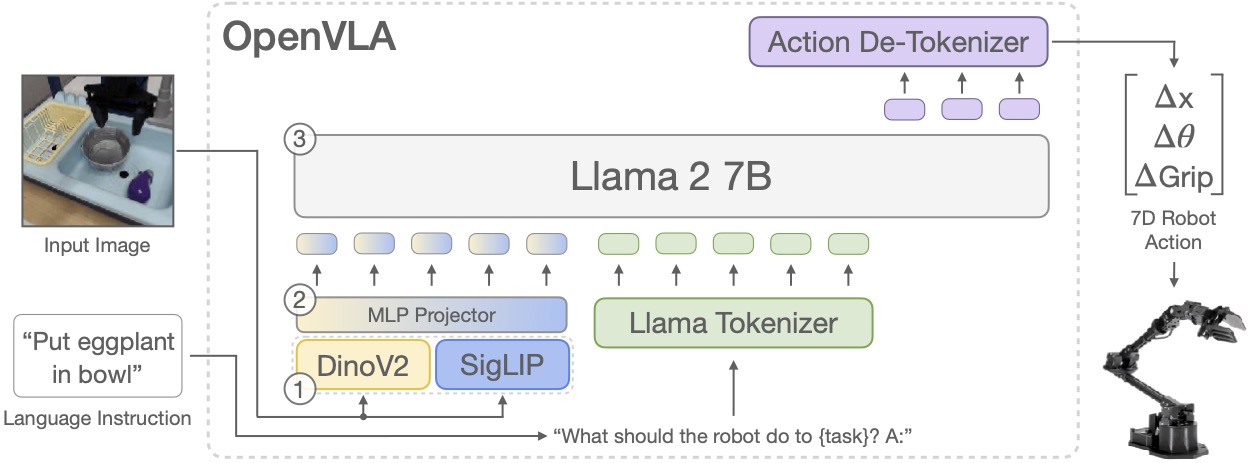
OpenVLA is built on a Prismatic VLM. Instead of training every part from scratch, the authors fine-tune a pretrained vision-language model so that it predicts robot action tokens. The architecture has three main blocks:
Camera image
    |
    v
+-----------------------------+
| Fused visual encoder        |
| DINOv2 + SigLIP             |
+-----------------------------+
    |
    v
+-----------------------------+
| Projector                   |
| image embeddings -> LLM dim |
+-----------------------------+
    |
    v
+-----------------------------+
| Llama 2 7B backbone         |
| instruction + image tokens  |
+-----------------------------+
    |
    v
Tokenized robot actions
    |
    v
Continuous robot command
1. Fused Visual Encoder
OpenVLA uses two vision backbones: DINOv2 and SigLIP. DINOv2 is strong at self-supervised visual representation, while SigLIP is strong at image-language alignment. Combining them gives the model richer features for objects, colors, backgrounds, spatial layout, and instruction-conditioned targeting.
For a beginner, the simple mental model is this: the camera image is converted into a sequence of embeddings. Each embedding acts like a visual token containing information about a patch or region of the image. The language model does not directly read pixels. It reads the compressed visual embeddings produced by the encoder.
2. Projector
The projector is the bridge between the visual encoder and the LLM. Raw visual features do not naturally live in the same space as Llama 2 token embeddings. The projector learns to map image embeddings into a representation the LLM can process together with language tokens.
If you have used CLIP, BLIP, or other multimodal models, this is similar to an adapter between modalities. In robot learning, that adapter is especially important because the final output is not a caption. The final output is an action that will be executed by hardware.
3. Llama 2 7B Backbone
OpenVLA formats the task as a prompt:
In: What action should the robot take to {instruction}?
Out:
Instead of generating English text, the model generates action tokens. Those tokens are decoded into a continuous action vector and passed to the robot controller. Architecturally, OpenVLA reuses the autoregressive token prediction machinery of a language model. Functionally, it behaves as a visuomotor policy.
How Action Tokenization Works
Robot actions are usually continuous. A typical end-effector action looks like this:
action = [
  delta_x,
  delta_y,
  delta_z,
  delta_roll,
  delta_pitch,
  delta_yaw,
  gripper
]
A language model, however, predicts discrete tokens. OpenVLA-style policies therefore discretize each action dimension into bins, often described as 256-bin action discretization. During training, continuous dataset actions are normalized, discretized, and represented as tokens. During inference, the model predicts tokens, the tokenizer maps them back to bins, and the result is unnormalized using robot- or dataset-specific statistics.
The conceptual pipeline is:
continuous action in dataset
        |
        v
normalize per dataset / robot
        |
        v
discretize into action bins
        |
        v
train LLM to predict action tokens
        |
        v
at inference: decode tokens -> unnormalize -> robot.act()
This is why unnorm_key is not a minor detail. If you use the wrong normalization statistics, the token may represent the right abstract action but the wrong physical scale. The robot may move too far, too slowly, or operate the gripper at the wrong time.
Environment Setup
OpenVLA has two practical setup levels: minimal inference and full training or fine-tuning. Beginners should start with inference to validate the GPU, dependencies, checkpoint loading, and output shape before connecting any hardware.
Minimal Inference Setup
conda create -n openvla python=3.10 -y
conda activate openvla

pip install torch torchvision torchaudio --index-url https://download.pytorch.org/whl/cu121
pip install transformers timm tokenizers pillow accelerate
pip install flash-attn --no-build-isolation
If flash-attn fails to build, you can try loading the model without attn_implementation="flash_attention_2", but inference will usually be slower and more memory hungry. On a 24GB GPU, you may need quantization or a server-client deployment where a larger GPU hosts the model.
Repository Setup for Fine-Tuning
conda create -n openvla-train python=3.10 -y
conda activate openvla-train

conda install pytorch torchvision torchaudio pytorch-cuda=12.4 -c pytorch -c nvidia -y

git clone https://github.com/openvla/openvla.git
cd openvla
pip install -e .

pip install packaging ninja
pip install "flash-attn==2.5.5" --no-build-isolation
The original repository states that the code was developed with Python 3.10, PyTorch 2.2.x, transformers 4.40.1, tokenizers 0.19.1, timm 0.9.10, and flash-attn 2.5.5. In robotics projects, dependency drift is a common source of false debugging. If the model fails to load or produces strange outputs, check package versions before questioning the paper or your robot.
Basic Inference
The following example shows the flow from an image to a predicted action. It is not a complete robot controller, but it is enough to understand the interface.
from PIL import Image
import torch
from transformers import AutoModelForVision2Seq, AutoProcessor

processor = AutoProcessor.from_pretrained(
    "openvla/openvla-7b",
    trust_remote_code=True,
)

vla = AutoModelForVision2Seq.from_pretrained(
    "openvla/openvla-7b",
    torch_dtype=torch.bfloat16,
    low_cpu_mem_usage=True,
    trust_remote_code=True,
).to("cuda:0")

image = Image.open("workspace.jpg").convert("RGB")
instruction = "put the yellow corn on the plate"
prompt = f"In: What action should the robot take to {instruction}?\nOut:"

inputs = processor(prompt, image).to("cuda:0", dtype=torch.bfloat16)
action = vla.predict_action(
    **inputs,
    unnorm_key="bridge_orig",
    do_sample=False,
)

print(action)
On a real robot, image comes from a camera stream and robot.act(action) sends the command to the low-level controller. Before doing that, verify five things:
| Component | Question to ask |
|---|---|
| Camera pose | Does the view match the dataset or fine-tuning data? |
| Action space | Does the robot expect end-effector deltas or joint commands? |
| Control frequency | Is the policy running at 5 Hz, 10 Hz, or 15 Hz? |
| Normalization | Is the unnorm_key correct for this dataset and robot? |
| Safety | Do you have workspace limits, emergency stop, and velocity clamps? |
The OpenVLA model card states that the model predicts normalized 7-DoF end-effector deltas and that actions must be unnormalized using per-robot or per-dataset statistics before execution. This is not a small implementation detail. It is the difference between a controlled demo and unsafe hardware behavior.
Fine-Tuning with LoRA
Full fine-tuning a 7B model requires serious compute. The project page says that OpenVLA pretraining used a cluster of 64 A100 GPUs for 15 days. The GitHub repository provides a LoRA fine-tuning recipe because it is more realistic for many smaller labs.
LoRA adds low-rank adapters to selected layers and trains only those adapters instead of updating every model weight. The OpenVLA project reports that LoRA provides the best trade-off between performance and memory in their experiments, matching full fine-tuning while updating only about 1.4% of the parameters.
A representative command from the repository workflow looks like this:
torchrun --standalone --nnodes 1 --nproc-per-node 1 vla-scripts/finetune.py \
  --vla_path "openvla/openvla-7b" \
  --data_root_dir /data/robot_datasets \
  --dataset_name bridge_orig \
  --run_root_dir /runs/openvla_lora \
  --adapter_tmp_dir /tmp/openvla_adapter \
  --lora_rank 32 \
  --batch_size 16 \
  --grad_accumulation_steps 1 \
  --learning_rate 5e-4 \
  --image_aug True \
  --wandb_project openvla \
  --wandb_entity your_team \
  --save_steps 5000
The repository notes that the example batch size of 16 can require around 72GB of GPU memory for BridgeData V2. If you have a smaller GPU, reduce batch_size and increase grad_accumulation_steps to keep the effective batch size stable. On a 24GB GPU, you may need a small batch, gradient accumulation, quantization, or a newer recipe such as OpenVLA-OFT if it matches your use case.
Preparing a Custom Dataset
OpenVLA works naturally with RLDS because its pretraining and fine-tuning pipeline uses Open X-Embodiment data. If you have a custom robot dataset, the workflow should look like this:
teleoperation demos
    |
    v
store images + actions + language instructions
    |
    v
convert to RLDS or write PyTorch Dataset wrapper
    |
    v
register dataset config + transform
    |
    v
LoRA fine-tune
    |
    v
evaluate on held-out tasks
A minimal episode should contain:
episode/
  observations/
    image_primary[t]
    image_wrist[t]       # optional
    proprio[t]           # optional
  actions/
    world_vector[t]
    rotation_delta[t]
    gripper_closedness[t]
  language_instruction
  metadata/
    robot_id
    control_frequency
    camera_intrinsics
For a beginner project, do not start with 50 tasks. Pick two or three tasks with clear success criteria, such as pick red block, place block in bowl, and open drawer. Collect 50-100 demonstrations per task, split train and validation data, and replay actions offline before training. If replay from the dataset is already wrong, the VLA will learn the wrong behavior quickly.
What to Watch During Training
Training logs may show loss and action accuracy, but robotics cannot be evaluated by token accuracy alone. A model can predict many correct tokens and still fail the rollout because one important grasp or placement step is wrong.
Track these metrics:
| Metric | Meaning | Caveat |
|---|---|---|
| Training loss | Whether the model fits demonstrations | Fast low loss can mean overfitting |
| Action token accuracy | Discrete token correctness | Not a replacement for real rollouts |
| Validation rollout success | Whether the task is completed | Needs a fixed protocol |
| Intervention count | How often a human must rescue the run | Useful for debugging |
| Latency | Time from frame to action | Control needs consistency |
A simple evaluation protocol:
For each task:
  run 20 trials
  randomize object position within safe region
  use the same natural-language instruction template
  record success/failure
  record failure reason:
    perception miss
    wrong object
    bad grasp
    collision / safety stop
    task sequencing error
When OpenVLA fails, classify the failure. If the model targets the wrong object, check camera placement, lighting, augmentation, and language labels. If the action scale is wrong, check normalization. If the policy moves in the right direction but too slowly, check control frequency and action clipping. If the robot grasps correctly but cannot complete the longer sequence, you may need more demonstrations or a recipe with action chunking such as OFT.
What Do the Results Tell Us?
OpenVLA has three result groups worth remembering.
First, direct evaluation on multiple robot platforms. The project page describes evaluations on the WidowX setup from Bridge V2 and the Google Robot from the RT-series of papers. OpenVLA outperforms RT-1-X, Octo, and even RT-2-X on the aggregate benchmark, while RT-2-X remains stronger on some difficult semantic tasks that require Internet concepts not strongly preserved during OpenVLA's robot-only fine-tuning.
Second, adaptation to new robot setups. The paper evaluates Franka-Tabletop and Franka-DROID. The important lesson is not that OpenVLA always beats Diffusion Policy. Diffusion Policy remains very strong for narrow, precise, single-instruction tasks. OpenVLA shines more in multi-object, multi-task settings where language grounding matters. That gives you a practical heuristic: if the task is a narrow industrial motion, a smaller policy may be enough; if the task has many objects and diverse instructions, a VLA becomes more attractive.
Third, parameter-efficient fine-tuning. LoRA shows that you can get close to full fine-tuning performance with much lower memory. This is why OpenVLA became a common baseline for robotics labs and startups: you do not need to reproduce a 64-A100 pretraining run before starting. You can begin from a public checkpoint and train adapters.
Practical Limitations
OpenVLA is powerful, but it is not plug-and-play for every robot.
| Limitation | Impact | Risk reduction |
|---|---|---|
| Weak zero-shot transfer to unseen embodiments | Different kinematics or action spaces can fail | Collect demos and fine-tune |
| 7B model latency | Control loop may be slow | Quantization, GPU server, OFT |
| Action normalization is critical | Wrong scale can be unsafe | Validate unnorm_key, clamp actions |
| Camera/domain shift | Wrong object or pose estimate | Calibration and augmentation |
| Semantic gaps | Some Internet concepts are not retained | Fine-tune diverse instructions |
For serious deployment, put OpenVLA above a safety layer:
OpenVLA action
    |
    v
action unnormalization
    |
    v
safety filter: workspace, velocity, force, collision
    |
    v
low-level controller
    |
    v
robot hardware
Do not let a 7B model send raw commands directly to actuators without workspace limits and an emergency stop path. Robotics is different from chat: a bad output can damage equipment.
When Should You Choose OpenVLA?
Choose OpenVLA if you are researching or prototyping language-conditioned robot manipulation with camera observations, multiple objects, and a realistic fine-tuning plan. Do not choose OpenVLA if you only need one narrow industrial task with strict cycle-time requirements, or if you do not have enough GPU/server capacity.
A quick comparison:
| Option | Best fit | Weakness |
|---|---|---|
| Hand-coded motion + perception | Fixed task, high stability | Hard to scale language |
| ACT | Simple imitation learning, fast inference | Less generalization |
| Diffusion Policy | Contact-rich precise manipulation | From-scratch training, weaker language |
| OpenVLA | Multi-task, multi-object language grounding | 7B model, needs careful fine-tuning |
| OpenVLA-OFT | Faster VLA adaptation and action chunking | Requires following the newer recipe |
Beginner Checklist
If you want to get started in one or two weeks, follow this order:
Day 1-2:
  read the paper abstract and project page
  run minimal inference on a static image

Day 3-4:
  connect a camera stream
  verify prompt format and output shape
  do not connect robot actuators yet

Day 5-7:
  collect small demonstrations
  replay actions offline
  convert the dataset

Day 8-10:
  LoRA fine-tune
  monitor loss, action accuracy, validation samples

Day 11-14:
  run slow, bounded robot rollouts
  log failures
  improve data and normalization
The most important thing to learn from OpenVLA is the boundary between a foundation model and a robot system. The model gives you a strong prior from 970k trajectories, but the system still needs clean data, stable cameras, safe control, a repeatable evaluation protocol, and disciplined debugging.
Sources
- Paper: OpenVLA: An Open-Source Vision-Language-Action Model
- Project page: openvla.github.io
- GitHub repo: openvla/openvla
- Model card: openvla/openvla-7b on Hugging Face