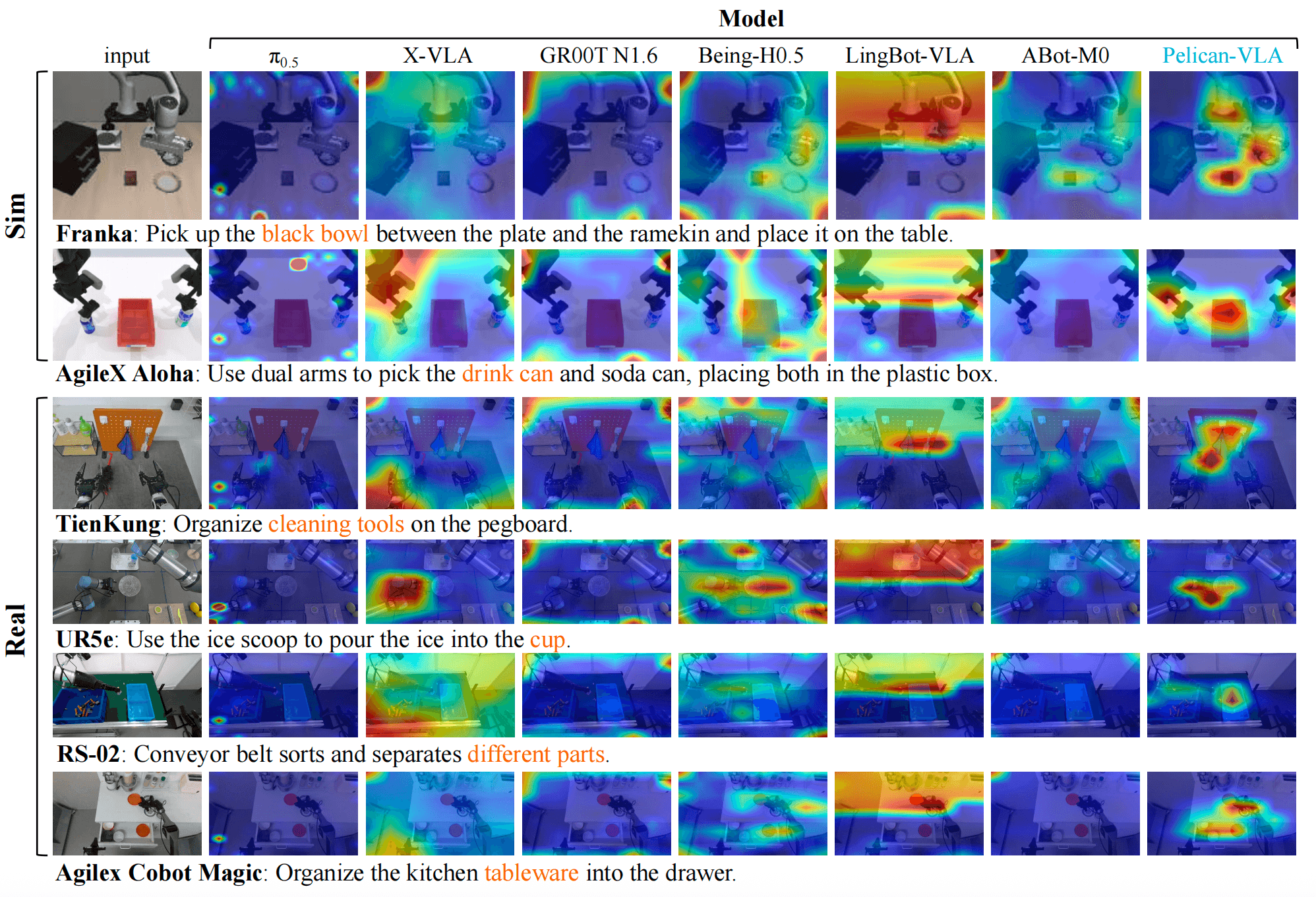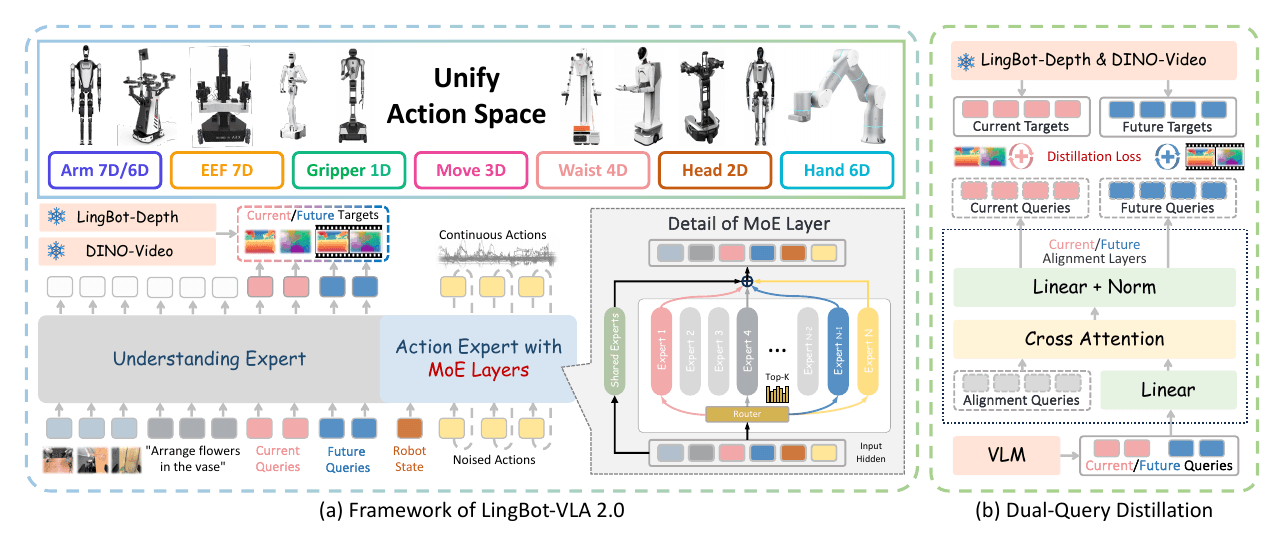
LingBot-VLA 2.0 is interesting because it is not just another dual-arm manipulation policy. Robbyant positions it as a more deployment-oriented Vision-Language-Action model: it learns across many embodiments, uses a vision-language backbone for instruction and visual grounding, and predicts continuous robot actions in a unified 55-dimensional canonical space. For a robot-learning engineer, the practical value is that the release includes Apache-2.0 code, a 6B checkpoint, a RoboTwin 2.0 post-training example, open-loop evaluation scripts, a 50-task RoboTwin evaluation launcher, and a real-robot policy server entrypoint.
This tutorial is written as a practical walkthrough. We will cover the paper idea, the 55D architecture, installation, RoboTwin 2.0 data preparation, post-training, open-loop evaluation, simulator inference, and real-robot deployment cautions. If you are new to VLA policies, start with our VLA Models overview. If LeRobot data format is unfamiliar, the LeRobot hands-on guide will make the dataset and normalization steps easier to understand.
What the paper is solving
The paper From Foundation to Application: Improving VLA Models in Practice appeared on arXiv on July 7, 2026. Its core claim is pragmatic: many VLA systems look strong in controlled lab conditions, but real deployment exposes three gaps. First, the data distribution is often too narrow, tied to one robot or one task family. Second, the action space is not broad enough for whole-body robots: a policy may control only arms and grippers while the actual platform also has a head, waist, mobile base, or dexterous hands. Third, the model may lack predictive temporal understanding, so small early errors accumulate and break long-horizon tasks.
LingBot-VLA 2.0 upgrades LingBot-VLA 1.0 along those three axes. Its pretraining corpus grows to about 60,000 hours, including 50,000 hours of robot trajectories across 20 robot configurations and 10,000 hours of egocentric human videos. Its action representation becomes a 55D canonical vector that can hold arm joints, end-effector pose, grippers, dexterous hands, waist, head, and mobility signals. Its perception stack adds a future-prediction proxy task: DINO-Video provides semantic temporal priors, while LingBot-Depth provides geometric cues.
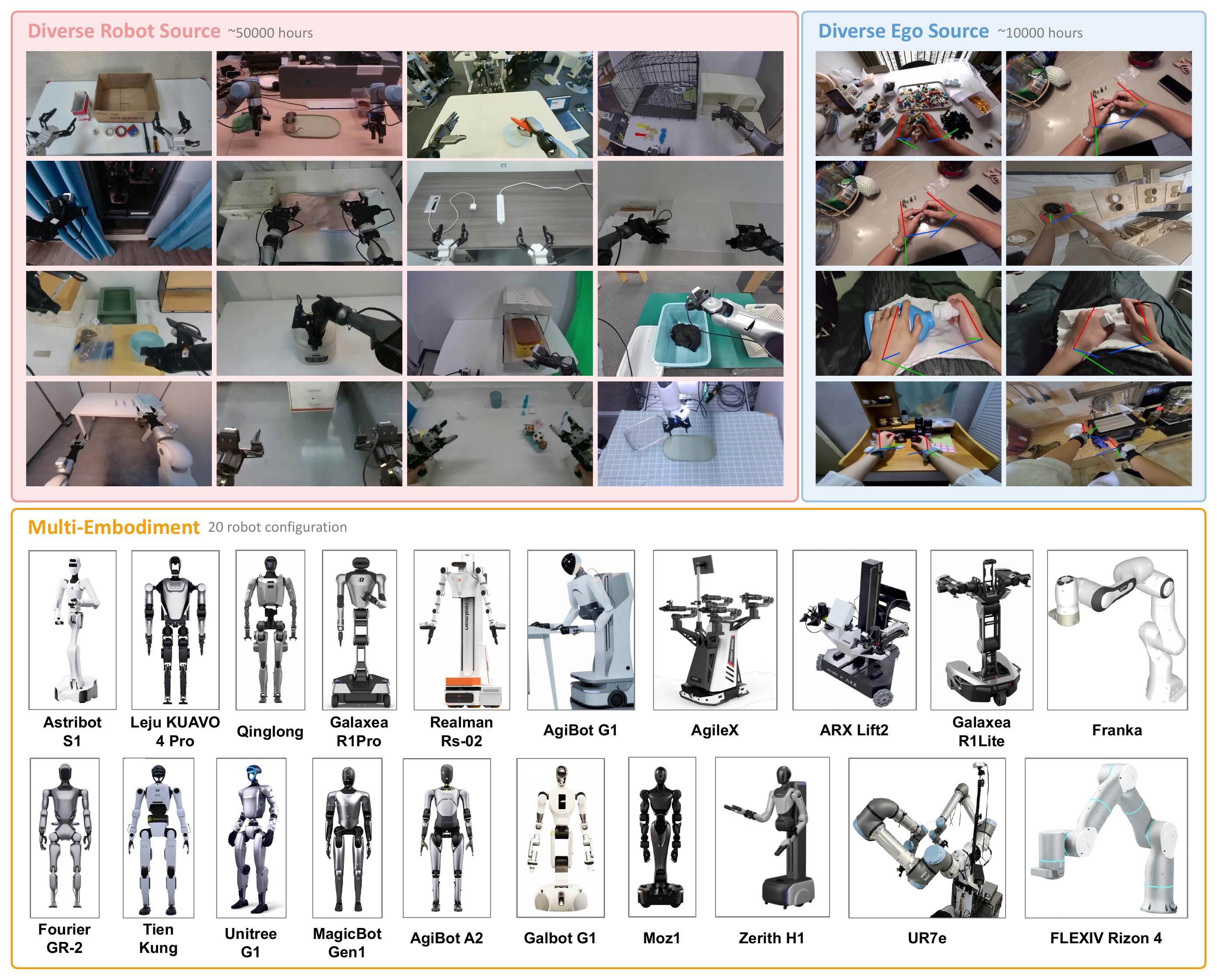
The right expectation is important. This is not a tutorial for reproducing a 60,000-hour foundation-model pretraining run on a workstation. The useful engineering workflow is to start from the released robbyant/lingbot-vla-v2-6b checkpoint, then post-train or fine-tune it on a downstream dataset such as RoboTwin 2.0. The official repository supports exactly that path: download weights, prepare LeRobot datasets, map raw features through a robot config, compute normalization statistics, train with train.sh, then evaluate or deploy.
The 55D cross-embodiment action space
The most important design choice in LingBot-VLA 2.0 is the unified action representation. Instead of making a separate policy head for every robot, heterogeneous embodiments are mapped into one 55-dimensional state/action vector:
| Signal group | Dimensions | Meaning |
|---|---|---|
| Arm joint position | 14 | two arms, with padding for different robots |
| End-effector pose | 14 | left/right hand pose or equivalent features |
| Gripper position | 2 | gripper open/close values |
| Hand joint position | 12 | dexterous hand joints |
| Waist position | 4 | torso or waist degrees of freedom |
| Head position | 2 | pan/tilt or equivalent head control |
| Mobility signal | 3 | mobile-base command |
| Reserved | 4 | room for future embodiments |
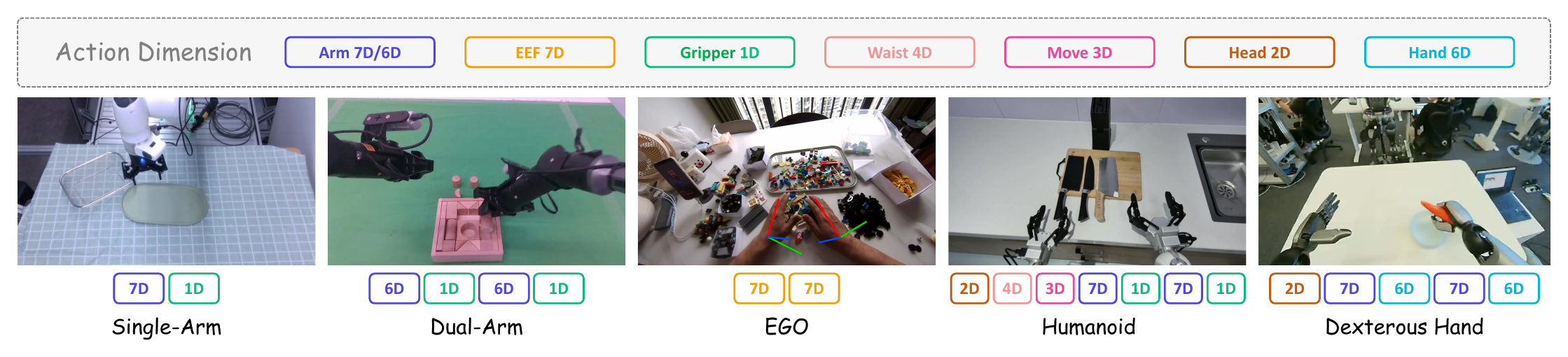
For RoboTwin 2.0, you will not fill every one of those 55 dimensions. The bimanual RoboTwin setup typically declares arm.position with 14 dimensions, end.position with 14 dimensions, and effector.position with 2 dimensions in the training config. The actual robot config maps raw two-arm state/action tensors into 12 arm dimensions and 2 gripper dimensions. The remaining capacity exists so the model keeps one action/state head across easier dual-arm tasks and richer whole-body embodiments. Beginners often assume their dataset must physically contain 55 meaningful numbers per timestep. In practice, your job is to map the available state, action, and camera fields correctly; the framework handles padding and the canonical head dimensions through configuration.
The action expert uses sparse MoE layers. The intuition is straightforward: the model needs shared priors across manipulation, but it also needs specialized capacity for different embodiments and task distributions. A single dense action head can cause very different distributions to interfere. MoE lets a small set of experts activate for a given context while shared experts preserve universal knowledge. The repository's RoboTwin post-training config also includes sequence-wise auxiliary loss and router z-loss options to stabilize routing.
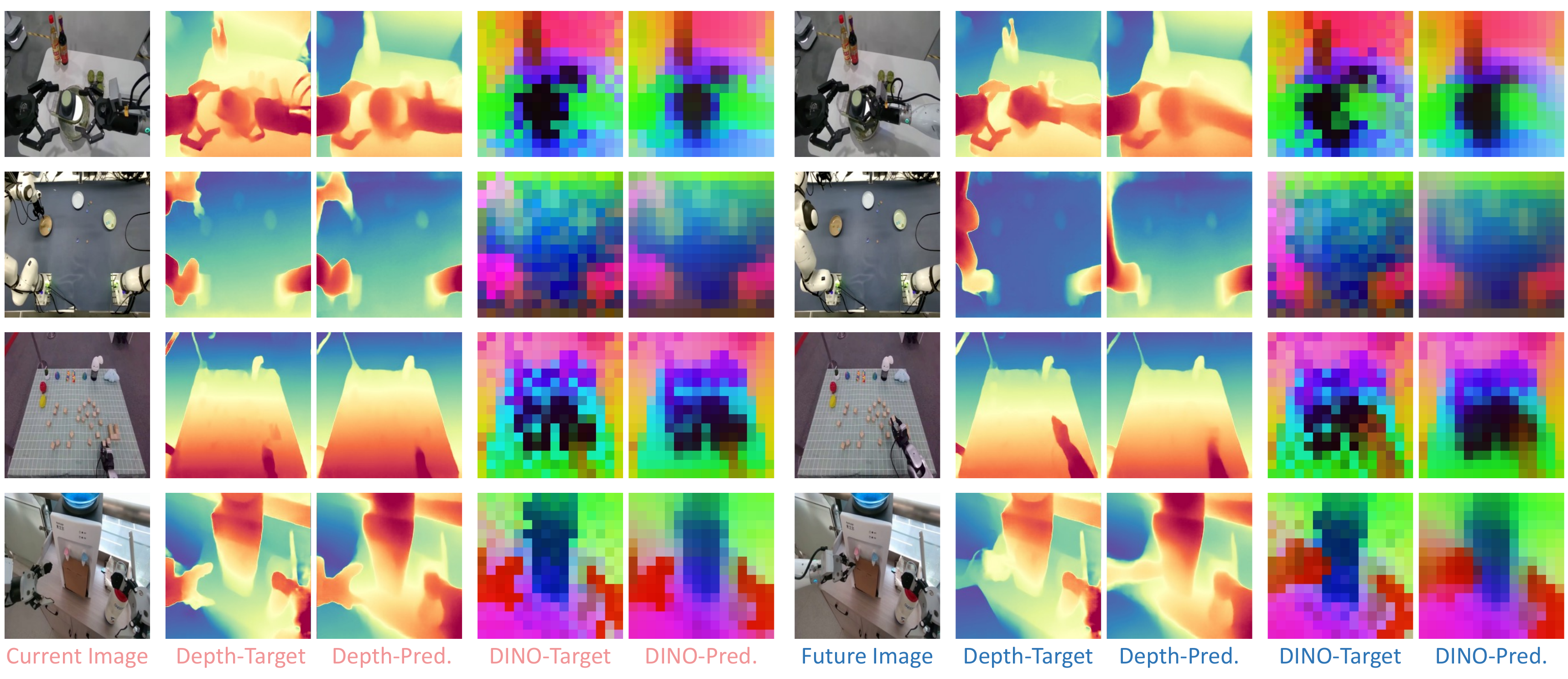
Dual-query distillation addresses a second deployment issue: a policy observing the current frame still needs to understand where the scene is going after future actions. LingBot-VLA 2.0 appends current and future perceptual queries to the visual/text tokens and distills them from LingBot-Depth and DINO-Video. Depth supplies geometry such as distance, object surfaces, and contact-relevant structure. DINO-Video supplies temporal and semantic cues. This matters for long-horizon manipulation because success depends not only on the first grasp frame, but also on whether the policy reaches useful intermediate states.
Machine setup
The official repository requires Miniconda or Anaconda, Python 3.12, and PyTorch 2.8.0. A normal workstation is enough for reading code and preparing datasets. For 6B inference, use a large NVIDIA GPU. For post-training across 50 RoboTwin tasks, treat this as a real multi-GPU workload: the config uses FSDP2, gradient checkpointing, flash-attn==2.8.3, torch.compile(), and small micro-batches. A single RTX 4090 can be useful for inference or dataset debugging, but serious post-training should be planned on a multi-GPU server.
You will need these components:
| Component | Purpose |
|---|---|
Robbyant/lingbot-vla-v2 |
training, evaluation, and deployment code |
robbyant/lingbot-vla-v2-6b |
LingBot-VLA 2.0 checkpoint |
Qwen/Qwen3-VL-4B-Instruct |
tokenizer/backbone path for training and inference |
Ruicheng/moge-2-vitb-normal |
depth model dependency |
LingBot-Depth inside the model repo |
depth teacher/checkpoint |
DINO-VIDEO inside the model repo |
video-representation teacher |
| RoboTwin 2.0 dataset | downstream simulator data |
Install the repository:
git clone https://github.com/Robbyant/lingbot-vla-v2.git
cd lingbot-vla-v2

bash tools/create_train_env.sh
If your system cannot build flash-attn from pip, download the matching CUDA/PyTorch wheel and pass it explicitly:
bash tools/create_train_env.sh \
  --flash-attn-wheel /path/to/flash_attn-2.8.3+cu12torch2.8cxx11abiTRUE-cp312-cp312-linux_x86_64.whl
Download the 6B checkpoint:
python3 scripts/download_hf_model.py \
  --repo_id robbyant/lingbot-vla-v2-6b \
  --local_dir lingbot-vla
For the commands below, assume you have set:
export LINGBOT_CKPT=/path/to/lingbot-vla
export QWEN3VL_PATH=/path/to/Qwen3-VL-4B-Instruct
export ROBOTWIN_ROOT=/path/to/RoboTwin
Preparing RoboTwin 2.0 data
RoboTwin 2.0 is a benchmark and data generator for bimanual manipulation, and it provides a pre-collected large-scale dataset on Hugging Face. The official RoboTwin repository can collect task data with:
bash collect_data.sh ${task_name} ${task_config} ${gpu_id}
For LingBot-VLA 2.0, the more direct path is to use an available RoboTwin dataset, convert it to HDF5 through RoboTwin's policy/pi0 scripts, then generate a LeRobotDataset v2.1 directory. According to the LingBot-VLA 2.0 RoboTwin guide, clone RoboTwin, create the folders under policy/pi0, download the dataset into /path/to/RoboTwin/data, and process each task:
cd /path/to/RoboTwin/policy/pi0
mkdir -p processed_data training_data

bash process_data_pi0.sh adjust_bottle aloha-agilex_clean_50 50
bash process_data_pi0.sh adjust_bottle aloha-agilex_randomized_500 50
The processed outputs will look like:
processed_data/adjust_bottle-aloha-agilex_clean_50-50/
processed_data/adjust_bottle-aloha-agilex_randomized_500-50/
Copy the processed folders you want into training_data/<model_name>/, then generate the LeRobot dataset:
cp -r processed_data/adjust_bottle-aloha-agilex_clean_50-50 \
  training_data/demo_lingbot/

bash generate.sh ./training_data/demo_lingbot/ demo_lingbot_repo
The default output is under:
${XDG_CACHE_HOME}/huggingface/lerobot/demo_lingbot_repo
If ~/.cache does not have enough disk space, set a larger cache location before generation:
export XDG_CACHE_HOME=/data/cache
Robot config and normalization
LingBot-VLA 2.0 reads downstream data through LeRobotDataset. For a single dataset, set data.data_name to the robot config name, such as robotwin, and set data.train_path to the local LeRobot dataset directory. For multiple datasets, use data.data_name: multi and pass a text file where every non-empty line contains:
<robot_config_name> <lerobot_repo_or_local_path>
Example assets/training_data/robotwin.txt:
robotwin /data/cache/huggingface/lerobot/demo_lingbot_repo
robotwin /data/cache/huggingface/lerobot/another_robotwin_task
The robot config configs/robot_configs/robotwin.yaml maps raw RoboTwin tensors into unified features. For state, the two arms are read from observation.state[0:6] and observation.state[7:13]; the two grippers are read from [6:7] and [13:14]. Actions are mapped similarly. Camera mapping typically looks like this:
images:
  - observation.images.camera_top:
      origin_keys: observation.images.cam_high
  - observation.images.camera_wrist_left:
      origin_keys: observation.images.cam_left_wrist
  - observation.images.camera_wrist_right:
      origin_keys: observation.images.cam_right_wrist
Once the dataset exists, compute normalization statistics:
CUDA_VISIBLE_DEVICES=0 bash train.sh scripts/compute_norm_stats.py \
  ./configs/vla/robotwin/robotwin.yaml \
  --data.data_name robotwin \
  --data.train_path /path/to/lerobot_dataset \
  --data.robot_config_root ./configs/robot_configs \
  --data.norm_path assets/norm_stats/robotwin.json \
  --data.data_ratio_for_norm_compute 1
Do not skip this step. The VLA action head learns on normalized distributions. If the stats are wrong, the generated actions can have the correct tensor shape but the wrong scale, causing bad gripper commands, excessive joint motion, or unstable rollouts. For debugging, print a few observation/action samples before and after normalization and verify that joint ordering is correct.
Post-training on RoboTwin 2.0
The repository provides a post-training example for 50 RoboTwin 2.0 tasks using clean and randomized data together:
bash train.sh tasks/vla/train_lingbotvla.py \
  ./configs/vla/robotwin/robotwin.yaml \
  --data.train_path assets/training_data/robotwin.txt \
  --data.data_name multi \
  --train.output_dir output/
Important config fields include:
| Field | How to read it |
|---|---|
action_dim: 55 |
preserve the canonical action/state head |
max_action_dim: 55, max_state_dim: 55 |
padding and compatibility across embodiments |
use_moe: true |
enable the MoE action expert |
token_num_experts: 32, token_top_k: 4 |
expert count and active experts |
enable_gradient_checkpointing: true |
reduce VRAM at the cost of speed |
data_parallel_mode: fsdp2 |
distributed training mode |
use_future_image: true |
enable future-image distillation |
depth_loss_weight: 0.004 |
current/future depth query loss weight |
future_video_loss_weight: 0.004 |
future video query loss weight |
loss_type: L1_fm |
RoboTwin action prediction loss setting |
If this is your first run, start with one or two RoboTwin tasks instead of all 50. The first objective is not to reach the reported benchmark score. It is to verify that the dataloader runs, camera keys match, normalization is valid, the model can perform forward and backward passes without NaNs, checkpoints are saved, and inference can reload the checkpoint. After that, scale to more tasks, increase the dataset mixture, enable logging, and move to more GPUs.
A common beginner mistake is setting data.data_name: robotwin while data.train_path points to a multi-dataset text list. The simple rule is: one dataset directory uses robotwin; a text file with many lines uses multi. Another common mistake is mismatching camera names between the robot config and data.cameras in the VLA config. That can break the loader or silently create batches without the expected image views.
Open-loop evaluation and simulator inference
After post-training, run open-loop evaluation to check action prediction on validation data:
export QWEN3_PATH=Qwen/Qwen3-VL-4B-Instruct

python scripts/open_loop_eval.py \
  --model_path path_to_posttraining_ckpt \
  --robo_name robotwin \
  --data_path path_to_validation_data \
  --use_length 50
--robo_name robotwin is required because the script resolves configs/robot_configs/robotwin.yaml. Open-loop evaluation is not a replacement for closed-loop simulator rollout, but it is a fast way to catch format problems: wrong checkpoint path, missing tokenizer path, action dimension mismatch, bad normalization file, or missing image keys.
To evaluate the policy inside RoboTwin for all 50 tasks, use the repository launcher:
QWEN3VL_PATH=/path/to/Qwen3-VL-4B-Instruct/ \
EVAL_WORKDIR=/path/to/RoboTwin/ \
bash experiment/robotwin/start_robotwin_infer_and_eval.sh \
  --model_path /path/to/your/post_training_checkpoint \
  --output_base /path/to/your/eval_output \
  --num_per_gpu 2
--num_per_gpu controls how many tasks run concurrently on each GPU. If you see OOM errors or unstable simulator communication, reduce it to 1. If GPU memory and CPU/simulator throughput are healthy, increase it gradually. For serious experiments, save the seed, task config, checkpoint hash, normalization stats, and RoboTwin version because domain randomization can affect measured performance.
Real-robot deployment path
The repository also exposes a real-robot deployment entrypoint:
export QWEN3VL_PATH=/path/to/Qwen3-VL-4B-Instruct

python -m deploy.lingbot_vla_v2_policy \
  --model_path path_to_posttraining_ckpt \
  --use_compile \
  --use_length 25 \
  --port 8000
The README reports that one inference call on an NVIDIA GeForce RTX 4090D takes about 130 ms with 10 denoising steps. Treat that as a reference number, not a guaranteed latency. Real latency depends on GPU, compile cache, image resolution, batch size, communication between the policy server and robot controller, and whether depth/video heads are active on the inference path.
For real hardware, do not connect raw VLA output directly to actuators without a safety layer. At minimum, add action clipping, joint limits, velocity and acceleration limits, emergency stop, watchdog timeout, collision zones, and logging. For whole-body robots, base, waist, and head signals require extra care because a bad command can change the camera viewpoint and degrade visual grounding in later steps. If your focus is humanoid whole-body policy learning, compare this design with GROOT synthetic data for WholeBody VLA and the LeRobot humanoid 2500-hour dataset guide.
Reported results
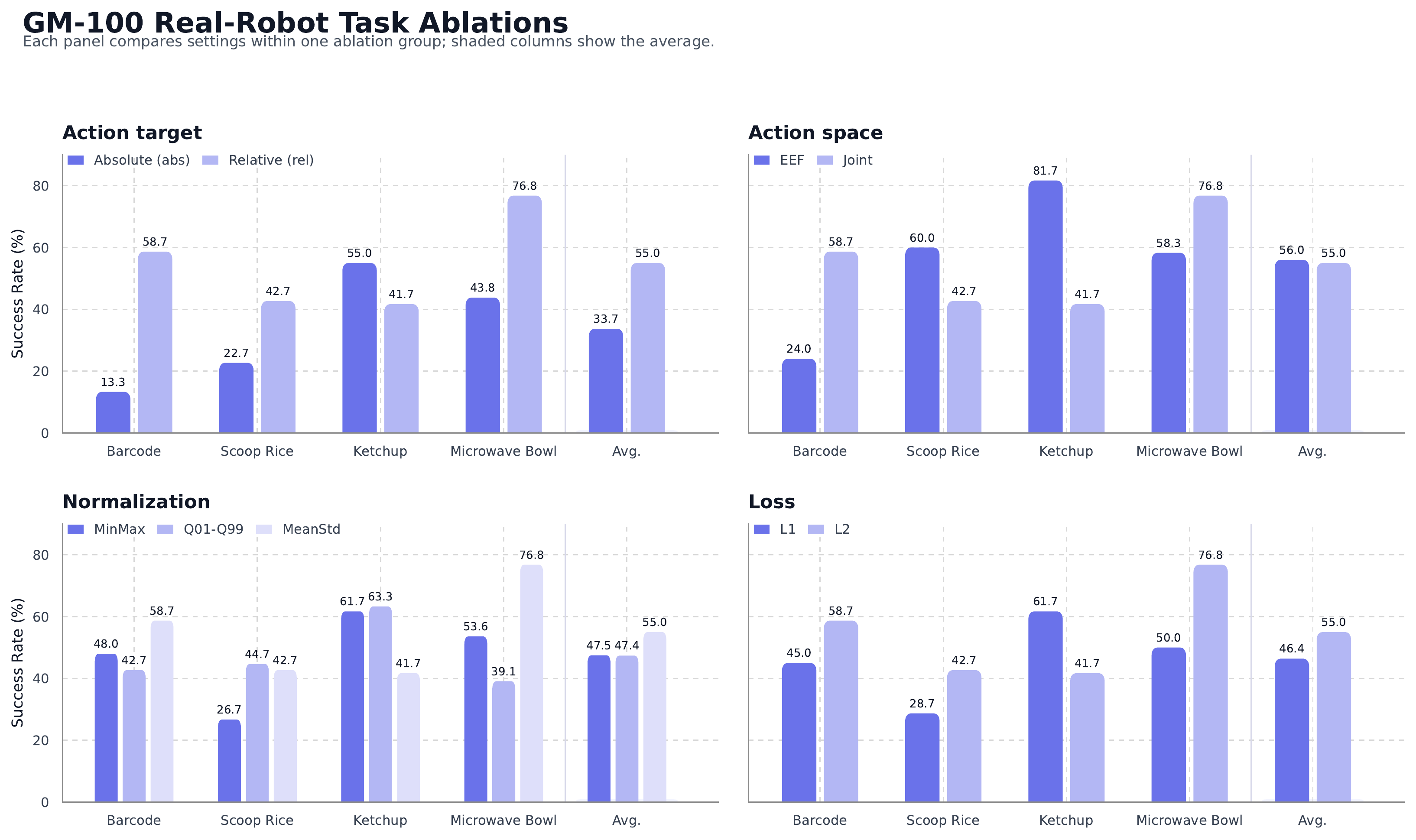
LingBot-VLA 2.0 is evaluated on GM-100 bimanual manipulation and long-horizon mobile manipulation. On the GM-100 generalist setting, the reported averages are:
| Platform | GR00T N1.7 | π0.5 | LingBot-VLA 1.0 | LingBot-VLA 2.0 |
|---|---|---|---|---|
| AgileX Cobot Magic | 36.3 / 17.8 | 59.1 / 32.2 | 58.2 / 30.0 | 66.2 / 34.4 |
| Galaxea R1Pro | 16.4 / 5.6 | 27.4 / 8.9 | 32.7 / 15.6 | 34.6 / 15.6 |
The two numbers are progress score / success rate. Progress score matters because a long task can fail at the final placement step after completing many useful substeps. Success rate is stricter: the robot must complete the whole task.
For long-horizon mobile manipulation, the paper evaluates Astribot S1 on refrigerator sorting and Cobot Magic-ARX X5 on stove cleaning. LingBot-VLA 2.0 reports 77.1 / 60.0 on refrigerator sorting in-domain, 37.0 / 13.3 out-of-domain, 84.3 / 66.7 on stove cleaning in-domain, and 67.5 / 40.0 out-of-domain. The refrigerator OOD setting is harder because it changes both the initial pose and the object categories. Stove cleaning mainly tests robustness to initial pose perturbation while keeping the scene structure more stable.
The important conclusion is not that whole-body manipulation is solved. The refrigerator OOD success rate still leaves a large gap. The useful signal is that larger mixed data, a broader action space, MoE action experts, and future-aware perception all improve generalist long-horizon behavior over the baselines in a more deployment-like setting.
Beginner debug checklist
Use this order for your first run:
- Clone the repo and create the environment, then verify
python -c "import torch; print(torch.__version__)". - Download the 6B checkpoint and Qwen3-VL tokenizer/backbone path.
- Generate a small LeRobot dataset from RoboTwin and inspect its metadata.
- Compute normalization statistics and confirm the JSON contains
arm.positionandeffector.position. - Train one task for a few steps to catch shape and camera errors.
- Run open-loop evaluation with
--robo_name robotwin. - Run RoboTwin rollout with
--num_per_gpu 1. - Scale to more tasks or real-robot deployment only after the small path is stable.
The key sources to read are the Robbyant/lingbot-vla-v2 repository, arXiv 2607.06403, the RoboTwin 2.0 repository, and the custom LeRobot dataset guide inside the LingBot-VLA 2.0 repo. If you understand bimanual manipulation but not whole-body VLA yet, our Bimanual manipulation guide is a useful bridge because it explains why progress score, task decomposition, and camera viewpoint matter.