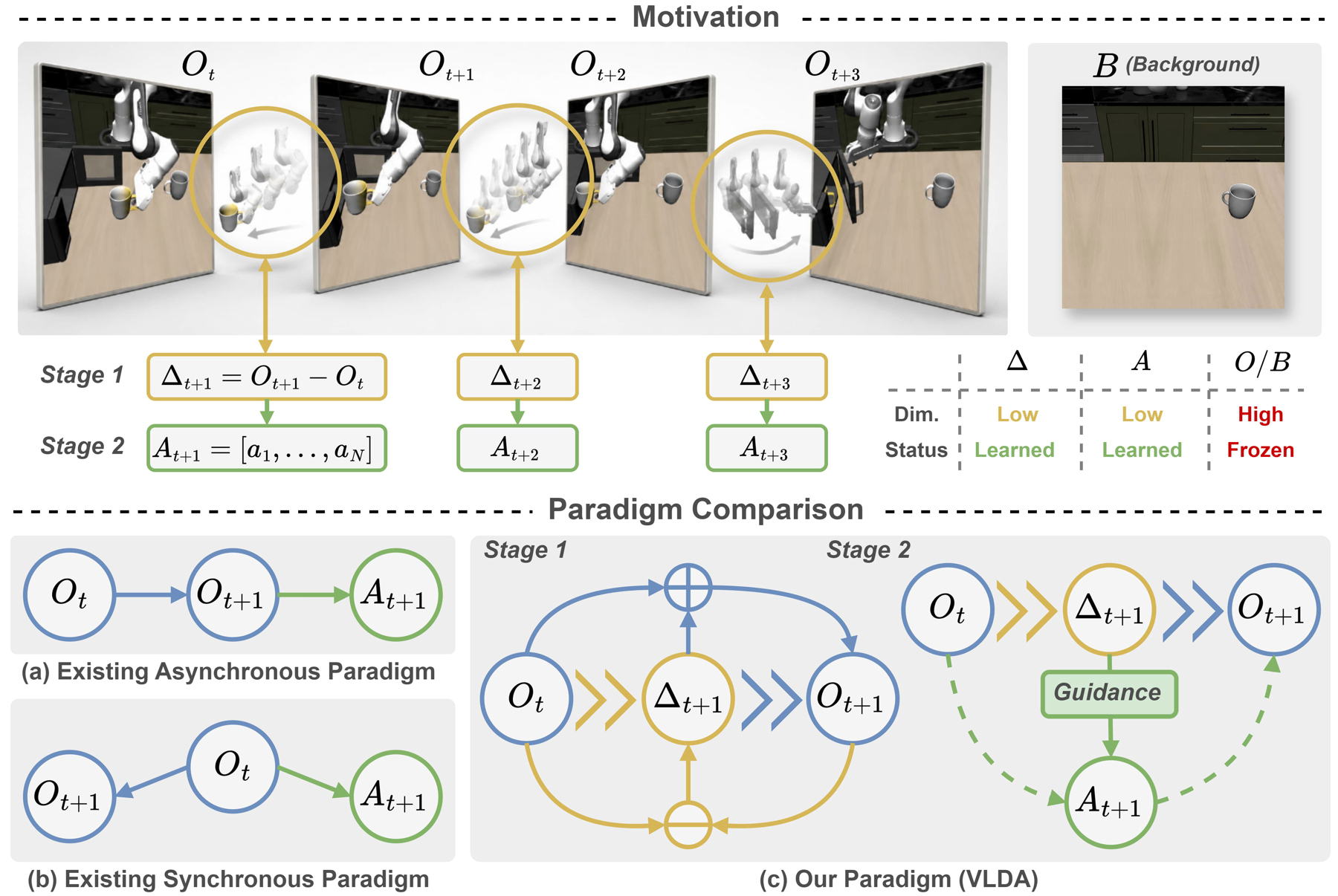
A robot asked to put a bottle into a bin does not need to predict every future pixel of the room. It needs to identify the changes that matter: approach the bottle, establish contact, lift it and move it into the bin. LoongForge-VLDA makes this question of “what should change?” explicit through a learned intermediate representation called Delta, then uses that representation to guide action generation.
The original work is Vision-Language-Delta-Action: Learning Compact Deltas as Actionable Transition Interfaces for Robotic Manipulation, by Lingsen Zhang and colleagues, arXiv 2026. This guide checks the official project page, open-source cookbook and released LIBERO checkpoint as of October 21, 2026.
For beginners, the practical sequence is to understand the architecture, evaluate a checkpoint on one task, expand to the complete benchmark and only then attempt training. The commands below follow the public documentation and configuration. They are not a claim that vnrobo has executed the GPU training or independently reproduced the reported scores.
1. What problem does Delta solve?
A conventional vision-language-action model receives images, an instruction and robot state, then predicts an action chunk: a short sequence of control commands. The released VLDA LIBERO checkpoint predicts chunks of 10 steps with 7 action dimensions per step. Its state input has 8 dimensions. State and action describe different quantities and do not need identical dimensions.
Direct observation-to-action training asks the policy to discover the connection between semantic understanding and motor execution implicitly. World-action models provide another approach by predicting future observations or features. However, representing an entire future state can devote substantial capacity to appearance and background details that do not help accomplish the task.
VLDA decomposes control into understanding → transition → execution. A vision-language backbone interprets the current scene and instruction. A World Expert predicts a compact Delta. An Action Expert uses the predicted transition to generate executable actions. Delta is learned in latent space; it is neither a manually written plan nor simply a Cartesian displacement vector.
For background on how visual inputs and instructions become robot actions, read the OpenVLA architecture overview. VLDA adds an explicitly supervised transition interface and makes that interface participate in action generation.
2. Architecture and training signals
According to the paper appendix, VLDA extends π0.5 with a PaliGemma-initialized vision-language backbone of approximately 2B parameters and a Gemma Action Expert of approximately 300M. A separate World Expert uses the same transformer architecture and capacity as the Action Expert, but is initialized independently from scratch. This is more substantial than attaching a small linear prediction head.
During training, V-JEPA 2 ViT-g/16 supplies visual representations for current and future observations. The online encoder receives gradient updates; the teacher encoder changes through an exponential moving average, or EMA. A slowly evolving teacher provides a more stable future-feature target while the online representation learns.
Transition supervision uses the primary camera at 256 × 256. The policy backbone still processes the configured camera views at 224 × 224, including external and wrist views for the LIBERO release. Keeping these resolutions separate matters when reproducing preprocessing.
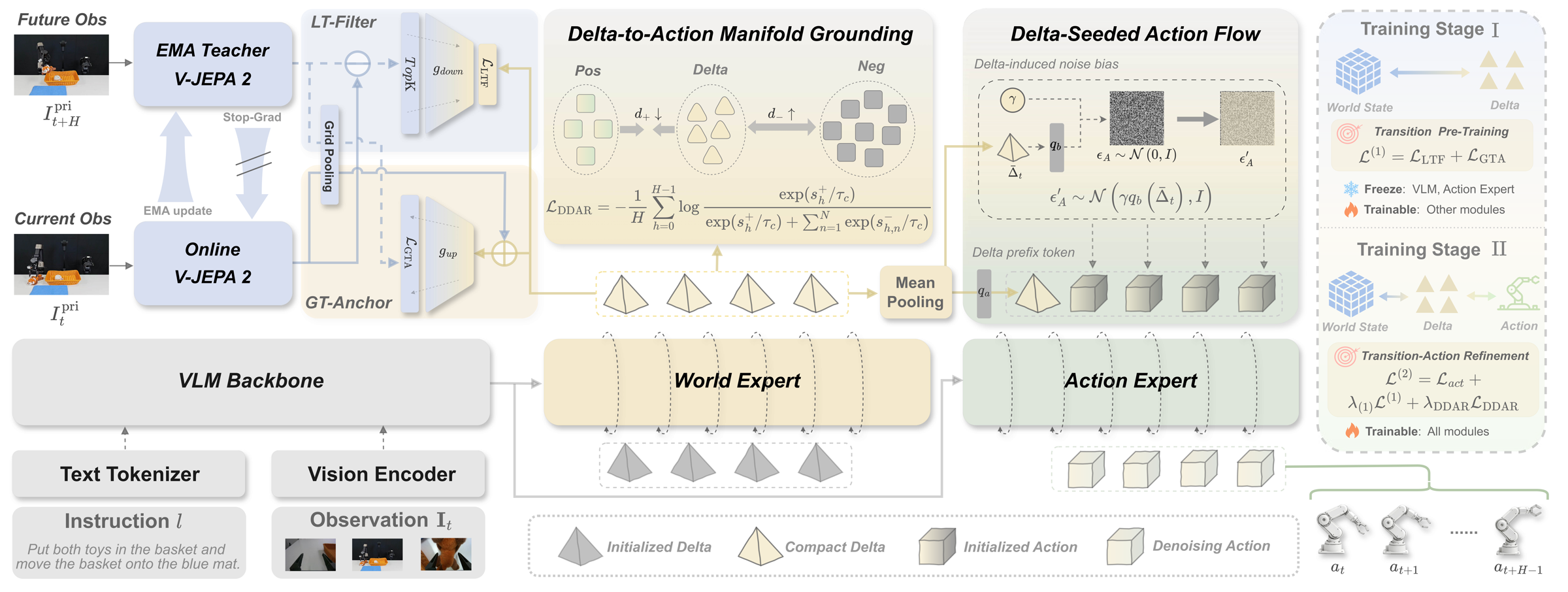
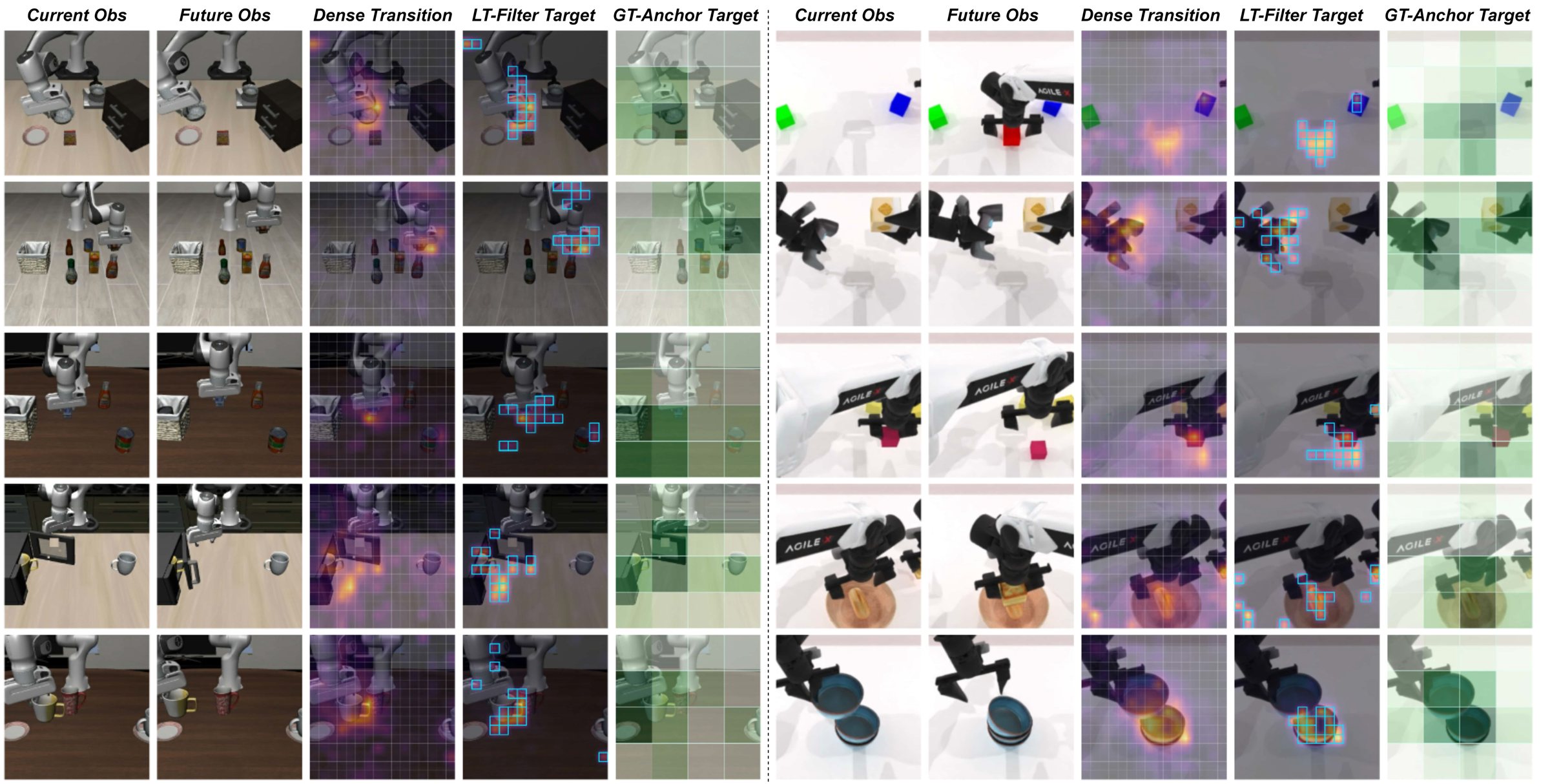
Read the diagram as two pathways. The training pathway constructs targets using future observations. The deployment pathway predicts Delta and actions from current observations and the instruction. Evaluation does not feed future episode frames into the policy.
Local Transition Filter
LT-Filter subtracts current online features from future teacher features, then selects spatial tokens with the largest transition magnitudes. The main paper uses top-64 tokens, projected into a 256-dimensional Delta space. This emphasizes regions where the state changes while avoiding reconstruction of every static background feature.
The selected tokens form a set without a fixed semantic ordering. Ordinary point-by-point regression would unnecessarily require token one to match target token one. VLDA uses entropy-regularized Sinkhorn optimal transport to obtain a soft correspondence between predicted and target token sets. Intuitively, it learns how the changing regions should match rather than treating their list positions as meaningful identities.
Global Transition Anchor
Local changes alone can lose the overall direction of a task. GT-Anchor pools current and future visual features into a coarse representation of their difference. Predicted Delta tokens are projected back into visual feature space and matched against that global anchor. The objective preserves broad transition consistency without asking the model to reconstruct a complete future image.
Delta-Driven Action Refinement
DDAR has two complementary components. Delta-to-Action Manifold Grounding, or DAMG, aligns Delta with demonstrated actions through an InfoNCE objective. Actions inside the current chunk are positives; negatives come from non-overlapping temporal regions of the same trajectory. This encourages the transition representation to describe changes connected to executable actions.
Delta-Seeded Action Flow, or DSAF, injects Delta into the Action Expert in two ways: a learned bias shifts the initial action noise, and a prefix token supplies Delta context during denoising. The action flow therefore receives transition information both at initialization and while refining the action sequence.
3. The paper and released recipe are different configurations
Do not combine numbers from different configurations without identifying them. The paper appendix, cookbook launchers and released checkpoint contain several differences:
| Setting | Paper | Public cookbook or checkpoint |
|---|---|---|
| Delta tokens | 64 | 16 in released checkpoint and evaluation YAML |
| Stage 1 global batch | 48 | 96 in current launcher |
| Stage 2 alignment weight | 0.1 | 0.01 |
| EMA momentum | 0.99925 | 0.9985005625 |
| Average LIBERO result | 98.5% in paper | 98.00% across 10 checkpoint evaluations |
When loading the public checkpoint, keep the evaluation model settings compatible with its vlda_config.json. Changing delta_token_num to 64 because the paper uses 64 is not a valid way to reproduce the paper with 16-token weights. Reproducing the paper configuration is a separate training experiment requiring control of the complete recipe.
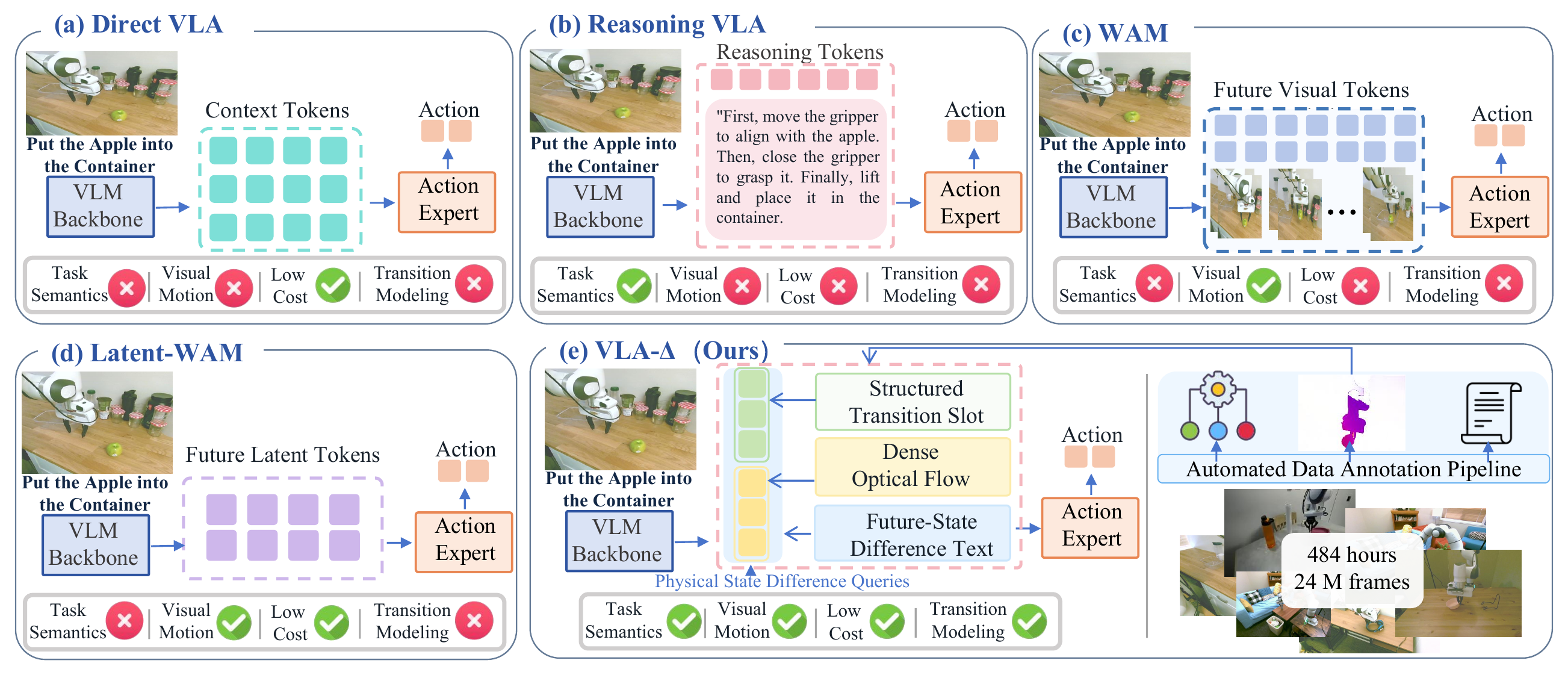
Also distinguish LoongForge-VLDA from VLA-Δ and its physical state-transition objectives. The names are similar, but these are separate projects with different code, checkpoints and results.
4. Install the training and model-server environment
LoongForge recommends Linux with an NVIDIA Ampere/Hopper GPU or newer. The published training setup uses eight GPUs; the cookbook says recent batch-128 runs used eight GPUs with 80 GB each. Single-GPU inference should not be interpreted as proof that the training recipe fits any single GPU. The cited documentation does not establish a universal minimum inference VRAM requirement.
Install uv through its official instructions if it is not already available. Use a dedicated Python 3.12 environment for this recipe:
git clone --recurse-submodules https://github.com/baidu-baige/LoongForge.git
cd LoongForge
uv venv --python 3.12 .venv
source .venv/bin/activate
uv pip install -e ".[gpu]"
The LoongForge installation guide also documents python setup_env.py --te-tag v2.9 for building the GPU source-install TransformerEngine dependency. Complete the relevant base setup for your environment before treating the supplemental packages below as a ready-to-run installation.
The cookbook pins the VLDA dependencies as follows:
uv pip install --python .venv/bin/python \
  torch==2.8.0 torchvision==0.23.0 torchcodec==0.7.0 \
  --index-url https://download.pytorch.org/whl/cu128
uv pip install --python .venv/bin/python \
  lerobot==0.5.0 transformers==5.3.0 torchdata==0.11.0 \
  sentencepiece timm==1.0.3 pandas pyarrow tensorboard \
  websockets==15.0.1 msgpack
.venv/bin/python -c 'import torch; print(torch.__version__, torch.version.cuda, torch.cuda.is_available())'
The expected check is 2.8.0+cu128 12.8 True. Installing CUDA wheels does not replace the host NVIDIA driver. If availability is false, resolve driver compatibility, container GPU visibility and Python-environment selection before downloading large model assets. Initial training steps also include compilation and autotuning, so they are not representative of steady-state throughput.
5. Download the released checkpoint and isolate LIBERO
Start with the released Stage 2 checkpoint rather than training from scratch:
.venv/bin/hf download LoongForge/LoongForge-VLDA-LIBERO \
  --local-dir models/LoongForge-VLDA-LIBERO
mkdir -p models
curl -fL https://storage.googleapis.com/big_vision/paligemma_tokenizer.model \
  -o models/paligemma_tokenizer.model
Keep model.safetensors, vlda_config.json and assets/norm_stats.json together. The tokenizer is supplied separately. The model card explicitly says the release does not include optimizer state for resuming the original training run. Loading weights and restoring an interrupted run are different operations.
The simulator uses a separate Python 3.10 environment. From the LoongForge repository root, run:
uv venv --python 3.10 .venv-libero
git clone https://github.com/Lifelong-Robot-Learning/LIBERO.git third_party/LIBERO
uv pip install --python .venv-libero/bin/python \
  torch==2.1.2 numpy==1.24.4 robosuite==1.4.0 mujoco==3.2.3 \
  gym==0.25.2 opencv-python==4.6.0.66 \
  imageio==2.35.1 imageio-ffmpeg==0.5.1 \
  websockets==13.1 msgpack==1.1.1 PyYAML==6.0.3 \
  bddl==1.0.1 easydict==1.9 cloudpickle==2.1.0 \
  matplotlib==3.5.3 future==0.18.2 termcolor==2.5.0
uv pip install --python .venv-libero/bin/python \
  --no-deps -e third_party/LIBERO
The LIBERO checkout provides task definitions, assets and initial states. Default evaluation uses EGL offscreen rendering. The host or container must expose NVIDIA EGL graphics libraries, not just CUDA compute libraries. On an OSMesa machine, change both env.mujoco_gl and env.pyopengl_platform to osmesa and install the corresponding system library, such as Ubuntu's libosmesa6, following the cookbook.
6. Configure inference and run one episode
Edit the existing cookbook/loongforge-vlda/eval/configs/libero/libero.yaml. Replace the placeholder paths for server.python, server.ckpt_path, server.dataset_statistics_path, server.tokenizer_path, server.loongforge_root and the repository paths under env with absolute local paths. Point ckpt_path to the downloaded checkpoint directory and the statistics path to that checkpoint's assets/norm_stats.json.
Set env.libero_config_path to the local LIBERO configuration directory and run.output_dir to your desired results directory. For a smoke test, set benchmark.max_tasks: 1, benchmark.episodes_per_task: 1 and retain only libero_object in sweep. Edit the complete supplied YAML; a new fragment containing only these fields is not a replacement for all its other settings.
CUDA_VISIBLE_DEVICES=0 \
BENCHMARK_PYTHON="$PWD/.venv-libero/bin/python" \
bash cookbook/loongforge-vlda/eval/run_libero_eval.sh
The launcher manages the policy server and LIBERO client automatically. The server uses the training environment, while the client uses .venv-libero. During inference, the World Expert generates Delta using three explicit Euler steps; the Action Expert uses ten steps to produce an action chunk. Integration steps, control steps per chunk and robot FPS are different quantities.
After the smoke test, restore max_tasks: 0, episodes_per_task: 50 and all four suites: libero_spatial, libero_object, libero_goal and libero_10. Each suite contains 10 tasks × 50 episodes, or 500 episodes. One complete four-suite evaluation therefore contains 2,000 episodes. Inspect results.jsonl, summary.csv, suite_summary.csv, policy_server.log and the rollout artifacts under the configured output directory.
The paper describes discarding both V-JEPA encoders and modules used exclusively for transition targets or alignment at deployment. However, the public checkpoint still contains related weights. Use the supplied evaluation factory and launcher instead of manually deleting checkpoint tensors. Default evaluation disables compilation and gradient checkpointing and uses eager attention. The cookbook fixes the client seed to 7 by default but notes that the server seed is not fixed; record this limitation when reporting repeated runs.
7. Prepare the training dataset and normalization
The VLDA reader requires LeRobot v2 with embedded images. A LeRobot v3 dataset or a video-backed variant is not an interchangeable input just because its name contains LIBERO. The cookbook specifies this revision:
.venv/bin/hf download physical-intelligence/libero \
  --repo-type dataset \
  --revision a4336d589d589045d1c56423ffdf3b88a0e19b1f \
  --local-dir datasets/libero
Check for meta/info.json, meta/episodes.jsonl, meta/tasks.jsonl and data/chunk-*/episode_*.parquet. Required columns include image, wrist_image, state and actions. Quantile normalization needs q01 and q99 for state and actions; mean/std/min/max metadata alone is insufficient.
For a fresh training dataset, the following follows the cookbook's statistics calculation. It loads the complete state/action columns into RAM, which needs reconsideration for datasets larger than this recipe:
DATA_PATH="$PWD/datasets/libero" .venv/bin/python - <<'PY'
import json
import os
from pathlib import Path
import numpy as np
import pyarrow as pa
import pyarrow.parquet as pq

root = Path(os.environ["DATA_PATH"])
files = sorted((root / "data").glob("chunk-*/episode_*.parquet"))
if not files:
    raise RuntimeError("No episode parquet files found")
table = pa.concat_tables([
    pq.read_table(p, columns=["state", "actions"]) for p in files
])
stats = {}
for key in ("state", "actions"):
    values = np.asarray(table[key].to_pylist(), dtype=np.float64)
    q01, q99 = np.quantile(values, [0.01, 0.99], axis=0)
    stats[key] = {
        "mean": values.mean(axis=0).tolist(),
        "std": values.std(axis=0).tolist(),
        "q01": q01.tolist(), "q99": q99.tolist(),
    }
(root / "norm_stats.json").write_text(
    json.dumps({"norm_stats": stats}, indent=2) + "\n"
)
PY
For an existing checkpoint, reuse its original statistics instead of replacing them with newly computed values. Different quantiles can map the same normalized model output to different physical commands. A policy can return correctly shaped tensors while failing every rollout because its normalization is inconsistent.
8. Train Stage 1 and Stage 2
Stage 1 needs the π0.5 base checkpoint in OpenPI PyTorch format, the tokenizer and the original V-JEPA 2 vitg.pt containing both encoder and target_encoder. If your base weights are in JAX format, follow OpenPI's PyTorch conversion instructions in a separate conversion environment. The cookbook selects the architecture with --config_name pi05_libero, but its input is still the pi05_base checkpoint rather than an arbitrary fine-tuned policy.
Place the converted base weights at models/pi05_base_pytorch/model.safetensors and download the visual initializer:
mkdir -p models/vjepa2
curl -fL https://dl.fbaipublicfiles.com/vjepa2/vitg.pt \
  -o models/vjepa2/vitg.pt
Stage 1 freezes PaliGemma and the Action Expert while optimizing delta_loss + future_loss for 10,000 optimizer updates. The current launcher can be invoked as follows:
CUDA_VISIBLE_DEVICES=0,1,2,3,4,5,6,7 \
DATA_PATH="$PWD/datasets/libero" \
NORM_STATS_PATH="$PWD/datasets/libero/norm_stats.json" \
TOKENIZER_PATH="$PWD/models/paligemma_tokenizer.model" \
CHECKPOINT_PATH="$PWD/models/pi05_base_pytorch" \
VJEPA_CHECKPOINT="$PWD/models/vjepa2/vitg.pt" \
OUTPUT_DIR="$PWD/outputs/vlda/libero_stage1" RESUME=0 \
bash cookbook/loongforge-vlda/run_vlda_8gpu_stage1.sh
Stage 2 starts from Stage 1 with a new optimizer and schedule. The public recipe optimizes action_loss + delta_loss + future_loss + 0.01 * align_loss, jointly learning actions while retaining transition supervision:
INIT_CHECKPOINT="$PWD/outputs/vlda/libero_stage1/checkpoints/steps_10000"
CUDA_VISIBLE_DEVICES=0,1,2,3,4,5,6,7 \
DATA_PATH="$PWD/datasets/libero" \
NORM_STATS_PATH="$INIT_CHECKPOINT/assets/norm_stats.json" \
TOKENIZER_PATH="$PWD/models/paligemma_tokenizer.model" \
CHECKPOINT_PATH="$INIT_CHECKPOINT" \
OUTPUT_DIR="$PWD/outputs/vlda/libero_stage2" RESUME=0 \
bash cookbook/loongforge-vlda/run_vlda_8gpu_stage2.sh
Cookbook Stage 1 uses global batch 96, a peak learning rate of 7e-5 and 500 warmup updates. Stage 2 uses batch 128 and 60,000 updates. Its learning rate warms up to 5e-5 during the first 10,000 updates, holds until update 40,000 and then cosine-decays to 1e-5. With accumulation equal to one, batch 128 across eight GPUs means 16 samples per GPU. Gradient checkpointing reduces activation memory through recomputation; it does not change this batch calculation.
Monitor individual losses in metrics.jsonl and TensorBoard rather than only total loss. When changing GPU count, configure both GPUS_PER_NODE and CUDA_VISIBLE_DEVICES; the global batch must divide evenly by GPU count times accumulation steps. An interrupted run can use RESUME=1 with the same output directory and settings. A changed learning-rate schedule should start a new run with RESUME=0; that is weight initialization, not an exact resume.
9. Results: separate the paper from checkpoint evaluation
These numbers come from the paper and project page, not from a vnrobo reproduction:
| Method | Spatial | Object | Goal | Long | Average |
|---|---|---|---|---|---|
| π0.5 | 98.8 | 98.2 | 98.0 | 92.4 | 96.9 |
| OpenVLA-OFT | 97.6 | 98.4 | 97.9 | 94.5 | 97.1 |
| VLA-Adapter | 97.8 | 99.2 | 97.2 | 95.0 | 97.3 |
| VLDA | 99.8 | 99.6 | 99.4 | 95.2 | 98.5 |
All entries are percentage success rates. VLDA improves the average over π0.5 by 1.6 percentage points. On zero-shot LIBERO-Plus, it scores 84.5% against 73.6%, a 10.9-point improvement across 10,030 rollouts. This is not a win in every perturbation dimension: GuidedVLA scores 73.7% for camera perturbations, compared with VLDA's 72.4%.
On RoboTwin 2.0, 62.9% refers to 10 selected hard tasks, compared with π0.5 at 42.7%. Across all 50 tasks, the reported averages are 50.86% and 43.84%. Reporting the selected-task result as the full-benchmark average would misrepresent the experiment.
On GALAXEA R1 Lite, final-stage success averages 73.0% across four tasks, compared with π0.5 at 56.0%, with 25 trials per task. AgileX Cobot Magic averages 72.0% against 54.0%. These results apply to the studied tasks and platforms, rather than guaranteeing the same success on a new robot.
The released checkpoint has its own cookbook evaluation: across ten runs, mean scores are Spatial 98.94%, Object 98.66%, Goal 98.68% and Long 95.72%, giving an overall mean of 98.00%. Its ±0.60 average fluctuation is defined as half the maximum-minus-minimum range, not a standard deviation or confidence interval. Each run uses 500 episodes per suite. A single successful smoke-test episode verifies execution, not benchmark accuracy.
10. Troubleshooting and research limits
A checkpoint shape error should first trigger a comparison of Delta-token count, state/action dimensions and horizon against its configuration. An OpenGL failure points toward EGL/OSMesa or graphics-library visibility. If the server returns actions but the robot behaves incorrectly, check normalization, encoding and preprocessing before concluding the policy is ineffective. If training cannot read episodes, confirm the LeRobot v2 embedded-image format and parquet columns.
The paper also identifies limitations. Large unrelated background motion can contaminate a top-magnitude transition filter. A fixed horizon cannot fully accommodate tasks with variable-speed transitions. Cross-embodiment transfer remains a research direction rather than a demonstrated universal capability. For another perspective on prediction-assisted control, compare SmolWAM's latent-future approach on LIBERO.
VLDA is useful when you want to investigate the interface between scene understanding and action generation, have suitable training resources and care about robustness beyond clean-scene success. Begin with one checkpoint, one task and an inspectable rollout. Expand to repeated benchmark evaluations before investing in architectural changes or large training runs.