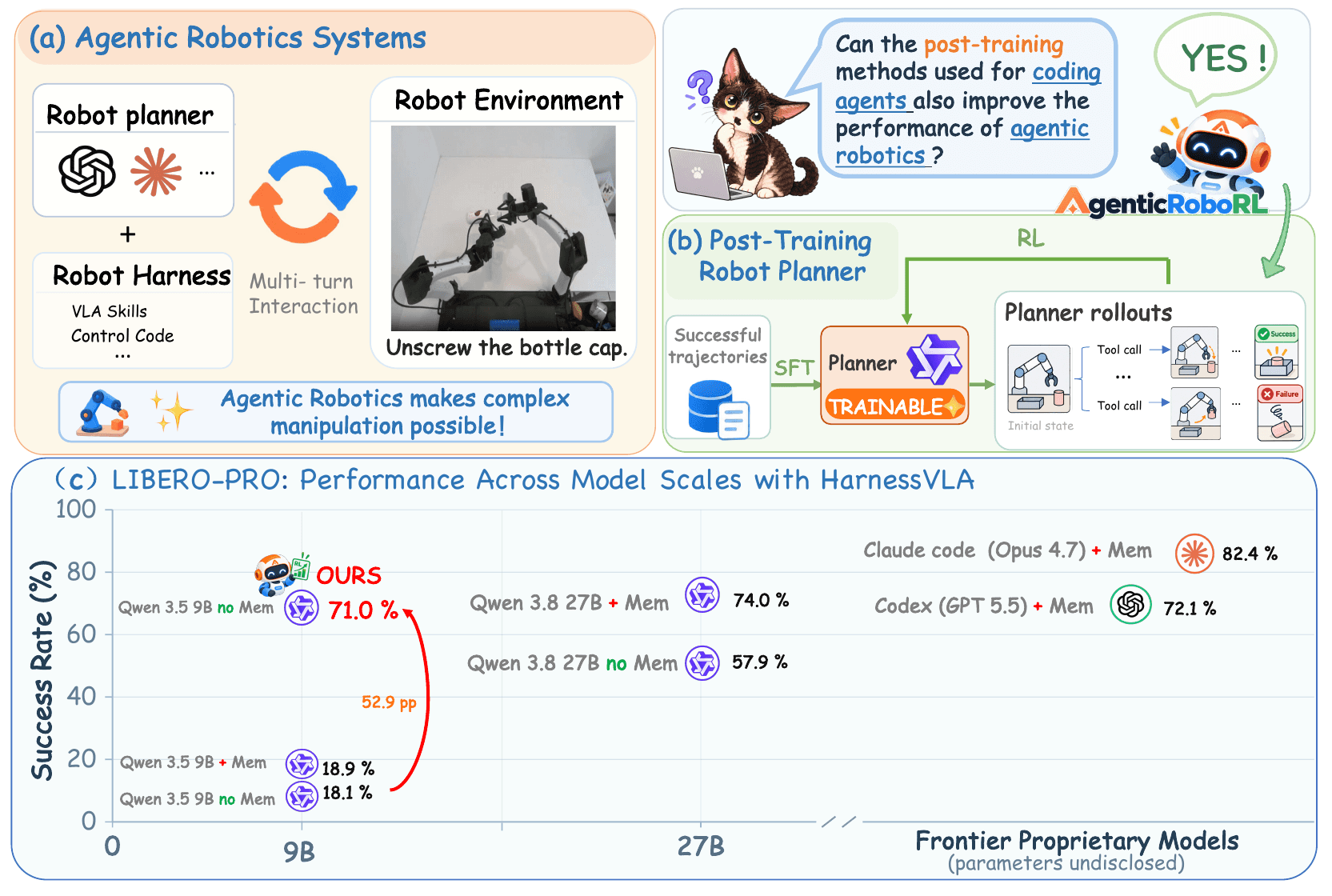
A robot can have a capable grasping policy and still pick the wrong object, miss a changed instruction, or repeat an unsuccessful strategy. Improving manipulation therefore involves more than improving the network that moves the arm. AgenticRoboRL studies how to train the planner that chooses and sequences robot tools, while keeping its execution components fixed.
The AgenticRoboRL paper reports that a Qwen3.5-9B planner improves from 18.1% success on LIBERO-PRO to 65.1% after supervised fine-tuning, then to 71.0% after reinforcement learning. These are the authors' simulation results. This tutorial explains the released implementation; it does not claim a new training run or a physical-robot reproduction.
We will first separate the planner from the VLA executor, run a small CPU demonstration, prepare RPent, download the open checkpoints, and use the evaluation controller for inference. Finally, we will examine how to continue RL from the released SFT model and how to interpret the benchmark fairly.
1. What does the planner actually learn?
A robot harness is the software surrounding the model. It assembles observations and tool descriptions, executes the model's requests, and returns feedback. Think of a workbench with several reliable instruments: useful work still requires choosing the appropriate instrument and checking whether the last operation succeeded.
In the RPent integration, a planner can use perception tools, invoke a frozen VLA as a skill, and call motion primitives. Conceptually, it might identify an object, request a grasp, move toward a destination, release, and inspect the resulting scene. This is an explanation of the interaction pattern, not a new executable API.
The distinction between the two policies matters. The planner policy generates tokens and structured tool calls. The VLA policy executes robot skills. AgenticRoboRL optimizes the former. If you replace the VLA or perception stack during a comparison, any measured change can no longer be attributed only to planner post-training.
2. Architecture: record the decisions that were really made
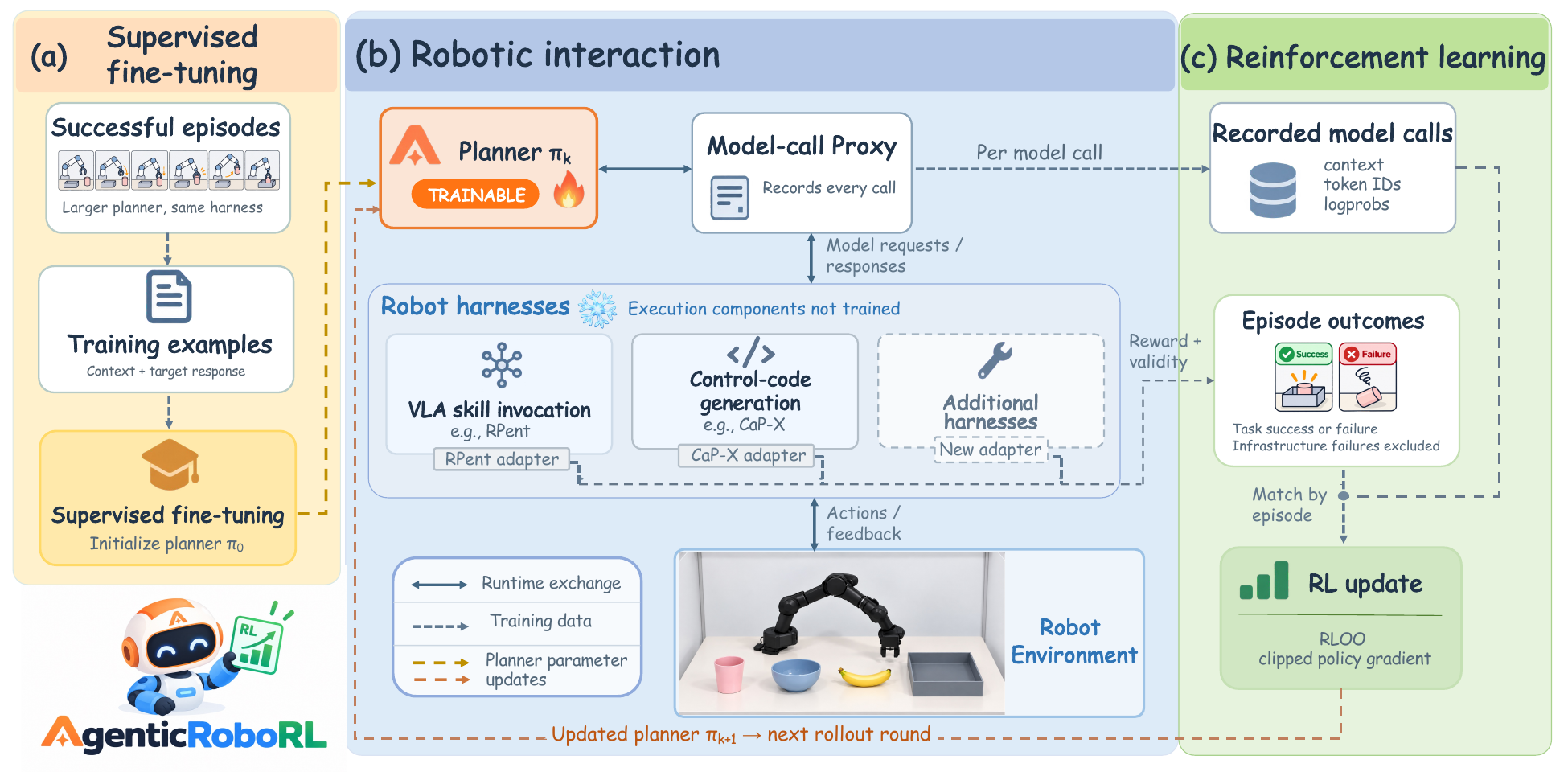
The released repository connects a harness, a recording proxy, a vLLM model server, an outcome adapter, and a trainer. During collection, the proxy records model inputs, generated token IDs, and log-probabilities. The adapter connects those calls to episode outcomes so that the trainer can update the planner for the next collection round.
Why record individual requests rather than reconstruct everything from a final conversation? A harness may remove old images, omit earlier reasoning, or prune history before the next decision. A final transcript is therefore not necessarily the input the model saw. Training against a reconstructed but different prompt would resemble grading an answer using a question that was edited afterward.
The adapter identifies each episode's task, initial state, attempt, reward, and validity. A robot that grasps the wrong object has produced a meaningful task failure. A model server that crashes has produced an infrastructure failure. Keeping those cases distinct prevents unrelated service problems from becoming misleading evidence about robot competence.
The project also connects CaP-X, whose planner writes executable Python against robot APIs. RPent and CaP-X do not need a shared low-level action format. Their common training interface is the model request and response, which is a useful design principle if you later build an adapter for another harness.
3. Choose a realistic starting point
There are three different exercises here:
| Exercise | What it teaches | Required resources |
|---|---|---|
| Minimal harness | Controller phases and data flow | CPU and Python; fake model and trainer |
| RPent inference | Checkpoint-driven manipulation in simulation | GPU services, simulator and checkpoints |
| Full planner RL | Rollout collection and weight updates | Rollout capacity and multi-GPU training |
The CPU example does not train a manipulation model. It is still valuable because you can inspect the controller without debugging CUDA, rendering, segmentation, and model serving at the same time. Establishing that small baseline makes later failures easier to localize.
The repository lists Python 3.11, vLLM 0.28.0 for serving, and a training stack with torch 2.13.0, transformers 5.17.0, and flash-linear-attention 0.5.2. RPent uses a separate environment with transformers 4.57.6 and pydantic-ai-slim 2.49.0. Treat these as separate dependency sets; combining them in one environment can create incompatible requirements. Consult the upstream prerequisites when selecting CUDA-compatible packages.
The RPent training command in the released YAML uses torchrun --nproc_per_node 8. A single-machine controller does not imply a single-GPU optimizer. Serving also involves the planner, its context cache, the VLA, and SAM 3. The README does not establish a universal minimum VRAM requirement for this complete stack, so do not choose hardware based only on the planner's parameter count.
4. Install the source and run the CPU demonstration
The following archive-based workflow avoids requiring Git commands. Run it in a separate experiment directory rather than inside your website repository:
mkdir -p ~/robot-lab
cd ~/robot-lab
curl -L https://github.com/xinxinliu-ai/AgenticRoboRL/archive/refs/heads/main.tar.gz \
  -o agenticroborl.tar.gz
tar -xzf agenticroborl.tar.gz
cd AgenticRoboRL-main
python3.11 -m venv .venv-minimal
source .venv-minimal/bin/activate
pip install pyyaml fastapi uvicorn httpx requests pytest
python rl/local_ctl.py train \
  --config harnesses/minimal/harness.yaml \
  --run-dir /tmp/agenticroborl-minimal \
  --weights w0 --rounds 2 --groups 6
python -m pytest -q tests
Afterward, inspect the run directory and state.json. Your immediate goal is to understand which phase completed and how the controller tracks progress. A successful minimal run validates this small orchestration exercise; it says nothing yet about the robot's grasp quality.
Because main can change, save the archive's checksum and download date with your experiment records. Also record the exact configuration used for a real run. Otherwise, a future implementation change might be mistaken for the effect of a new checkpoint or learning-rate setting.
5. Prepare the pinned RPent integration
AgenticRoboRL requires RPent revision f70d720 with its provided patch. The patch adds planner switches, the knowledge profile, and outcome fields read by the adapter. Its scope is documented in the RPent patch notes.
Starting inside the extracted AgenticRoboRL directory, download that RPent revision and apply the patch with the standard patch utility:
export AGENTICROBORL_DIR="$PWD"
cd ..
curl -L https://github.com/RLinf/RPent/archive/f70d720.tar.gz -o rpent.tar.gz
mkdir -p RPent-f70d720
tar -xzf rpent.tar.gz --strip-components=1 -C RPent-f70d720
cd RPent-f70d720
patch --dry-run -p1 < "$AGENTICROBORL_DIR/patches/rpent/rpent_f70d720.patch"
patch -p1 < "$AGENTICROBORL_DIR/patches/rpent/rpent_f70d720.patch"
python3.11 -m venv .venv
source .venv/bin/activate
pip install -e ".[full]"
liberopro-download-assets --skip-existing
export RPENT_DIR="$PWD"
export RPENT_ENV="$PWD/.venv"
The full extra follows the RPent installation instructions at the required revision. It installs the broader execution stack, whose native dependencies still depend on your driver and CUDA environment. Completing venv creation does not prove that simulation or GPU inference works; verify service startup before launching a large evaluation.
Download the frozen execution model and the segmentation checkpoint:
pip install -U huggingface_hub modelscope
hf download RLinf/RLinf-Pi05-LIBERO-130-fullshot-SFT \
  --exclude optimizer.pt \
  --local-dir "$RPENT_DIR/checkpoints/pi05"
modelscope download facebook/sam3 \
  --local-dir "$RPENT_DIR/checkpoints/sam3"
export PI05_CHECKPOINT="$RPENT_DIR/checkpoints/pi05"
export SAM3_CHECKPOINT="$RPENT_DIR/checkpoints/sam3/sam3.pt"
These two variable names belong to the AgenticRoboRL controller configuration. It passes the corresponding checkpoint paths to the underlying services. Confirm that sam3.pt exists and satisfy any provider access conditions before proceeding. A locally served planner does not require credentials for a commercial planner API.
6. Download the open planner checkpoints
The official Hugging Face model repository includes sft/ and rl-v006/. The controller's --weights argument must point to one of these model directories, including its tokenizer and processor files, rather than to the parent download folder.
hf download ciciciciliu/AgenticRoboRL-Qwen3.5-9B \
  --include "sft/*" "rl-v006/*" \
  --local-dir "$RPENT_DIR/checkpoints/agenticroborl"
export SFT_WEIGHTS="$RPENT_DIR/checkpoints/agenticroborl/sft"
export RL_WEIGHTS="$RPENT_DIR/checkpoints/agenticroborl/rl-v006"
Prepare a separate vLLM environment and a separate training environment using the upstream versions. The next two paths are placeholders: replace them with existing absolute environment paths. Do not assume that exporting a path installs the packages it names.
export PLANNER_ENV=/absolute/path/to/vllm-env
export TRAIN_ENV=/absolute/path/to/training-env
cd "$AGENTICROBORL_DIR"
python rl/local_ctl.py eval \
  --config harnesses/rpent_libero/harness.yaml \
  --run-dir runs/rpent-rl-validation \
  --weights "$RL_WEIGHTS" --tag rl_validation \
  --init-key val_init_ids \
  --var gpu=0 --var model_port=18100 --var proxy_port=18200 \
  --var vla_port=18300 --var sam3_port=18400
This evaluation command is also the practical inference path for the integrated system. It starts the services, runs planner–harness interaction in simulation, and writes an outcome report. Merely asking a language model to describe a manipulation plan would not test the same behavior.
Look for eval/rl_validation/report.json under the run directory. A full validation pass can still take substantial time. Add --shard 0/8 to exercise a task subset, and label that result as a shard rather than a full benchmark score. Concurrent workers need separate ports and run directories to avoid service collisions.
7. Understand what SFT can and cannot reproduce today
In RPent, the teacher is Qwen3.8-27B with external memory, whereas the student does not retrieve that memory. Simply copying all teacher reasoning would create targets dependent on information missing from the student's context. The pipeline therefore rebuilds student requests, removes memory interactions, and rewrites memory-dependent reasoning while preserving tool-call arguments. The paper's SFT method explains this context alignment.
There is an important release boundary: the original teacher trajectories are not released. You can inspect sft/rpent/replay_build.py, teacher_rewrite/, sft/rpent/build_index.py, and sft/rpent/train_fsdp.py, but downloading the repository alone does not recover the authors' dataset.
For a practical experiment, start RL from the released SFT checkpoint. If you collect your own teacher demonstrations, describe them as a new dataset and document the teacher's tools and memory access. A training recipe can be open even when the exact data needed for a full from-scratch reproduction remains unavailable.
8. Continue multi-turn RL from the SFT checkpoint
A group contains attempts sharing a task and initial state. With binary success rewards, the leave-one-out advantage compares one attempt against the average of the others. This small educational example makes the signal concrete without pretending to replace the production trainer:
rewards = [1, 0, 1, 0, 0, 1]
advantages = []
for i, reward in enumerate(rewards):
    others = rewards[:i] + rewards[i + 1:]
    advantages.append(reward - sum(others) / len(others))
print(advantages)  # [0.6, -0.6, 0.6, -0.6, -0.6, 0.6]
If every attempt receives the same reward, the advantages vanish. More episodes do not automatically provide more learning signal. Validation-based pool selection helps focus collection on tasks where different attempts can still produce different outcomes.
First validate the SFT model, then pass its report to training. Do not use a report from a different checkpoint merely because its path is convenient:
python rl/local_ctl.py eval \
  --config harnesses/rpent_libero/harness.yaml \
  --run-dir runs/rpent-sft --weights "$SFT_WEIGHTS" --tag sft_val \
  --init-key val_init_ids \
  --var gpu=0 --var model_port=18100 --var proxy_port=18200 \
  --var vla_port=18300 --var sam3_port=18400
python rl/local_ctl.py train \
  --config harnesses/rpent_libero/harness.yaml \
  --run-dir runs/rpent-training --weights "$SFT_WEIGHTS" \
  --rounds 6 --groups 64 \
  --pool-report runs/rpent-sft/eval/sft_val/report.json \
  --var gpu=0 --var model_port=18100 --var proxy_port=18200 \
  --var vla_port=18300 --var sam3_port=18400
The default collection budget is 64 groups with six attempts each: 384 episodes per round before exclusions. At most 16 selected calls per episode enter training. Read the released RPent YAML before starting: it currently enables length and post-success filters that the README says were introduced in the sixth round of the reported run. Applying today's YAML for all six rounds is a new continuation experiment, not an exact reconstruction of the historical v006 recipe.
The trainer uses dual-clip PPO with learning rate 1e-6, global batch 128, clipping thresholds 0.2/0.28, dual clip 3.0, and a truncated importance-sampling cap of 2.0. The reported configuration adds neither a KL penalty nor an entropy bonus. Selected turns are weighted by the inverse of their episode's selected-turn count, so simply producing more calls does not give a long episode more aggregate weight. These settings are documented in the repository RL section; keep them fixed while first validating the data pipeline.
The run directory tracks resumable state. Restart the same command to resume it; do not silently change its starting checkpoint. To request a controlled stop, create STOP inside that run directory. The controller checks between episodes and phases, so a stop request is not an instantaneous interruption of the current robot episode.
9. Evaluate the result without mixing protocols
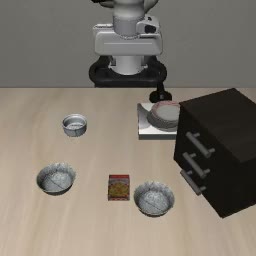
The official results table reports:
| RPent planner | LIBERO-PRO | LIBERO-Plus |
|---|---|---|
| Original Qwen3.5-9B | 18.1% | 19.2% |
| After SFT | 65.1% | 66.7% |
| After SFT and RL | 71.0% | 72.2% |
LIBERO-PRO uses 800 evaluation episodes. LIBERO-Plus uses 10,030 configurations, evaluated with the PRO-trained checkpoints without further training. RL adds 5.9 percentage points on PRO over SFT; SFT provides most of the overall improvement. Describing the entire gain as the effect of RL alone would misrepresent the experiment.
Keep initial states 11–44 for training, 45–49 for validation, and 1–10 for final evaluation. When reporting a final score, use --init-key eval_init_ids, a new tag and run directory, and all required tasks. A validation score used for checkpoint selection is not an independent final evaluation score.
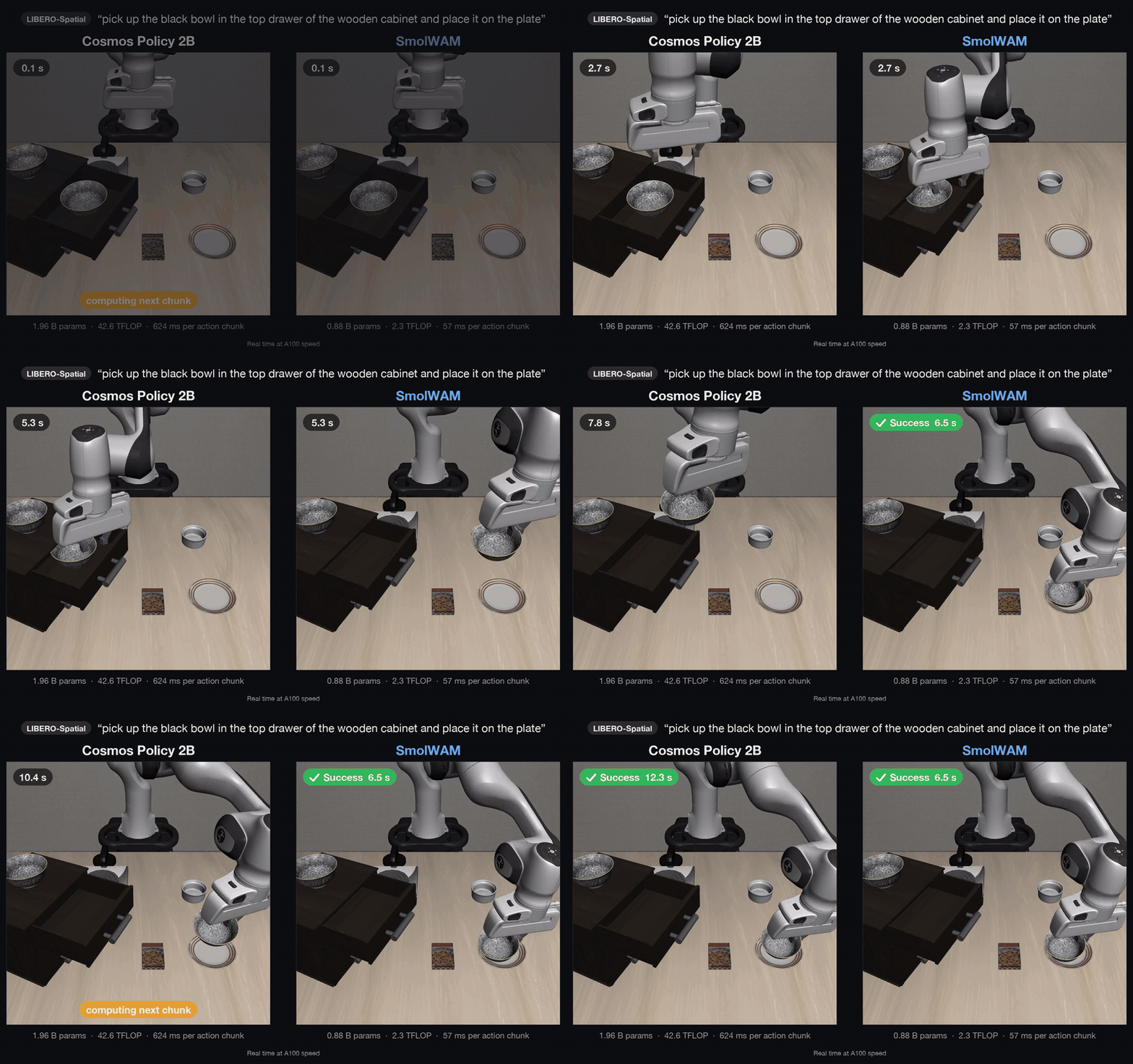
Single demo frames show what a scene looks like, not the reliability of the system. For your own comparison, use the same executor, services, task set and evaluation settings for both checkpoints. Inspect failures as well as successes; otherwise a planner that exchanges one class of errors for another may look better than it is.
10. Troubleshooting and a useful first experiment
If the simulator fails before the first planner turn, check downloaded assets and the EGL rendering setup. If tools are never selected, check the RPent patch and model-server tool parser. If GPU memory is exhausted, identify whether the error came from vLLM, SAM 3 or the VLA rather than immediately changing training batch size.
If collection succeeds but training has little effect, examine group reward diversity, valid sample counts and prompt-token matching. A zero-weight sample cannot improve the model, and an all-failure group has no within-group success contrast. These diagnostics should come before an arbitrary learning-rate sweep.
A sensible first project is to compare the released SFT and RL checkpoints under the same validation setup, review their episode logs, and classify differences in target selection, tool sequencing and recovery. Only after those services behave consistently should you spend resources collecting new RL rounds.
The available evidence concerns the studied simulation tasks and two harness integrations. It does not establish performance on an unfamiliar physical robot or guarantee real-time deployment. The transferable engineering lesson is to measure decision quality separately from execution quality: a fixed skill library can become more useful when the planner learns how to use it.