A robot reaching for a cup must accomplish more than moving its gripper to the correct coordinates. The cup must become securely grasped, leave the table, move toward its destination, and eventually become supported by another surface. A policy trained only to associate observations with demonstrated actions may learn these intermediate changes indirectly and inconsistently.
VLA-Δ makes those changes an explicit learning target. The original work is VLA-Δ: Learning Physical State Transition for Vision-Language-Action Models, Qi Lu and colleagues, arXiv, 2026. This tutorial follows the official ZJU-OmniAI/VLA-Delta repository and project website, checked on October 19, 2026.
Code, a base checkpoint, and a LIBERO checkpoint are publicly available. The commands below are instructions for your own Linux CUDA machine, rather than an independently reproduced benchmark run by vnrobo. Beginners should evaluate the released policy first, confirm one task works, and only then attempt full evaluation or training.
1. Understand the transition before installing anything
A state can describe object positions, gripper position, whether the gripper is open, and which objects are touching. A transition describes what changes between the present and a future moment. For example, a cup initially supported by the table becomes held by a closed gripper and lifted above the table. This is an explanatory example, not a quotation from the dataset annotations.
A vision-language-action model receives images and an instruction and produces robot actions. If that interface is unfamiliar, start with our OpenVLA architecture guide. VLA-Δ adds pretraining objectives that encourage the internal representation to describe action-relevant physical changes. The deployed policy still operates from current observations.
Crucially, future images are not required during inference. They help construct training targets offline. A manipulation system cannot depend on observing the actual future before deciding what to do now. Keeping this distinction clear also prevents accidentally introducing future-information leakage when developing your own evaluation code.
2. Architecture: observations, queries and continuous actions
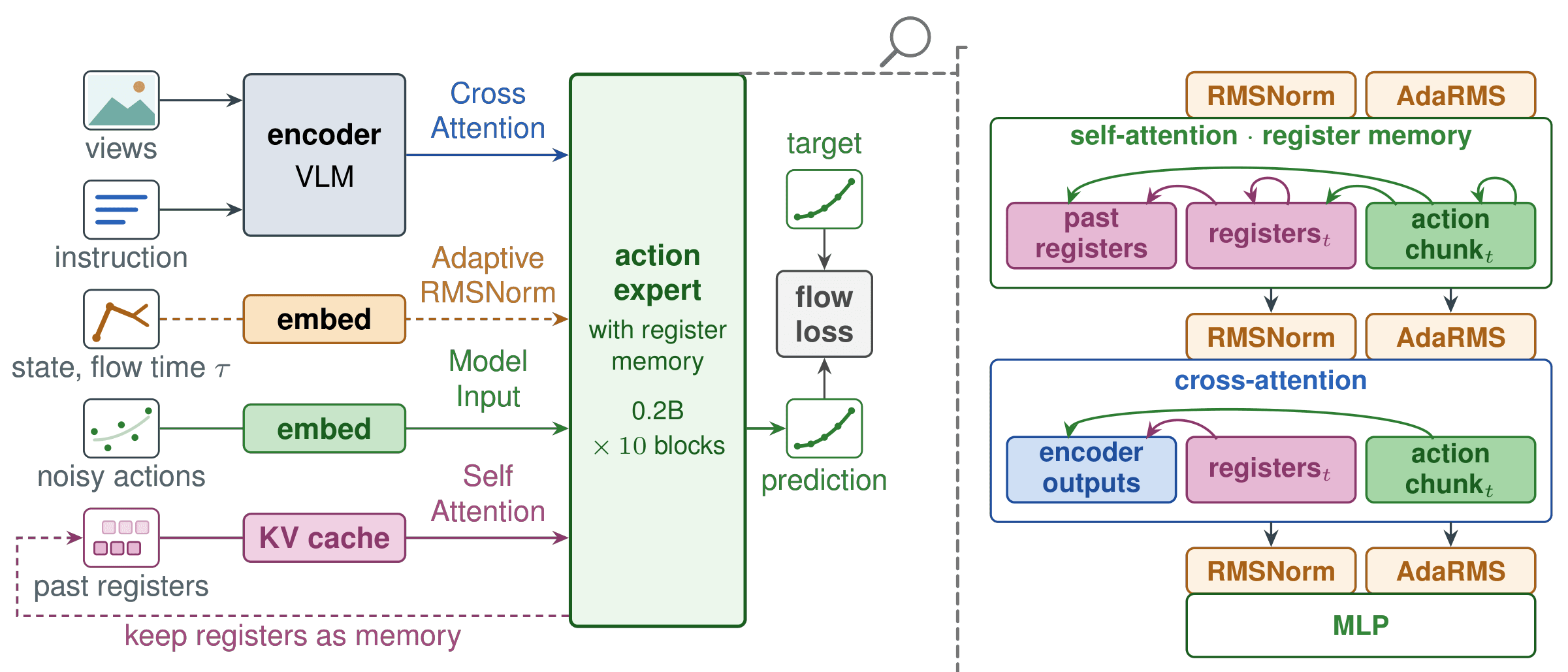
The paper describes a Qwen3-VL-2B-Instruct vision-language backbone and a nine-layer Diffusion Transformer action expert, following the GR00T N1 backbone/expert design. Its VLM initialization comes from ZR-0 base. For this tutorial, you can start directly from the released VLA-Δ weights instead of rebuilding that initialization pipeline.
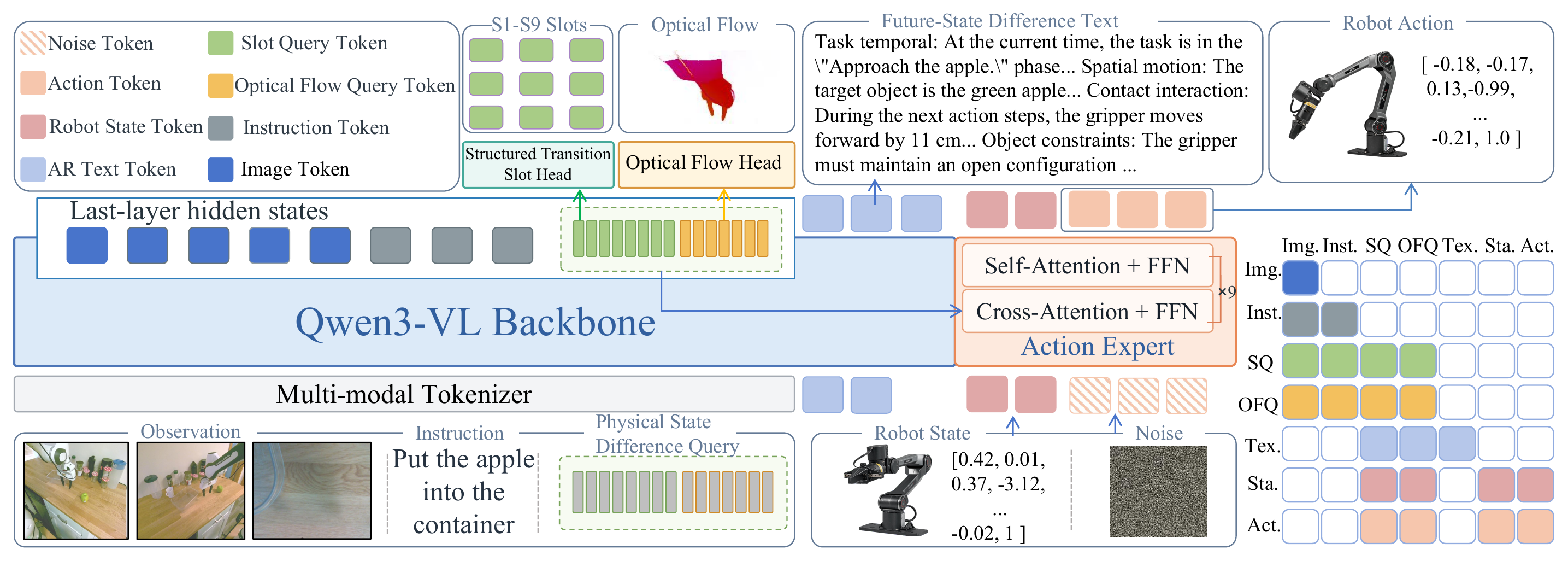
Source: the official VLA-Δ project website. Auxiliary prediction branches train the representation; action generation remains active during deployment.
Physical State Difference Queries are learned vectors that collect information from the vision-language context. The hidden states at query positions form a transition representation. An action expert reads that representation through cross-attention, combines it with the robot's proprioceptive state, and produces an action chunk, a sequence of actions spanning multiple time steps.
The public fine-tuning configuration sets num_difference_queries: 32 and num_flow_queries: 16. These vectors are not 32 readable instructions. They are internal model features optimized through training. Likewise, proprioception is different from the task instruction: it contains numerical robot-state information represented according to the dataset schema.
The action expert uses flow matching to learn a vector field that transforms noise into continuous actions. “Diffusion Transformer” describes its network architecture; flow matching describes the training objective used here. Denoising steps, predicted action horizon, and the number of actions executed before replanning are separate concepts. Changing one does not automatically change the others.
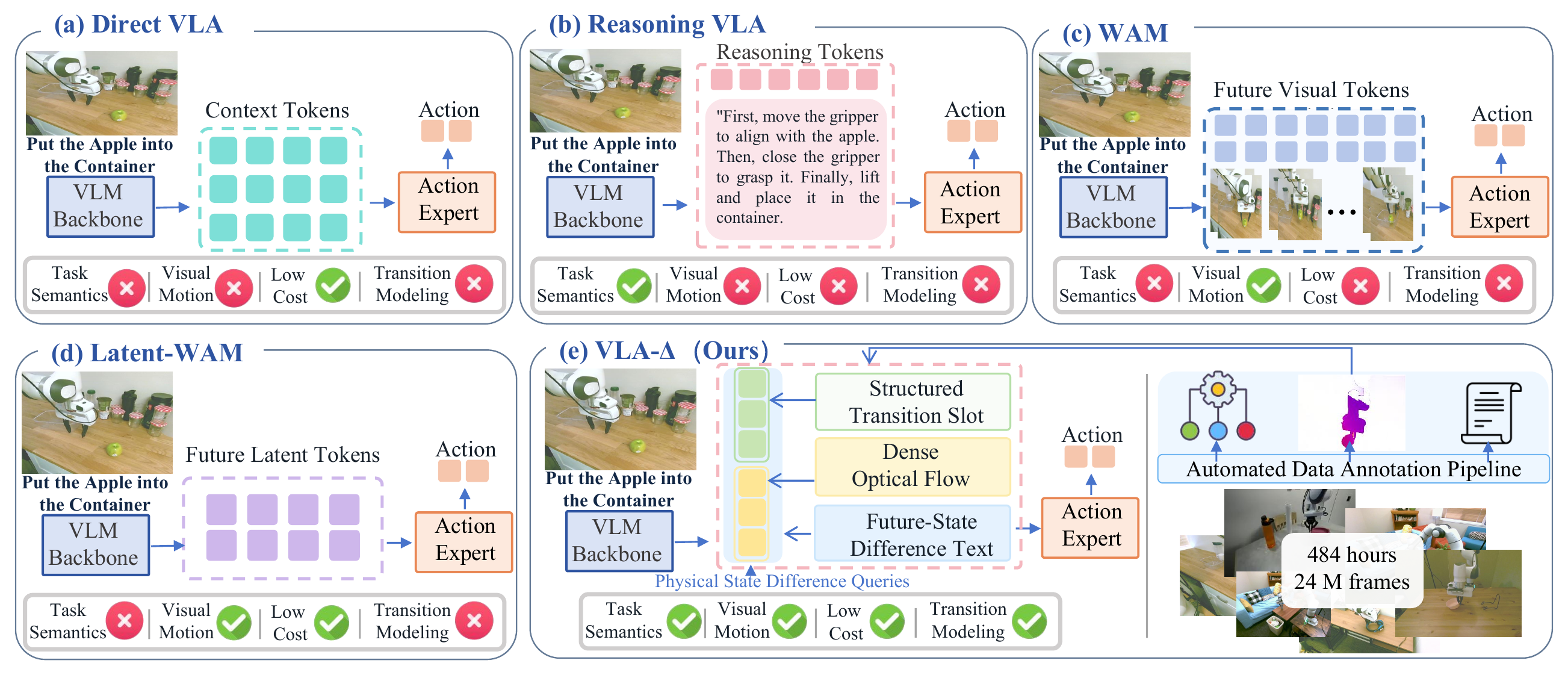
Three complementary supervision signals
The paper combines structured slots, optical flow and future-state difference text. Slots cover nine target categories involving progress, phase, positions, motion, gripper changes, contact changes and obstacle risk. Optical flow provides pixel-level motion. Difference text connects local changes with task progress and constraints. The annotation pipeline uses a corpus of approximately 484 hours and 24 million frames from DROID, MolmoAct and RH20T. Source: the paper's Method and Experiments sections.
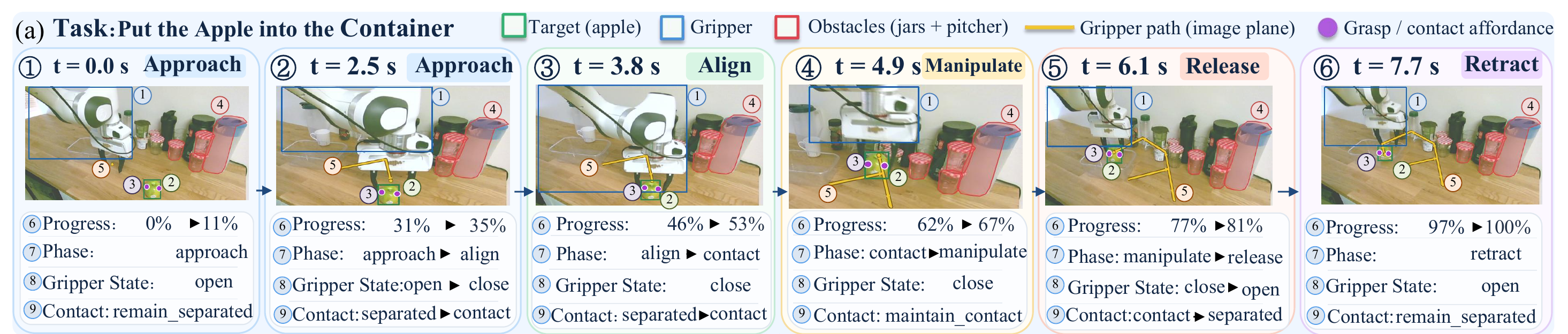
Source: the official VLA-Δ project website. Follow the episode stages to distinguish a state description from a description of change.
A practical way to understand these signals is to ask three questions while watching a grasp: which stage is the robot in, which image regions are moving, and does that motion advance the goal? No single answer describes the entire manipulation problem. This is an intuition for the design, not a claim that optical flow measures contact forces or provides an exact physics simulator.
3. Set up the model environment
Create a separate practice directory. Download the source ZIP using the Code button in the official repository, extract it, and open a terminal in the folder containing server.py, configs/ and requirements/. All subsequent commands assume this VLA-Delta repository root, not the vnrobo website repository.
You need Conda, Linux, an NVIDIA GPU with a compatible driver, and enough storage for the checkpoints and any training data. The official setup uses PyTorch with CUDA 12.4. This is not a guarantee that every GPU has sufficient memory. Check nvidia-smi first, and measure memory requirements with your actual configuration, especially before full-model fine-tuning.
conda create -n vla-delta -c conda-forge python=3.10 pip libgl libegl ffmpeg -y
conda activate vla-delta
export PYTHONNOUSERSITE=1
export LD_LIBRARY_PATH="$CONDA_PREFIX/lib${LD_LIBRARY_PATH:+:$LD_LIBRARY_PATH}"
python -m pip install torch==2.6.0 torchvision==0.21.0 --index-url https://download.pytorch.org/whl/cu124
python -m pip install -r requirements/train.txt
python -c "import torch; print(torch.__version__, torch.cuda.is_available())"
CUDA availability should print True before starting the model server. PYTHONNOUSERSITE prevents packages from your user installation from silently entering the environment. LD_LIBRARY_PATH makes the Conda libraries discoverable. A new terminal needs its own environment activation and relevant exports; variables set in one terminal are not automatically shared with another.
Download the correct checkpoint
Use VLA-Delta-libero for LIBERO evaluation. Use VLA-Delta-base as the starting point for downstream fine-tuning. Interchanging these checkpoints changes the experiment and should not be expected to preserve the reported performance.
# Run in the vla-delta environment, from the repository root.
python - <<'PY'
from huggingface_hub import snapshot_download
snapshot_download(
    repo_id="t0rn0d0/VLA-Delta-libero",
    local_dir="checkpoints/VLA-Delta-libero",
)
PY
Download the complete snapshot instead of selecting one weights file. Configuration, tokenizer files, difference queries and the action expert can all be necessary for restoring the model. Finish an interrupted download before investigating inference failures. Record the downloaded checkpoint revision so a future comparison refers to the same model artifacts.
4. Install LIBERO in a separate environment
The repository's LIBERO evaluation guide uses Python 3.8.13 for the simulation client, separately from the model's Python 3.10 environment. This separation avoids mixing older simulator dependencies with the newer VLM stack.
First download the source ZIP from Lifelong-Robot-Learning/LIBERO. Extract the source into third_party/libero inside VLA-Delta. Make sure you have not introduced an extra directory level such as third_party/libero/LIBERO-master, because the editable installation below expects the source directly at the specified path.
conda create -n vla-libero -c conda-forge python=3.8.13 pip libgl libegl -y
conda activate vla-libero
export PYTHONNOUSERSITE=1
export LD_LIBRARY_PATH="$CONDA_PREFIX/lib${LD_LIBRARY_PATH:+:$LD_LIBRARY_PATH}"
python -m pip install torch==1.11.0+cpu torchvision==0.12.0+cpu --extra-index-url https://download.pytorch.org/whl/cpu
python -m pip install -r requirements/libero.txt
python -m pip install -e ./third_party/libero --no-deps
python scripts/setup_libero.py --libero-root ./third_party/libero --config-dir ./data/libero-config
CPU PyTorch in this client environment does not mean model inference runs on the CPU. The model lives in vla-delta and uses CUDA. The simulator sends observations to it over WebSocket, using 127.0.0.1:8000 in the default local configuration.
Evaluating released weights does not require downloading the demonstration training dataset. The simulator still requires its assets and initialized paths. If the failure happens before the server receives any request, investigate simulator setup, EGL rendering and asset paths before blaming checkpoint weights.
5. Run inference through the supplied server and client
Open terminal A at the repository root. Start the model server and leave it running:
conda activate vla-delta
export PYTHONNOUSERSITE=1
export LD_LIBRARY_PATH="$CONDA_PREFIX/lib${LD_LIBRARY_PATH:+:$LD_LIBRARY_PATH}"
export VLA_EVAL_CHECKPOINT="$PWD/checkpoints/VLA-Delta-libero"
python server.py --config configs/eval/libero_server.yaml
The public server configuration selects inference_mode: direct_action, window_size: 1 and num_denoised_steps: 5. It also selects stats/demo_libero/meta/stats.json for the published LIBERO model. Use the supplied evaluation client rather than inventing a JSON payload: the client already implements the expected observation processing and communication protocol.
Open terminal B at the same repository root:
conda activate vla-libero
export PYTHONNOUSERSITE=1
export LD_LIBRARY_PATH="$CONDA_PREFIX/lib${LD_LIBRARY_PATH:+:$LD_LIBRARY_PATH}"
export LIBERO_CONFIG_PATH="$PWD/data/libero-config"
export MUJOCO_GL=egl
export PYOPENGL_PLATFORM=egl

# One task and two episodes: a smoke test, not the full benchmark.
python scripts/evaluate.py --config configs/eval/libero.yaml \
  --suites libero_spatial --tasks 0 --trials 2 \
  --output-dir outputs/eval/libero-smoke-01 --execute
A useful smoke test completes episodes, produces result files and demonstrates that the model actually controls the simulated robot. A server startup message alone does not establish that the entire pipeline works. Two episodes are also too few to establish policy quality; this run checks the path from model to network to simulator.
The implementation of scripts/evaluate.py requires a new output directory. Pick another name for each run instead of reusing an existing destination. It writes an experiment record, suite logs and a summary.json. A failed group can leave an incomplete evaluation. Do not present the success rate over whichever episodes happened to finish as a complete benchmark score.
Run the full evaluation
Once the short run works, keep the model server running and launch:
python scripts/evaluate.py --config configs/eval/libero.yaml \
  --output-dir outputs/eval/libero-full-01 --execute
Defaults cover libero_spatial, libero_object, libero_goal and libero_10. Each suite contains ten tasks with 50 episodes per task, giving 2,000 episodes in total. The default client seed is 7. Execution horizon 10 means the client executes ten consecutive actions before requesting a new prediction.
Keep checkpoint identity, preprocessing, normalization statistics and execution horizon consistent when comparing runs. Save failures as well as successful videos. A policy that reaches the object but fails during placement needs a different diagnosis from one that follows the wrong language instruction.
6. Fine-tune the base checkpoint on LIBERO
Download HuggingFaceVLA/libero to data/libero and the base model to checkpoints/VLA-Delta-base. The dataset registry uses the entry libero_wo_ecot_pt. Relative YAML paths resolve against the file declaring the field, so inspect the registry rather than assuming everything resolves against your shell directory.
conda activate vla-delta
python - <<'PY'
from huggingface_hub import snapshot_download
snapshot_download("t0rn0d0/VLA-Delta-base",
                  local_dir="checkpoints/VLA-Delta-base")
snapshot_download("HuggingFaceVLA/libero", repo_type="dataset",
                  local_dir="data/libero")
PY
export PYTHONNOUSERSITE=1
export LD_LIBRARY_PATH="$CONDA_PREFIX/lib${LD_LIBRARY_PATH:+:$LD_LIBRARY_PATH}"
export VLA_PRETRAIN_CHECKPOINT="$PWD/checkpoints/VLA-Delta-base"
export VLA_OUTPUT_ROOT="$PWD/outputs"

# Inspect the launch plan before starting training.
python scripts/train.py --config configs/finetune/libero.yaml --dry-run
python scripts/train.py --config configs/finetune/libero.yaml --execute
The published fine-tuning configuration uses an action horizon of 10 and action-only loss. Its shared configuration specifies eight epochs, per-device batch size 16, expected global batch size 64 and peak learning rate 2e-5. Both the VLM and action expert are tuned. Treat this as a research configuration whose hardware needs must be checked, rather than a guaranteed single-GPU beginner preset.
Read the launch command produced by dry-run to understand how the repository launches training. A dry-run checks the plan; it does not prove that your dataset is readable or your GPU has sufficient memory. If you change GPU count, per-device batch size or gradient accumulation, verify the resulting effective global batch size.
A short run with --max_train_steps can validate data loading and checkpoint saving. It does not establish that the model has converged or reproduced the paper. If memory limits require configuration changes, record them with the experiment instead of presenting results as if the original settings were unchanged. For another policy-training workflow, see our π0-FAST tutorial.
Keep normalization statistics with the dataset
Training commonly normalizes actions and inference reverses that normalization before execution. Incorrect statistics can produce a model that loads successfully but moves with the wrong magnitude. For a checkpoint you trained yourself, provide its real checkpoint directory and the statistics from its own training dataset:
export VLA_EVAL_CHECKPOINT="/absolute/path/to/your/checkpoint"
python server.py --config configs/eval/libero_server.yaml \
  --stats_file /absolute/path/to/your/training_dataset/meta/stats.json
Check camera selection, state dimensions, action dimensions and normalization together. Copying the demonstration statistics does not repair a mismatched robot schema. Keep those files identifiable alongside your training configuration so you can later explain how a normalized model output became an executed command.
7. Pretraining is a separate research project
The fine-tuning workflow reuses an already learned representation. The repository also exposes three pretraining stages: difference-text learning, auxiliary slot/optical-flow learning, and joint action prediction. Repeating this pipeline requires ZR-0 initialization, the relevant datasets, prepared annotations and matching registry entries. Downloading LIBERO alone does not supply those inputs.
# Run only after preparing the datasets and annotations required by the registry.
export VLA_BASE_MODEL="$PWD/checkpoints/ZR-0"
export VLA_PREPARED_ROOT="$PWD/data/prepared"
export VLA_OUTPUT_ROOT="$PWD/outputs/pretrain"
python scripts/prepare_pretraining.py --config configs/pretrain/prepare.yaml
python scripts/train.py --config configs/pretrain/stage1_ar.yaml --execute
export VLA_STAGE1_CHECKPOINT="$VLA_OUTPUT_ROOT/stage1_ar/model-final"
python scripts/train.py --config configs/pretrain/stage2_aux.yaml --execute
export VLA_STAGE2_CHECKPOINT="$VLA_OUTPUT_ROOT/stage2_aux/model-final"
python scripts/train.py --config configs/pretrain/stage3_joint.yaml --execute
Before starting, confirm that annotations exist and align with the underlying trajectories. Public entry points do not imply that every large dataset, auxiliary annotation or labeling service is bundled with the code. Starting from the released base checkpoint lets a beginner learn policy adaptation independently of building a large pretraining corpus.
8. Read the reported results carefully
The following rows come from the official repository results. Values are success percentages. The repository's 2B label refers to VLM size; it should not automatically be interpreted as the total parameter count of every component in the system.
| Model | Spatial | Object | Goal | Long | Average |
|---|---|---|---|---|---|
| π₀.₅ | 98.8 | 98.2 | 98.0 | 92.4 | 96.9 |
| VLA-Adapter | 97.8 | 99.2 | 97.2 | 95.0 | 97.3 |
| ZR-0 | 97.4 | 99.4 | 97.8 | 96.4 | 97.8 |
| VLA-Δ | 98.8 | 99.8 | 98.6 | 96.4 | 98.4 |
VLA-Δ exceeds ZR-0 by 0.6 percentage points on average and ties it on Long. On RoboTwin 2.0, the repository reports 90.06% in Clean and 89.74% in Random. These benchmarks represent different evaluation conditions. Do not combine them into a single headline score or treat them as real-robot success probabilities.
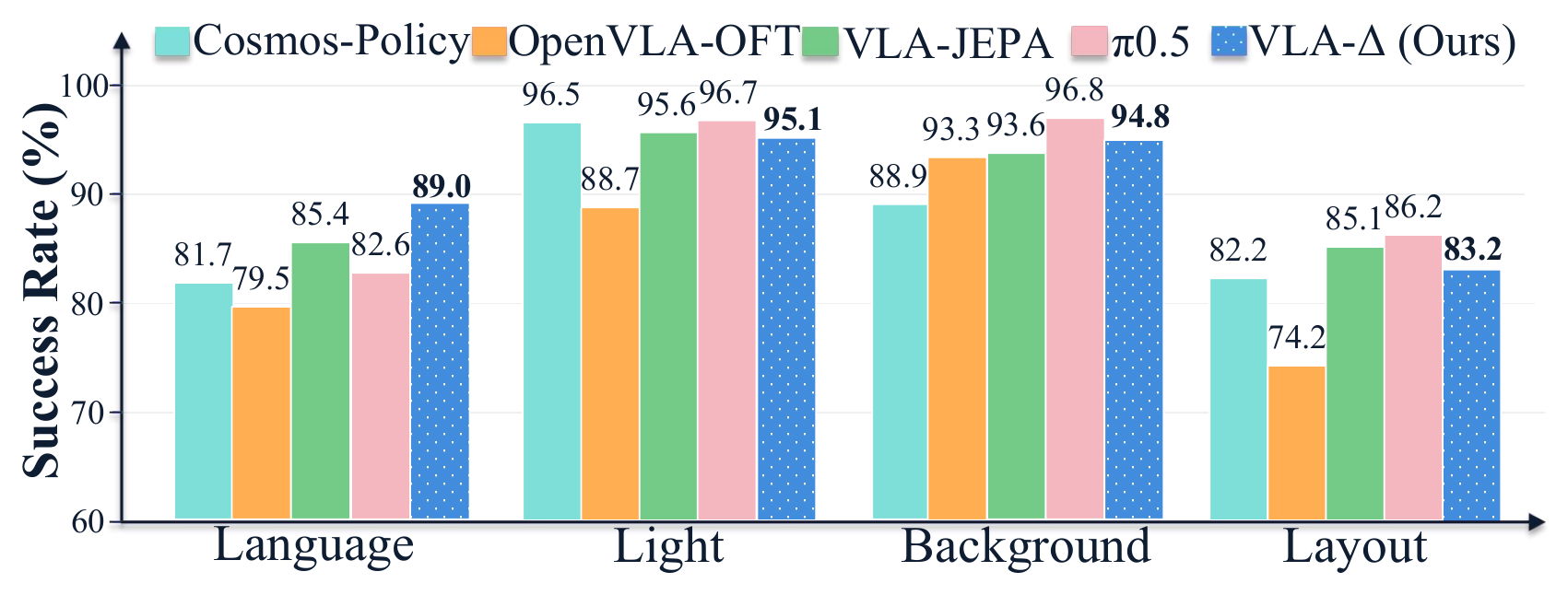
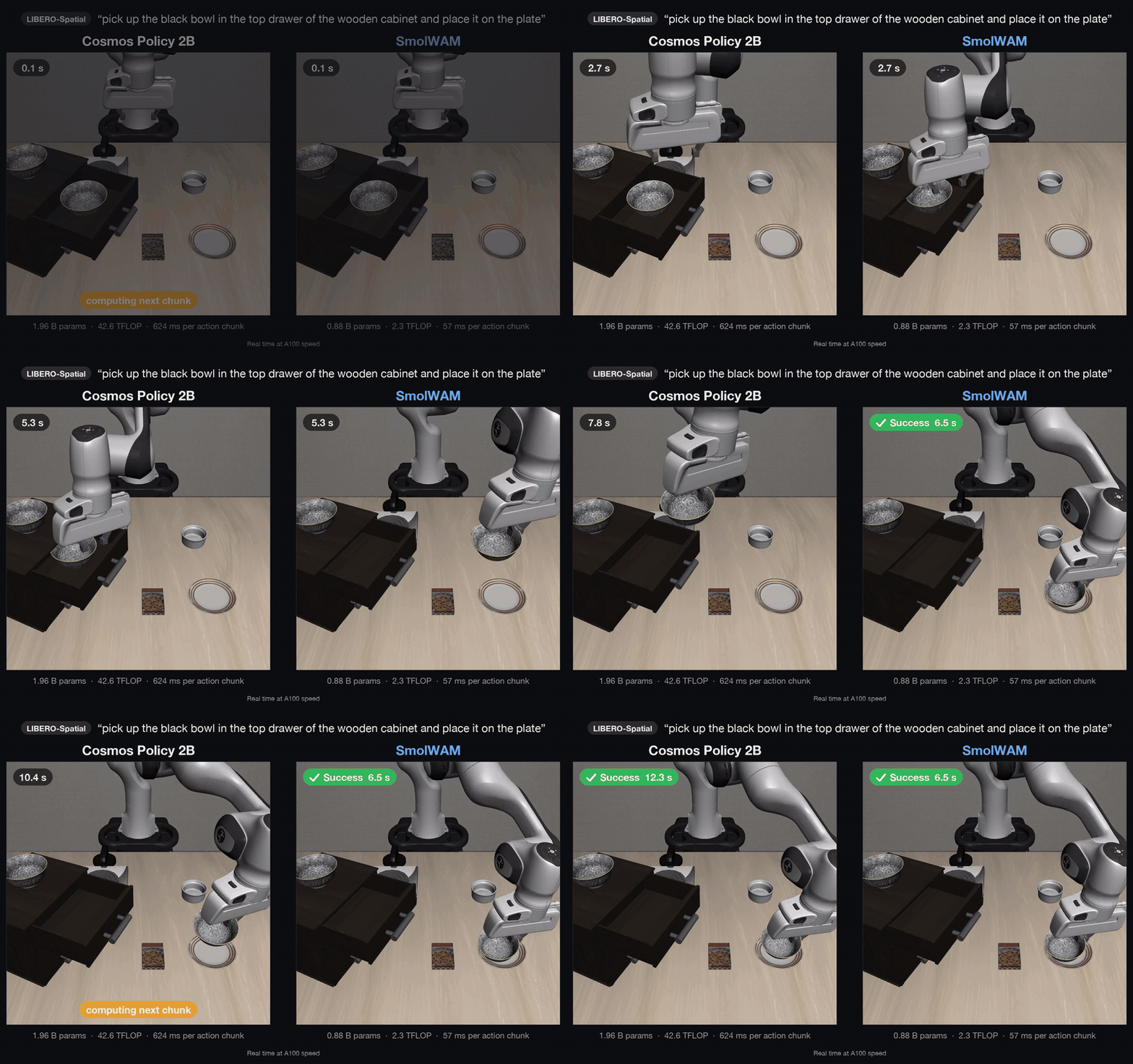
Source: the official VLA-Δ project website. Robustness under perturbations requires its own evaluation; a successful demonstration video cannot establish it.
The paper reports a real-robot average of 68.0%, exceeding π₀.₅ by 5.5 percentage points across its five-task experiment. That is different from the LIBERO score. “No additional inference overhead” concerns not decoding auxiliary supervision targets at deployment; it does not mean zero latency, since the backbone and action expert still run. Source: the original paper.
9. Debug the stage that actually failed
| Symptom | First checks |
|---|---|
| Model cannot see CUDA | Active Conda environment, driver and CUDA PyTorch build |
| Simulator fails during EGL startup | EGL libraries, rendering exports and GPU access |
| Client cannot connect | Running server and matching host/port |
| Robot motions have the wrong scale | Statistics, action dimensions and checkpoint pairing |
| Evaluation refuses its output directory | Choose a new destination and preserve old logs |
| Score differs from the paper | Completed episodes, suites, seeds, horizon and model identity |
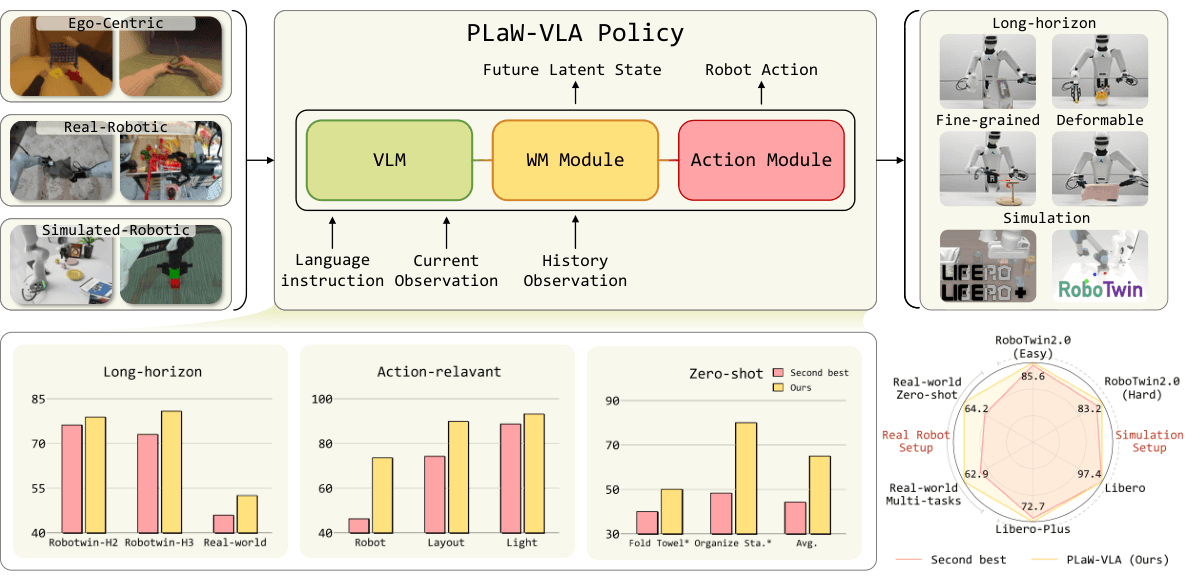
When watching rollouts, annotate the moments of approach, gripper closure, lifting and placement. This breakdown separates instruction-following errors from control failures and normalization problems. For a different approach to using future information during policy learning, read our PLaW-VLA and V-JEPA 2 guide.
A useful practical milestone is a completed smoke test, a full evaluation with an explicit configuration, and a fine-tuned checkpoint evaluated with the correct statistics. Those artifacts give you evidence for deciding whether to invest in more training or adapt the pipeline to your own robot demonstrations.