A robot reaches toward a bowl, pulls back, then reaches again. Each individual camera image looks reasonable, but the policy keeps reversing its decision. An image of the present does not always reveal whether the robot is approaching an object for the first time or recovering from an unsuccessful attempt. A short history can resolve that ambiguity.
REKI, or Registering Knowledge in VLAs, addresses this problem by putting memory inside the action expert of a vision-language-action model. Developed by Kyutai with collaborators at Inria and École nationale des ponts et chaussées, it has approximately 2.4 billion parameters and is pretrained exclusively on public data. The team then fine-tunes separate checkpoints for individual benchmarks, including LIBERO.
This tutorial explains the architecture, installs the official environment, runs a task through LeRobot, and follows the LIBERO fine-tuning and evaluation workflow. Commands were checked against the repository on October 20, 2026. Benchmark numbers below are author-reported results; we have not independently rerun them here. Start with the original paper and official repository for the underlying research and implementation.
1. Choose the right starting point
A VLA converts images, a language instruction and robot state into actions. Its vision-language model, or VLM, interprets the scene and instruction. Its action expert generates commands suitable for the robot. LIBERO provides simulated manipulation tasks using a Franka Panda arm, allowing you to evaluate policies without owning that hardware.
For this walkthrough, use kyutai/reki-2b-libero, the checkpoint already fine-tuned on LIBERO. The base kyutai/reki-2b checkpoint is intended for further fine-tuning. Loading the base model does not reproduce the task adaptation of the LIBERO release.
Separate three goals before allocating compute. Running the released policy tests your installation and observation pipeline. Fine-tuning adapts a pretrained model and requires substantially more GPU memory. Reproducing pretraining is a larger research effort: the published recipe uses 200,000 steps on 32 H100 GPUs. At the time of this review, the repository still states that pretraining code and the data pipeline will arrive in a later update. A published recipe does not mean every pretraining component is already executable.
Your first milestone should be one functioning task with correctly oriented images, valid actions and a readable evaluation log. Establish that baseline before paying for a full training node.
2. The paper's idea: keep history in registers
A straightforward memory mechanism feeds previous camera frames into the VLM alongside the current frame. This increases the amount of visual input the backbone must process. Recurrent approaches can keep the input smaller, but may introduce sequential training dependencies. Other methods add a separate memory module.
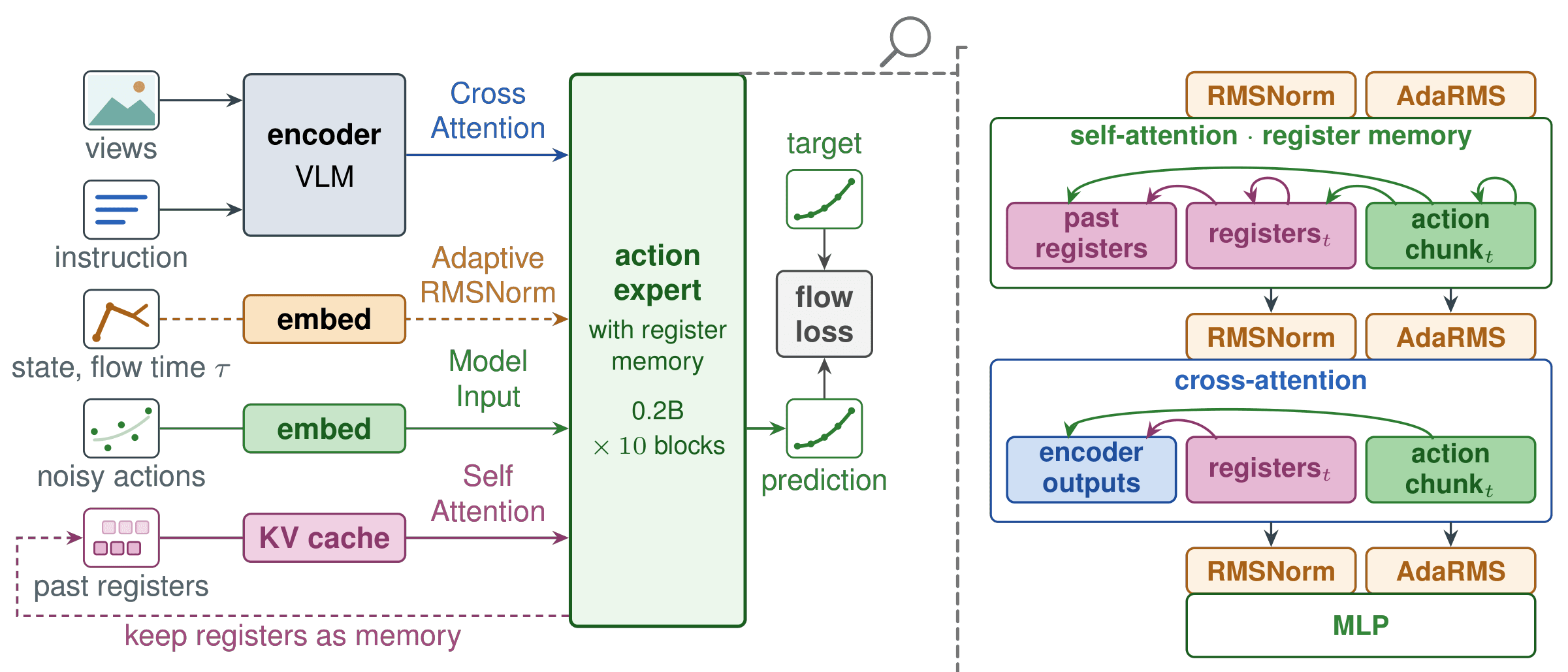
REKI keeps the VLM focused on one observation at a time. The action expert contains 32 learned register tokens per frame that summarize the observation's visual and language context. Their keys and values are cached so later action predictions can access recent history without encoding the old images again.
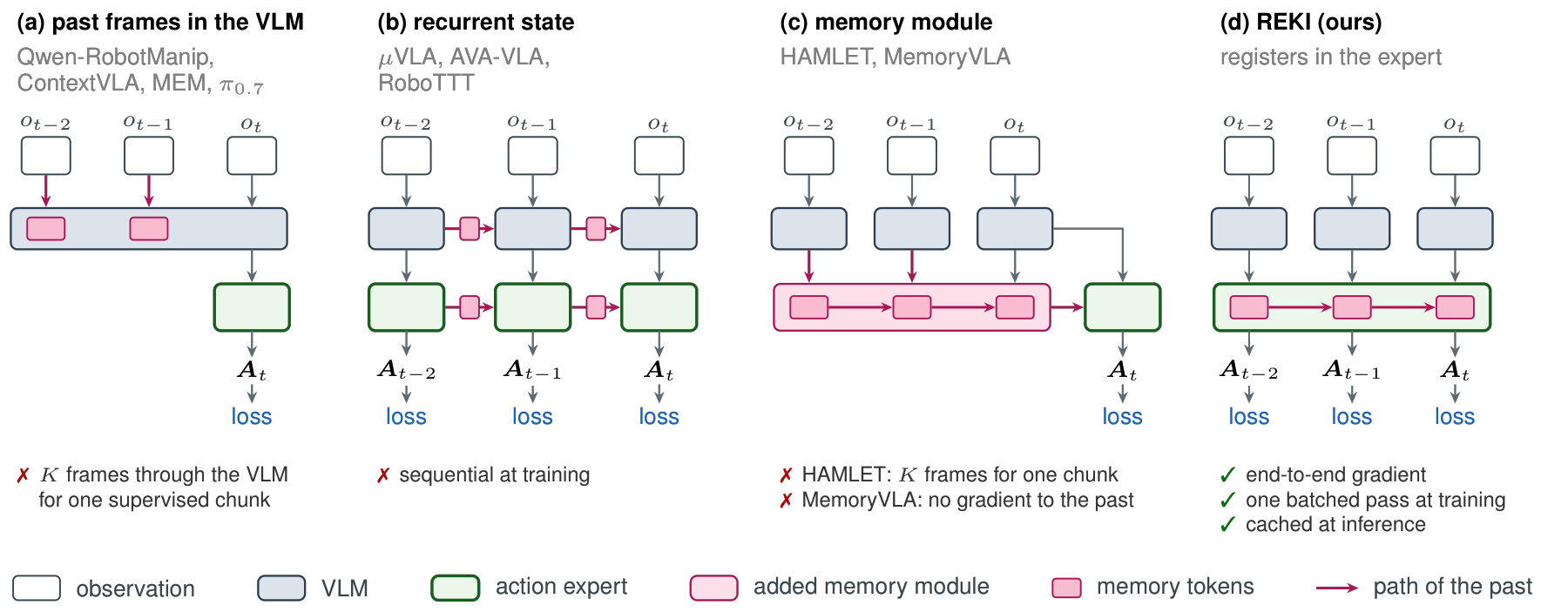
The default training window contains three frames spaced one second apart. At inference, the current frame's action tokens can read its registers and the cached registers of the two preceding frames. This is a short temporal context, not an unlimited record of everything the robot has experienced.
The crucial attention restriction is that registers do not read action tokens or robot state. They also do not depend on the denoising flow time. Consequently, registers can be computed once for the new observation and reused across denoising steps and subsequent predictions.
The official project page reports approximately 2 MiB of additional cache memory per past frame. In its H100 setup, reading the cached registers adds about 0.1 ms. These measurements describe a specific implementation and input configuration; they are not universal guarantees for every GPU or image resolution.
3. Architecture and action generation
The architecture documentation describes a Qwen3.5-2B VLM accounting for approximately 2.2B parameters, followed by a roughly 0.2B diffusion-transformer action expert. The expert has 10 layers, hidden width 768, 12 attention heads and MLP width 3072.
Camera images + instruction
             |
             v
       Qwen3.5 VLM ----> current observation context
                                  |
                           cross-attention
                                  v
Cached past registers ---> action expert ---> 1-second action chunk
                                  ^
                      robot state + flow time
                       through adaptive RMSNorm
Each expert block applies self-attention, cross-attention to the final VLM outputs, and an MLP. A state-format-specific MLP encodes the robot state. Its output and the flow time condition action tokens through adaptive RMSNorm. State is therefore part of action generation, while the register memory remains independent of it.
Flow matching learns to transform a noisy action chunk into a useful movement sequence conditioned on the observation. The released configuration uses 10 denoising steps to generate one second of actions. Do not confuse these two time scales: ten denoising steps do not imply that the returned chunk contains exactly ten robot commands. The command count depends on the checkpoint's control frequency.
During training, actions are padded to 32 dimensions so the model can support different embodiments. The loss ignores padded dimensions. Inference returns the action dimensions appropriate for the trained checkpoint; the simulator should receive those actions in its expected convention.
4. Install the pinned environment
The official requirements are Linux x86-64, an NVIDIA GPU with CUDA 12, and Pixi. Pixi supplies Python 3.12 and the locked dependencies. Check that nvidia-smi can see your GPU and that pixi --version works before proceeding.
Run the following on your own development or GPU machine:
git clone https://github.com/kyutai-labs/reki.git
cd reki
pixi install --frozen
cp .env.example .env
Edit .env for your storage layout. REKI_DATASETS_ROOT identifies the dataset root, REKI_RUNS_DIR stores training runs, and REKI_SIM_ROOT stores benchmark simulators. Optionally set HF_HOME to place the model cache on a suitable disk. On a cluster, the relevant compute nodes must be able to read these paths.
Keep the lockfile when establishing your baseline. The repository lists the result-producing environment as PyTorch 2.7.0, Transformers 5.3.0, flash-linear-attention 0.4.2, FlashAttention 2.8.3 and LeRobot revision aa9cc9b. Installing the latest package versions independently can change interfaces or numerical behavior.
Install the LIBERO simulator separately:
bash scripts/eval/install.sh libero
This creates the Pixi sim environment. LIBERO rendering uses CPU-based OSMesa, while policy inference still uses the NVIDIA GPU. The simulator setup guide explicitly pins MuJoCo 3.3.2. Other MuJoCo versions can render different colors and reduce success rates even when the checkpoint is unchanged.
5. Run your first LIBERO task through LeRobot
Pixi installs lerobot_policy_reki, which registers the reki policy type and the reki environment type. The environment wrapper lets lerobot-eval use the project's benchmark protocol. The plugin supports inference only; model training uses REKI's own scripts.
Start with the first task in the Spatial suite:
S=$(pixi run printenv REKI_SIM_ROOT)
env -u DISPLAY MUJOCO_GL=osmesa PYOPENGL_PLATFORM=osmesa \
  LIBERO_CONFIG_PATH="$S/libero/config" \
  pixi run -e sim lerobot-eval \
    --policy.path=kyutai/reki-2b-libero \
    --env.type=reki --env.benchmark=libero \
    --env.task=libero_spatial --env.task_ids='[0]' \
    --env.n_episodes=10 \
    --eval.batch_size=1 --eval.n_episodes=10 \
    --output_dir=results/reki-libero-smoke
Here, S is a temporary shell variable containing the simulator root. Removing DISPLAY avoids depending on an attached desktop. OSMesa supplies headless rendering. The command explicitly requests ten episodes for the selected task and ten total episodes from the evaluator.
Keep --eval.batch_size=1 because the plugin does not currently support batched inference. When evaluating multiple tasks, set --eval.n_episodes to the number of tasks multiplied by episodes per task. The environment prints the expected total at startup. Use --env.seed to control benchmark episode seeds; the documentation states that LeRobot's top-level --seed does not change those episodes.
The first prediction can take 15–30 seconds while the model compiles. Inspect the logs before treating that delay as a failure. LeRobot writes eval_info.json after evaluation. Completing this small run validates the installation and simulator connection, but does not reproduce a full benchmark score. Consult the evaluation documentation when expanding the run.
6. Understand the direct inference API
The native API returns a complete action chunk. The following example assumes that your simulator adapter has already supplied obs and a correctly constructed proprio vector. It is an observation-adapter illustration, not a complete standalone rollout program:
import numpy as np
from reki import RekiPolicy

policy = RekiPolicy.from_pretrained(
    "kyutai/reki-2b-libero", device="cuda"
)
print(policy.spec.camera_keys)
print(policy.spec.state_layout)
policy.reset()  # at the beginning of every episode

images = {
    "camera_top": np.ascontiguousarray(
        obs["agentview_image"][::-1, ::-1]
    ),
    "camera_wrist_left": np.ascontiguousarray(
        obs["robot0_eye_in_hand_image"][::-1, ::-1]
    ),
}
actions = policy.predict(
    images=images,
    state=proprio,
    task="put the bowl on the plate",
)
print(actions.shape)
Images must be RGB uint8 arrays with shape H×W×3. LIBERO environment images require a 180-degree rotation to match the training orientation. Reversing both spatial axes performs that rotation. Do not apply it a second time if your environment wrapper already handles orientation.
Treat camera names and state_layout as a data contract. Supply the training dataset's observation.state convention; the official adapter performs the corresponding slicing and conversions. Concatenating joint values, a quaternion and gripper state into an arbitrary vector is not a substitute for matching that contract.
predict returns an unnormalized float32 NumPy array with shape [n_action_steps, action_dim]. Execute these actions at the environment's control frequency, then predict again after policy.n_action_steps environment steps. The released benchmark checkpoints use one second between predictions. Do not normalize the returned actions again.
Calling predict at every physics step would also fill the memory cache with observations much closer together than those seen during training. Low inference latency does not remove the need to match history_stride_s. With the LeRobot wrapper, select_action handles chunk queuing internally, so let that wrapper own the action queue.
Finally, call reset() at the start of every episode. Cached registers from the previous task must not influence the next one. This matters even when both episodes use the same camera setup and instruction.
7. Prepare data and fine-tune on LIBERO
Once the released checkpoint works, prepare the fine-tuning data:
pixi run python scripts/data/download.py libero
pixi run python scripts/data/recompute_euler_stats.py --datasets libero
pixi run python scripts/dry_run.py \
  --config=configs/sft.yaml --dataset=libero --batch_size=4
The LIBERO dataset is already in LeRobot v3.0 format. Recomputing Euler statistics aligns normalization with the project's rotation representation. The dry run performs one forward and backward batch, helping expose missing data, decoding problems, incompatible shapes or memory issues before a full run.
The documented local training command uses Accelerate and all GPUs on the machine:
pixi run train --config=configs/sft.yaml \
  --pretrained_path=kyutai/reki-2b --dataset=libero \
  --steps=15000 --warmup_steps=1000 --mirror_prob=0.0 \
  --state_mlp_embodiments="{'single_arm_ee_euler': 8}" \
  --aug_random_crop=0.95 --aug_random_scale=True \
  --pin_overhead_camera=False --output_dir=runs/libero
The dimension eight belongs to the configured state format; it does not mean the action vector has eight dimensions. Keep mirror_prob=0.0 for this recipe. Mirroring robot data requires consistent transformations of camera images, state, actions and gripper conventions.
The training documentation reports 15,000 LIBERO steps on eight H100 GPUs, costing 40 GPU-hours. GPU-hours are aggregate accelerator usage, not a prediction that a consumer GPU will finish in forty hours. The published recipes recommend 80 GB GPUs; a RoboTwin run can use approximately 73 GB per GPU. Reducing batch size is useful for experiments, but changes the optimization conditions and should be documented.
Fine-tuning optimizes the flow-matching loss. The action expert and state MLPs use learning rate 1e-4; the shared fine-tuning configuration scales the backbone learning rate by 0.3. Training uses bf16 with fp32 flow heads, AdamW, gradient clipping at 1.0 and EMA decay 0.999. Reported evaluation uses EMA weights.
Each sample contains three observations separated by one second, with a supervised action chunk for every frame. Eight independent noise/time draws share each frame's VLM computation. Earlier registers receive gradients through later frames' losses, so the memory mechanism is learned during training rather than attached as an inference-only cache.
Watch metrics.jsonl for loss, gradient norm, loading time and peak GPU memory. A lower loss is useful diagnostic evidence, but task completion must be measured with rollouts. Use --resume=True with the correct output directory when continuing a run.
8. Export and evaluate the full protocol
Export packages EMA weights, inference metadata and normalization statistics so inference does not require the entire training dataset:
pixi run python scripts/export_checkpoint.py \
  runs/libero/checkpoint-15000 exports/libero \
  --merge-ema --pretrained-path kyutai/reki-2b --benchmark libero
To evaluate the released checkpoint without training, use the protocol generator:
pixi run hf download kyutai/reki-2b-libero \
  --local-dir checkpoints/reki-2b-libero
pixi run python launchers/eval_protocols.py \
  libero checkpoints/reki-2b-libero results/reki-full | bash
pixi run python scripts/eval/results_table.py results/reki-full
The generator prints benchmark commands and the pipe executes them sequentially. Remove | bash if you want to inspect the generated commands first. Substitute exports/libero to evaluate your own exported checkpoint. The protocol scripts produce a different result format from LeRobot's eval_info.json; do not pass that LeRobot file to the protocol result-table script.
For LIBERO-Plus, install bash scripts/eval/install.sh libero_plus and select libero_plus in the protocol generator. It evaluates the LIBERO-adapted checkpoint under perturbations; it does not require a separately fine-tuned LIBERO-Plus model.
9. Read the results carefully
The official LIBERO model card reports the following results for one checkpoint covering all four suites:
| Suite | Success rate |
|---|---|
| Spatial | 99.2% |
| Object | 99.4% |
| Goal | 96.6% |
| Long | 95.0% |
| Mean | 97.6% |
The protocol uses ten tasks per suite and fifty episodes per task, totaling 2,000 episodes. LIBERO-Plus reaches 90.4% across 10,030 perturbed episodes. Its robot-initialization axis scores 75.6%, while sensor noise scores 98.6%. These differences show why an aggregate number should not replace inspection of individual conditions.
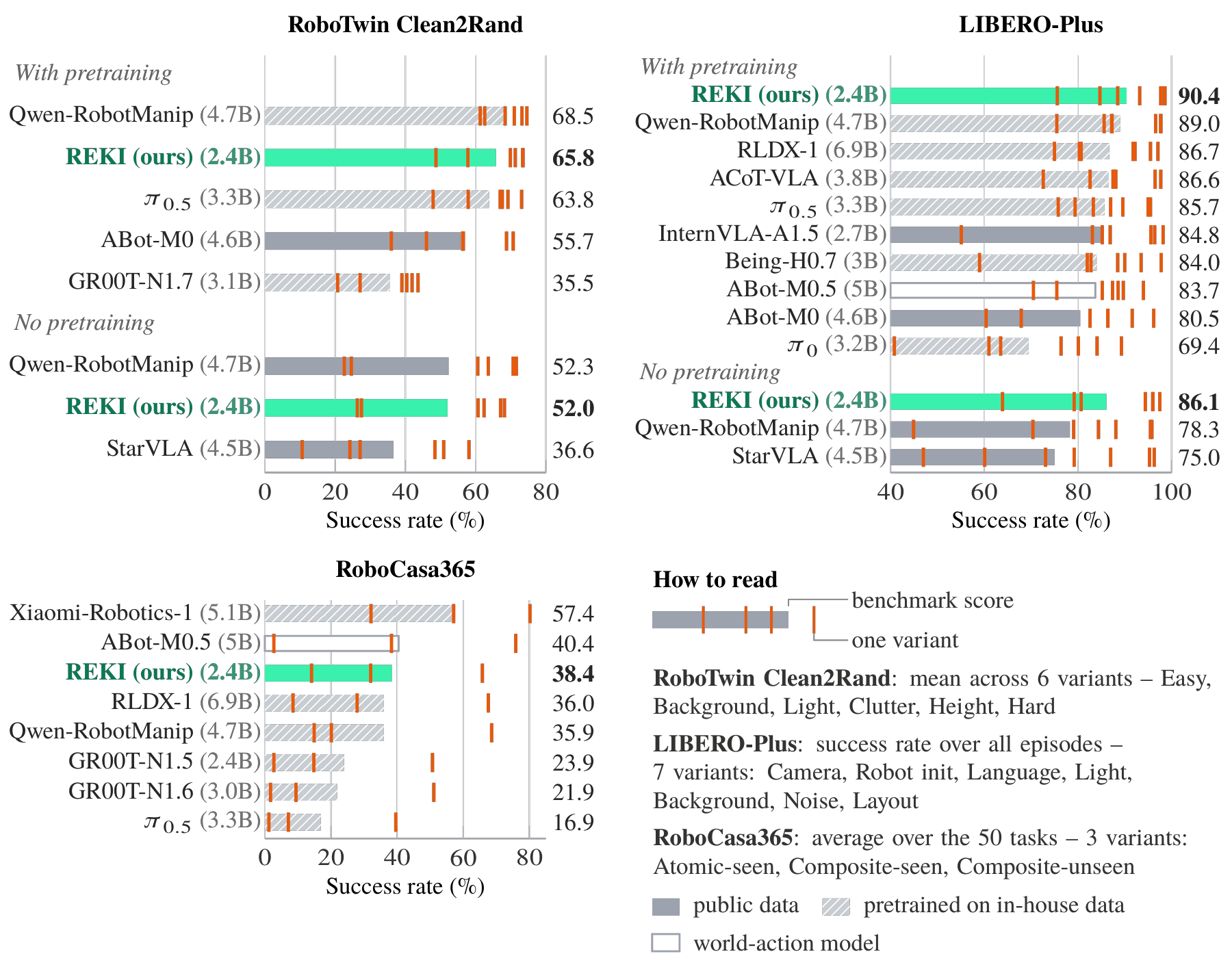
The paper's memory ablation reports gains of 1.5 percentage points on LIBERO-Plus, 5.5 on RoboTwin clean and 5.4 on RoboCasa365. Percentage points describe an absolute change in success rate, not the same-sized relative percentage increase.
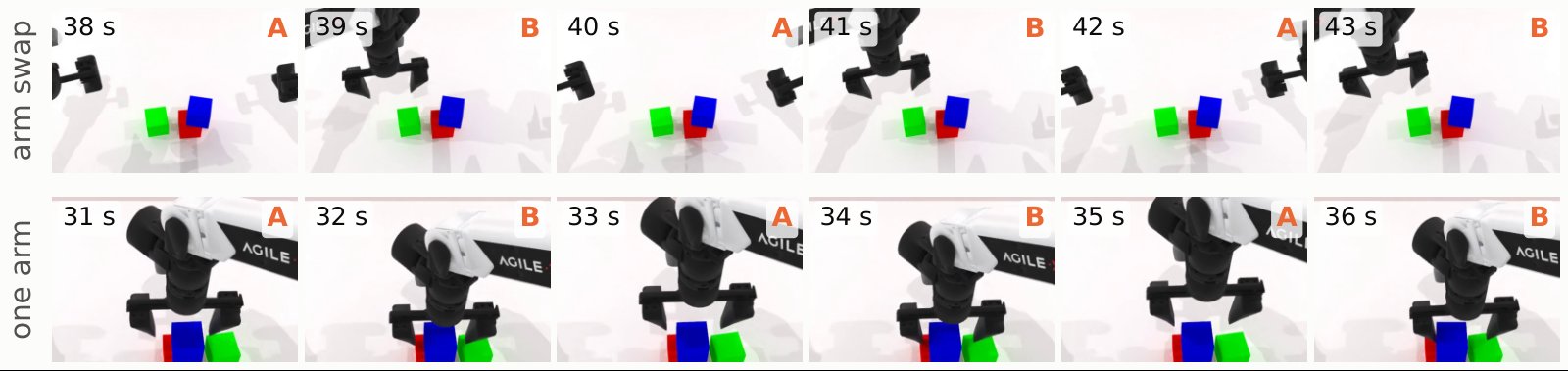
On RoboTwin Clean, oscillating episodes fall from 18.6% for the model trained without memory to 4.1% with memory. These are RoboTwin results, not LIBERO oscillation measurements. Removing past frames during evaluation while keeping the memory-trained weights raises oscillation to 14.8%, supporting the conclusion that reading history at inference contributes to the effect.
The latency figure also needs context. 21.8 ms measures one action-chunk prediction on an H100, using two 256×256 images and compilation. It is not a demonstrated safe robot control loop at roughly 46 Hz. The released policy still uses one-second replanning intervals to match its training history spacing.
10. Real-robot demo, troubleshooting and limits
The project includes UR5 demonstrations after robot-specific fine-tuning. The following video is shown at 3× speed. It illustrates REKI on real hardware, but does not imply that the Franka/LIBERO checkpoint can control a UR5 unchanged.
When a rollout fails, check the observation pipeline before changing the network. Consistently reaching from the wrong direction suggests camera orientation or mapping problems. Incorrect motion magnitude or reversed gripper behavior suggests an action convention, normalization or state-layout mismatch. A good first episode followed by strange later behavior suggests a missing reset. A sudden benchmark change after upgrading dependencies warrants checking the simulator pins.
Training memory usage does not directly predict inference memory usage: training retains activations, gradients and optimizer state. Conversely, a 2.4B parameter count alone does not prove that compilation and all image configurations will fit on every 8 GB GPU. Measure the actual target machine before planning deployment costs.
REKI's short memory does not establish reliable recall of events many minutes earlier. Demonstration coverage still constrains its behavior, and simulation success does not certify real-robot safety. The code uses MIT with some Apache-2.0 components, while the released weights use CC-BY-NC-SA 4.0. Review the weights and source-data terms before commercial use.
A useful first experiment ends with three concrete records: the installed versions, a rollout with verified observation and action conventions, and a success-rate report stating the tasks and episode count. That gives you a defensible baseline for memory ablations, recipe changes or adaptation to your own robot data.