Why EgoHumanoid is the third stack
In Part 1 on OpenWBT, we started with debuggable whole-body teleoperation: lower-body policy, upper-body IK, simulator first, real robot later. In Part 2 on TWIST2, the focus moved to direct robot data collection with PICO teleoperation, a Redis bus, a low-level controller, and a sim-to-real path. Both stacks place the robot at the center: good demonstrations require the robot to run, the operator to drive the robot, and every latency or tracking issue to directly affect the collected data.
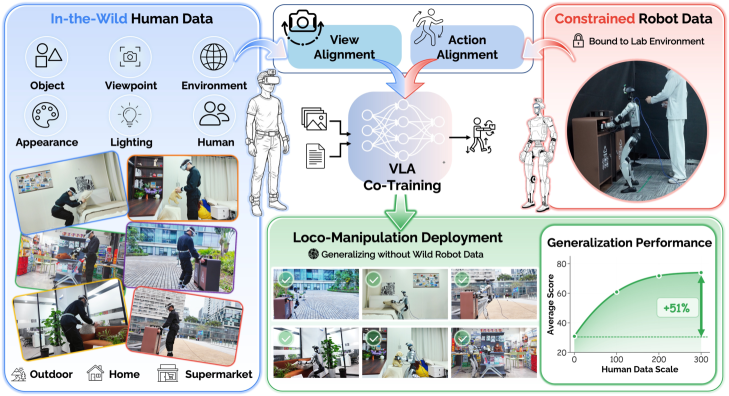
EgoHumanoid asks a different question: if a lab cannot collect thousands of clean robot episodes yet, can it use egocentric human demonstrations? The OpenDriveLab/EgoHumanoid repository describes a framework that co-trains a VLA policy from human first-person demonstrations plus a limited amount of robot data. The EgoHumanoid project page highlights two alignment modules: view alignment reduces the camera-view gap between humans and robots, while action alignment maps human motion into a robot-compatible action space. This is the key difference from TWIST2. TWIST2 tries to make robot teleoperation better; EgoHumanoid tries to make human data more robot-ready.
This post follows the four-step path exposed by the repository: collect robot/human data, run data_alignment/human_data_process/run_human_data_pipeline.sh, convert HDF5 to LeRobot with data_alignment/convert_to_lerobot.py, then train and deploy with scripts/train.py, scripts/serve_policy.py, and scripts/deploy.py. The most important work is not the final deployment command. It is the alignment layer in the middle: view_alignment/viewport_transform_batch_h5.py with cache_3d.py for images, and process_navigation_pipeline.py with add_hand_status.py for actions.
Series roadmap
- OpenWBT: G1 Teleop in MuJoCo/Isaac: build the environment, verify ONNX policies, and understand lower-body joystick plus upper-body IK.
- TWIST2: PICO Teleop and G1 Sim2Real: use PICO teleop, Redis, and a low-level controller to collect direct robot data.
- EgoHumanoid: Human Demos to G1 VLA: turn egocentric human demonstrations into HDF5/LeRobot data with images, navigation commands, and hand status.
- VIRAL: retargeting and skill validation: use external motion sources, retarget them to the target humanoid, and evaluate failures.
- FromW1: moving skills onto real hardware: move from simulation policy to real hardware while handling latency, contact, and actuator limits.
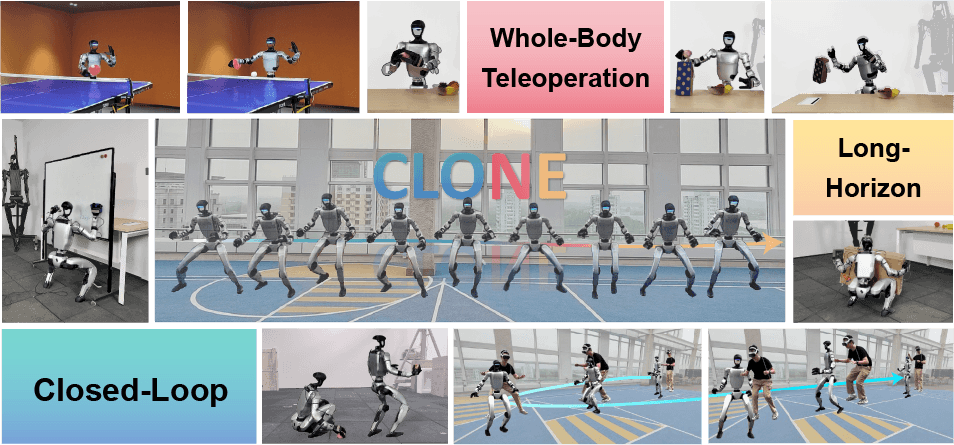
- CLONE: closed-loop whole-body teleop: treat closed-loop teleoperation as a long-horizon data stack for loco-manipulation.
For broader context, also read GR00T N1 + G1 data collection and the WholeBodyVLA open-source guide. They place EgoHumanoid inside the larger data, VLA, and whole-body control landscape.
Technical references to keep open
| Source | Why it matters | Detail to remember |
|---|---|---|
| EgoHumanoid README | Understand the full collect, process, train, deploy pipeline | The repository is organized around data collection, data processing, model training, and deployment |
| Human data pipeline README | Understand run_human_data_pipeline.sh |
The script internally runs reorder, navigation, downsample, camera merge, and hand-status stages |
| View alignment README | Run viewport_transform_batch_h5.py |
The pipeline uses MoGe depth, Cache3D point-cloud warping, and Stable Diffusion inpainting |
| EgoHumanoid paper | Understand why alignment is needed | Human demos use PICO + ZED; robot demos use Unitree G1 + Dex3 + ZED; actions are represented as EEF deltas, velocity commands, and hand open/close |
Mental model: EgoHumanoid is not just dataset conversion
Beginners often read EgoHumanoid as a script that converts HDF5 files to LeRobot. The real pipeline has three gaps to close:
Human demonstrator
  PICO VR + 5 trackers + ZED
  body pose, hand pose, egocentric RGB
        |
        | human_data_process + view/action alignment
        v
Robot-ready HDF5
  teleop_navigate_command
  observation_image_left/right
  action_eef, action_delta_eef
  delta_height, hand_status
        |
        | convert_to_lerobot.py
        v
LeRobot dataset
  observation.images.left
  action_eef, action_delta_eef
  teleop_navigate, delta_height, hand_status
        |
        | scripts/train.py
        v
π0.5-style G1 VLA policy
        |
        | serve_policy.py + deploy.py
        v
Unitree G1 runtime
The first gap is the visual domain gap. A person wears a camera at a different height, pose, and heading from the camera mounted on a G1 head. During the same toy-pickup task, a human image may look down from a higher point or be offset relative to the robot view. View alignment uses depth, point-cloud warping, and inpainting to produce images that better approximate the robot viewpoint.
The second gap is the action domain gap. A human body has different bones, hand proportions, gait, and reachability from a humanoid robot. EgoHumanoid does not try to export human joints and retarget every joint to G1. The paper describes a unified action space: the upper body uses 6-DoF delta end-effector poses, the lower body uses discrete velocity commands, and the hand uses binary open/close status. This is practical because the policy learns task-level movement and manipulation signals, while the lower controller and IK layer handle embodiment.
The third gap is the dataset format gap. The internal HDF5 files are useful for alignment and episode inspection. LeRobot is better for policy training, image writing, metadata, FPS, and task instructions. For that reason, convert_to_lerobot.py is not an administrative step. It is where the training schema becomes fixed.
Step 1: collect robot data and human data
EgoHumanoid supports two data branches. Robot data is collected on a Unitree G1 with Dex3 hands, an Ubuntu workstation, a ZED Mini mounted on the robot head, and PICO VR for teleoperation. The robot-data README shows a practical loop with a control process, a teleoperation process, and a ZED exporter:
# Terminal 1: G1 control loop, real interface, with hands
python decoupled_wbc/control/main/teleop/run_g1_control_loop.py \
  --interface real \
  --control-frequency 50 \
  --with_hands

# Terminal 2: PICO teleoperation
python decoupled_wbc/control/main/teleop/run_teleop_policy_loop.py \
  --body-control-device pico \
  --hand_control_device pico \
  --enable_real_device

# Terminal 3: ZED + robot data exporter
python decoupled_wbc/control/main/teleop/zed_mini_run_g1_data_exporter.py \
  --dataset-name pick_toy_v1 \
  --visualize
Human data uses a PICO VR headset, five PICO Motion Trackers for full-body tracking, a ZED Mini mounted on the headset, and a workstation with USB 3.0. The paper mentions ZED X Mini, while the repository README notes that the released setup uses ZED Mini for easier access. The raw data should contain at least these fields:
| Raw field | Reference shape | Used for |
|---|---|---|
body_pose |
(N, num_joints, 7) |
Pelvis trajectory, navigation commands, and end-effector pose |
left_hand_pose |
(N, 26, >=3) |
Infer left-hand open/close state |
right_hand_pose |
(N, 26, >=3) |
Infer right-hand open/close state |
local_timestamps_ns |
(N,) |
Synchronize motion with ZED frames |
episode_*.svo2 |
ZED video | Extract left/right camera frames |
The expected raw folder structure is dated batches. Do not flatten every episode into one directory if you want to use the default script:
raw_human/
  2026-06-11_batch1/
    episode_0.hdf5
    episode_0.svo2
    episode_1.hdf5
    episode_1.svo2
  2026-06-11_batch2/
    episode_0.hdf5
    episode_0.svo2
For a first lab run, collect less data but keep it clean. A task such as "put the pillow on the bed" or "grasp the toy and put it on the table" is better than ten mixed tasks. Each episode should begin and end in a recognizable state, the camera should not be covered, the hand should stay visible for most of the interaction, and the operator should repeat the same instruction.
Step 2: run the human data pipeline
The shortest command is:
cd data_alignment/human_data_process

./run_human_data_pipeline.sh \
  --input_dir /data/ego/raw_human \
  --output_dir /data/ego/intermediate \
  --final-output-dir /data/ego/final \
  --file all
Although we call this Step 2 of the four-step pipeline, the shell script contains five smaller stages:
| Stage | Related script | Result |
|---|---|---|
| Reorder | scripts/reorder_episodes_for_raw.py |
Sort episodes by time and copy them as episode_N.hdf5 and episode_N.svo2 |
| Navigation | process_navigation_pipeline.py |
Convert body_pose into a trajectory and velocity [vx, vy, yaw_rate] |
| Downsample | downsample_episode.py |
Reduce frequency, default factor 5, and create teleop_navigate_command |
| Merge camera | merge_camera_only.py |
Match timestamps and write ZED left/right images into HDF5 |
| Hand status | add_hand_status.py |
Write hand_status with shape (M, 2) for left/right hands |
To debug one stage at a time, run the scripts independently:
# 1. Reorder
python scripts/reorder_episodes_for_raw.py \
  --input_dir /data/ego/raw_human \
  --output_dir /data/ego/intermediate \
  --file all \
  --workers 32

# 2. Navigation: pelvis trajectory -> velocity command
python process_navigation_pipeline.py \
  --dataset-dir /data/ego/intermediate \
  --baseline-sec 15 \
  --tangent-lag 5 \
  --overwrite \
  --no-png

# 3. Downsample: create teleop_navigate_command
python downsample_episode.py \
  --dataset-dir /data/ego/intermediate \
  --downsample-rate 5 \
  --overwrite

# 4. Merge camera: SVO2 -> HDF5 images
python merge_camera_only.py \
  --dataset-dir /data/ego/intermediate \
  --output-dir /data/ego/final \
  --num-workers 32

# 5. Hand status: hand pose -> open/close
python add_hand_status.py \
  --raw /data/ego/intermediate/hdf5 \
  --mid /data/ego/final \
  --target /data/ego/final \
  --downsample 5 \
  --num_workers 32
After this step, the final HDF5 files should contain the important fields:
body_pose
navigation_command
teleop_navigate_command
delta_height
observation_image_left
observation_image_right
camera_timestamp
timestamp_diff_ms
hand_status
teleop_navigate_command is where lower-body alignment becomes concrete. The navigation script reads pelvis and hip landmarks, smooths the trajectory with a Savitzky-Golay filter, estimates tangent directions, and converts human movement into velocity commands in the local body frame. After downsampling, the command is discretized through thresholds so it resembles robot teleoperation primitives. It is not perfect ground truth, but it gives the policy a consistent signal for moving forward, backward, sideways, turning, or standing.
hand_status is where dexterous hands become a simpler learning target. add_hand_status.py reads hand pose, computes a metric based on fingertip distance and finger curvature, then fits a square-wave approximation to infer 0/1 states. The README defines 1 = closed, 0 = open, with shape (M, 2) in [left, right] order. For G1 + Dex3, this is coarser than joint-level hand pose, but it is easier to learn and less sensitive to tracker noise.
Step 3: view alignment with viewport_transform_batch_h5.py
View alignment is easy to skip because it costs GPU time and looks like image augmentation. In EgoHumanoid, it is central. The paper explains that the height and camera-pose differences between humans and humanoids create a clear visual gap. The view-alignment pipeline uses MoGe to infer per-pixel 3D points and depth, uses Cache3D to warp the point cloud to a new viewpoint, then uses Stable Diffusion inpainting to fill disoccluded regions.
Run one HDF5 file:
cd data_alignment/view_alignment

python viewport_transform_batch_h5.py \
  --h5_file /data/ego/final/episode_0.hdf5 \
  --image_key "observation_image_left" \
  --trajectory "down" \
  --movement_distance 0.07 \
  --output_dir /data/ego/view_aligned/episode_0
Run a directory with multiple GPUs:
python viewport_transform_batch_h5.py \
  --h5_dir /data/ego/final \
  --batch_size 32 \
  --trajectory "down" \
  --movement_distance 0.07 \
  --num_gpus 4 \
  --output_dir /data/ego/view_aligned
Understand these arguments before changing them:
| Argument | Meaning | Beginner guidance |
|---|---|---|
--image_key |
HDF5 image field | Start with observation_image_left; handle right images later if needed |
--trajectory |
Camera shift direction: left, right, up, down, forward, backward |
If the human viewpoint is higher than the robot, try down first |
--movement_distance |
Camera movement distance | The README example uses 0.07; inspect images before increasing it |
--movement_distance_noise |
Per-sample pose noise | Useful for making the policy robust to mounting errors |
--sd_model |
Inpainting model | Default is stabilityai/stable-diffusion-2-inpainting |
--save_h5 |
Save output back as H5 | Use this when the transformed images should become part of the training dataset |
After running the transform, do not only look at training loss. Open frames before and after alignment. If the warp distorts the hand or the manipulated object, the policy may learn the wrong visual signal. If inpainting removes a small object, reduce the movement distance or inspect the depth validity mask. Real robot data usually does not need this human-to-robot view transform; human data often does.
Step 4: action alignment and robot-ready HDF5
Action alignment in EgoHumanoid has three parts. The upper body uses action_eef and action_delta_eef; the lower body uses teleop_navigate_command; the hand uses hand_status. The repository's convert_to_lerobot.py expects HDF5 fields like these:
action_eef               # (N, 14), end-effector pose
action_delta_eef         # (N, 12), delta end-effector action
teleop_navigate_command  # (N, 3), discrete navigation command
delta_height             # (N,), base/pelvis height change
hand_status              # (N, 2), left/right open-close
observation_image_left   # RGB/JPEG image from ZED
If your file already has navigation and hand status but not EEF actions, inspect process_human_eef_pipeline.py in the human-data process folder. The README describes it as the utility that computes 7D hand end-effector poses and 6D deltas from skeleton data. For a beginner tutorial, the best first check is to print HDF5 keys and shapes with h5py:
python - <<'PY'
import h5py

path = "/data/ego/final/episode_0.hdf5"
with h5py.File(path, "r") as f:
    for key in [
        "action_eef",
        "action_delta_eef",
        "teleop_navigate_command",
        "delta_height",
        "hand_status",
        "observation_image_left",
        "observation_image_right",
    ]:
        if key in f:
            print(key, f[key].shape, f[key].dtype)
        else:
            print("MISSING", key)
PY
A good episode for conversion satisfies three basic conditions. First, the frame counts of actions and images must match, or the loader must handle the mismatch explicitly. Second, teleop_navigate_command should not be all zeros if the task includes walking. Third, hand_status should change around grasp and release, not flip every few frames. If hand status jitters, rerun add_hand_status.py with per-hand wave settings or manual transition shifts instead of asking the policy to learn noise.
Step 5: convert to LeRobot
Once the HDF5 files are clean, convert them to LeRobot:
cd data_alignment

python convert_to_lerobot.py \
  --src-path /data/ego/final \
  --output-path /data/ego/lerobot \
  --repo-id egohumanoid_pick_toy_v1 \
  --fps 20 \
  --task "grasp the toy and put it on the table"
For a larger dataset, use parallel workers:
python convert_to_lerobot.py \
  --src-path /data/ego/final \
  --output-path /data/ego/lerobot \
  --repo-id egohumanoid_pick_toy_v1 \
  --num-workers 16 \
  --fps 20 \
  --task "grasp the toy and put it on the table"
The converter's main LeRobot features include observation.images.left, action_eef, action_delta_eef, teleop_navigate, delta_height, and hand_status. Notice that the current converter centers on the left image feature. If you want stereo training with both left and right images, extend the feature config and loader explicitly instead of assuming the right stream is used automatically. For a first run, train a left-only dataset to reduce moving parts.
The task instruction matters. Do not use a vague instruction such as "do task". If the episode is toy pickup, say so. If the episode is trash disposal, use a different repo-id or at least a different task label. A VLA learns from images, actions, and language; vague task labels make the dataset harder to audit.
Step 6: train, serve, and deploy
Before training, the EgoHumanoid README asks you to compute normalization statistics:
uv run python scripts/compute_norm_states_ultra_fast.py \
  --config-name=norm_compute
Then run training:
XLA_PYTHON_CLIENT_MEM_FRACTION=0.9 \
uv run scripts/train.py pi05_g1_custom \
  --exp_name=egohumanoid_pick_toy_v1
For multi-GPU training:
XLA_PYTHON_CLIENT_MEM_FRACTION=0.9 \
uv run scripts/train.py pi05_g1_custom \
  --exp_name=egohumanoid_pick_toy_v1 \
  --fsdp-devices 4
Checkpoints are saved under:
checkpoints/<config_name>/<exp_name>/<iteration>
After you have a checkpoint, start the policy server:
uv run scripts/serve_policy.py policy:checkpoint \
  --policy.config=pi05_g1_custom \
  --policy.dir=checkpoints/pi05_g1_custom/egohumanoid_pick_toy_v1/10000
The server listens on port 8000 by default. On the robot/client side, run:
cd /root/Projects/openpi

python scripts/deploy.py \
  --host <server_ip> \
  --port 8000
This is where the safety lessons from Parts 1 and 2 matter again. Do not deploy to a real G1 just because the server returns actions. Check the camera mount, network, emergency stop, low-level locomotion policy, clear workspace, and task speed. EgoHumanoid helps a policy learn from human data, but it does not remove the risks of a real whole-body robot.
EgoHumanoid or TWIST2: direct robot data or human demos?
| Question | TWIST2 | EgoHumanoid |
|---|---|---|
| Primary data | Direct robot teleoperation | Human egocentric demos plus limited robot data |
| Strength | Actions and states are close to the real robot | Faster scaling, more scene diversity, no robot needed for every demo |
| Weakness | Consumes robot time, tires operators, and is harder to scale across scenes | Requires view/action alignment and fails easily if HDF5 data is dirty |
| Camera | Robot-centric active vision during teleop | Human headset/ZED views aligned toward the robot viewpoint |
| Lower-body signal | Commands from teleop/retargeting directly | Pelvis trajectory -> teleop_navigate_command |
| Hand signal | Robot hand command/tracking | Human hand pose -> hand_status |
| Best fit | The lab has a stable G1 and needs precise imitation data | The lab has limited robot time and wants diverse human demonstrations |
A practical decision rule is simple. If the task depends on precise contact, force, or robot morphology, collect direct robot data first. Examples include pulling a heavy cart, opening a difficult handle, or operating near the edge of the G1 workspace. If the task mostly requires scene understanding, moving toward an object, and approximate grasp/release across many environments, EgoHumanoid is attractive because human demonstrations are cheaper than robot demonstrations.
A strong lab does not need to choose one forever. Use TWIST2 to build a clean robot dataset for a few core tasks. Use EgoHumanoid to expand diversity across rooms, object placements, and approach styles. Then co-train so the policy has both real robot grounding and broad visual diversity.
Debug checklist before long training
| Check | Command or method | Expected result |
|---|---|---|
| HDF5 has required keys | Print keys and shapes with h5py |
No missing teleop_navigate_command, image, hand_status, or EEF action fields |
| FPS is reasonable | Inspect metadata and frame counts | Human data is usually downsampled to 20 Hz |
| Camera sync is acceptable | Inspect timestamp_diff_ms |
No long runs of large spikes |
| Navigation is not all zero | Plot or print unique commands | Walking tasks should show command changes |
| Hand status is meaningful | Plot both left/right columns | State changes around grasp and release |
| View alignment preserves objects | Open frames before and after alignment | The object and hand remain recognizable |
| LeRobot loads | Run a small smoke training job | Dataloader has no image/action shape errors |
If one of these checks fails, do not train overnight. A VLA can reduce loss on dirty data, but a real robot will expose the mistake quickly. In EgoHumanoid, alignment quality determines whether human demonstrations are valuable.
Conclusion
EgoHumanoid is worth studying because it moves humanoid VLA work beyond the question of "how many robot teleoperation hours do we have?" Instead of treating human videos as loose visual references, it turns them into data with a robot-like schema: egocentric images aligned toward the robot viewpoint, teleop_navigate_command for the lower body, action_delta_eef for the arms, and hand_status for grasping. After conversion to LeRobot and training with scripts/train.py, you have a clear path from human demonstration to a policy that can be served and deployed on G1.
That advantage only matters if the data is audited carefully. run_human_data_pipeline.sh, viewport_transform_batch_h5.py, process_navigation_pipeline.py, add_hand_status.py, and convert_to_lerobot.py are not paperwork. They are where the embodiment gap is reduced. If you treat them as black boxes, EgoHumanoid may give you a nicely named dataset that is hard to use. If you inspect each HDF5 field, it becomes a practical way to scale whole-body VLA data in 2026.