Why end the series with CLONE?
In Part 1 on OpenWBT, we started with a stack that can be debugged in MuJoCo and Isaac to understand whole-body teleoperation. Part 4 on VIRAL moved to RGB sim2real: a policy observes images and proprioception, then acts in loco-manipulation tasks. Part 5 on FRoM-W1 asked another question: can a text prompt become a full-body motion and then a G1 tracking policy? CLONE is the right closing article because it returns to a lab problem that is hard to avoid: how do you teleoperate a real Unitree G1 for long-horizon tasks with Apple Vision Pro without letting the robot drift away from the operator's frame?
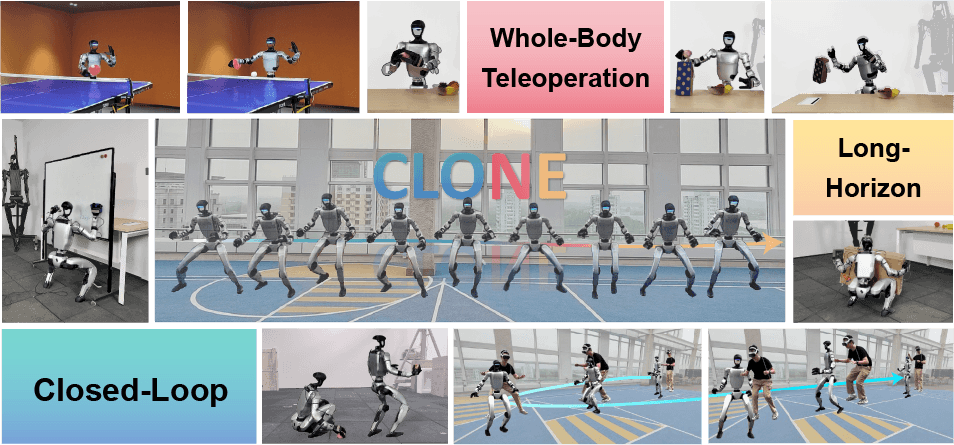
The humanoid-clone/CLONE repository describes CLONE as a whole-body teleoperation system based on a Mixture-of-Experts policy and closed-loop error correction. The project page breaks the approach into three pieces: curate and augment retargeted AMASS data, train a teacher policy with privileged information, distill it into an MoE student policy, then deploy on real hardware with LiDAR odometry for real-time humanoid state feedback. The CLONE arXiv paper makes the same point: the deployed interface only needs head tracking and hand tracking from a commercial mixed-reality headset, Apple Vision Pro in the release code, while the closed-loop system maintains whole-body coordination and reduces accumulated drift.
If you are new to this area, read the WholeBodyVLA open-source guide first for the basic vocabulary around policies, teleoperation, retargeting, and whole-body control. If your main interest is camera-based robot behavior and sim2real, GR00T VisualSim2Real on G1 gives useful context before comparing CLONE with VIRAL.
If you only want a simulator demo, CLONE is not the lightest option in this series. Its value appears when the goal is long-horizon data collection on a real G1: walking, squatting, picking up objects from the ground, carrying them across a room, placing them in a bin, wiping a table, or any task where the robot must remain spatially aligned with the operator. Open-loop teleoperation can look good in short clips, but after several meters the robot frame and the operator frame can diverge. Once that error becomes large, the operator believes the robot hand is in one place while the base has drifted somewhere else. CLONE closes the loop with LiDAR odometry and Apple Vision Pro poses so the system can keep correcting that error.
Technical references to keep open
| Source | Why it matters | Detail to remember |
|---|---|---|
| CLONE README | Repository overview, license, checkpoint and deploy status | The repo has released an early checkpoint and deployment document |
| deploy/README.md | Bare-metal setup on the server PC and G1 PC2 | Reference hardware is Unitree G1 EDU 29-DoF, Apple Vision Pro, router, and a Linux PC |
| deploy/Docker_README.md | Faster installation with Docker Compose | There is one container path for the G1 side and one for the server PC |
| CLONE project page | MoE, LiDAR odometry, AVP tracking, and data curation | The MoE student policy is distilled from a teacher trained with privileged information |
| CLONE paper | Scientific motivation and real-world results | The paper reports 12 cm translational drift over 8.9 m and a 5.1 cm mean tracking error |
| FAST_LIO_LOCALIZATION | ROS1 localization package deployed on G1 PC2 | CLONE uses LiDAR odometry to feed the robot's pose back into the policy loop |
| VisionProTeleop | AVP stream backend acknowledged and integrated through VisionWrapper | Provides head and hand poses from Apple Vision Pro |
Mental model: four loops running together
Beginners should read CLONE as four services running at the same time, not as one magic script:
Apple Vision Pro
  head pose + left/right hand pose
        |
        v
deploy/g1_server.py
  VisionWrapper + MoE policy + ROS2 LowCmd publisher
        |
        v
lowcmd_buffer topic at ~50 Hz
        |
        v
deploy/lowcmd_publisher.py
  relay to lowcmd topic at 1 kHz with CRC
        |
        v
Unitree G1 motors

G1 PC2 LiDAR odometry
  FAST_LIO_LOCALIZATION + Livox driver
        |
        v
deploy/g1_localization/pos_server.py
  ROS1 /localization -> ZeroMQ PUB
        |
        v
deploy/g1_localization/pos_client.py inside localization.py
  smoothed global pose -> shared memory -> g1_server.py
The easy mistake is assuming g1_server.py sends final motor commands directly. In the released code, it publishes LowCmd messages to lowcmd_buffer at a policy/control frequency around 50 Hz. deploy/lowcmd_publisher.py subscribes to lowcmd_buffer, keeps the latest command, computes CRC through teleop.crc.CRC, then publishes to the lowcmd topic at HZ = 1000. That relay layer matters because Unitree low-level control expects a stable command stream that is more regular than policy inference.
Another important detail is the checkpoint path. deploy/g1_server.py defines:
POLICY_PATH = 'models/g1_student_moel.pt'
Because the script is normally run from the deploy directory or inside the deployment container, this maps to deploy/models/g1_student_moel.pt. That file is the early G1 student checkpoint used for deployment. This tutorial does not retrain CLONE. It uses the released checkpoint and focuses on the deployment architecture around it.
Minimum hardware
The official deploy/README.md and deploy/Docker_README.md reference the following setup:
| Component | Role | Practical note |
|---|---|---|
| Unitree G1 EDU 29-DoF | Real robot receiving low-level commands | Start in Debug Mode and keep the first runs in a clear, controlled space |
| Apple Vision Pro | Tracks 3D head pose and 6D hand poses | Must be on the same network as the server PC; use App Streamer or avp_stream/vuer |
| Router | Stable local network | Connect G1 and server PC over Ethernet; use Wi-Fi for AVP |
| Linux server PC | Runs policy server, ROS2/Unitree SDK, and VisionWrapper | CUDA is useful for latency, although the code can fall back to CPU |
| G1 PC2 | Runs ROS1 LiDAR odometry | The instructions copy deploy/onboard to PC2 |
| Livox/MID360 LiDAR stack | Relative/global odometry | localization_server.sh launches FAST-LIO localization and Livox driver |
If you do not have a real G1, do not treat this as a normal laptop demo. You can still study the code to learn how closed-loop teleoperation is structured, but CLONE's main value is in the real hardware integration: MR headset input, LiDAR odometry, policy inference, ROS topics, and low-level command relay.
Docker deployment path
The Docker path is the easier starting point because the README separates the G1-side environment from the server-side environment. First install Docker V2 and Docker Compose V2 on both machines. Then copy the on_g1 folder to the G1 PC, build the image, bring up the container, enter it, and start localization.
# On the G1 PC
cd on_g1
docker compose build
docker compose up -d

docker exec -it on-g1 bash
cd deploy_onboard
bash localization_server.sh
The deploy/onboard/localization_server.sh script performs three jobs:
cd nav/rosws/fastlio_localization
source devel/setup.bash
roslaunch fast_lio_localization localization_mid360.launch &

cd ../livox_ros_driver2
source devel/setup.bash
roslaunch livox_ros_driver2 msg_MID360.launch &

cd ~/teleoperation
python pos_server.py &
In plain terms, FAST-LIO localization produces odometry, the Livox driver feeds MID360 data into ROS1, and pos_server.py reads /localization and publishes position/quaternion messages over ZeroMQ. In deploy/g1_localization/pos_server.py, the node subscribes to nav_msgs/Odometry, extracts pose.pose.position and pose.pose.orientation, then publishes (position, quat) on port 6006. That is the bridge from onboard ROS1 localization to the external policy server.
On the server PC, build and start the deployment container from the deploy directory. The README uses xhost +local:docker, which is useful when the MuJoCo viewer needs display access.
# On the server PC
xhost +local:docker
cd deploy
docker compose build
docker compose up -d
Keep the first terminal running the 1 kHz relay:
docker exec -it clone_unitree_server bash
python3 deploy/lowcmd_publisher.py
Then run the policy server from a second terminal:
docker exec -it clone_unitree_server bash
python3 deploy/g1_server.py
Before starting g1_server.py, set the correct Apple Vision Pro IPv4 address in config.py. The repository default is:
VISION_WRAPPER_BACKEND = 'avp_stream'
VISION_PRO_IP = '192.168.123.8'
VISION_PRO_DELTA_H = -0.54
USE_DEX_HANDS = True
You can find the AVP address in Wi-Fi settings or in the App Streamer screen before pressing Start. Wrong AVP IP is one of the most common causes of a policy server that starts but does not receive meaningful target poses.
Bare-metal deployment path
Without Docker, deploy/README.md asks you to prepare ROS 2 on the server PC, install the Unitree ROS 2 SDK, clone the CLONE repository, and install Python dependencies with pip install -r requirements.txt. On G1 PC2, install the Livox drivers for ROS1 following FAST_LIO, install FAST_LIO_LOCALIZATION, then copy deploy/onboard to PC2. The README also notes that if files such as localization_mid360.launch or mid360.yaml are missing, check deploy/onboard/launch and deploy/onboard/misc.
The runtime sequence mirrors the Docker path:
# G1 PC2
cd <copied_onboard_directory>
bash localization_server.sh
# Apple Vision Pro
# Start the Tracking Streamer if using avp_stream
# Server PC, terminal 1
python deploy/lowcmd_publisher.py
# Server PC, terminal 2
python deploy/g1_server.py
Once the robot is in Debug Mode, align the human and humanoid frames with R1/R2 on the remote. In g1_server.py, the low-level state callback parses wireless remote data. R1 resets the Vision Pro frame, R2 resets localization, L1 starts the policy, and L2 stops it. This is not a minor UI detail. On real hardware, the first-run order should be: check the physical E-stop, clear the area, start odometry, start the relay, start the policy server, align frames with R1/R2, then press L1 only when the robot pose is reasonable.
What problem does the MoE policy solve?
A single monolithic MLP policy has a hard time learning walking, turning, reaching, squatting, picking up objects from the ground, and tabletop manipulation under one behavior distribution. These behaviors have different contact patterns and priorities. Walking needs stable leg rhythm. Squatting needs center-of-mass control. Wrist tracking needs upper-body precision. Turning needs coordinated yaw from the base, waist, and feet. If everything is compressed into one small policy, the result often averages across behaviors: stable enough for standing or gentle walking, but weak once the operator makes a motion outside the common part of the distribution.
CLONE uses a Mixture-of-Experts architecture so one deployed policy can still contain specialized pathways. According to the paper, a teacher policy is trained with privileged information, then a student MoE policy is distilled to operate using real-world observations. The control interface is sparse: 3D head position and 6D poses for both wrists from Apple Vision Pro. The task observation also includes target positions and velocities, wrist orientations, and robot state-derived quantities. The result is a system that does not require a full motion-capture room, body markers, or an exoskeleton; the policy learns to map sparse human control signals into coordinated full-body robot motion.
In g1_server.py, class G1 declares num_actions = 29, matching the 29 commanded DoFs of the G1 EDU. The file also defines PD gains, soft joint limits, torque limits, default joint pose, and observation history. The policy is loaded through:
POLICY_PATH = 'models/g1_student_moel.pt'
self.policy = torch.jit.load(os.path.join(file_pth, POLICY_PATH), map_location=self.env.device)
The deploy lesson is that "load a checkpoint" is only the small visible part. Before the policy, there is observation preprocessing, history buffering, quaternion transformation, AVP/localization calibration, and forward kinematics for body positions. After the policy, there are joint limits, PD command construction, CRC, and the 1 kHz relay. If you replace the checkpoint, the observation and action contract must stay compatible, otherwise the failure mode may be a robot that moves but tracks the wrong posture.
How closed-loop error correction works
CLONE closes the loop by feeding the robot's real localization back into the policy observation. On G1 PC2, pos_server.py reads /localization from FAST-LIO and sends it over ZeroMQ. On the server PC, deploy/g1_localization/pos_client.py connects to tcp://<server_ip>:6006, receives pickled messages, keeps a moving average over 10 samples (ma_len = 10), then updates position and quat. In deploy/localization.py, start_service() runs Position_Client in a separate thread, maps shared memory between the localization process and g1_server.py, flips selected axes (position_factor[2] *= -1, position_factor[1] *= -1) to match frames, and uses compute_fk_body_pos() to build extended body positions.
Read the loop like this:
LiDAR odometry says:
  base/head frame is now at global pose L_t

Apple Vision Pro says:
  operator head and hands are at pose V_t

g1_server.py maintains:
  loc_offset, obs_quat, loc_delta_rot, body_pos_extend

Policy observation includes:
  current robot state + corrected global pose + target head/wrist pose

Policy output:
  29 joint position targets
When the operator presses R2, reset_localization() updates loc_offset so the real robot position realigns with the current head target and ground height. It also computes a heading delta between the current robot quaternion and the head quaternion, then writes it into loc_delta_rot. When the operator presses R1, reset_vision_pro() aligns yaw between the AVP frame and the robot frame. This is why CLONE is more than "read LiDAR and run a policy"; LiDAR odometry is part of the deployed feedback loop that prevents unbounded pose drift over longer walks.
The paper reports that the closed-loop correction using LiDAR odometry and AVP tracking reduces translational drift to 12 cm over an 8.9 m trajectory, while the arXiv HTML notes a 5.1 cm mean tracking error in real-world experiments. Those numbers are not a guarantee for your lab. Network latency, LiDAR calibration, floor material, firmware, and operator motion can all change the result. But they show the design principle: long-horizon humanoid teleoperation needs real pose feedback, not just relative operator replay.
Where arm IK and dexterous hands fit
The deploy tree also contains arm control. deploy/teleop/robot_control/robot_arm_ik.py defines G1_29_ArmIK, using Pinocchio, CasADi, and IPOPT to solve inverse kinematics for two end-effectors: L_ee and R_ee. The code builds a reduced robot from g1_body29_hand14.urdf, locks the legs, waist, and hand joints, adds frames at left_wrist_yaw_joint and right_wrist_yaw_joint, and optimizes:
minimize
  50 * translational_cost
  + 1 * rotation_cost
  + 0.02 * regularization_cost
  + 0.1 * smooth_cost

subject to
  lowerPositionLimit <= q <= upperPositionLimit
solve_ik() returns sol_q and feedforward torque from Recursive Newton-Euler through pin.rnea. If the solver fails, the code falls back to the current joint configuration and zero feedforward. That fallback is preferable to publishing a noisy IK solution. The beginner takeaway is simple: wrist poses from AVP should not be mapped to arm joints with ad hoc trigonometry. CLONE uses constrained IK, smoothing, and fallback logic to make upper-body teleoperation more robust.
If USE_DEX_HANDS = True, g1_server.py also launches a dexterous hand server via shared memory. This depends on the exact hands installed on your G1 EDU. If your lab does not have dex hands or you only need locomotion and coarse upper-body tracking for the first run, inspect the config before enabling the real policy.
First-session safety checklist
1. Connect G1 and the server PC to the same router with Ethernet.
2. Connect Apple Vision Pro to the same router over Wi-Fi.
3. Confirm the IP addresses of G1 PC2, the server PC, and Apple Vision Pro.
4. On G1 PC2, run localization_server.sh and verify /localization is publishing.
5. On the server PC, set VISION_PRO_IP in config.py.
6. Run lowcmd_publisher.py and look for the "Initialized" log.
7. Run g1_server.py and confirm g1_student_moel.pt loads.
8. Put the robot in Debug Mode and keep a person ready with stop control.
9. Align frames with R1/R2; press them multiple times if needed.
10. Press L1 to start the policy, and L2 immediately if the pose looks wrong.
Common failure modes:
| Symptom | Likely cause | What to check |
|---|---|---|
g1_server.py starts but does not receive AVP pose |
Wrong VISION_PRO_IP or AVP stream not started |
Ping AVP, check App Streamer, check VISION_WRAPPER_BACKEND |
| Policy runs but robot receives no command | lowcmd_publisher.py is not running or ROS2 topics are wrong |
Echo lowcmd_buffer and lowcmd, check Unitree ROS2 SDK |
| Global pose jumps or drifts badly | FAST-LIO/localization is unstable, frame axes are wrong, or network jitter is high | Inspect /localization, MID360 launch files, timestamps |
| R1/R2 appear to do nothing | Remote data is not parsed or lowstate callback is not running | Check the lowstate topic and wireless remote bits |
| Arms shake while following wrists | IK target is unreachable, AVP pose is noisy, or hand calibration is off | Reduce range, inspect robot_arm_ik.py, disable dex hands to isolate |
Who should use CLONE?
CLONE is a good fit when you have a real G1, want long-horizon whole-body teleoperation, and can operate several services at once. It is not a one-click ROS demo for a first week robotics student. But it gives beginners a strong architecture to copy: separate localization, headset streaming, policy inference, low-level relay, and safety controls into modules with clear boundaries.
For data collection teams, CLONE is attractive because the operator only needs Apple Vision Pro instead of a motion-capture room. For VLA teams, it can generate longer demonstrations: walk to the object, squat, pick it up, turn, carry it, place it in a bin, while global pose is corrected. For sim2real locomotion teams, the useful lessons are in history buffers, PD gains, joint limit handling, and the 1 kHz relay needed to keep a learned policy alive on hardware.
Stack choice after six articles
| Lab need | Stack to choose | Why |
|---|---|---|
| No real G1 yet, want to learn whole-body teleop in simulation | OpenWBT | Easy to debug, lower hardware risk, useful for MuJoCo/Isaac and action-space understanding |
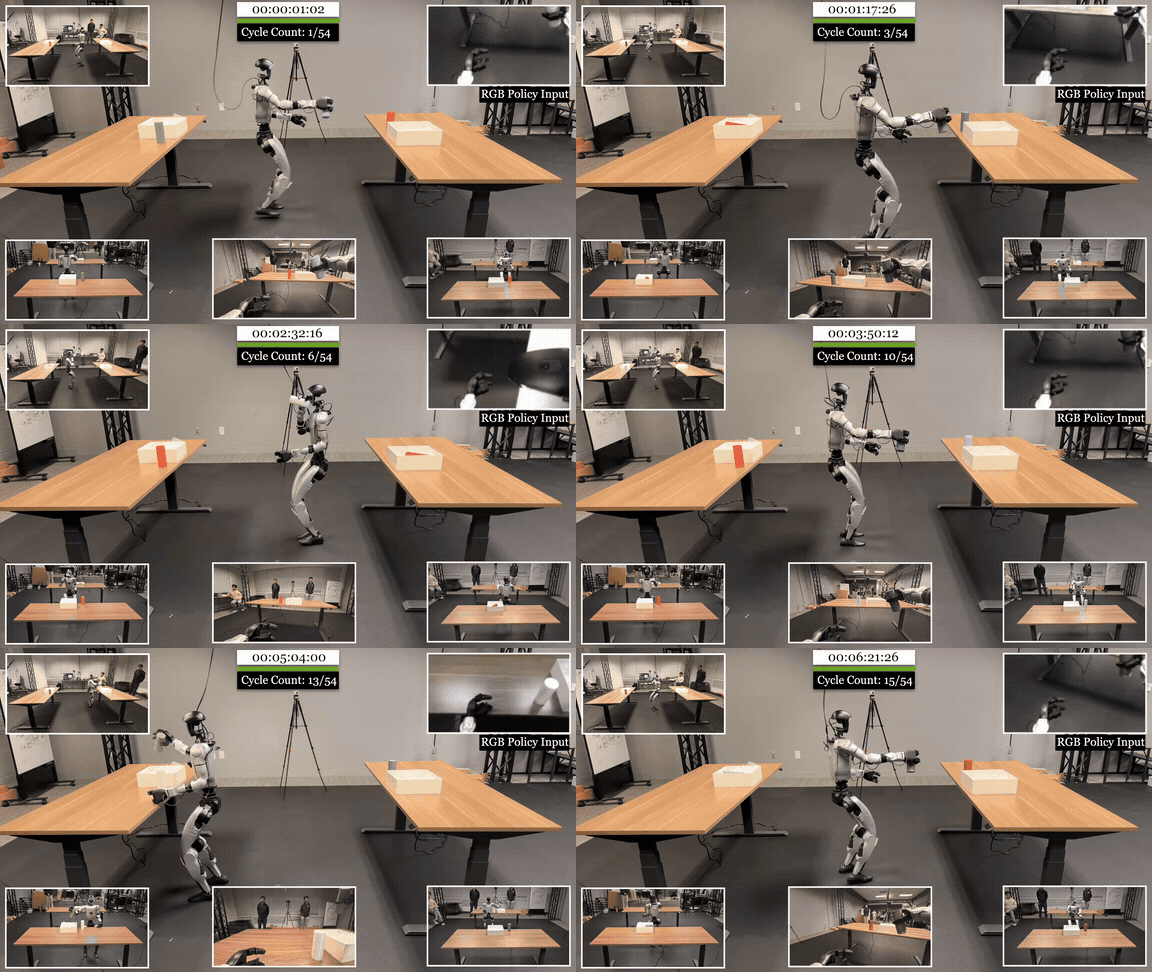
| Have a G1 and want pragmatic teleop/data collection with a PICO headset | TWIST2 | Focuses on robot-side data collection, Redis/low-level control, and sim2real |
| Have many egocentric human demos and want to transfer them to a robot policy | EgoHumanoid | Strong fit for human-to-humanoid view/action alignment |
| Need RGB sim2real for loco-manipulation | VIRAL | Choose it when camera observation is central and you need to distill a privileged teacher into an RGB student |
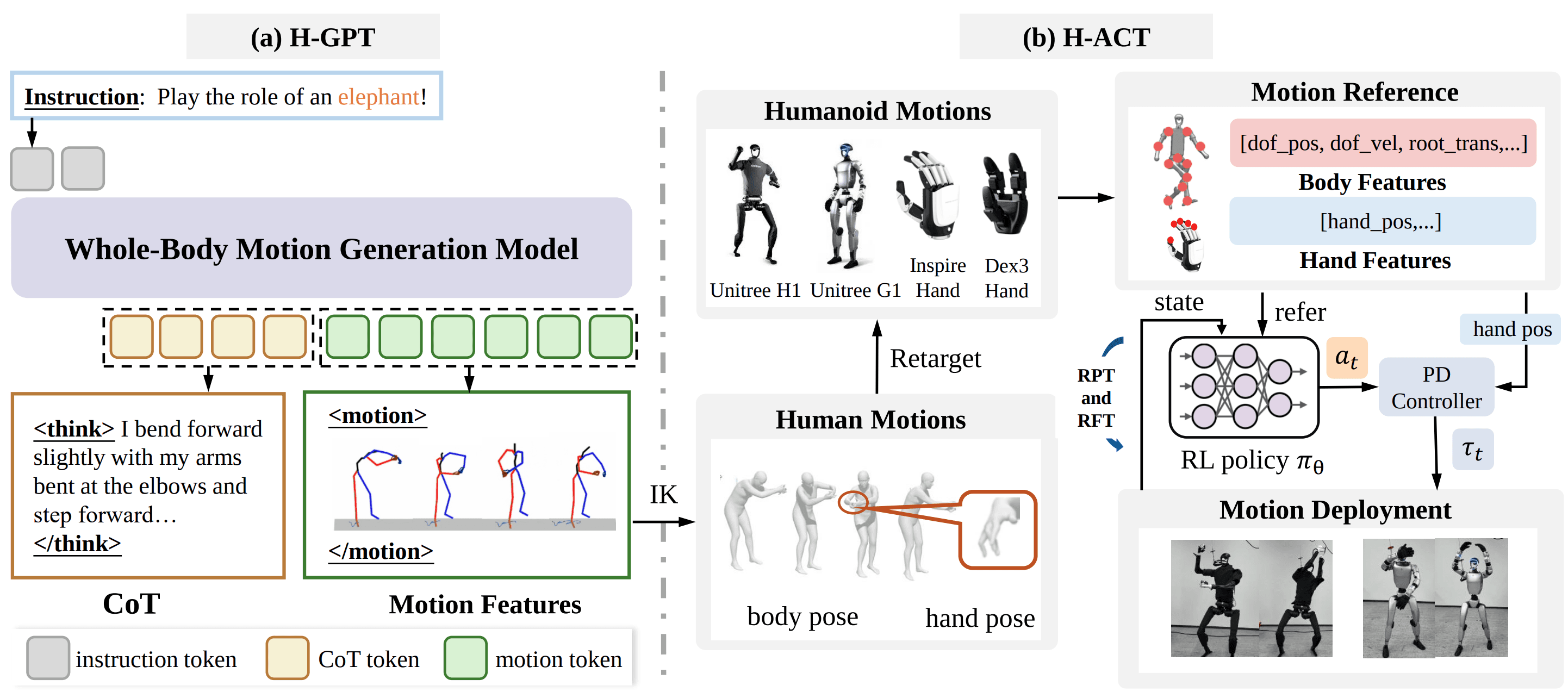
| Need text-to-motion, natural-language prompts, or motion generation before tracking | FRoM-W1 | Fits the H-GPT -> H-ACT -> G1 policy pipeline |
| Have real G1, Apple Vision Pro, LiDAR odometry, and need long-horizon teleop/data collection | CLONE | MoE teleop plus closed-loop correction targets drift in long tasks |
A faster decision table:
| Condition | Avoid as the first choice | Prefer |
|---|---|---|
| Low hardware budget, no real humanoid | Full CLONE or real TWIST2 deployment | OpenWBT, FRoM-W1 generation stage |
| Real G1 but no Apple Vision Pro | Full CLONE | TWIST2 or OpenWBT depending on available controller |
| Need RGB sim2real | FRoM-W1, CLONE | VIRAL |
| Need text-to-motion | VIRAL, CLONE | FRoM-W1 |
| Need long demonstrations over several meters | Simple open-loop teleop | CLONE |
| Need dataset learning from egocentric human video | CLONE is not the main target | EgoHumanoid |
| Need a control baseline to understand G1 action space | Heavy paper stacks first | OpenWBT first, then TWIST2 or CLONE |
For a new lab, the learning order I would use is: start with OpenWBT to understand the control loop, read TWIST2 to see how real robot wiring changes the problem, read EgoHumanoid and VIRAL to understand data and pixel policies, read FRoM-W1 to add language-to-motion, then use CLONE once the hardware is ready and long-horizon teleoperation matters.
Series conclusion
The six articles are not six competing answers to one question. They are six answers to six different humanoid VLA questions in 2026:
OpenWBT: how do we build debuggable whole-body teleop?
TWIST2: how do we bring teleop onto a real G1?
EgoHumanoid: how do we use human demonstrations?
VIRAL: how do we train RGB policies and cross sim2real?
FRoM-W1: how do we turn text into motion and robot tracking?
CLONE: how do we teleoperate whole-body tasks for a long time without drift?
CLONE is the final piece because it reminds us that humanoid VLA is not only about larger models. On real robots, a good policy still needs reliable localization, frame calibration, regular low-level command streaming, clear stop controls, and an operator interface that is intuitive enough for data collection. The MoE policy helps coordinate legs, torso, and arms. Closed-loop error correction keeps the operator from losing the robot after several meters. Apple Vision Pro reduces the need for a motion-capture room. That is the most practical direction when the goal is long-horizon loco-manipulation data for the next generation of humanoid foundation models.