GR00T N1 + G1 (Post 3): fine-tuning GR00T N1 — GPU, config, training script
This is post 3 of the GR00T N1 + Unitree G1 series. The previous post produced a LeRobot dataset. This post: running fine-tune on GR00T N1 2B params with that dataset.
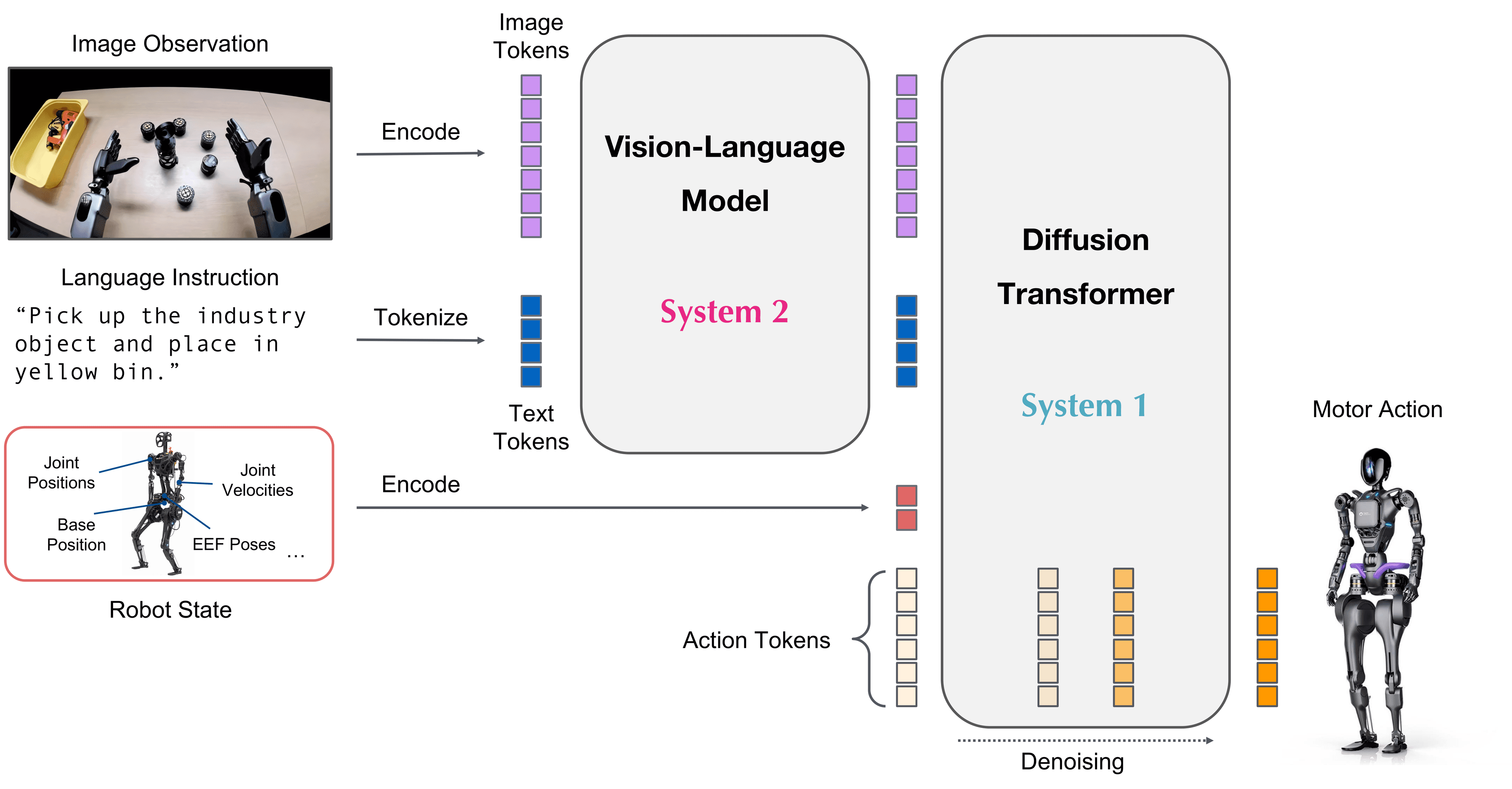
GR00T N1 is a pretrained foundation model — it already knows many general tasks. Fine-tuning only teaches it your specific task on your specific robot. With 50-100 demos, training typically takes 2-4 hours on an RTX 4090.
GPU requirements in practice
| Setup | VRAM | Batch size | Training time (50 demos) |
|---|---|---|---|
| RTX 4090 | 24GB | 8 | ~3 hours |
| A100 40GB | 40GB | 16 | ~1.5 hours |
| A100 80GB | 80GB | 32 | ~45 minutes |
| 2× RTX 4090 | 48GB | 16 | ~1.5 hours (DDP) |
Minimum: RTX 4090 (24GB). Below 24GB VRAM will OOM with default config. You can use gradient checkpointing to reduce VRAM but training will be ~40% slower.
Training environment setup
git clone https://github.com/NVIDIA/Isaac-GR00T.git
cd Isaac-GR00T

# Create conda environment
conda create -n groot python=3.10
conda activate groot

# Install dependencies
pip install -e ".[train]"

# Verify CUDA + torch
python -c "import torch; print(torch.cuda.get_device_name(0)); print(torch.version.cuda)"

# Download GR00T N1 pretrained checkpoint
python scripts/download_model.py --model GR00T-N1-2B
# checkpoint will be at: ./checkpoints/GR00T-N1-2B/
Config file
GR00T uses YAML config. Create a config file for your task:
# configs/finetune_g1_pickplace.yaml

# Model
model:
  name: "GR00T-N1-2B"
  checkpoint_path: "./checkpoints/GR00T-N1-2B"
  freeze_vision_encoder: false    # true for faster training, false for better accuracy
  freeze_language_model: true     # ALWAYS freeze LM to save VRAM

# Dataset
dataset:
  path: "./data/g1_pickplace_lerobot"
  robot: "g1"
  cameras:
    - "observation.images.left_wrist"
    - "observation.images.right_wrist"
    - "observation.images.head"      # omit if no head camera
  action_keys:
    - "action/left_ee_pose"     # 7-dim: xyz + quat
    - "action/right_ee_pose"    # 7-dim
    - "action/gripper"          # 2-dim: left, right

  # Train/val split
  train_split: 0.9
  val_split: 0.1

# Training hyperparams
training:
  batch_size: 8                 # reduce to 4 if OOM
  learning_rate: 1.0e-4
  lr_scheduler: "cosine"
  warmup_steps: 100
  num_epochs: 100
  gradient_clip: 1.0

  # Gradient checkpointing — enable if VRAM < 24GB
  gradient_checkpointing: false

  # Mixed precision
  bf16: true                    # A100 uses bf16; RTX 4090 uses fp16
  fp16: false

# Action head — flow matching
action_head:
  num_timesteps: 100           # denoising steps (10 for fast inference)
  action_chunk_size: 16        # predict 16 steps ahead

# Logging
output_dir: "./runs/g1_pickplace"
log_every: 10                  # log loss every 10 steps
eval_every: 500                # evaluate on val set every 500 steps
save_every: 500                # save checkpoint every 500 steps
Running training
# Single GPU
python scripts/finetune.py \
  --config configs/finetune_g1_pickplace.yaml

# Multi-GPU (2× RTX 4090)
torchrun --nproc_per_node=2 scripts/finetune.py \
  --config configs/finetune_g1_pickplace.yaml

# View training logs
tensorboard --logdir ./runs/g1_pickplace/tensorboard
Terminal output:
Epoch 1/100 | Step 50/500 | Loss: 0.342 | Action loss: 0.298 | LR: 8.3e-5
Epoch 1/100 | Step 100/500 | Loss: 0.241 | Action loss: 0.198 | LR: 1.0e-4
...
[Eval] Step 500 | Val loss: 0.187 | Saved checkpoint: ./runs/g1_pickplace/checkpoint_500/
Monitoring training — when to stop?
Normal loss curve:
Train loss:   0.35 → 0.20 → 0.12 → 0.09 → 0.07 (steady decrease)
Val loss:     0.33 → 0.19 → 0.13 → 0.10 → 0.08 (tracks train closely)
Overfitting signs — stop early:
Train loss:   0.35 → 0.15 → 0.08 → 0.04 → 0.02 (drops very fast)
Val loss:     0.33 → 0.18 → 0.16 → 0.18 → 0.22 (starts going back up)
When val loss increases for 3 consecutive eval steps → use the previous checkpoint (early stopping).
Adapting config for other robots
Change robot: "g1" and action_keys to match your robot:
# Example for GR1 (Fourier Intelligence)
dataset:
  robot: "gr1"
  cameras:
    - "observation.images.left_wrist"
    - "observation.images.right_wrist"
  action_keys:
    - "action/left_ee_pose"
    - "action/right_ee_pose"
    - "action/gripper"

# Example for single robot arm (not a humanoid)
dataset:
  robot: "franka"
  cameras:
    - "observation.images.wrist"
    - "observation.images.overhead"
  action_keys:
    - "action/ee_pose"     # 7-dim
    - "action/gripper"     # 1-dim
GR00T N1 supports variable action dimensions — just declare the correct action_keys.
Evaluating checkpoint in sim
Before deploying to a real robot, always evaluate in sim:
# Rollout checkpoint in Isaac Lab
python scripts/evaluate_checkpoint.py \
  --checkpoint ./runs/g1_pickplace/checkpoint_best/ \
  --robot g1 \
  --task PickPlace \
  --num_episodes 20 \
  --render         # show Isaac Sim GUI

# Output:
# Episode 0: SUCCESS (12.3s)
# Episode 1: SUCCESS (11.8s)
# Episode 2: FAIL — gripper missed object at step 45
# ...
# Success rate: 17/20 = 85%
Threshold before real robot deploy: ≥ 80% success rate in sim for simple tasks (pick-place). Complex tasks can be lower but must show an improving trend.
Common troubleshooting
OOM (Out of Memory):
# Reduce batch size
training:
  batch_size: 4   # from 8 down to 4

# Or enable gradient checkpointing
  gradient_checkpointing: true

# Or freeze vision encoder
model:
  freeze_vision_encoder: true
Loss not decreasing after 20 epochs:
# Try increasing learning rate
training:
  learning_rate: 3.0e-4   # from 1e-4 to 3e-4

# Or unfreeze vision encoder
model:
  freeze_vision_encoder: false
Good val loss but poor sim performance: → Dataset quality issue. Review demos: are there failed demos in the dataset? Is object position varied enough? Is camera calibration correct?
checkpoint_best vs checkpoint_last
The script automatically saves checkpoint_best (lowest val loss) and checkpoint_last (final epoch).
ls ./runs/g1_pickplace/
# checkpoint_500/   checkpoint_1000/  checkpoint_best/  checkpoint_last/

# Always use checkpoint_best for deploy
python scripts/evaluate_checkpoint.py \
  --checkpoint ./runs/g1_pickplace/checkpoint_best/
Always use checkpoint_best — not checkpoint_last. More training epochs don't always mean better.
Next: Deploy GR00T-WBC on real G1 — GEAR + SONIC.