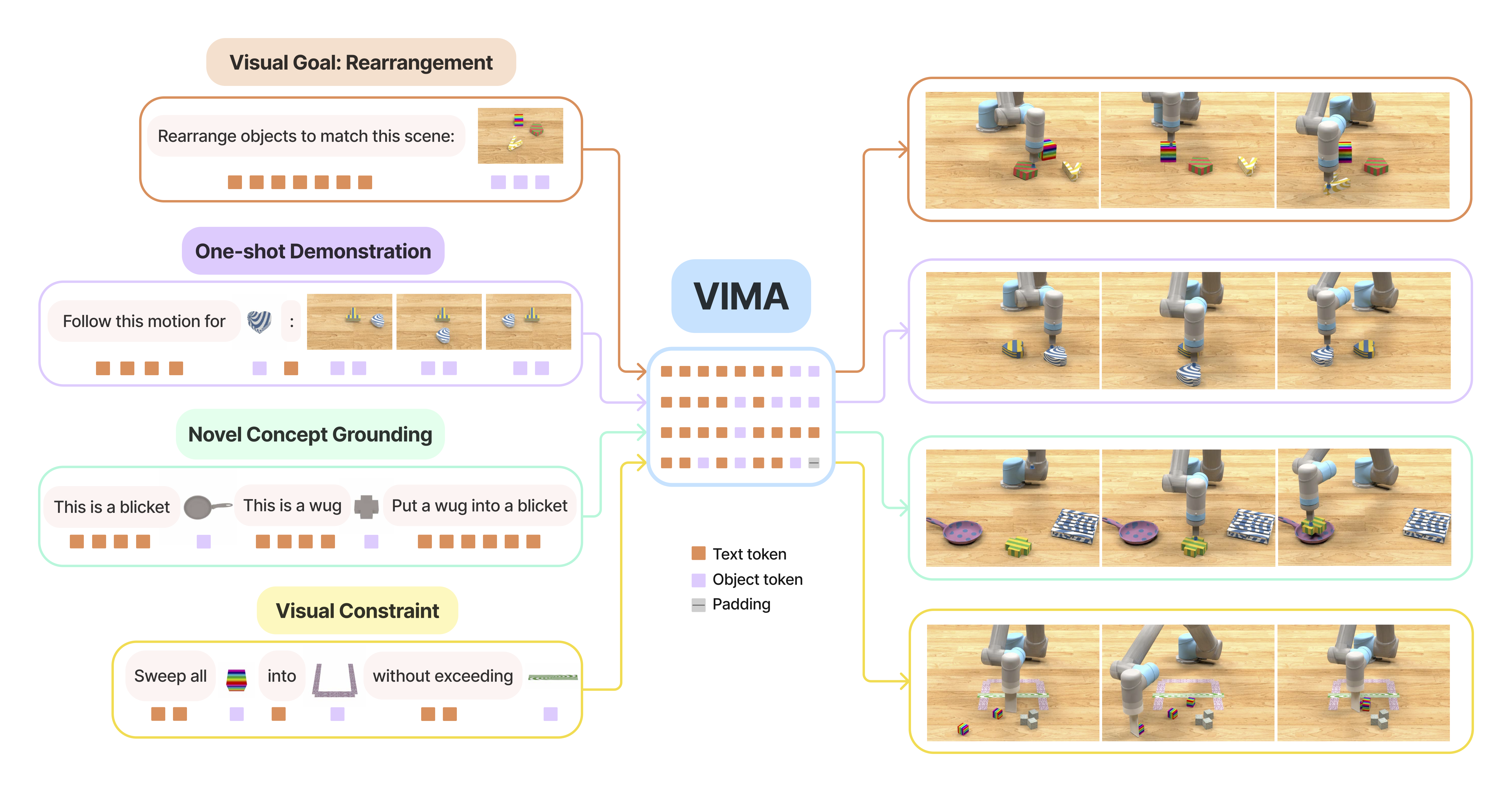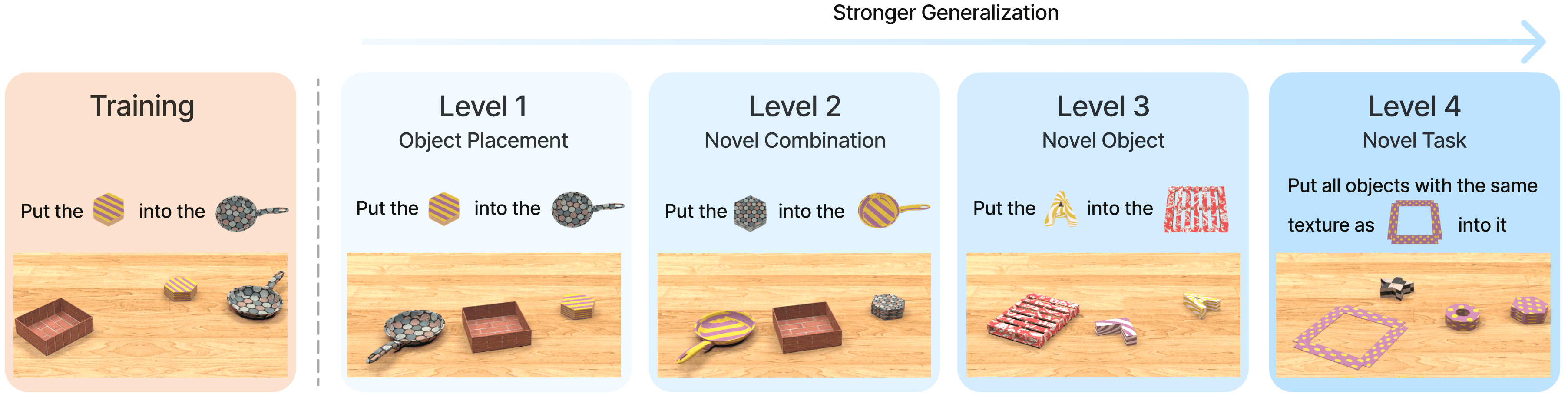
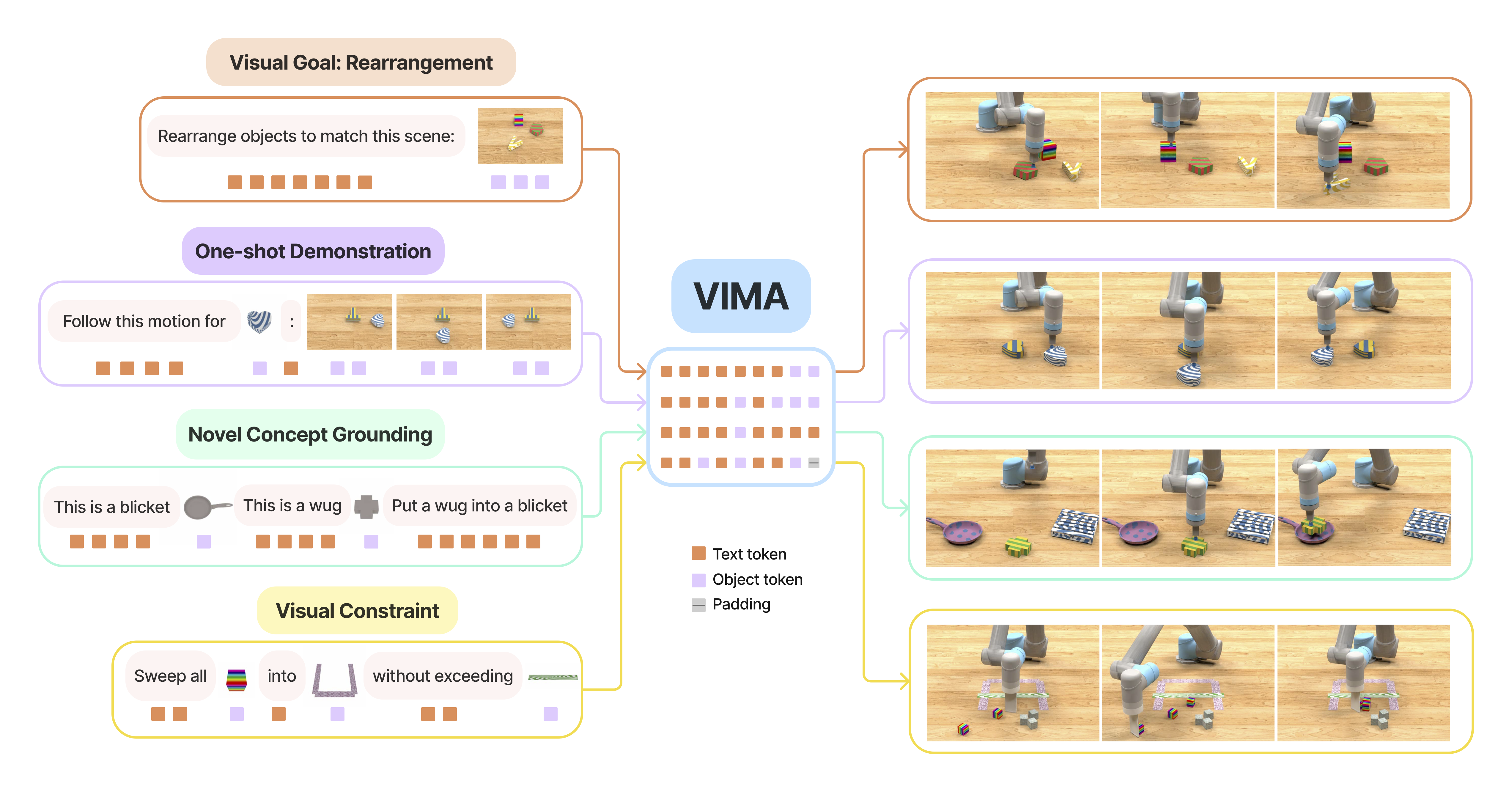
In part 1 on VIMA's cross-attention architecture, we saw that VIMA does not control a robot from plain text alone. A VIMA prompt can interleave words, object images, full-scene images, or multiple frames from a demonstration video. In part 2 on VimaBench, we also saw that the 17 benchmark tasks differ not only in language, but also in how visual information appears in the prompt: some tasks say "put this object into that object", some ask the robot to imitate a video, and some specify visual constraints to avoid.
Part 3 goes into the layer that is easy to skip but critical to the whole system: the object tokenizer. If the T5 encoder is the module that "reads" the prompt, the object tokenizer is the module that turns images into readable units. VIMA does not feed the whole RGB image into the transformer as a large grid of raw image patches. Instead, it parses the image into objects, then turns each object into a token carrying both appearance and position.
The short version is:
RGB image, front/top views
        |
        v
Mask R-CNN / ground-truth detector
        |
        +--> object mask
        +--> bounding box: top, left, bottom, right
        +--> cropped object image
        |
        v
ViT encodes crop + MLP encodes bbox
        |
        v
object token sequence
        |
        v
interleaved with T5 word tokens in multimodal prompt
        |
        v
T5 prompt encoder -> XAttn GPT controller
One note before reading the code: the VIMA paper describes full-scene image processing with a domain-finetuned Mask R-CNN. In the current public repository, the often-mentioned vima/utils/object_utils.py path is no longer present on main; checking that URL returns 404. The model code that is publicly exposed lives in vima/nn/obj_encoder/, vima/nn/prompt_encoder/, and vima/policy/vima_policy.py. So this article separates two layers: the detect/crop layer described in the paper, and the object-token encoding layer implemented in the public code.
Series Roadmap
This is post 3 of 5 in the VIMA: Multimodal Prompts for Robot Manipulation series:
| Post | Topic |
|---|---|
| Post 1: Cross-Attention Architecture | XAttn GPT + T5 encoder, and why cross-attention matters |
| Post 2: VimaBench 17 Tasks | 17 tasks, 4 generalization levels, and benchmark demos |
| Post 3 (you are here) | Object tokenizer: from raw pixels to object tokens |
| Post 4: Dataset 650K | Large-scale imitation data collection |
| Post 5: Humanoid Adaptation | Scaling VIMA toward humanoids and high-DoF hands |
Why Not Use Raw Image Patches?
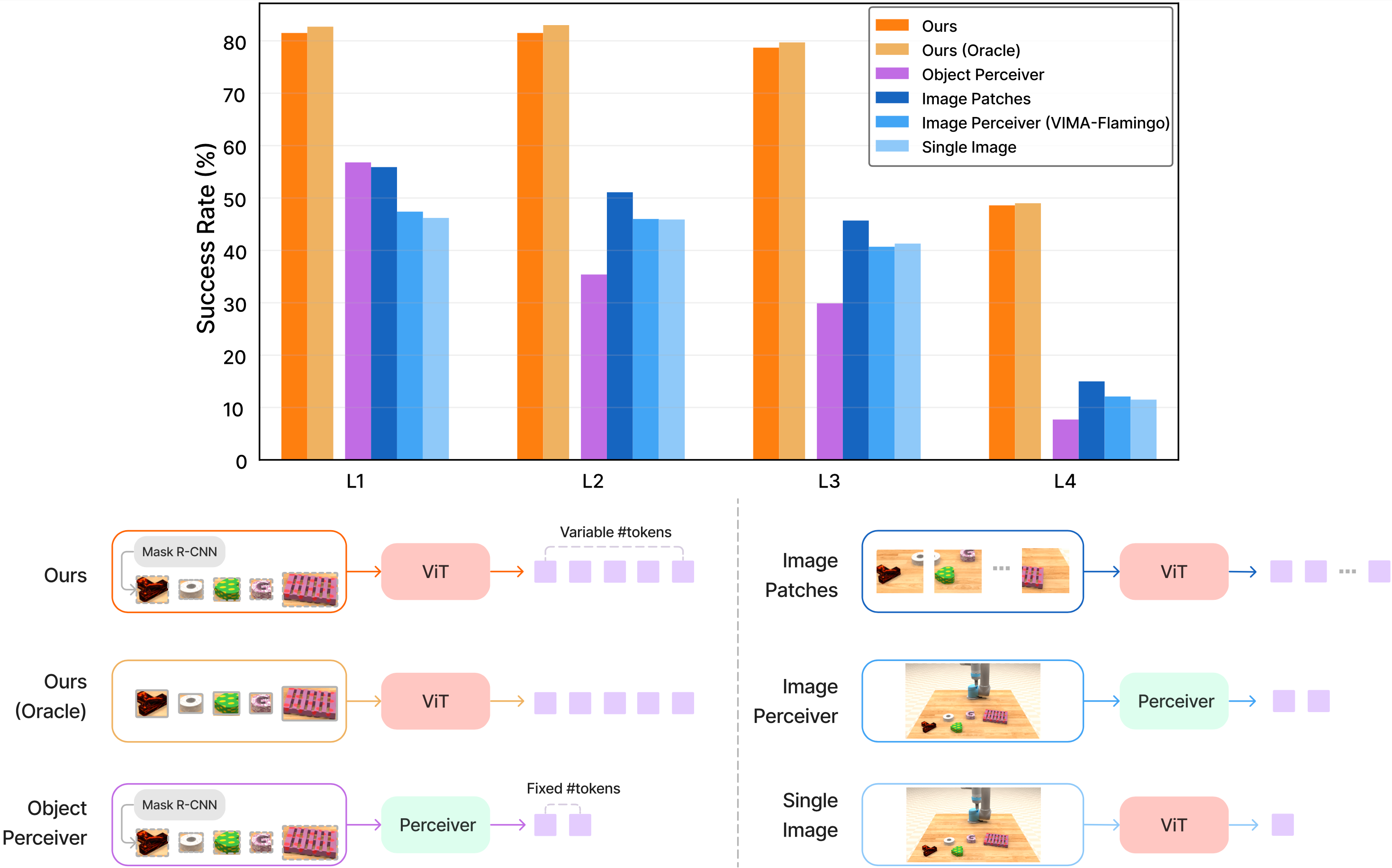
The natural approach for a vision transformer is to split the image into regular patches. For example, a 256 x 128 image with 16 x 16 patches creates 128 patch tokens for one view. With front and top cameras, that doubles. With video frames in the prompt, the token count grows quickly. In tabletop manipulation, many of those patches are not task-relevant: blank table, background, shadows, or object edges that carry little semantic meaning.
VIMA chooses a different direction: object-centric representation. Instead of asking the transformer to discover objects from hundreds of patches, the tokenizer tells the model: "this is an object, here is its crop, and here is its bounding box in the front or top view." That design has three practical benefits.
First, the sequence is shorter. A robot does not need to reason over every pixel when the task only involves 3 to 8 objects on a tabletop. The length of the object-token sequence is closer to the number of objects, not the area of the image.
Second, the inductive bias matches manipulation. Robot actions are usually object-bound: pick object A, place it into container B, avoid zone C. When a token is already an object, attention can learn relations such as "the red object left of the bowl" more directly than when object and background patches are mixed together.
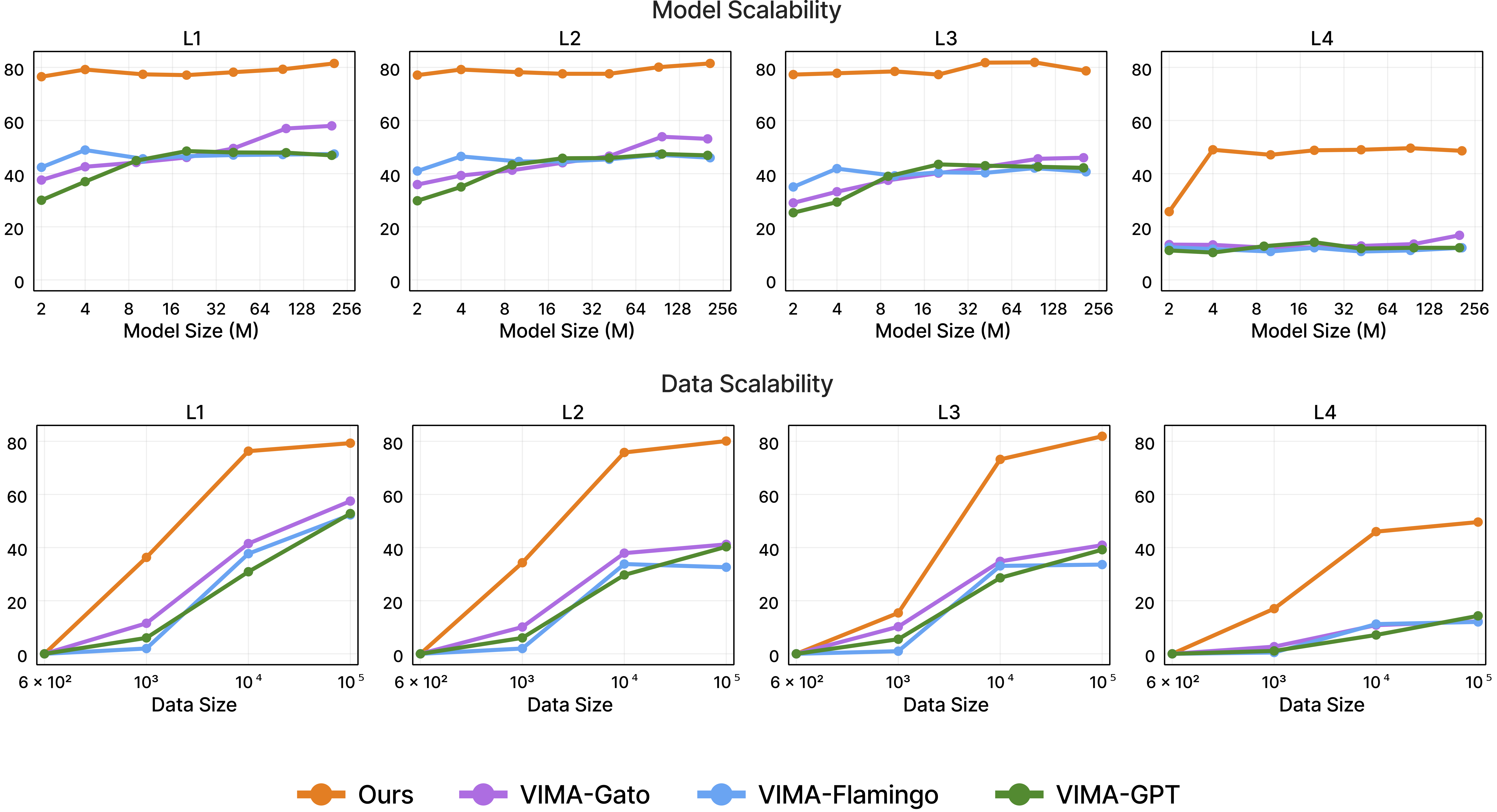
Third, it generalizes better under limited data. The VIMA paper compares object tokens against tokenizers that learn directly from raw pixels, and object tokens perform better on harder generalization levels. This matters in robotics because robot data is expensive. Any representation that reduces overfitting to texture, background, or camera layout is valuable.
Content-Type: image/png.
Step 1: Extract Objects with Mask R-CNN
The paper states that prompts may contain three raw input formats: text, an image of a single object, and an image of a full tabletop scene. Text is handled by the T5 tokenizer and word embedding. For full-scene images, VIMA first extracts individual objects with a domain-finetuned Mask R-CNN. Each object is represented by:
| Component | Meaning |
|---|---|
bbox |
Object location in the image, usually four coordinates such as top/left/bottom/right or an equivalent detector convention |
cropped_img |
The RGB crop around the object, sometimes masked and sometimes still containing irrelevant background pixels |
mask |
A boolean validity mask because different scenes have different numbers of objects |
In VimaBench, the simulator provides RGB images from both a frontal view and a top-down view. The paper also notes that ground-truth segmentation and bounding boxes are available for training object-centric models. At evaluation time, if a detector is used, Mask R-CNN can be imperfect: a box may be noisy, a crop may include irrelevant pixels, or the detector may produce false positives. VIMA addresses this during training with object augmentation, where false-positive detection outputs are randomly injected so the policy becomes more robust to perception errors.
The beginner takeaway: Mask R-CNN is not the "brain" of VIMA. It is the adapter that turns a full scene image into a list of object candidates. The intelligence comes from how those candidates are encoded into tokens and how those tokens interact with language through the prompt encoder and cross-attention controller.
Step 2: ViT Encodes the Crop, MLP Encodes the Box
The clearest code path is in vima/nn/obj_encoder/obj_encoder.py. The key class is ObjEncoder. It receives cropped_img, bbox, and mask, then processes each camera view separately. In the default VIMAPolicy, the views are ["front", "top"].
Here is the important part, simplified:
class ObjEncoder(nn.Module):
    bbox_max_h = 128
    bbox_max_w = 256

    def __init__(self, *, transformer_emb_dim, views, vit_output_dim,
                 vit_resolution, vit_patch_size, vit_width, vit_layers,
                 vit_heads, bbox_mlp_hidden_dim, bbox_mlp_hidden_depth):
        self.cropped_img_encoder = ViTEncoder(
            output_dim=vit_output_dim,
            resolution=vit_resolution,
            patch_size=vit_patch_size,
            width=vit_width,
            layers=vit_layers,
            heads=vit_heads,
        )

        self.bbox_mlp = nn.ModuleDict({
            view: build_mlp(
                4,
                hidden_dim=bbox_mlp_hidden_dim,
                hidden_depth=bbox_mlp_hidden_depth,
                output_dim=bbox_mlp_hidden_dim,
            )
            for view in views
        })

        self.pre_transformer_layer = nn.ModuleDict({
            view: nn.Linear(
                self.cropped_img_encoder.output_dim + bbox_mlp_hidden_dim,
                transformer_emb_dim,
            )
            for view in views
        })
There are two parallel branches:
cropped_img_encoder: a small ViT that takes the object crop. The default code usesvit_resolution=32,vit_patch_size=16,vit_layers=4,vit_heads=24, andvit_output_dim=768.bbox_mlp: an MLP that takes four bounding-box numbers. This is the object's positional signal: where the object is in the image, not just what it looks like.
In forward, VIMA encodes the crop, normalizes the box, encodes the box with the MLP, and concatenates the two embeddings:
def forward(self, cropped_img, bbox, mask):
    img_feats = {
        view: self.cropped_img_encoder(cropped_img[view])
        for view in self._views
    }

    bbox = {view: bbox[view].float() for view in self._views}
    normalizer = torch.tensor(
        [self.bbox_max_w, self.bbox_max_h, self.bbox_max_h, self.bbox_max_w],
        dtype=bbox[self._views[0]].dtype,
        device=bbox[self._views[0]].device,
    )
    bbox = {view: bbox[view] / normalizer for view in self._views}
    bbox = {view: self.bbox_mlp[view](bbox[view]) for view in self._views}

    in_feats = {
        view: self.pre_transformer_layer[view](
            torch.concat([img_feats[view], bbox[view]], dim=-1)
        )
        for view in self._views
    }

    return torch.concat([in_feats[view] for view in self._views], dim=-2)
This is where many summaries become inaccurate. An "object token" is not just an image-crop embedding. If you only use the crop, the model knows what the object looks like but not where it is on the table. If you only use the box, the model knows where something is but not whether it is a bowl, block, constraint zone, or tool. VIMA needs both.
Step 3: ViT Turns a Crop into a Vector
Inside vima/nn/obj_encoder/vit/vit.py, ViTEncoder does three familiar things:
- normalizes the image from
[0, 255]using VIMA's image mean and standard deviation; - divides the crop into patches using a convolution whose stride equals the patch size;
- adds positional embeddings within the crop and runs residual attention blocks.
With a 32 x 32 crop and 16 x 16 patches, the ViT sees only four image patches plus a cls_token. The final output is a 768-dimensional vector for that crop. This is a pragmatic choice: the crop is tiny, the ViT is shallow, and the feature is strong enough to represent object shape and texture without exploding sequence length.
object crop 32x32
    |
    | patch size 16
    v
4 image patches + cls token
    |
    v
4-layer ViT
    |
    v
crop embedding, 768 dims
If you have used ViT for image classification, treat this branch as a very small feature extractor. It does not output a class label. It outputs a feature vector that the downstream policy learns to use in context.
Step 4: Interleave Object Tokens with T5 Text Tokens
An object token only becomes useful when it enters the prompt in the correct order. Prompt assembly happens in VIMAPolicy.forward_prompt_assembly(). The function receives raw_prompts_token_type, word_batch, and image_batch.
raw_prompts_token_type is a sequence of markers: 0 means a word token, and 1 means an image token. When the policy sees a word, it reads an embedding from WordEmbedding, which uses pretrained t5-base embedding weights. When it sees an image, it calls ObjEncoder, gets n_max_objs object tokens, and inserts all valid object tokens into the prompt sequence.
def forward_prompt_assembly(self, prompts):
    raw_prompts_token_type, word_batch, image_batch = prompts

    batch_word_emb = self.prompt_embedding(word_batch)
    batch_image_emb = self.obj_encoder(**image_batch)
    batch_image_emb = self.prompt_obj_post_layer(batch_image_emb)

    for item in raw_prompt:
        if item == 0:
            assembled_prompt.append(batch_word_emb[word_ptr])
            assembled_mask.append(True)
            word_ptr += 1
        elif item == 1:
            obj_mask = concat_masks_from_front_and_top_views(...)
            for q in range(n_max_objs):
                assembled_prompt.append(batch_image_emb[img_ptr][q])
                assembled_mask.append(obj_mask[q])
            img_ptr += 1

    prompt_tokens = self.t5_prompt_encoder(
        prompt_tokens,
        attention_mask=prompt_masks,
        batch_first=False,
    )
For a prompt such as:
"put" <image of red block> "into" <image of bowl>
the sequence may become:
word("put")
obj(red_block, front)
obj(red_block, top)
word("into")
obj(bowl, front)
obj(bowl, top)
That sequence then enters the T5 encoder through inputs_embeds, not input_ids. This trick matters: T5 does not need an "object token" in its vocabulary. It only needs an embedding vector with the same dimension as a word embedding. VIMA uses MLPs to make non-text tokens compatible with the T5 embedding space.
Step 5: Object Tokens Enter Cross-Attention
Once the prompt is a sequence of T5-contextualized embeddings, the XAttn GPT decoder uses them as keys and values. Observation/action history becomes the query. This is the mechanism discussed in part 1, but now we know what lives on the prompt side: not only words, but object tokens made from crop features and bounding boxes.
prompt tokens after T5:
    [word, object, object, word, object, object, ...]
        |
        | key/value
        v
XAttn GPT decoder
        ^
        | query
observation tokens + previous action tokens
In XAttnGPT.forward(), each layer cross-attends to the prompt first, then performs causal self-attention over the observation/action stream:
for self_attn, xattn in zip(self.h, self.xattns):
    obs_action_tokens = xattn(
        q=obs_action_tokens,
        kv=prompt_tokens,
        attention_mask=prompt_mask,
    )
    obs_action_tokens = self_attn(
        obs_action_tokens,
        attention_mask=obs_action_masks,
    )[0]
The result is that every action prediction step can ask the prompt again: "which prompt object matches the current observation?", "which box describes the region to avoid?", "which demonstration frame indicates the motion to imitate?".
Content-Type: image/png.
Running a Tokenizer on Your Own Image: Minimal Script
The public repository provides a pretrained Mask R-CNN checkpoint through Hugging Face, but the current main branch does not expose a simple object_utils.py API. So if you want to try your own image, the practical approach is to split the pipeline into two parts:
- use any detector or segmenter to produce
bbox,mask, andcrop; - pass tensors with the expected shape into
ObjEncoder.
The script below demonstrates the shape contract. It uses a Detectron2 COCO Mask R-CNN for convenience. To match VIMA more closely, replace that detector with VIMA's domain-finetuned Mask R-CNN.
from pathlib import Path

import cv2
import torch
import torch.nn.functional as F
from detectron2.config import get_cfg
from detectron2.engine import DefaultPredictor
from detectron2 import model_zoo

from vima.nn.obj_encoder import ObjEncoder

def build_detector(score_thresh=0.5):
    cfg = get_cfg()
    cfg.merge_from_file(model_zoo.get_config_file(
        "COCO-InstanceSegmentation/mask_rcnn_R_50_FPN_3x.yaml"
    ))
    cfg.MODEL.ROI_HEADS.SCORE_THRESH_TEST = score_thresh
    cfg.MODEL.WEIGHTS = model_zoo.get_checkpoint_url(
        "COCO-InstanceSegmentation/mask_rcnn_R_50_FPN_3x.yaml"
    )
    return DefaultPredictor(cfg)

def crop_objects_bgr(image_bgr, boxes_xyxy, crop_size=32, max_objs=8):
    crops, boxes = [], []
    h, w = image_bgr.shape[:2]
    for box in boxes_xyxy[:max_objs]:
        x1, y1, x2, y2 = [int(v) for v in box]
        x1, y1 = max(0, x1), max(0, y1)
        x2, y2 = min(w, x2), min(h, y2)
        crop = image_bgr[y1:y2, x1:x2]
        if crop.size == 0:
            continue
        crop = cv2.cvtColor(crop, cv2.COLOR_BGR2RGB)
        crop_t = torch.from_numpy(crop).permute(2, 0, 1).float()[None]
        crop_t = F.interpolate(crop_t, size=(crop_size, crop_size), mode="bilinear")
        crops.append(crop_t[0])
        boxes.append(torch.tensor([x1, y1, y2, x2], dtype=torch.float32))

    while len(crops) < max_objs:
        crops.append(torch.zeros(3, crop_size, crop_size))
        boxes.append(torch.zeros(4))

    mask = torch.zeros(max_objs, dtype=torch.bool)
    mask[: min(len(boxes_xyxy), max_objs)] = True
    return torch.stack(crops), torch.stack(boxes), mask

image = cv2.imread(str(Path("my_tabletop_image.png")))
predictor = build_detector()
instances = predictor(image)["instances"].to("cpu")

crops, boxes, valid = crop_objects_bgr(
    image,
    instances.pred_boxes.tensor.numpy(),
    crop_size=32,
    max_objs=8,
)

encoder = ObjEncoder(
    transformer_emb_dim=768,
    views=["front"],
    vit_output_dim=768,
    vit_resolution=32,
    vit_patch_size=16,
    vit_width=768,
    vit_layers=4,
    vit_heads=24,
    bbox_mlp_hidden_dim=768,
    bbox_mlp_hidden_depth=2,
)

image_batch = {
    "cropped_img": {"front": crops.unsqueeze(0)},  # (B, N, 3, 32, 32)
    "bbox": {"front": boxes.unsqueeze(0)},         # (B, N, 4)
    "mask": {"front": valid.unsqueeze(0)},         # (B, N)
}

with torch.no_grad():
    object_tokens = encoder(**image_batch)

print(object_tokens.shape)  # (B, N * num_views, 768)
This is not a full reproduction of VIMA inference, because the real policy also needs prompt assembly, observation history, action discretization, and a checkpoint. But it shows the most important interface: after detection and cropping, the contract into ObjEncoder is just three tensor dictionaries indexed by view.
If you are using two cameras like VIMA, expand image_batch like this:
image_batch = {
    "cropped_img": {
        "front": front_crops.unsqueeze(0),
        "top": top_crops.unsqueeze(0),
    },
    "bbox": {
        "front": front_boxes.unsqueeze(0),
        "top": top_boxes.unsqueeze(0),
    },
    "mask": {
        "front": front_valid.unsqueeze(0),
        "top": top_valid.unsqueeze(0),
    },
}
ObjEncoder sorts the views, encodes each view independently, and concatenates the result along the object-sequence dimension. So one physical object can contribute two tokens: one from the front view and one from the top view. For tabletop manipulation, top view is often better for planar position, while front view helps with shape, height, stacking, and containment.
Debug Checklist for Tokenizer Failures
When you run your own tokenizer, failures are usually in the input data, not in the transformer. Here is a quick checklist:
| Symptom | Common cause | What to check |
|---|---|---|
assert img.max() > 2 fails |
The image was already normalized to [0, 1] before VIMA preprocessing |
Feed crops in [0, 255] scale |
| Tokens are all zeros | mask is all false or every crop is padding |
Print valid.sum() |
| The policy selects the wrong object | Box convention is flipped or views are mismatched | Draw boxes back onto the source image |
| T5 shape mismatch | Object embeddings are not in the same d_model as word embeddings |
Check the post MLP and embed_dim |
| Model is sensitive to false positives | The detector emits many background objects | Raise score threshold or train with augmentation |
For beginners, the most useful habit is to always save a debug image with bounding boxes and object indices. If the prompt says "red block" but object slot 3 is actually the table edge, the downstream transformer has very little chance of recovering.
Connection to Humanoid Manipulation
This series uses "robot manipulation" with a humanoid direction in mind because the final question is how to scale VIMA-like prompting toward humanoids or dual-arm manipulation. VIMA's object tokenizer is still very tabletop-oriented: front/top RGB, pick-place and wipe primitives, and discretized end-effector poses. But the object-centric idea becomes even more important when the robot becomes a humanoid.
For a humanoid, raw pixels are messier: the egocentric camera moves, robot hands occlude objects, objects disappear behind the body, and the scene contains many irrelevant visual regions. If a policy consumes raw patches directly, it must learn perception, grounding, affordance, and control at the same time. A good object tokenizer can act as a semantic compression layer: which objects are present, where they are, how they relate to the prompt, and whether they are reachable by the left or right hand.
However, humanoids also need capabilities VIMA does not fully solve:
- 3D or RGB-D object tokens, not only 2D bounding boxes;
- object tracking over time under egocentric camera motion;
- hand-object contact state, not only visual crops;
- tokens for body parts, workspace boundaries, obstacles, and human instructions;
- coupling object tokens to a whole-body controller rather than pick-place primitives.
That is why part 5 of this series returns to the adaptation question: VIMA's object tokens are a strong foundation, but humanoid deployment needs 3D spatial tokens, memory, and a lower-level controller that can coordinate the full body.
Summary
The object tokenizer is the bridge between perception and prompt learning in VIMA. Mask R-CNN parses a scene into object candidates; ViT encodes each crop; a bbox MLP encodes top/left/bottom/right position signals; tokens from front and top views are flattened into a sequence; and that sequence is interleaved with T5 word tokens to form the multimodal prompt.
If part 1 answered "what architecture lets VIMA read prompts?", this article answers "how does an image inside the prompt become tokens?". And if part 2 showed why the benchmark demands strong generalization, the object tokenizer explains why VIMA does not drown in pixels: it forces the model to reason through the units a robot can actually manipulate.