In Part 3 on the Object Tokenizer, we saw how VIMA transforms raw images into object token sequences — each tabletop object detected by Mask R-CNN, cropped by ViT, and positioned by a bbox MLP. But to train that entire pipeline, VIMA needs something equally important as the architecture: data. And not data recorded from real robots — entirely synthetic data generated at scale inside a simulator.
Part 4 covers what many VIMA articles skip over: how the 650K trajectory dataset was built, what format it uses, how to download and use it in Python, and — most importantly — why a dataset generated entirely in simulation is sufficient to train an agent that generalizes well.
Series Roadmap
This is Part 4 of 5 in the VIMA: Multimodal Prompts for Robot Manipulation series:
| Part | Topic |
|---|---|
| Part 1: Cross-Attention Architecture | XAttn GPT + T5 encoder, why cross-attention matters |
| Part 2: VimaBench 17 Tasks | 17 tasks, 4 generalization levels, running the benchmark |
| Part 3: Object Tokenizer | Mask R-CNN + ViT: from raw pixels to object tokens |
| Part 4 (you are here) | Dataset 650K: collection, format, download, and usage |
| Part 5: Humanoid Adaptation | Scaling up to humanoid robots with multi-DoF arms |
Why Not Use Data from Real Robots?
The first question when hearing "650K trajectories" is: which robot collected all that? The answer is no real robot at all. The entire dataset was generated inside PyBullet — an open-source physics engine — using oracle programs with privileged access to the simulator state.
This might sound like a weakness, but it's actually a deliberate design choice. Consider the cost tradeoffs:
| Method | Collection Cost | Speed | Generalization |
|---|---|---|---|
| Teleoperation (human controls real robot) | Very high (~$50–200/hour) | Slow (~1–5 demos/min) | Good if diverse |
| Scripted playback (real robot) | Medium | Medium | Limited |
| Simulation with oracle scripts | Low | Extremely fast (thousands/hour) | Good if sim2real gap is small |
VIMA chose the third path: scripted oracle programs — scripts that know the exact positions of every object in the scene (via direct simulator state access) and generate optimal actions. The result is 650K perfectly successful demonstrations with no failed trajectories mixed in.
Across the 17 task templates described in Part 2, each task has roughly 50K trajectories procedurally generated by randomly varying:
- Object types (geometry + texture)
- Initial positions of all objects
- Colors and sizes
- Number of distractors
A single trajectory in VIMA is a complete episode: from the robot's first look at the scene, through reading the multimodal prompt, to completing the final task.
Procedural Generation in PyBullet: How It Works
"Procedural generation" sounds complex, but the idea is straightforward. Think of it like a script that generates game levels — each run has different terrain, different enemy positions, but the game rules stay the same. VIMA does exactly that for robot manipulation.
For each task template (e.g., "place the object with the same color as this one into that box"), the VIMA generator:
- Randomly selects objects from a 3D geometry set (boxes, cylinders, L-shapes, T-shapes, ...) with random textures
- Spawns objects into PyBullet at non-overlapping positions
- Generates the multimodal prompt: captures images of "query objects" from front/top cameras, interleaves them with text instructions from the template
- Runs the oracle script: the script knows exact positions of everything, computes optimal pick/place poses, executes them
- Records the trajectory: saves each step — observation, action, end state
The entire process requires no human intervention. Running in parallel across multiple CPUs, 650K trajectories can be generated in a matter of days.
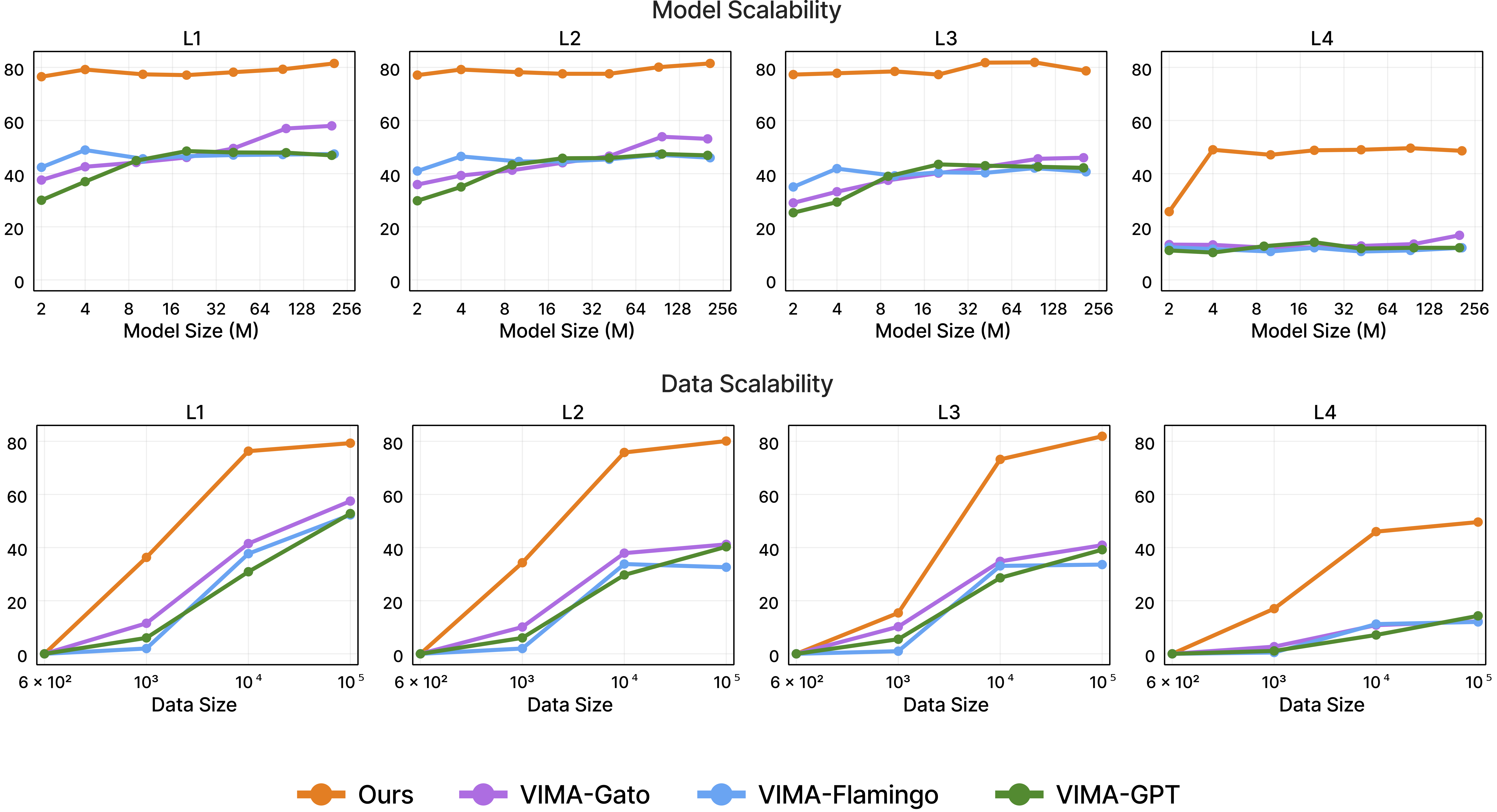
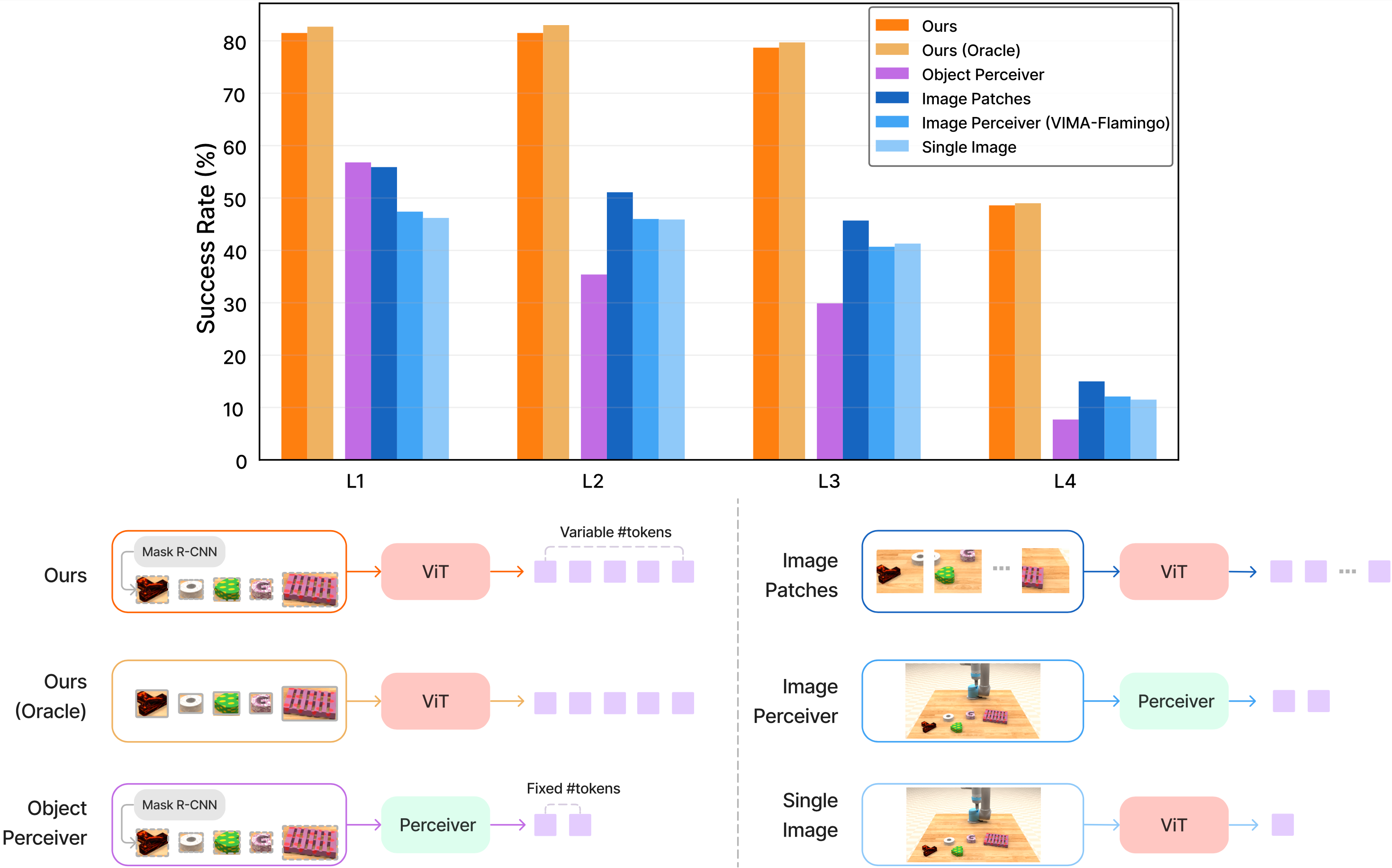
Image: Ablation results on visual tokenizers and dataset scale. Using object tokens with full data is best, but even with 1% of data, VIMA object-tokens already outperform many baselines. Source: vimalabs.github.io
Dataset Structure: Folders, Files, and Schema
The dataset is hosted on HuggingFace at VIMA/VIMA-Data, 21.5 GB in size, licensed under CC BY 4.0.
Downloading the Dataset
# Option 1: Using huggingface-hub CLI
pip install huggingface-hub
huggingface-cli download VIMA/VIMA-Data --repo-type dataset --local-dir ./vima_data

# Option 2: Using git-lfs (requires git-lfs installed)
git lfs install
git clone https://huggingface.co/datasets/VIMA/VIMA-Data ./vima_data
Directory Structure
vima_data/
├── task_01_visual_manipulation/
│   ├── 000000/
│   │   ├── rgb_front/          # Front-view camera images
│   │   │   ├── 0.png           # Frame 0
│   │   │   ├── 1.png           # Frame 1
│   │   │   └── ...
│   │   ├── rgb_top/            # Top-down camera images
│   │   │   ├── 0.png
│   │   │   └── ...
│   │   ├── obs.pkl             # Observations: segmentation + end-effector state
│   │   ├── action.pkl          # Oracle actions: pick/place poses
│   │   └── trajectory.pkl      # Metadata: steps, task info, objects
│   ├── 000001/
│   └── ...
├── task_02_rotate/
│   └── ...
└── task_17_novel_concept_grounding/
    └── ...
Each trajectory is a numbered subdirectory containing two image folders and three pickle files.
Schema for Each Pickle File
obs.pkl — Observations at each timestep:
{
  "ee": array([x, y, z, qx, qy, qz, qw]),  # End-effector pose (6-DoF: position + quaternion)
  "objects": {
    "segm": {
      "front": array(H, W, dtype=int),  # Segmentation mask, front view
      "top":   array(H, W, dtype=int),  # Segmentation mask, top view
    },
    "bbox": {
      "front": array(N_obj, 4),  # Bounding boxes [top, left, bottom, right]
      "top":   array(N_obj, 4),
    },
    "cropped_img": {
      "front": array(N_obj, H_crop, W_crop, 3),  # Cropped RGB per object
      "top":   array(N_obj, H_crop, W_crop, 3),
    }
  }
}
action.pkl — Oracle actions at each timestep:
{
  "pose0_position": array(N_steps, 2),   # Pick position (x, y) in world frame
  "pose0_rotation": array(N_steps, 4),   # Pick rotation (quaternion)
  "pose1_position": array(N_steps, 2),   # Place position (x, y)
  "pose1_rotation": array(N_steps, 4),   # Place rotation (quaternion)
}
Important note: the action space is SE(2) — only x, y (on the table plane) and rotation, not full 6-DoF. This is a reasonable simplification for tabletop manipulation since robot arms don't need to move far vertically when manipulating objects on a flat surface.
trajectory.pkl — Metadata:
{
  "elapsed_steps": int,        # Actual number of steps in this trajectory
  "task_id": str,              # Task template name
  "task_kwargs": dict,         # Task-specific parameters (objects, goals, ...)
  "prompt_token_type": list,   # ["text", "image", "text", ...] — prompt structure
  "prompt_tokens": list,       # Content of each prompt token
}
Python Code: Loading and Visualizing the Dataset
Here is complete code to load a trajectory and inspect its contents:
import pickle
import numpy as np
import matplotlib.pyplot as plt
from pathlib import Path

def load_trajectory(traj_dir: str):
    """Load a single trajectory from its directory."""
    traj_path = Path(traj_dir)

    with open(traj_path / "obs.pkl", "rb") as f:
        obs = pickle.load(f)

    with open(traj_path / "action.pkl", "rb") as f:
        action = pickle.load(f)

    with open(traj_path / "trajectory.pkl", "rb") as f:
        meta = pickle.load(f)

    return obs, action, meta

def visualize_trajectory(traj_dir: str, step: int = 0):
    """Display observation at a specific timestep."""
    obs, action, meta = load_trajectory(traj_dir)
    traj_path = Path(traj_dir)

    # Load RGB images
    from PIL import Image
    img_front = Image.open(traj_path / "rgb_front" / f"{step}.png")
    img_top   = Image.open(traj_path / "rgb_top"   / f"{step}.png")

    fig, axes = plt.subplots(1, 2, figsize=(12, 5))
    axes[0].imshow(img_front)
    axes[0].set_title(f"Front view — Step {step}")
    axes[0].axis("off")

    axes[1].imshow(img_top)
    axes[1].set_title(f"Top-down view — Step {step}")
    axes[1].axis("off")

    plt.suptitle(
        f"Task: {meta['task_id']} | Steps: {meta['elapsed_steps']}",
        fontsize=14
    )
    plt.tight_layout()
    plt.show()

    # Print action information
    print(f"\nTask: {meta['task_id']}")
    print(f"Total steps: {meta['elapsed_steps']}")
    print(f"\nAction at step {step}:")
    print(f"  Pick position (x, y): {action['pose0_position'][step]}")
    print(f"  Pick rotation (quat): {action['pose0_rotation'][step]}")
    print(f"  Place position (x, y): {action['pose1_position'][step]}")
    print(f"  Place rotation (quat): {action['pose1_rotation'][step]}")

    # Print end-effector state
    if "ee" in obs:
        ee = obs["ee"]
        # ee shape: (n_steps, 7) — position (3) + quaternion (4)
        print(f"\nEnd-effector state at step {step}:")
        print(f"  Position: {ee[step, :3]}")
        print(f"  Quaternion: {ee[step, 3:]}")

    return obs, action, meta

def summarize_dataset(data_root: str):
    """Quick statistics for the full dataset."""
    data_path = Path(data_root)
    task_dirs = sorted(data_path.glob("task_*/"))

    print(f"Number of tasks: {len(task_dirs)}")
    total_trajs = 0

    for task_dir in task_dirs:
        traj_count = len(list(task_dir.glob("*/")))
        total_trajs += traj_count
        print(f"  {task_dir.name}: {traj_count:,} trajectories")

    print(f"\nTotal: {total_trajs:,} trajectories")

# Example usage
if __name__ == "__main__":
    # Inspect a single trajectory
    obs, action, meta = visualize_trajectory(
        "./vima_data/task_01_visual_manipulation/000000",
        step=0
    )

    # Summarize the full dataset
    summarize_dataset("./vima_data")
Downloading a Subset (if disk space is limited)
The full 21.5 GB dataset may be too large for quick experiments. You can download individual tasks:
from huggingface_hub import snapshot_download

# Download only task 01 and task 02 to try things out
snapshot_download(
    repo_id="VIMA/VIMA-Data",
    repo_type="dataset",
    local_dir="./vima_data_small",
    allow_patterns=["task_01_*/**", "task_02_*/**"],
)
Why Is 650K Trajectories "Enough"?
A reasonable follow-up question: with 17 tasks and ~50K trajectories each, is 650K a lot? Compared to real-robot datasets, it's substantial. Compared to internet-scale LLM data, it's tiny.
VIMA answers this with a dataset scale ablation — they train the 92M model with four different data fractions:
| Data Fraction | Trajectories | L1–L4 Generalization Result |
|---|---|---|
| 0.1% | ~650 | Low — model lacks diverse coverage |
| 1% | ~6,500 | Already beats most baselines trained on 100% |
| 10% | ~65,000 | Near parity with full data |
| 100% (full) | ~650,000 | Best overall |
The standout result: with just 1% of the data (~6,500 trajectories), VIMA object-tokens already outperform most baselines trained on the full dataset. This demonstrates the power of object-centric representation and multimodal prompting — when the model has the right inductive bias (tokens are objects, not pixels), it needs far less data to learn generalization.
The 650K count isn't because the model needs that many — it's because the task × object × texture × position coverage needs to be wide enough for the 4-level generalization evaluation to be statistically meaningful.
Dataset Scale Comparison: VIMA vs. Other Systems
| Dataset | Trajectories | Source | Format | Multi-task? |
|---|---|---|---|---|
| VIMA | 650K | PyBullet simulation | PKL + PNG | ✅ 17 tasks |
| RT-1 (Google) | ~130K | Real robots (kitchen) | TFRecord | ✅ ~700 task variants |
| RT-X (Open X-Embodiment) | ~970K | Real robots (multiple) | RLDS/TFRecord | ✅ many robots |
| OpenVLA | ~970K (RT-X subset) | Real robots | Parquet/RLDS | ✅ many |
| CALVIN | ~24K | Simulation (Franka) | PKL/NPZ | ✅ 4 tasks |
| RLBench | ~100K | Simulation (CoppéliaSim) | PKL | ✅ 100+ tasks |
VIMA-Data is not the largest dataset — RT-X is far bigger. But what makes VIMA-Data unique:
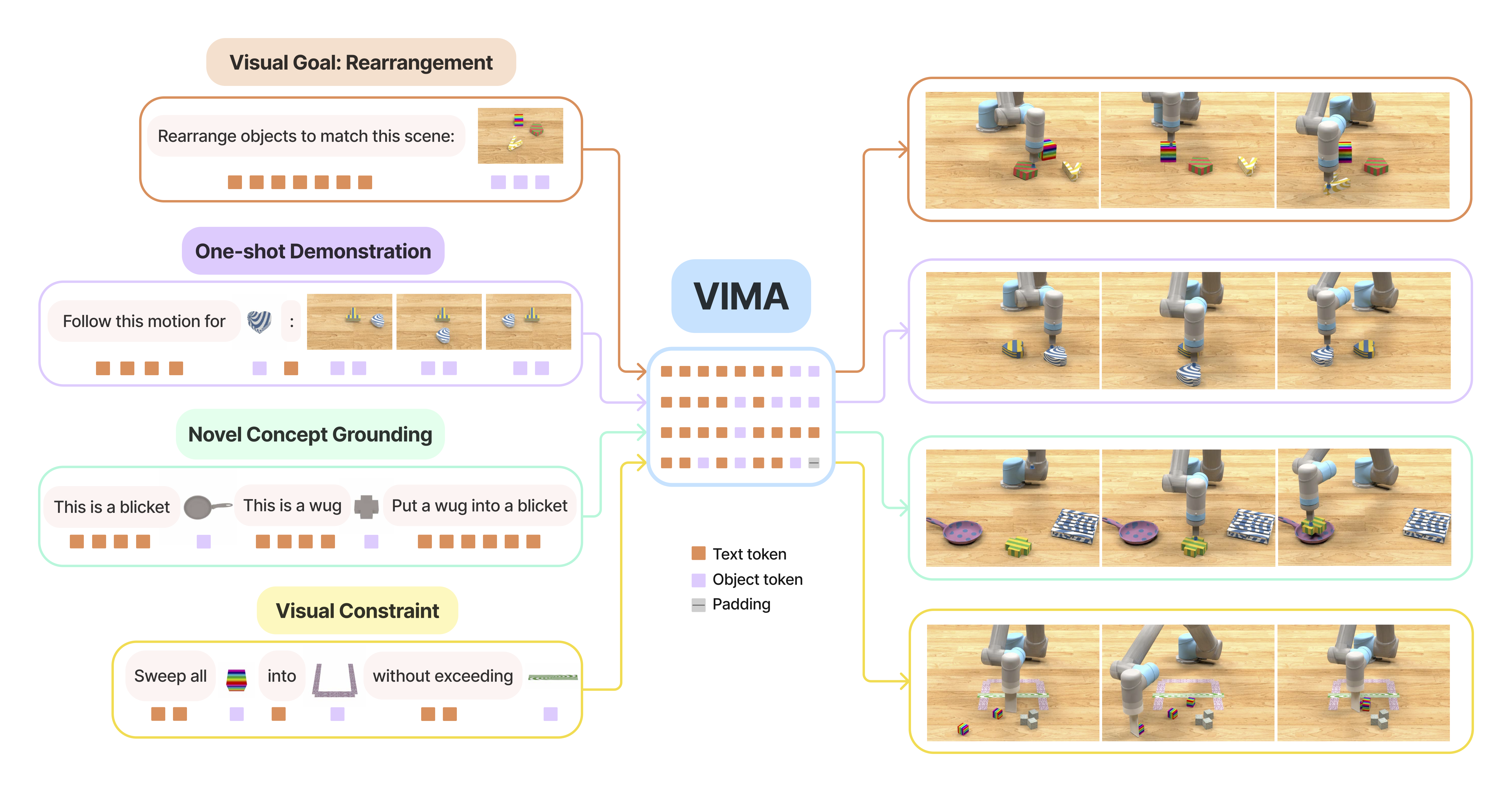
- Multimodal prompts bundled with the data: every trajectory ships with interleaved text + image prompts, not just a simple text command
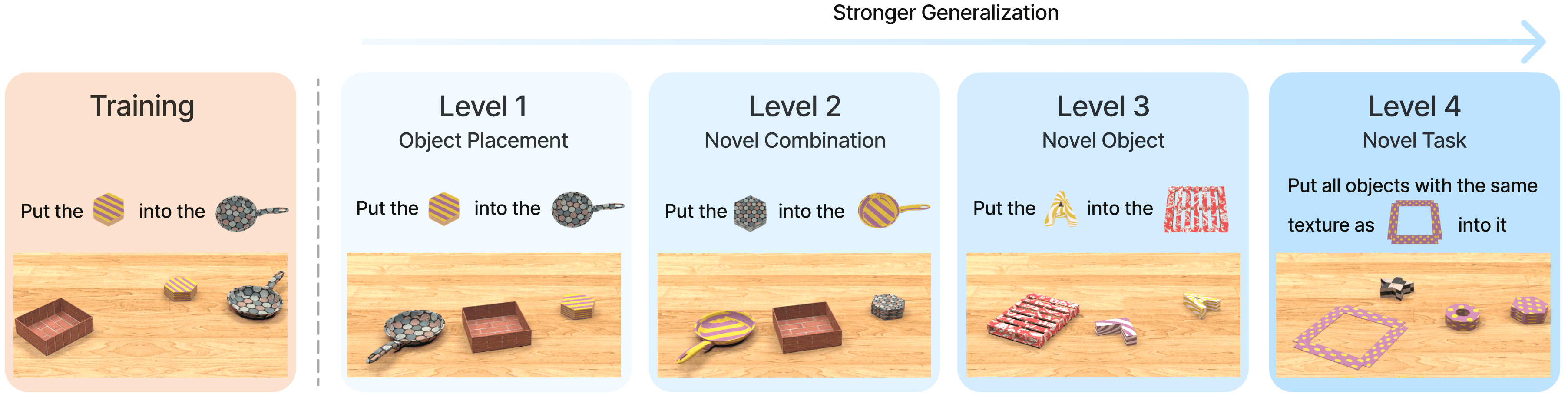
- Clear evaluation protocol: data pre-split to test L1/L2/L3/L4 generalization (see Part 2 on VimaBench)
- 100% success rate: no failed demonstrations — the oracle script ensures every trajectory completes the task
Model Sizes and Training Insights
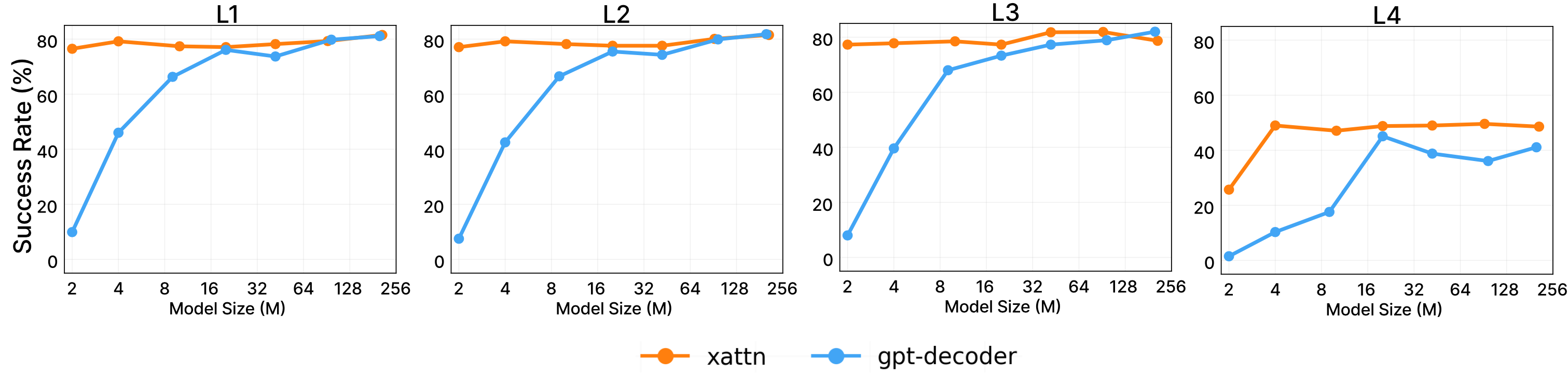
VIMA trains multiple model sizes on the same dataset to measure scalability:
| Checkpoint | Parameters | Notes |
|---|---|---|
| VIMA-2M | 2M | Smallest baseline |
| VIMA-4M | 4M | |
| VIMA-9M | 9M | |
| VIMA-20M | 20M | |
| VIMA-45M | 45M | |
| VIMA-92M | 92M | Main ablation model |
| VIMA-200M | 200M | Best performing |
Note: the T5-Base encoder (111M params) uses shared/frozen weights — it is not retrained. The sizes above refer to the decoder/controller that gets trained. Total model size is larger than these numbers.
Downloading all checkpoints from HuggingFace:
from huggingface_hub import hf_hub_download

# Download the 200M checkpoint
checkpoint_path = hf_hub_download(
    repo_id="VIMA/VIMA",
    filename="200M.ckpt",
)

# Download the Mask R-CNN checkpoint (needed for object detection)
maskrcnn_path = hf_hub_download(
    repo_id="VIMA/VIMA",
    filename="mask_rcnn.ckpt",
)

print(f"VIMA-200M checkpoint: {checkpoint_path}")
print(f"Mask R-CNN checkpoint: {maskrcnn_path}")
Insights from the Model Size Ablation
From the paper's results, the relationship between model size and performance varies by generalization level:
- L1 (placement generalization): Even VIMA-9M achieves >90% success. Simple tasks, small models suffice.
- L2 (combinatorial generalization): At least 45M needed to consistently exceed 70%.
- L3 (novel object appearance): 92M+ required for stable performance; smaller models drop significantly.
- L4 (novel task): Only 200M maintains decent performance. This is the hardest level because the task type was never seen during training.
Key lesson: scaling model size helps most on harder generalization levels, not easy ones. If production only requires L1–L2, VIMA-9M or 45M is sufficient and much lighter.
From Dataset to Humanoid — Bridge to Part 5
The current 650K dataset was collected for a 2-finger gripper robot arm in a tabletop environment. The action space is SE(2) — flat, simple. This is the main bottleneck for scaling VIMA to humanoid robots with two arms, many fingers, and full 3D manipulation space.
In Part 5, we'll look at how research groups approach this extension: from expanding the action space (SE(2) → SE(3) → full joint space), to collecting data from dual-arm simulation, to sim2real transfer techniques when moving from PyBullet to real hardware.
A well-collected large dataset is an irreplaceable foundation — even the most elegant architecture goes nowhere without data. VIMA-Data proves it: 650K simulation trajectories, each bundled with a properly structured multimodal prompt, are sufficient to train an agent that generalizes across 17 qualitatively different task types.
Summary
- VIMA-Data: 650K trajectories generated in PyBullet by oracle scripts — no real robot required
- ~50K trajectories/task, 17 task templates, procedurally generated with random object/texture/position combinations
- Format: PKL files (
obs.pkl,action.pkl,trajectory.pkl) + PNG frames from 2 cameras (front + top) - Observations: RGB images, segmentation masks, bounding boxes, end-effector pose (7D: xyz + quaternion)
- Action space: SE(2) — pick pose + place pose, each consisting of (x, y) + quaternion
- Download:
VIMA/VIMA-Dataon HuggingFace, 21.5 GB, CC BY 4.0 license - 1% of data (~6.5K trajectories) is sufficient to outperform baselines trained on 100%, thanks to object-centric representation
- Model sizes: 2M to 200M params; L4 generalization requires at least 200M