Imagine you have just finished training a robot manipulation model. Now the real question begins: does this model genuinely understand the tasks, or is it just memorizing patterns from training data? You need an evaluation framework strict enough to tell these two cases apart — one that does not simply re-test on the training distribution but measures what kind of generalization the model has actually achieved.
VimaBench is that framework. Built alongside VIMA (ICML 2023), VimaBench provides 17 task templates — each instantiable into thousands of individual episodes by combining diverse object types and textures — and defines a 4-level evaluation protocol that measures precisely which kind of generalization a model has mastered.
This post walks you through the full pipeline: installing VimaBench, running the 200M checkpoint demo, understanding the 17 tasks across 6 functional groups, and analyzing each of the 4 evaluation levels — from placement_generalization (easiest) to novel_task_generalization (hardest). By the end, you will understand why Level 4 is the only number worth caring about when the goal is deploying VIMA on a real humanoid robot.
Series Roadmap
This is post 2 of 5 in the VIMA: Multimodal Prompts for Humanoid Robot Manipulation series:
| Post | Topic |
|---|---|
| Post 1: Cross-Attention Architecture | XAttn GPT + T5 Encoder — why cross-attention wins |
| Post 2 (you are here) | VimaBench: 17 Tasks and the 4-Level Protocol |
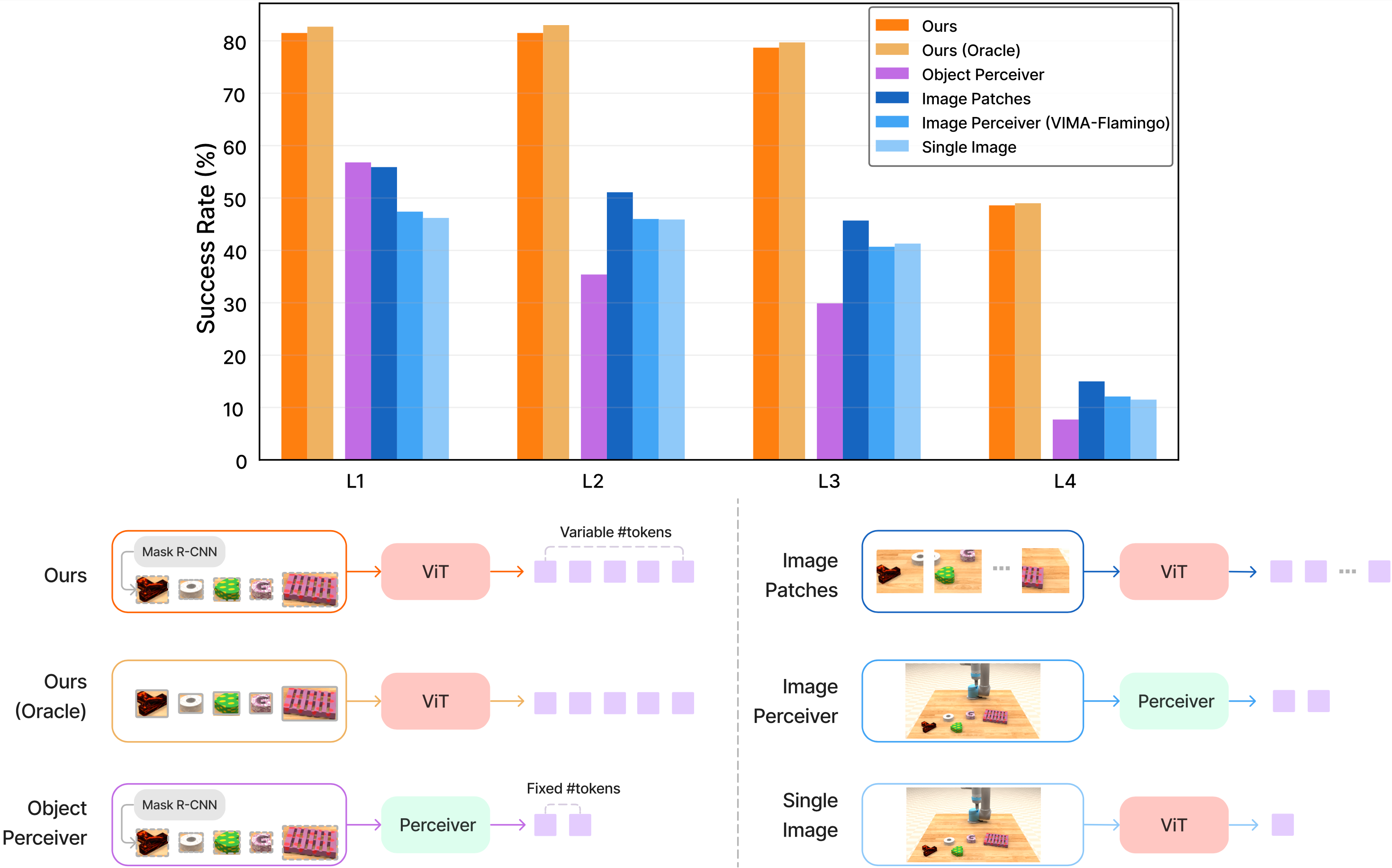
| Post 3: Object Tokenizer | From raw pixels to object tokens via Mask R-CNN + ViT |
| Post 4: Dataset 650K | Multi-task data collection at scale |
| Post 5: Humanoid Adaptation | Scaling VIMA to high-DoF humanoid hands |
Installing VimaBench
System Requirements
- Python ≥ 3.9
- Git
- ≥ 4 GB RAM (for PyBullet simulation environment)
- GPU optional for running single-episode demos
Installation
# Step 1: Clone the VimaBench repo
git clone https://github.com/vimalabs/VimaBench
cd VimaBench

# Step 2: Install in editable mode (required for `import vima_bench`)
pip install -e .
Verify the installation in Python:
from vima_bench import make, PARTITION_TO_SPECS

# Check: list all available evaluation partitions
partitions = list(PARTITION_TO_SPECS["test"].keys())
print(partitions)
# Output: ['placement_generalization', 'combinatorial_generalization',
#          'novel_object_generalization', 'novel_task_generalization']
A clean import with no errors means you are ready to go.
Downloading Checkpoints
VimaBench does not bundle model checkpoints — they live in the main VIMA algorithm repository:
# Clone the VIMA algorithm repo
git clone https://github.com/vimalabs/VIMA
cd VIMA

# Create a checkpoint directory
mkdir -p ckpts

# Download the 200M checkpoint (best performance)
# See the VIMA README for the current download link
# wget <checkpoint_url> -O ckpts/200M.ckpt
VIMA ships 7 pretrained checkpoints ranging from 2M to 200M parameters. This post uses 200M.ckpt for all examples. If RAM is limited, 9M.ckpt or 4M.ckpt work with identical command syntax — just change the path.
Running Your First Demo
VimaBench ships scripts/example.py to test any policy immediately:
python scripts/example.py \
  --ckpt=ckpts/200M.ckpt \
  --partition=placement_generalization \
  --task=follow_order
The three key arguments:
| Argument | Meaning | Example value |
|---|---|---|
--ckpt |
Path to checkpoint file | ckpts/200M.ckpt |
--partition |
Evaluation level (1 of 4) | placement_generalization |
--task |
Specific task (1 of 17) | follow_order |
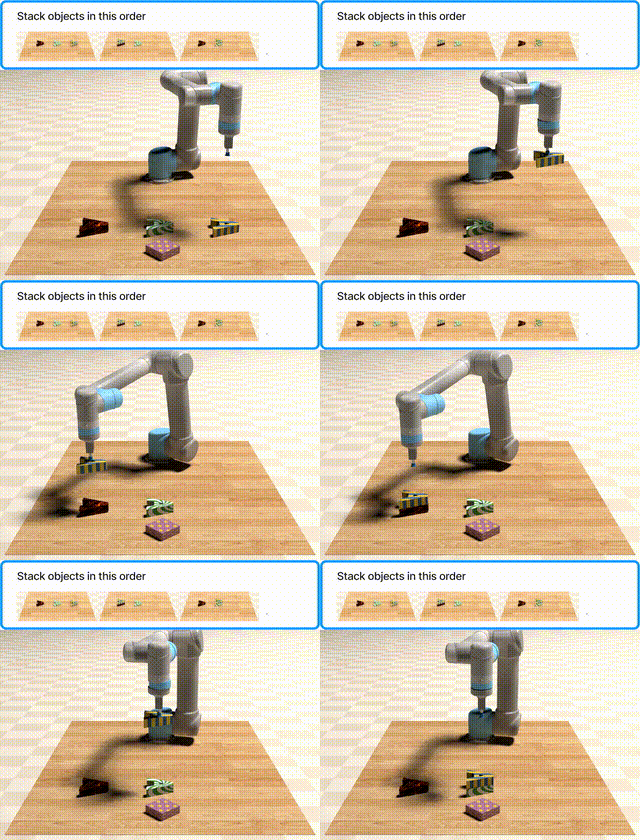
When launched, PyBullet opens a simulator window showing a tabletop with randomly placed objects. The robot receives a multimodal prompt — a mix of descriptive text and reference images — executes an action sequence, and you watch in real time whether the model succeeds.
Stress-testing with a harder partition
Swap placement_generalization for novel_task_generalization to observe the model on a task template it never saw during training:
# Level 2: unseen adjective-noun combinations
python scripts/example.py \
  --ckpt=ckpts/200M.ckpt \
  --partition=combinatorial_generalization \
  --task=same_texture

# Level 4: entirely new task template
python scripts/example.py \
  --ckpt=ckpts/200M.ckpt \
  --partition=novel_task_generalization \
  --task=novel_adj_noun
The performance gap between these two commands is the answer to "does this model generalize?" — and it typically spans 20–40 percentage points in success rate.
17 Tasks — 6 Functional Groups
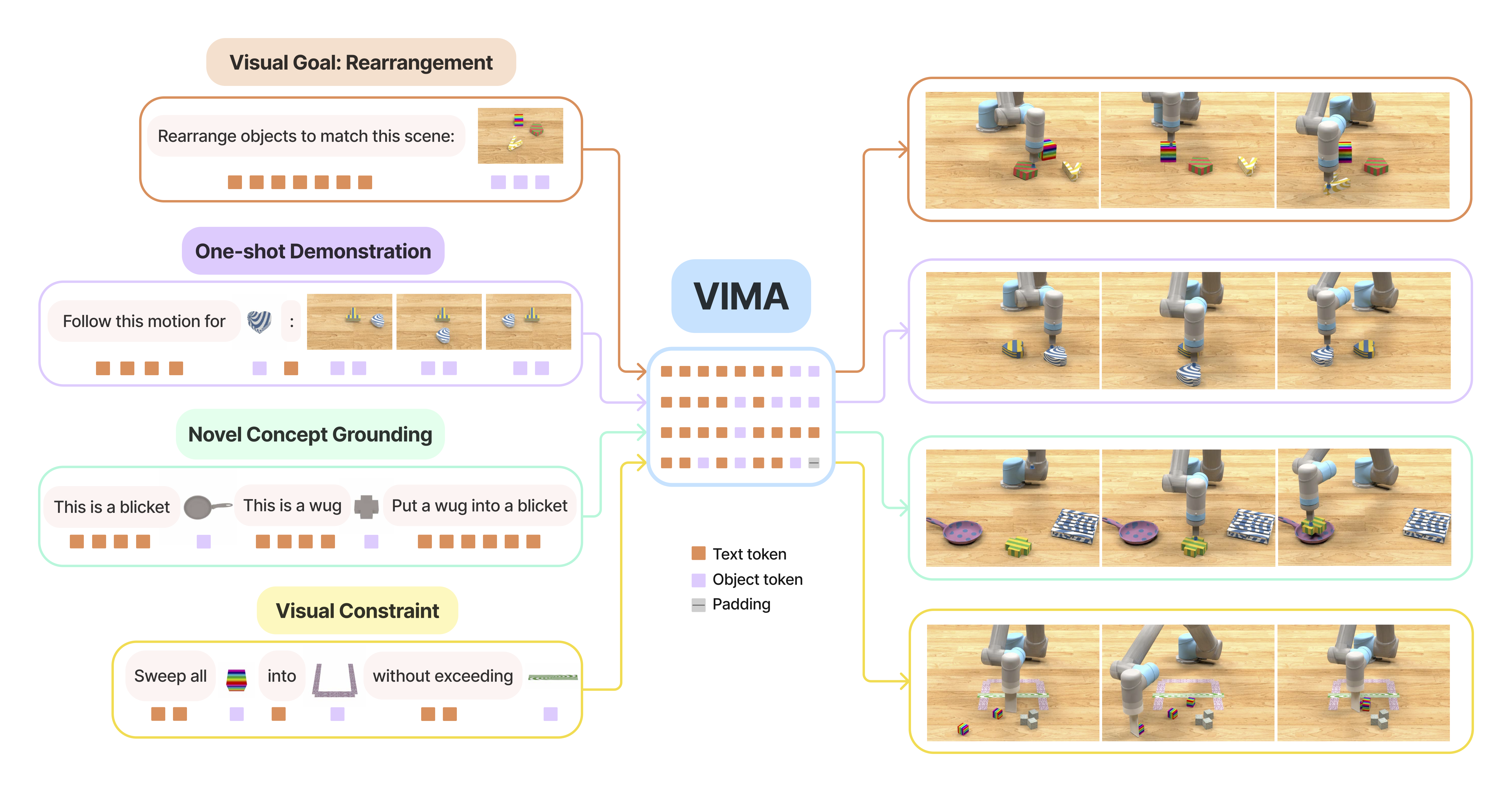
VimaBench's 17 tasks were not chosen arbitrarily. They are designed to cover different cognitive capabilities that a manipulation system needs, from simple pick-and-place to multi-step reasoning. Every task belongs to one of six groups:
Group 1: Simple Object Manipulation
| Task | Description |
|---|---|
visual_manipulation |
Pick object A → place at location B, specified by reference images |
scene_understanding |
Analyze the scene and select the correct object from a visual description |
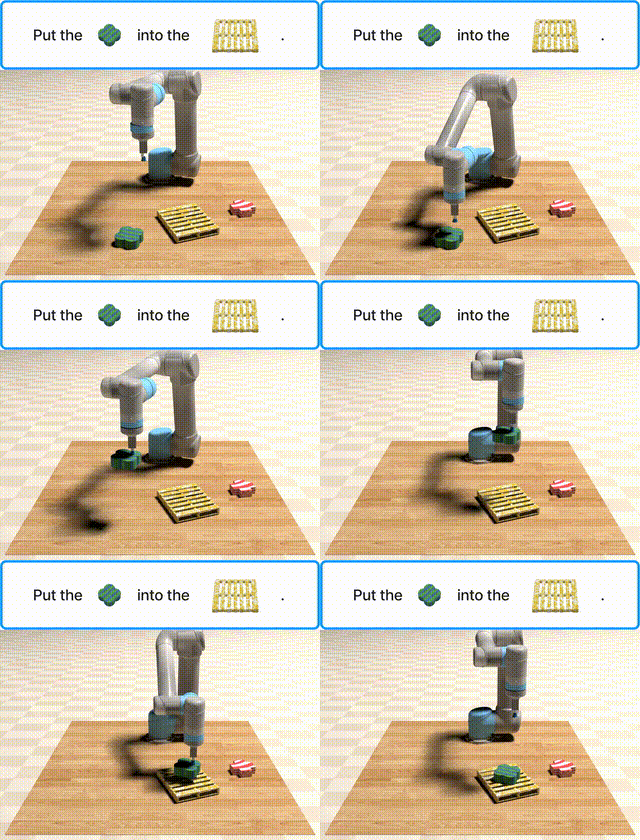
The "hello world" of robot manipulation — with a critical twist: information about which object and where to place it is conveyed through images in the prompt, not plain text. The model must ground multimodal references into 3D physical space.
Group 2: Visual Goal Reaching
| Task | Description |
|---|---|
rotate |
Rotate an object to the orientation shown in a goal image |
rearrange |
Rearrange objects to match a target configuration shown in a goal image |
rearrange_then_restore |
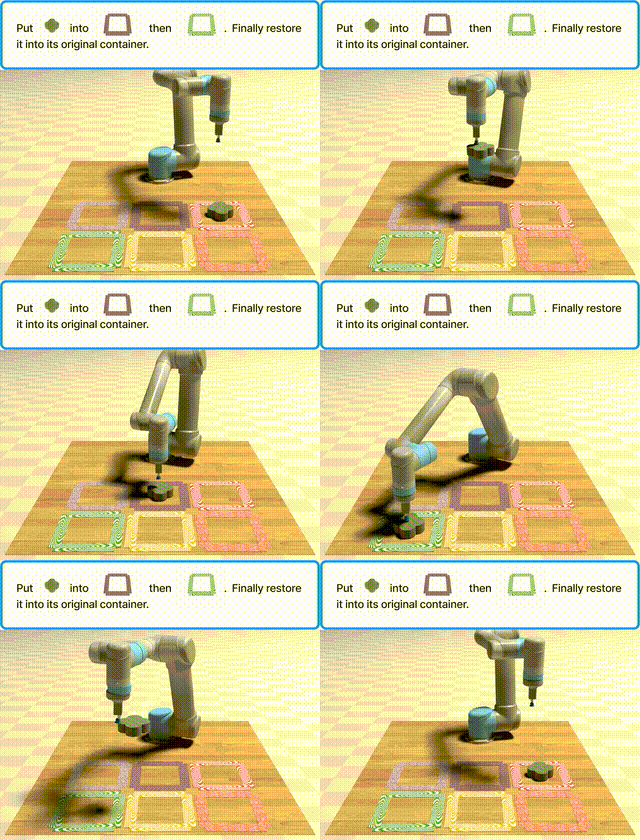
Rearrange to match the goal, then restore to the original state |
Harder than Group 1: the model must understand relative spatial relationships between objects, not just absolute positions. rearrange_then_restore is especially interesting — it requires maintaining a memory of the initial state throughout execution.
Group 3: Novel Concept Grounding
| Task | Description |
|---|---|
novel_adj |
Learn a new adjective (unseen color/texture) from 1–2 in-prompt examples |
novel_noun |
Learn a new noun (unseen object type) from 1–2 in-prompt examples |
novel_adj_noun |
Combine both a new adjective and a new noun never seen before |
twist |
Apply the concept of "twisting" in a novel context |
These are few-shot grounding tasks: the prompt provides 1–2 examples of a new concept (e.g. "glassy" or "mug"), and the model must generalize to unseen instances. This group directly tests the ability to learn from context rather than training data.
Group 4: One-Shot Video Imitation
| Task | Description |
|---|---|
follow_motion |
Replicate a motion trajectory demonstrated in a video clip |
follow_order |
Execute actions in the exact order they appear in a demo video |
The prompt is a video clip — a sequence of frames showing a demonstration — not a static image. The model must extract temporal structure from the video: which objects appear in what order, and which actions are performed.
Group 5: Visual Constraint Satisfaction
| Task | Description |
|---|---|
sweep_without_exceeding |
Sweep objects into an area without exceeding a quantity threshold |
sweep_without_touching |
Sweep objects without touching a designated object |
The model must complete a task while satisfying a negative constraint — do not do X while doing Y. This is critical for real-world safety: a welding robot must not touch adjacent wires; a pick-and-place robot must not overload a shelf.
Group 6: Visual Reasoning
| Task | Description |
|---|---|
same_texture |
Pick the object sharing the same texture as a reference object in the prompt |
same_shape |
Pick the object sharing the same shape as a reference object |
manipulate_old_neighbor |
Interact with the object that was previously adjacent to another (spatial memory) |
pick_in_order_then_restore |
Pick objects in a specified order, then place them back in reverse order |
The hardest group: requires multi-step reasoning, memory of prior state, and visual attribute comparison. manipulate_old_neighbor is particularly challenging — the model must remember the spatial relationship from the start of the episode to identify who the "neighbor" was.
The 4-Level Protocol — VimaBench's Core Innovation
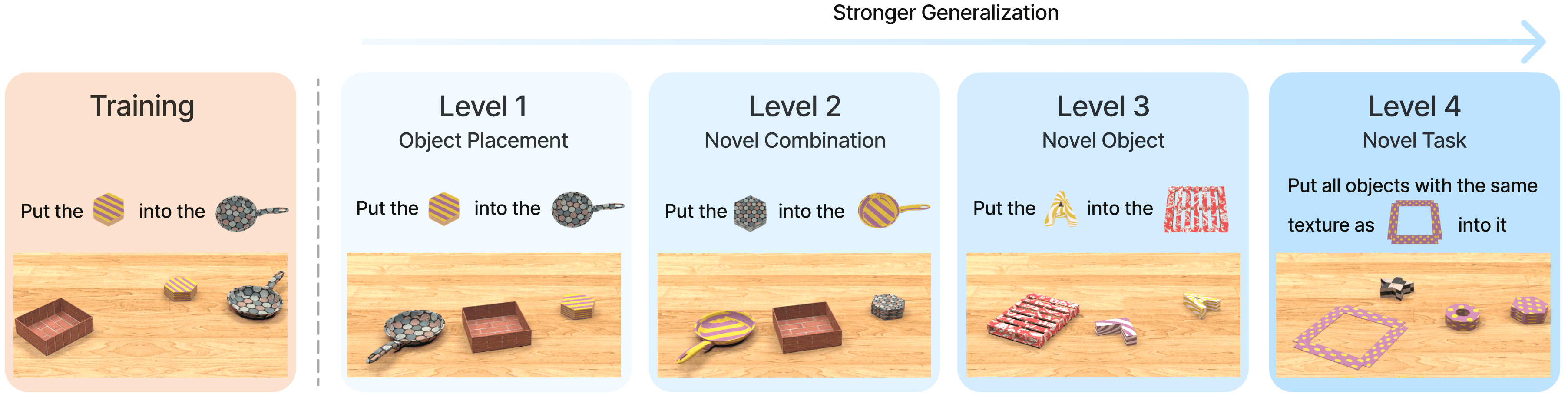
This is what separates VimaBench from a typical benchmark. Instead of testing only on distributions similar to training, VimaBench defines 4 partitions of increasing difficulty, each measuring a different type of generalization.
Think of the 4 levels as four progressively harder questions asked of the model:
Level 1: placement_generalization
Question: Did the model overfit to specific positions in the training data?
Setup: Training uses a restricted set of object positions; evaluation randomizes object placement across the entire tabletop.
This is the minimum baseline sanity check. If a model fails here, it has completely overfit to fixed spatial patterns — useless in practice because objects in the real world never sit in the exact positions seen during training.
from vima_bench import make, PARTITION_TO_SPECS

task = "follow_order"
partition = "placement_generalization"

env = make(
    task,
    task_kwargs=PARTITION_TO_SPECS["test"][partition][task],
    render_prompt=True,
    display_debug_window=True,
)

obs, prompt, prompt_assets = env.reset()
# prompt: dict with 'prompt_token_type' and 'prompt_tokens'
# prompt_assets: dict with reference images for image placeholders in the prompt
print(f"Prompt token types: {prompt['prompt_token_type']}")
# Output: [0, 0, 1, 0, 1, 0]  — 0=text token, 1=image token
All 17 tasks have a Level 1 partition — this is the mandatory starting point when evaluating any model.
Level 2: combinatorial_generalization
Question: Has the model learned attributes as independent concepts, or only specific fixed combinations?
Setup: Training sees "red cube" and "blue sphere"; evaluation presents "red sphere" and "blue cube" — novel combinations, but every individual word is familiar.
This is the classic systematic compositionality test in AI. Many deep learning models fail here because they learn "red → cube" as a unit rather than treating "red" and "cube" as two independently composable attributes.
partition = "combinatorial_generalization"
env = make(
    task,
    task_kwargs=PARTITION_TO_SPECS["test"][partition][task],
)

# Inspect the config to see which combinations are tested
config = PARTITION_TO_SPECS["test"][partition][task]
print(f"Config keys: {list(config.keys())}")
# Includes: possible_dragged_obj, possible_dragged_obj_texture,
#           possible_base_obj, possible_base_obj_texture, ...
Why this matters for real-world robotics: Factory workers instruct robots with new attribute combinations every day — "move this (new color) to that position (new shelf)". A model that fails Level 2 requires re-training every time a new combination appears on the floor.
Level 3: novel_object_generalization
Question: Can the model handle entirely new objects (never seen during training)?
Setup: Training uses a fixed set of objects and colors; evaluation introduces a NEW adjective (unseen color/texture) or a NEW noun (unseen object type).
This is true zero-shot generalization over objects. The model cannot rely on visual memory of specific objects — it must understand the task instruction well enough to execute with any new object pointed to in the prompt.
partition = "novel_object_generalization"
env = make(
    task,
    task_kwargs=PARTITION_TO_SPECS["test"][partition][task],
)

obs, prompt, prompt_assets = env.reset()
# prompt_assets will contain images of NEW objects never seen in training
# The model must use cross-attention to "read" the image in the prompt
# rather than recalling from training memory
Why this is the practical boundary: Real environments always have new objects — new product launches, seasonal colors, customer-specific items. A model that only passes L1/L2 will fail immediately on anything outside its training vocabulary.
Level 4: novel_task_generalization
Question: Can the model execute a completely new task template it has never seen during training?
Setup: Training uses 16 of 17 task templates; the held-out task is completely excluded from all training. The prompt uses familiar words and familiar objects, but the task structure itself is brand new.
partition = "novel_task_generalization"

# Example: test on novel_adj_noun — both the adjective and noun are new
task = "novel_adj_noun"
env = make(
    task,
    task_kwargs=PARTITION_TO_SPECS["test"][partition][task],
)

obs, prompt, prompt_assets = env.reset()
# The prompt header contains few-shot examples of the new concept
# The model must reason about task structure from those examples
# No pattern-matching with training memory is possible
This is the hardest and most scientifically interesting level. The model cannot pattern-match against anything it has seen — it must read the multimodal prompt and reason about intent, much like a human understanding a new instruction from context alone.
PARTITION_TO_SPECS: What Is Inside the Config
PARTITION_TO_SPECS is a dictionary holding the exact configuration for each eval level and each task — controlling precisely what is allowed to appear when instantiating an episode:
from vima_bench import PARTITION_TO_SPECS

# Structure: test → partition → task → config dict
config = PARTITION_TO_SPECS["test"]["novel_object_generalization"]["same_texture"]
print(config)
# Example output:
# {
#   'num_dragged_obj': 1,
#   'num_distractor_obj': 3,
#   'possible_dragged_obj_texture': ['new_texture_1', 'new_texture_2', ...],
#   'possible_base_obj_texture': ['familiar_texture_1', ...],
#   'possible_dragged_obj': ['cube', 'sphere', ...],
#   ...
# }
This config enforces:
- L1: familiar object pool and textures; only placement positions are randomized
- L2: familiar objects and textures, but adjective-noun combinations are held out
- L3: at least one adjective or noun in
possible_...is completely new to the model - L4: not just new objects, but the entire task template structure is new
This is what makes VimaBench a rigorous benchmark — each partition actually tests the type of generalization it claims, with no data leakage between levels.
Which Level Matters Most for Humanoid Deployment?
Short answer: Level 4 is the only number worth reporting when the goal is real-world humanoid deployment.
Here is why each level maps to a different deployment requirement:
L1 is the minimum bar, not an achievement. If a model does not pass placement generalization, it is unusable. Passing L1 merely says "this model is not fundamentally broken" — the same way a car must start before being called a car.
L2 is a prerequisite for production. A humanoid on a factory floor encounters hundreds of new attribute combinations daily — new products, new colors, new sizes on the same assembly line. A model that fails L2 needs retraining constantly, turning deployment into an operational nightmare.
L3 separates "lab demo" from "actual robot". For a humanoid working in an open-world environment with new objects appearing continuously, L3 marks the boundary between "usable" and "requires 24/7 human supervision to handle exceptions".
L4 is a test of architecture, not data. A model that passes L4 has demonstrated that its prompt conditioning mechanism actually works — the model reads and understands task intent from the prompt rather than recalling from training memory. This is the core capability required for a household or office humanoid assistant, where users issue novel instructions every day that were never seen in any training set.
The Pattern in VIMA's Results
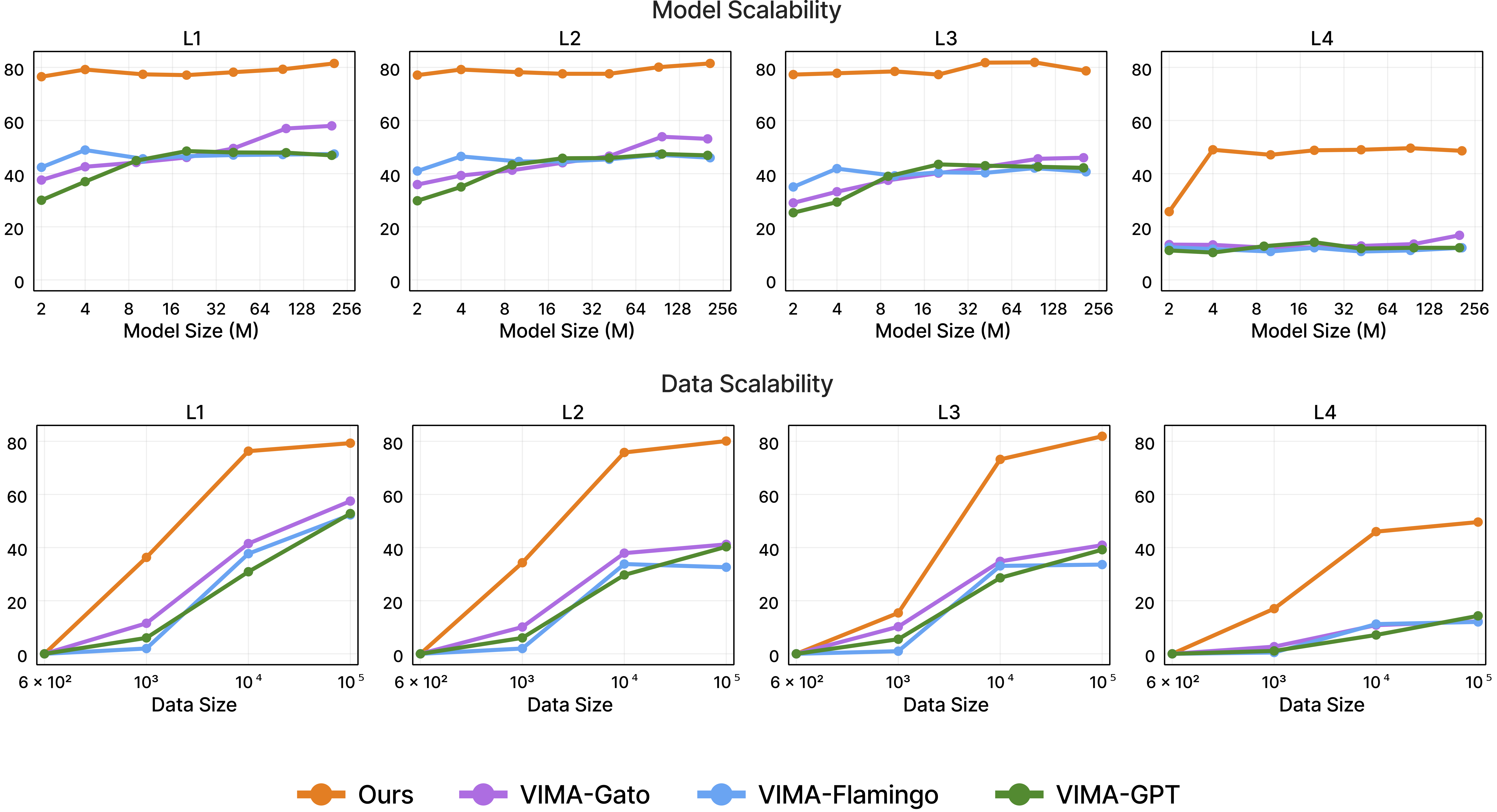
The VIMA paper (ICML 2023) shows a consistent pattern: VIMA with dense cross-attention maintains significantly better performance than baselines as the level climbs from L1 to L4 — especially at L3 and L4, where GPT-style prefix conditioning degrades most sharply.
The mechanism was analyzed in Post 1: GPT-style prefix reads the prompt once and relies on self-attention to propagate that signal — the prompt context dilutes across layers. When the task is entirely new (L4), the model needs to "re-read the prompt" at every layer to avoid drifting from task intent. Dense cross-attention at every one of the 12 layers does exactly this.
Scaling also follows an interesting pattern: smaller models (9M) degrade more steeply climbing from L1 to L4 compared to larger models (200M) — but even VIMA-9M degrades less than a GPT-style prefix model at 200M parameters on the higher levels. Architecture matters more than size when measuring generalization.
Running a Full Systematic Evaluation
To evaluate a policy across all tasks in a given partition programmatically:
from vima_bench import make, PARTITION_TO_SPECS
import numpy as np

def evaluate_partition(policy, partition: str, n_episodes: int = 50):
    """Evaluate a policy across all tasks in one partition."""
    results = {}
    task_names = list(PARTITION_TO_SPECS["test"][partition].keys())

    for task in task_names:
        env = make(
            task,
            task_kwargs=PARTITION_TO_SPECS["test"][partition][task],
        )

        success_count = 0
        for _ in range(n_episodes):
            obs, prompt, prompt_assets = env.reset()
            done = False

            while not done:
                # Replace with your actual policy inference
                action = policy.predict(obs, prompt, prompt_assets)
                obs, reward, done, info = env.step(action)

            if info["success"]:
                success_count += 1

        results[task] = success_count / n_episodes
        print(f"  {task}: {results[task]:.1%}")

    mean_success = np.mean(list(results.values()))
    print(f"\n→ Mean {partition}: {mean_success:.1%}")
    return results

# Run through all 4 levels
for partition in PARTITION_TO_SPECS["test"]:
    print(f"\n=== {partition} ===")
    evaluate_partition(your_policy, partition)
Comparing Checkpoint Sizes
To compare two model sizes head-to-head on the hardest partition:
for size in 9M 200M; do
  python scripts/example.py \
    --ckpt=ckpts/${size}.ckpt \
    --partition=novel_task_generalization \
    --task=follow_order
done
The performance difference directly shows the cost of running a smaller model in deployment — useful for choosing the right checkpoint size given the edge hardware constraints of your humanoid platform.
Conclusion
VimaBench is not just a collection of 17 tasks — it is a language for speaking precisely about generalization. When someone says "my model hits 70% on VimaBench," the correct follow-up question is: 70% on which partition? L1 or L4? That difference can be the gap between a compelling lab demo and a production-ready system.
For humanoid robots, the standard must be Level 4. A robot in a home, factory, or hospital receives hundreds of novel instructions every day from users — and there is no way to pre-train on all of them. A model must demonstrate Level 4 performance to confirm that it genuinely reads and understands prompts rather than just recalling patterns.
In Post 3: Object Tokenizer, we will go deep into how VIMA converts raw pixels into object tokens — the most critical part of the pipeline that enables the model to handle new objects at Level 3 without having seen them in training.