SUGAR: Train Humanoid from Human Videos, No Reward Engineering
In May 2026, a research team at Peking University and collaborators released a notable paper on arXiv: SUGAR — A Scalable Human-Video-Driven Generalizable Humanoid Loco-Manipulation Learning Framework (arXiv:2605.20373). The lead author is Tianshu Wu, with Xiangqi Kong, Yue Chen, Qize Yu, Hang Ye, Jia Li, Yizhou Wang, and Hao Dong.
Why does it matter? Because SUGAR tackles the two most painful problems when training humanoids: (1) reward engineering — every task typically requires a hand-crafted reward function — and (2) data scarcity — teleoperation and mocap are expensive, while SUGAR only needs ordinary human videos you can record with a phone.
In this tutorial we walk through everything end-to-end: the core idea, the 3-stage architecture, installation from GitHub, training the 6 bundled tasks (CarryBox, KickBox, PushBox, SitChair, StandBottle, PickBottle), and inference on real hardware.

1. Why SUGAR exists — old problem, new solution
In Humanoid Series 5 — Loco-Manipulation we explained why loco-manipulation (walking while manipulating) is the Holy Grail of humanoids. It's hard because you must simultaneously:
- Maintain whole-body balance
- Plan manipulation trajectories
- Avoid self-collision and environment collision
- React to external disturbances (someone pushes the robot, the object slips)
Traditional approach: RL with hand-designed rewards per task. Rewards must include many terms — tracking, energy, smoothness, collision penalty, contact — and their weights take weeks to tune. Worse, each new task (kicking, sitting, opening a cabinet) starts from scratch.
SUGAR's approach: Forget reward engineering. Take human videos of the task being performed (transporting boxes, kicking, sitting, picking bottles), extract motion and contacts, then distill them into a policy that runs on real hardware.
The striking design choice: no reference-motion conditioning at inference. After training, the robot generates actions autonomously — it does NOT mimic the video frame-by-frame. This is a major departure from prior work (H1-2 motion tracking, OmniH2O, etc.).
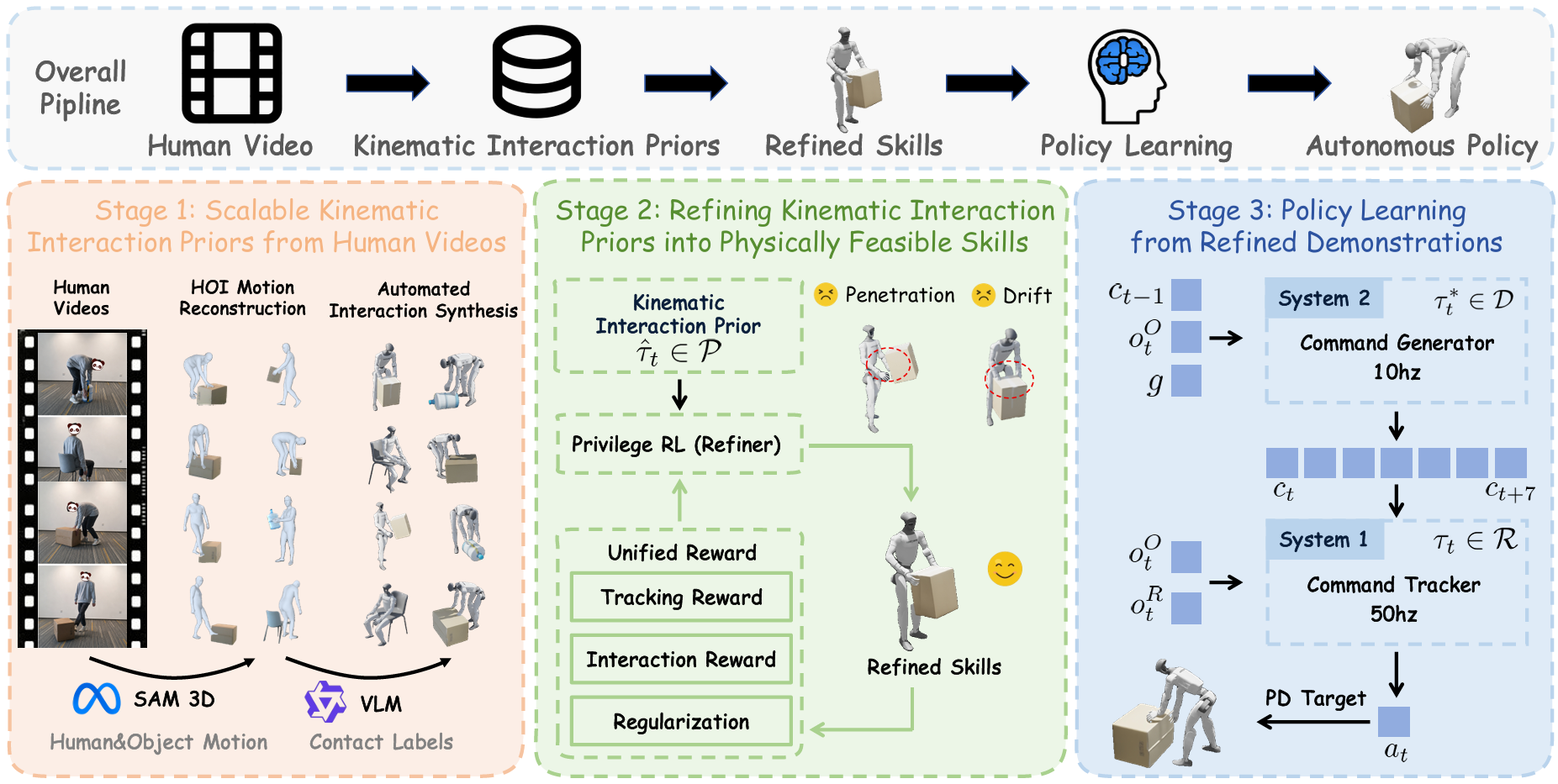
2. The 3-Stage Architecture — pipeline overview
SUGAR runs three sequential stages. Understanding them is 80% of understanding the paper.
Stage 1 — Kinematic Extraction (motion priors from video)
Input: human videos performing a task (third-person, unstructured — shot freely with a phone, no studio needed).
The automated pipeline does:
- Human pose estimation — Recover human skeleton frame by frame.
- Object detection & tracking — Locate objects (boxes, bottles, chairs) and track their trajectories.
- Contact label extraction — Detect when hands contact objects, feet contact ground, hips contact the chair.
- Retargeting to humanoid kinematics — Map the human skeleton to a 29-DoF humanoid skeleton. This is tricky due to differing limb ratios and joint constraints.
Stage 1's output is called kinematic interaction priors: robot-object trajectories plus contact labels. Note the word priors — these are hints, not ground truth, because retargeting often introduces artifacts (clipping, broken contacts).
Stage 2 — Physics-based Refinement
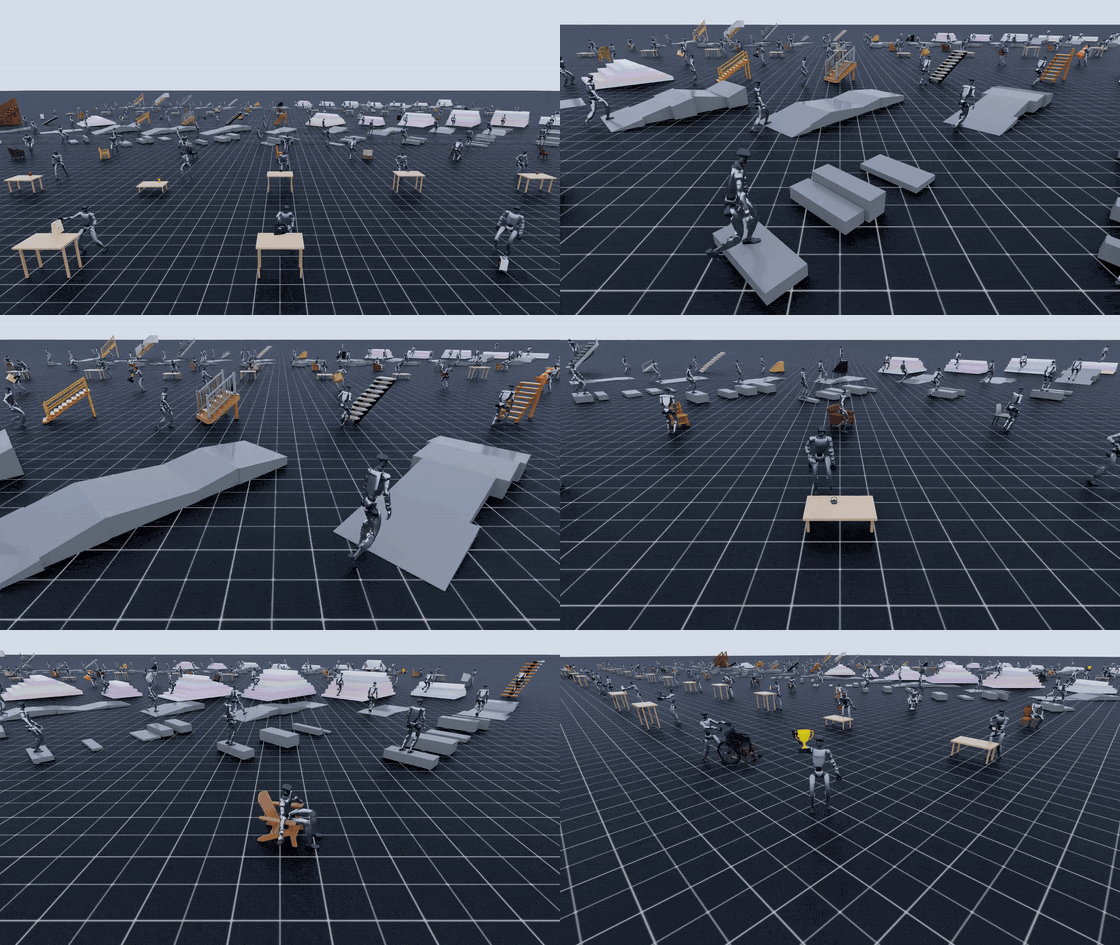
Take the priors from Stage 1 (which are physically infeasible — hand penetrating the box, feet sinking through the floor) and use RL in simulation (IsaacSim) to refine them into feasible motion.
Two key tricks:
- Unified mimic reward — A single reward tracking the error between robot state and prior state. NO task-specific reward. This is the key to "no reward engineering."
- Progressive state pool — The robot starts training from easy states (near task completion) and gradually expands to hard states (task start). It's an automatic curriculum.
Stage 2 runs in privileged mode: the policy can access cheat info like exact object pose, exact contact forces — things the real robot won't have. This is for training speed and stability.
Stage 3 — Hierarchical Policy Distillation
Distill the Stage 2 "cheating" policy into 2 modules deployable in the real world:
- Command Generator (high-level) — Takes observations (RGB-D, proprioception) and emits abstract commands ("move base 0.5m forward, lift left hand"). Trained with behavior cloning on Stage 2 rollouts.
- Command Tracker (low-level) — Whole-body controller, takes commands and emits joint targets. Trained with RL in sim with commands sampled from rollouts.
Separating the two modules mirrors NaviGo / NaVid for navigation: split planning and control so each module is smaller, more stable, and easier to debug.

3. Installing SUGAR — Step by Step
Repo: github.com/tianshuwu/SUGAR. Hardware requirements: NVIDIA GPU (RTX 4090/5090 ideal, A100 fine, minimum RTX 3090 24GB VRAM for lighter tasks).
3.1 Clone and create environment
git clone https://github.com/tianshuwu/SUGAR.git
cd SUGAR
conda create -n sugar python=3.11 -y
conda activate sugar
3.2 Install IsaacSim 5.1 and IsaacLab 2.3
SUGAR is built on the IsaacLab manager-based framework, so you need Isaac Sim. Note: IsaacSim 5.1 requires Linux Ubuntu 22.04 LTS (don't install on WSL2 — GPU driver becomes a mess).
# IsaacSim 5.1 via pip (fastest, no Omniverse Launcher needed)
pip install isaacsim[all,extscache]==5.1.0 --extra-index-url https://pypi.nvidia.com

# IsaacLab 2.3 with RSL_RL support
git clone https://github.com/isaac-sim/IsaacLab.git
cd IsaacLab
git checkout v2.3.0
./isaaclab.sh -i rsl_rl
cd ..
If you're new to Isaac Lab, read Genie Sim 3 — Train Humanoid on Isaac or GR00T N1 — Fine-tune with Isaac Lab first — it will be much easier to follow.
3.3 Install PyTorch matching your GPU
For RTX 5090 / Blackwell (CUDA 12.8):
pip install torch==2.8.0 torchvision==0.23.0 torchaudio==2.8.0 \
  --index-url https://download.pytorch.org/whl/cu128
For RTX 30/40-series (CUDA 12.1):
pip install torch==2.8.0 torchvision==0.23.0 torchaudio==2.8.0
3.4 Install SUGAR packages
pip install -e source/sugar_rl
pip install -e source/sugar_il
The two packages cleanly separate the RL backbone (Stage 2) from IL distillation (Stage 3).
3.5 Download dataset and checkpoints
The repo ships 3 archives via gdown:
pip install gdown
# Data archive (pre-extracted kinematic priors, ~400MB)
gdown <DATA_LINK>  -O data.zip && unzip data.zip -d data/

# Task descriptions (~50MB)
gdown <DESC_LINK> -O descriptions.zip && unzip descriptions.zip -d descriptions/

# Demo checkpoints (~250MB) — run inference immediately without training
gdown <CKPT_LINK> -O checkpoints.zip && unzip checkpoints.zip -d checkpoints/
The exact gdown URLs live in the repo README (they change between versions). Total ~700MB — quick to download.
4. Training — the 6 bundled tasks
SUGAR ships 6 representative tasks that cover the core loco-manipulation skills:
| Task | Description | Main skill |
|---|---|---|
CarryBox |
Carry a box from A to B | Whole-body carry + bipedal walking |
KickBox |
Kick the box forward | Single-leg balance + dynamic motion |
PushBox |
Push the box across the floor | Pushing with force feedback |
SitChair |
Walk to a chair and sit | Bipedal walk + sit + balance |
StandBottle |
Stand a bottle upright (from horizontal) | Bimanual fine-grained manipulation |
PickBottle |
Squat and pick up the bottle | Squat + grasp + recover |
Train one task:
bash train.sh CarryBox
Estimated training time (RTX 4090): ~6–10 hours per task to convergence. RTX 3090 is ~50% slower.
train.sh is actually a wrapper around the two stages:
# Pseudo-code inside train.sh
# Stage 2: privileged RL refinement
python -m sugar_rl.train --task CarryBox --num_envs 4096

# Stage 3: hierarchical distillation
python -m sugar_il.distill --task CarryBox --rl_ckpt <stage2_ckpt>
You can run them step by step for debugging. Monitor training via TensorBoard:
tensorboard --logdir logs/ --port 6006
Reward curves rise then plateau — when plateau holds ~1k steps with no further gain, you can stop.
5. Inference — running a checkpoint
After training (or downloading demo checkpoints), inference is trivial:
bash inference.sh CarryBox
The script loads the model from checkpoints/CarryBox/, spawns one robot in IsaacSim, and rolls out. You'll see the robot step forward, squat, pick the box, and walk to the target.
Inference with custom checkpoints:
bash inference.sh CarryBox \
  --tracker_ckpt path/to/your/tracker.pt \
  --generator_ckpt path/to/your/generator.pt
--tracker_ckpt and --generator_ckpt let you mix and match modules — e.g. test a new generator with an old tracker.

6. Sim-to-Real — Deploying to real hardware
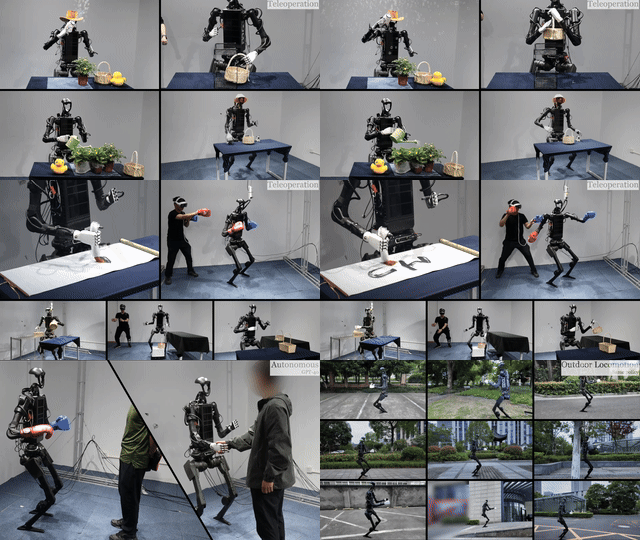
The paper reports successful deployment on real humanoid hardware (the brand isn't named in the abstract, but the characteristics match Unitree H1-2 or Booster T1). Sim-to-real pipeline:
- Domain randomization in Stage 2 — Randomize mass, friction, motor delay, sensor noise. This is the standard trick (see Booster Gym ICRA 2026 — sim2real for T1 for deep details).
- Privileged-to-non-privileged distillation — The Stage 3 tracker only sees observations that the real robot can produce (joint pos/vel, IMU, RGB-D), not the ground-truth pose available in Stage 2.
- Closed-loop execution — At deployment the robot re-plans continuously rather than blindly following the generated trajectory. If pushed or the object slips, the generator emits a fresh command immediately.
To deploy on your own robot you'll need:
- A ROS 2 bridge (most commercial humanoids ship one)
- Mapping real-robot observations into Stage 3's observation space
- Mapping action outputs to your robot's joint command space (joint ordering often differs)
This section isn't fully documented yet in the paper — fork the repo and wait for the authors to release hardware-integration code.
7. Results reported in the paper
Condensed results (from the paper):
- 6/6 tasks zero-shot generalize to new objects within the same category (different box sizes, different bottle shapes).
- Failure recovery — When pushed, fallen, or after dropping the object, the autonomous policy resumes the task without a manual reset.
- Data scaling — Clear scaling of performance with the number of human videos (10 → 100 → 1000). More videos, more robust.
- Stable closed-loop — Long-horizon tasks (CarryBox over 5m) are stable.
Versus baselines (motion tracking + manual reward), SUGAR clearly wins on task generalization, especially on unseen objects/scenes.
8. Pitfalls — common gotchas reproducing
A few traps to watch for when reproducing open-source robotics papers:
- CUDA version mismatch — PyTorch 2.8 CU128 only runs correctly on Blackwell. RTX 4090/3090 must use CU121. Get this wrong and IsaacSim crashes immediately.
- IsaacSim 5.1 on Ubuntu 24.04 isn't stable yet — Recommended: Ubuntu 22.04 LTS with kernel 5.15.
- GPU memory —
num_envs=4096needs ~22GB VRAM. With only 12GB (RTX 3060), drop to 1024 or 2048. - Headless mode is mandatory on servers — Add
--headlessto the train command, otherwise IsaacSim tries to open a GUI and crashes. - Manager-based config is verbose — IsaacLab manager-based forces YAML/Python config files. Read the IsaacLab tutorial first, don't dive straight into SUGAR.
9. When should you use SUGAR? When not?
Use SUGAR when:
- You want to train new tasks without tuning rewards.
- You have (or can record) human videos performing the task. A few dozen 30-second iPhone clips is fine.
- You have real humanoid hardware or an accurate sim.
Don't use SUGAR when:
- The task is too far from human morphology (fixed 6-DoF industrial arms are a poor fit).
- You need sub-millimeter precision (precision assembly) — SUGAR favors generality over precision.
- You lack a strong GPU (minimum RTX 3090 / A6000).
You can contrast this with Gear Sonic Whole-Body Control — Gear Sonic uses motion priors + MPC, while SUGAR uses human videos + RL distillation. The two approaches complement rather than replace each other.
10. Resources & References
- Paper: SUGAR — arXiv:2605.20373 — Tianshu Wu et al., 2026
- Project site: tianshuwu.github.io/sugar-humanoid
- Code: github.com/tianshuwu/SUGAR
- IsaacLab docs: isaac-sim.github.io/IsaacLab
Summary
SUGAR represents a shift in thinking: instead of treating a humanoid as an industrial robot needing precise programming, treat it as a student who can learn by watching videos. The approach scales with data (more videos help), needs no expert reward tuning, and gracefully handles unseen objects and scenes.
If you're building a humanoid stack in Vietnam (or anywhere), SUGAR is worth forking and trying right now. Minimum hardware is Unitree G1 or equivalent plus a single 24GB GPU. The vnrobo community will track and update as hardware-integration code lands.