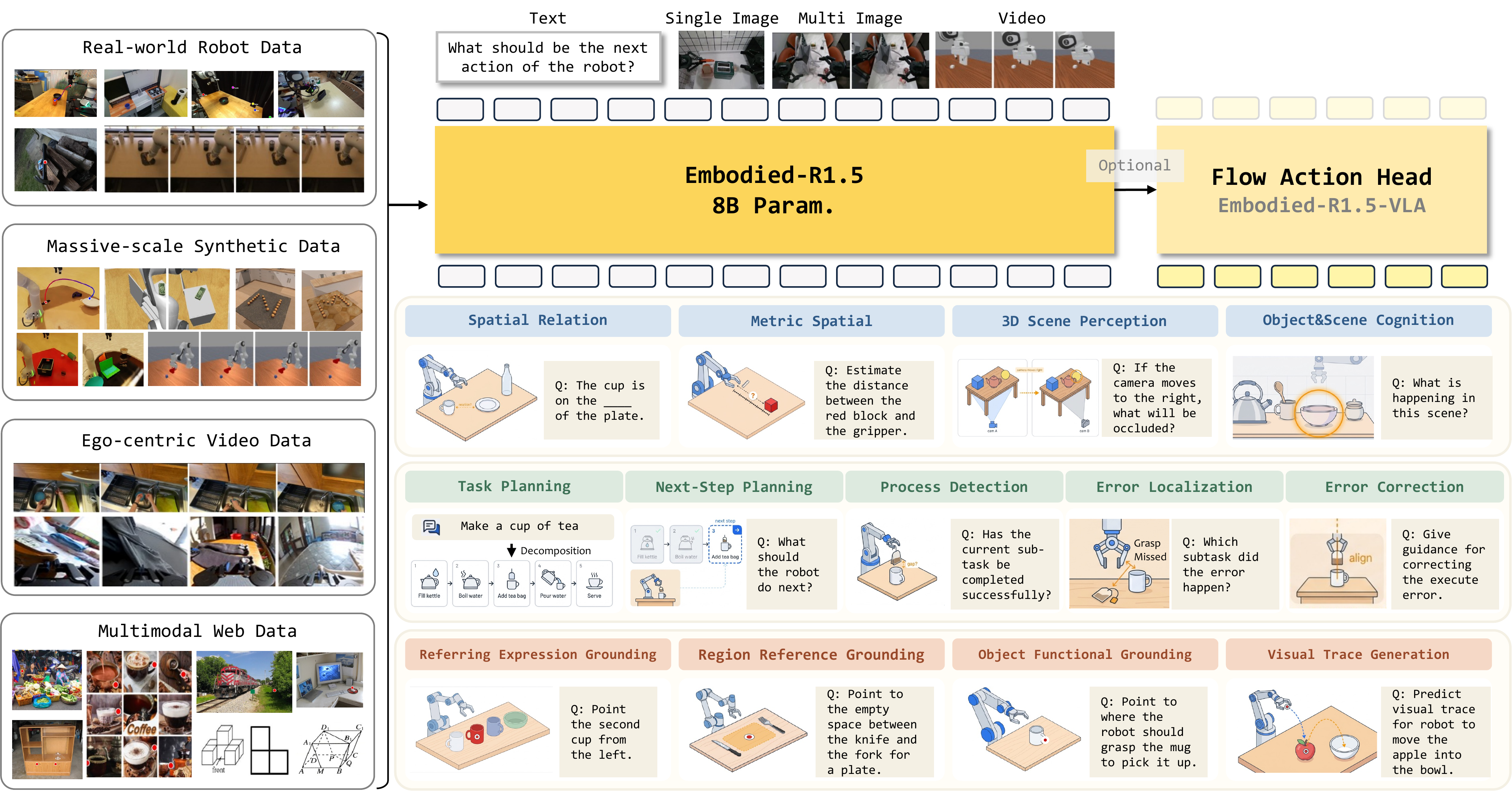
Embodied-R1.5-VLA is one of the most interesting open-source releases in the 2026 Embodied Foundation Model wave. Instead of training a Vision-Language-Action model from scratch with massive robot trajectories, the authors start from a VLM that has already learned embodied reasoning, then attach an action head and fine-tune it into a robot manipulation policy. The important practical detail is that Embodied-R1.5-VLA-LIBERO is available on Hugging Face, the official project code lives in the Embodied-R1.5 repository, and the VLA training/evaluation workflow uses StarVLA.
This tutorial is written for practitioners. We will cover the paper idea, architecture, installation, LIBERO evaluation with a released checkpoint, and fine-tuning a VLA policy on LIBERO. If you are new to VLA models, read our VLA Models overview first. If you already use StarVLA, the modular StarVLA tutorial will make the training and evaluation commands easier to place in context.
Where Embodied-R1.5 comes from
The paper Embodied-R1.5: Evolving Physical Intelligence via Embodied Foundation Models appeared on arXiv on June 9, 2026. The official project page describes Embodied-R1.5 as an 8B-parameter model based on Qwen3-VL-8B-Instruct, trained to unify several embodied reasoning capabilities: cognition, spatial reasoning, task planning, correction, pointing, and localization. The official code is at https://github.com/pickxiguapi/Embodied-R1.5; model and dataset releases are collected under the Hugging Face collection IffYuan/embodied-r15.
The key change from the earlier Embodied-R1 is scope. Embodied-R1 focused on "pointing" as an embodiment-agnostic intermediate representation: the model predicts grasp points, placement regions, or visual traces instead of directly predicting robot-specific joint commands. Embodied-R1.5 expands this into a broader Embodied Foundation Model that can plan, ground plans into coordinates, correct execution errors, and then, when needed, be adapted into a VLA that directly emits continuous robot actions.
The high-level idea looks like this:
Image + language instruction
        |
        v
Qwen3-VL-based Embodied-R1.5 backbone
        |
        +--> cognition / spatial reasoning
        +--> task planning
        +--> pointing / visual trace / affordance grounding
        +--> correction
        |
        v
VLA adaptation with action head
        |
        v
Continuous robot action chunk
The paper reports a data system of more than 15B tokens, built with three automated data construction pipelines, and a multi-task balanced RL recipe to reduce conflicts across heterogeneous embodied tasks. The project page also highlights a Planner-Grounder-Corrector (PGC) closed-loop framework: a single model decomposes a long-horizon task, grounds each step into spatial targets, checks whether execution is on track, and corrects mistakes when the state diverges.
For VLA adaptation, the authors do not rely on large-scale action pretraining in the same way many robot policies do. Embodied-R1.5-VLA uses Embodied-R1.5 as the backbone, adds an action head, and fine-tunes on action data. This is why LIBERO is a useful starting point: it is small enough to reproduce as a workflow, but broad enough to test several manipulation skills.
What LIBERO measures
LIBERO is a simulated manipulation benchmark, commonly using a Franka/Panda-style arm in MuJoCo environments. You will usually see four task suites:
| Suite | What it tests | Example task type |
|---|---|---|
| LIBERO-Spatial | Spatial relationships | place an object left/right/on top of another |
| LIBERO-Object | Object recognition under similar distractors | choose the correct object |
| LIBERO-Goal | Goal-conditioned manipulation | satisfy a language-specified final state |
| LIBERO-Long | Long-horizon execution | complete multi-step tasks with accumulated risk |
Results are reported as success rate. An episode is successful when the simulator's task checker confirms that the final state satisfies the instruction. Because evaluation runs many episodes, average success rate is much more meaningful than a single video. StarVLA's LIBERO README describes the common setup as 50 episodes per task, with 10 tasks per suite, or roughly 500 trials for each suite.
According to the official Embodied-R1.5 project page, on LIBERO Benchmark 40 Tasks, Embodied-R1.5-VLA reports the following results without action pretraining:
| Model | Action pretraining | Goal | Spatial | Object | Long | Overall |
|---|---|---|---|---|---|---|
| OpenVLA-OFT | Yes | 97.9 | 97.6 | 98.4 | 94.5 | 97.1 |
| pi0.5 | Yes | 98.0 | 98.8 | 98.2 | 92.4 | 96.9 |
| OpenVLA-OFT | No | 91.7 | 94.3 | 95.2 | 86.5 | 91.9 |
| pi0.5 | No | 94.6 | 96.6 | 97.2 | 85.8 | 93.6 |
| Embodied-R1.5-VLA | No | 97.4 | 97.8 | 99.2 | 93.2 | 97.3 |
These are reported results from the authors, not a local rerun in this article. The important part is not only the 97.3 overall score. It is that the model reaches that tier without action pretraining. That supports the paper's central claim: a backbone with strong embodied cognition, pointing, planning, and correction can transfer into manipulation policy learning with less action data.
Hardware expectations
You can inspect files and prepare datasets on a normal machine, but serious VLA inference and training need GPU memory. A realistic setup is:
| Goal | Suggested GPU | Notes |
|---|---|---|
| Read model cards and download checkpoints | No GPU | Hugging Face CLI is enough |
| Evaluate LIBERO checkpoint | RTX 4090 24GB or A100 | separate starVLA and libero environments |
| Fine-tune one suite | 1-2 GPUs with 24GB each | small batch, gradient accumulation |
Fine-tune libero_all |
8x A100/H800, matching StarVLA guidance | around 30K steps, close to 10 epochs |
If you only have a laptop, you can still learn the workflow and prepare configuration files. Do not expect to fine-tune an 8B model or a Qwen3-VL backbone on CPU. For a beginner, the practical path is to evaluate first, then rent cloud GPUs for a small fine-tuning run on a single suite such as libero_goal.
Install the Embodied-R1.5 repo
The official Embodied-R1.5 repository is useful for reading the project scripts, running the foundation model as a VLM, and understanding output formats. The VLA workflow itself is delegated to StarVLA, but you should still clone the official repo:
git clone https://github.com/pickxiguapi/Embodied-R1.5.git
cd Embodied-R1.5

conda create -n er15 python=3.10 -y
conda activate er15

pip install "transformers>=4.57.0" qwen-vl-utils vllm openai pillow
You can serve Embodied-R1.5 as a VLM with vLLM:
vllm serve IffYuan/Embodied-R1.5 \
  --served-model-name "Embodied-R1.5" \
  --tensor-parallel-size 1 \
  --mm-encoder-tp-mode data \
  --gpu-memory-utilization 0.7 \
  --async-scheduling \
  --media-io-kwargs '{"video": {"num_frames": 32}, "image": {"max_num": 32}}' \
  --max_model_len 20000 \
  --limit-mm-per-prompt '{"image": 8, "video": 1}' \
  --host 0.0.0.0 \
  --port 22002
The foundation model returns structured answers inside <answer>...</answer> tags. For pointing tasks, it returns JSON with point_2d; coordinates are normalized to the [0, 1000] range, independent of original image resolution. For 3D traces, the output can include a depth value in meters. This is the reasoning and grounding layer. To execute actions in LIBERO, we need the VLA action head.
Install StarVLA for VLA training
The Embodied-R1.5 README states that VLA training and inference use starVLA. Work with LIBERO from the StarVLA repository:
git clone https://github.com/starVLA/starVLA.git
cd starVLA

conda create -n starVLA python=3.10 -y
conda activate starVLA

pip install -r requirements.txt
pip install flash-attn --no-build-isolation
pip install -e .
If flash-attn fails, inspect CUDA and PyTorch:
nvcc -V
pip list | grep -E 'torch|transformers|flash-attn'
The StarVLA guideline says flash-attn==2.7.4.post1 has been verified with CUDA 12.0 and 12.4. Community users have also reported AMD MI300X support with ROCm by switching attention implementation to sdpa, but beginners should start on NVIDIA hardware if possible. It removes one major source of setup uncertainty.
Download Embodied-R1.5-VLA-LIBERO
Download the released LIBERO checkpoint:
huggingface-cli download IffYuan/Embodied-R1.5-VLA-LIBERO \
  --local-dir playground/Pretrained_models/Embodied-R1.5-VLA-LIBERO
If you plan to fine-tune from the foundation backbone, also download Embodied-R1.5:
huggingface-cli download IffYuan/Embodied-R1.5 \
  --local-dir playground/Pretrained_models/Embodied-R1.5
In practice, a Hugging Face release may contain weights and config files in a layout that differs from the checkpoint paths expected by an evolving research framework. After downloading, inspect playground/Pretrained_models/Embodied-R1.5-VLA-LIBERO and identify whether the actual model file is .pt, .safetensors, or a framework-specific checkpoint directory. If the current StarVLA script expects the layout of StarVLA/bench-libero, you may need to edit CKPT and the loader configuration. That is a normal integration detail, not necessarily a model problem.
Set up LIBERO
Do not install LIBERO into the same environment as StarVLA. Evaluation uses a client-server pattern: one terminal runs the policy server in the starVLA environment, and another terminal runs the simulator in the libero environment.
conda create -n libero python=3.10 -y
conda activate libero

pip install mujoco==3.2.3
git clone https://github.com/Lifelong-Robot-Learning/LIBERO.git
cd LIBERO
pip install -e .
cd ..

pip install tyro matplotlib mediapy websockets msgpack numpy==1.24.4
On a headless GPU server, set EGL rendering:
export MUJOCO_GL=egl
export PYOPENGL_PLATFORM=egl
If rendering fails, check the NVIDIA driver, nvidia-smi, MuJoCo version, and OpenGL libraries before blaming the policy. Many LIBERO failures are simulator/rendering issues, not learning issues.
Evaluate on LIBERO
Inside StarVLA, examples/LIBERO/eval_files/ contains two central scripts:
run_policy_server.sh: starts the policy server, loads a checkpoint, and exposes the endpoint that receives observations.eval_libero.sh: runs the simulator, sends observations to the server, receives actions, and computes success rate.
The runtime data flow is:
LIBERO simulator
  observation: image, proprio/state, language instruction
        |
        | websocket / msgpack
        v
StarVLA policy server
  Embodied-R1.5 backbone + action head
        |
        v
action chunk: [x, y, z, roll, pitch, yaw, gripper]
        |
        v
LIBERO environment step
Terminal 1:
conda activate starVLA

# Edit CKPT inside examples/LIBERO/eval_files/run_policy_server.sh
# Example:
# CKPT=playground/Pretrained_models/Embodied-R1.5-VLA-LIBERO/checkpoints/steps_xxxxx_pytorch_model.pt

bash examples/LIBERO/eval_files/run_policy_server.sh
Wait for a message similar to:
server listening on 0.0.0.0:6694
Terminal 2:
conda activate libero
export MUJOCO_GL=egl
export PYOPENGL_PLATFORM=egl

# Edit paths inside examples/LIBERO/eval_files/eval_libero.sh
bash examples/LIBERO/eval_files/eval_libero.sh
At the end, the script should print success rates and save videos under results/{task_suite}/{checkpoint_name}/. For your first run, evaluate only one suite, such as libero_goal, to confirm the full pipeline. Then run all four suites.
Prepare data for fine-tuning
StarVLA uses LeRobot-format LIBERO data. Download the four subsets with the helper script:
conda activate starVLA
cd starVLA

export DEST=/path/to/your/data/directory
bash examples/LIBERO/data_preparation.sh
The script downloads:
libero_spatial_no_noops_1.0.0_lerobotlibero_object_no_noops_1.0.0_lerobotlibero_goal_no_noops_1.0.0_lerobotlibero_10_no_noops_1.0.0_lerobot- VLM co-training data such as
LLaVA-OneVision-COCO
After preparation, the expected structure is:
playground/Datasets/
├── LEROBOT_LIBERO_DATA/
│   ├── libero_spatial_no_noops_1.0.0_lerobot/
│   │   ├── meta/
│   │   │   └── modality.json
│   │   └── ...
│   ├── libero_object_no_noops_1.0.0_lerobot/
│   ├── libero_goal_no_noops_1.0.0_lerobot/
│   └── libero_10_no_noops_1.0.0_lerobot/
└── LLaVA-OneVision-COCO/
Verify that the dataloader works:
python starVLA/dataloader/lerobot_datasets.py \
  --config_yaml examples/LIBERO/train_files/starvla_cotrain_libero.yaml
If modality.json is missing, copy it from examples/LIBERO/train_files/modality.json into every dataset meta/ directory. If a data key is missing, inspect a sample and verify that image, state, action, and language fields match the schema expected by the StarVLA loader.
Understand the training config
The core config is examples/LIBERO/train_files/starvla_cotrain_libero.yaml. The sections you will edit most often are framework, action model, datasets, and trainer:
framework:
  name: QwenOFT
  qwenvl:
    base_vlm: ./playground/Pretrained_models/Embodied-R1.5
    attn_implementation: flash_attention_2
  action_model:
    action_dim: 7
    state_dim: 7
    future_action_window_size: 7
    action_horizon: 8

datasets:
  vlm_data:
    dataset_py: vlm_datasets
    per_device_batch_size: 4
  vla_data:
    dataset_py: lerobot_datasets
    data_root_dir: playground/Datasets/LEROBOT_LIBERO_DATA
    data_mix: libero_all
    per_device_batch_size: 16

trainer:
  max_train_steps: 100000
  save_interval: 10000
  eval_interval: 100
  learning_rate:
    base: 2.5e-05
    qwen_vl_interface: 1.0e-05
    action_model: 1.0e-04
  loss_scale:
    vla: 1.0
    vlm: 0.1
For beginners, start with QwenOFT. OFT uses a continuous MLP action head and parallel decoding, making it easier to debug than FAST tokenized actions or flow-matching policies. Once you have a baseline, try QwenPI or QwenGR00T. In LIBERO, action_dim: 7 usually corresponds to 6-DoF delta pose plus gripper. action_horizon: 8 means the policy predicts a short action chunk, which reduces the number of expensive model calls.
For a small GPU run, reduce scope:
datasets:
  vla_data:
    data_mix: libero_goal
    per_device_batch_size: 2

trainer:
  max_train_steps: 10000
  save_interval: 2000
This is not a SOTA recipe. It is a smoke test that tells you whether data loading, forward pass, loss computation, checkpointing, and evaluation are wired correctly.
Launch fine-tuning
Open examples/LIBERO/train_files/run_libero_train.sh and set the main variables:
Framework_name=QwenOFT
freeze_module_list=''
base_vlm=playground/Pretrained_models/Embodied-R1.5
config_yaml=./examples/LIBERO/train_files/starvla_cotrain_libero.yaml
libero_data_root=playground/Datasets/LEROBOT_LIBERO_DATA
data_mix=libero_all
run_root_dir=./results/Checkpoints
run_id=er15_vla_libero_oft
Then run:
conda activate starVLA
bash examples/LIBERO/train_files/run_libero_train.sh
The script wraps accelerate launch with DeepSpeed ZeRO-2. StarVLA's guideline says libero_all training on 8x A100/H800 is around 30K steps, roughly 10 epochs. On a single GPU, reduce batch size, use gradient accumulation, and expect slow iteration. Do not compare a small one-GPU smoke run against the official table.
Track three signals during training:
| Signal | Expected behavior | If abnormal |
|---|---|---|
vla_loss |
gradually lower or stabilize below its initial range | check action normalization |
| GPU memory | stable after the first few steps | reduce batch or enable gradient checkpointing |
| checkpoint eval | success rate improves with steps | check prompts and unnormalization stats |
A common failure is training a policy that evaluates poorly because the evaluation script uses the wrong action unnormalization stats. If you train on new data or a new mixture, make sure the eval config points to the stats associated with that checkpoint.
What changes for real robots?
Embodied-R1.5-VLA-LIBERO is a policy for the LIBERO benchmark. To deploy on a real robot, you need a bridge from real robot observations into the policy format:
Real robot cameras + state
        |
        v
preprocess to StarVLA sample format
        |
        v
Embodied-R1.5-VLA policy
        |
        v
action unnormalize
        |
        v
robot controller / safety layer / rate limiter
At minimum, you need:
- RGB or RGB-D cameras with calibration.
- A state vector matching the model's
state_dim. - A mapping from
[x, y, z, r, p, y, gripper]to your robot controller. - A safety layer for velocity limits, workspace limits, force limits, and emergency stop.
- Logging so you can replay failures.
If real-world deployment is your goal, read more about OpenVLA and VLA0 to understand deployment pitfalls and the tradeoff between action-as-text and continuous action heads.
Quick debugging checklist
[ ] Does Embodied-R1.5 VLM inference run with vLLM or HF?
[ ] Does the StarVLA smoke test run?
[ ] Does the LIBERO simulator render with MUJOCO_GL=egl?
[ ] Does the LeRobot LIBERO dataloader load samples?
[ ] Does the policy server open port 6694?
[ ] Do eval scripts point to the right checkpoint and stats?
[ ] Do saved videos show reasonable motion?
[ ] Is low success caused by policy quality or action scaling?
If the policy does nothing, suspect action unnormalization or checkpoint path. If the robot moves wildly, check action order and gripper convention. If the simulator crashes, debug MuJoCo/OpenGL before debugging the model.
Conclusion
Embodied-R1.5-VLA matters because it reframes a central VLA question: instead of asking only how much action data is needed, it asks how much a strong embodied reasoning backbone can reduce the action data burden. The reported LIBERO overall score of 97.3 without action pretraining is a strong signal that cognition, pointing, planning, and correction can transfer into manipulation policy learning when the action head and data pipeline are set up correctly.
For beginners, the best path is sequential: run Embodied-R1.5 as a VLM to understand grounding output, evaluate the Embodied-R1.5-VLA-LIBERO checkpoint in simulation, then fine-tune libero_goal before expanding to libero_all. Do not start on a physical robot. Let the simulator expose data, action scaling, and checkpoint mistakes first.