Go bimanual: UMI two-arm pipeline with official scripts
This is Part 5 in the UMI + VLA series. This post assumes you have a working single-arm policy from Part 4.
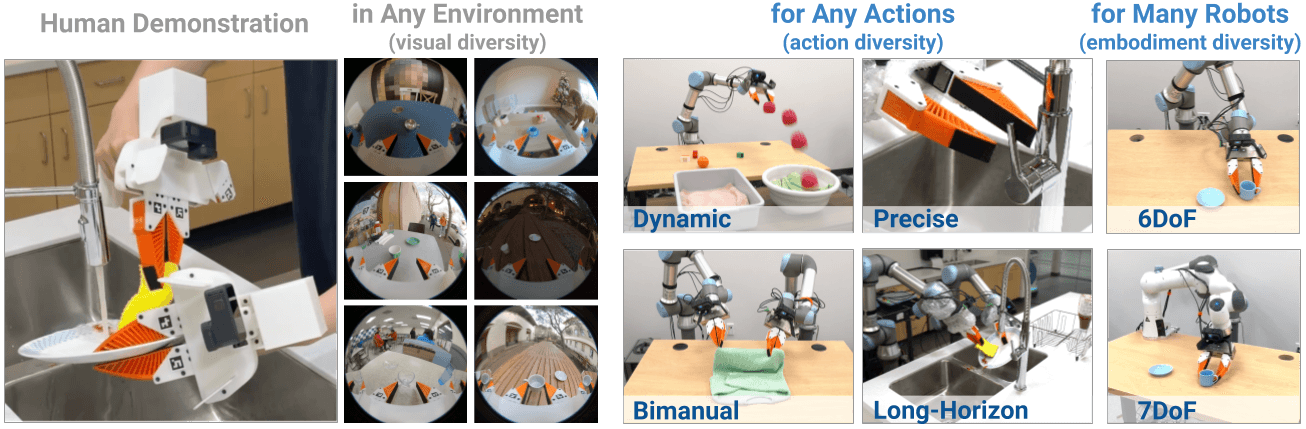
Goal: collect bimanual demos with 2 UMI units, use the official scripts already in the repo (demo_real_bimanual_robots.py, eval_real_bimanual_umi.py, umi_bimanual.yaml config), and train your first two-arm policy.
What makes bimanual harder than single-arm? Both arms must be coordinated in time — left hand holds an object while the right manipulates it. A small timing mismatch (>50ms) can prevent the policy from learning coordination at all. The time sync section in this post is mandatory.
Preparation: 2 UMI units must match
Before collecting data, verify:
[ ] Both units printed from the same STL revision, same print settings
[ ] Caliper check: max gripper width of both units matches (±1mm)
[ ] Camera angle matches between both units (place side-by-side and compare)
[ ] Same ArUco tag size
[ ] Same GoPro firmware version (recommended)
Why this matters: the policy maps "left UMI pose" → "left robot gripper" and "right UMI pose" → "right robot gripper". If the two units have different geometry, the mapping will be wrong.
Left/right convention: decide now
Set the convention now and use it consistently through the entire pipeline:
robot0 = right arm    (right UMI unit, right camera, right tracker)
robot1 = left arm     (left UMI unit, left camera, left tracker)
camera0 = right wrist
camera1 = left wrist
Write this to calib/convention.txt. If you swap left/right at any step, the policy will learn the wrong handedness.
Verify official bimanual scripts exist in repo
cd universal_manipulation_interface

# Official bimanual scripts — ALL VERIFIED TO EXIST
ls scripts_real/demo_real_bimanual_robots.py    # ✓
ls scripts_real/eval_real_bimanual_umi.py       # ✓
ls scripts_real/replay_real_bimanual_umi.py     # ✓

# Bimanual training configs — ALL VERIFIED TO EXIST
ls diffusion_policy/config/task/umi_bimanual.yaml                          # ✓
ls diffusion_policy/config/train_diffusion_unet_umi_bimanual_workspace.yaml # ✓
ls diffusion_policy/config/train_diffusion_transformer_umi_bimanual_workspace.yaml # ✓

# Read options
python scripts_real/demo_real_bimanual_robots.py --help
python scripts_real/eval_real_bimanual_umi.py --help
These are official scripts, already in the repo — not custom code. Read --help to understand the correct arguments for your robot and camera setup.
Bimanual workspace setup
Working area
               [optional overhead camera]

    LEFT ARM      WORKSPACE      RIGHT ARM
    ←──────────────────────────────────→
         ↑                      ↑
    Left UMI                Right UMI

    Central workspace: reachable by both arms
    No obstacles between grippers
    Even lighting from all angles
Choose a task where both arms genuinely need to coordinate:
- Folding a towel (right holds one corner, left holds the other)
- Fitting a lid on a box (left holds box, right places lid)
- Passing an object from right to left hand
Don't use a task where the two arms work independently — for that you don't need a bimanual policy.
Time synchronization
This is the most common failure point in bimanual setups. Both cameras must record on the same clock:
# Recommended: use 1 host machine for both GoPros
# Avoid 2 separate machines — network sync is complex

# If two machines are unavoidable, set up NTP/chrony:
sudo apt install chrony -y
chronyc tracking
chronyc sources -v
# Clock offset must be < 10ms
Sync event: start each demo with a hand clap or LED flash visible from both cameras — helps manual timestamp alignment if needed.
Recording bimanual demos
Use the official script:
python scripts_real/demo_real_bimanual_robots.py --help
Fill in the correct arguments for your setup (camera serials, robot connections, output path, task description).
Demo workflow:
- Start both GoPros simultaneously
- Point both cameras at the calibration board for ~3 seconds
- Perform the task — both hands together
- Moderate speed; avoid one hand blocking the other's camera
- Open/close grippers clearly at grasp points
- End: point both cameras at the board
- Stop recording
Demo counts:
| Purpose | Bimanual demos needed |
|---|---|
| Smoke test | 5 |
| Check coordination | 20 |
| Reasonable baseline | 50 |
| Production | 100–200 |
SLAM pipeline for bimanual data
Run the SLAM pipeline (scripts 00–07) separately for each arm first, then merge:
# Process left UMI data
python scripts_slam_pipeline/00_process_videos.py [args for left data]
# ... run scripts 01-07 for left ...

# Process right UMI data
python scripts_slam_pipeline/00_process_videos.py [args for right data]
# ... run scripts 01-07 for right ...
Then merge into a bimanual replay buffer following your convention (robot0=right, robot1=left).
Verify time alignment:
import numpy as np

left_ts = ...   # timestamps from left demo
right_ts = ...  # timestamps from right demo
offset_ms = np.abs(left_ts - right_ts).max() * 1000
print(f"Max time offset: {offset_ms:.1f} ms")
assert offset_ms < 30, "Time sync needs to be fixed before training"
Train bimanual policy
Official bimanual training configs are already in the repo:
# Check the bimanual task config
cat diffusion_policy/config/task/umi_bimanual.yaml

# Train with UNet
python train.py --config-name=train_diffusion_unet_umi_bimanual_workspace \
  task.dataset.dataset_path=/absolute/path/to/bimanual_replay_buffer.zarr.zip \
  training.seed=42

# Train with Transformer (requires more VRAM)
python train.py --config-name=train_diffusion_transformer_umi_bimanual_workspace \
  task.dataset.dataset_path=/absolute/path/to/bimanual_replay_buffer.zarr.zip \
  training.seed=42
VRAM requirements:
- Bimanual UNet (2 cameras): 1× 24–48 GB
- Bimanual Transformer: 1× 48 GB recommended
Verify action dimension from the config:
python -c "
import yaml
with open('diffusion_policy/config/task/umi_bimanual.yaml') as f:
    cfg = yaml.safe_load(f)
print('Action dim:', cfg.get('shape_meta', {}).get('action', {}).get('shape'))
"
Bimanual action includes both arms: typically [3+6+1, 3+6+1] = [10, 10] = 20D total (xyz + rot6d + gripper per arm).
Deploy and test
python scripts_real/eval_real_bimanual_umi.py --help

# Replay demo to test robot motion first
python scripts_real/replay_real_bimanual_umi.py --help
Bimanual safety checklist (more critical than single-arm):
[ ] E-stop connected, test the button before starting
[ ] Check two arms can't collide in workspace
[ ] Collision detection/avoidance active in robot SDK
[ ] Dry-run at slow speed first (20–30% max speed)
[ ] No one standing between the two robot arms
[ ] Per-arm workspace box constraints set
Bimanual test scenarios:
| Scenario | What to check |
|---|---|
| Object at exact demo position | Do both arms go to the right places? |
| Object slightly shifted | Spatial generalization |
| Task started from different initial state | Coordination timing |
| One arm perturbed slightly | Recovery |
Common bimanual errors
| Error | Cause | Fix |
|---|---|---|
| Arms out of sync | Large time offset | Use single host, clap sync event |
| Policy learns one arm, other fails | Left/right convention wrong | Reset convention from the beginning |
| Arms collide | No bimanual collision check | Add collision sphere/capsule check |
| Unstable training | Wrong action dimension | Verify from umi_bimanual.yaml |
| One arm "frozen" | That arm's trajectory isn't moving in demos | Check each arm's trajectory separately |
Next steps
If the bimanual baseline works, you can:
- Part 6: Upgrade to D405 — if you want RGB-D near the gripper
- Fine-tune a VLA — GR00T/GR00T-LeRobot for language conditioning
- Part 7: Whole-body pipeline — architecture for full-body humanoid data collection
References
- real-stanford/universal_manipulation_interface
- UMI bimanual task config
- UMI paper (Chi et al., 2024)