Upgrading to D405: when to replace GoPro in UMI and how
This is Part 6 in the UMI + VLA series. This post is for people who have a working UMI pipeline (Parts 2–5) and are considering using Intel RealSense D405 instead of GoPro.
TL;DR: D405 adds RGB-D near the gripper, useful for contact estimation and object segmentation. But it is not a drop-in replacement — you have to build custom tracking, a custom recorder, and a custom converter. If your GoPro pipeline is working, don't upgrade unless you have a specific reason.
Why GoPro and D405 are fundamentally different
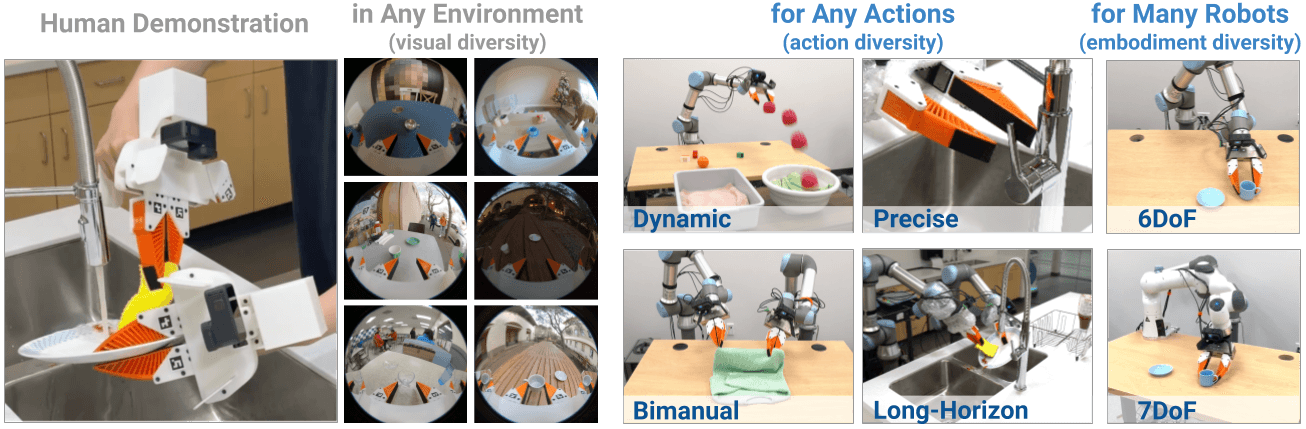
In the original UMI, GoPro does 3 things simultaneously:
GoPro in UMI:
  1. Camera observation (fisheye 155° wrist view)
  2. IMU source (accelerometer + gyroscope for SLAM)
  3. Visual odometry base (feature-rich fisheye for ORB-SLAM3)
RealSense D405 has no built-in IMU (unlike D435i). Its FOV is much narrower. The SLAM pipeline scripts in the repo (01_extract_gopro_imu.py, 03_batch_slam.py) are written specifically for GoPro format.
| Item | GoPro (original UMI) | RealSense D405 |
|---|---|---|
| FOV | Fisheye ~155° | 87° × 58° (RGB) |
| IMU | Built-in | None |
| Depth | None | Yes (short-range, ~0.1–0.5m) |
| UMI SLAM scripts | Work directly ✓ | Need custom adapter ✗ |
| Upstream support | Full ✓ | None in upstream ✗ |
When D405 is actually worth it
Only upgrade to D405 if you specifically need at least one of these:
-
Contact estimation — you need to know exactly when the fingertip touches an object. D405 depth gives a point cloud near the gripper (~0.1–0.5m range), far better than RGB-only for grasping.
-
Object segmentation — your task has many similar objects; depth helps segment 3D object bounds more accurately.
-
Partial occlusion — objects are partially hidden in RGB; depth helps estimate pose from the visible surface.
-
Sensor redundancy — you want both RGB (observation) and depth (feature) as independent information sources.
Don't upgrade if:
- Your GoPro pipeline works and the policy is good enough
- You want to "improve" without knowing what specific problem D405 solves
- You don't have a working 6DoF tracker yet (see below)
What you MUST build yourself when using D405
This is the part most people overlook: D405 needs custom infrastructure, not just a camera swap:
1. External 6DoF tracking
D405 cannot SLAM like GoPro. You need:
| Option | Accuracy | Cost | Setup complexity |
|---|---|---|---|
| Mocap (OptiTrack/Vicon) | Very high (<0.5mm) | High ($5k–$50k) | High |
| SteamVR tracker | High (~1–3mm) | Medium (~$150/tracker) | Medium |
| AprilTag/ArUco rig | Medium (~5–10mm) | Low | Low |
| Custom RGB-D SLAM | Low–medium (drift) | Low | Very high |
Recommendation: SteamVR tracker or mocap for lab setups. AprilTag rig for budget setups but watch for drift in occluded areas.
If you choose custom RGB-D SLAM (Open3D or ORB-SLAM3 RGB-D mode): this is a research project, not an engineering task. You must validate drift against ground truth, handle texture-poor surfaces, and implement tracking loss recovery. Not suitable for beginners.
2. Custom recorder
UMI repo has no recorder for D405. You must write your own sync script:
# Skeleton — starting point only, NOT production code
# You must add: error handling, proper shutdown, latency measurement
import pyrealsense2 as rs
import numpy as np

pipe = rs.pipeline()
cfg = rs.config()
cfg.enable_stream(rs.stream.color, 640, 480, rs.format.bgr8, 30)
cfg.enable_stream(rs.stream.depth, 640, 480, rs.format.z16, 30)

align = rs.align(rs.stream.color)
profile = pipe.start(cfg)

# Save intrinsics once for calibration
color_intr = profile.get_stream(rs.stream.color).as_video_stream_profile().get_intrinsics()
print("D405 intrinsics:", color_intr)

frames_rgb, frames_depth, timestamps = [], [], []
for i in range(90):  # 3 seconds at 30fps
    frames = pipe.wait_for_frames()
    aligned = align.process(frames)
    color = aligned.get_color_frame()
    depth = aligned.get_depth_frame()
    ts = frames.get_timestamp() / 1000.0  # ms → s

    frames_rgb.append(np.asanyarray(color.get_data()))
    frames_depth.append(np.asanyarray(depth.get_data()))
    timestamps.append(ts)

pipe.stop()
The real recorder must sync with tracker poses and gripper width in the same loop.
3. Custom data converter
No script in the UMI repo converts D405 data to replay_buffer.zarr.zip or LeRobot format. You must write a converter mapping:
D405 color frames + D405 depth frames
+ External tracker poses
+ Gripper width measurements
    ↓ (custom converter)
UMI replay buffer keys:
  robot0_eef_pos, robot0_eef_rot_axis_angle
  robot0_gripper_width
  camera0_rgb, camera0_depth (if your model supports depth)
Correct architecture for UMI-D405
Hardware:
  D405 (wrist RGB-D observation)
  + External tracker rigidly mounted to gripper body
  + Gripper width sensor (ArUco tag or encoder)

Software:
  Custom sync recorder
      → saves: color.mp4, depth.zarr, poses.csv, width.csv, timestamps.csv
  Calibration:
      → D405 intrinsics (camera_matrix, dist_coeffs)
      → T_gripper_camera (rigid transform from gripper body → camera)
      → T_tracker_gripper (if using mocap/VR)
  Custom converter:
      → Combine RGB-D + pose + width → replay buffer or LeRobot format
Most critical calibration: T_gripper_camera — the rigid transform from the gripper body to the D405 optical frame. If wrong, policy actions will be misaligned with camera observations. Use a ChArUco board and hand-eye calibration.
Can depth be used with VLAs?
GR00T/GR00T-LeRobot (NVIDIA): Depends on version and config. Check whether your branch's modality.json supports depth keys before investing in a depth pipeline.
UMI Diffusion Policy baseline: Default config is RGB-only. To add depth, you need a custom encoder (e.g., concatenate depth as an extra channel, or separate depth encoder). Not in the official configs.
Practical recommendation:
- Train an RGB-only baseline with the D405 color stream first
- If baseline works, add depth as a supplementary feature
- Test: does the model improve with depth? If not → stick with RGB-only
Real D405 depth problems
| Problem | Cause | Fix |
|---|---|---|
| Shiny/transparent objects have no depth | Stereo depth failure | Use matte props during data collection |
| Depth misaligned with RGB | Stereo baseline not aligned | Use rs.align(), save intrinsics/extrinsics |
| Noisy depth at edges | Stereo disparity noise | librealsense spatial/temporal filter |
| Depth can't see <10cm | D405 minimum range limit | Adjust camera position |
| Model doesn't improve with depth | Depth features not used | Verify dataloader reads depth correctly |
Decision checklist before upgrading
Answer these questions before buying a D405:

[ ] Is your current GoPro pipeline working well?
    → If not, fix the GoPro pipeline first.

[ ] Do you have a specific problem that D405 solves?
    → If not sure, keep GoPro.

[ ] Have you chosen an external 6DoF tracking solution?
    → If not, D405 won't have pose data.

[ ] Are you prepared to write a custom recorder + converter?
    → Estimate 2–4 weeks for an experienced engineer.

[ ] Does your VLA support depth input?
    → Check before investing in a depth pipeline.

[ ] Have you tested an RGB-only D405 baseline?
    → Test that first, then decide on adding depth.
References
- Intel RealSense D405 product page
- pyrealsense2 documentation
- ORB-SLAM3 repo (RGB-D mode)
- real-stanford/universal_manipulation_interface