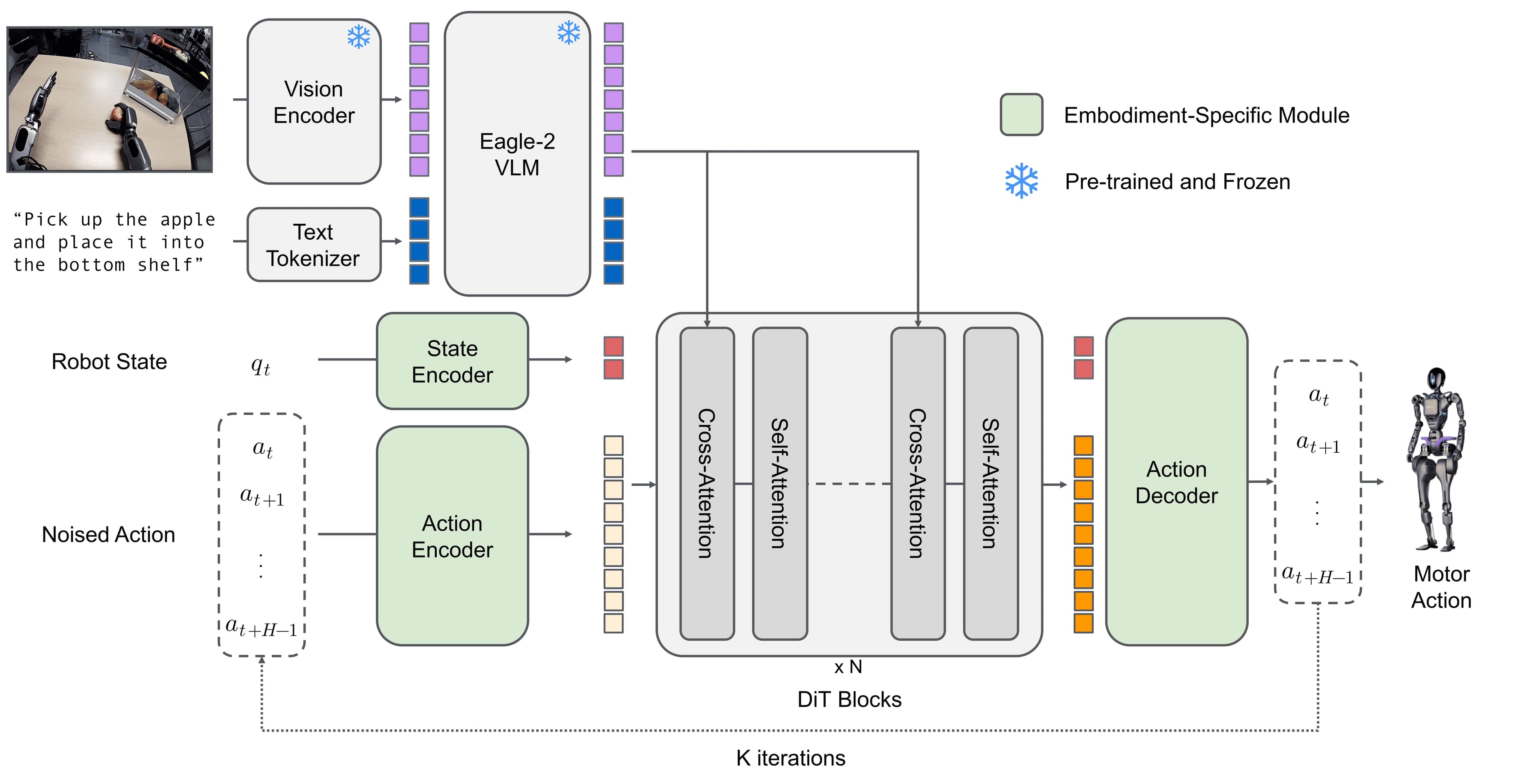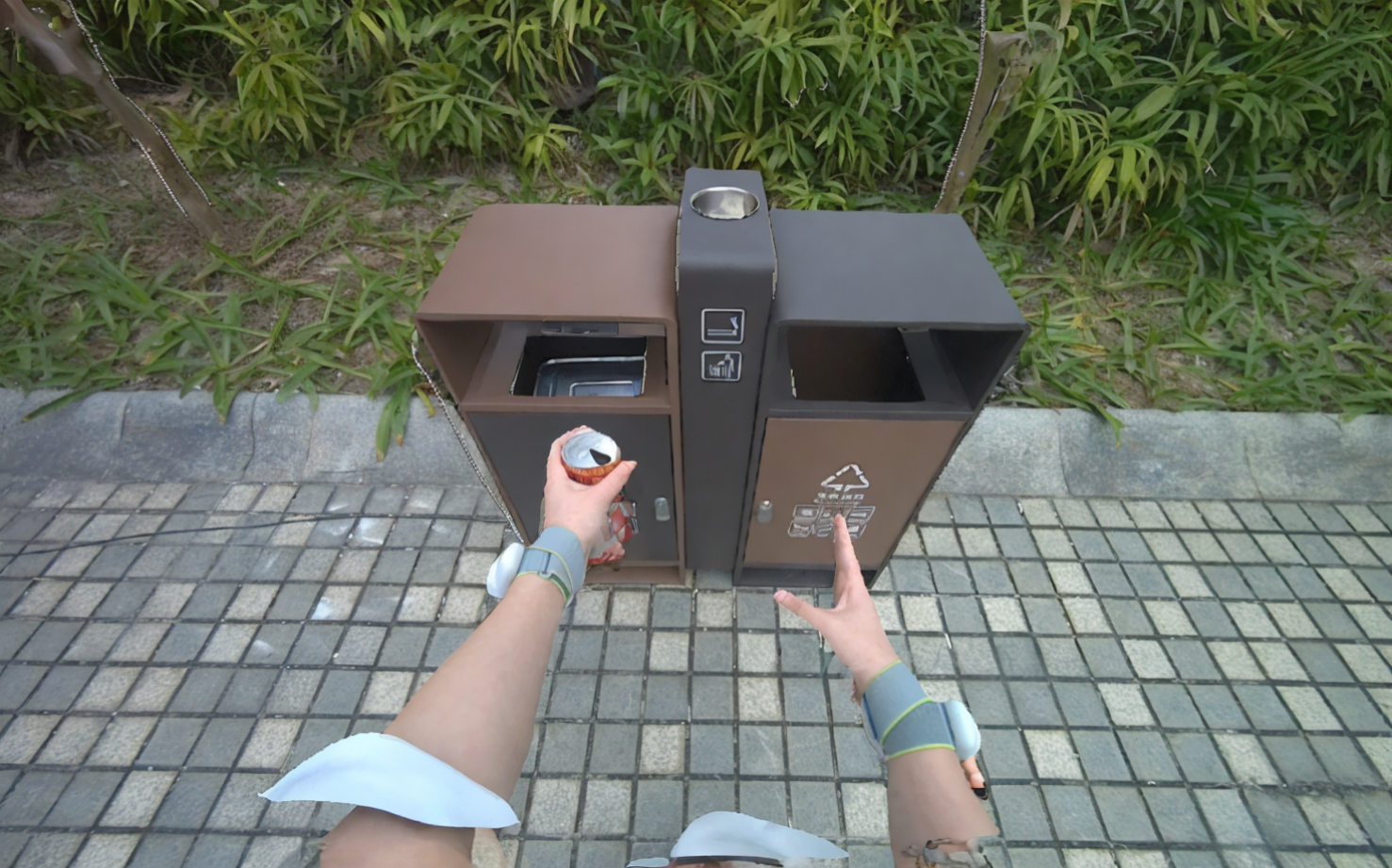
Learning humanoid robot policies from human video sounds almost obvious. Humans walk into rooms, look at objects, pick things up, place them down, open doors, push carts, and tidy tables. If a robot model can watch enough of those demonstrations, maybe it can learn high-level behavior without forcing the physical robot to repeat every task thousands of times.
The hard part is that the human camera and the robot camera are not in the same place.
A human demonstrator may wear an egocentric camera on the head or chest. The camera is often higher than the camera on a humanoid robot. Human hands, arms, body sway, and head motion also look different from the robot's metallic hands and mechanically constrained movement. If you feed raw human egocentric video directly into a robot policy, the model sees one geometry during training and another geometry during deployment. The table appears at a different height. The object occupies a different region of the image. The background behind an object may become visible or hidden in a different way.
Part 1 of this series, the humanoid data ownership map, framed the strategic question: who owns the data advantage? Part 2, VR teleoperation and robot data, focused on demonstrations collected while a person directly controls the robot. This article looks at a more subtle layer: when human video is transformed with depth warping and inpainting so it looks closer to a robot viewpoint, is the result still "human video," or is it a new derived data asset?
The technical anchor is EgoHumanoid's view alignment script:
cd data_alignment/view_alignment

python viewport_transform_batch_h5.py \
  --h5_dir /path/to/h5_directory \
  --image_key observation_image_left \
  --trajectory down \
  --movement_distance 0.07 \
  --batch_size 32 \
  --num_gpus 4 \
  --output_dir /path/to/output
By the end, you should be able to explain four things: why view alignment is needed, what depth warping does to pixels, how inpainting fills missing regions, and why these transformed frames make data ownership harder to reason about.
The Problem: Same Task, Different Camera
Imagine a person wearing an egocentric camera while picking up a toy from a table. In the human video, the camera is near eye height and often looks down at the tabletop. The hand has skin, soft fingers, and flexible wrist motion. As the person approaches the table, the view feels high: you see more of the tabletop surface and less of the table edge.
A humanoid robot such as Unitree G1 sees the same scene from a different camera position. Its camera may be lower, offset, and tied to the robot head or torso design. When the robot looks at the table, the table edge appears at another part of the image, the object may look larger or smaller, and the background becomes visible in a different pattern.
For robot learning, this is not a cosmetic difference. A policy often receives RGB images as observations and predicts actions. If the training observation distribution differs from the deployment observation distribution, the policy faces a domain gap. In manipulation, a shift of a few dozen pixels can move the predicted grasp point. In loco-manipulation, a wrong viewpoint can change how the robot approaches the table, avoids obstacles, and chooses a standing pose.
EgoHumanoid calls this step view alignment: transforming human egocentric observations so they approximate the robot's viewpoint. The paper describes the core idea as estimating depth from a monocular image, reprojecting 3D points into a target robot camera frame, and using inpainting to fill missing pixels. The repository implements the tool in data_alignment/view_alignment/viewport_transform_batch_h5.py.
For beginners, the key is that this is not just cropping or resizing. Cropping is a 2D operation. View alignment tries to recover a rough 3D structure of the scene, move a virtual camera, and render a new view from that camera.
What Are HDF5 and observation_image_left?
Many robot learning pipelines store an episode as an HDF5 file. HDF5 is a container for arrays: camera frames, robot state, actions, timestamps, language instructions, hand status, and locomotion commands. Instead of saving every frame as a separate JPEG file, HDF5 keeps synchronized data in one structured file that can be read by frame index or batch.
The argument:
--image_key observation_image_left
tells the script where the RGB observation lives inside the HDF5 file. The name observation_image_left suggests the left or main egocentric image stream. In EgoHumanoid's script, this is also the default image key. When the script reads a frame, it checks whether the key exists, loads the requested frame, decodes it if the stored data is JPEG-compressed, and converts the image from BGR to RGB for PyTorch and PIL processing.
Here is the command broken down:
| Argument | Value in this article | Practical meaning |
|---|---|---|
--h5_dir |
/path/to/h5_directory |
Process a directory of .h5 or .hdf5 episodes |
--image_key |
observation_image_left |
Source image dataset inside each HDF5 file |
--trajectory |
down |
Move the virtual camera downward, useful when the robot camera is lower than the human camera |
--movement_distance |
0.07 |
Nominal virtual camera movement distance |
--batch_size |
32 |
Number of frames processed per batch |
--num_gpus |
4 |
Number of GPU workers used for depth, warping, and inpainting |
--output_dir |
/path/to/output |
Destination for output images or transformed HDF5 files |
In directory mode, the script lists all HDF5 files, splits frames into batches, and dispatches work to GPU workers. Each worker loads the MoGe model for depth prediction and a Stable Diffusion inpainting pipeline for hole filling. With --num_gpus 4, the goal is to avoid processing thousands of frames sequentially on one GPU.
The Three-Step Pipeline: Depth, Warp, Inpaint
To understand view alignment, follow one frame through the pipeline.
Step 1: Estimate Depth from a Single RGB Image
The input is one egocentric RGB frame from a human demonstration. The script uses MoGe to estimate depth and intrinsics from the single image. In plain terms, the model predicts how far each pixel is from the camera and what camera parameters should explain the image. This is not perfect metric depth like a calibrated depth sensor, but it is useful enough to build a relative 3D point map.
Inside the script, the image is resized to a shape suitable for MoGe, converted into a tensor, and passed through the model:
output = moge_model.infer(image_tensor)
depth = output["depth"]
intrinsics = output["intrinsics"]
mask = output.get("mask")
If the model returns an invalid mask, the script pushes invalid depth values far away so they do not dominate the render. It then rescales camera intrinsics back to the original image resolution.
A beginner-friendly mental model: a depth map is like a relief map. Pixels on a nearby cup have small depth. Pixels on a far wall have larger depth. Once depth and intrinsics are known, each 2D pixel can be lifted into an approximate 3D point in the camera coordinate frame.
Step 2: Warp the Image with a Virtual Camera
After recovering a 3D point cloud, the script creates an initial camera and a target camera. The arguments:
--trajectory down
--movement_distance 0.07
say that the target camera should move downward by a nominal distance of 0.07. The script also supports --movement_distance_noise, with a default of 0.02, so each sample can receive a small independent perturbation. This helps the policy avoid overfitting to one exact camera height.
The warping stage calls generate_camera_trajectory() to create the new camera pose, then uses Cache3D_Buffer to render the point cloud from the target viewpoint. The core call looks like this:
warped_rgb, mask = warp_image_3d(
    image_rgb,
    depth,
    intrinsics,
    args.trajectory,
    actual_movement_distance,
    device,
)
warped_rgb is the reprojected image. mask says which pixels contain real content from the source image and which pixels are holes. Holes appear for two main reasons:
| Hole source | Explanation |
|---|---|
| Invalid depth | MoGe may not trust regions with reflections, repeated texture, motion blur, or low visual evidence |
| Disocclusion | Moving the virtual camera reveals regions that were hidden in the original view |
This is the key geometric point. When you change viewpoint, you cannot simply slide 2D pixels around and call it done. The new camera may see the side of an object, the leg of a table, or the space under an edge that the original camera never captured. Those pixels do not exist in the source image.
Step 3: Fill Missing Regions with Inpainting
The script uses Stable Diffusion Inpainting when the diffusers dependency is available. If not, it falls back to OpenCV inpainting. The mask convention must be inverted: the warp mask uses 255 = content and 0 = hole, while the inpainting model expects 255 = region to fill.
The logic is:
inpaint_mask = 255 - mask
result = sd_pipeline(
    prompt=prompt,
    negative_prompt="blurry, low quality, distorted",
    image=image_pil,
    mask_image=mask_pil,
    num_inference_steps=20,
    guidance_scale=7.5,
)
The output is a complete RGB image that approximates what the robot would see from a lower viewpoint. The EgoHumanoid paper notes that reprojected images often contain black holes caused by disocclusions and invalid depth predictions; inpainting fills these regions to produce complete egocentric RGB observations.
Single-File Debugging vs Directory Processing
If you only want to inspect one episode, run the script on a single HDF5 file:
python viewport_transform_batch_h5.py \
  --h5_file /path/to/input.h5 \
  --image_key observation_image_left \
  --trajectory down \
  --movement_distance 0.07 \
  --output_dir ./output
This mode is useful for debugging. The script can save files such as frame_000123_result.jpg and frame_000123_comparison.jpg. The comparison image usually stacks three views horizontally: original, warped, and final result. This is the fastest way to check whether the viewpoint shift is reasonable before processing a full dataset.
Once the visual check passes, switch to directory mode:
python viewport_transform_batch_h5.py \
  --h5_dir /path/to/h5_directory \
  --image_key observation_image_left \
  --trajectory down \
  --movement_distance 0.07 \
  --batch_size 32 \
  --num_gpus 4 \
  --output_dir /path/to/output
For large datasets, batching and multi-GPU processing are not just speed optimizations. They determine whether the pipeline is usable at all. Depth prediction and diffusion inpainting are both expensive. If the batch is too large, GPU memory runs out. If the batch is too small, dispatch overhead dominates. --batch_size 32 is a practical starting point, but real teams still need to measure throughput for their GPU type, image resolution, and number of diffusion steps.
If --save_h5 is enabled, the script can copy the original HDF5 file and replace the dataset at image_key with the aligned images. This small implementation detail has a large governance consequence: the new file may keep the original actions, timestamps, and metadata, but the observation images have been transformed by another model.
Why trajectory down Matters for Humanoids
In EgoHumanoid, the goal is to learn loco-manipulation from both human demonstrations and robot demonstrations. Camera height is a major visual domain gap. If the human camera is higher than the robot camera, objects on a table are seen more from above. The lower robot camera sees the same objects from a more horizontal angle. Therefore trajectory down creates a consistent shift: it pulls the human camera viewpoint closer to the robot camera viewpoint.
Do not interpret down as the correct transformation for every robot. It is a geometric assumption. A different robot, camera mount, lens, or human recording setup may require forward, up, or another movement distance. EgoHumanoid supports left, right, up, down, forward, and backward because alignment is embodiment-specific.
A practical inspection table:
| Signal | Likely OK | Needs review |
|---|---|---|
| Table edge | Moves to a plausible lower-camera position | Bends, tears, or shifts too aggressively |
| Main object | Still recognizable and stable | Distorted or overwritten by inpainting |
| Holes | Mostly appear in newly revealed regions | Cover the object or contact area |
| Final result | Closer to the robot camera view | Merely looks prettier but is geometrically wrong |
In robot learning, a good image is not necessarily a beautiful image. A good image preserves the observation-action relationship the robot needs at deployment time.
Derived Data: Who Owns the Aligned Frame?
Now we reach the ownership question. One aligned frame contains at least five layers of contribution:
| Layer | Who may claim rights or interests? | Why it is complicated |
|---|---|---|
| Original human video | Demonstrator, data-collecting company, site owner | Contains the person, private spaces, objects, and real environments |
| Metadata and actions | Data collection team | Timestamps, poses, hand states, and commands are valuable training signals |
| Estimated depth | MoGe model and processing pipeline | Depth is inferred by a model, not measured by the original sensor |
| Warped frame | Team running the alignment pipeline | The new viewpoint is created by a 3D transformation |
| Inpainted pixels | Diffusion model, prompt, seed, and pipeline owner | Some pixels did not exist in the source video and were generated |
If a policy is trained on these derived frames, the commercial value comes from the whole chain, not only from the original video. A company may say, "We own the aligned dataset because we built the pipeline and paid for compute." A demonstrator may say, "Without my action and environment, there would be no frame to transform." A foundation model provider may impose license conditions on model use or output use. If the video was recorded in a customer's factory, the customer may claim interest in the layout, process, objects, and operational know-how.
The hard part is that the final frame both resembles and differs from the raw video. It keeps the object, scene, and human behavior, but the perspective has changed and some pixels are generated. For robot data governance, it is not enough to write source = human video. Teams need detailed provenance:
source_episode: human_demo_00042.h5
source_image_key: observation_image_left
alignment_script: data_alignment/view_alignment/viewport_transform_batch_h5.py
trajectory: down
movement_distance: 0.07
movement_distance_noise: 0.02
batch_size: 32
num_gpus: 4
depth_model: Ruicheng/moge-vitl
inpaint_model: stabilityai/stable-diffusion-2-inpainting
prompt: ""
negative_prompt: "blurry, low quality, distorted"
seed_policy: seed + frame_index
output_type: derived_observation
This provenance does not solve every legal dispute, but it makes the technical lineage clear. The team can separate raw data from transformed data, audit which model produced which frames, and decide whether a derived dataset can be shared, sold, or used for a specific training run.
Checklist for Teams Using View Alignment
If you are building a small humanoid dataset, do not start with "should we use inpainting?" Start with "what must the robot see to act correctly?"
- Define the real robot camera: height, field of view, direction, resolution, and latency.
- Define the human camera: head, chest, AR/VR headset, ZED, phone, or handheld camera.
- Capture one matched scene: a human records a task, then the robot stands in its deployment pose and captures the same scene.
- Run alignment with several values such as
0.03,0.07, and0.10. - Compare original, warped, and final images against the real robot image, focusing on task-relevant object positions.
- Check whether inpainting touches the manipulated object. If the model rewrites the cup or hand, the data may hurt training.
- Store provenance for every output file.
- Separate raw and derived datasets in storage, naming, and license records.
- Run ablations: robot-only, raw human, aligned human, and aligned human plus robot data.
Ablation matters. EgoHumanoid reports that view alignment reduces viewpoint mismatch and helps co-training, especially when object heights vary. But your dataset may behave differently. If your robot only navigates corridors, alignment may matter less. If it must pick objects from low shelves, alignment may decide whether the policy transfers at all.
Connection to the Next Articles
This article focused on transforming human video into robot-compatible observations. Part 4, simulation and synthetic data, goes one step further: if inpainting can generate missing pixels, can simulation generate entire scenes or trajectories? Part 5, human video mining, returns to web-scale human video and asks what happens when privacy, licensing, and embodiment gap meet at internet scale.
For related reading outside this series, see GROOT N1 and G1 data collection for a practical robot data pipeline, and teleoperation in WholeBodyVLA for why operator-collected data remains central to many humanoid systems.
Conclusion
View alignment is a visual translation layer between humans and robots. It does not turn human video into true robot data, but it reduces the observation gap enough for co-training to have a chance. Technically, the pipeline combines depth estimation, 3D reprojection, hole masks, and inpainting. From a data ownership perspective, it creates a new asset class: derived frames that originate from humans, are processed by models, and are optimized for robot embodiment.
In the 2026 humanoid data race, the winner is not simply the team with the most videos. The winner is the team that can turn raw video into training signals with clear provenance, clear licensing, and real embodiment compatibility. EgoHumanoid gives us a concrete example: one viewport_transform_batch_h5.py command pulls together 3D geometry, diffusion models, compute infrastructure, and the unresolved question of who owns transformed robot learning data.
Technical Sources
- EgoHumanoid GitHub repository
- EgoHumanoid paper on arXiv
- View alignment script:
viewport_transform_batch_h5.py - View alignment README