Why does part 4 move into simulation?
The first three articles in this series moved from a high-level map to data created by human operators. Part 1 asked who controls value at each data layer. Part 2 covered VR teleoperation, where head motion, hand motion, and human recovery behavior become demonstrations. Part 3 covered view alignment and action alignment, the layer that makes human video or human pose more compatible with humanoid robot learning.
Part 4 changes the surface: if the data is not recorded directly on a real robot, but generated in simulation with NVIDIA Isaac Lab Mimic, who owns it? This sounds easier than privacy-heavy human video, but it is harder from a provenance perspective. A file named generated_dataset_gr1_nut_pouring.hdf5 may not contain a real person's face, but it still depends on human seed demonstrations, a USD scene, robot assets, object assets, task definitions, annotation boundaries, success criteria, compute, toolchain licenses, and training-time normalization artifacts.
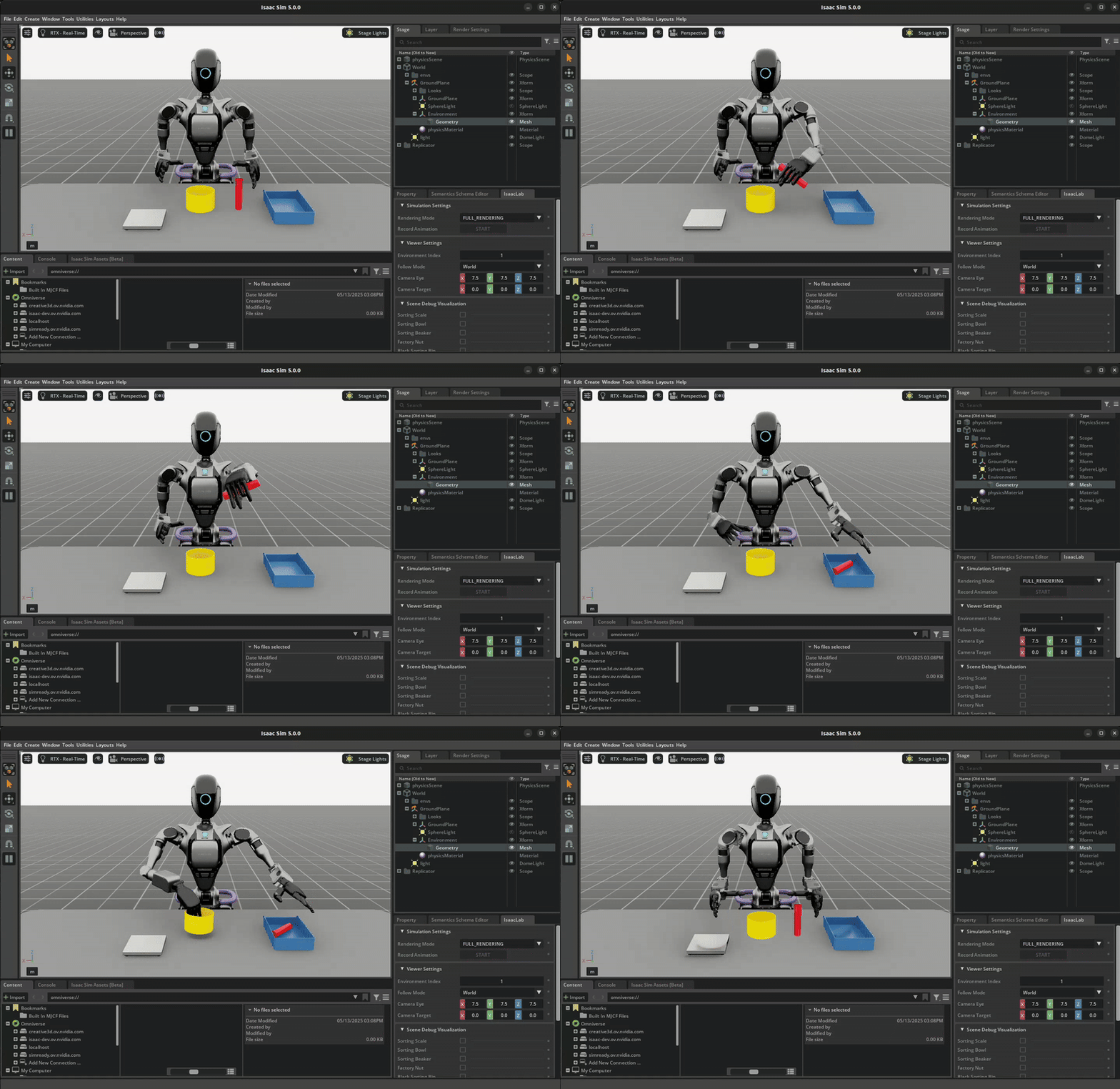
This article traces one concrete pipeline: Isaac-NutPour-GR1T2-Pink-IK-Abs-Mimic-v0. It is the Isaac Lab example where a Fourier GR-1 humanoid performs a nut pouring and placing task: pick up a red beaker, pour the nut into a yellow bowl, drop the beaker into a blue bin, and place the bowl on a white scale. Isaac Lab documentation describes a pre-generated dataset of roughly 12GB containing 1000 demonstrations generated with Isaac Lab Mimic for this task. Primary technical sources: Teleoperation and Imitation Learning with Isaac Lab Mimic, Robomimic implemented algorithms, and the Isaac Lab changelog for GR1 Pink IK tasks.
If you need background before running commands, read Isaac Lab for robotics simulation and GR00T synthetic data for whole-body VLA.
The pipeline in one sentence
The pipeline has four steps:
human seed demos
  -> record_demos.py --teleop_device handtracking
  -> dataset_gr1_nut_pouring.hdf5
  -> annotate_demos.py --enable_cameras
  -> dataset_annotated_gr1_nut_pouring.hdf5
  -> generate_dataset.py --generation_num_trials 1000
  -> generated_dataset_gr1_nut_pouring.hdf5
  -> robomimic/train.py --algo bc
  -> model checkpoint + logs/normalization_params.txt
Beginners should read this as a chain of control, not just a chain of files. The seed demonstrations are where the human operator still appears in the dataset. The annotated file is where a person or heuristic tells Isaac Lab Mimic how the episode is divided into subtasks. The generated HDF5 is the synthetic training dataset. The checkpoint and normalization_params.txt are training artifacts; they are no longer demonstrations, but they are required for correct visualization or deployment of the policy.
What is Isaac-NutPour-GR1T2-Pink-IK-Abs-Mimic-v0?
The long environment name encodes several technical decisions:
| Name component | Practical meaning |
|---|---|
Isaac |
The environment belongs to the Isaac Lab ecosystem |
NutPour |
The core task is pouring a nut from a beaker into a bowl, then placing objects correctly |
GR1T2 |
The robot is a Fourier GR-1 humanoid variant |
Pink-IK |
End-effector control uses the Pink inverse kinematics controller |
Abs |
The policy uses absolute pose control, which fits hand tracking and XR better than relative keyboard control |
Mimic |
The environment includes subtask configuration for Isaac Lab Mimic generation |
v0 |
The Gymnasium environment version |
This is not a one-object pick task. The policy must execute a long sequence: approach the beaker, grasp it, keep it stable, pour, move the beaker to the bin, release, switch attention to the bowl, grasp or stabilize the bowl, and place it on the scale. The success criteria are also multi-condition: the beaker must be in the bin, the nut must be in the bowl, and the bowl must be on the scale. The dataset therefore combines perception, manipulation, and long-horizon sequencing.
The ownership point is that this task contains a large amount of design knowledge inside the scene and success definition. If you only look at the final HDF5 file, you miss the people who defined which asset is the beaker, bowl, bin, and scale; which state counts as success; which cameras are enabled; and which subtasks can be stitched.
Step 1: Collect seed demos with hand tracking
The seed collection command is:
./isaaclab.sh -p scripts/tools/record_demos.py \
  --device cpu \
  --task Isaac-NutPour-GR1T2-Pink-IK-Abs-v0 \
  --teleop_device handtracking \
  --dataset_file ./datasets/dataset_gr1_nut_pouring.hdf5 \
  --num_demos 5 \
  --enable_pinocchio
This step does not use the Mimic environment. It records on the controllable task environment: Isaac-NutPour-GR1T2-Pink-IK-Abs-v0. The teleoperation device is handtracking, typically used with an XR or CloudXR setup. Isaac Lab documentation also recommends absolute pose tasks for XR hand tracking because the operator's hands map more directly to the end-effector target poses.
The output file, dataset_gr1_nut_pouring.hdf5, is the seed dataset. It is much smaller than the generated 1000-rollout dataset, but it has high ownership value. It contains the operator's style: whether the hand path is smooth, whether the operator pauses, whether the beaker is stabilized before pouring, whether the motion takes a direct route, and how errors are avoided. Isaac Lab documentation warns that long demonstrations, pauses, and jerky motion make policies harder to learn; in other words, human labor quality still shapes the synthetic dataset downstream.
The beginner rule is: a synthetic pipeline does not remove human demonstrations; it amplifies them. Poor seed demos can lead to poor generated rollouts or low generation success. Good seed demos give Mimic better material for stitching new subtask variations.
Ownership at step 1:
| Artifact | Who contributes value? | Ownership question to ask |
|---|---|---|
dataset_gr1_nut_pouring.hdf5 |
Teleoperator, sim operator, XR setup owner | Is the operator credited or contractually bound for data reuse? |
| Hand/head tracking stream | The person wearing the device and the CloudXR/OpenXR system | Can human motion data be reused beyond this training purpose? |
| Non-Mimic task environment | Simulation team, robot asset owner | Do the robot asset and scene licenses permit downstream dataset generation? |
| Discarded failed demos | Operator and QA reviewer | Are discarded recordings logged, retained, or privacy-reviewed? |
Step 2: Annotate subtasks, and enable cameras
The annotation command is:
./isaaclab.sh -p scripts/imitation_learning/isaaclab_mimic/annotate_demos.py \
  --device cpu \
  --enable_cameras \
  --rendering_mode balanced \
  --task Isaac-NutPour-GR1T2-Pink-IK-Abs-Mimic-v0 \
  --input_file ./datasets/dataset_gr1_nut_pouring.hdf5 \
  --output_file ./datasets/dataset_annotated_gr1_nut_pouring.hdf5 \
  --enable_pinocchio
This step is easy to underestimate. Isaac Lab Mimic works by splitting demonstrations into subtasks, then transforming and stitching those segments using object references and success criteria. Because this nut pouring task is a visuomotor environment, the documentation requires --enable_cameras in both annotation and generation. If you forget it, you may create artifacts that do not match the image-based policy you intend to train.
Annotation tells Mimic where the subtask boundaries are. In a nut pouring task, boundaries may correspond to the beaker being grasped, the pour being complete, the beaker being moved to the bin, or the bowl being placed on the scale. The documentation warns that this task has multiple annotations for the right end effector, and subtasks for the same end effector cannot share the same action index. For a beginner, the simple mental model is: wrong annotation means Mimic stitches the wrong motion segment, like editing a video at the wrong frame.
The file dataset_annotated_gr1_nut_pouring.hdf5 is derived data from the seed demos. It does not merely copy the original data; it adds segmentation knowledge. Ownership therefore no longer belongs only to the party that recorded the demo. The annotator also creates value.
Before and after annotation:
| File layer | Main content | Trainable immediately? | Value control |
|---|---|---|---|
| Seed HDF5 | Original teleop episodes with state, action, and camera observations | Useful for small IL, but not enough for Mimic generation | Operator and environment owner |
| Annotated HDF5 | Seed demos plus boundary and subtask signals | Main input to generate_dataset.py |
Operator, annotator, and task designer |
| Generated HDF5 | New rollouts that pass success filtering | Yes, directly usable by Robomimic BC | Generation runner and owner of the annotated input |
Step 3: Generate 1000 synthetic rollouts
The generation command is:
./isaaclab.sh -p scripts/imitation_learning/isaaclab_mimic/generate_dataset.py \
  --device cpu \
  --headless \
  --enable_pinocchio \
  --enable_cameras \
  --rendering_mode balanced \
  --task Isaac-NutPour-GR1T2-Pink-IK-Abs-Mimic-v0 \
  --generation_num_trials 1000 \
  --num_envs 5 \
  --input_file ./datasets/dataset_annotated_gr1_nut_pouring.hdf5 \
  --output_file ./datasets/generated_dataset_gr1_nut_pouring.hdf5
This is where synthetic data actually appears. --generation_num_trials 1000 asks the pipeline to generate 1000 candidate or successful demonstrations, depending on the task pipeline and filtering. --num_envs 5 runs multiple environments in parallel for better throughput. --headless is appropriate for non-GUI generation. --enable_cameras keeps camera observations for the visuomotor policy. --rendering_mode balanced is a practical choice between rendering quality and speed.
Mimic is not simple trajectory copy-paste. Isaac Lab documentation explains that it uses annotated subtasks, object references, and helper functions in the environment to transform demonstration segments, create new candidate demonstrations, and use boolean success criteria to decide whether a candidate should be added to the output dataset. For difficult tasks, success rate can vary substantially with seed demonstration quality and annotation quality. For the nut pouring visuomotor task, the documentation notes that generating 1000 demonstrations can take around 10 hours on an RTX ADA 6000, and that the downstream BC policy should be evaluated across multiple checkpoints.
The file generated_dataset_gr1_nut_pouring.hdf5 is the most contested ownership surface:
| Claim | Why it makes sense | Weakness |
|---|---|---|
| "It belongs to the seed demo recorder" | Generated rollouts inherit style and subtask structure from the human demo | Simulation assets and the generator also create new value |
| "It belongs to the simulation pipeline owner" | The Mimic operator creates the 1000-rollout file and pays compute | Without seed demos and annotations, the pipeline has no material |
| "It belongs to the robot, asset, or task owner" | The scene, GR-1 model, objects, and success criteria define the data | This can be too broad if the asset license permits downstream generation |
| "It is a derived dataset with multiple contributors" | This matches the value chain best | It is harder to operate without clear contracts upfront |
For a startup, the pragmatic move is to write provenance into a dataset card or internal manifest:
dataset: generated_dataset_gr1_nut_pouring.hdf5
task: Isaac-NutPour-GR1T2-Pink-IK-Abs-Mimic-v0
source_seed: dataset_gr1_nut_pouring.hdf5
source_annotation: dataset_annotated_gr1_nut_pouring.hdf5
teleop_device: handtracking
num_seed_demos: 5
generation_num_trials: 1000
num_envs: 5
cameras_enabled: true
rendering_mode: balanced
operator_consent_id: internal-record-2026-06-10-a
asset_license_review: required
downstream_allowed: train-internal-policy
This manifest does not solve every legal question, but it clarifies technical provenance. If the dataset is later converted to LeRobot, used to fine-tune a VLA model, or included in an evaluation benchmark, you can still trace where it came from.
Step 4: Train Behavior Cloning with Robomimic
The training command is:
./isaaclab.sh -p scripts/imitation_learning/robomimic/train.py \
  --task Isaac-NutPour-GR1T2-Pink-IK-Abs-v0 \
  --algo bc \
  --normalize_training_actions \
  --dataset ./datasets/generated_dataset_gr1_nut_pouring.hdf5
--algo bc means Behavior Cloning: supervised learning from observations to actions. Robomimic documentation describes BC as a standard imitation learning baseline, and Robomimic also includes variants such as BC-RNN, BC-Transformer, and Diffusion Policy. This tutorial starts with BC because the concept is clean: the dataset contains (observation, action) pairs, and the model learns to imitate the action.
--normalize_training_actions is a key flag. Isaac Lab documentation states that the training script normalizes actions in the dataset to the [-1, 1] range and saves the normalization parameters at:
PATH_TO_MODEL_DIRECTORY/logs/normalization_params.txt
This file is often treated as a minor log, but it matters in the ownership chain. Without normalization parameters, visualization or deployment can apply the wrong action scale. Action min/max can also reveal the action distribution inside the dataset: hand motion ranges, commonly used controller limits, gripper ranges, or end-effector workspace. It is not a raw demonstration, but it is a derived statistical artifact from the generated HDF5.
Training artifacts:
| Artifact | What it contains | Is it training data? | Risk or value |
|---|---|---|---|
| Model checkpoint | Weights learned from generated HDF5 | Not a dataset, but it absorbs dataset information | May encode proprietary behavior or procedures |
normalization_params.txt |
Min/max or factors for action scaling | Derived statistical artifact | Required for correct replay and may leak action distribution |
| TensorBoard/logs | Losses, metrics, config, training time | Operational metadata | Can reveal recipe and compute budget |
| Evaluation videos | Rollouts from the trained policy | New data from model plus simulator | Useful performance evidence and a possible failure-mode leak |
How is a seed demo different from a generated rollout?
This is the core comparison:
| Question | Seed human demo | Generated HDF5 rollout |
|---|---|---|
| Direct source | Human operator through hand tracking | Isaac Lab Mimic generated from annotated seed demos |
| Does it contain real human behavior? | Yes, directly | Yes, indirectly through subtask structure and style |
| Does it depend on scene, object, and sim assets? | Yes, through the recording environment | Yes, often even more through generation and randomization |
| Does it include annotations? | Not necessarily | Yes, because generation uses annotated input |
| Can it contain operator mistakes? | Yes, if not discarded | Output usually passes success criteria, but still has variation |
| Who should be in provenance records? | Operator, reviewer, environment owner | All seed contributors plus annotator and generation runner |
| What should be checked before sharing? | Consent, privacy, labor agreement, asset license | Derived-data license, benchmark leakage, asset provenance |
In short: a seed demo is "recorded control labor"; a generated rollout is "derived data synthesized from that labor and a simulation pipeline." If a company only licenses the final generated file and ignores the seed demo rights, the risk returns as soon as the dataset becomes valuable.
Checklist before scaling synthetic humanoid data
Before generating 1000, 10,000, or 100,000 rollouts, a team should have a minimal checklist:
| Area | Question |
|---|---|
| Operator consent | Does the teleoperator know seed demos will be used to synthesize more rollouts? |
| Asset provenance | Do robot, object, texture, and USD scene licenses permit data generation? |
| Annotation ownership | Who annotated the subtasks, and how is that annotation licensed? |
| Dataset manifest | Does the generated file record source seed, task, version, command, and flags? |
| Camera policy | Do rendered cameras expose sensitive or non-shareable assets? |
| Normalization artifact | Is normalization_params.txt stored with the checkpoint and access-controlled? |
| Downstream use | Can the dataset be used for Robomimic BC, VLA fine-tuning, benchmarks, or commercial products? |
| Deletion path | If a seed demo is withdrawn, what happens to generated rollouts and checkpoints? |
The last point is often missed. If an operator withdraws consent for a seed demo, what is your policy for the generated HDF5 derived from it? Delete the generated file? Stop sharing it? Retrain checkpoints? There is no universal answer, but the question should be asked before scaling.
Conclusion
Isaac Lab Mimic does something powerful: it turns a few human-operated demonstrations into a larger camera-enabled dataset with success criteria, and that dataset can train a policy with Robomimic BC. For Isaac-NutPour-GR1T2-Pink-IK-Abs-Mimic-v0, the pipeline is explicit: record with handtracking, annotate with --enable_cameras, generate 1000 rollouts, then train with --algo bc and save normalization_params.txt.
The ownership lesson is just as explicit: synthetic data is not automatically "clean" because it was generated in simulation. It shifts the burden from direct privacy to provenance of seed demos, annotations, assets, task definitions, generation scripts, and statistical artifacts. Teams that govern this chain early will have a stronger position when synthetic humanoid data becomes a strategic asset.
The next article moves from simulation to human video and robot-free data: when videos of people working outside a robot setup become VLA pretraining data, ownership gets even harder because the data does not start from a robot or a simulator.