Why end the series with the stack?
The first five posts separated the major sources of humanoid data: the ownership map, VR teleoperation, view alignment, synthetic data, and human video. Part 1 asked who creates value at each data layer. Part 2 showed that teleoperation is not just a joystick, but a chain of sensors, operators, robots, and action logs. Part 5 explained when human video becomes training data, derived robot data, or benchmark evidence.
Part 6 puts those layers into one practical VLA lifecycle: data is converted to LeRobot format, normalization statistics are computed, pi0.5 is trained, checkpoints are saved, a policy server is started, the robot sends observations to the server, and the server returns actions to be executed by the robot. This is where data ownership becomes concrete. Instead of asking "who owns the data?" in the abstract, we can point to a file, a key, a command, or an inference request.
The main technical sources for this walkthrough are the EgoHumanoid README, the EgoHumanoid paper, the OpenPI config, the OpenPI remote inference docs, and the LeRobot Dataset documentation. For related VLA tooling outside this series, read LeRobot and pi0-FAST training and EXPO-FT: Online RL for VLA π0.5.
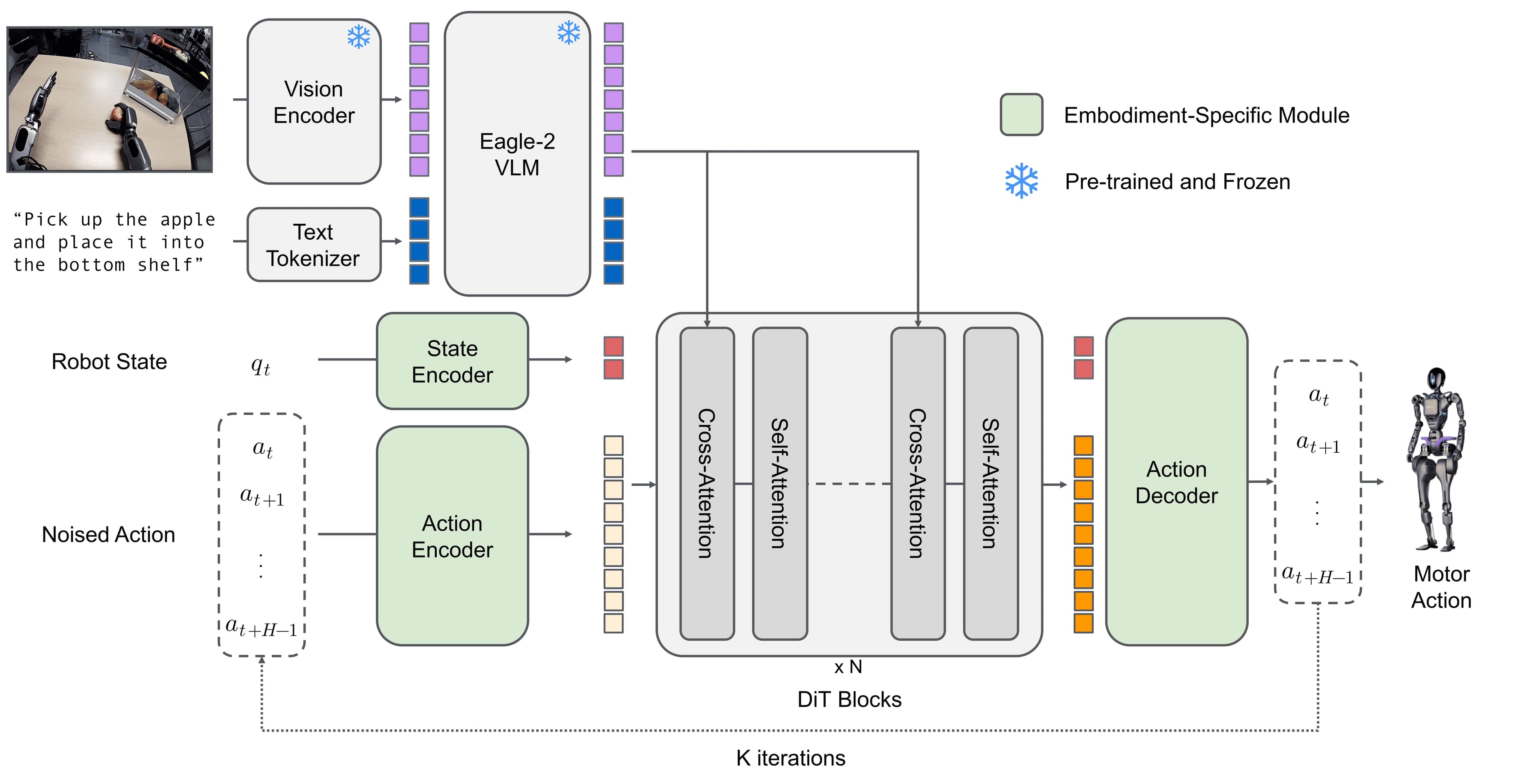
The VLA lifecycle in one diagram
Read the stack from left to right:
raw human / robot demonstrations
  -> processed HDF5 trajectories
  -> LeRobot dataset
  -> normalization statistics
  -> pi0.5 training run
  -> checkpoint directory
  -> policy server on GPU host
  -> robot-side deployment client
  -> action chunks executed by humanoid controller
  -> telemetry and rollout review
In EgoHumanoid, this workflow maps to concrete commands:
# 1. Convert processed data to LeRobot format
python convert_to_lerobot.py \
  --src-path /path/to/processed/data \
  --output-path /path/to/lerobot/data \
  --repo-id my_dataset \
  --fps 20 \
  --task "task description"

# 2. Compute normalization statistics
uv run python scripts/compute_norm_states_ultra_fast.py --config-name=norm_compute

# 3. Train pi0.5 on a G1 custom config with 4 FSDP devices
XLA_PYTHON_CLIENT_MEM_FRACTION=0.9 uv run scripts/train.py pi05_g1_custom \
  --exp_name=my_experiment \
  --fsdp-devices 4

# 4. Serve a trained checkpoint
uv run scripts/serve_policy.py policy:checkpoint \
  --policy.config=<config_name> \
  --policy.dir=checkpoints/<config_name>/<exp_name>/<iteration>

# 5. Run robot-side deployment client
python scripts/deploy.py --host <server_ip> --port 8000
For beginners, the most important point is that these are not five isolated commands. Each command creates or consumes an artifact with its own ownership, risk, and responsibility. convert_to_lerobot.py turns processed data into a dataset with a schema. compute_norm_states_ultra_fast.py creates statistics derived from the dataset. train.py creates a checkpoint. serve_policy.py turns the checkpoint into an inference service. deploy.py sends real robot observations into the policy and turns outputs into physical actions.
Ownership by artifact
| Artifact | Created at | Who usually creates value? | Main risk |
|---|---|---|---|
| Raw video / teleop log | Data collection | Demonstrator, operator, robot owner, site owner | Consent, privacy, reuse rights |
| Processed HDF5 | Alignment, cleaning, merge | Data engineer, pipeline owner | Lost provenance, wrong timestamps, frame mismatch |
| LeRobot dataset | convert_to_lerobot.py |
Dataset owner, annotation owner, task designer | Schema mismatch, unclear license, vague task prompt |
| Norm stats | compute_norm_states_ultra_fast.py |
Training engineer | Test leakage, distribution shift |
| Checkpoint | train.py pi05_g1_custom |
Model owner, data contributors, infrastructure owner | Memorization, contamination, hard deletion |
| Policy server | serve_policy.py policy:checkpoint |
MLOps / robotics engineer | Exposed endpoint, wrong checkpoint, missing audit log |
| Robot action | deploy.py and controller |
Robot runtime owner, safety engineer | Unsafe action, latency, observation spoofing |
| Rollout telemetry | After deployment | Product team, user, robot operator | Customer data, incident evidence, retraining rights |
This table is the final map of the series. If you can assign owner and risk for each row, you have moved from abstract AI data ownership to operational governance.
Step 1: Convert to LeRobot
EgoHumanoid uses convert_to_lerobot.py to convert processed HDF5 datasets into LeRobot format. The --fps 20 argument packages the dataset at 20 frames per second. The --task argument stores the language description of the task, such as "pick up the object" or "open the drawer and place the item inside." For a VLA, the prompt is not decorative metadata. It is part of the policy input.
cd data_alignment

python convert_to_lerobot.py \
  --src-path /datasets/g1_kitchen_processed \
  --output-path /datasets/g1_kitchen_lerobot \
  --repo-id vnrobo/g1-kitchen-v1 \
  --fps 20 \
  --task "pick up the cup and place it on the tray"
For a faster multi-threaded conversion, the EgoHumanoid README also shows --num-workers 16:
python convert_to_lerobot.py \
  --src-path /datasets/g1_kitchen_processed \
  --output-path /datasets/g1_kitchen_lerobot \
  --repo-id vnrobo/g1-kitchen-v1 \
  --num-workers 16 \
  --fps 20 \
  --task "pick up the cup and place it on the tray"
At this ownership layer, do not stop at "who owns the output folder?" Ask more precise questions:
| Question | Why it matters |
|---|---|
| Did the raw data come from egocentric human demos, robot teleop, or simulation? | Rights and consent differ |
Who wrote --task? |
The prompt may encode rules, labels, and task intent |
| Does FPS conversion change action semantics? | Bad resampling can make the policy learn the wrong timing |
| Does the dataset include exterior and wrist cameras? | Camera views may reveal customer environments or assets |
| Is the dataset allowed to be uploaded to the Hub? | LeRobot makes sharing easy, but shareability is not a legal right |
LeRobot standardizes robot learning datasets so training becomes easier. That standardization does not automatically solve rights. A clean dataset that loads correctly and has a clear prompt still needs a dataset card: source, robot, cameras, action space, consent, license, allowed use, retention, and deletion process for future training.
Step 2: Compute normalization statistics
After the dataset is in the right format, EgoHumanoid computes normalization statistics:
uv run python scripts/compute_norm_states_ultra_fast.py --config-name=norm_compute
For a beginner, normalization means putting state and action values on scales that the model can learn from more reliably. Joint positions may have a large range, gripper values may have a smaller range, and action velocities may follow a different distribution. If those signals enter the loss at raw scale, training can become unstable or biased toward the largest numeric ranges. Norm stats usually include means, standard deviations, or quantiles, depending on the pipeline.
But norm stats are also derived data. They do not contain full images or trajectories, but they reveal the distribution of a dataset. If you compute norm stats on customer A's private data and reuse them for customer B, you create two problems. The technical problem is distribution mismatch. The governance problem is that an artifact derived from customer A is now part of customer B's pipeline.
A practical review checklist can be compact:
norm_stats_review:
  computed_from:
    - train_split_only
  excludes:
    - heldout_test_episodes
    - private_customer_eval_rollouts
  stores:
    - state_mean
    - state_std
    - action_mean
    - action_std
  owner: training_platform_team
  reusable_across_customers: false
For a small internal robot lab, this may look strict. For humanoid SaaS or policy-as-a-service, it is basic hygiene. When a checkpoint fails, the first questions are usually: which dataset version, which norm stats, which config, and which checkpoint iteration?
Step 3: Train pi0.5 and save checkpoints
EgoHumanoid shows training a custom dataset with the pi05_g1_custom config and multi-GPU FSDP:
XLA_PYTHON_CLIENT_MEM_FRACTION=0.9 uv run scripts/train.py pi05_g1_custom \
  --exp_name=g1_kitchen_v1 \
  --fsdp-devices 4
pi05_g1_custom is the config name. --exp_name names the experiment. --fsdp-devices 4 means training uses four devices with FSDP. The EgoHumanoid README says checkpoints are saved under:
checkpoints/<config_name>/<exp_name>/
For example:
checkpoints/pi05_g1_custom/g1_kitchen_v1/
  1000/
  2000/
  5000/
  10000/
The checkpoint is the most sensitive artifact in the stack. It is not a dataset in the Parquet/video sense, but it absorbs information from datasets. If the dataset includes human videos without enough consent, the checkpoint inherits risk. If the dataset includes prompts with customer-specific details, the checkpoint may learn patterns from those prompts. If the training mixture combines robot data, human data, and simulation data, the checkpoint is where all those rights become compressed.
A minimal checkpoint manifest should look like this:
checkpoint: checkpoints/pi05_g1_custom/g1_kitchen_v1/10000
base_model: pi0.5
config_name: pi05_g1_custom
experiment_name: g1_kitchen_v1
training_data:
  - repo_id: vnrobo/g1-kitchen-v1
    split: train
    allowed_use: internal_policy_training
norm_stats: assets/norm_compute/g1_kitchen_v1
contains_human_video_derivatives: true
contains_customer_environment: false
serving_allowed:
  - lab_robot
  - staging_demo
serving_blocked:
  - public_api
  - third_party_resale
This is not paperwork for its own sake. It lets the team answer rollback questions quickly: which checkpoint is running, what data trained it, where is it allowed to be deployed, and can it be used to train the next model?
Step 4: Serve the policy on a GPU host
In VLA deployment, the robot often does not run the large model directly on the control computer. OpenPI and EgoHumanoid use a policy server: a GPU machine holds the checkpoint, a robot or evaluation script sends observations over the network, and the server returns actions. The EgoHumanoid command is:
uv run scripts/serve_policy.py policy:checkpoint \
  --policy.config=pi05_g1_custom \
  --policy.dir=checkpoints/pi05_g1_custom/g1_kitchen_v1/10000
The README states that the server listens on port 8000 by default. The OpenPI remote inference docs describe the same policy-server pattern for robot code querying a remote policy over the network. Technically, this is practical: the GPU host handles inference, while the robot-side client keeps the control loop lighter.
From an ownership perspective, the policy server is the boundary between model artifact and product runtime. Once the server is live, real observations begin crossing the network:
observation = {
    "observation/exterior_image_1_left": camera_left_image,
    "observation/wrist_image_left": wrist_image,
    "observation/state": joint_positions,
    "prompt": "pick up the object",
}
action_chunk = policy.infer(observation)["actions"]
These keys appear in the EgoHumanoid inference example. The OpenPI config also shows repacking data into keys such as observation/exterior_image_1_left, observation/wrist_image_left, observation/joint_position, observation/gripper_position, actions, and prompt. This post uses the requested observation/state form because the G1 inference example represents state as joint positions. The core point is the same: state/proprioception is not harmless just because it is numeric. Combined with video and timestamps, it can reconstruct robot behavior.
Step 5: Run the robot-side deployment client
The robot-side command in EgoHumanoid is:
python scripts/deploy.py --host <server_ip> --port 8000
The README describes this client as connecting to the OpenPI policy server over websocket for action inference and controlling the Unitree G1 through the GR00T WBC framework. Runtime keyboard controls such as activating the policy, entering preparation mode, starting or pausing the inference loop, entering silent mode, and emergency stop show that deployment is not just model serving. It is a stateful human-machine control loop.
In production, separate three log layers:
| Log | Content | Who needs it? | Suggested retention |
|---|---|---|---|
| Server inference log | checkpoint id, request time, latency, action shape | ML/infra team | Short, sampled |
| Robot safety log | mode, emergency stop, controller state | robotics/safety team | Longer, for incidents |
| Product telemetry | task success, user feedback, environment class | product/data team | Based on customer consent |
Do not store raw camera by default unless you need it. If you need raw frames for debugging, make it a controlled option: sampling rate, redaction, retention, access rights, and retraining purpose should all be explicit. This is the difference between a lab demo and a commercial product.
Map risk from input to action
| Policy input | Technical role | Ownership risk | Risk reduction |
|---|---|---|---|
observation/exterior_image_1_left |
Exterior camera showing scene and objects | Exposes environment, bystanders, customer assets | Sensitive-region masking, minimal logging, site consent |
observation/wrist_image_left |
Close camera near the gripper | Exposes objects, product labels, work process | Short retention, store only for incidents or debug |
observation/state |
Proprioception / joint state | Can reconstruct robot behavior and failure modes | Aggregate metrics, restrict raw state export |
prompt |
Task instruction | Exposes intent, object names, customer workflow | Prompt templates, redaction, prompt-source audit |
actions |
Policy output for execution | Safety, liability, traceability | Action limits, controller guardrails, emergency stop |
The key lesson is that ownership does not stop at the training dataset. During deployment, every inference request can create new data. If you use rollout telemetry to fine-tune the next checkpoint, that telemetry loops back to the beginning of the lifecycle and becomes training data. Terms of service and customer data policy must clearly state whether runtime data may be used to improve models.
Deployment checklist for small teams
If you are a robotics startup or lab starting with VLAs, use this checklist before letting the robot run:
before_training:
  dataset_card_exists: true
  source_data_provenance_checked: true
  consent_for_human_demonstrations: true
  task_prompts_reviewed: true
  train_eval_split_locked: true

before_checkpoint_release:
  norm_stats_versioned: true
  config_name_recorded: true
  exp_name_recorded: true
  checkpoint_path_recorded: true
  eval_results_attached: true
  unsafe_rollouts_reviewed: true

before_serving:
  policy_dir_matches_release: true
  server_port_restricted: true
  request_logging_minimized: true
  rollback_checkpoint_ready: true
  robot_side_emergency_stop_tested: true

before_retraining_from_runtime:
  customer_permission_checked: true
  private_frames_filtered: true
  incident_data_labeled: true
  deletion_request_process_defined: true
This checklist does not replace legal review, but it prevents engineers from missing technical ownership points. In many teams, risk does not come from bad intent. It comes from artifacts being too easy to copy: a sample dataset uploaded to the Hub, a checkpoint shared through a bucket, norm stats reused across projects, or server logs retaining raw observations longer than necessary.
Conclusion: ownership lives in the lifecycle
The series "Who Owns Humanoid Robot Data in 2026" began with a map and ends with a stack. The main lesson is that there is no single answer to "who owns humanoid data." Data changes state continuously. Human video can become a LeRobot dataset. The dataset creates norm stats. Norm stats and data create a checkpoint. The checkpoint runs inside a policy server. The policy server receives real observations and returns actions. Actions create rollout telemetry. Telemetry may become training data for the next cycle.
If you only look at the final file, you miss the rights of the demonstrator, operator, robot owner, collection site, prompt writer, alignment-pipeline author, model trainer, deployment engineer, and customer whose runtime telemetry is created in production. If you look at the lifecycle, you can set a clear policy for each artifact.
Final rules:
- Record provenance at conversion time, not after deployment.
- Version the dataset, norm stats, config, and checkpoint together.
- Treat prompts as data, not as incidental text.
- Separate the right to train, serve, log, and retrain.
- For humanoids operating around people, govern runtime telemetry as carefully as training data.
When you run:
python scripts/deploy.py --host <server_ip> --port 8000
you are not merely calling a model. You are connecting the entire history of the data pipeline to a robot's physical action. That is why robotics ownership cannot be reduced to a license line in a repository. It has to be designed across the full VLA lifecycle.