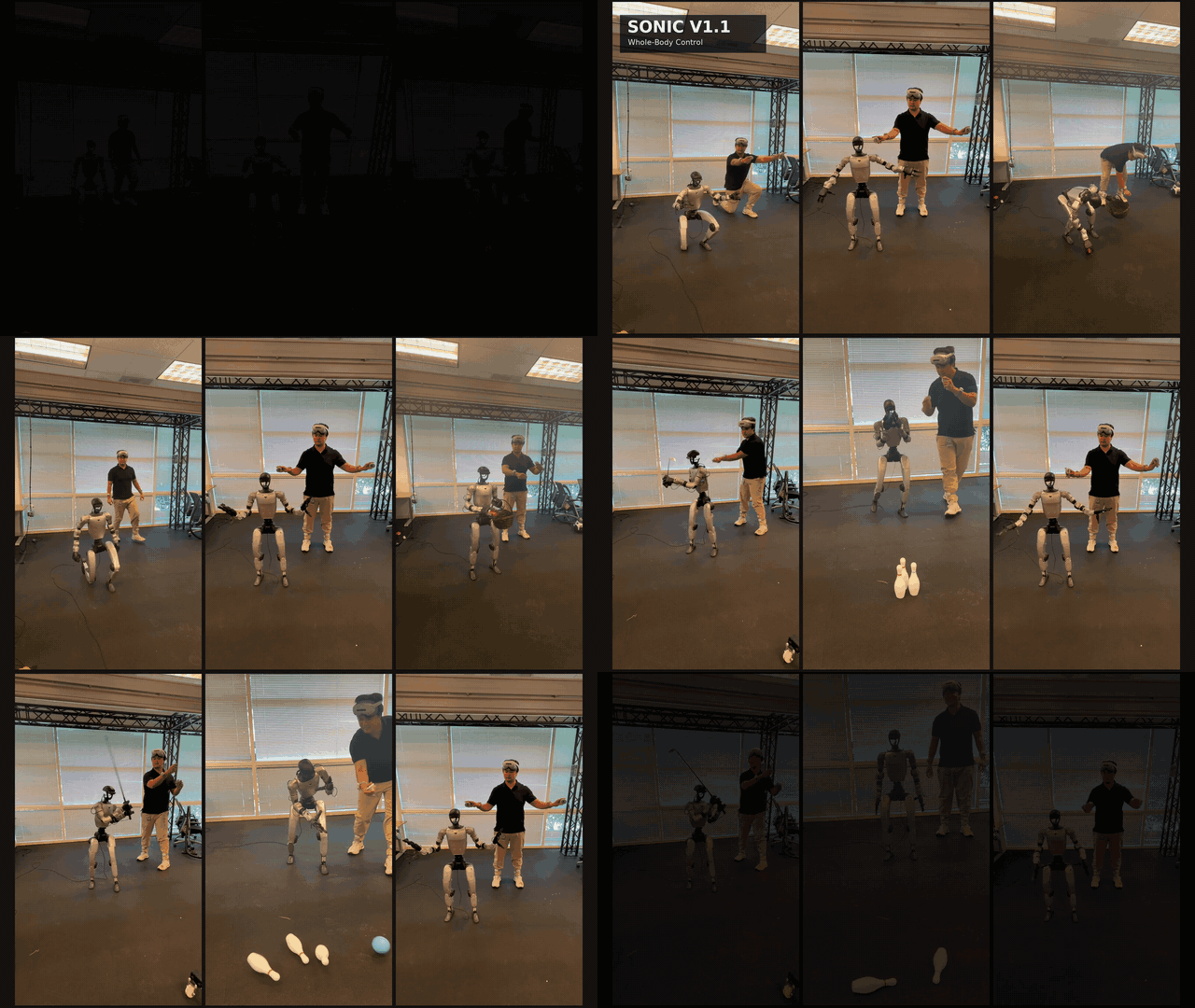
Picture an elite swimmer moving through the water — arms, shoulders, hips, and legs flowing in one continuous, perfect arc. No conscious programming; just instinct built over thousands of hours of practice. SONIC does exactly the same thing for humanoid robots: instead of hand-coding each motion, you feed the robot 100 million frames of real human movement and let the neural network learn full-body coordination on its own.
This guide walks you from A to Z: the Science Robotics 2026 context, the technical architecture, and then installation, training, evaluation, and deployment of the SONIC controller on a Unitree G1 using NVIDIA's open-source GR00T-WholeBodyControl framework.
Why Science Robotics 2026 Is a Turning Point
The paper SONIC: Supersizing Motion Tracking for Natural Humanoid Whole-Body Control (DOI: 10.1126/scirobotics.aed4592), accepted in Science Robotics Vol. 11, Issue 117 (2026) by Zhengyi Luo, Ye Yuan, Tingwu Wang, and more than 25 co-authors from NVIDIA GEAR Lab, marks a fundamental shift.
Before SONIC, the robotics community was stuck in the "split controller" trap: a locomotion module for the legs, a manipulation module for the arms, and an awkward coordination layer on top. Every new behavior — jumping, rope-pulling, picking something up from the floor — required a freshly designed reward function, separate training, and separate testing. It did not scale.
SONIC asks a different question: "If we teach a robot to accurately replicate any human motion, does it automatically acquire every skill it needs?"
The answer is yes — proven across three scaling axes:
| Scaling Axis | Smallest | Largest |
|---|---|---|
| Model size | 1.2M parameters | 42M parameters |
| Training data | A few dozen hours of mocap | 100M+ frames (700 hours) |
| Compute | ~1k GPU hours | 21,000 GPU hours |
The result: a single policy that controls all 29 degrees of freedom of the Unitree G1 — including both arms — and generalises to motions never seen during training, stays robust under external perturbations, and transfers directly from simulation to the real robot without additional fine-tuning.
GR00T-WholeBodyControl: The Open-Source Platform
NVIDIA released GEAR-SONIC on 19 February 2026, shipping:
- Pretrained checkpoints on HuggingFace (
nvidia/GEAR-SONIC) - GR00T-WholeBodyControl framework (Apache 2.0): github.com/NVlabs/GR00T-WholeBodyControl
- C++ inference stack optimised for Jetson Orin (1–2 ms latency)
- VR teleoperation via PICO headset
- Full documentation: nvlabs.github.io/GR00T-WholeBodyControl
GR00T-WholeBodyControl is a unified platform supporting multiple controller types:
- SONIC — the behaviour foundation model learned from mocap (focus of this guide)
- Decoupled WBC — used inside GR00T N1.5/N1.6 for VLA integration
- Custom embodiment support (an H2 robot example is included)
SONIC Architecture: Three Encoders, One Token Space
Understanding the architecture helps you debug training and design fine-tuning effectively. Full details are in SONIC architecture deep-dive; here is the concise overview.
Three Specialised Encoders
SONIC has three independent encoders, each handling a different kind of input:
Robot Motion Encoder (Er) — receives 10 future frames (spaced 0.1 s apart) of robot joint trajectory. Used when you already have a retargeted target trajectory.
Human Motion Encoder (Eh) — receives 10 future frames (spaced 0.02 s apart) of an SMPL pose — the 3-D human body representation from the Max Planck Institute. Used when you have raw mocap data.
Hybrid Motion Encoder (Em) — receives mixed robot/human commands (e.g. 3-point VR tracking: head + 2 wrists). Used for VR teleoperation and video-based control.
All three encoders are MLPs with architecture [2048, 1024, 512, 512].
Finite Scalar Quantization (FSQ): A Shared Language
Outputs from all three encoders are quantised into the same discrete token space via FSQ. This is the key insight: whether input comes from a robot trajectory, an SMPL pose, or a VR controller, it becomes tokens in the same shared language.
Practical implication: you can switch seamlessly between control modes (gamepad → VR → VLA output) without any retraining — just switch which encoder is active.
Decoder and Action Space
Control Decoder (Dc) maps tokens to 29 target joint positions (Gaussian distribution). Decoder MLP: [2048, 2048, 1024, 1024, 512, 512].
Auxiliary Robot Motion Decoder (Dr) reconstructs robot motion to provide an additional supervision signal during training, helping the encoder learn better representations.
| Parameter | Value |
|---|---|
| Action space | 29-dimensional joint positions |
| Policy frequency | 50 Hz |
| Motor stream | 500 Hz (Unitree low-level API) |
| Inference latency | 1–2 ms (Jetson Orin, TensorRT + CUDA Graph) |
The BONES-SEED Dataset: 100M+ Motion Capture Frames
SONIC trains on BONES-SEED (Bones Studio Skeletal Everyday Embodiment Dataset) — the largest motion capture dataset in humanoid robotics history as of 2026:
| Parameter | Value |
|---|---|
| Total motion sequences | 142,220 (71,132 original + 71,088 mirrored) |
| Duration | ~288 hours @ 120 fps |
| Total frames | ~124 million |
| Actors | 522 people (253 female, 269 male) |
| Age range | 17–71 years |
| Height range | 145–199 cm |
| Capture hardware | Vicon optical mocap (sub-millimetre accuracy) |
| Distribution format | SMPL + retargeted Unitree G1 SOMA CSV |
The original SONIC paper used 170 subjects. Bones Studio expanded and released the public version with 522 actors at GTC March 2026.
Why so many actors? Every person has different body proportions — long legs, short arms, wide shoulders, narrow hips. SONIC must learn to retarget all those proportions onto the fixed skeleton of the Unitree G1 (height 127 cm, weight 35 kg). More actors = more proportions covered = a controller that generalises well instead of overfitting to a single body type.
Installing GR00T-WholeBodyControl
Hardware Requirements
| Component | Minimum | Recommended |
|---|---|---|
| Training GPU | RTX 4090 (24 GB VRAM) | NVIDIA L40 / A100 |
| RAM | 64 GB | 128 GB |
| Storage | 200 GB SSD | 500 GB NVMe |
| OS | Ubuntu 22.04 | Ubuntu 22.04 |
| Python | 3.11 (required) | 3.11 |
| CUDA | 12.x | 12.4 |
Training SONIC from scratch on the full dataset requires ~21,000 GPU hours (roughly 2 weeks on a 64×A100 cluster). Fine-tuning from the pretrained checkpoint needs only a few hundred GPU hours — well within reach of a single GPU.
Step 1: Install Isaac Lab
Isaac Lab is a prerequisite for SONIC training. Follow the official guide at Isaac Lab v2.3.2, then verify:
python -c "import isaaclab; print(isaaclab.__version__)"
# Expected: 2.3.2 or higher
Step 2: Clone and Install GR00T-WholeBodyControl
git clone https://github.com/NVlabs/GR00T-WholeBodyControl.git
cd GR00T-WholeBodyControl

# Install the training package with all dependencies
pip install -e "gear_sonic/[training]"

# Install HuggingFace Hub for checkpoint downloads
pip install huggingface_hub
Step 3: Download Checkpoints and Sample Data
# Download PyTorch checkpoint + SMPL motion data (~5 GB)
python download_from_hf.py --training

# Download small sample dataset for quick tests (~200 MB)
python download_from_hf.py --sample

# Verify the full environment
python check_environment.py --training
Checkpoints are hosted at nvidia/GEAR-SONIC on HuggingFace. The download_from_hf.py script handles authentication and places files in the correct directories automatically.
Preparing the BONES-SEED Dataset
If you want to fine-tune on custom data or the full BONES-SEED release, two processing steps are required.
Step 1: Convert SOMA CSV → Motion Library
BONES-SEED is distributed as SOMA CSV files (retargeted from SMPL to the Unitree G1). This converts them to the internal format the SONIC trainer reads:
python gear_sonic/data_process/convert_soma_csv_to_motion_lib.py \
    --input /path/to/bones_seed/g1/csv/ \
    --output data/motion_lib_bones_seed/robot \
    --fps 30 \
    --fps_source 120 \
    --individual \
    --num_workers 16
--fps_source 120— BONES-SEED was captured at 120 fps--fps 30— downsample to 30 fps to reduce training cost--individual— save each motion as a separate file for easy filtering
Step 2: Filter Low-Quality Motions
Not all 142K motions are suitable — some are too short, too static, or have retargeting artefacts:
python gear_sonic/data_process/filter_and_copy_bones_data.py \
    --source data/motion_lib_bones_seed/robot \
    --dest data/motion_lib_bones_seed/robot_filtered \
    --workers 16
The filtered, clean dataset lands at data/motion_lib_bones_seed/robot_filtered/.
See training and ONNX export guide for working with custom mocap data on new embodiments.
Training SONIC
Mandatory Smoke Test First
Always run a 5-iteration smoke test before launching a full training run — it catches config and data issues before they waste GPU hours:
# With UI (watch the robot move in Isaac Sim)
python gear_sonic/train_agent_trl.py \
    +exp=manager/universal_token/all_modes/sonic_release \
    num_envs=16 \
    headless=False \
    ++algo.config.num_learning_iterations=5

# Headless (server with no display)
python gear_sonic/train_agent_trl.py \
    +exp=manager/universal_token/all_modes/sonic_release \
    num_envs=16 \
    headless=True \
    ++algo.config.num_learning_iterations=5
A passing smoke test confirms: Isaac Lab rendered the environment correctly, the policy network loaded, the data pipeline is working, and there are no CUDA OOM errors.
Fine-Tuning from the Pretrained Checkpoint (Recommended)
python gear_sonic/train_agent_trl.py \
    +exp=manager/universal_token/all_modes/sonic_release \
    num_envs=256 \
    headless=True \
    ++algo.config.num_learning_iterations=10000 \
    +checkpoint=sonic_release/last.pt
num_envs=256— number of parallel simulation environments; push as high as RAM/VRAM allows+checkpoint=sonic_release/last.pt— fine-tune from the NVIDIA checkpoint instead of random init- Fine-tuning takes a few hundred GPU hours; training from scratch needs ~21,000
Evaluating Checkpoints
Visualise Policy in Isaac Sim (Single Environment)
python gear_sonic/eval_agent_trl.py \
    +checkpoint=sonic_release/last.pt \
    +headless=False \
    ++num_envs=1 \
    ++manager_env.observations.policy.enable_corruption=False \
    ++manager_env.observations.tokenizer.enable_corruption=False \
    "++manager_env.commands.motion.motion_lib_cfg.motion_file=sample_data/robot_filtered" \
    "++manager_env.commands.motion.motion_lib_cfg.smpl_motion_file=sample_data/smpl_filtered"
Automated Metrics Evaluation (128 Parallel Environments)
python gear_sonic/eval_agent_trl.py \
    +checkpoint=sonic_release/last.pt \
    +headless=True \
    ++eval_callbacks=im_eval \
    ++run_eval_loop=False \
    ++num_envs=128 \
    ++manager_env.observations.policy.enable_corruption=False \
    ++manager_env.observations.tokenizer.enable_corruption=False \
    "+manager_env/terminations=tracking/eval" \
    "++manager_env.commands.motion.motion_lib_cfg.max_unique_motions=512" \
    "++manager_env.commands.motion.motion_lib_cfg.motion_file=sample_data/robot_filtered" \
    "++manager_env.commands.motion.motion_lib_cfg.smpl_motion_file=sample_data/smpl_filtered"
The primary metric to track: tracking accuracy on unseen motions — the generalization score that separates a good controller from an overfitted one.
Deployment: From Simulation to the Real Robot
Step 1: Sim-to-Sim Validation in MuJoCo
Before running on real hardware, always validate through MuJoCo to verify behaviour safely:
# Install MuJoCo simulation environment
bash install_scripts/install_mujoco_sim.sh

# Terminal 1: Start MuJoCo simulator
source .venv_sim/bin/activate
python gear_sonic/scripts/run_sim_loop.py

# Terminal 2: Launch SONIC deployment stack
bash deploy.sh sim
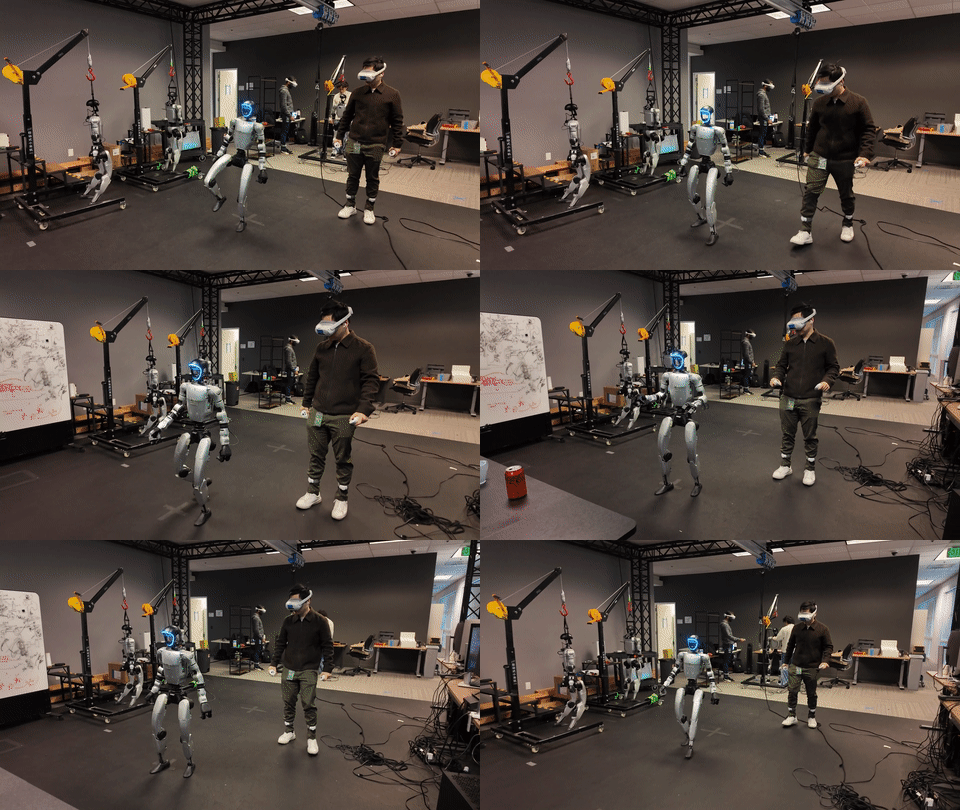
In MuJoCo you can test: keyboard control (WASD to move, QE to rotate), gamepad (PS5/Xbox), and VR (PICO headset with additional setup).
Step 2: Deploy on the Real Unitree G1
bash deploy.sh real
This launches the C++ inference stack, connects to the Unitree low-level API over Ethernet, and starts the 500 Hz control loop.
Safety checklist before running on real hardware:
- Operator physically present with an emergency stop
- Robot stands in a wide, obstacle-free area
- Start at lowest velocity setting and increase gradually
- Confirm MuJoCo sim ran stably for at least 5 minutes before switching to real
Real-Time Monitoring
# Stream joint states and tracking error
python visualize_motion.py --realtime_debug_url tcp://localhost:5557
VLA Integration: SONIC as a Low-Level Controller
One of the most important applications of SONIC is as a low-level controller for VLA models such as GR00T N1.7. The VLA predicts compact latent action tokens; SONIC decodes them into full-body joint commands — combining vision, language, and whole-body motion in a single system.
VLA + SONIC integration pipeline:
- Camera input → VLA model (GR00T N1.7, embodiment tag
UNITREE_G1_SONIC) - VLA predicts latent action tokens
- SONIC Hybrid encoder receives tokens through the shared FSQ space
- Control Decoder outputs 29 joint targets
- 500 Hz motor stream → Unitree G1
See the VLA integration and teleoperation guide for how to connect GR00T N1.7 with the SONIC controller in practice.
Results and Comparison
From the Science Robotics 2026 paper:
- Clear scaling law: increasing data + model size improves tracking accuracy monotonically
- Strong generalisation: policy transfers well to motions unseen during training
- Perturbation robustness: tracking remains stable under external pushes
- Small sim-to-real gap: direct transfer from Isaac Lab to the real G1 — 100% success rate across multiple behaviours
- Low latency: 1–2 ms on Jetson Orin → real-time 500 Hz with no dropped frames
| Criterion | Traditional Split Controller | SONIC |
|---|---|---|
| New behaviour | Design a new reward + retrain | Just add mocap data |
| Hand–foot coordination | Manual, brittle | Learned naturally |
| Scales with data | Hard, non-linear | Clear scaling law |
| VLA integration | Complex, much glue code | Native via FSQ tokens |
| Deployment latency | Low (simple controller) | 1–2 ms (TensorRT optimised) |
Practical Tips for GR00T-WholeBodyControl
- Start with fine-tuning, not from scratch — the pretrained checkpoint already knows how to walk, stand, and use both arms; fine-tuning costs hundreds of GPU hours, not 21,000
- Always run the 5-iteration smoke test before any long run — catches config and data issues before they waste compute
- Filter your data rigorously — motions shorter than 2 seconds or nearly static add noise, not signal
- MuJoCo first, real robot second — sim-to-sim validation saves enormous hardware debugging time
- Maximise
num_envs— SONIC uses on-policy RL; more parallel environments means far better sample efficiency - Watch tracking loss — if loss does not decrease after 1,000 iterations, check the data path and dataset format before touching hyperparameters
For a deeper look at deploying via ZMQ protocol for remote control setups, see the dedicated article.