What ASAP is trying to solve
ASAP, short for Aligning Simulation and Real Physics, is an RSS 2025 paper and code release from LeCAR-Lab/CMU, NVIDIA, and collaborators. The official project page is agile.human2humanoid.com, and the implementation is available at LeCAR-Lab/ASAP. If you have read our notes on humanoid sim-to-real deployment, whole-body data pipelines, or G1 WBC deployment, ASAP is worth studying because it gives a concrete alternative to "randomize everything and hope the policy survives."
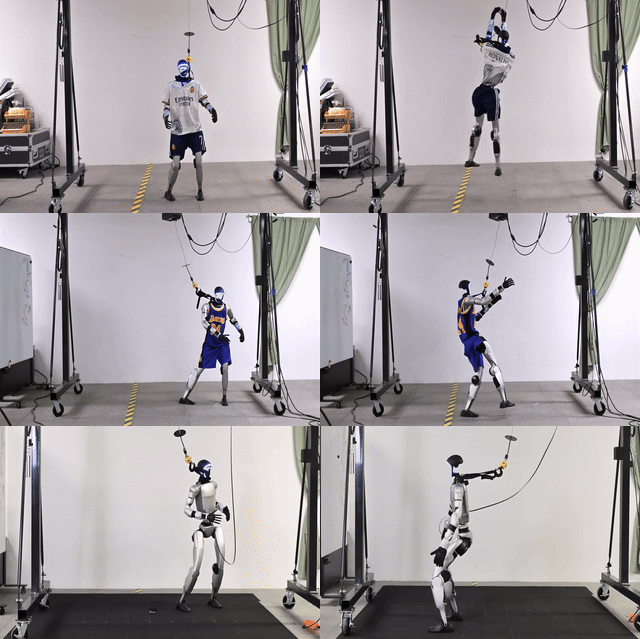
The core problem is simple to state and difficult to fix. A motion tracking policy can look excellent in IsaacGym, then become jerky or unstable in IsaacSim, Genesis, or on a real Unitree G1. The same state and action do not produce the same next state. The gap comes from actuator behavior, delay, joint friction, contact modeling, ankle linkage mechanics, imperfect mass and inertia parameters, low-level PD gains, and unmodeled compliance. For normal walking, this mismatch is already painful. For agile whole-body skills such as kicks, jumps, side jumps, dance moves, or single-foot balance, small errors accumulate quickly and can make the robot fall.
Traditional system identification tries to find better physical parameters. Domain randomization trains the policy across many randomized worlds. Both can help, but both have drawbacks. SysID is labor-intensive and cannot easily capture every mismatch in a 23-29 DoF humanoid. Domain randomization can make policies robust, but often at the cost of agility. ASAP takes a more direct route: learn a delta action model from real or target-environment rollouts, then use that residual action model inside the simulator while fine-tuning the policy.
The paper idea in beginner terms
Think of three worlds. The first world is IsaacGym, where training is fast because thousands of environments can run in parallel. The second world is another simulator such as IsaacSim or Genesis. The third world is the real Unitree G1. A policy trained in the first world issues actions that are optimal for that world's physics. When the same action is replayed in another world, the body trajectory drifts.
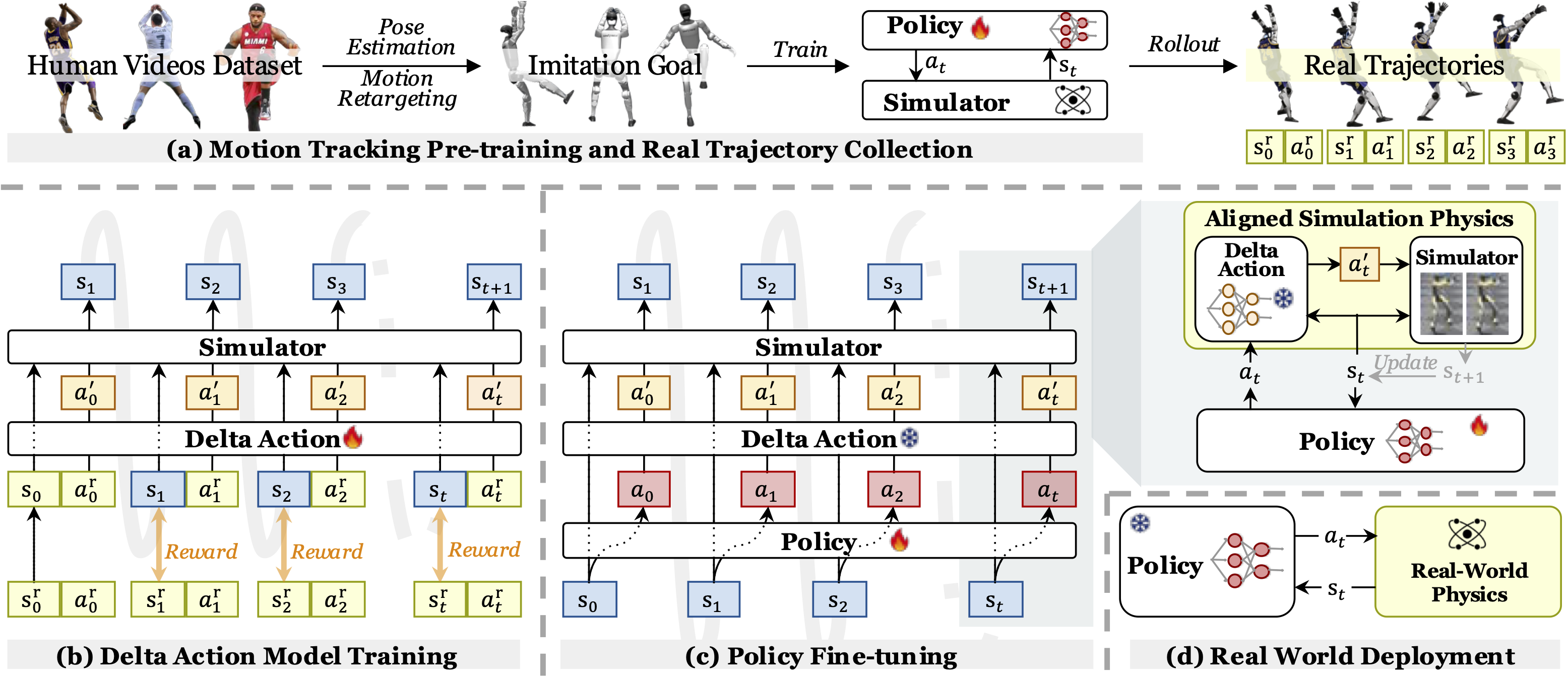
ASAP breaks the problem into four steps:
- Motion tracking pre-training: retarget human motion to the robot and train an RL policy in IsaacGym to imitate it.
- Trajectory collection: deploy the pre-trained policy in the target world, either another simulator or the real G1, and record state-action trajectories.
- Delta action model training: train a residual model that modifies actions so simulation rollouts match the collected target trajectories more closely.
- Policy fine-tuning: freeze the delta action model, insert it into the simulator, fine-tune the motion tracking policy, then deploy the fine-tuned policy directly.
The delta model is not a full dynamics model. It does not primarily predict the next state. It predicts an action correction. A simplified view is:
base_policy(state, motion_phase) -> action
delta_action_model(state, action, history) -> delta_action
sim_action = action + delta_action
During delta model training, the goal is to make the simulator replay target trajectories more accurately. During policy fine-tuning, the policy learns in a simulator whose action execution has been adjusted to behave more like the target world. During real deployment, the fine-tuned policy is used directly; the delta action model is a training-time alignment tool, not necessarily an online controller on the robot.
This distinction matters. If you train a residual dynamics model, prediction errors can cascade over time. If you tune a handful of SysID parameters, the chosen parameter set may help short horizons but fail on longer agile motions. ASAP's residual action approach is closer to the interface the controller actually uses: the action command.
Code architecture: HumanoidVerse, Human2Humanoid, and ASAP
The ASAP repository builds on HumanoidVerse and Human2Humanoid. HumanoidVerse is a modular humanoid learning framework that separates simulators, tasks, robots, rewards, observations, and algorithms. It supports IsaacGym, IsaacSim, and Genesis. Human2Humanoid is the earlier motion tracking and retargeting line of work that helps turn human motion into humanoid robot skills. ASAP adds the delta action pipeline, datasets, retargeting utilities, and sim2real deployment scripts.
At a high level, the repository is organized like this:
ASAP/
  humanoidverse/        # training code, tasks, robot configs, motion data
  isaac_utils/          # IsaacGym and IsaacSim helper utilities
  sim2real/             # MuJoCo, Unitree SDK, ONNX policies, deployment scripts
  scripts/              # helper scripts
  imgs/                 # README figures and GIF demos
The robot used in the paper is the Unitree G1. The README focuses on a G1 29 DoF setup, with configurations that anneal to 23 DoF for some policies. This is not a minor detail. If your G1 has a different wrist or waist configuration, a different firmware version, or a different joint order, public checkpoints may not map safely to your hardware. Before running anything on the robot, verify the XML/URDF, joint order, action scale, PD gains, low-level mode, network interface, and emergency stop behavior.
Installation and environment setup
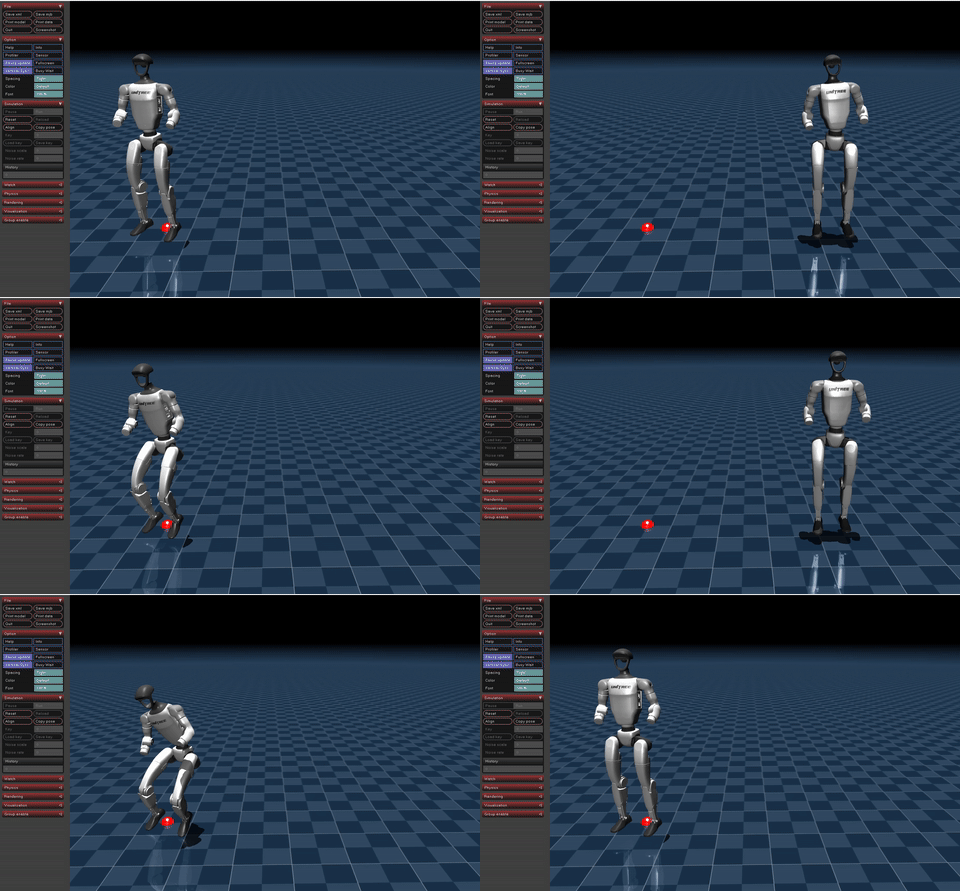
Start in simulation. Do not start on the physical robot. A practical setup includes Linux, an NVIDIA GPU, a compatible CUDA/PyTorch stack, conda or mamba, IsaacGym Preview 4, and enough storage for motion data. The README uses IsaacGym as the main training backend because it can run thousands of parallel environments. IsaacSim/IsaacLab and Genesis are useful for sim-to-sim transfer and evaluation.
The base installation flow is:
conda create -n hvgym python=3.8
conda activate hvgym

# Download IsaacGym Preview 4 from NVIDIA, then extract it.
tar -xvzf isaac-gym-preview-4
pip install -e isaacgym/python

# Inside the ASAP repository
pip install -e .
pip install -e isaac_utils
pip install -r requirements.txt
After installing IsaacGym, run small tests before touching the full training stack:
python 1080_balls_of_solitude.py
python joint_monkey.py
If you hit a libpython error, the README suggests checking the conda environment path and exporting LD_LIBRARY_PATH:
conda info -e
export LD_LIBRARY_PATH=/path/to/conda/envs/hvgym/lib:$LD_LIBRARY_PATH
Then run a HumanoidVerse smoke test with one environment:
HYDRA_FULL_ERROR=1 python humanoidverse/train_agent.py \
  +simulator=isaacgym \
  +exp=locomotion \
  +domain_rand=NO_domain_rand \
  +rewards=loco/reward_g1_locomotion \
  +robot=g1/g1_29dof_anneal_23dof \
  +terrain=terrain_locomotion_plane \
  +obs=loco/leggedloco_obs_singlestep_withlinvel \
  num_envs=1 \
  project_name=TestIsaacGymInstallation \
  experiment_name=G123dof_loco \
  headless=False
This is not the exact ASAP paper training run. It is a sanity check for assets, simulator startup, GPU visibility, Hydra config resolution, and viewer rendering. Only after this works should you scale to 4096 or 5000 environments.
Motion data and retargeting
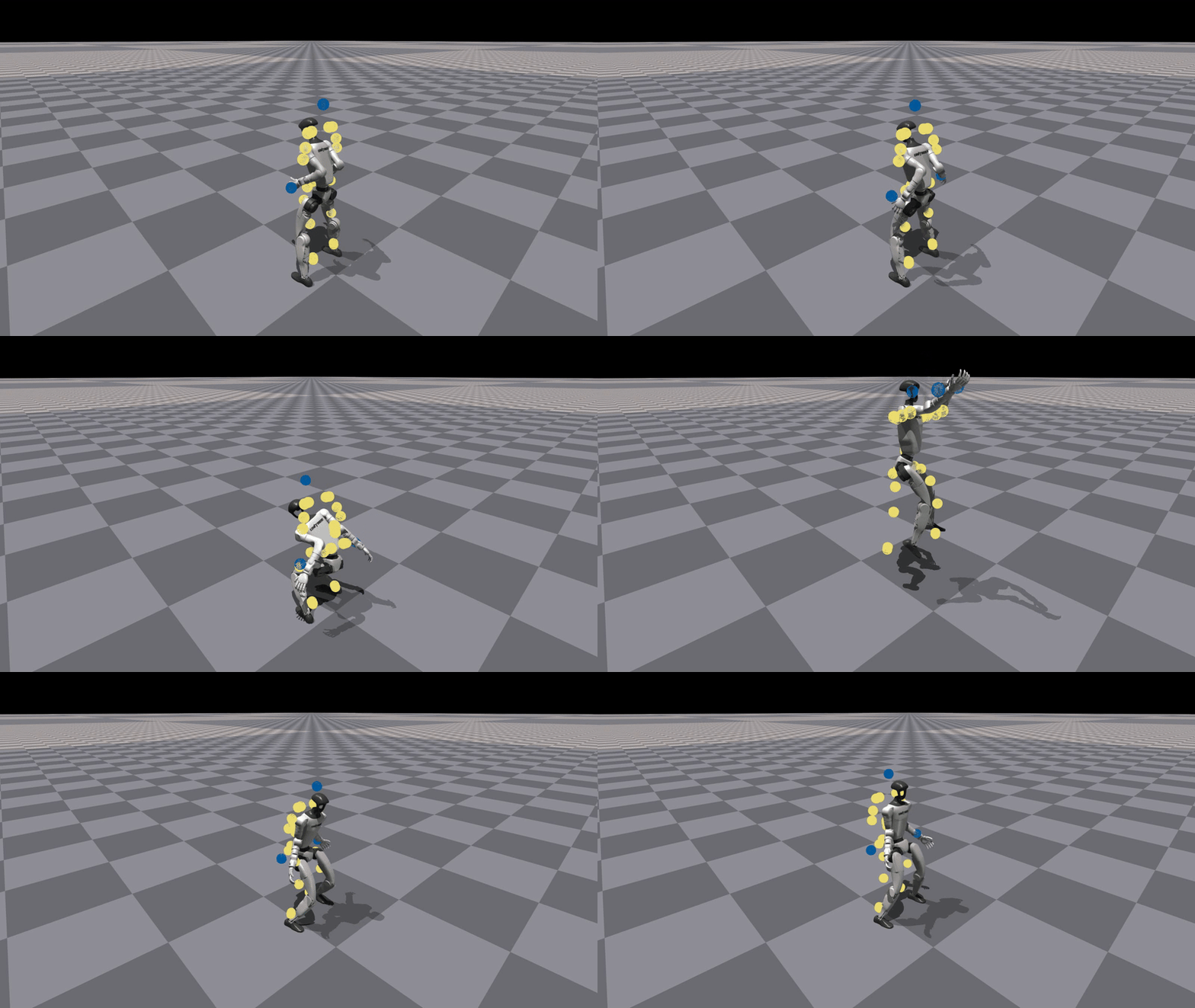
ASAP uses human motion as the source of agile skills. The project page describes a pipeline from human video to SMPL motion, then from SMPL to the Unitree G1. Human motion is reconstructed into SMPL parameters, an RL policy is trained to track that motion in simulation, the motion is retargeted to the G1, and the learned policy is eventually deployed on the real robot.
If your goal is to reproduce the paper motions, the repository already includes SMPL motions and retargeted G1 motions used by ASAP. The README points to paths such as:
humanoidverse/data/motions/raw_tairantestbed_smpl
humanoidverse/data/motions/g1_29dof_anneal_23dof/TairanTestbed/singles
If you want to retarget your own motion or use a different humanoid, the workflow is longer:
- Download SMPL v1.1.0
.pklfiles and place them underhumanoidverse/data/smpl/. - Download AMASS in
SMPL + H Gformat. - Prepare the robot XML and motion config.
- Fit the humanoid shape to the SMPL body.
- Retarget SMPL motion to robot motion.
For a first run, use the provided motions. Retargeting errors are a common source of confusing failures. If the reference motion asks the robot to hit an infeasible pose, the policy may learn an awkward compromise, terminate constantly, or appear to train while never producing deployable behavior.
Training the motion tracking policy
The first real training stage is phase-based motion tracking. The policy observes robot state, state history, the motion phase, and reference motion information, then outputs actions that make the robot imitate the clip. The README includes a training example for Cristiano Ronaldo's "Siuuu" motion:
python humanoidverse/train_agent.py \
  +simulator=isaacgym \
  +exp=motion_tracking \
  +domain_rand=NO_domain_rand \
  +rewards=motion_tracking/reward_motion_tracking_dm_2real \
  +robot=g1/g1_29dof_anneal_23dof \
  +terrain=terrain_locomotion_plane \
  +obs=motion_tracking/deepmimic_a2c_nolinvel_LARGEnoise_history \
  num_envs=4096 \
  project_name=MotionTracking \
  experiment_name=MotionTracking_CR7 \
  robot.motion.motion_file="humanoidverse/data/motions/g1_29dof_anneal_23dof/TairanTestbed/singles/0-TairanTestbed_TairanTestbed_CR7_video_CR7_level1_filter_amass.pkl" \
  rewards.reward_penalty_curriculum=True \
  rewards.reward_penalty_degree=0.00001 \
  env.config.resample_motion_when_training=False \
  env.config.termination.terminate_when_motion_far=True \
  env.config.termination_curriculum.terminate_when_motion_far_curriculum=True \
  env.config.termination_curriculum.terminate_when_motion_far_threshold_min=0.3 \
  env.config.termination_curriculum.terminate_when_motion_far_curriculum_degree=0.000025 \
  robot.asset.self_collisions=0
Key arguments to understand:
| Argument | Meaning |
|---|---|
+exp=motion_tracking |
selects the imitation/motion tracking task |
+robot=g1/g1_29dof_anneal_23dof |
selects the G1 robot configuration |
robot.motion.motion_file |
points to the retargeted reference motion |
terminate_when_motion_far |
stops episodes when the robot drifts too far from the reference |
reward_penalty_curriculum |
gradually increases penalties during training |
num_envs=4096 |
runs thousands of IsaacGym environments in parallel |
After training, visualize the policy with:
python humanoidverse/eval_agent.py \
  +checkpoint=logs/MotionTracking/.../model_5800.pt
At this stage, the goal is only to produce a good IsaacGym policy. If the policy already shakes, loses phase, contacts the ground incorrectly, or terminates frequently in the training simulator, the delta action model will not magically fix it. Delta action alignment is for transfer mismatch, not for repairing a weak base policy.
Training the delta action model
The delta action model requires a motion file with an extra "action" key. That is because it learns from state-action trajectories collected in the target environment or on the real robot. In sim-to-sim experiments, the target can be IsaacSim or Genesis. In sim-to-real experiments, the target is the physical G1.
The README provides this open-loop delta action training command:
python humanoidverse/train_agent.py \
  +simulator=isaacgym \
  +exp=train_delta_a_open_loop \
  +domain_rand=NO_domain_rand \
  +rewards=motion_tracking/delta_a/reward_delta_a_openloop \
  +robot=g1/g1_29dof_anneal_23dof \
  +terrain=terrain_locomotion_plane \
  +obs=delta_a/open_loop \
  num_envs=5000 \
  project_name=DeltaA_Training \
  experiment_name=openloopDeltaA_training \
  robot.motion.motion_file="<PATH_TO_YOUR_MOTION_FILE_WITH_ACTION_KEYNAME>" \
  env.config.max_episode_length_s=1.0 \
  rewards.reward_scales.penalty_minimal_action_norm=-0.1 \
  +device=cuda:0 \
  env.config.resample_motion_when_training=True \
  env.config.resample_time_interval_s=10000
The one-second episode length is a practical choice. The model is being trained to align short-horizon action effects. Long open-loop horizons are where small physics errors cascade. In the paper's sim-to-sim evaluation, ASAP improves long-horizon replay compared with OpenLoop, SysID, and DeltaDynamics baselines.
On real hardware, the authors did not train a full 23 DoF delta action model. That would require too much real-world data and would stress the robot heavily. Instead, they trained a 4 DoF ankle delta action model. The motivation is that the Unitree G1 ankle linkage introduces a large sim-to-real gap, while real data is limited. The paper reports collecting 100 motion clips for real-world experiments, executing each task 30 times, and collecting an additional 10 minutes of locomotion data for transitions between tracking skills.
Fine-tuning with the delta action model
Once the delta action model is trained, freeze it and insert it into the simulator. The original motion tracking policy is then fine-tuned in a simulator where actions are modified by the learned residual. The README command is:
HYDRA_FULL_ERROR=1 python humanoidverse/train_agent.py \
  +simulator=isaacgym \
  +exp=train_delta_a_closed_loop \
  algo.config.policy_checkpoint="<PATH_TO_YOUR_DELTA_A_MODEL>" \
  +domain_rand=NO_domain_rand_finetune_with_deltaA \
  +rewards=motion_tracking/reward_motion_tracking_dm_simfinetuning \
  +robot=g1/g1_29dof_anneal_23dof \
  +terrain=terrain_locomotion_plane \
  +obs=delta_a/train_policy_with_delta_a \
  num_envs=4096 \
  project_name=DeltaA_Finetune \
  experiment_name=finetune_with_deltaA \
  robot.motion.motion_file="<PATH_TO_YOUR_MOTION_FILE>" \
  +opt=wandb \
  env.config.add_extra_action=True \
  +checkpoint="<PATH_TO_YOUR_POLICY_TO_BE_FINETUNED>" \
  domain_rand.push_robots=False \
  env.config.noise_to_initial_level=1 \
  rewards.reward_penalty_curriculum=True \
  +device=cuda:0 \
  algo.config.save_interval=5 \
  algo.config.num_learning_iterations=1000
There are two checkpoints here. algo.config.policy_checkpoint points to the delta action model. +checkpoint points to the base motion tracking policy that should be fine-tuned. Mixing them up can produce a run that starts but is conceptually wrong. Use explicit experiment names:
logs/
  MotionTracking/CR7_base_policy/
  DeltaA_Training/g1_ankle_delta_a/
  DeltaA_Finetune/CR7_with_delta_a/
During fine-tuning, monitor more than reward. Track root position error, MPJPE, acceleration error, root velocity error, episode termination, action norm, body height, contact pattern, and joint velocity. If reward rises while the motion becomes violent, check action penalties, termination thresholds, noisy initialization, and the quality of collected trajectories.
Inference, sim2sim, and sim2real deployment
The repository includes a sim2real/ directory for MuJoCo sim2sim and Unitree SDK deployment. This is not a beginner hardware step. The README explicitly warns that deploying these models on physical hardware can be hazardous and should only be done with strong sim-to-real expertise and safety protocols.
For a real G1, the README notes that the robot should be configured for 29 DoF by unlocking the waist according to Unitree documentation, then restarted. The operator enters Low-Level mode, connects the PC to the G1 over Ethernet, configures the network, and edits config/g1_29dof_hist.yaml so INTERFACE matches the network interface with an IP like 192.168.123.xxx, for example eth0.
The sample policy command is:
python rl_policy/deepmimic_dec_loco_height.py \
  --config=config/g1_29dof_hist.yaml \
  --loco_model_path=./models/dec_loco/20250109_231507-noDR_rand_history_loco_stand_height_noise-decoupled_locomotion-g1_29dof/model_6600.onnx \
  --mimic_model_paths=./models/mimic
The README lists these keyboard controls:
| Key | Function |
|---|---|
] |
activate the locomotion policy |
[ |
activate the ASAP phase-based motion tracking policy |
; |
switch to the ASAP policy |
i |
move the robot to the initial position |
o |
emergency stop |
9 |
release the robot stack in the MuJoCo viewer |
= |
switch between tapping and walking for locomotion |
w/a/s/d |
control linear velocity |
q/e |
control angular velocity |
z |
set all commands to zero |
A safe progression is: IsaacGym evaluation, MuJoCo sim2sim, hardware with a safety rig if available, low-amplitude motions, then high-energy motions. With agile humanoid skills, one bad contact can overheat or damage an ankle or knee actuator.
Reported results
ASAP is evaluated across three transfer settings: IsaacGym to IsaacSim, IsaacGym to Genesis, and IsaacGym to the real Unitree G1. In sim-to-sim transfer, the paper reports lower tracking errors than OpenLoop, SysID, and DeltaDynamics, especially at longer horizons. In closed-loop motion imitation, ASAP maintains strong success rates across Easy, Medium, and Hard task levels, while DeltaDynamics can lose success on harder tasks because errors cascade or the learned residual overfits.
For real-world evaluation, the authors selected five tasks with clear sim-to-real mismatch: kick, jump forward, step forward and back, single-foot balance, and single-foot jump. Because agile motion collection overheats motors and risks hardware damage, they used a sample-efficient 4 DoF ankle delta action model rather than a full-body 23 DoF residual. The paper's conclusion reports up to 52.7% reduction in motion tracking error on sim-to-real tasks and successful deployment of agile jumps and kicks on the G1.
The bigger engineering lesson is that residual learning does not need to cover the whole body to be useful. If the largest mismatch is concentrated in the ankle, learning a controlled residual there can produce a larger improvement than trying to identify every mass, friction, delay, and actuator parameter. For small labs, this is a practical pattern: find the bottleneck mismatch, learn a bounded residual, and fine-tune the policy in an aligned simulator.
Common beginner mistakes
The first mistake is treating ASAP as a single script that makes a G1 jump. It is a research pipeline: motion data, retargeting, simulation training, trajectory collection, residual action learning, policy fine-tuning, and deployment. Skipping one stage changes the problem.
The second mistake is using the wrong motion file. Base motion tracking uses reference motion. Delta action training needs a trajectory file that includes actions. If the "action" key is missing, the delta model cannot learn the residual command that produced the target rollout.
The third mistake is deploying a checkpoint on mismatched hardware. DoF count, joint order, action scale, PD gains, sign conventions, and firmware differences matter. Before enabling strong motion, verify mapping with tiny commands, log joint targets, and confirm emergency stop behavior.
The fourth mistake is evaluating only by video. A good GIF is not enough. Track root position error, MPJPE, acceleration error, root velocity error, success rate, termination rate, action norm, and motor temperature. Agile humanoid control must be repeatable and hardware-aware, not merely visually impressive once.
Minimal reproduction checklist
If you want to follow ASAP in a disciplined way, use this sequence:
- Install IsaacGym and run viewer tests.
- Install HumanoidVerse inside the ASAP repository.
- Run a one-environment G1 locomotion smoke test.
- Train one motion tracking policy using a provided motion.
- Evaluate the checkpoint in IsaacGym and inspect phase tracking.
- Collect target trajectories from another simulator or from real hardware with a safety setup.
- Build a motion file that includes the
"action"key. - Train the open-loop delta action model.
- Freeze the delta model and fine-tune the tracking policy.
- Evaluate sim2sim before touching the real robot.
- For real G1 deployment, verify DoF, network, Low-Level mode, emergency stop, and thermal limits.
ASAP is valuable because it reframes humanoid sim-to-real as behavior alignment through residual actions, not just physics parameter tuning. For Unitree G1 and similar humanoids, this opens a path toward richer whole-body skills such as jumping, kicking, dancing, and sports-style motion. It is still an advanced pipeline, so treat the physical robot as the final validation step, not the first debugging environment.