Imagine you are a robot standing in front of a kitchen counter. A user says: "Grab the spoon and put it in the basket." The question is: should you write a Python script and run it all at once — or should you ask one small question, act, wait for feedback, then repeat?
This is not a philosophical question. It is the core design choice behind ALRM: Agentic LLM for Robotic Manipulation (arXiv 2601.19510), a paper from the Technology Innovation Institute (TII UAE) that formally defines and compares two execution modes across 56 tasks and 10 LLMs — from Claude-4.1-Opus down to Falcon-H1-7B — with results that may surprise you.
By the end of this post, you will understand why both modes exist, when to choose each one, and what the real benchmark numbers look like.
Series Roadmap
| # | Post | Content |
|---|---|---|
| 1 | Why Multi-Agent Beats VLA? | ManiAgent 86.8% vs pi0 55.7% |
| 2 | Perception Agent & Grasp Planning | Florence-v2, AnyGrasp, 3D coordinates |
| 3 | ALRM: CaP vs TaP in ReAct ← you are here | Two execution modes, benchmark 10 LLMs |
| 4 | SAP Verifier: Self-Check Before Execute | Preventing execution errors with verifier agent |
| 5 | Sim-to-Real Deploy Pipeline | From Gazebo to a real robot |
What Is ALRM and What Problem Does It Solve?
Before ALRM, most LLM-for-robotics systems shared a fundamental flaw: no closed-loop mechanism. The LLM receives a command, generates an action, the robot executes it — done. If the robot picks up the wrong object, the system has no awareness and cannot self-correct. Human intervention is required.
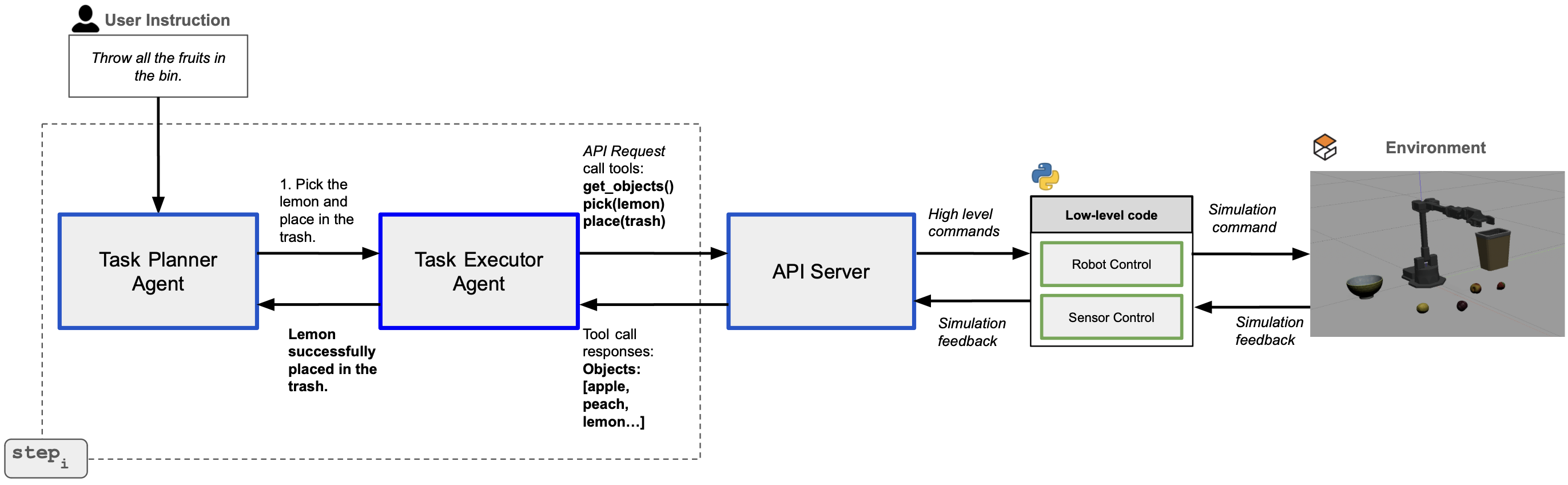
ALRM addresses this with a three-layer architecture:
Layer 1 — Task Planner Agent: Receives natural language instructions (e.g. "clear the breakfast table"), uses the ReAct framework to decompose them into executable subtasks (e.g. pick spoon → place bowl → move_to home). The Planner continuously receives observations from the Executor to revise the plan when needed.
Layer 2 — Task Executor Agent: Receives each subtask from the Planner and executes it using one of two modes: Code-as-Policy (CaP) or Tool-as-Policy (TaP). This is ALRM's core differentiator.
Layer 3 — REST API Server: The bridge between the LLM and the physical robot. The server exposes 8 standardized actions through two internal modules:
wx250sRobot: robot arm control via MoveIt/ROSSimPerception: object detection via Gazebo
REST API — The Common Language Between LLM and Robot
Before diving into CaP and TaP, you need to understand the vocabulary. ALRM defines 8 primitive actions split into 3 groups:
| Group | Action | Description |
|---|---|---|
| Control | pick(object_name) |
Grasp an object by name |
| Control | place(location) |
Place at specified location |
| Control | move_to(pose) |
Move to specific coordinates |
| Control | move_to_home_pos() |
Return to safe home position |
| Perception | get_objects() |
Return list of objects in the scene |
| Perception | get_reference_names() |
Get names of reference points (basket, table, etc.) |
| Pose | compute_grasp(object) |
Compute optimal grasp pose for an object |
| Pose | get_pose(object) |
Get current pose of an object |
These 8 actions form an immutable interface — regardless of whether you use CaP or TaP, regardless of whether the LLM is GPT-5 or Falcon-H1-7B, every operation ultimately calls through these 8 primitives. This design cleanly separates the reasoning layer (LLM) from the execution layer (robot).
Code-as-Policy (CaP) — Write Script, Run Once
How it works: The LLM receives a subtask description plus full Python function definitions for all 8 actions (signatures, docstrings, and a one-shot pick-and-place example), then generates a complete Python snippet to handle the entire subtask in a single pass.
For the subtask "pick the spoon and place it in the basket", CaP outputs code similar to:
# CaP output — all logic in one LLM call
objects = get_objects()
if "spoon" in objects:
    grasp_pose = compute_grasp("spoon")
    move_to(grasp_pose)
    pick("spoon")
    basket_pose = get_pose("basket")
    move_to(basket_pose)
    place("basket")
    move_to_home_pos()
This code is sent to the REST API server, executed from start to finish, and the result is returned.
CaP advantages:
- Fast: Only 1 LLM call for the entire subtask → low latency
- Deterministic: The generated code can be read and validated before execution
- Easy to debug: If something goes wrong, the specific line of code is visible
CaP disadvantages:
- Not adaptive: If
get_objects()returns a scene different from what the LLM assumed, the already-generated code cannot self-correct - Requires capable LLMs: Weaker models generate code with syntax errors or logic bugs
- Struggles with complex conditionals: Tasks requiring multi-round reasoning are difficult to encode in one snippet
Tool-as-Policy (TaP) — Ask, Act, Receive Feedback, Repeat
How it works: The LLM is given tool definitions (JSON schema of all 8 actions), but instead of generating code, it calls one tool per step. Each tool call result is appended to the conversation history and sent back to the LLM to decide the next action.
For the same subtask, TaP operates as a ReAct loop:
Step 1: LLM → tool_call: get_objects()
         Obs: ["spoon", "spatula", "basket", "coke_can"]

Step 2: LLM → tool_call: compute_grasp("spoon")
         Obs: {position: [0.3, 0.1, 0.05], orientation: [0, 0, 0.7, 0.7]}

Step 3: LLM → tool_call: move_to({position: [0.3, 0.1, 0.05], ...})
         Obs: "Move successful"

Step 4: LLM → tool_call: pick("spoon")
         Obs: "Pick successful"

Step 5: LLM → tool_call: get_pose("basket")
         Obs: {position: [0.5, -0.2, 0.1], ...}

Step 6: LLM → tool_call: place("basket")
         Obs: "Place successful"

Step 7: LLM → tool_call: move_to_home_pos()
         Obs: "Home position reached"
         → DONE
At each step, the LLM sees the complete history — it knows where the robot is, what has been done, and what the responses were. If step 4 (pick) fails because the object is occluded, the LLM can adjust its strategy at step 5 instead of blindly continuing.
TaP advantages:
- Adaptive: Real-time feedback from the robot directly influences subsequent decisions
- Handles complex tasks well: Multi-step conditional logic and error recovery happen naturally
- Large models fully utilized: GPT-5, Claude-4.1-Opus are more effective with full context at each step
TaP disadvantages:
- Significantly slower: Each tool call requires a full LLM round-trip → latency accumulates quickly
- Small models often fail: Requires the LLM to precisely understand tool call schemas — 7B models are rarely reliable enough
- Higher token cost: Conversation history grows with every step
Benchmark — 56 Tasks, 3 Environments, 10 LLMs
To make a fair comparison, ALRM constructed a carefully designed benchmark:
3 Gazebo simulation environments:
- Kitchen Utensils: spoon, spatula, coke can, basket
- Boxes: cardboard box, wooden box, metal box, container
- Fruits: strawberry, plum, lemon, peach, bowl, trash bin
56 tasks — each with 6 linguistic variations (from direct "pick the red apple" to indirect "take the round sweet fruit and put it away") to test genuine language understanding rather than pattern matching.
Scoring — 3 judge models (majority voting):
- Score 2: All subtasks completed correctly with accurate parameters
- Score 1: At least one subtask completed, but with errors or omissions
- Score 0: No subtask completed correctly
The three judges are GPT-4.1, Claude-Sonnet-4, and Gemini-2.5-Flash — majority voting eliminates single-model bias.
Results — Who Wins, Who Loses?
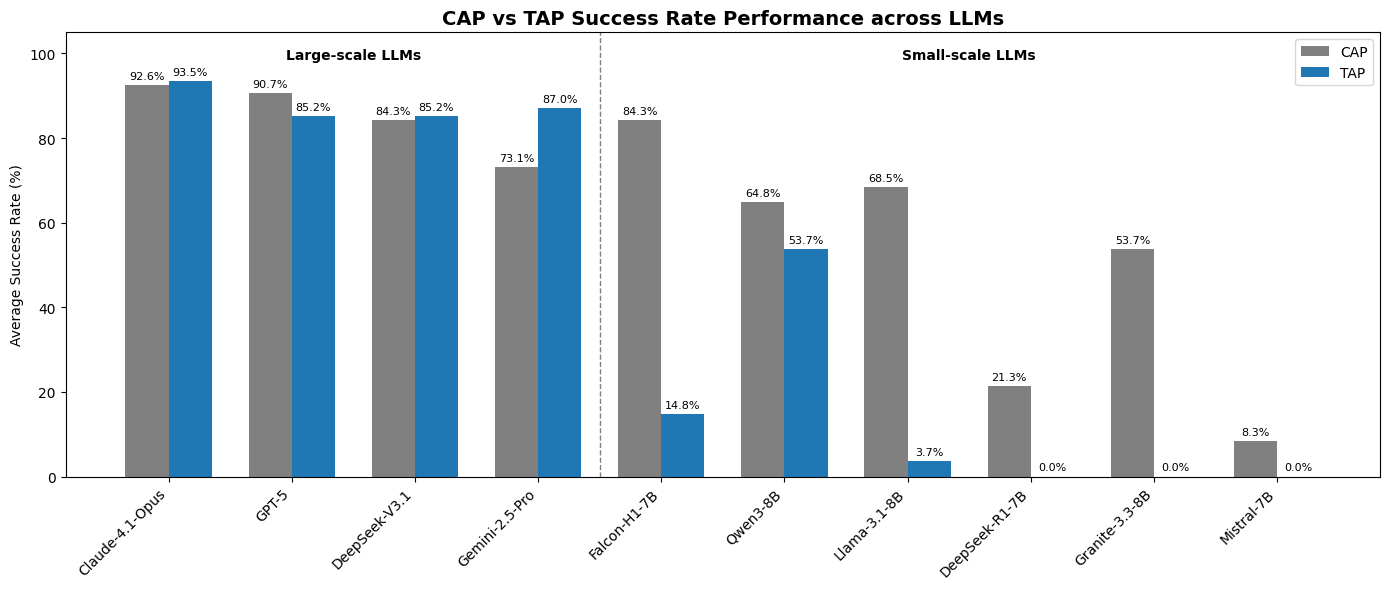
Large-scale models
| Model | CaP Success | CaP Latency | TaP Success | TaP Latency |
|---|---|---|---|---|
| Claude-4.1-Opus | 92.6% | 33.4s | 93.5% | 82.6s |
| GPT-5 | 90.7% | 145.6s | 85.2% | 113.9s |
| DeepSeek-V3.1 | 84.3% | 69.8s | 85.2% | 161.7s |
| Gemini-2.5-Pro | 73.1% | 52.6s | 87.0% | 117.4s |
Notable observation: Claude-4.1-Opus leads not only in accuracy but also in latency among large models in CaP mode (33.4s vs GPT-5's 145.6s — 4.3x faster). In TaP, Opus accuracy improves slightly (93.5% vs 92.6%), but latency increases 2.5x.
Gemini-2.5-Pro shows the opposite behavior: CaP 73.1% but TaP 87.0% — this model has significantly stronger iterative reasoning than it does one-shot code synthesis.
Small-scale (open-source) models
| Model | CaP Success | CaP Latency | TaP Success |
|---|---|---|---|
| Falcon-H1-7B | 84.3% | 24.9s | Unreliable |
| Llama-3.1-8B | 68.5% | 20.1s | Failed |
| Qwen3-8B | 64.8% | 343.3s | 53.7% |
| Granite-3.3-8B | 53.7% | 24.5s | Failed |
| DeepSeek-R1-7B | 21.3% | 53.6s | Failed |
| Mistral-7B | 8.3% | 19.0s | Failed |
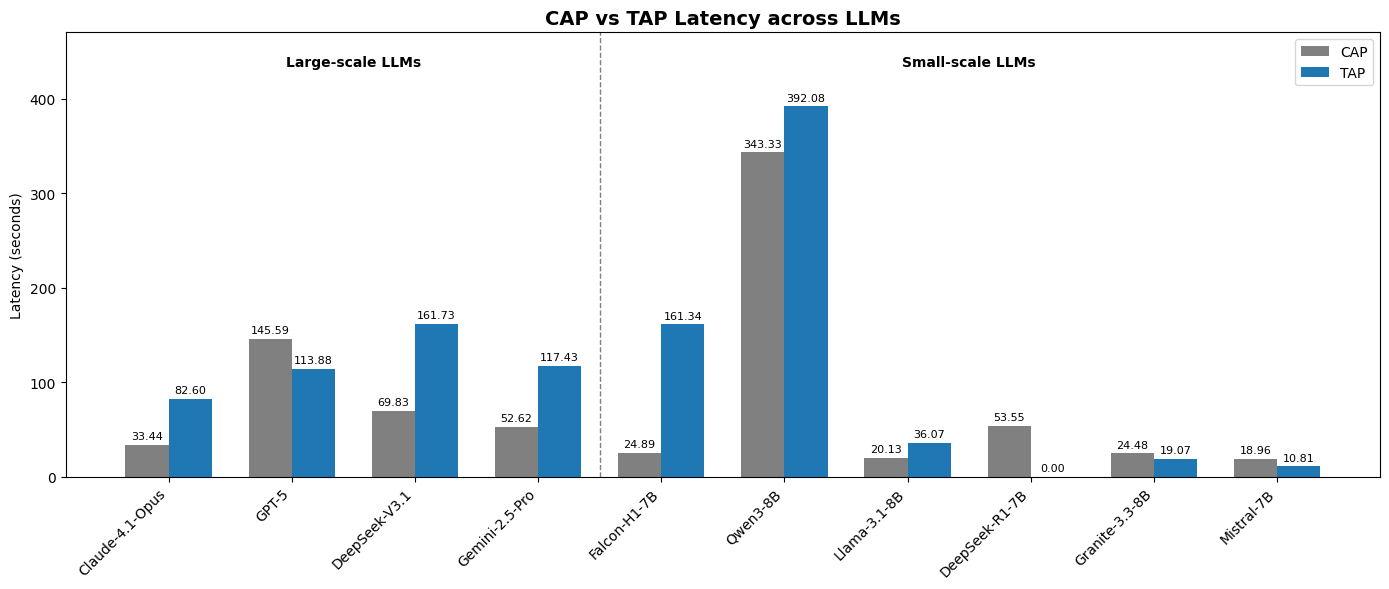
Falcon-H1-7B is the benchmark's biggest surprise. At 84.3% CaP success with only 24.9s latency, it matches DeepSeek-V3.1 (a model many times larger) and significantly outperforms every other 7-8B open-source model. This is the payoff from TII UAE's Hybrid SSM-Transformer architecture in the Falcon-H1 family — optimized specifically for tool use and code generation.
Qwen3-8B is the curious outlier: CaP latency of 343.3s (the slowest in the entire benchmark) yet it is the only open-source model with functional TaP (53.7%). This suggests Qwen3-8B has strong structured reasoning but is significantly slower at code generation throughput.
When to Use CaP vs TaP
This is the most practical question of all. Based on benchmark results, clear principles emerge:
Choose CaP when:
- The task has clear structure with little conditional branching (pick → place without intermediate checks)
- Low latency is a requirement (high-throughput warehouse robots, many operations per minute)
- You are using an open-source 7-8B model (CaP is the ONLY viable choice — TaP is too unreliable for small models)
- You want code that can be inspected and validated before running on a real robot
Choose TaP when:
- The task is complex and requires real-time error recovery (e.g. if object is occluded, find another approach)
- You are using a large model (GPT-5, Claude-4.1-Opus, Gemini-2.5-Pro) and accuracy matters more than speed
- The robot environment is dynamic and the scene may change during execution
- The task requires multiple perception-action cycles (observe → decide → act → observe → decide again)
Quick decision table:
| Condition | Recommendation |
|---|---|
| Open-source 7-8B model | CaP (TaP not reliable) |
| Large model + simple task | CaP (2-3x faster) |
| Large model + complex task | TaP (higher accuracy) |
| Latency < 30s is a hard requirement | CaP (or Claude-4.1-Opus + CaP) |
| Real robot, dynamic environment | TaP (more adaptive) |
| Simulation testing/development | Start with CaP, upgrade to TaP if needed |
Why Does Claude-4.1-Opus Lead Both Modes?
This is the most interesting takeaway from the benchmark. Usually, a model strong at code generation (CaP) is not necessarily strong at iterative tool-calling (TaP), and vice versa. Yet Opus tops both.
The paper attributes this to Opus's extremely precise instruction following — when generating Python code, it adheres correctly to API contracts (correct signatures, correct types, correct edge case handling). When using TaP, it also parses tool call schemas accurately without hallucinating non-existent parameters. Both modes demand high precision — and that is Opus's core strength.
This also explains why Mistral-7B achieves only 8.3% in CaP: the model lacks the ability to generate syntactically valid Python that respects the strict API constraints.
Connecting to the Broader Pipeline
The previous post on Perception Agent showed how Florence-v2 + AnyGrasp generates 3D coordinates for objects in the scene. Those coordinates are precisely the input to compute_grasp() and get_pose() in the ALRM REST API.
The next post on SAP Verifier will explain how to add a verification layer before the Executor acts — particularly important in CaP mode where generated code must be validated before running on a real robot.
Summary
- ALRM uses a 3-layer architecture: Task Planner (ReAct) → Task Executor (CaP/TaP) → REST API Server
- CaP generates complete Python in 1 LLM call → fast, deterministic, works with small models
- TaP calls one tool at a time, receives observations, decides next step → slower, adaptive, requires large models
- Claude-4.1-Opus leads both modes: 92.6% CaP (33.4s) and 93.5% TaP
- Falcon-H1-7B is the open-source champion: 84.3% CaP at 24.9s latency — matching DeepSeek-V3.1
- Mode selection rule: Open-source/latency-critical → CaP. Large model/complex task → TaP.