Quick Summary
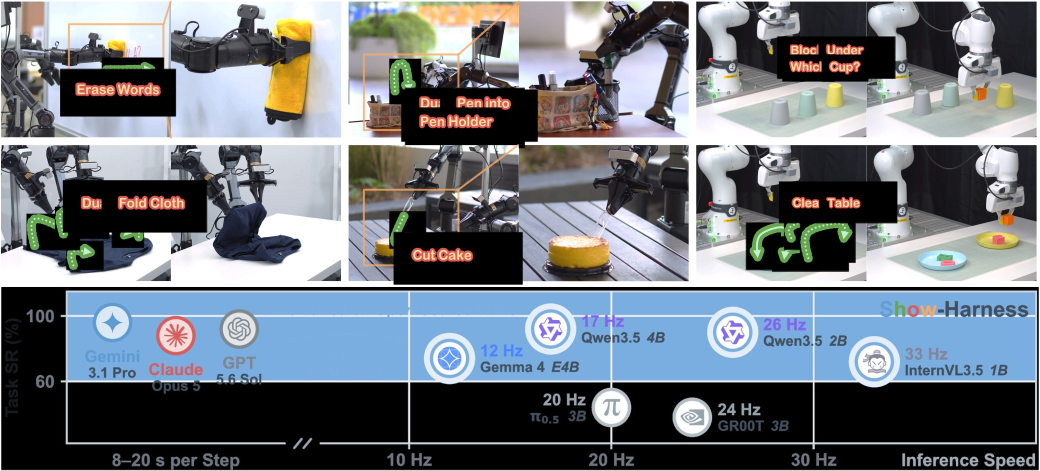
Show-Harness: Just a VLM Agent Can Play Robots is an open-source paper and project from Show Lab at the National University of Singapore. Its most interesting move is not a larger VLA backbone. It reframes the controller problem: if a modern VLM can read images, understand an instruction, reason step by step, and use computer interfaces, can we let it operate a robot as if it were playing a carefully designed game?
Show-Harness answers yes, but only if the interface is disciplined. Instead of asking the model to regress continuous Cartesian deltas, joint targets, trajectory splines, or embodiment-specific action vectors, it exposes a small set of semantic action units: MV_FWD, MV_BACK, MV_LEFT, MV_RIGHT, MV_UP, MV_DOWN, GRASP, RELEASE, and DONE. Each token is a small physical decision. It is readable by humans, learnable by a small VLM, and grounded by an embodiment-specific interpreter.
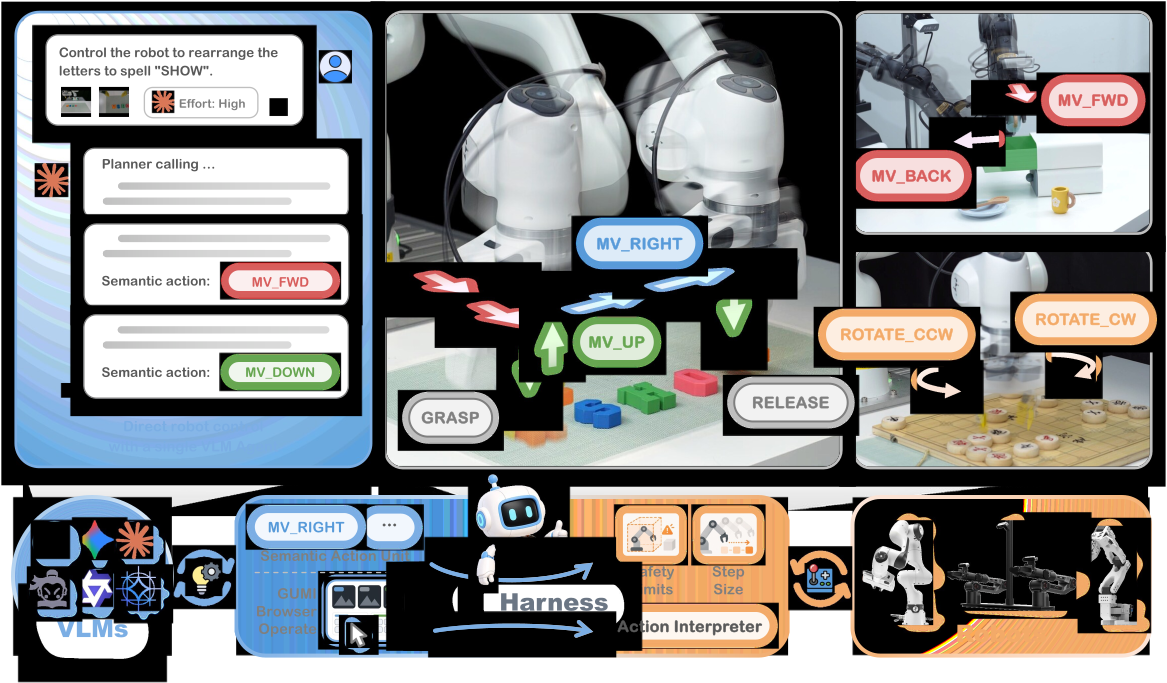
The second key idea is GUMI, the GUI-based Manipulation Interface. An operator can collect demonstrations through a browser using keys or buttons, without a VR rig, haptic device, or custom teleoperation hardware. More importantly, the collected data already matches the inference format: one observation, one task context, one action token. That removes a large amount of post-processing that usually creeps into robot-learning pipelines.
If you have read our LeRobot Framework Deep Dive, Show-Harness is a complementary layer. LeRobot standardizes datasets, policies, and robot interfaces; Show-Harness standardizes the action language between a VLM and the physical robot. For broader VLA context, see OpenVLA Deep Dive. For dual-arm manipulation, FineVLA dual-arm tutorial is a useful companion.
The Paper Idea
Many VLA systems learn a direct mapping from images and language to continuous action vectors or action chunks. That can work very well when you have enough data, but it creates two practical problems for smaller labs. First, real robot trajectories are expensive. Second, the learned action space is often tightly bound to a particular embodiment. Moving from a Franka arm to an AgileX Piper arm, or from a simulator to a real setup, may require new data, new calibration, and substantial fine-tuning.
Show-Harness takes a different path. It keeps the VLM as the decision maker, while robot-specific control is handled by a deterministic interpreter. The VLM sees camera frames, reads the task, observes a short action history, and chooses one semantic unit. The interpreter then converts that unit into a small bounded motion, such as a 2 cm translation in a normalized direction, or a gripper open or close command. After execution, the cameras update and the VLM chooses the next unit.
Because the action is semantic, humans can understand the policy while it runs. If the model alternates MV_LEFT and MV_RIGHT, you can see an oscillation. If it emits GRASP before alignment, the failure is at the decision level, not buried inside a numeric vector. This is valuable in real-world manipulation, where a failed rollout often costs time because the scene must be reset.
The paper supports two operating modes. Zero-shot mode uses a frontier VLM as an agent. The model receives a richer prompt, plugin context, perception hints, planning state, memory, and recovery information, then emits semantic actions. Fine-tuned mode uses a smaller open VLM with a LoRA adapter trained on GUMI demonstrations. Each step returns exactly one action token, with no separate high-level planner. Both modes share the same interface, so demonstrations, prompt contracts, and runtime logic do not split into unrelated systems.
Show-Harness Architecture
The core architecture is a perceive, reason, act loop. During perception, the system reads images from two main camera views: an agent view for the full workspace and a wrist view for close alignment near the gripper. Depending on configuration, plugins can add proprioception, wrist markers, view selection, step-size hints, or additional context.
During reasoning, the VLM receives the task text, camera frames, recent moves, and any plugin-injected prompt fragments. In zero-shot mode, the model can produce longer reasoning, plan subgoals, detect failure, and decide on the next unit. In fine-tuned mode, the prompt is intentionally minimal and the answer must be a single token. This makes inference cheaper and easier to validate: instead of asking the model to write prose, the controller expects one symbolic action.
During action, the semantic unit passes through an interpreter. A Franka implementation can track Cartesian setpoints with impedance control. AgileX Piper can use inverse kinematics and streamed joint targets. Simulators such as ManiSkill or RoboLab execute corresponding operational-space commands. From the model side, MV_DOWN remains MV_DOWN; from the robot side, the controller is embodiment-specific.
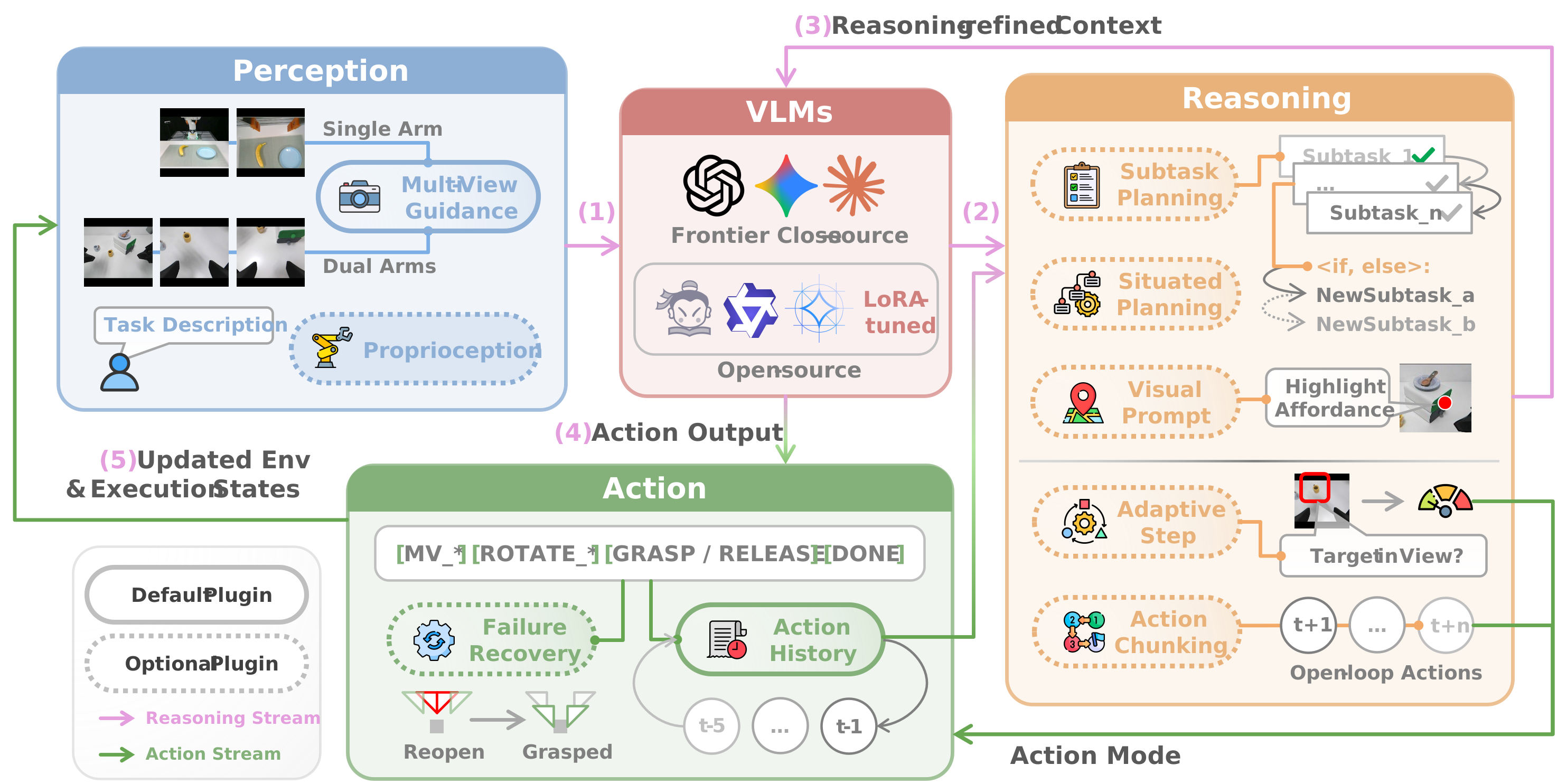
The repository also includes a practical plugin system. Subtask Planning breaks long tasks into visual milestones. Situated Planning adds scene context. Action Chunking reduces model calls when the target is still far away by allowing a short sequence of semantic actions. Action History helps the agent avoid repeated moves. Failure Recovery handles cases such as empty grasps, unverified grasps, or losing the object after lifting. The plugins can be toggled from config, which makes ablations and debugging much cleaner.
GUMI: Collect Data by Playing the Robot
GUMI is the part that makes Show-Harness approachable for beginners. Instead of starting with a full teleoperation stack, you run a local web server, open the browser UI, and drive the robot through the same action vocabulary used by the policy. The single-arm collector runs on port 8600, the dual-arm collector runs on port 8620, and the agent-operator dashboard runs on port 8630.
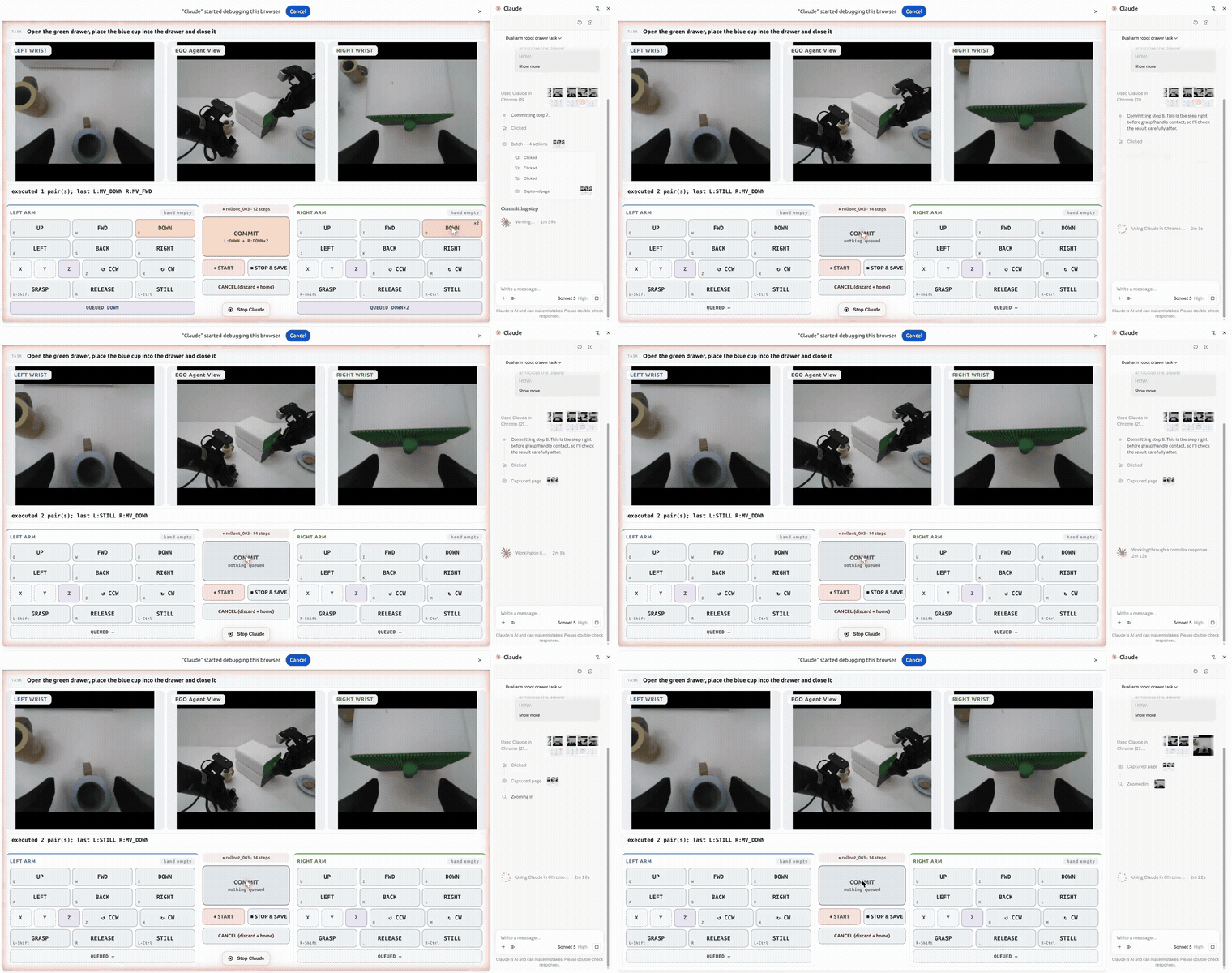
Every button press or key press records an (observation, action) pair. The observation includes the agent-view image, the wrist image, the task text, recent move history, and metadata. The action is one of nine tokens. This differs from continuous teleoperation logs: the data does not need a large post-processing step to become supervision. It is already an action-token dataset.
GUMI also supports an agent operator. A VLM can read camera frames over HTTP and post action tokens into the UI just like a human operator. That makes the same interface useful for human teleoperation, VLM teleoperation, and data collection. For small robotics teams, this is a clever systems choice: fewer tools, one data format, and an interface that can be inspected visually.
Installation and First Run
The main repository is https://github.com/showlab/Show-Harness. The project page links to the arXiv paper 2609.10522, Hugging Face model adapters at showlab/Show-Harness-VLMs, and the dataset at showlab/Show-Harness-Data. The repo separates environments because the harness, VLM serving, real hardware, and training have different dependency constraints.
To run the harness and try GUMI in simulation:
git clone https://github.com/showlab/Show-Harness
cd Show-Harness
bash scripts/setup.sh base
.venv/bin/python gumi/collect_rollouts_web.py data/rollouts_demo --sim
Then open http://localhost:8600, click the page so it receives keyboard focus, and drive the simulated gripper. The --sim mode lets you test the workflow before connecting a Franka arm, AgileX Piper arm, RealSense cameras, or ROS shims. For real hardware, you remove --sim, create a site config such as configs/site/franka.yaml or configs/site/piper_arms.yaml, fill in robot addresses and camera serials, and run the preflight checker.
For the Franka setup, the repo expects a Polymetis-based robot server on the NUC, plus two Intel RealSense cameras: a third-person D435 and a wrist-mounted D405. Before autonomous rollouts, you must capture the table Z floor and begin pose for your own rig. The scripts/check_setup.py command validates the environment, site config, calibration, VLM backend, robot connection, and camera availability before motion.
A zero-shot real-robot run looks like this:
cp configs/site/franka.yaml.example configs/site/franka.yaml
cp configs/secrets.env.example configs/secrets.env
python scripts/check_setup.py --robot-config configs/robot_franka.yaml
python scripts/run_real.py --robot-config configs/robot_franka.yaml
A fine-tuned local policy can be served and executed like this:
ADAPTER=qwen3_5_2b WITH_BASE=1 bash scripts/model/download_vlm_model.sh
MODEL=Qwen/Qwen3.5-2B \
  LORA=qwen3_5_2b_showharness_ft=models/Show-Harness-VLMs/qwen3_5_2b \
  FAMILY=qwen3_5 bash scripts/serve_vlm.sh

python scripts/run_real_mvtoken.py \
  --robot-config configs/robot_franka_ft.yaml \
  --version v3 \
  --model qwen3_5_2b_showharness_ft
One deployment rule matters a lot: the prompt template is a contract. If the adapter was trained with the v3 prompt, inference must use --version v3. If you serve Qwen with the base model's original chat template instead of the training-time template, the model may still return a token, but it is off distribution and can silently get worse.
Training: From GUMI Rollouts to LoRA
The training pipeline lives under train/ and uses LLaMA-Factory. The basic flow is: collect rollouts with GUMI or download the released dataset, convert rollouts into Alpaca-style multimodal samples, register the dataset, and train a LoRA adapter for a backbone such as Qwen3.5, InternVL3.5, or Gemma 4.
bash train/scripts/setup_llamafactory.sh
bash train/scripts/download_dataset.sh
cp train/configs/qwen3_5_2b_lora.yaml train/configs/my_run.yaml
CONFIG=train/configs/my_run.yaml GPU=0 bash train/scripts/train.sh
The released dataset has two major splits. The real split contains 164 episodes, 7,933 samples, and 15,866 images from Franka and AgileX over 17 tasks. The simulation split contains 230 episodes, 13,753 samples, and 27,046 images from RoboLab and ManiSkill. Each sample contains two images, the rendered prompt, and one output token. The action vocabulary is six MV_* directions plus GRASP, RELEASE, and DONE.
The model card reports a consistent recipe for the released adapters: LoRA rank 64, alpha 128, dropout 0.05, target all, frozen vision tower, 1e-4 learning rate, cosine schedule, 0.1 warmup ratio, bf16, and DeepSpeed ZeRO-2. The real adapters train for 40 epochs; the simulation adapter trains for 30 epochs. Real-robot adapters are released for Qwen3.5-0.8B, Qwen3.5-2B, Qwen3.5-4B, Qwen3.5-9B, and Gemma-4-E4B. The simulation adapter is Qwen3.5-2B and covers both RoboLab and ManiSkill.
One subtle issue is the direction convention on AgileX. The dataset standardizes directions using the Franka rig's exocentric overhead view. AgileX observes from a first-person view, which flips the forward and backward axis. Deployment on AgileX therefore requires swapping MV_FWD and MV_BACK. The repo handles this with execution_token_swap, but if you write your own runner, this is exactly the kind of silent error that makes a policy look bad while the real bug is in the interface boundary.
Inference: Why a One-Token Policy Matters
In fine-tuned mode, each step sends camera frames and a fixed prompt, and the model returns exactly one token. If the token is DONE, the rollout ends. Otherwise, the interpreter executes the corresponding motion and the loop continues until max_steps. This makes latency easier to reason about because camera read, model decision, arm motion, and logging are separated in steps.jsonl.
Such a policy is not "general intelligence" in the theatrical sense. It is a compact closed-loop manipulation controller. When the target is not yet visible in the wrist view, it uses the agent view to approach. When the object is close to the gripper, it uses the wrist view for fine alignment. When the fingers are around the object, it emits GRASP. At the destination, it emits RELEASE, then DONE. Because actions are small and feedback is frequent, one imperfect move does not necessarily ruin the episode.
Compared with continuous action chunks in many VLA systems, Show-Harness feels closer to a manual transmission. The model has to make decisions often, but each decision is interpretable and easy to override. On real robots, that trade-off can be attractive, especially when you need a safety floor, human takeover, rollout videos, and postmortem debugging.
Results and Why They Matter
The paper reports that Show-Harness enables frontier VLMs to control robots zero-shot through the semantic interface, while smaller open VLMs become capable controllers after only a few GPU-hours of LoRA fine-tuning. According to the model card, the Qwen3.5-2B adapter is only about 135 MB but can be served as a real-robot policy. The dataset is also modest by foundation-robotics standards: 7,933 real samples and 13,753 simulation samples, not millions of trajectories.
That does not mean Show-Harness replaces every end-to-end VLA. It is best suited to tabletop manipulation where incremental movements are meaningful, cameras provide enough feedback, and the task can be solved as a sequence of small corrections. For heavy contact-rich manipulation, deformable objects, force control, or high-speed dynamic tasks, a 2 cm semantic token may be too coarse or too slow. But for pick-place, sorting, moving objects, simple dual-arm coordination, and sim-to-real experimentation, the design is compelling.
The deeper contribution is the interface. Humans, zero-shot VLM agents, and fine-tuned VLM policies all use the same vocabulary. Data collection and inference look almost identical. The interpreter keeps hardware-specific details local without hiding the model's decisions. For teams building practical VLA stacks, this architecture may be worth copying even before copying any particular model.
A Practical Checklist
If you want to evaluate Show-Harness seriously, begin with simulated GUMI instead of real hardware. Run --sim, collect a few rollouts, inspect rollouts.json, then serve a released adapter with vLLM. Only after that should you standardize camera placement, table Z floor, begin pose, and safety stop on the physical robot.
For custom data, keep task text short and consistent. Do not change prompt versions between training and inference. Do not mix camera transforms casually. Verify direction tokens with a dry run. Always save rollout video, because with a semantic action policy, video is often the fastest way to see whether the failure came from perception, decision making, or the interpreter.