In Part 2, you learned Topics, Services, and Actions — how nodes talk to each other. But a real robot system has dozens of nodes, each needing configuration (max speed, serial port, frequency…), each needing to be launched together in the right order, and sometimes needing controlled start/stop. Those are the three tools of this article: Parameters, Launch files, and Lifecycle nodes.
Version (June 2026): Uses ROS 2 Jazzy (Ubuntu 24.04). Every example has both C++ (
rclcpp) and Python (rclpy). On Humble, swapjazzy→humble.
1. Parameters — configure a node without editing code
Imagine your motor-control node has a max speed max_speed = 0.5. Hard-code it, and you must edit and rebuild every time you change robots. Parameters let you set this value from the outside — via the command line, a YAML file, or at runtime.
Declare and read a parameter
Python (rclpy):
# minimal_param.py
import rclpy
from rclpy.node import Node


class ParamDemo(Node):
    def __init__(self):
        super().__init__('param_demo')

        # Declare a parameter with a default value
        self.declare_parameter('max_speed', 0.5)
        self.declare_parameter('robot_name', 'turtle')

        # Read the values
        speed = self.get_parameter('max_speed').value
        name = self.get_parameter('robot_name').value
        self.get_logger().info(f'{name} runs at up to {speed} m/s')


def main():
    rclpy.init()
    rclpy.spin(ParamDemo())
    rclpy.shutdown()
C++ (rclcpp):
// minimal_param.cpp
#include "rclcpp/rclcpp.hpp"

class ParamDemo : public rclcpp::Node
{
public:
  ParamDemo() : Node("param_demo")
  {
    // Declare parameters with default values
    this->declare_parameter<double>("max_speed", 0.5);
    this->declare_parameter<std::string>("robot_name", "turtle");

    double speed = this->get_parameter("max_speed").as_double();
    std::string name = this->get_parameter("robot_name").as_string();
    RCLCPP_INFO(this->get_logger(), "%s runs at up to %.2f m/s",
                name.c_str(), speed);
  }
};

int main(int argc, char ** argv)
{
  rclcpp::init(argc, argv);
  rclcpp::spin(std::make_shared<ParamDemo>());
  rclcpp::shutdown();
}
Set parameters from the outside
# Set directly when running the node
ros2 run my_pkg param_demo --ros-args -p max_speed:=1.2 -p robot_name:=amr_01

# List all parameters of a node
ros2 param list /param_demo

# Read/write at runtime
ros2 param get /param_demo max_speed
ros2 param set /param_demo max_speed 0.8
YAML parameter files
For many parameters, a YAML file is cleaner:
# config/robot_params.yaml
param_demo:
  ros__parameters:
    max_speed: 1.0
    robot_name: "amr_warehouse"
    pid:
      kp: 1.2
      ki: 0.05
      kd: 0.1
ros2 run my_pkg param_demo --ros-args --params-file config/robot_params.yaml
Parameter callbacks — react when values change
The most powerful part: a node updates itself when a parameter changes at runtime (no restart needed).
Python:
from rcl_interfaces.msg import SetParametersResult

class ParamDemo(Node):
    def __init__(self):
        super().__init__('param_demo')
        self.declare_parameter('max_speed', 0.5)
        self.max_speed = self.get_parameter('max_speed').value
        # Register the callback
        self.add_on_set_parameters_callback(self.on_param_change)

    def on_param_change(self, params):
        for p in params:
            if p.name == 'max_speed' and p.value > 0:
                self.max_speed = p.value
                self.get_logger().info(f'max_speed updated: {p.value}')
        return SetParametersResult(successful=True)
Practical tip: Always validate in the callback (e.g.
max_speed > 0). Returningsuccessful=Falsemakes ROS 2 reject a bad value — so the robot can't be set to a negative speed by a typo.
2. Launch files — bring up a whole system with one command
An AMR needs to run: a LiDAR driver, an odometry node, robot_state_publisher, a control node… Typing ros2 run for each is tedious. A launch file starts them all at once, passes parameters, and remaps topics — in a single command.
ROS 2 uses Python launch files (more flexible than ROS 1's XML).
# launch/robot_bringup.launch.py
import os
from launch import LaunchDescription
from launch.actions import DeclareLaunchArgument
from launch.substitutions import LaunchConfiguration
from launch_ros.actions import Node
from ament_index_python.packages import get_package_share_directory


def generate_launch_description():
    pkg = get_package_share_directory('my_pkg')
    params_file = os.path.join(pkg, 'config', 'robot_params.yaml')

    # Command-line argument: ros2 launch ... use_sim_time:=true
    use_sim_time = LaunchConfiguration('use_sim_time')

    return LaunchDescription([
        DeclareLaunchArgument('use_sim_time', default_value='false'),

        # Motor-control node — load params from YAML
        Node(
            package='my_pkg',
            executable='param_demo',
            name='param_demo',
            parameters=[params_file, {'use_sim_time': use_sim_time}],
            output='screen',
        ),

        # Sensor node — remap topic /scan → /lidar/scan
        Node(
            package='my_pkg',
            executable='lidar_node',
            remappings=[('/scan', '/lidar/scan')],
        ),
    ])
# Launch the whole system
ros2 launch my_pkg robot_bringup.launch.py use_sim_time:=true
Include another launch file
Reuse another package's launch file (e.g. Nav2) with IncludeLaunchDescription:
from launch.actions import IncludeLaunchDescription
from launch.launch_description_sources import PythonLaunchDescriptionSource

nav2 = IncludeLaunchDescription(
    PythonLaunchDescriptionSource(
        os.path.join(get_package_share_directory('nav2_bringup'),
                     'launch', 'navigation_launch.py')),
    launch_arguments={'use_sim_time': 'true'}.items(),
)
This is exactly how we'll wire Nav2 into the robot in Part 6.
3. Lifecycle nodes — nodes with a managed lifecycle
A regular node (rclcpp::Node) runs as soon as it starts. But for critical hardware (LiDAR driver, motors), you want control: configure first, activate later, shut down safely. That's a lifecycle node (managed node).
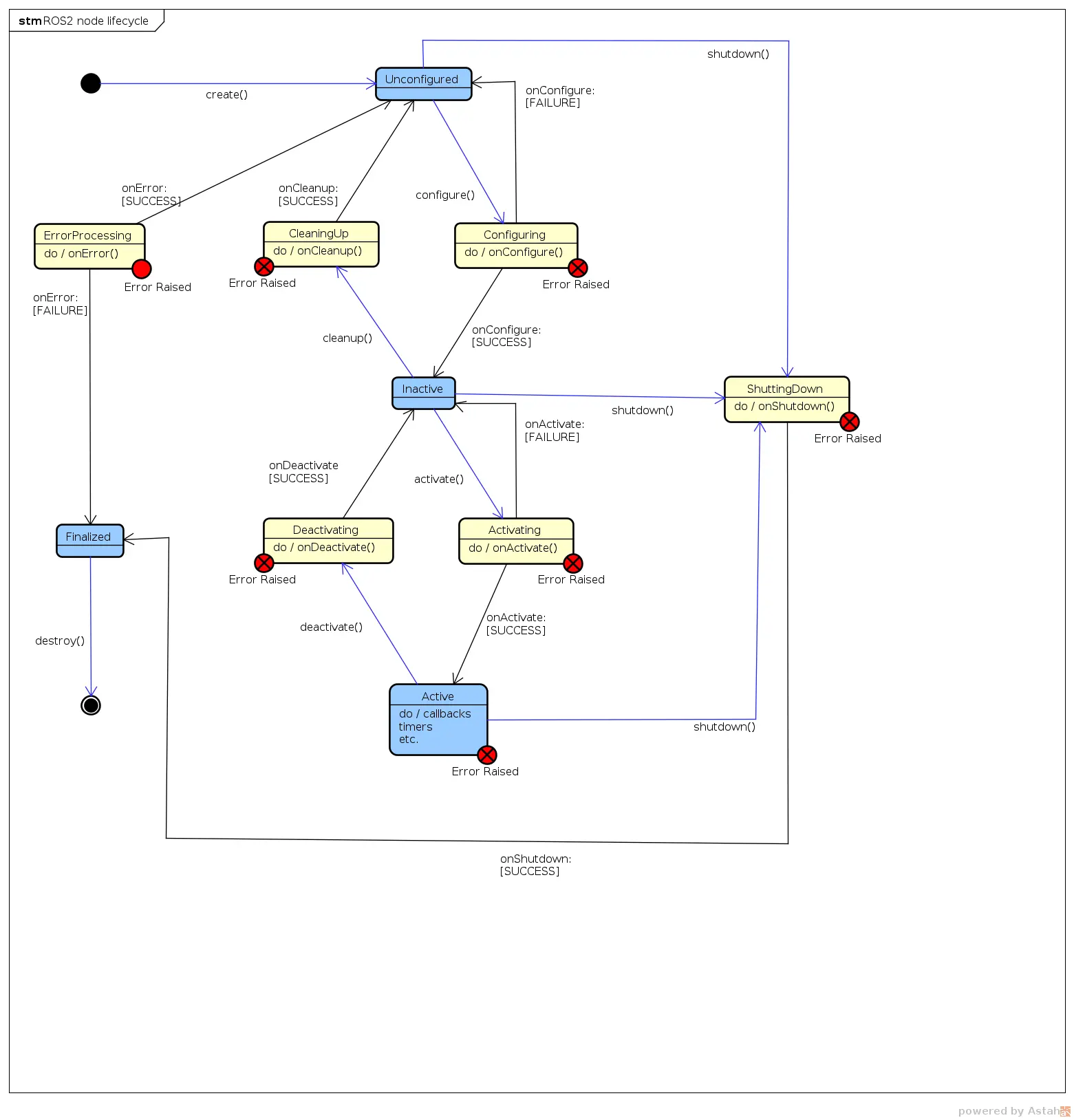
A lifecycle node has 4 main states, changed via transitions:
   ┌──────────────┐  configure   ┌──────────┐  activate   ┌────────┐
   │ Unconfigured │ ───────────► │ Inactive │ ──────────► │ Active │
   └──────────────┘              └──────────┘ ◄────────── └────────┘
          ▲                           │       deactivate
          └───────────────────────────┘
                  cleanup
- Unconfigured: just created, doing nothing.
- Inactive: configured (file opened, buffers allocated) but not yet processing data.
- Active: actually running — publishing, reading sensors.
- Finalized: shut down.
Why useful: for a robot fleet, you can configure all drivers, verify everything is OK, then activate them all at once — avoiding node A running before node B is ready.
Python (rclpy lifecycle):
import rclpy
from rclpy.lifecycle import Node, State, TransitionCallbackReturn


class LidarDriver(Node):
    def __init__(self):
        super().__init__('lidar_driver')

    def on_configure(self, state: State) -> TransitionCallbackReturn:
        # Open serial port, allocate buffers — NOT publishing yet
        self.get_logger().info('Configuring: opening /dev/ttyUSB0')
        self._pub = self.create_lifecycle_publisher(...)  # example
        return TransitionCallbackReturn.SUCCESS

    def on_activate(self, state: State) -> TransitionCallbackReturn:
        self.get_logger().info('Activating: start reading LiDAR')
        return super().on_activate(state)

    def on_deactivate(self, state: State) -> TransitionCallbackReturn:
        self.get_logger().info('Deactivating: pausing')
        return super().on_deactivate(state)

    def on_cleanup(self, state: State) -> TransitionCallbackReturn:
        self.get_logger().info('Cleanup: closing serial')
        return TransitionCallbackReturn.SUCCESS
C++ (rclcpp_lifecycle):
#include "rclcpp_lifecycle/lifecycle_node.hpp"
using CallbackReturn =
  rclcpp_lifecycle::node_interfaces::LifecycleNodeInterface::CallbackReturn;

class LidarDriver : public rclcpp_lifecycle::LifecycleNode
{
public:
  LidarDriver() : rclcpp_lifecycle::LifecycleNode("lidar_driver") {}

  CallbackReturn on_configure(const rclcpp_lifecycle::State &) override
  {
    RCLCPP_INFO(get_logger(), "Configuring: opening serial");
    return CallbackReturn::SUCCESS;
  }
  CallbackReturn on_activate(const rclcpp_lifecycle::State & s) override
  {
    LifecycleNode::on_activate(s);  // activate the publisher
    RCLCPP_INFO(get_logger(), "Activating");
    return CallbackReturn::SUCCESS;
  }
  CallbackReturn on_deactivate(const rclcpp_lifecycle::State & s) override
  {
    LifecycleNode::on_deactivate(s);
    return CallbackReturn::SUCCESS;
  }
};
Drive transitions from the CLI:
# Get current state
ros2 lifecycle get /lidar_driver

# Change states
ros2 lifecycle set /lidar_driver configure
ros2 lifecycle set /lidar_driver activate
When you DON'T need lifecycle: simple logic nodes (a filter, a converter) are fine as regular nodes. Lifecycle is worth it for hardware drivers and nodes where startup order matters.
Common pitfalls
- Forgetting
declare_parameterbeforeget— ROS 2 raisesParameterNotDeclaredException. Always declare first. - Launch file can't find the node — you didn't
colcon buildafter editingsetup.py/CMakeLists.txt, or didn't sourceinstall/setup.bash. - Wrong node name in the param YAML — the YAML key must match the node's
name(or use the/**wildcard to apply to every node). - Lifecycle publisher emits nothing — you forgot to call
super().on_activate(); a lifecycle node's publisher only emits in the Active state.
Summary
This article gives you 3 tools for operating a real ROS 2 system:
- Parameters — configure nodes externally, change at runtime, with validation.
- Launch files — bring up a whole system, pass params, remap, include other launches.
- Lifecycle nodes — controlled lifecycle management for hardware nodes.
In Part 4, we'll describe the robot's shape with URDF, track coordinate relationships between its parts with TF2, and visualize it all in RViz2.
Related Articles
- ROS 2 A to Z (P2): Topics, Services and Actions — How nodes communicate
- ROS 2 A to Z (P4): TF2, URDF and RViz2 — Describe & visualize the robot
- ROS 2 A to Z (P5): ros2_control and Hardware — Using parameters & launch for hardware