Communication in ROS 2 — The Heart of Every Robot System
A robot system comprises dozens, even hundreds of nodes. Sensor nodes read LiDAR, camera nodes process images, planner nodes compute paths, motor nodes control wheels. They all need to communicate with each other. ROS 2 provides 3 primary communication mechanisms: Topics, Services, and Actions. Understanding when to use each is the most critical skill for a robotics engineer.
This post continues from Part 1: Setup and First Node, where you wrote simple publisher/subscriber code. Now we'll go deeper.
Topics — Continuous Data Streams
When to Use Topics?
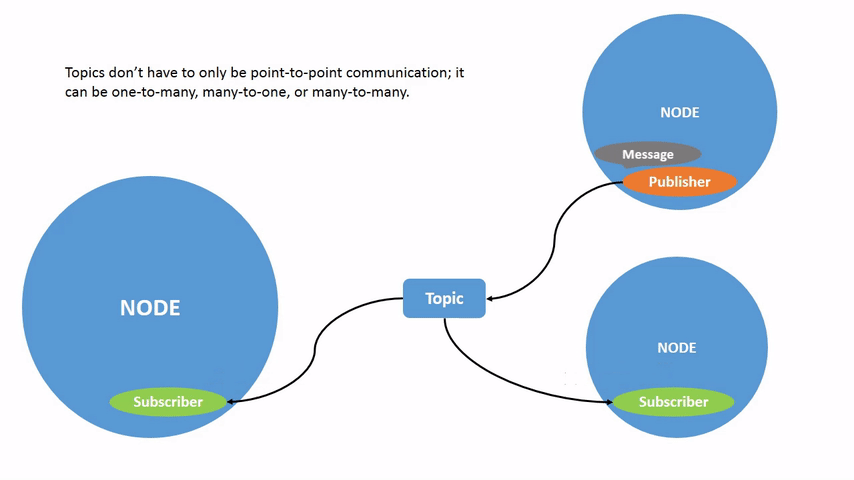
Topics are ideal when you need continuous data streaming from one or more sources to one or more receivers. Characteristics:
- Publish/Subscribe (1-to-many, many-to-many)
- Asynchronous — publisher doesn't know who's subscribing
- No response — fire and forget
Real-world examples: sensor data (LiDAR scans, camera frames, IMU readings), robot state (position, velocity), log messages.
Custom Messages
In Part 1, we used std_msgs/Float32. In practice, you'll create custom messages. Create a package for custom messages:
cd ~/ros2_ws/src
ros2 pkg create --build-type ament_cmake my_robot_interfaces \
  --dependencies std_msgs geometry_msgs
Create a message file:
# ~/ros2_ws/src/my_robot_interfaces/msg/SensorData.msg
# Composite data from multiple sensors
std_msgs/Header header
float32 temperature
float32 humidity
float32 battery_voltage
bool emergency_stop
string status_message
Update CMakeLists.txt:
# Add to CMakeLists.txt
find_package(rosidl_default_generators REQUIRED)

rosidl_generate_interfaces(${PROJECT_NAME}
  "msg/SensorData.msg"
  DEPENDENCIES std_msgs geometry_msgs
)
Update package.xml:
<build_depend>rosidl_default_generators</build_depend>
<exec_depend>rosidl_default_runtime</exec_depend>
<member_of_group>rosidl_interface_packages</member_of_group>
Build and verify:
cd ~/ros2_ws
colcon build --packages-select my_robot_interfaces
source install/setup.bash

# Verify message was created
ros2 interface show my_robot_interfaces/msg/SensorData
Publisher with Custom Message
# ~/ros2_ws/src/my_first_robot/my_first_robot/sensor_data_publisher.py
import rclpy
from rclpy.node import Node
from my_robot_interfaces.msg import SensorData
import random
from builtin_interfaces.msg import Time


class SensorDataPublisher(Node):
    def __init__(self):
        super().__init__('sensor_data_publisher')
        self.publisher_ = self.create_publisher(SensorData, '/sensor_data', 10)
        self.timer = self.create_timer(0.5, self.publish_sensor_data)
        self.get_logger().info('Sensor data publisher started (2 Hz)')

    def publish_sensor_data(self):
        msg = SensorData()
        msg.header.stamp = self.get_clock().now().to_msg()
        msg.header.frame_id = 'base_link'
        msg.temperature = 25.0 + random.uniform(-3.0, 3.0)
        msg.humidity = 60.0 + random.uniform(-10.0, 10.0)
        msg.battery_voltage = 12.6 - random.uniform(0.0, 0.5)
        msg.emergency_stop = False
        msg.status_message = 'nominal'

        self.publisher_.publish(msg)


def main(args=None):
    rclpy.init(args=args)
    node = SensorDataPublisher()
    try:
        rclpy.spin(node)
    except KeyboardInterrupt:
        pass
    finally:
        node.destroy_node()
        rclpy.shutdown()
QoS — Quality of Service
QoS is one of ROS 2's strongest features compared to ROS 1. You can configure how data is transmitted for each topic:
from rclpy.qos import QoSProfile, ReliabilityPolicy, HistoryPolicy, DurabilityPolicy

# QoS for sensor data (acceptable to lose some messages)
sensor_qos = QoSProfile(
    reliability=ReliabilityPolicy.BEST_EFFORT,
    history=HistoryPolicy.KEEP_LAST,
    depth=5,
)

# QoS for control commands (must not lose messages)
command_qos = QoSProfile(
    reliability=ReliabilityPolicy.RELIABLE,
    history=HistoryPolicy.KEEP_LAST,
    depth=10,
)

# QoS for map data (subscriber receives even if joining late)
map_qos = QoSProfile(
    reliability=ReliabilityPolicy.RELIABLE,
    durability=DurabilityPolicy.TRANSIENT_LOCAL,
    history=HistoryPolicy.KEEP_LAST,
    depth=1,
)

# Usage
self.publisher_ = self.create_publisher(LaserScan, '/scan', sensor_qos)
How to Choose QoS?
| Situation | Reliability | Durability | Depth |
|---|---|---|---|
| Sensor data (LiDAR, camera) | BEST_EFFORT | VOLATILE | 5-10 |
| Control commands (cmd_vel) | RELIABLE | VOLATILE | 10 |
| Map, TF static | RELIABLE | TRANSIENT_LOCAL | 1 |
| Logs, diagnostics | BEST_EFFORT | VOLATILE | 20 |
Services — Ask and Answer
When to Use Services?
Services are ideal when you need to request a specific result and wait for a response:
- Request/Response (1-to-1)
- Synchronous — client sends request, waits for server reply
- Not suitable for long-running tasks (will block)
Real-world examples: get battery status, trigger photo capture, reset sensor, change operating mode.
Create Custom Service
# ~/ros2_ws/src/my_robot_interfaces/srv/GetBatteryStatus.srv
# Request (above ---)
string robot_id
---
# Response (below ---)
float32 voltage
float32 percentage
float32 estimated_runtime_minutes
string health_status
bool is_charging
Update CMakeLists.txt:
rosidl_generate_interfaces(${PROJECT_NAME}
  "msg/SensorData.msg"
  "srv/GetBatteryStatus.srv"
  DEPENDENCIES std_msgs geometry_msgs
)
Service Server
# ~/ros2_ws/src/my_first_robot/my_first_robot/battery_service_server.py
import rclpy
from rclpy.node import Node
from my_robot_interfaces.srv import GetBatteryStatus


class BatteryServiceServer(Node):
    def __init__(self):
        super().__init__('battery_service_server')
        self.srv = self.create_service(
            GetBatteryStatus,
            '/get_battery_status',
            self.handle_battery_request
        )
        # Simulate battery state
        self.voltage = 12.4
        self.is_charging = False
        self.get_logger().info('Battery service server ready')

    def handle_battery_request(self, request, response):
        self.get_logger().info(f'Battery status requested for: {request.robot_id}')

        response.voltage = self.voltage
        response.percentage = max(0.0, (self.voltage - 10.0) / 2.6 * 100.0)
        response.estimated_runtime_minutes = response.percentage * 1.2
        response.is_charging = self.is_charging

        if response.percentage > 50.0:
            response.health_status = 'good'
        elif response.percentage > 20.0:
            response.health_status = 'low'
        else:
            response.health_status = 'critical'

        self.get_logger().info(
            f'Response: {response.voltage}V ({response.percentage:.0f}%)'
        )
        return response


def main(args=None):
    rclpy.init(args=args)
    node = BatteryServiceServer()
    try:
        rclpy.spin(node)
    except KeyboardInterrupt:
        pass
    finally:
        node.destroy_node()
        rclpy.shutdown()
Service Client (async)
# ~/ros2_ws/src/my_first_robot/my_first_robot/battery_service_client.py
import rclpy
from rclpy.node import Node
from my_robot_interfaces.srv import GetBatteryStatus


class BatteryServiceClient(Node):
    def __init__(self):
        super().__init__('battery_service_client')
        self.client = self.create_client(
            GetBatteryStatus,
            '/get_battery_status'
        )
        # Wait for server to be ready
        while not self.client.wait_for_service(timeout_sec=1.0):
            self.get_logger().info('Waiting for battery service...')

    def send_request(self, robot_id):
        request = GetBatteryStatus.Request()
        request.robot_id = robot_id

        # Call async — doesn't block event loop
        future = self.client.call_async(request)
        return future


def main(args=None):
    rclpy.init(args=args)
    client = BatteryServiceClient()

    future = client.send_request('robot_01')
    rclpy.spin_until_future_complete(client, future)

    result = future.result()
    client.get_logger().info(
        f'Battery: {result.voltage}V | {result.percentage:.0f}% | '
        f'Status: {result.health_status} | Charging: {result.is_charging}'
    )

    client.destroy_node()
    rclpy.shutdown()
Test from command line:
# Terminal 1: Run server
ros2 run my_first_robot battery_server

# Terminal 2: Call service from CLI
ros2 service call /get_battery_status \
  my_robot_interfaces/srv/GetBatteryStatus \
  "{robot_id: 'robot_01'}"
Actions — Long-Running Tasks with Feedback
When to Use Actions?
Actions are for long-running tasks that need intermediate feedback and can be canceled mid-way:
- Goal/Feedback/Result pattern
- Asynchronous — client sends goal, receives continuous feedback, finally gets result
- Cancelable — can abort task mid-way
Real-world examples: navigate to waypoint (feedback = current position), map sweep (feedback = % complete), move robot arm (feedback = current joint angles).
Create Custom Action
# ~/ros2_ws/src/my_robot_interfaces/action/MoveToPosition.action
# Goal
float32 target_x
float32 target_y
float32 target_theta
---
# Result
bool success
float32 final_x
float32 final_y
float32 total_time_seconds
string message
---
# Feedback
float32 current_x
float32 current_y
float32 distance_remaining
float32 estimated_time_remaining
Update CMakeLists.txt:
find_package(action_msgs REQUIRED)

rosidl_generate_interfaces(${PROJECT_NAME}
  "msg/SensorData.msg"
  "srv/GetBatteryStatus.srv"
  "action/MoveToPosition.action"
  DEPENDENCIES std_msgs geometry_msgs action_msgs
)
Action Server
# ~/ros2_ws/src/my_first_robot/my_first_robot/move_action_server.py
import rclpy
from rclpy.node import Node
from rclpy.action import ActionServer, GoalResponse, CancelResponse
from my_robot_interfaces.action import MoveToPosition
import math
import time


class MoveActionServer(Node):
    def __init__(self):
        super().__init__('move_action_server')

        self._action_server = ActionServer(
            self,
            MoveToPosition,
            '/move_to_position',
            execute_callback=self.execute_callback,
            goal_callback=self.goal_callback,
            cancel_callback=self.cancel_callback,
        )

        # Current robot position
        self.current_x = 0.0
        self.current_y = 0.0
        self.speed = 0.5  # m/s

        self.get_logger().info('Move action server ready')

    def goal_callback(self, goal_request):
        self.get_logger().info(
            f'Received goal: ({goal_request.target_x}, {goal_request.target_y})'
        )
        return GoalResponse.ACCEPT

    def cancel_callback(self, goal_handle):
        self.get_logger().info('Received cancel request')
        return CancelResponse.ACCEPT

    async def execute_callback(self, goal_handle):
        self.get_logger().info('Executing move...')

        target_x = goal_handle.request.target_x
        target_y = goal_handle.request.target_y
        start_time = time.time()

        feedback_msg = MoveToPosition.Feedback()

        while True:
            # Calculate remaining distance
            dx = target_x - self.current_x
            dy = target_y - self.current_y
            distance = math.sqrt(dx * dx + dy * dy)

            # Reached destination?
            if distance < 0.05:
                break

            # Check for cancel
            if goal_handle.is_cancel_requested:
                goal_handle.canceled()
                result = MoveToPosition.Result()
                result.success = False
                result.message = 'Movement canceled'
                return result

            # Move one step
            step = min(self.speed * 0.1, distance)
            self.current_x += (dx / distance) * step
            self.current_y += (dy / distance) * step

            # Send feedback
            feedback_msg.current_x = self.current_x
            feedback_msg.current_y = self.current_y
            feedback_msg.distance_remaining = distance
            feedback_msg.estimated_time_remaining = distance / self.speed
            goal_handle.publish_feedback(feedback_msg)

            time.sleep(0.1)  # 10 Hz update

        # Complete
        goal_handle.succeed()
        result = MoveToPosition.Result()
        result.success = True
        result.final_x = self.current_x
        result.final_y = self.current_y
        result.total_time_seconds = time.time() - start_time
        result.message = 'Reached target position'

        self.get_logger().info(
            f'Move completed in {result.total_time_seconds:.1f}s'
        )
        return result


def main(args=None):
    rclpy.init(args=args)
    node = MoveActionServer()
    try:
        rclpy.spin(node)
    except KeyboardInterrupt:
        pass
    finally:
        node.destroy_node()
        rclpy.shutdown()
Action Client
# ~/ros2_ws/src/my_first_robot/my_first_robot/move_action_client.py
import rclpy
from rclpy.node import Node
from rclpy.action import ActionClient
from my_robot_interfaces.action import MoveToPosition


class MoveActionClient(Node):
    def __init__(self):
        super().__init__('move_action_client')
        self._action_client = ActionClient(
            self, MoveToPosition, '/move_to_position'
        )

    def send_goal(self, x, y, theta=0.0):
        goal_msg = MoveToPosition.Goal()
        goal_msg.target_x = x
        goal_msg.target_y = y
        goal_msg.target_theta = theta

        self._action_client.wait_for_server()
        self.get_logger().info(f'Sending goal: ({x}, {y})')

        self._send_goal_future = self._action_client.send_goal_async(
            goal_msg,
            feedback_callback=self.feedback_callback
        )
        self._send_goal_future.add_done_callback(self.goal_response_callback)

    def goal_response_callback(self, future):
        goal_handle = future.result()
        if not goal_handle.accepted:
            self.get_logger().info('Goal rejected')
            return

        self.get_logger().info('Goal accepted!')
        self._get_result_future = goal_handle.get_result_async()
        self._get_result_future.add_done_callback(self.get_result_callback)

    def feedback_callback(self, feedback_msg):
        fb = feedback_msg.feedback
        self.get_logger().info(
            f'Position: ({fb.current_x:.2f}, {fb.current_y:.2f}) | '
            f'Remaining: {fb.distance_remaining:.2f}m'
        )

    def get_result_callback(self, future):
        result = future.result().result
        if result.success:
            self.get_logger().info(
                f'Arrived at ({result.final_x:.2f}, {result.final_y:.2f}) '
                f'in {result.total_time_seconds:.1f}s'
            )
        else:
            self.get_logger().warn(f'Failed: {result.message}')
        rclpy.shutdown()


def main(args=None):
    rclpy.init(args=args)
    client = MoveActionClient()
    client.send_goal(3.0, 4.0)
    rclpy.spin(client)


if __name__ == '__main__':
    main()
Comparison: When to Use What?
Here's a summary table to help you decide quickly:
| Criterion | Topic | Service | Action |
|---|---|---|---|
| Pattern | Pub/Sub | Request/Response | Goal/Feedback/Result |
| Synchronous | Asynchronous | Synchronous (blocking) | Asynchronous |
| Feedback | Continuous (stream) | Single response only | Continuous feedback + 1 result |
| Cancel | N/A | No | Yes |
| Use case | Sensor data, state | Query, trigger | Navigation, long task |
| Example | /scan, /cmd_vel |
/get_map, /set_mode |
/navigate_to_pose |
Simple rules:
- Data flowing continuously? => Topic
- Quick question/answer (< 1 second)? => Service
- Long-running task, need progress tracking? => Action
Debug Communication with CLI
Some useful CLI commands for debugging:
# === Topics ===
ros2 topic list -t                     # List with message type
ros2 topic info /sensor_data --verbose # Detailed QoS info
ros2 topic pub /cmd_vel geometry_msgs/msg/Twist \
  "{linear: {x: 0.5}, angular: {z: 0.3}}"  # Publish manually

# === Services ===
ros2 service list -t
ros2 service type /get_battery_status
ros2 service call /get_battery_status \
  my_robot_interfaces/srv/GetBatteryStatus \
  "{robot_id: 'robot_01'}"

# === Actions ===
ros2 action list -t
ros2 action info /move_to_position
ros2 action send_goal /move_to_position \
  my_robot_interfaces/action/MoveToPosition \
  "{target_x: 2.0, target_y: 3.0, target_theta: 0.0}" \
  --feedback  # Display feedback
Summary
You now understand the 3 core communication primitives of ROS 2:
- Topics for continuous data streams with QoS control
- Services for quick request/response
- Actions for long-running tasks with feedback and cancellation
Mastering these 3 mechanisms is the foundation for designing any robot system. In Part 3, we'll learn to configure nodes flexibly with Parameters, bring up a whole system with Launch files, and manage node lifecycle with Lifecycle — in both C++ and Python.
Related Articles
- ROS 2 A to Z (P3): Parameters, Launch and Lifecycle — Configuring & launching systems
- ROS 2 A to Z (P1): Setup and First Node — Installation, workspace, publisher/subscriber
- Introduction to ROS 2: The Next Generation Robot Programming Framework — ROS 2 architecture overview
- MQTT for IoT Robot Communication — Compare MQTT and ROS 2 DDS