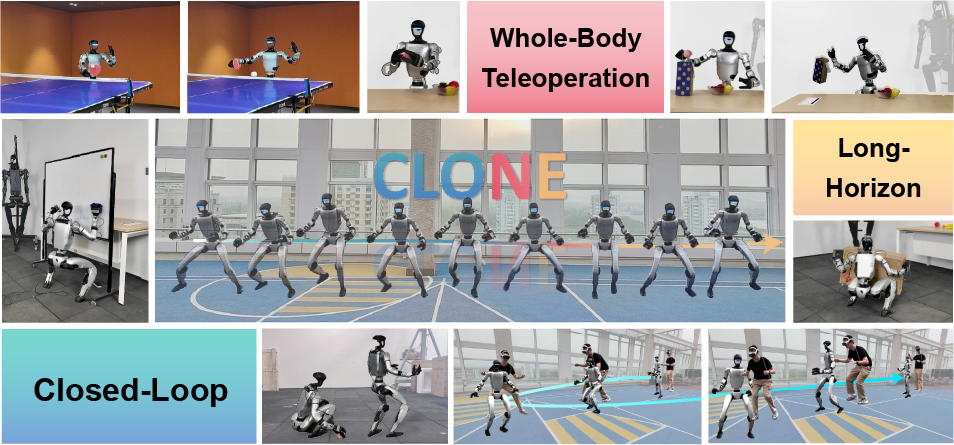
If you own a Unitree G1 and want to teach it complex skills — picking up objects, moving items around, opening drawers — you need whole-body data. Not just arm data. Not just locomotion data. You need the full picture: both arms and legs working together at the same time.
That's exactly what OpenWBC (github.com/jiachengliu3/OpenWBC) solves: an open-source XR-based teleoperation system that lets you control the Unitree G1's upper body with Apple Vision Pro while the robot walks autonomously, all while capturing synchronized whole-body data for VLA training.
This guide walks you through every step — from SDK compilation and network setup to the 3-terminal deploy process, data collection, LeRobot format conversion, and GR00T N1.5 fine-tuning.
Why Whole-Body Teleop Matters
Imagine teaching a robot to pick up a can from a table and place it in a refrigerator across the room. This task requires:
- Arms: Reaching, grasping, carrying
- Legs: Walking from the table to the refrigerator
- Coordination: Both must happen simultaneously and consistently
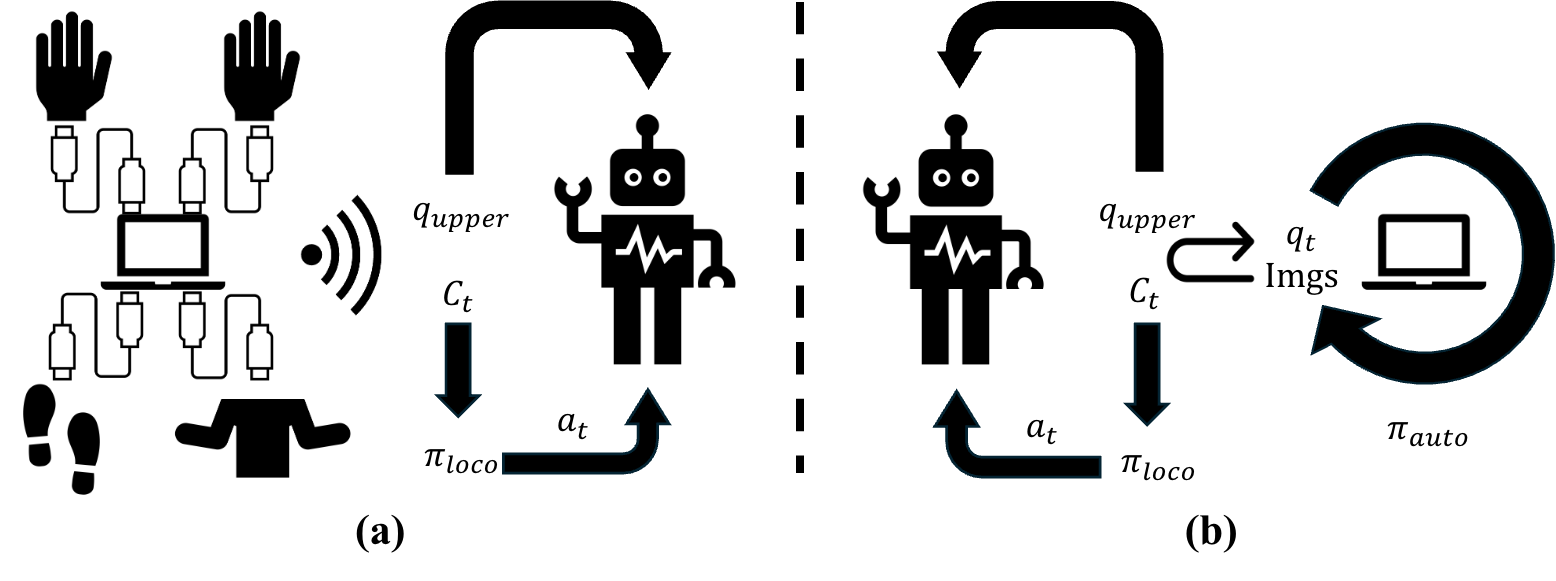
If you only collect arm data (arm-only datasets) or only locomotion data, the VLA model will never learn to coordinate the full body. OpenWBC solves this by splitting responsibility: Apple Vision Pro handles the upper body while the OpenHomie algorithm handles lower body locomotion — the operator only needs to focus on the arms.
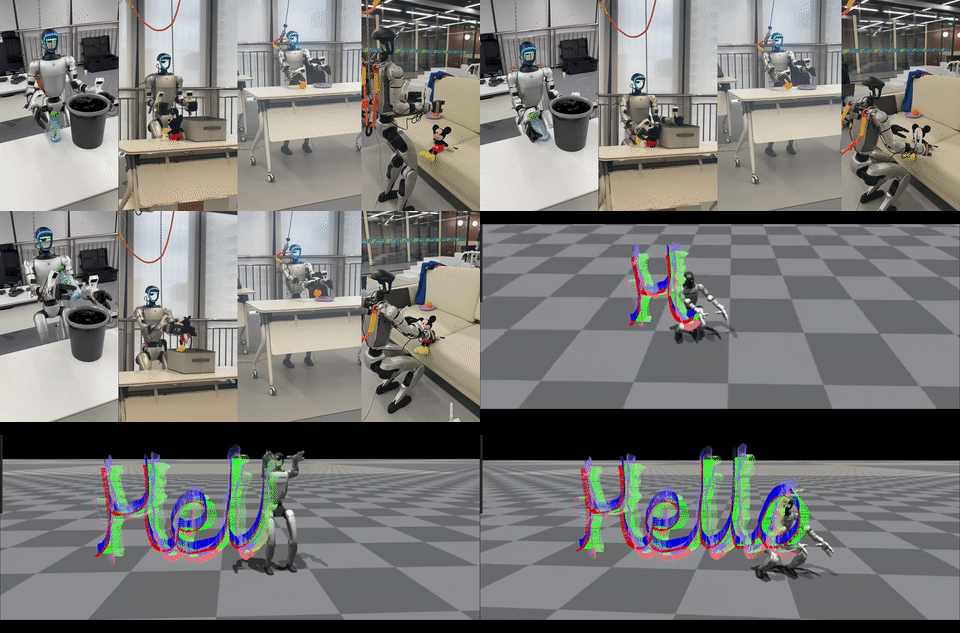
This is TrajBooster (ICRA 2026) — a VLA system trained on data collected by OpenWBC.
Dual-Mode Control Architecture
OpenWBC uses a dual-mode control approach — separating upper and lower body control completely:
┌─────────────────────────────────────────────┐
│              UNITREE G1 ROBOT                │
│                                              │
│  ┌──────────────┐    ┌──────────────────┐   │
│  │  UPPER BODY  │    │   LOWER BODY     │   │
│  │              │    │                  │   │
│  │ avp_teleoperate    │  OpenHomie       │   │
│  │ (Apple Vision Pro) │  (autonomous)    │   │
│  │              │    │                  │   │
│  │ - Shoulders  │    │ - Walking        │   │
│  │ - Elbows     │    │ - Balance        │   │
│  │ - Wrists     │    │ - Obstacle avoid │   │
│  │ - Fingers    │    │                  │   │
│  └──────────────┘    └──────────────────┘   │
└─────────────────────────────────────────────┘
        ▲                        ▲
        │                        │
  Apple Vision Pro          Policy inference
  (operator's hands)        (running on PC)
        │                        │
        └────────TCP/IP───────────┘
Why separate? Controlling a humanoid's legs is enormously complex — it requires whole-body control (WBC), hundreds of hours of RL training, and handling thousands of balance scenarios. Instead of asking operators to learn full-body teleoperation, OpenWBC lets OpenHomie "drive the legs" automatically while the operator only manages the arms.
System Requirements
Hardware
| Component | Required | Notes |
|---|---|---|
| Unitree G1 (29 DoF) | ✅ | Standard model |
| Dex-3 Dexterous Hand | ⚪ Optional | Needed for complex grasping tasks |
| Apple Vision Pro | ✅ | XR teleoperation interface |
| Linux Host (CUDA) | ✅ | x86_64 or ARM64, CUDA for inference |
| Wrist camera | ⚪ Recommended | Improves depth perception for VLA |
Software
| Package | Version | Purpose |
|---|---|---|
| Python | 3.8+ | Main runtime |
| CMake | 3.16+ | Build Unitree SDK2 |
| GCC/G++ | C++14 | Compile SDK2 |
| Unitree SDK2 | Latest | Robot communication |
| LeRobot | Latest | Data conversion + training |
Step-by-Step Installation
Step 1: Clone and Initialize Submodules
git clone https://github.com/jiachengliu3/OpenWBC.git
cd OpenWBC
git submodule update --init --recursive
The --recursive flag is critical — OpenWBC depends on several submodules (avp_teleoperate, OpenHomie, OpenWBC_to_Lerobot). Without it, you'll get empty directories.
Step 2: Build Unitree SDK2 (C++)
Unitree SDK2 is the low-level communication layer for the robot and must be compiled from source:
cd unitree_sdk2
rm -rf build        # clear any previous build
mkdir build && cd build
cmake ..
make -j$(nproc)     # use all CPU cores for faster compilation
After building, executables are located at:
unitree_sdk2/build/bin/g1_control— G1 robot controlunitree_sdk2/build/bin/hand_control— Dex-3 hand control
Step 3: Install g1_gym_deploy
cd ../../  # back to OpenWBC root
cd g1_gym_deploy && pip install -e .
The -e (editable) flag lets you modify the code without reinstalling — handy when tuning policies.
Step 4: Install LeRobot
pip install lerobot
Step 5: Initialize the Data Converter
cd OpenWBC_to_Lerobot
pip install -e .
This submodule contains convert_to_lerobot.py, which transforms raw OpenWBC recordings into LeRobot Dataset format — required for GR00T training.
Network Configuration
OpenWBC uses TCP/IP to connect Robot ↔ PC. Get both IP addresses:
# Run on both robot and PC
ifconfig | grep inet
Then update the IP addresses in the code. The G1 robot typically uses IPs in the 192.168.123.x range. Make sure the robot and PC are on the same subnet.
Note: Apple Vision Pro also needs to be on the same WiFi network as the PC to stream hand/head tracking data.
Deployment Process — 3 Terminals
Pre-Deployment: Disable Default G1 Control
Before running anything, you must disable G1's default control process using this gamepad sequence:
1. L1 + A          → exit current mode
2. L2 + R2         → enter transition mode
3. L2 + A          → robot raises its arms (confirms success)
4. L2 + B          → robot loses force control (ready for custom program)
Don't skip this. If the default process is still running, your program will conflict with it and the robot may behave unpredictably.
Robot-Side: 3 Terminals Running in Parallel
Terminal 1 — Start robot control:
cd unitree_sdk2/build/bin
./g1_control eth0
# If eth0 doesn't work, try: ./g1_control eth1
This opens the low-level connection with the G1, sending and receiving control commands.
Terminal 2 — Start policy inference:
python g1_gym_deploy/scripts/deploy_policy.py
This thread runs the OpenHomie policy that keeps the robot balanced and walking. It's the "brain" controlling the legs.
Terminal 3 — Start image server (for AVP):
cd avp_teleoperate/teleop/image_server
python image_server.py
This server streams robot camera images to Apple Vision Pro so the operator can see the robot's perspective.
Robot Startup
# After all 3 terminals are running:
# Press R2 on gamepad → robot stands up
# Press R2 again → starts accepting control from AVP
Data Collection with Apple Vision Pro
PC-Side Command
cd avp_teleoperate/teleop
python teleop_data_collecting.py --arm=G1_29 --hand=dex3 --record
Parameter breakdown:
--arm=G1_29: Specifies the robot arm type — G1 with 29 degrees of freedom--hand=dex3: Use the Dex-3 dexterous hand (omit if not installed)--record: Required to save data — without this flag, the script only teleoperates without recording
Data Captured Per Episode
Every episode saves synchronized streams:
| Data Type | Contents | Frequency |
|---|---|---|
| Visual | Multi-angle camera feed (ego view + wrist cameras) | 30 Hz |
| Action | All 29 joint angles + end-effector positions | 50 Hz |
| State | Robot pose, velocity, torque | 50 Hz |
| Sync | Timestamps synchronizing all streams | — |
Collection tips:
- Episode length: 10-30 seconds, one specific task per episode
- Target: 50-100 episodes per task for the VLA to generalize
- Diversity: vary object positions, approach angles, execution speed across episodes
Converting Data to LeRobot Format
Raw OpenWBC recordings must be converted before training. OpenWBC_to_Lerobot handles this:
cd OpenWBC_to_Lerobot

# Basic conversion
python convert_to_lerobot.py \
    --input_dir /path/to/openwbc/dataset \
    --output_dir ./lerobot_dataset \
    --dataset_name "pick_cola" \
    --robot_type "g1" \
    --fps 30
Or using the CLI shortcut after install:
wbc-convert \
    --input_dir /path/to/dataset \
    --output_dir ./output \
    --dataset_name "my_task"
The script creates a standard LeRobot Dataset with:
data/— HDF5 files containing observations and actionsvideos/— MP4 videos for visual observationsmeta/— Metadata about robot modality and episode infomodality.json— Describes G1's data structure
Training VLA with GR00T N1.5
With a LeRobot dataset ready, you can fine-tune GR00T N1.5 — NVIDIA's foundation model for humanoid robots:
# The gr00t_modified_for_OpenWBC submodule is already included
python scripts/gr00t_finetune.py \
    --dataset_path ./lerobot_dataset \
    --model_name nvidia/GR00T-N1-5 \
    --output_dir ./output_model \
    --num_epochs 100 \
    --batch_size 32
For detailed training instructions, see our GR00T N1 data collection guide for G1.
Project Structure
OpenWBC/
├── avp_teleoperate/          # Apple Vision Pro teleoperation (submodule)
│   └── teleop/
│       ├── image_server/     # Stream camera to AVP
│       └── teleop_data_collecting.py  # Main script
├── OpenHomie/                # Lower body locomotion (submodule)
│   └── HomieDeploy/
│       ├── unitree_sdk2/     # Unitree SDK2 (C++)
│       └── g1_gym_deploy/    # Python deployment scripts
├── OpenWBC_to_Lerobot/       # Data converter (submodule)
│   ├── convert_to_lerobot.py # Main conversion script
│   ├── modality.json         # G1 robot modality config
│   └── requirements.txt
├── demos_all.gif             # Demo animation
└── README.md
TrajBooster — ICRA 2026 Results
OpenWBC is the foundation for TrajBooster (accepted at ICRA 2026), a method that significantly boosts VLA performance for whole-body manipulation.
TrajBooster's core insight:
Instead of collecting thousands of hours of teleoperation data from scratch, TrajBooster:
- Takes existing manipulation datasets from other robots (AgBot, etc.)
- Retargets end-effector trajectories from those robots to the Unitree G1
- Post-pre-trains a pretrained VLA on the retargeted data
- Fine-tunes minimally on a small set of real teleoperation data (collected by OpenWBC)
The result: dramatically less teleoperation data needed while achieving high performance, and even enabling zero-shot transfer to tasks the model has never seen.
A pre-trained checkpoint (PPT model) is available on HuggingFace at l2aggle/PPTmodel4UnitreeG1 for immediate deployment.
Comparison with Other Teleop Systems
| System | Lower Body | Upper Body | Data Type | Open Source |
|---|---|---|---|---|
| OpenWBC | OpenHomie (autonomous) | Apple Vision Pro | Whole-body | ✅ |
| OpenWBT | Trained WBC | FISM/GELLO | Whole-body | ✅ |
| UMI | — (arm-only) | Wrist cam | Arm-only | ✅ |
| NVIDIA GR00T Sonic | WBC | HTC Vive | Whole-body | ❌ |
OpenWBC is simpler than GR00T Sonic (no complex VR room setup required) but powerful enough for high-quality whole-body data collection.
Safety — Critical Notes
The Unitree G1 weighs ~35kg and can move at significant speeds. Mandatory precautions:
- Never deploy without thoroughly understanding every file in the repository
- Test in an open, unobstructed space on the first deployment
- Always have experienced personnel supervising
- Keep the emergency stop button within reach at all times
- Maintain at least 2 meters of clearance around the robot in all directions
Conclusion
OpenWBC is one of the most complete open-source whole-body teleop and data collection systems available for the Unitree G1. The dual-mode architecture (AVP for arms + OpenHomie for legs) solves one of humanoid data collection's biggest challenges: letting operators focus on the task instead of managing balance.
The full pipeline from teleop → LeRobot → GR00T N1.5 has been validated through TrajBooster (ICRA 2026), proving that data collected by OpenWBC is high enough quality to train production-grade VLA models.
For more on deploying trained models, see our GR00T N1 WBC deployment guide for G1 and the LeRobot G1 + Pi0Fast whole-body pipeline. For a comparison with the Galaxy General Robotics approach, see our OpenWBT deep dive.