What this article helps you build
If you want to build a "data center" for humanoid VLA models, do not start by hiring ten operators, buying more robots, or building a large dashboard. Start with a two-person pilot session that lasts two to three hours, has a concrete checklist, has clear episode rules, uses replay to validate the data, and produces enough throughput numbers to decide whether scaling is justified.
This first article in the series designs that initial session from two practical pipelines. The first is LeRobot, with the familiar flow around teleoperate.py, record.py, replay.py, and evaluate.py (in current releases these are commonly exposed as CLI commands such as lerobot-teleoperate, lerobot-record, lerobot-replay, and lerobot-eval). The second is GR00T WholeBodyControl for Unitree G1, especially run_g1_control_loop.py and run_g1_data_exporter.py. LeRobot gives you the discipline of standardized video, state, action, and episode storage. GR00T WBC gives you the humanoid whole-body pattern: control loop, teleoperation, camera forwarder, data exporter, save, and discard.
By the end, you should be able to prepare a camera/state/action/language checklist, name episodes, split work between two operators, measure throughput, and decide whether the process is ready for more people. If you are using a small robot arm, the same operating logic still applies. If you are targeting G1, humanoid loco-manipulation, or GR00T-style VLA training, this is the base layer.
Roadmap series
- Two-Person Pilot for Humanoid VLA Data: first-session design, signal checklist, episode rules, and throughput.
- Teleop Stack for Humanoid VLA: teleop devices, hand/body/leg mapping, latency, safety gates, and scene reset.
- ROS 2, MCAP, and Data Synchronization: topic design, timestamps, camera streams, state/action logs, and playback.
- LeRobot, RoboDM, and Dataset Format: converting raw logs into trainable datasets, validating schema, and publishing internally.
- Synthetic QA for Humanoid Data: using rules, vision models, and replay to detect broken episodes.
- Evaluation and Scaling the Data Team: cost per good episode, operator expansion, and weekly quality tracking.
Technical references to read first
The LeRobot documentation describes the real-robot imitation learning workflow: teleoperate the robot with a leader arm, keyboard, or other teleoperation device; record a dataset; replay recorded episodes to check repeatability; then train and evaluate a policy. The LeRobotDataset v3 documentation describes a standardized format for multi-camera video, sensorimotor signals, and metadata for indexing, search, and visualization. The LeRobot repository also describes a dataset structure based on MP4 or image data for vision and Parquet files for state/action data, with tools such as lerobot-record, lerobot-replay, and lerobot-eval.
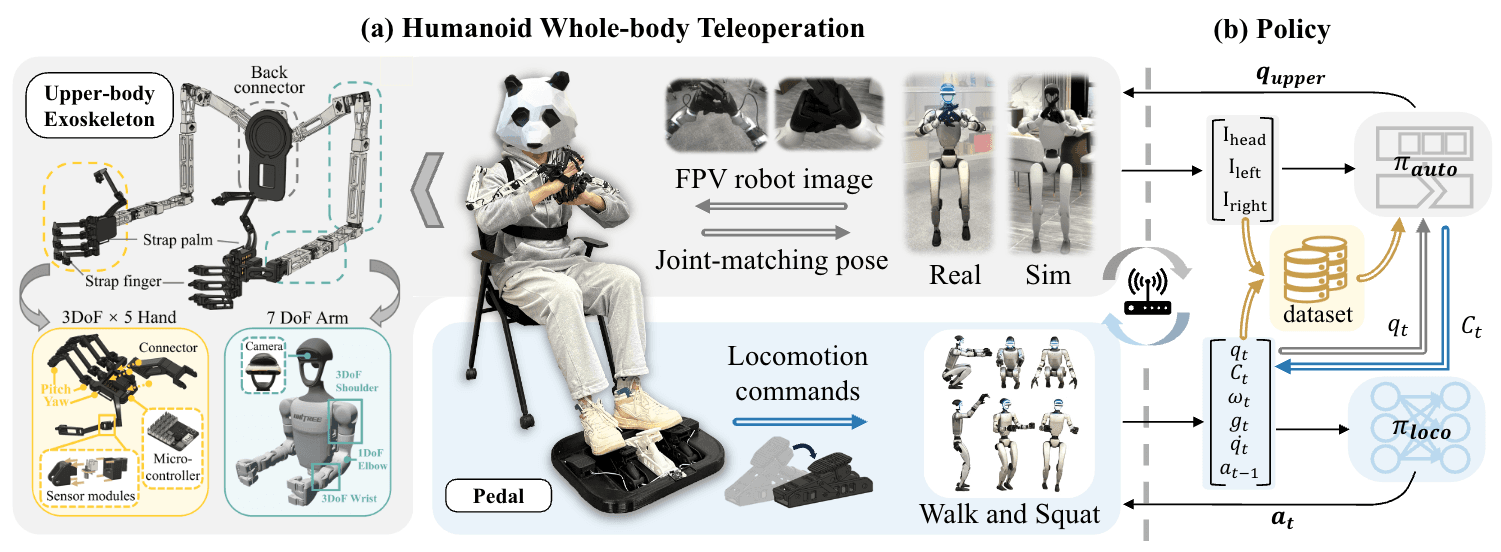
The GR00T WholeBodyControl documentation describes a decoupled WBC stack for humanoids, primarily Unitree G1. The control stack launches run_g1_control_loop.py; the data collection stack can create a tmux session with panes for the control loop, camera forwarder, optional camera viewer, and data exporter. In the source of run_g1_control_loop.py, the loop observes the robot, receives teleop commands, computes WBC actions, queues actions into the environment, publishes status, and publishes state/action messages without images. In run_g1_data_exporter.py, the exporter reads proprio messages and image messages, checks episode state, adds frames containing observation.state, observation.eef_state, action, action.eef, teleop.navigate_command, teleop.base_height_command, and camera images, then saves or discards the episode.
Primary sources:
- LeRobot: Imitation Learning on Real-World Robots
- LeRobotDataset v3.0
- GR00T WholeBodyControl Decoupled WBC
- NVIDIA Isaac GR00T repository
- NVlabs GR00T-WholeBodyControl repository
A pilot is not a production dataset
A pilot has one job: expose real bottlenecks. Many teams start with the question, "How many thousands of episodes do we need to train a VLA?" That question comes too early. Before discussing 10,000 episodes, you need to know whether the first 20 episodes can be opened, replayed, and inspected. You need to know whether state/action dimensions are stable, whether language prompts match the actual task, whether camera frames lag behind proprioception, and whether the operator remains consistent after 45 minutes.
For that reason, a two-person pilot should not maximize raw volume. It should maximize visibility into errors. One person controls the robot. One person owns the scene and data quality. Every episode gets a clear decision: save, discard, or mark for review. At the end of the session, you should have not only data, but also timing for reset, teleoperation, saving, replay, and QA.
The two-person setup works especially well for humanoids because humanoids have more failure modes than tabletop arms. The robot can lose balance, bump the table, drift away from the target, occlude the camera with its hands, or produce actions that do not match the prompt. If one person is teleoperating, watching logs, managing recording, and resetting objects at the same time, bad data will slip through. If you add too many people at the beginning, you will not know which roles are actually necessary.
Roles in the pilot session
| Role | Main responsibility | Avoid |
|---|---|---|
| Operator A: teleoperator | Control the robot, start and stop movements cleanly, keep trajectories smooth, report control issues | Changing prompts mid-episode, ignoring safety, editing datasets while controlling |
| Operator B: data captain | Read the checklist, enter task prompts, reset the scene, watch camera/state/action, decide save/discard | Taking over control without a handoff, editing scripts while the robot is active |
Operator A focuses on trajectory quality. Operator B focuses on data correctness. In the GR00T WBC data collection workflow, the data exporter asks for a task prompt and supports start/stop recording and trajectory discard. That is Operator B's territory. The prompt must match the episode. Discard must be quick. Each episode needs a short note.
A practical pilot has three phases:
| Phase | Duration | Goal |
|---|---|---|
| Dry run | 20-30 min | Run teleoperation without recording; check camera, delay, workspace, and emergency stop |
| Record pilot | 60-90 min | Capture 20-40 short episodes with save/discard and timing logs |
| Replay/QA | 30-45 min | Replay samples, open the dataset, check prompts, state/action, camera sync, and throughput |
Do not collect for three hours and inspect only at the end. In robotics data collection, a schema bug in minute five can ruin the whole session if you catch it too late.
Pre-record checklist
This checklist is intentionally concrete. A beginner should be able to print it and mark each row.
| Group | Check | Pass criterion |
|---|---|---|
| Camera | Camera names, placement, resolution, FPS, exposure, focus | Each camera has a stable feature name such as observation.images.ego_view; device index does not silently change after reboot |
| State | Joint position, base height, wrist/eef state, navigate command, timestamp | Shape is stable across frames; timestamps increase monotonically; no NaN values |
| Action | Joint target/action, eef action, base command, hand/gripper command if available | Action uses the same coordinate convention expected by replay/evaluation; no scale mismatch |
| Language | Task prompt, scene id, object id, success condition | Prompt is short, templated, and semantically stable across episodes |
| Episode | Episode id, operator id, robot id, start/stop, save/discard reason | Each episode has exactly one outcome: good, discard, or review |
| Safety | E-stop, robot zone, battery, thermals, joint limits, obstacles | Both operators can stop the robot within one second |
In LeRobot, recording usually declares the robot, teleoperation device, camera, and dataset repository. In G1/GR00T WBC, the control loop publishes state/action and the data exporter combines that with camera frames. Regardless of stack, the checklist is the same: you must know what one training frame contains.
A minimal humanoid VLA frame might look like this:
timestamp:
  camera_ego: 1718000000.123
  proprio: 1718000000.118
  action: 1718000000.121
observation:
  images:
    ego_view: "rgb frame"
    wrist_left: "optional rgb frame"
    wrist_right: "optional rgb frame"
  state:
    q: [joint_positions]
    base_height: 0.72
    eef_left: [x, y, z, qw, qx, qy, qz]
    eef_right: [x, y, z, qw, qx, qy, qz]
action:
  joints: [target_joint_positions]
  eef_left: [target_delta_or_pose]
  eef_right: [target_delta_or_pose]
teleop:
  navigate_command: [vx, vy, yaw_rate]
  base_height_command: 0.72
language:
  task: "pick up the red cup and place it into the tray"
episode:
  id: "g1_pilot_20260610_s01_ep0007"
  operator: "op_a"
  support: "op_b"
This schema does not need to match LeRobot or GR00T exactly. The point is mapping. When the data is converted to LeRobotDataset, these concepts often become feature names such as observation.images.ego_view, observation.state, action, task, and episode metadata.
Pick the first task carefully
The first task should be simple enough to replay, but still humanoid enough to expose data issues. Do not choose "clean the room" or "make coffee". Choose a 10-20 second task with a clear object, a clear target, few props, and fast reset.
Good pilot tasks:
| Task | Why it works | Easy-to-see failures |
|---|---|---|
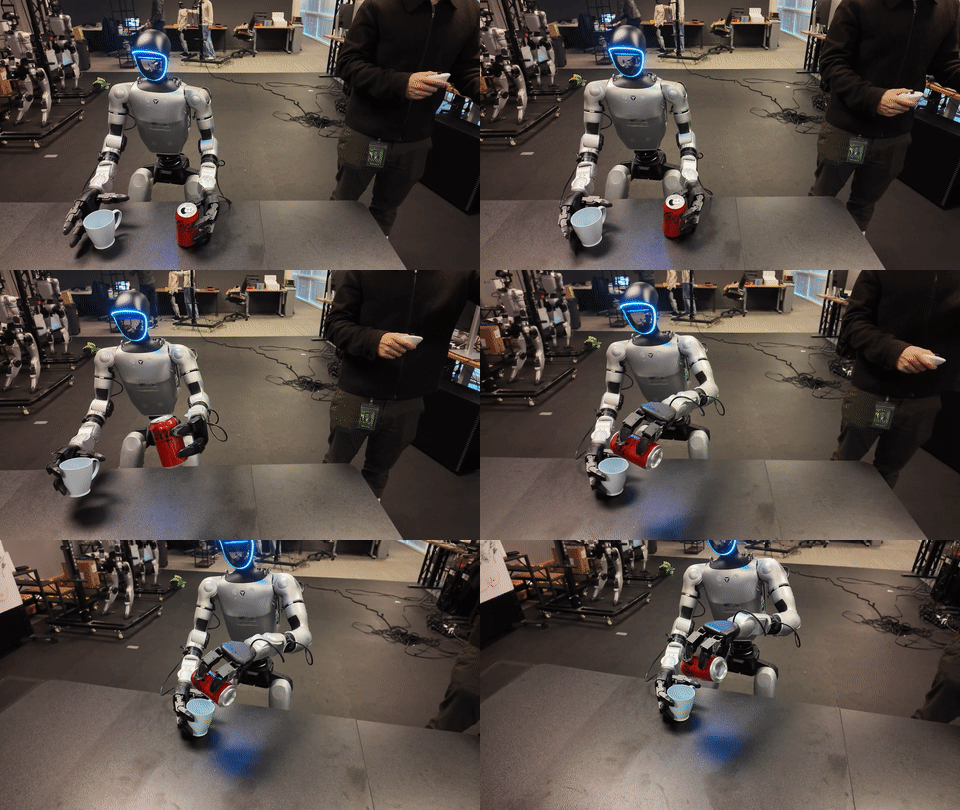
| Pick the red cup from the table and place it into the tray | Clear object, target, grasp, place, and prompt | Camera occlusion by the hand, wrong eef action, inaccurate placement |
| Approach a low shelf, pick a box, place it on the table | Short locomotion plus approach/squat behavior | Base command desync, target leaves ego view |
| Pull a cart handle by 20 cm | Simple contact-rich task | State/action does not represent contact well, replay cannot repeat the pull |
In the first pilot, keep the same layout for ten consecutive episodes. Only then change distance, approach angle, or object color. If you alter the scene every episode, you will not know whether errors come from the operator, robot, camera, or task.
Use a stable prompt template:
<verb> the <object_color> <object_name> from <source> to <target>.

Examples:
pick up the red cup from the table and place it into the black tray.
move the blue box from the low shelf to the table.
pull the cart handle toward the robot by twenty centimeters.
Article 4 will cover prompt mapping into LeRobot/RoboDM-style modality configuration. For this first pilot, the important rule is simpler: never use vague notes such as "task 1" or "cup thing". VLA models learn from language. A bad prompt is a bad label.
Episode naming and metadata
Episodes are the economic unit of your data center. You pay for them with operator time, robot wear, battery, scene reset, and QA. Episode IDs must make debugging fast.
Suggested convention:
<robot>_<date>_<session>_<task>_<episode>

g1_20260610_s01_cup_tray_ep0001
g1_20260610_s01_cup_tray_ep0002
g1_20260610_s01_low_shelf_box_ep0001
Recommended metadata:
| Field | Example | Why it matters |
|---|---|---|
robot_id |
g1_sim or g1_lab01 |
Separates real robot, sim, and robots after maintenance |
teleoperator_username |
op_a |
Enables throughput and quality tracking by operator |
support_operator_username |
op_b |
Tells you who entered prompts and reset scenes |
task_prompt |
pick up the red cup... |
Main language label |
scene_id |
table_a_layout_01 |
Makes scene changes debuggable |
outcome |
good, discard, review |
Keeps suspicious episodes out of training |
discard_reason |
camera_occluded, bad_grasp, sync_delta_high |
Shows systematic failure patterns |
GR00T's data exporter already embodies this idea: recording can start and stop, an episode can be saved, a trajectory can be discarded, and operator information can be attached when creating a dataset. Keep the same discipline even if you are not using the exact code. An episode is not just a video file. It is a record with provenance.
LeRobot validation loop: teleoperate, record, replay, evaluate
LeRobot is useful for beginners because it separates four questions:
- Can the robot be controlled? Use
teleoperate. - Can data be recorded? Use
record. - Can a recorded episode be replayed? Use
replay. - Can a policy or dataset be evaluated? Use
evaluateorlerobot-eval.
A small-arm skeleton command looks like this:
lerobot-teleoperate \
  --robot.type=so101_follower \
  --robot.port=/dev/ttyUSB0 \
  --robot.id=pilot_follower \
  --teleop.type=so101_leader \
  --teleop.port=/dev/ttyUSB1 \
  --teleop.id=pilot_leader
Record a dataset:
lerobot-record \
  --robot.type=so101_follower \
  --robot.port=/dev/ttyUSB0 \
  --robot.id=pilot_follower \
  --robot.cameras="{ ego: {type: opencv, index_or_path: 0, width: 1280, height: 720, fps: 30}}" \
  --teleop.type=so101_leader \
  --teleop.port=/dev/ttyUSB1 \
  --teleop.id=pilot_leader \
  --display_data=true \
  --dataset.repo_id=vnrobo/g1-pilot-style-test \
  --dataset.num_episodes=10 \
  --dataset.fps=30
Replay one episode:
lerobot-replay \
  --robot.type=so101_follower \
  --robot.port=/dev/ttyUSB0 \
  --robot.id=pilot_follower \
  --dataset.repo_id=vnrobo/g1-pilot-style-test \
  --dataset.episode=0
The lesson is not SO101 itself. The lesson is the validation loop. If replay does not resemble the recorded motion, do not train yet. If camera indices change after reboot, do not add more operators. If robot.id differs between teleoperation, recording, replay, and evaluation, calibration can become inconsistent. Fix the process first.
GR00T WBC loop: control loop and data exporter
For a humanoid G1, the control loop is not merely sending an action to one arm. It observes the full body, receives teleoperation commands, computes WBC actions, queues actions into the environment, publishes status, and publishes state/action data for the exporter. The GR00T WBC documentation shows that simulation can launch the G1 control loop with:
python decoupled_wbc/control/main/teleop/run_g1_control_loop.py
For a real robot, the machine must be networked according to the Unitree G1 SDK expectations, and the real interface is used:
python decoupled_wbc/control/main/teleop/run_g1_control_loop.py --interface real
The data collection stack can be launched through the deployment helper, which opens the control loop, teleop policy, camera forwarder, and related panes in tmux:
python decoupled_wbc/scripts/deploy_g1.py \
  --interface sim \
  --camera_host localhost \
  --sim_in_single_process \
  --simulator robocasa \
  --image-publish \
  --enable-offscreen \
  --env_name PnPBottle \
  --hand_control_device=pico \
  --body_control_device=pico
In the data exporter workflow, Operator B enters the task prompt, starts and stops recording, and discards bad trajectories. The exporter source also monitors time delta between image and proprio messages; if the delta is too high repeatedly, it warns that the data should be discarded. That is a major pilot lesson: synchronization is not a later cleanup task. If images and proprioception are 300-500 ms apart, the VLA sees the hand at one moment and the action from another.
Measure throughput before hiring
After the pilot, count good episodes, not recorded files. Use simple formulas:
good_episode_rate = good_episodes / total_recorded_episodes
minutes_per_good_episode = total_session_minutes / good_episodes
usable_seconds_per_hour = sum(good_episode_duration_seconds) / session_hours
discard_rate_by_reason = count(discard_reason) / total_discarded
Minimum session log:
| Metric | Example pilot | Meaning |
|---|---|---|
| Total session time | 120 min | Includes setup, dry run, record, and replay |
| Recorded episodes | 36 | Every episode with a file |
| Good episodes | 24 | Usable for training or light review |
| Discarded episodes | 9 | Not used for training |
| Review episodes | 3 | Needs additional QA |
| Good episode rate | 67% | Below 60%, scaling is premature |
| Minutes per good episode | 5 min | Staffing cost basis |
| Usable seconds per hour | 240-360 sec | Actual training data captured per hour |
Suggested thresholds before adding more operators:
| Condition | Minimum threshold |
|---|---|
| Good episode rate | >= 75% for two consecutive sessions |
| Camera/proprio sync warning | < 5% of episodes |
| Replay sample pass | >= 8/10 sampled episodes |
| Prompt mismatch | 0 severe errors |
| Scene reset time | < 90 seconds for a simple task |
| Operator fatigue | No clear quality drop after 60 minutes |
If you have not reached these thresholds, scaling will mainly multiply errors. Hiring after the process is stable is cheaper than hiring people to create more broken episodes.
Quick QA after every 10 episodes
After each block of 10 episodes, Operator B should pause for five to seven minutes:
1. Open two random episodes and watch the videos.
2. Check that the prompt names the correct object, source, and target.
3. Check that state/action shapes are stable.
4. Check camera and proprio timestamps.
5. Replay one episode if the robot and scene allow it.
6. Write the top two errors in the session log.
7. Continue only if the errors are not systematic.
Small-block QA is more valuable than end-of-day QA. If the right wrist camera is swapped with the left wrist camera, you want to know after episode 3, not after episode 80. If the operator stops recording too late every time, fix the start/stop ritual immediately.
Common beginner mistakes
| Mistake | Consequence | Fix |
|---|---|---|
| Prompts are long and inconsistent | The model learns noisy language labels | Use a template and only vary object/source/target |
| Episodes are never replayed | Action scale or calibration errors stay hidden | Replay samples in every block |
| Throughput is counted by file count | The process looks better than it is | Count good episodes only |
| Camera names are unstable | Views get mixed inside the dataset | Use explicit feature names and test after reboot |
| One operator handles teleop and QA | Sync and safety issues are missed | Keep the two-person split |
| Discard reasons are not logged | The biggest failure mode remains unknown | Require one reason from a short fixed list |
Conclusion
A two-person pilot is the cheapest way to turn "humanoid VLA data center" from an idea into a measurable operation. LeRobot gives you the discipline of teleoperate, record, replay, and evaluate. GR00T WBC shows how a humanoid control loop, teleop command, state/action publisher, camera stream, and data exporter become whole-body episodes. The key is not to jump straight into scale. First prove that your first 20-40 episodes are clean, replayable, correctly prompted, synchronized, and not dependent on heroic operator effort.
The next article goes into the teleop stack for humanoid VLA: device selection, hand-body-leg mapping, latency budget, and safety gates for longer sessions.