What this article helps you decide
In part 1 of this series, we designed a two-person pilot session for humanoid VLA data: who controls the robot, who owns data quality, which camera/state/action signals matter, and when an episode should be saved or discarded. This second article handles the decision you must make before recording: which teleoperation stack should you use?
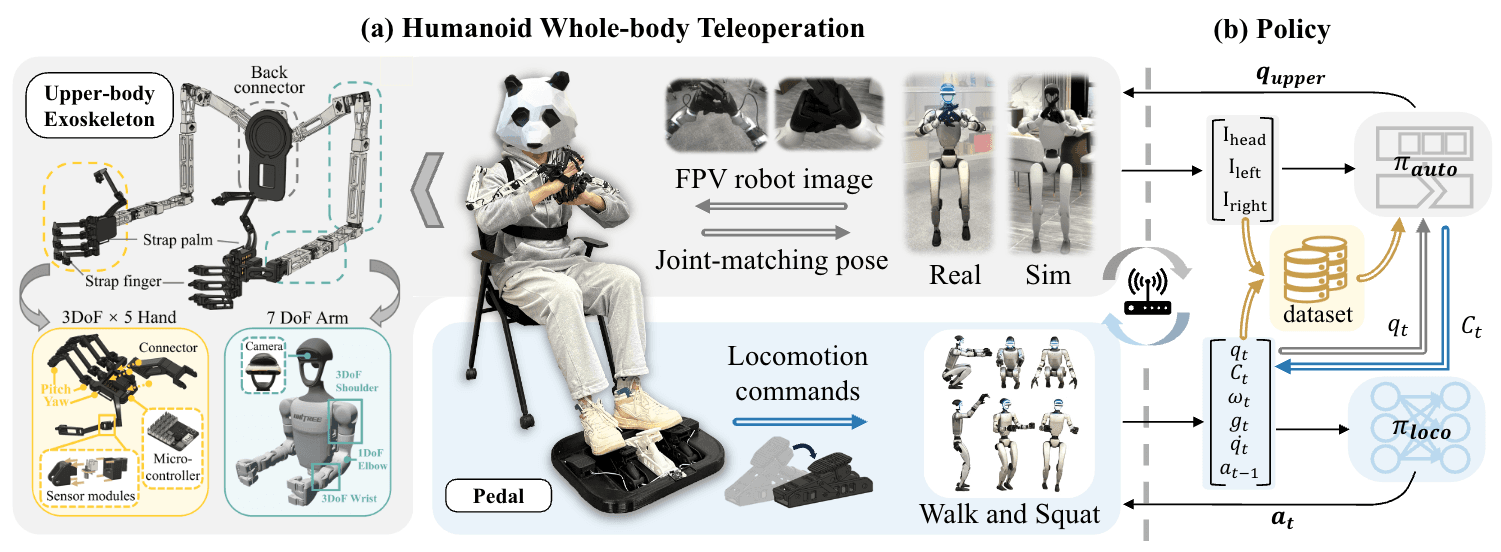
For a humanoid, "teleop" is not just a controller. It is the path from human intent to the action representation your model will learn. A keyboard or SpaceMouse produces SE(3) deltas. OpenXR hand tracking produces wrist poses and finger joints. Motion controllers provide pose plus physical buttons and triggers. GR00T WholeBodyControl splits the system into a control loop, teleop loop, policy loop, body control, hand control, locomotion, and data export. If you choose the wrong stack, you may still record attractive video, but the action stream can be delayed, noisy, unsafe to replay, or poorly matched to the policy you want to train.
By the end, you should know when to use Isaac Lab teleop_se3_agent.py with --teleop_device keyboard, spacemouse, or handtracking; when OpenXR retargeters such as g1_upper_body_retargeter.py are the right abstraction; and when you should move to GR00T WBC BaseConfig with body_control_device, hand_control_device, teleop_frequency=20, and control_frequency=50. If your next step is ROS 2, MCAP, and data synchronization, today's teleop decision will shape tomorrow's dataset schema.
Quick decision table
| Data need | Start with | Action you collect | Strength | Main risk |
|---|---|---|---|---|
| Beginner pipeline test, simple pick/place in sim | Isaac Lab keyboard | SE(3) delta, binary gripper | Cheap, easy to debug, deterministic | Jerky motion, unnatural demonstrations |
| Smooth pick/place without finger dexterity | Isaac Lab SpaceMouse | SE(3) delta, binary gripper | Smoother 6-DoF control | Requires a supported device; still no finger data |
| Bimanual or upper-body pose with wrist tracking | Isaac Lab OpenXR handtracking | Absolute hand/wrist pose, pinch/grip, retargeted hand joints | Natural demonstrations | Calibration, latency, and tracking jitter |
| G1 loco-manipulation with stable lower body | GR00T WBC / Decoupled WBC | Navigate command, body/hand teleop, WBC action, state/action stream | Close to real humanoid deployment | More safety and operator discipline required |
| Production humanoid VLA data | GR00T WBC + data exporter + camera sync | Camera, proprio, eef, action, teleop command, prompt per episode | Scales toward training/evaluation | Schema and QA work become serious |
The practical rule is simple: keyboard for debugging, SpaceMouse for clean SE(3) demos, hand tracking for natural arm/hand motion, WBC for whole-body humanoid data. Do not jump straight into VR if you cannot replay ten keyboard episodes. Do not use keyboard-only data if the final task requires dexterous finger behavior.
The three layers of a teleop stack
Beginners often treat teleoperation as "the device that controls the robot." For humanoid VLA data, it is better to split it into three layers:
| Layer | Question | Examples |
|---|---|---|
| Input device | What does the human use? | Keyboard, SpaceMouse, OpenXR hand tracking, PICO controller, Vive, Joy-Con |
| Retargeting | How is human input mapped to the robot? | SE(3) delta, absolute wrist pose, pinch gripper, G1 upper-body retargeter |
| Control loop | At what frequency and stability level does the robot receive action? | Isaac Lab env step, GR00T WBC control_frequency=50, teleop loop at 20 Hz |
When debugging, log each layer separately. If the robot jitters, the bug might be noisy input, wrong scale in the retargeter, a coordinate-frame mismatch, or a control loop receiving sparse commands. If the dataset is weak, the camera may be fine while the action representation is not. The model sees smooth video but learns from a sequence of deltas that does not explain the motion.
Isaac Lab teleop_se3_agent.py: best for SE(3) demonstrations
Isaac Lab provides scripts/environments/teleoperation/teleop_se3_agent.py for teleoperating manipulation environments. In the official documentation, SE(3) teleoperation returns a six-dimensional pose-change command. Keyboard and SpaceMouse are demonstrated on IK manipulation tasks, and hand tracking is routed through XR/CloudXR for absolute-pose tasks.
Debug with keyboard:
./isaaclab.sh -p scripts/environments/teleoperation/teleop_se3_agent.py \
  --task Isaac-Stack-Cube-Franka-IK-Rel-v0 \
  --num_envs 1 \
  --teleop_device keyboard
Use SpaceMouse:
./isaaclab.sh -p scripts/environments/teleoperation/teleop_se3_agent.py \
  --task Isaac-Stack-Cube-Franka-IK-Rel-v0 \
  --num_envs 1 \
  --teleop_device spacemouse
Use hand tracking with an absolute task:
./isaaclab.sh -p scripts/environments/teleoperation/teleop_se3_agent.py \
  --task Isaac-Stack-Cube-Franka-IK-Abs-v0 \
  --teleop_device handtracking \
  --device cpu
Keyboard is the best first step because every command is visible and repeatable. The standard keyboard mapping moves along x/y/z, rotates around x/y/z, resets the environment, and toggles the gripper. This is ideal for checking the environment, reset behavior, termination logic, and recording flow. The downside is trajectory quality. Keyboard trajectories tend to have hard corners, stop-start velocity, and unnatural timing. If you train heavily from keyboard demonstrations, the cloned policy can inherit that stepwise style.
SpaceMouse is the obvious upgrade for simple pick/place, insertion, and off-axis manipulation. It gives continuous 6-DoF control: tilt for x/y, push or pull for z, twist for rotation. Isaac Lab recommends SpaceMouse for smoother operation because smoother demonstrations are easier for policies to clone. There is a hardware detail: the Isaac Lab documentation names SpaceMouse Wireless and SpaceMouse Compact as compatible models. If you run inside a container, you may need to mount the relevant /dev/hidraw device and grant permission.
Hand tracking in Isaac Lab is appropriate when you want absolute hand pose or pinch-based interaction. The Isaac Lab device API describes OpenXR as using index/thumb tracking to drive the target pose, with gripping based on pinching. For hand tracking, prefer absolute tasks such as Isaac-Stack-Cube-Franka-IK-Abs-v0, because the user's hand in XR is naturally an absolute pose in space, not a relative keyboard delta.
For a data center, teleop_se3_agent.py is a strong way to generate clean SE(3) demonstrations, but it is not the whole humanoid data pipeline. It does not solve multi-camera synchronization, language prompts, dangerous mode switches, body/hand separation, or production QA by itself. Treat it as the input and simulation-control layer, not as the final dataset system.
OpenXR retargeters: mapping human hands to G1
OpenXR in Isaac Lab gives you a more natural teleoperation path: read tracking data from an XR device, then use retargeters to convert hand pose, wrist pose, or motion-controller input into robot commands. The Isaac Lab device interface can accept a list of retargeters; when advance() is called, raw device data is transformed into a command tensor. Retargeters may map hand joints to end-effector pose, pinch distance to gripper state, or full hand data to robot hand joints.
For the Unitree G1 locomanipulation environment, Isaac Lab currently configures two important device groups:
teleop_devices:
  handtracking:
    - G1TriHandUpperBodyRetargeterCfg
    - G1LowerBodyStandingRetargeterCfg
  motion_controllers:
    - G1TriHandUpperBodyMotionControllerRetargeterCfg
    - G1LowerBodyStandingMotionControllerRetargeterCfg
In practical terms:
| Device key | Use when | Main signal | Note |
|---|---|---|---|
handtracking |
You need natural hand/finger movement | OpenXR hand joints, wrist pose, pinch | The G1 config uses 2 * 26 OpenXR hand joints for both hands |
motion_controllers |
You prefer physical controller stability | Controller pose, buttons, triggers | Less finger detail, easier operator training |
g1_upper_body_retargeter.py belongs in this retargeter family: it turns human tracking signals into upper-body and hand targets for G1. In the G1 locomanipulation config, the upper-body retargeter is paired with a lower-body standing retargeter. That pairing matters. A humanoid is not just two robot arms attached to a table; the lower body must remain stable while the hands work. The same config anchors XR to the robot pelvis, fixes anchor height, and follows the pelvis yaw with smoothing. That is not cosmetic. If the anchor drifts or rotates incorrectly, the operator feels as if their hands and the robot live in different worlds.
A useful beginner mental model: human hands and robot hands do not share the same length, joint limits, palm frame, or finger topology. If you copy human joints directly into robot joints, the robot may collide with its body, exceed limits, or request an impossible IK pose. The retargeter is where you define the mapping: human wrist to left_wrist_yaw_link, pinch to close, human finger motion to scaled and clamped robot hand joints, lower body held by a standing policy.
Checklist before using OpenXR retargeting:
| Check | Correct question |
|---|---|
| Coordinate frame | Is the wrist pose in OpenXR, USD/world, or robot pelvis frame? |
| Anchor | Where is the operator standing relative to the robot? Does the anchor follow the pelvis? |
| Calibration | Does the human neutral pose match the robot neutral pose? |
| Joint limits | Does the retargeter clamp targets to safe ranges? |
| Visualization | Can you see target poses or joints before applying them? |
| Data schema | Are you saving raw tracking, retargeted action, or both? |
For VLA data, I recommend saving both levels when storage allows: the raw-ish teleop signal for debugging and the actual action sent to the robot for training/replay. When an episode fails, you need to know whether the failure came from the operator, tracker, retargeter, or controller.
GR00T WBC BaseConfig: when the task is whole-body
GR00T WholeBodyControl is not just another input device. It is a whole-body control stack for humanoids, with Decoupled WBC documentation for Unitree G1, a control loop, a teleoperation stack, and a data exporter. The Decoupled WBC guide runs run_g1_control_loop.py, then runs run_teleop_policy_loop.py in another terminal with --hand_control_device and --body_control_device. The docs show PICO controllers for coordinated body and hand control, and the data collection helper starts panes for control, camera forwarding, camera viewing, and export.
The relevant BaseConfig fields are:
control_frequency = 50
body_control_device = "dummy"
hand_control_device = "dummy"
teleop_frequency = 20
data_collection_frequency = 20
In practice, you override device fields from the command line:
python decoupled_wbc/control/main/teleop/run_teleop_policy_loop.py \
  --hand_control_device=pico \
  --body_control_device=pico
Or in data collection:
python decoupled_wbc/scripts/deploy_g1.py \
  --interface sim \
  --simulator robocasa \
  --image-publish \
  --hand_control_device=pico \
  --body_control_device=pico
Why is teleop_frequency=20 while control_frequency=50? Human input does not need to update as fast as the robot control loop. A human can provide intent and target pose at roughly 20 Hz; the controller should run faster to maintain stability, interpolate, process state, and send actions consistently. If you push teleop input too high over an unstable WiFi or XR stream, you may increase jitter rather than reduce latency. If the control loop is too slow, the robot feels sluggish and less stable. Keeping two frequencies is a sound design choice.
GR00T WBC becomes the right tool when the action is no longer "move the end-effector 3 cm left." For humanoids, action can include:
| Action to learn | Suitable stack |
|---|---|
| Navigate command: forward/back/strafe/yaw | GR00T WBC planner or controller joystick |
| Upper-body reach while lower body balances | GR00T WBC or Isaac Lab G1 OpenXR retargeting |
| Simple hand grasp via trigger | PICO/controller or SpaceMouse gripper |
| Detailed finger dexterity | OpenXR hand tracking, Manus, or LeapMotion if stable |
| Whole-body pose or motion | PICO full-body teleop or SONIC/GR00T WBC mode |
The GR00T WBC PICO VR teleop docs put heavy emphasis on safety. Modes include POSE, PLANNER, PLANNER_FROZEN_UPPER, and VR_3PT. There is full calibration and per-switch calibration. Emergency stop can be triggered from the PICO controllers or with O in the C++ terminal. The beginner lesson is direct: mode switching is the dangerous moment. If the operator's body is not aligned with the robot before switching into POSE or VR_3PT, the robot can snap toward the human pose and move aggressively.
Choose by latency
Latency is not just a millisecond number. In data collection, latency affects both safety and action quality.
| Stack | Felt latency | Why | Acceptable use |
|---|---|---|---|
| Keyboard | Low and predictable | Discrete events, few sensors | Debugging, scripted reset, simple manipulation |
| SpaceMouse | Low to medium | Continuous HID, little retargeting | Smooth SE(3) manipulation |
| OpenXR handtracking | Medium, sometimes jittery | Tracking, streaming, retargeting, rendering | Natural upper-body/hand demos in simulation |
| GR00T WBC PICO/VR | Medium to high if network is weak | XR stream, teleop loop, policy/control loop | Whole-body data after safety process is ready |
Do not only ask "which stack is fastest?" Ask "is the latency stable?" Stable 80 ms can be easier to control than latency that jumps between 30 and 150 ms. With hand tracking, small finger jitter can produce noisy hand action. With locomotion, delayed commands make operators overcorrect: the robot passes the target, the operator pulls back, and the dataset fills with oscillations.
A minimal timing log should look like this:
timing:
  input_timestamp: 1718000000.100
  retarget_timestamp: 1718000000.118
  action_publish_timestamp: 1718000000.122
  robot_state_timestamp: 1718000000.140
  camera_timestamp: 1718000000.151
  episode_frame_index: 42
Part 3 will go deeper on ROS 2 and MCAP, but you should name timestamps clearly now. Otherwise, when training fails, you will not know whether the model learned from the right action or from an action shifted by two or three frames.
Choose by safety
Humanoid safety is different from robot-arm safety. A robot arm can often stop at a joint target. A humanoid also has balance, foot contact, base drift, and mode switching.
Safety gates by stack:
| Stack | Minimum gate |
|---|---|
| Keyboard/SpaceMouse in simulation | Reset with R, workspace limits, termination on falling objects or robot instability |
| Hand tracking in simulation | Teleop inactive by default; apply START only after visualization check |
| G1 OpenXR retargeting | Anchor/calibration check, joint limits, target visualization, lower-body standing state |
| GR00T WBC simulation | Operator can stop policy, reset simulation, and discard trajectory |
| GR00T WBC real robot | Dedicated safety operator, clear zone, tested emergency stop, no mode switch while poses are misaligned |
In teleop_se3_agent.py, XR is treated more cautiously: when XR is enabled, teleoperation can start inactive and only apply commands after START. That is a pattern worth copying. The input device may stream continuously, but the robot should apply action only when the gates are satisfied: robot ready, operator sees the scene, calibration passed, and the data captain has started recording.
Choose by action type
If you only collect tabletop pick/place, you do not need whole-body VR. If the task is "walk to the table, bend, pick up a box, and place it on a shelf," SE(3) keyboard control is not enough. Choose the stack by writing the action schema first:
action_schema:
  base:
    type: velocity_command
    fields: [vx, vy, yaw_rate]
  upper_body:
    type: eef_pose_or_delta
    fields: [left_wrist, right_wrist]
  hand:
    type: gripper_or_joint
    fields: [left_hand, right_hand]
  safety:
    type: mode_state
    fields: [teleop_active, planner_mode, emergency_stop]
Then map the schema to the device:
| If the schema needs | Avoid | Prefer |
|---|---|---|
Simple eef_delta |
Full VR as the first step | Keyboard or SpaceMouse |
eef_absolute_pose |
Keyboard-only control | OpenXR handtracking or motion controller |
hand_joint |
Binary SpaceMouse gripper only | Hand tracking, Manus, LeapMotion if stable |
base velocity |
Pure arm teleop | WBC planner, joystick, controller |
whole-body pose |
SE(3) arm-only | PICO/VR whole-body teleop + WBC |
A common mistake is collecting data with the easiest stack and hoping the model learns a harder task later. If the dataset has no hand joints, the model will not learn dexterity from nowhere. If it has no base command, it will not learn navigation. If it has no mode state, it cannot know whether the robot was in planner, pose, or frozen-upper mode.
Recommended rollout for a small data center
For a small two-to-four-person humanoid VLA team, I would roll out teleop in four stages:
- Keyboard in Isaac Lab: collect 10 episodes, replay them, verify state/action shapes, and confirm save/discard.
- SpaceMouse in Isaac Lab: collect 30-50 smoother episodes, measure reset time and success rate.
- OpenXR handtracking or motion controllers in simulation: enable visualization, log raw input plus retargeted action, and check calibration.
- GR00T WBC in simulation before real hardware: run the control loop at 50 Hz, teleop at 20 Hz, data collection at 20 Hz, with a data captain and safety operator.
When you move to a real G1, do not change the device, task, camera layout, and exporter all at once. Keep the task simple, keep the number of objects small, run in simulation first, and switch the interface to real only after the emergency stop has been rehearsed. For more on G1/GR00T data collection for fine-tuning, read GR00T N1 + G1: data collection in Isaac Lab and xr_teleoperate. For a wider view of VLA/WBC repositories in the humanoid ecosystem, see VLA + WBC repos for humanoids.
Technical sources
- Isaac Lab: Teleoperation and Imitation Learning
- Isaac Lab devices API: keyboard, SpaceMouse, OpenXR and retargeters
- Isaac Lab
teleop_se3_agent.py - Isaac Lab G1 locomanipulation OpenXR retargeter config
- GR00T WholeBodyControl documentation
- GR00T WBC Decoupled WBC guide
- GR00T WBC PICO VR Whole-body Teleop