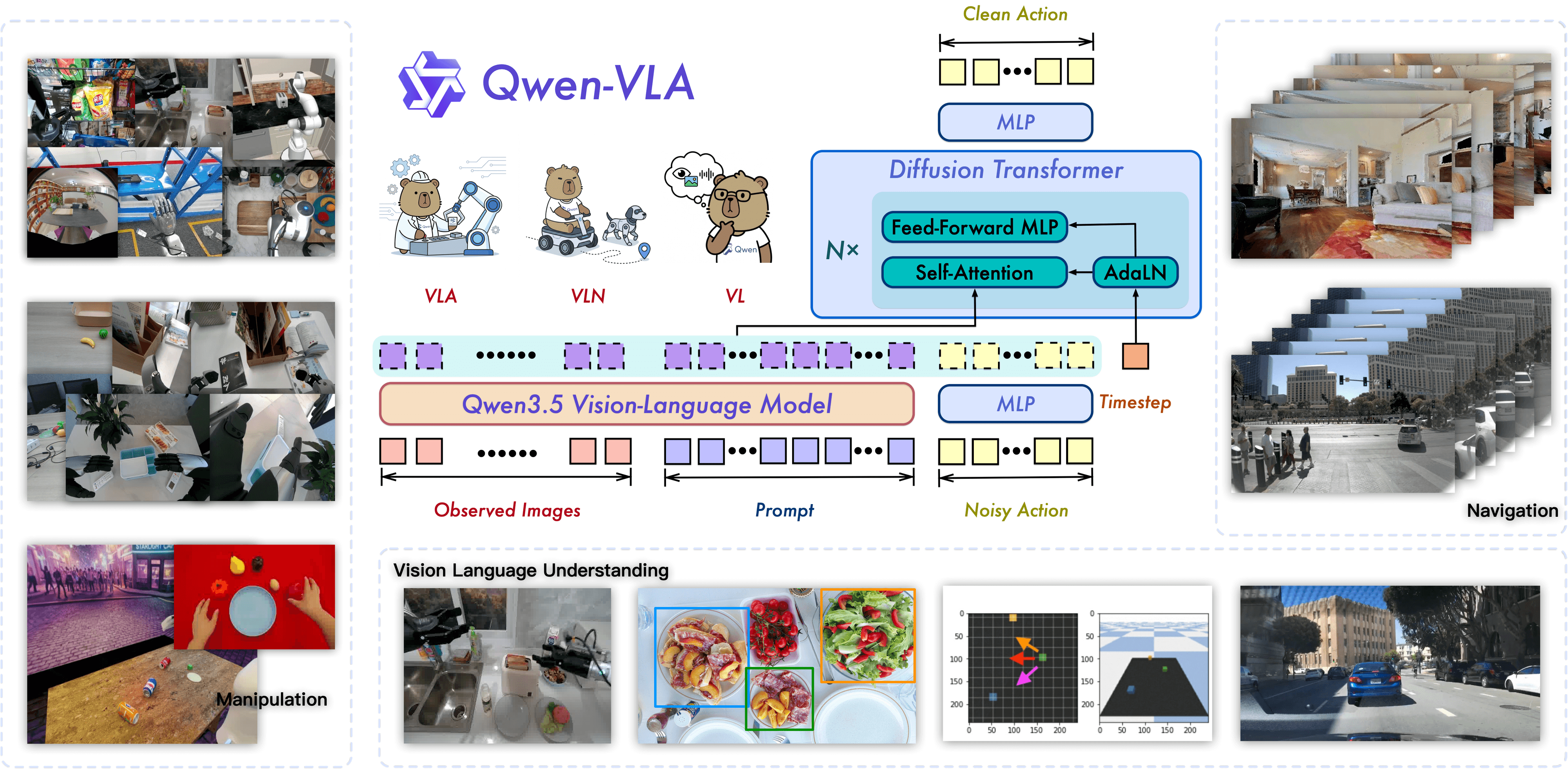
OpenEAI-VLA is one of the more interesting open robotics releases from early June 2026: a roughly 5B-parameter Vision-Language-Action model built on Qwen3-VL-4B-Instruct, paired with a Diffusion Transformer action head, released with a public pretrained checkpoint, training/inference code, dataset tooling, and a target low-cost 6+1 DoF robot arm called OpenEAI-Arm. The paper reports an estimated material cost of about 790 USD for the arm, which makes the project especially relevant for small labs and independent robotics teams.
The important part is not just "another VLA model". OpenEAI-Platform tries to open the whole stack: robot hardware, low-level control, data format, pretraining, task fine-tuning, and policy serving. For beginners, that makes it a useful case study in how a modern VLA moves from paper to real robot deployment. If the VLA idea or diffusion/flow matching is new to you, read the architecture section slowly before jumping into inference.
This guide focuses on the practical path: install the repo, download the pretrained checkpoint, prepare data, run the inference server, understand the input/output contract, and know what must change before connecting the policy to a low-cost robot arm. Because OpenEAI-VLA is a new project, treat the workflow as a staged bring-up: get the server running first, verify tensor shapes, test a dummy request, then connect real cameras and a real controller.
Original sources
The primary sources to read are:
- Paper: OpenEAI-Platform: An Open-source Embodied Artificial Intelligence Hardware-Software Unified Platform
- Code: github.com/eai-yeslab/OpenEAI-VLA
- Pretrained checkpoint: OpenEAI/OpenEAI-VLA-Pretrained
- Processed dataset: OpenEAI/OpenEAI-Dataset
- Required backbone: Qwen/Qwen3-VL-4B-Instruct
The paper was submitted to arXiv on 2026-06-02. Its abstract states that OpenEAI-Platform combines OpenEAI-Arm, a low-cost 6+1 DoF arm, and OpenEAI-VLA, a reproducible VLA model using Qwen3-VL-4B and a Diffusion Transformer action head. The GitHub repo includes installation, dataset conversion, pretraining, fine-tuning, and a FastAPI inference server. The Hugging Face model card lists the checkpoint as about 5B parameters with F32 tensors; the main model.safetensors file is about 20.9 GB.
What the paper is trying to solve
The main problem is reproducibility. Strong VLA systems such as π0 and π0.5 show impressive real-robot results, but large parts of their data scale and training details are not fully open. On the other side, many affordable robot arms are inaccurate, lack low-level access, or expose only black-box high-level interfaces. That makes it hard to collect reproducible data and hard to deploy learned policies fairly across hardware.
OpenEAI-Platform opens both sides:
| Component | Role | Practical takeaway |
|---|---|---|
| OpenEAI-Arm | 6+1 DoF robot arm | About 790 USD material cost, designed for desktop manipulation |
| FF-PID + action smoothing | Low-level control | Turns discrete VLA chunks into smoother robot motion |
| OpenEAI-VLA | End-to-end policy | Takes images, instruction, state; returns an action chunk |
| OpenEAI-Dataset | Unified data format | HDF5, state/action statistics, compressed images, dataset adapters |
| Policy server | Deployment interface | FastAPI + MessagePack between robot client and policy |
You can think of the policy as this pipeline:
Camera images + language instruction + proprioceptive state
                         |
                         v
              Qwen3-VL-4B-Instruct backbone
                         |
            learnable query embeddings readout
                         |
                         v
       Diffusion Transformer / flow-matching action expert
                         |
                         v
        50-step continuous action chunk for robot arm
                         |
                         v
        smoothing + low-level controller + real robot
The subtle design choice is the learnable query embedding interface. Instead of feeding every hidden state from the VLM into the action head, OpenEAI-VLA appends a fixed-length sequence of trainable query tokens to the Qwen3-VL input. After the VLM forward pass, it extracts only the final-layer hidden states corresponding to those query tokens. Those states become compact conditioning embeddings for the action head.
This gives the model a fixed-bandwidth bridge between perception/language and control. The action head does not grow with the number of image patches or the prompt length, but the query tokens can still learn which information must be compressed for robot action generation.
OpenEAI-VLA architecture
From the public paper and config files, the model uses:
| Parameter | Public config value |
|---|---|
| Backbone | Qwen3-VL-4B-Instruct |
| Image resize | 224 |
| Qwen hidden dim | 2560 |
| Action head hidden dim | 1664 |
| DiT layers | 18 |
| Attention heads | 32 |
| Action horizon | 50 |
| Denoise steps in config | 10; inference file sets 20 |
| Feature length | 20 |
The default inference path in openeai/infer.py expects three cameras:
batch = {
    "images": {
        "cam_left_wrist": left_wrist_rgb,
        "cam_right_wrist": right_wrist_rgb,
        "cam_high": third_person_rgb,
    },
    "state": robot_state,
    "prompt": "fold the towel",
}
The server resizes images to 224x224, normalizes robot state with processor statistics, combines the prompt with three vision placeholders, and calls model.infer(..., act=True). The returned action tensor is then unnormalized using the dataset key. If the checkpoint uses relative joint actions, the inference code adds the current state back to produce absolute joint commands.
That means the pretrained checkpoint is not a normal image chatbot. It is a robot policy. The text prompt is only one conditioning input; the important output is a continuous action chunk that must be executed through a controller with proper timing and safety limits.
Reported results
OpenEAI-Platform evaluates four real-world manipulation tasks:
- Clean Table: pick and place tabletop objects.
- Make Tea: a multi-step rigid-object task.
- Fold Towel: deformable manipulation.
- Fold T-shirt: long-horizon dual-arm deformable manipulation.
On the hardware side, the paper runs π0 on multiple 6-DoF arms under the same settings. OpenEAI-Arm reaches an average success rate of 0.75, compared with 0.71 for ARX R5 and 0.64 for AgileX Piper in the reported setup. The paper also reports material cost of about 0.79 kUSD for OpenEAI-Arm, compared with 8.60 kUSD for ARX R5 and 2.16 kUSD for Piper.
On the model side, evaluated on OpenEAI-Arm:
| Model | Clean Table avg | Make Tea final | Fold Towel final | Fold T-shirt final |
|---|---|---|---|---|
| ACT | 0.72 | 0.60 | 0.33 | 0.00 |
| Octo | 0.20 | 0.00 | 0.00 | not multi-arm |
| OpenVLA-oft | 0.68 | very low | 0.27 | 0.00 |
| π0 | 0.92 | 0.60 | 0.73 | 0.83 |
| π0.5 | 0.96 | 0.80 | 0.80 | 0.83 |
| OpenEAI-VLA | 0.94 | 0.70 | 0.80 | 0.83 |
The practical interpretation is precise: OpenEAI-VLA does not beat π0.5 overall, but it is close to π0/π0.5 on the four reported tasks while emphasizing open-source pretraining data. That supports the "near π0" framing, but only within the scope of the paper's task suite and evaluation protocol. It is not proof that the checkpoint will transfer zero-shot to every robot arm.
Machine setup
Start with a Linux workstation with an NVIDIA GPU. The checkpoint is F32 and large, so 24 GB VRAM can be tight depending on CUDA and PyTorch memory overhead. You can inspect code and test request plumbing on CPU, but real policy inference should use a GPU.
Practical requirements:
| Item | Recommendation |
|---|---|
| OS | Ubuntu 22.04 or similar |
| Python | 3.10+ |
| GPU | RTX 4090/A5000/A6000/A100; more VRAM is better |
| Disk | 80 GB for code and checkpoint; several TB for the full dataset |
| RAM | 32 GB or more |
| Network | Needed for Hugging Face downloads |
Install base tools:
sudo apt update
sudo apt install -y git git-lfs ffmpeg libgl1
git lfs install
Create an environment:
conda create -n openeai python=3.10 -y
conda activate openeai
Install OpenEAI-VLA
Clone the repo and install dependencies:
git clone https://github.com/eai-yeslab/OpenEAI-VLA.git
cd OpenEAI-VLA

pip install -r requirements.txt
pip install -e .
The repo requirements include packages such as torch, torchvision, transformers==4.57.1, accelerate, deepspeed, h5py, datasets, uvicorn, fastapi, opencv-python, scipy, imageio, and pillow. If your CUDA stack is unusual, install the correct PyTorch build for your system first, then install the repo requirements.
Verify basic imports:
python - <<'PY'
import torch
import transformers
print("torch", torch.__version__, "cuda", torch.cuda.is_available())
print("transformers", transformers.__version__)
PY
Download the pretrained checkpoint
Download the Qwen3-VL backbone:
huggingface-cli login
huggingface-cli download Qwen/Qwen3-VL-4B-Instruct --repo-type model
Download the OpenEAI-VLA pretrained weights:
huggingface-cli download OpenEAI/OpenEAI-VLA-Pretrained \
  --repo-type model \
  --local-dir log/OpenEAI-VLA-Pretrained/openeai
The default inference file contains:
CKPT_PATH = "log/finetune/openeai_finetune_openeaiarm_fold_towel/checkpoints/100000/openeai"
For pretrained inference, point it to the downloaded checkpoint:
CKPT_PATH = "log/OpenEAI-VLA-Pretrained/openeai"
A cleaner local patch is to read from an environment variable:
import os
CKPT_PATH = os.environ.get(
    "OPENEAI_CKPT",
    "log/OpenEAI-VLA-Pretrained/openeai",
)
Then run:
export OPENEAI_CKPT=log/OpenEAI-VLA-Pretrained/openeai
python openeai/infer.py
Run the inference server
The server uses FastAPI and listens on port 8000:
python openeai/infer.py
On startup it:
- Loads
OpenEAIVLAConfigfrom the checkpoint. - Sets
config.denoise_steps = 20. - Uses
Qwen3-VL-4B-Instructwhen the checkpoint path indicates Qwen3. - Loads the processor and model.
- Moves the model to
cuda:0with default dtypetorch.float32. - Creates a
POST /inferendpoint.
Requests use MessagePack, not plain JSON. A simplified client looks like this:
import msgpack
import requests
import numpy as np

def pack_array(obj):
    if isinstance(obj, np.ndarray):
        return {
            b"__ndarray__": True,
            b"data": obj.tobytes(),
            b"dtype": obj.dtype.str,
            b"shape": obj.shape,
        }
    return obj

obs = {
    "images": {
        "cam_left_wrist": np.zeros((480, 640, 3), dtype=np.uint8),
        "cam_right_wrist": np.zeros((480, 640, 3), dtype=np.uint8),
        "cam_high": np.zeros((480, 640, 3), dtype=np.uint8),
    },
    "state": np.zeros((14,), dtype=np.float32),
    "prompt": "clean the table",
}

payload = msgpack.packb(obs, default=pack_array, use_bin_type=True)
resp = requests.post(
    "http://127.0.0.1:8000/infer",
    data=payload,
    headers={"Content-Type": "application/msgpack"},
)
print(resp.status_code, len(resp.content))
For a real robot, replace the dummy black images with synchronized frames from the three cameras, read the current joint/gripper state, and stream the returned action chunk to your controller.
Prepare data for fine-tuning
If your only goal is "run pretrained", the inference server is enough. For a robot to perform a specific task reliably, however, you should expect to fine-tune. Action spaces, camera placement, grippers, calibration, and kinematics differ across embodiments. Pretraining gives the policy useful priors; it does not remove the need for demonstration data on your hardware.
OpenEAI-Dataset uses a unified HDF5 structure:
data/
  OpenEAI-Dataset/
    meta/
      pretrain_meta.json
      bc_z_meta.npy
      droid_meta.npy
    bc_z/
      0000.hdf5
        episode_0/
          attrs: instruction, action_type, length
          action: (traj_length, action_dim)
          state:  (traj_length, state_dim)
          image_mid: compressed image sequence
A minimal episode needs:
instruction: natural-language command, for example "put the red cup on the plate".state: robot proprioception, usually joint positions plus gripper state.action: target action in the same convention used by the controller.image_*: camera frames in a loader-compatible format.state_statandaction_stat: statistics for normalization and unnormalization.
Convert a task dataset:
cd data_utils
bash run.sh openeai_arm_my_task
Then edit config/sft_openeai_multimodal.json:
{
  "task_name": "finetune",
  "pretrain_ckpt_dir": "log/OpenEAI-VLA-Pretrained/openeai",
  "train_steps": 100000,
  "action_chunk": 50,
  "data": {
    "data_root": "data",
    "name": "openeai_arm_my_task",
    "batch_size": 2,
    "resize_size": 224,
    "use_multimodal": true,
    "multimodal_root": "data/OpenEAI-Dataset/multi_modal",
    "multimodal_weight": 0.4
  },
  "optimizer": {
    "lr": 3e-5,
    "weight_decay": 1e-2
  }
}
Training and fine-tuning
Pretraining from scratch is a large job. The public pretraining config uses:
{
  "train_steps": 100000,
  "action_chunk": 50,
  "data": {
    "mixed": true,
    "data_root": "data/OpenEAI-Dataset",
    "batch_size": 4,
    "resize_size": 224
  },
  "optimizer": {
    "lr": 1e-4,
    "weight_decay": 1e-2
  },
  "scheduler": {
    "warmup_steps": 5000,
    "decay_steps": 100000,
    "decay_lr": 1e-5
  }
}
The repo shows multi-node pretraining through:
bash scripts/pretrain.sh openeai_pretrain
For beginners, fine-tuning is the reasonable path:
bash scripts/sft.sh openeai_arm_my_task
scripts/sft.sh launches openeai/sft_zero2.py through Accelerate with a single-node ZeRO-2 config. If you have only one GPU, inspect the Accelerate/DeepSpeed config and reduce batch size, use gradient accumulation, or enable memory-saving options. With an F32 checkpoint and Qwen3-VL-4B, do not expect a 12 GB GPU to be comfortable.
A practical fine-tuning checklist:
| Step | What to verify |
|---|---|
| 1 | Camera order matches inference: left wrist, high, right wrist |
| 2 | State dimension matches processor statistics |
| 3 | Action dimension matches the controller |
| 4 | Action convention is clear: absolute joint, relative joint, or end-effector delta |
| 5 | Prompt wording is consistent between training and inference |
| 6 | Failed or incomplete episodes are filtered |
| 7 | Actions replay correctly offline before policy rollout |
Deploy on a low-cost robot arm
OpenEAI-VLA returns an action chunk, but motors need smooth continuous commands. The paper uses FF-PID, dynamics feedforward, and three-point rolling Bezier action chunking to reduce discontinuities at chunk boundaries. If you use a different arm, you still need a safety/controller layer between the policy and the motor drivers:
OpenEAI-VLA action chunk
        |
        v
action clipping + rate limit
        |
        v
joint limit check + collision zone check
        |
        v
trajectory smoothing
        |
        v
low-level position/velocity/torque controller
        |
        v
robot arm
Do not send raw model outputs directly to motor drivers without checks. Low-cost arms have backlash, latency, servo saturation, and calibration error. A policy can be mathematically correct and still fail physically if the execution layer is rough.
A safer staged test:
- Run the server with real cameras but robot disabled; log predicted actions.
- Replay actions in simulation or a dry-run visualizer.
- Enable the robot at low speed with a constrained workspace.
- Test a narrow prompt such as "move to home" or "pick the cup".
- Increase speed only after action chunks are smooth and joint limits are respected.
If you are building around LeRobot or OpenArm, compare this workflow with the data collection and action normalization articles listed in the related posts section.
Common failure modes
| Symptom | Likely cause | Fix |
|---|---|---|
| CUDA out of memory | F32 checkpoint, high denoise count, large model | Use more VRAM, reduce denoise steps, check dtype |
ModuleNotFoundError |
Editable install missing | Run pip install -e . inside the repo |
| Wrong action shape | Dataset statistics do not match | Inspect meta files, state_dim, and action_dim |
| Robot jerks at chunk boundaries | No smoothing layer | Add interpolation and rate limiting |
| Prompt appears ignored | Prompt templates are inconsistent or sparse | Normalize instruction templates |
| Policy stays still | Normalization or camera order is wrong | Log processed batches before inference |
When should you use OpenEAI-VLA?
Use OpenEAI-VLA if you want an open VLA stack for learning, fine-tuning, and deploying manipulation policies with cameras, language, and robot state. It is especially useful for small labs because the code, checkpoint, dataset format, and control discussion are all public. It is also a good baseline if you want to compare against π0, OpenVLA, ACT, or other VLA families under your own pipeline.
Do not treat the pretrained checkpoint as a universal plug-and-play controller for any arm. VLA policies are highly embodiment-dependent. Camera placement, action representation, gripper behavior, calibration, and controller dynamics matter as much as model architecture. If your arm has one camera instead of three, a different gripper, or a different action space, you will need adapters and fine-tuning data.
The short version: OpenEAI-VLA is valuable because it turns "how do I train a paper-grade VLA?" into a concrete open pipeline. Beginners should start by running the inference server and a dummy request. Teams with real hardware should collect 20-100 clean demonstrations for one narrow task before attempting multi-task or deformable-object deployment.