Why G0Tiny Matters
GalaxeaVLA is OpenGalaxea's open-source repository for Vision-Language-Action models aimed at real-world robot manipulation. The G0 family is introduced in the paper Galaxea Open-World Dataset and G0 Dual-System VLA Model. The core idea is a dual-system robot stack: a high-level Vision-Language Model plans, while a low-level Vision-Language-Action model executes. The planner reads the scene and user command, decomposes the task into subtasks, and the VLA consumes camera images, proprioception, and subtask language to generate continuous action chunks.
G0Tiny is the small member of that family. The public OpenGalaxea/GalaxeaVLA README describes G0Tiny_250M-base as a lightweight model for edge deployment on R1 Pro Orin. It uses a SmolVLM2 backbone, follows the same LeRobot-format data workflow, and has an on-device TensorRT demo that can run up to 10 Hz for the handover gift task. Compared with G0Plus 3B, G0Tiny is much easier to reason about for teams that care about deployment latency, memory, and iteration speed.
This guide assumes you are new to VLA fine-tuning. We will cover the paper idea, architecture, LeRobot data format, installation, training, inference, and result evaluation. If you use a robot other than Galaxea R1 Pro, you can still follow the workflow, but you will need to map your cameras, states, and actions into a compatible schema or create a new data config.
The Paper Idea: Split Planning From Execution
The G0 paper starts from a practical robotics problem. A household or office robot does not only need to pick and place one object on a clean table. It needs to interpret long natural-language instructions, understand cluttered scenes, choose a sequence of executable subtasks, and then control arms, grippers, torso, or mobile base smoothly. If a single model is forced to handle long-horizon planning and low-level control at the same time, training becomes harder and deployment failures become harder to diagnose.
G0 separates the system into two layers:
Human command
     |
     v
+--------------------+
| System 2: G0-VLM   |  slow planner
| scene + language   |
| -> subtask plan    |
+--------------------+
     |
     | "pick up the cup", "move torso down", ...
     v
+--------------------+
| System 1: G0-VLA   |  fast executor
| images + state     |
| + subtask text     |
| -> action chunk    |
+--------------------+
     |
     v
Robot controller
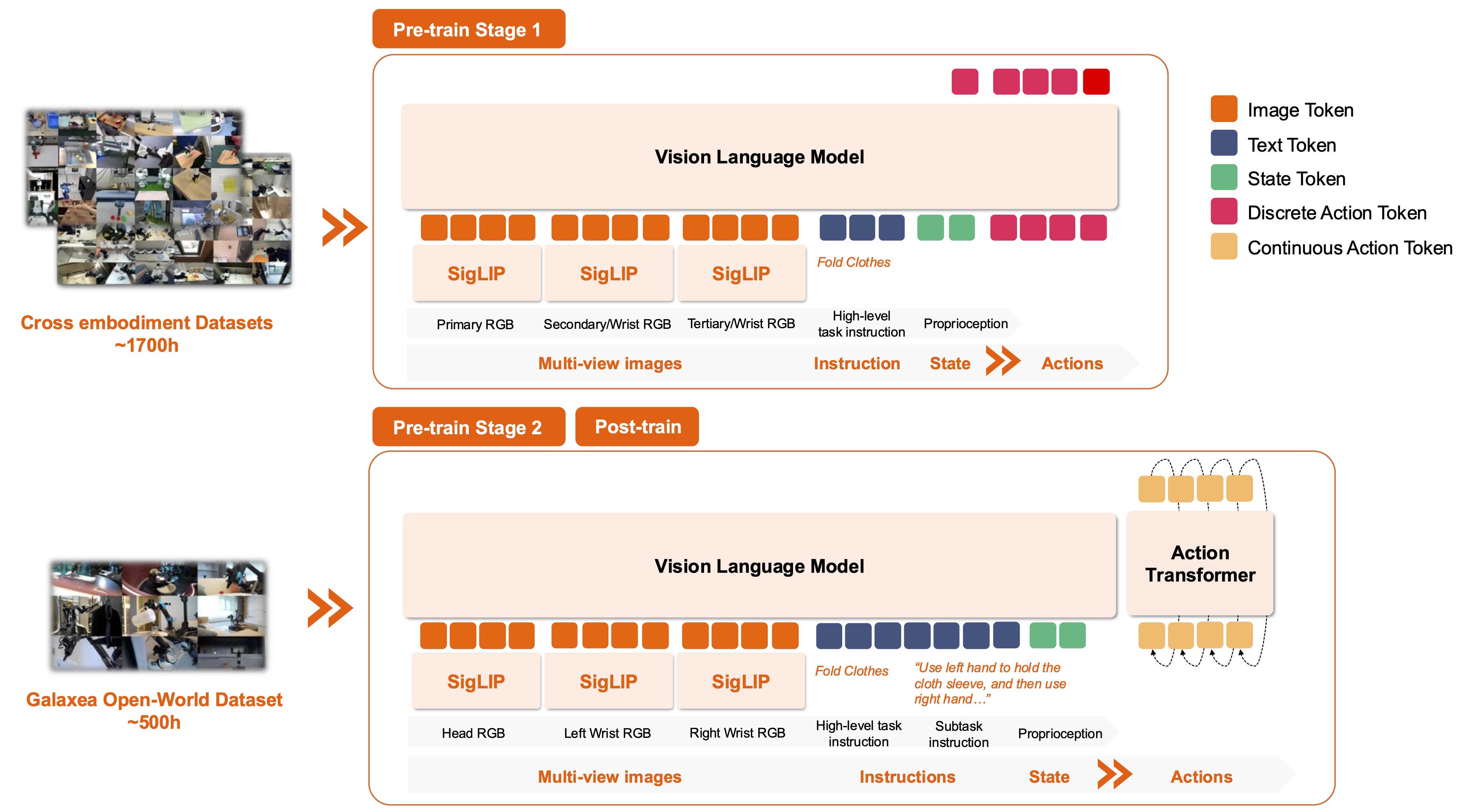
The VLA is trained with a three-stage curriculum. Stage 1 uses cross-embodiment robot data to learn broad visual-language-action priors. Stage 2 uses the Galaxea Open-World Dataset from a consistent embodiment so the model can specialize to one action space, camera layout, and robot dynamics. Post-training then uses a small number of high-quality demonstrations for the target task. One of the key results is that single-embodiment pre-training matters a lot. When the source embodiment is too different from the target robot, cross-embodiment pre-training can help less than expected or even hurt embodiment-specific behaviors such as torso and chassis control.
For fine-tuning, the lesson is simple: do not only count hours of data. Check whether the data matches your real robot's cameras, control mode, timing, action representation, and task distribution. G0Tiny is compact, so clean and consistent data matters even more.
G0Tiny Architecture From Public Configs
The public config configs/model/vla/g0tiny.yaml exposes enough details to understand how the model is intended to be used.
| Component | Practical meaning |
|---|---|
| Backbone | HuggingFaceTB/SmolVLM2-500M-Video-Instruct is used for pretrained model and tokenizer paths |
| Vision encoder | SigLIP-style vision transformer, 512 image size, 16 patch size, 768 hidden size |
| Text/VLM hidden | Joint VLM hidden size 960 |
| Action expert | 720 hidden size, 16 layers, flow-matching action generation |
| Input images | obs_size * num_output_cameras; the R1 Pro config uses 1 observation step and 3 cameras |
| Action horizon | action_size: 32, so the policy predicts a 32-step chunk |
| Training defaults | batch size 16, 4 epochs, learning rate 6e-5, cosine schedule, bf16 enabled |
| Inference | num_inference_steps: 10 for flow sampling |
The important design choice is that G0Tiny does not have to autoregress one continuous control value at a time. It uses the VLM side to encode images, language, and robot state, then an action expert predicts a continuous action chunk with flow matching. This is a better fit for robot control because actions are real-valued: end-effector poses, gripper values, torso motion, or velocities.
For the public R1 Pro eef_torso data config, actions include left and right end-effector pose, gripper, and torso. Pose rotation is transformed into a 6D representation, action and state are normalized from dataset statistics, and images from the head plus two wrist cameras are resized to the model input size.
head_rgb       left_wrist_rgb       right_wrist_rgb
   |                |                    |
   +----------------+--------------------+
                    |
              Vision encoder
                    |
Subtask text -----> tokenizer -> joint VLM cache
Robot state ------> proprio encoder
                    |
             Flow action expert
                    |
       32-step continuous action chunk
Because the model predicts chunks, the robot does not need to call the policy at every low-level control tick. In a real deployment, the controller typically executes part of the chunk, smooths or blends the trajectory, observes the scene again, and replans. That reduces jitter while keeping the robot responsive.
What the LeRobot Dataset Should Look Like
Galaxea's dataset documentation says its format is based on LeRobot v2.1 and adapted to BaseLerobotDataset. Hugging Face's LeRobot docs also emphasize storing camera streams as videos and non-video fields as parquet files. The resulting folder should be easy to inspect and efficient to load.
my_task_dataset/
  meta/
    info.json
    tasks.jsonl
    episodes.jsonl
    episodes_stats.jsonl
  data/
    chunk-000/
      episode_000000.parquet
      episode_000001.parquet
  videos/
    chunk-000/
      observation.images.head_rgb/
        episode_000000.mp4
      observation.images.left_wrist_rgb/
        episode_000000.mp4
      observation.images.right_wrist_rgb/
        episode_000000.mp4
Each frame should contain three categories of information:
| Group | Example field | Why it matters |
|---|---|---|
| Observation images | observation.images.head_rgb, left_wrist_rgb, right_wrist_rgb |
The model sees the scene and the gripper-object relation |
| Observation state | observation.state.left_ee_pose, right_ee_pose, torso, left_gripper |
The policy needs proprioception, not only images |
| Action | action.left_ee_pose, action.right_ee_pose, action.torso, action.left_gripper |
These are the supervised targets |
| Index/language | timestamp, frame_index, episode_index, task_index |
tasks.jsonl maps task ids to instructions |
If your robot is a single-arm tabletop setup, you have two practical options. The quick option is to map unused fields to fixed zeros or frozen values, but this can become fragile if transforms expect a specific robot layout. The cleaner option is to create a new data config under configs/data/<robot>/<schema>.yaml and explicitly define your own shape_meta, camera keys, action keys, and processor transforms.
For a beginner task, start with something short: pick an object and place it into a tray, open a small drawer, or move a bottle between two zones. Collect 50-100 successful episodes and keep a separate validation split. Add variation in object pose, lighting, background clutter, and initial gripper pose. Delete bad demonstrations. Bad data is worse than small data because it teaches the policy inconsistent intent.
Before training, run a data sanity pass:
# Visualize one episode with LeRobot tooling
lerobot-dataset-viz \
  --repo-id your_user/your_robot_task \
  --episode-index 0

# Confirm video dependencies
ffmpeg -version

# Inspect parquet columns
python - <<'PY'
import pandas as pd
df = pd.read_parquet("data/chunk-000/episode_000000.parquet")
print(df.columns.tolist())
print(df.head(1))
PY
Look for timing drift, frozen cameras, gripper values that never change, action fields in the wrong coordinate frame, and instructions that do not describe the actual subtask.
Installing GalaxeaVLA
Hardware requirements depend on the training mode. The GalaxeaVLA README states that inference requires more than 8 GB of NVIDIA GPU memory, while full fine-tuning of larger models can require very large accelerators. G0Tiny is smaller than G0Plus, but video decoding, bf16 training, and action-chunk batches still benefit from a recent NVIDIA GPU and a fast SSD.
# 1. Clone the repository
git clone https://github.com/OpenGalaxea/GalaxeaVLA
cd GalaxeaVLA

# 2. Install uv if needed
curl -LsSf https://astral.sh/uv/install.sh | sh

# 3. Create the environment used by the repo
uv sync --index-strategy unsafe-best-match
source .venv/bin/activate

# 4. Install the local package
uv pip install -e .
uv pip install -e ".[dev]"

# 5. Install system video tooling
sudo apt install ffmpeg
Download the checkpoint from OpenGalaxea/G0-VLA on Hugging Face. The public README points G0Tiny users to the G0Tiny_260120 folder. You should also make sure the SmolVLM2 pretrained model and tokenizer path can be resolved, especially on offline training machines.
Set the main environment variables:
export HF_DATASETS_CACHE=/data/cache/hf_datasets
export GALAXEA_FM_OUTPUT_DIR=/data/outputs/galaxea_fm
export GALAXEA_FM_DATASET_STATS_CACHE_DIR=/data/cache/galaxea_stats
export SWANLAB_API_KEY=your_swanlab_key

mkdir -p "$HF_DATASETS_CACHE" \
         "$GALAXEA_FM_OUTPUT_DIR" \
         "$GALAXEA_FM_DATASET_STATS_CACHE_DIR"
If you do not use SwanLab, disable or change the logger in configs/train.yaml, or use a Hydra override if your repo version supports it. For a first run, local or disabled logging is often easier than debugging an external dashboard.
Creating a Task Config
Do not edit the demo file directly. Copy it into a new task file:
cp configs/task/real/g0tiny_r1pro_finetune.yaml \
   configs/task/real/g0tiny_my_pick_place.yaml
A minimal task config looks like this:
# @package _global_

defaults:
  - override /data: r1pro/eef_torso
  - override /model: vla/g0tiny

model:
  pretrained_ckpt: /data/checkpoints/G0Tiny_260120

data:
  dataset:
    dataset_dirs:
      - /data/lerobot/my_pick_place_001
      - /data/lerobot/my_pick_place_002
For a custom robot, the task file only points to your data and model. The real work is in the data config. A single-arm robot with one gripper and two cameras might start with a skeleton like this:
dataset:
  _target_: galaxea_fm.data.galaxea_lerobot_dataset.GalaxeaLerobotDataset
  dataset_dirs: null
  shape_meta:
    action:
      - key: arm_joint
        raw_shape: 7
        shape: 7
      - key: gripper
        raw_shape: 1
        shape: 1
    state:
      - key: arm_joint
        raw_shape: 7
        shape: 7
      - key: gripper
        raw_shape: 1
        shape: 1
    images:
      - key: front_rgb
        raw_shape: [3, 480, 640]
        shape: [3, ${model.model_meta.input_image_size.0}, ${model.model_meta.input_image_size.1}]
      - key: wrist_rgb
        raw_shape: [3, 480, 640]
        shape: [3, ${model.model_meta.input_image_size.0}, ${model.model_meta.input_image_size.1}]
  action_size: 32
  obs_size: 1
Treat this as a starting point, not a complete config. You still need matching processor transforms so that action/state tensors are concatenated, normalized, and decoded correctly. The most common mistakes are simple: the dataset has observation.images.front but the config expects head_rgb, the action dimension after transforms does not match action_output_dim, or the robot uses absolute poses while the config expects relative action.
Running Fine-tuning
The public script wraps torchrun. It takes the GPU count and task path:
# 1 GPU, custom task
bash scripts/run/finetune.sh 1 real/g0tiny_my_pick_place

# If you hit OOM, reduce micro-batch and accumulate gradients
bash scripts/run/finetune.sh 1 real/g0tiny_my_pick_place \
  model.batch_size=4 \
  model.grad_accumulation_steps=4
For a first G0Tiny run, use conservative settings:
| Parameter | Starting value | When to change it |
|---|---|---|
model.batch_size |
4-8 | Increase if GPU memory is available |
grad_accumulation_steps |
2-4 | Keep effective batch size when micro-batch is small |
learning_rate |
3e-5 to 6e-5 | Lower it if the loss is unstable |
max_epochs |
4-10 | Increase for small datasets if validation is not overfitting |
warmup_steps |
200-500 | Increase if early training is noisy |
Track three signals. First, training and validation loss should move in a reasonable direction. If validation rises while training falls, you may be overfitting or your validation split may be out-of-distribution. Second, check video-action alignment. A half-second sensor delay can make a good policy look bad. Third, inspect normalization statistics. If the gripper always saturates at 0 or 1, the gripper distribution or transform exception may be wrong.
Use this quick debugging map:
NaN loss?
  -> lower learning rate, check bf16 support, disable compile

Out of memory?
  -> reduce batch_size, reduce workers, use gradient accumulation

Action moves in the wrong direction?
  -> check coordinate frames and relative vs absolute action

Policy ignores language?
  -> inspect tasks.jsonl and keep instructions short and executable

Low train loss but failed robot rollout?
  -> replay ground-truth actions before blaming the policy
Inference and Real-Robot Deployment
There are two practical inference modes. The lab mode runs the PyTorch checkpoint on a workstation GPU and streams actions to the robot through ROS or another bridge. The edge mode uses an optimized engine on the robot. Galaxea's handover gift documentation describes a TensorRT/CUDA path on JetPack 6.0 with FP16 engine files and spline-based trajectory post-processing. For a first deployment, the workstation path is easier because you can change code and inspect tensors quickly.
A real deployment should have a safety layer outside the neural policy:
Camera/state sync
      |
      v
G0Tiny policy inference
      |
      v
Action denormalization
      |
      v
Safety filter: joint limit, velocity limit, workspace box
      |
      v
Smoothing / spline / chunk blending
      |
      v
Robot low-level controller
Pseudo-code:
policy.eval()

while robot.is_enabled():
    obs = robot.get_observation()
    batch = processor.to_batch(
        images={
            "head_rgb": obs.head_rgb,
            "left_wrist_rgb": obs.left_wrist_rgb,
            "right_wrist_rgb": obs.right_wrist_rgb,
        },
        state=obs.proprio,
        instruction="pick up the bottle and place it on the tray",
    )

    with torch.no_grad(), torch.autocast("cuda", dtype=torch.bfloat16):
        action_chunk = policy.predict_action(batch)

    action_chunk = processor.denormalize_action(action_chunk)
    action_chunk = safety_filter(action_chunk)
    robot.execute_chunk(action_chunk, replan_after=8)
Do not skip emergency stop, workspace limits, speed limits, or dry runs. A policy can be correct most of the time and still produce an unsafe outlier. Test in stages: offline batch inference, replay in a simulator or log viewer, low-speed robot execution, then gradual speed increases.
Expected Results and Evaluation
The G0 paper evaluates table bussing, microwave operation, bed making, and blocks stacking. The main takeaway is not only that one checkpoint has a higher score. The important result is that Stage-2 single-embodiment pre-training improves smoothness, instruction following, and few-shot transfer. The paper also reports that its fine-tuned G0-VLM planner outperforms general-purpose VLM baselines in its instruction accuracy benchmark because it is adapted to robot-executable primitives.
For your own G0Tiny fine-tune, use simple metrics and keep the protocol fixed:
| Metric | How to measure it | Why it matters |
|---|---|---|
| Success rate | 20-50 real rollouts with the same setup | Directly compares checkpoints |
| Progress score | Score each completed subtask | Better for long-horizon tasks |
| Intervention rate | Count human takeovers | Measures deployment stability |
| Cycle time | Time to finish the task | Slow success may still be unusable |
| Safety violation | Collision, joint limit, workspace breach | Safety is not optional |
Your baseline should include a smaller behavior cloning policy such as ACT or Diffusion Policy on the same dataset, G0Tiny fine-tuned from the base checkpoint, and, if you have compute, a larger VLA such as G0Plus, Pi0, or SmolVLA. If G0Tiny does not beat a smaller baseline, first suspect schema mismatch, normalization issues, action delay, or insufficient task variation.
A Beginner-Friendly Roadmap
- Pick a short-horizon task: pick and place, drawer open/close, or bottle relocation.
- Record 50 good episodes, remove failed demonstrations, and keep the object visible.
- Convert the data into LeRobot format and visualize random episodes.
- Fine-tune G0Tiny with a small batch, log train/validation loss, and save checkpoints.
- Run offline inference on validation episodes and compare predicted actions with ground truth.
- Deploy at low speed with strict action clamps and chunk replanning.
- Add demonstrations for failure cases and fine-tune again.
G0Tiny is not a magic button for universal manipulation. It is a compact VLA base policy with a practical architecture, LeRobot-compatible training, and a deployment story that fits edge robots. The value appears when you pair it with synchronized data, clear subtask language, consistent action representation, and disciplined evaluation.
References
- Paper: Galaxea Open-World Dataset and G0 Dual-System VLA Model
- Code: OpenGalaxea/GalaxeaVLA
- Model weights: OpenGalaxea/G0-VLA
- Dataset: OpenGalaxea/Galaxea-Open-World-Dataset
- LeRobot docs: Using Dataset Tools