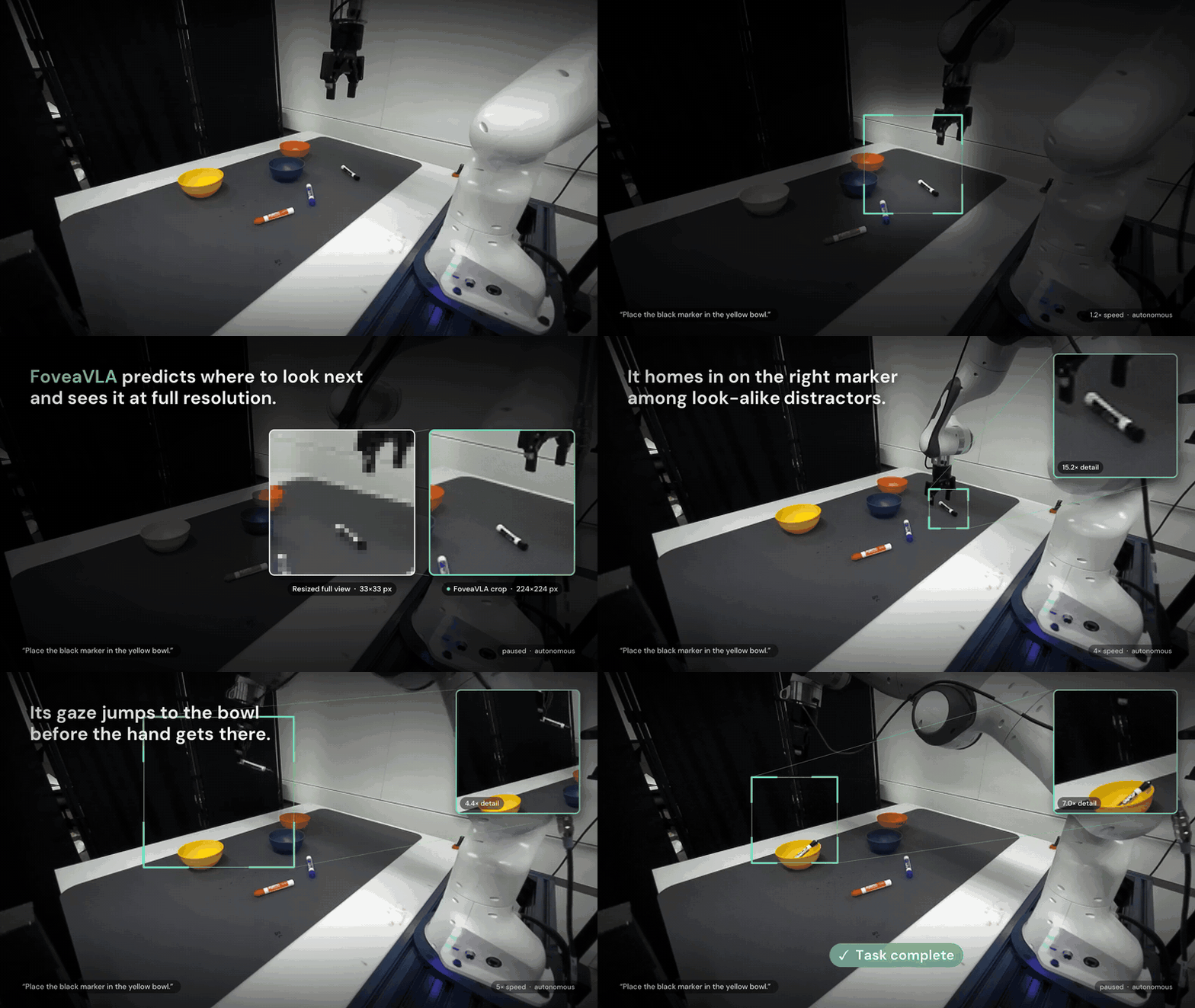
Where does close-up detail come from without a wrist camera?
An external camera can show a robot the entire table while still providing too little detail to grasp a marker reliably. The camera itself may capture 1280×720 pixels, but the policy receives a resized 224×224 image. After resizing, the interaction between the gripper and a small object can occupy only a handful of pixels. A wrist camera supplies a close-up, although its view moves with the hand and may exclude a distant placement target.
FoveaVLA: Foveation Actions Replace the Wrist Camera in VLAs, a 2026 preprint by Bingao Chen, Lihan Zha, C. Karen Liu and Guy Tevet, proposes learning where to look next alongside how to act. The policy predicts an interaction region for its next query. That region is cropped from the next original-resolution external image and supplied together with the full view.
The official Stanford-TML/FoveaVLA repository provides code, pretrained checkpoints, data preparation and real-robot deployment instructions. This tutorial explains the method, walks through checkpoint deployment, and then describes the post-training workflow. Commands were checked against the repository documentation for this article; they are not a claim that vnrobo reproduced the experiments on physical hardware.
If observations, action chunks and demonstrations are new concepts, start with the LeRobot hands-on introduction. FoveaVLA uses its own OpenPI/DROID-based stack. Understanding LeRobot helps with the concepts, but its robot support does not automatically make these checkpoints compatible with another embodiment.
1. What “without a wrist camera” actually requires
The released configuration uses external ZED stereo cameras, RGB images, metric depth, robot state and an NVIDIA GPU server. FoveaVLA-Single uses one external ZED device; Dual uses two. Each stereo device contains a pair of imagers for recovering depth. Single therefore does not mean monocular RGB input from an ordinary webcam.
The deployment guide targets a Franka/DROID setup. Running the checkpoint on an SO-101, another industrial arm or a humanoid requires compatible observation and action interfaces, normalization and potentially new training data. Sending its action output directly to an unrelated controller is not a supported shortcut.
| Component | FoveaVLA-Single | FoveaVLA-Dual |
|---|---|---|
| External cameras | One ZED stereo device | Two ZED stereo devices |
| Wrist camera | Not used | Not used |
| Inputs per external view | Full RGB, foveal RGB, full depth, foveal depth | Same as Single |
| Total image streams | Four | Eight |
| Configuration | foveavla_single |
foveavla_dual |
For a first deployment, use Single with pretrained weights. It has fewer camera streams to inspect and does not require downloading the complete training dataset. Reproducing training is a separate undertaking involving several terabytes of source data.
2. Foveation preserves detail before resizing
Imagine reading a small label in a photograph of an entire workbench. Enlarging the thumbnail cannot recover letters that resizing removed. Returning to the original photograph and cropping the label can. FoveaVLA applies the same idea to the robot's visual input.
The full view preserves scene layout. A separate foveal crop allocates more pixels to the interaction region, which may contain the gripper, manipulated object and destination. Both images are resized to 224×224 for the visual encoder. The crop does not synthesize a different viewpoint or reveal an occluded surface: the useful evidence must already exist in the source image.
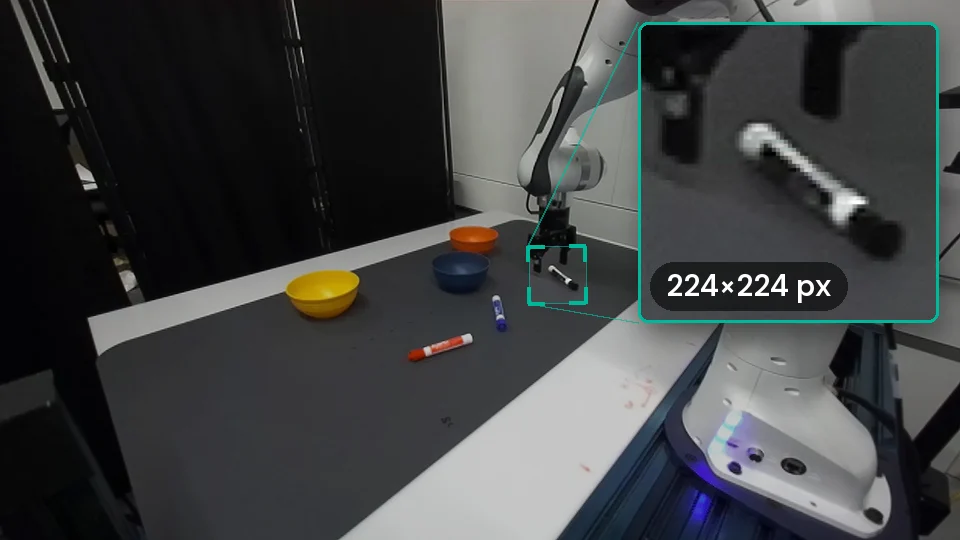
The selected region need not remain centered on the hand. During approach, grasping and placement, different parts of the scene become useful. Predicting the next interaction region allows the observation strategy to change with the task.
In the paper's encoder, a 224×224 image becomes a 16×16 grid of patch tokens. A small object may occupy only a few tokens in the resized full view. Cropping the source image lets the same grid represent much finer local detail. The method reallocates visual resolution rather than sending every source pixel through the transformer.
3. Architecture: one observation, two output branches
FoveaVLA builds on π0.5. Its PaliGemma backbone combines a SigLIP visual encoder and a Gemma language model. A separate action expert generates continuous action chunks through flow matching. FoveaVLA also uses the language-model output head to generate bounding boxes through PaliGemma's existing location tokens.
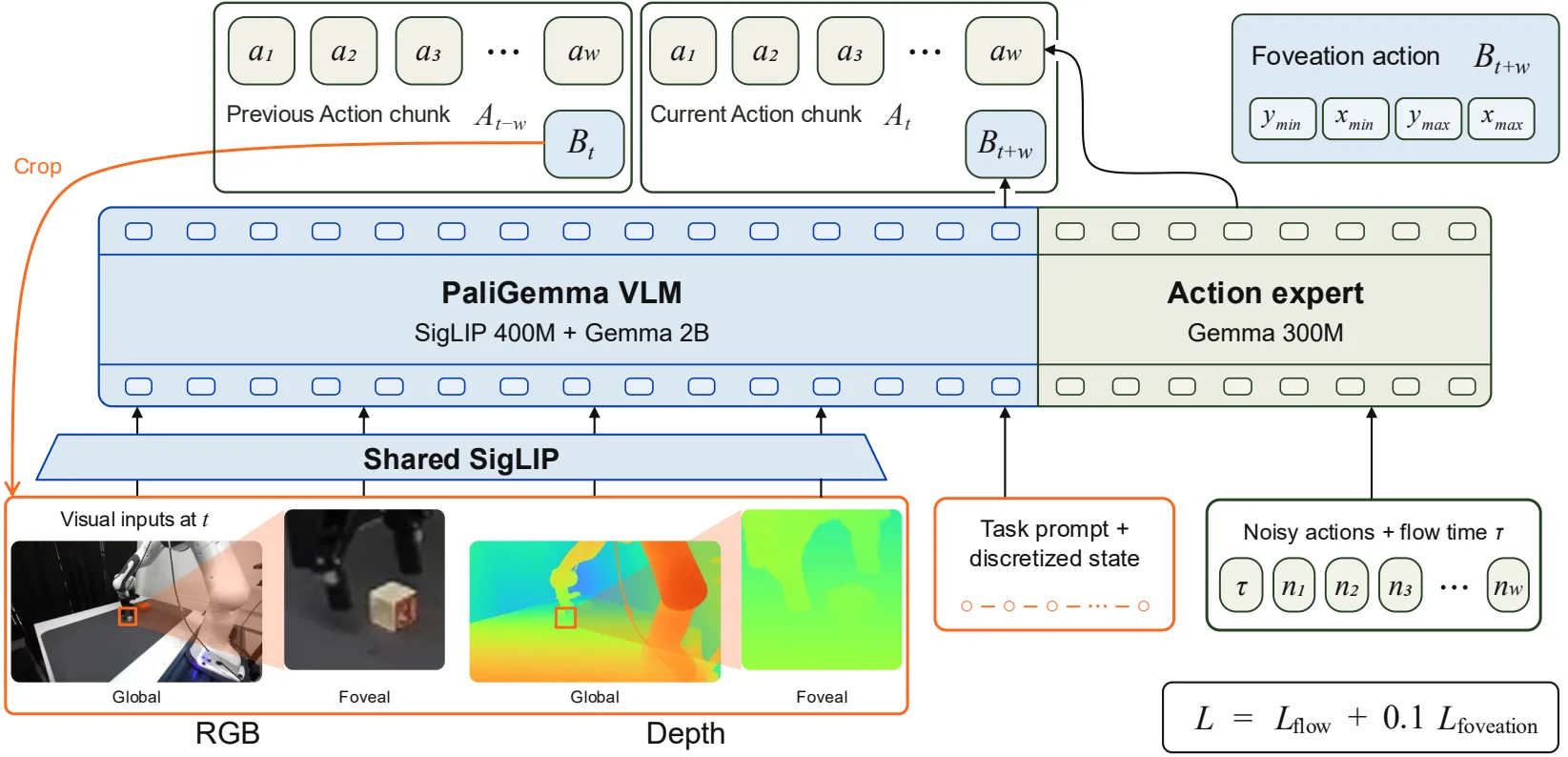
Joint positions, gripper state, RGB-D streams and the language instruction form a shared observation prefix. Processing then follows this sequence:
- The action expert predicts a chunk of 16 actions.
- The language-model head predicts the interaction box eight control steps ahead.
- The controller executes only the first eight actions before requesting another observation.
- The predicted box selects a crop from the newly captured image for the next policy query.
Coordinates use (y_min, x_min, y_max, x_max) order. Each coordinate is quantized into 1,024 bins on the resized and padded full view. Single generates four location tokens; Dual generates eight, with the physical-left camera's box preceding the physical-right camera's box. A familiar coordinate convention from another detector may be incompatible even when tensor dimensions appear correct.
The action and box branches share the observation representation but are masked from each other. The server returns the action chunk first. It then decodes box tokens from the cached prefix while the robot executes the chunk, preparing the crop selection before the next frame arrives. This avoids waiting for a fresh-frame detector solely to choose the crop. It does not eliminate policy inference or depth-estimation latency.
The first query uses full views as the initial foveal inputs because no previous prediction exists. Invalid predictions fall back to the last valid box for that view, or the full view if none exists. Keeping global context helps the system continue when a local prediction is imperfect.
4. Why depth matters
A sharp crop can show that a finger is beside an object without making their separation in depth unambiguous. The released system uses Fast-FoundationStereo to estimate disparity from rectified stereo pairs and converts it into metric depth using focal length and stereo baseline.
RGB and depth must remain aligned. Applying a crop to RGB requires applying the corresponding geometry to depth. The paper uses a fixed logarithmic depth encoding with a 0.2–3.0 m reference range and a color map so the visual encoder can process depth images. Patches with insufficient valid depth are masked. Independently normalizing every frame by its minimum and maximum would change what a color means over time and depart from this representation.
The real-world benchmark places external cameras without extrinsic calibration to the robot. That does not remove the need for stereo calibration. Intrinsics and baseline are still required to recover metric depth. Camera-to-robot extrinsics and calibration between a stereo camera's two imagers solve different problems.
5. Install the policy server
The official installation instructions require Linux, Python 3.11, an NVIDIA GPU and uv. The server environment occupies approximately 8 GB of disk, each pretrained checkpoint approximately 12.4 GB, and model serving uses approximately 13 GB of GPU memory. Leave additional room for caches and runtime allocations. Inference memory usage is not a training-memory estimate.
Run these commands on the GPU server:
git clone https://github.com/Stanford-TML/FoveaVLA.git
cd FoveaVLA
uv venv --python 3.11
uv sync --locked
scripts/setup_fast_foundation_depth.sh
The locked environment preserves the project's dependency versions. The final script prepares the depth stack. If installation fails, inspect the first relevant error before upgrading unrelated packages: robotics environments often depend on specific combinations of Python, CUDA and camera SDK versions.
Download and serve Single:
MODEL=foveavla_single
uv run scripts/download_checkpoint.py --model="$MODEL"
XLA_PYTHON_CLIENT_MEM_FRACTION=0.70 \
  uv run scripts/serve.py --model="$MODEL"
Weights default to checkpoints/foveavla_single, and the server listens on port 8000. XLA_PYTHON_CLIENT_MEM_FRACTION controls XLA's GPU memory allocation fraction; it does not shrink the model. Check nvidia-smi for competing processes before attributing an out-of-memory error to broken weights.
For Dual, set MODEL=foveavla_dual and download its checkpoint. The server configuration and client camera inputs must agree. Connecting a second camera does not turn a Single checkpoint into Dual.
6. Create a separate Python 3.10 robot client
The deployment guide separates the robot client from the Python 3.11 server. The client uses Python 3.10, ZED SDK 5.1.2, the ZED Python API and DROID. Both environments can live on the same workstation, but their dependencies should remain separate.
First complete the DROID host setup for the Franka, NUC and workstation. This includes configuring IP addresses, robot type and serial number in droid/misc/parameters.py. Use the DROID commit and Python version specified by FoveaVLA instead of the older environment in the general guide:
# Run from the FoveaVLA repository root.
git clone https://github.com/droid-dataset/droid.git .runtime/droid
git -C .runtime/droid checkout 33ae6a67274f36d2e29525b86f23a56616ef43a7
git -C .runtime/droid submodule update --init --recursive
conda create -n foveavla_droid python=3.10
conda activate foveavla_droid
Install ZED SDK 5.1.2, its Python API, and the remaining DROID dependencies. Then install the FoveaVLA client:
scripts/setup_droid_client_env.sh
The script pins numpy<2 for DROID's OpenCV and applies supplied patches. It rejects an unexpected DROID commit or an environment importing DROID from another location. If this check fails, inspect the active environment and import path. Bypassing the version check makes later camera and controller failures harder to diagnose.
7. Run inference and inspect a rollout
Before launching, confirm that DROID can reset the robot, the camera serial is correct, the server is ready and the workstation can reach port 8000. Clear the workspace and prepare the emergency stop for the first trial. The following client command resets the robot and begins motion:
LD_LIBRARY_PATH=/usr/local/zed/lib${LD_LIBRARY_PATH:+:$LD_LIBRARY_PATH} \
  python examples/droid/main.py \
  --left-camera-id=YOUR_LEFT_ZED_SERIAL \
  --instruction="Place the blue block in the box" \
  --remote-host=SERVER_IP --remote-port=8000 \
  --debug
Replace the serial and server address. For Dual, also provide --right-camera-id=YOUR_RIGHT_ZED_SERIAL, assigning the devices in physical-left then physical-right order. Start with a clearly identifiable object and destination before introducing several visually similar distractors.
Press Ctrl+C to stop the client. With --debug, the default output directory is outputs/rollouts/. Each rollout includes rollout.mp4, a crops/ directory and queries.jsonl. The debug video records one frame per policy query rather than every control step. It shows camera views, crop boxes, foveal inputs, depth, gripper state and timing.
If the robot selects the wrong object, check whether its crop contains the feature or color distinguishing the target. If it selects correctly but misses the grasp, inspect depth alignment and calibration. If execution pauses between chunks, inspect timing and network behavior. The client also exposes --max-timesteps, defaulting to 900, and --gripper-timeout-s, defaulting to 2.0 seconds. Increasing a timeout does not repair an unresponsive gripper.
8. Prepare data for post-training
Skip this section when using pretrained checkpoints. Reproducing training requires DROID RLDS 1.0.1, raw DROID metadata and trajectories, external-camera MP4/SVO recordings, RoboInter annotations and the OpenPI non-idle filter. The official data preparation guide advises allocating several terabytes for source data plus additional storage for crops and depth.
RoboInter identifies components involved in annotated primitive skills. The preparation pipeline constructs the smallest enclosing rectangle around required components, such as the gripper, manipulated object and target region. It pairs the observation at the current time with a box at t+8 as the prediction target. This supplies future interaction supervision from demonstrations rather than arbitrary detection boxes.
Complete the source download and complete-episode selection in steps 1–2 of the data guide first. Episode selection creates data/keys_foveavla_single.txt and checks the required views and SVO files. Downloading RLDS alone is insufficient. Then use the server's Python 3.11 environment:
uv sync --locked --group rlds
MODEL=foveavla_single
PREPARED_DIR="data/processed/${MODEL}"

uv run --no-sync scripts/prepare_data.py \
  --model="$MODEL" \
  --qsheet=data/RoboInter-Data/RoboInter_Data_Qsheet.json \
  --annotation-lmdb=data/RoboInter-Data/Annotation_pure/annotations \
  --raw-droid-root=data/raw \
  --keys-file="data/keys_${MODEL}.txt" \
  --rlds-filter=data/droid_sample_ranges.json \
  --output-dir="$PREPARED_DIR" --workers=8
Install ZED SDK 5.1.2 and its Python 3.11 API on the depth-preparation machine. Follow step 4 of the data guide to download calibration files for the selected camera serials into data/zed_settings/SN<serial>.conf. Then generate depth:
uv run --no-sync scripts/prepare_depth.py \
  --model="$MODEL" \
  --foveal-repack-dir="${PREPARED_DIR}/foveal" \
  --output-dir="${PREPARED_DIR}/depth" \
  --zed-settings=data/zed_settings
Expected outputs include annotations/, foveal/, depth/left/ and depth/paired_rlds_sample_ranges.json. Dual additionally requires depth/right/ and its own prepared output directory. RGB crops, depth and RLDS samples must refer to matching frames. Equal image dimensions do not establish temporal alignment.
9. Train action generation and future foveation together
The paper combines flow-matching loss for action generation with teacher-forced cross-entropy for box tokens: L_flow + 0.1 * L_foveation. Both update the shared backbone. Training perturbs crop centers and scales, sometimes replaces crops with full views, and independently drops depth streams with probability 0.1. These augmentations help bridge ideal training annotations and imperfect closed-loop predictions.
The training guide specifies eight GPUs, global batch size 256, 100,000 steps and learning rate 5e-5 by default. The paper uses eight NVIDIA H100 GPUs. The number of devices is configurable, but a GPU capable of serving the model is not automatically capable of full training.
export FOVEAVLA_DATA_ROOT="$(pwd)/${PREPARED_DIR}"
export FOVEAVLA_RLDS_DIR="$(pwd)/data/rlds"
export WANDB_API_KEY="YOUR_WANDB_API_KEY"

uv run --no-sync scripts/train.py "$MODEL" \
  --exp-name=my_run --batch-size=256 --fsdp-devices=8
Set your W&B key in the shell environment rather than source files. Use absolute paths for the prepared data and RLDS roots. On the first run, training downloads the π0.5 base weights and DROID normalization statistics. Those statistics are included in training checkpoints. Replacing them with statistics from an unrelated dataset changes the recipe.
Checkpoints are saved every 5,000 steps beneath checkpoints/<model>/<exp-name>/<step>/. Resume by adding --resume to the original command while retaining the experiment name and training settings. To serve trained weights, provide an existing step directory:
XLA_PYTHON_CLIENT_MEM_FRACTION=0.70 \
  uv run --no-sync scripts/serve.py \
  --model="$MODEL" \
  --checkpoint="checkpoints/$MODEL/my_run/99999"
The final step 99999 follows the documentation example; change it if your run stopped elsewhere. For one GPU, the guide specifies --fsdp-devices=1 and an appropriate batch size. Such changes can affect optimization, runtime and reproducibility, so record them with evaluation results.
10. Results and their practical limits
Table I evaluates four real-world task suites with 12 shared instances each: 48 trials per policy on DROID hardware. The following values are success percentages reported by the authors, not measurements made for this tutorial.
| Task suite | Wrist-equipped π0.5 | FoveaVLA-Single | FoveaVLA-Dual |
|---|---|---|---|
| Plain Pick-and-Place | 100.0 | 100.0 | 100.0 |
| Pick-and-Place with Distractors | 25.0 | 58.3 | 50.0 |
| Fold/Unfold | 41.7 | 50.0 | 75.0 |
| Move with far objects | 41.7 | 75.0 | 83.3 |
| Overall | 52.1 | 70.8 | 77.1 |
Using the rounded table values, Single gains 18.7 percentage points and Dual gains 25.0 percentage points over the wrist-equipped baseline. Dual does not win every suite: Single performs better with distractors. With only 12 instances per suite, one successful trial changes the reported rate by roughly 8.3 percentage points. Small differences should not be treated as universal guarantees.
The ablations are especially relevant to deployment. Blacking out the wrist image of the trained baseline gives 0% success. A retrained single external RGB view reaches 6.3%; adding depth without crops remains at 6.3%. FoveaVLA-Single with crops but no depth reaches 20.8%, while crops and depth together reach 70.8%. The practical lesson is to preserve local detail and geometric information when replacing the wrist view.
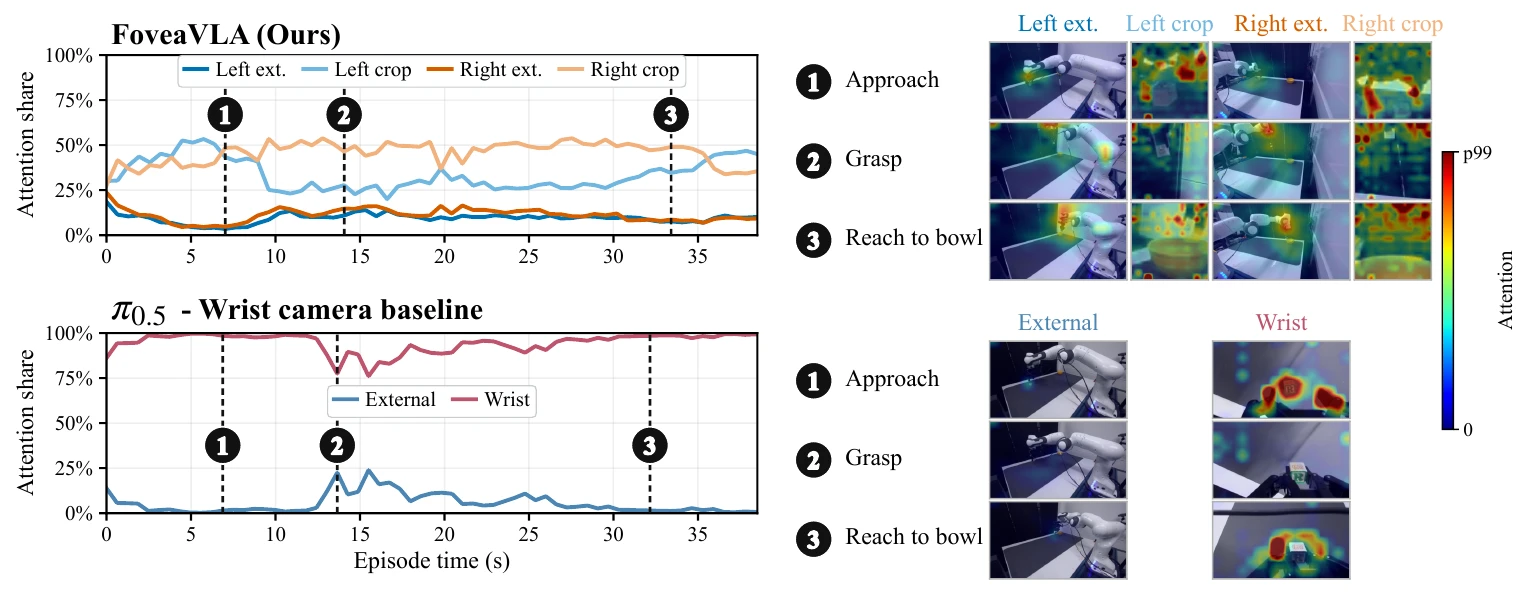
The attention visualization shows one Move episode. The baseline relies heavily on the wrist view, whereas FoveaVLA retains attention on external full views and obtains detail from crops. Each model's colors are normalized separately, so brightness cannot be compared directly across panels as a measure of stronger attention.
The paper also reports zero-shot MolmoSpaces evaluation: Dual averages 22.4%, compared with a 17.8% published π0.5-DROID leaderboard reference. FoveaVLA uses adapted external camera views and simulator-provided depth; the reference differs in camera layout, input resolution and depth availability. These results demonstrate initial transfer, but they do not isolate foveation in a controlled comparison.
11. A practical first experiment
Begin with Single, one correctly identified ZED and an uncluttered task involving a distinctive object. Inspect whether the predicted crop follows the interaction through approach, grasp and placement. Check that depth remains aligned and valid near contact before introducing distractors or adding another viewpoint.
For an evaluation on your own bench, define scenes, instructions, time limits, success criteria and trial counts before collecting results. Keep conditions consistent across configurations. A successful demonstration video establishes that one episode worked; deployment reliability requires repeated measurements on the actual hardware and tasks you intend to use.
Sources and implementation references
- FoveaVLA paper on arXiv: method, experiments, ablations and evaluation appendices.
- Stanford TML project page: rollouts, interactive explanations and technical media used here.
- Official source repository: installation, checkpoints and implementation. Code is Apache-2.0; consult NOTICE and the Gemma notices for underlying components.
- Data preparation, training and deployment: complete procedures and version requirements.