Why a successful grasping demo is not enough
A robot receives an instruction, picks up a cup, and hangs it on a rack. The demonstration looks convincing. But what happens after the lighting changes, the target disappears under a cover, or the instruction requires several consecutive operations? Choosing a Vision-Language-Action policy requires repeatable measurements, visible failures, and a clear description of what was trained.
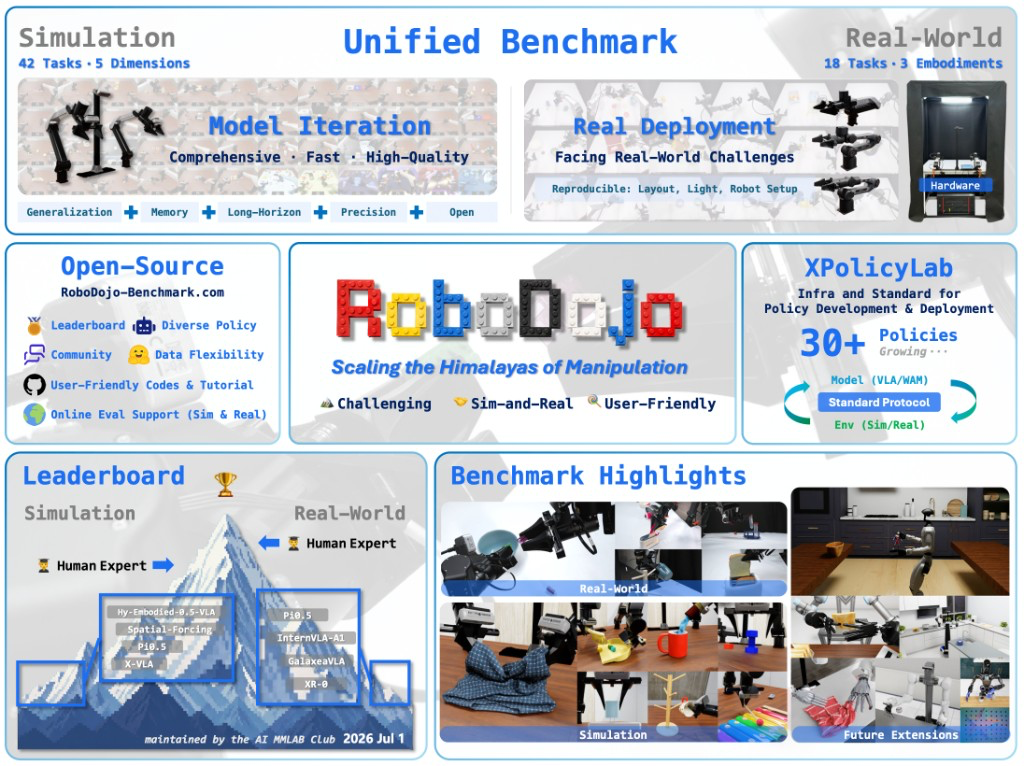
RoboDojo provides 42 simulation manipulation tasks and 18 physical tasks. XPolicyLab connects different policies to the evaluation environment while preserving their individual dependency stacks. This tutorial explains how to build a local evaluation workflow for π0.5, SmolVLA, and GR00T-N1.7, the particular GR00T version represented in the results discussed here.
Commands were checked against public documentation and scripts on October 11, 2026. Published results below belong to the benchmark authors; VnRobo has not independently executed these experiments. One distinction matters immediately: the paper labels SmolVLA Single Task. That row must not be described as a multitask checkpoint trained under identical conditions to the other models.
1. The research idea: measure distinct capabilities
A benchmark that only rearranges objects on a table can hide weaknesses in memory, contact control, and task composition. RoboDojo organizes evaluation around five capabilities. The official simulation task catalog explains their instructions and task conditions.
| Dimension | Tasks | What it tests | Examples |
|---|---|---|---|
| Generalization | 12 | Whether manipulation survives scene changes | stack_bowls, fold_clothes |
| Memory | 6 | Whether earlier observations guide later actions | cover_blocks, swap_T |
| Precision | 8 | Accurate placement and contact interaction | insert_tubes, deposit_coin |
| Long-Horizon | 8 | Successful composition of multiple operations | organize_table, fill_egg_holder |
| Open | 8 | Tasks without task-specific training demonstrations | solve_equation, pour_by_language |
Consider cover_blocks: after covering colored blocks, the robot must act using their previously observed colors. The current image alone cannot supply all the information. In insert_tubes, identifying the tube is only the beginning; orientation and final placement must match the rack. In organize_table, an early mistake can invalidate later steps even if each individual skill sometimes works.
Open tasks are evaluation-only in the benchmark's task data split. Adding demonstrations from those exact tasks to fine-tuning would change the experiment. Keep the intended split intact and document additional data rather than calling that modified setup open generalization.

Image source: the paper's simulation task overview. The featured image uses a separate project teaser from the RoboDojo README.
2. Architecture: separate simulation from policy inference
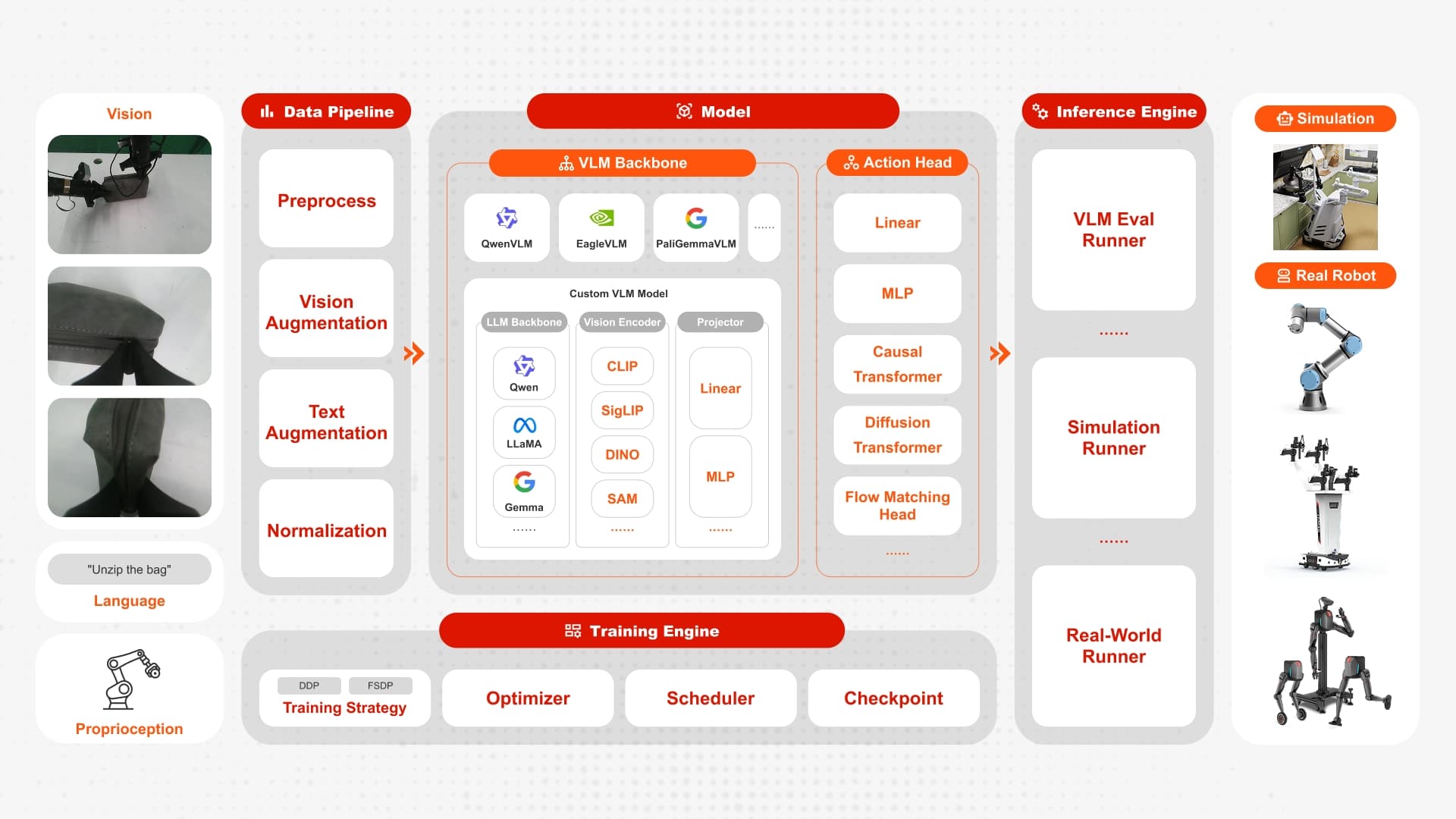
The simulator creates the robot, objects, cameras, and task conditions. The policy server runs the model. The environment sends images, robot state, and an instruction; the adapter converts them into the model's inputs and returns an action chunk. The simulator executes actions and obtains new observations.
Isaac Sim / Isaac Lab
  scene + robot + cameras + task success checker
                 |
       observation / instruction
                 v
XPolicyLab client <--- WebSocket ---> policy server
                                      |
                               model adapter
                                      |
                         π0.5 / SmolVLA / GR00T
                                      |
                               action chunk
                 <--------------------+
XPolicyLab defines shared methods including update_obs, get_action, their batched counterparts, and reset. Resetting clears policy state between episodes. A memory policy that retains the previous episode's information can produce invalid measurements even when the simulator correctly resets its scene.
Environment isolation also prevents dependency conflicts. The π0.5 adapter uses uv-managed OpenPI, SmolVLA uses a LeRobot conda environment, and GR00T-N1.7 has its own uv stack. Installing every model into the Isaac Sim environment is likely to create version conflicts and makes failures harder to diagnose.
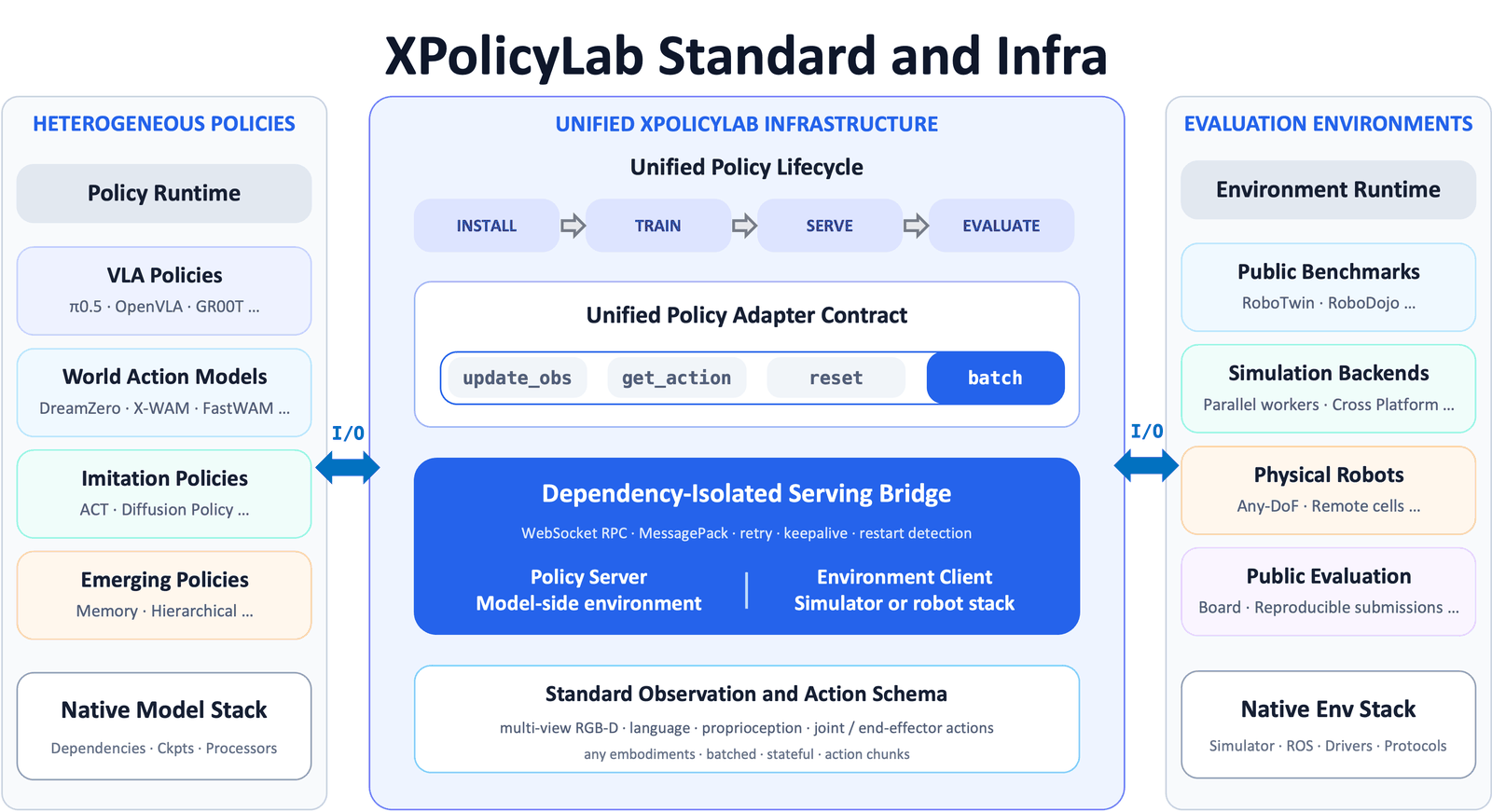
Image source: assets/infra.png in XPolicyLab.
What distinguishes the three policies?
π0.5 combines visual and language understanding with continuous action generation. The public OpenPI implementation supports the flow matching head for both training and inference: conditioned on observations, the model learns to transform noisy actions into executable action sequences. This is different from merely generating a textual plan. See the official OpenPI repository.
SmolVLA targets a smaller computational footprint with a compact vision-language backbone and an action expert. Its efficiency mechanisms include reducing visual tokens, and its broader deployment design supports asynchronous inference. Check the actual benchmark adapter before claiming a particular run enables asynchronous execution. A model feature and an evaluation setting are separate things. The Hugging Face architecture explanation provides the original design context.
GR00T-N1.7 is NVIDIA's foundation policy version used here. The examined integration defaults to nvidia/GR00T-N1.7-3B and includes a separate Cosmos configuration. Its modality configuration and embodiment_tag determine how images, state, and actions correspond to the benchmark robot. Results for N1, N1.5, and N1.7 should remain distinct. See the GR00T_N17 adapter.
3. Prepare a machine and install the simulator
The RoboDojo installation guide recommends Ubuntu 22.04 x64, at least 32 GB RAM, an NVIDIA GPU with at least 16 GB VRAM, Linux driver 570 or 580, and CUDA 12.8. These describe the simulation environment; they do not guarantee enough memory for full fine-tuning of every VLA model.
For context, OpenPI's single-GPU estimates exceed 22.5 GB for LoRA fine-tuning and 70 GB for full fine-tuning. Running simulation and inference on the same GPU adds their memory demands. Start with one episode, inspect memory consumption, and only then increase concurrency or choose a larger training configuration.
On your benchmark workstation, use a dedicated working directory:
sudo apt install libvulkan1 mesa-vulkan-drivers vulkan-tools git-lfs
vulkaninfo | head
git lfs install
git clone https://github.com/RoboDojo-Benchmark/RoboDojo.git
cd RoboDojo
bash scripts/install.sh -i
conda activate RoboDojo
bash scripts/init_assets.sh
python utils/update_embodiment_config_path.py
bash scripts/robodojo.sh doctor
bash scripts/robodojo.sh dimensions
The installer creates the environment and installs dependencies. The asset script retrieves the simulation assets. The Python utility updates robot configuration paths to the local asset location. Skipping that last step can produce missing USD errors even after a successful download. Repeat the path update if you move the repository.
The current installer updates submodules from their remotes. Record the actual RoboDojo and XPolicyLab revisions after installation, alongside dataset and checkpoint versions. The README reports September 16–17 fixes for observation alignment and RGB channel ordering and requires XPolicyLab commit bb9a0b5 or later for the corresponding update. Mixing new code with old data can make an integration problem look like poor model performance.
4. Choose data and verify action alignment
Downloading the entire dataset is unnecessary for an initial wiring check. The downloader lists a demo bundle of roughly 1.5 GB, joint-only LeRobot v3.0 data of roughly 120 GB, and full simulation HDF5 data of roughly 523 GB. The depth export is approximately 4.5 TB, which is an expensive starting point for RGB evaluation. These estimates come from the official data download script.
# From the RoboDojo root; select data for your intended workflow.
bash scripts/RoboDojo/download_data.sh huggingface demo

# Prepared joint-only data for compatible training workflows:
bash scripts/RoboDojo/download_data.sh huggingface lerobot_v3.0
The demo is a small bundle, not a promise that every training task is present. Inspect its contents before using it as a source. The π0.5 conversion example below requires raw HDF5 demonstrations for its selected task. Downloading a prepared LeRobot export does not automatically satisfy every adapter's raw-data conversion path.
Official LeRobot camera keys are observation.images.cam_high, observation.images.cam_left_wrist, and observation.images.cam_right_wrist. SmolVLA renames them internally at load time, so preserve the official on-disk keys. State and action fields must also match the selected control mode.
In simulation HDF5, state[t] represents the current state and action[t] is an absolute target for the next frame. Shared joint and gripper fields follow action[t] = state[t+1], with final-frame padding. Do not subtract state again if the adapter expects an absolute joint target. End-effector poses have a documented quaternion convention and coordinate frame; conventions from another dataset are not interchangeable.
Before training, watch the three camera previews, read the instruction, and inspect several state/action rows. If the left arm visibly moves while the right arm's joint values change, resolve the mapping first. A short inspection can prevent a long training run from learning a systematically incorrect relationship.
5. Training workflows and the published protocol
There are two useful starting points: download a benchmark checkpoint to validate evaluation, or fine-tune a foundation checkpoint using demonstrations. The first route separates deployment debugging from training expenditure.
# From the root; the corresponding policy adapters must already exist.
bash scripts/RoboDojo/download_ckpt.sh huggingface Pi_05
bash scripts/RoboDojo/download_ckpt.sh huggingface SmolVLA
bash scripts/RoboDojo/download_ckpt.sh huggingface GR00T_N17
The downloader checks policy names and remote folders. If the selected mirror lacks a checkpoint, it fails rather than silently producing usable weights. Inspect each adapter's checkpoints directory after downloading and select the actual run folder and training step.
π0.5: convert within the OpenPI environment
The Pi_05 README documents HDF5-to-LeRobot conversion and source task selection. This is a single-task learning exercise, requiring raw stack_bowls demonstrations beforehand:
cd XPolicyLab/policy/Pi_05
bash install.sh
bash process_data.sh RoboDojo stack_bowls arx_x5 joint
bash train.sh RoboDojo stack_bowls arx_x5 joint 0 0
The conventional run name is RoboDojo-stack_bowls-arx_x5-joint-0. The final argument selects the training GPU; the preceding zero is the seed. This exercise does not reproduce the paper's multitask π0.5 row. Multitask training requires the intended demonstration set, an appropriate dataset repo ID, and compatible values for OPENPI_TRAIN_CONFIG_NAME and OPENPI_LEROBOT_REPO_ID.
SmolVLA: use the LeRobot v3.0 dataset
The SmolVLA README has no top-level process_data.sh. Its training script consumes a dataset repo ID, mapping a task name to identifiers such as RoboDojo_sim_build_tower_v30. Make the corresponding export available through HF_LEROBOT_HOME, or set SMOVLA_REPO_ID to your real dataset.
cd XPolicyLab/policy/SmolVLA
bash install.sh
# Run only after the repo ID and cache contain the correct build_tower data.
bash train.sh RoboDojo build_tower arx_x5 joint 0 0
LeRobot checkpoints include nested training-step artifacts. Check checkpoint_num in deploy.yml: evaluating a different step changes the model even when the outer run name remains identical. Keep that distinction in experiment records.
GR00T-N1.7: conversion and modality configuration
The GR00T adapter requires GR00T_LEROBOT_HOME to point to the dataset parent directory. Its documented processing path copies a prepared v3.0 export and downgrades it to v2.1. For arx_x5, the default source dataset is RoboDojo_sim_arx-x5_v30.
cd XPolicyLab/policy/GR00T_N17
bash install.sh
export GR00T_LEROBOT_HOME=/absolute/path/to/lerobot/datasets
bash process_data.sh RoboDojo cotrain arx_x5 joint
bash train.sh RoboDojo cotrain arx_x5 joint 0 0
Replace the illustrative absolute path with your actual location. The converter accepts expert_data_num for compatibility but does not use it to subset episodes. A 50-demonstration ablation needs an actual subset dataset supplied through GR00T_SRC_DATASET. Naming a run “50ep” does not reduce its training data.
The paper reports the following simulation recipes, separately from the small exercises above:
| Policy | Batch size | Training steps | Important detail |
|---|---|---|---|
| π0.5 | 256 | 60,000 | Fine-tuned from pi05_base |
| SmolVLA Single Task | 512 | 100,000 | Preserve the single-task designation |
| GR00T-N1.7 | 640 | 100,000 | Match embodiment and modalities |
Source: RoboDojo paper, Appendix K. Different batch sizes, optimization budgets, and task scopes mean this is not a controlled architecture-only comparison. Changing to LoRA or a smaller batch is legitimate experimentation, but it creates a different recipe that should be reported explicitly.
6. Inference: one episode before the full benchmark
First inspect deploy.yml: checkpoint selection, camera transforms, action mode, and environment must agree. π0.5 accepts uv for its policy environment; SmolVLA normally uses the smolvla conda environment; GR00T can also use uv. The examples use joint, requiring compatible absolute joint actions in data and checkpoints.
The following evaluates the single-task π0.5 checkpoint trained above. For downloaded weights, substitute the actual run name and confirm its deployment settings.
# Return to the RoboDojo root before running this command.
export EVAL_ENV_TYPE=sim
bash scripts/robodojo.sh eval \
  --policy-dir XPolicyLab/policy/Pi_05 \
  --task stack_bowls \
  --ckpt RoboDojo-stack_bowls-arx_x5-joint-0 \
  --policy-env uv --eval-env RoboDojo \
  --env-cfg arx_x5 --action-type joint \
  --seed 0 --policy-gpu 0 --env-gpu 0 \
  --eval-num 1 --dry-run
The dry run prints dispatch arguments without running inference. Remove --dry-run after checking them. Watch the episode video: do the correct arm and gripper move, and are the cameras correct? A completed process demonstrates functioning execution; it does not necessarily demonstrate successful manipulation.
After a smoke test, select a checkpoint appropriate for the entire benchmark. This next command is a template: replace the uppercase directory and checkpoint values with your actual policy and run.
bash scripts/robodojo.sh benchmark \
  --policy-dir XPolicyLab/policy/POLICY_DIRECTORY \
  --ckpt ACTUAL_CHECKPOINT_NAME \
  --policy-env uv --eval-env RoboDojo \
  --env-cfg arx_x5 --action-type joint \
  --seed 0 --eval-num native
bash scripts/robodojo.sh summarize
Use --policy-env smolvla when evaluating the default SmolVLA conda setup. native uses per-task episode counts, whereas one or five episodes are debugging settings. Inspect the runnable inventory with dimensions: Generalization's _random variants can make the dispatch list longer than the 42 conceptual tasks.

Image source: the paper's heterogeneous parallel simulation figure.
Parallel simulation reduces waiting time but consumes additional GPU memory. Begin sequentially, then use the multi-GPU options described in Quick Evaluation. Extra CPU cores alone do not guarantee useful throughput when rendering and policy inference compete for the GPU.
7. Results: distinguish score from success rate
This table reproduces the paper snapshot dated July 3, 2026, not the live ranking on this article's publication date. Each cell is score / success rate. Score captures task-defined progress, while success rate measures complete task success.
| Policy | Generalization | Precision | Long-Horizon | Memory | Open | Average |
|---|---|---|---|---|---|---|
| π0.5 | 13.37 / 8.17% | 12.40 / 5.50% | 23.54 / 14.67% | 5.78 / 4.56% | 1.98 / 1.67% | 11.41 / 6.91% |
| GR00T-N1.7 | 2.16 / 1.22% | 2.54 / 0.67% | 8.30 / 3.58% | 1.06 / 0.89% | 0.18 / 0.17% | 2.85 / 1.31% |
| SmolVLA Single Task | 1.69 / 1.22% | 2.87 / 0.33% | 1.22 / 0.25% | 3.35 / 2.44% | 0.00 / 0.00% | 1.83 / 0.85% |
Source: RoboDojo paper, Table 1. New entries are published on the official leaderboard. Keep their evaluation dates and recipes separate from this snapshot.
Average is the mean of the five capability dimensions. It is not simply total successes divided by every episode across all tasks. Because dimensions contain different numbers of tasks, those calculations have different weights and can give different results.
The paper describes three training seeds for most policies, with 50 trials per task for each seed. Generalization splits those trials into 25 standard and 25 randomized runs. Distinguish training seeds from evaluation layout seeds: three layouts evaluated with one checkpoint do not reproduce three independently trained policies.
π0.5 has the strongest Average among these three published rows, but a 6.91% success rate still indicates substantial limitations. It does not establish reliable deployment readiness. SmolVLA's Memory success rate exceeds GR00T's in this snapshot, while its Precision success rate is lower. Such differences motivate task-level investigation instead of a universal claim that one model dominates another in every situation.
8. Troubleshooting and fair comparisons
If every task fails immediately, investigate integration first. Use doctor for missing assets, examine policy-server logs for loading failures, verify the checkpoint step, inspect RGB previews, and confirm joint versus end-effector control and gripper ordering. Use the official JPEG decoder instead of adding an extra BGR/RGB conversion based on an OpenCV habit.
If early operations succeed but later ones fail, inspect action chunks and observation timing. Longer chunks may reduce inference calls while leaving the robot without fresh feedback for longer. That is a testable hypothesis, not a diagnosis established by one video. Keep the checkpoint fixed, change one setting, and rerun the same layout set.
A useful report records task coverage, asset and dataset versions, camera mapping, action mode, training recipe, checkpoint step, seeds, and trial counts. Then report scores, success rates, variability, latency, and VRAM consumption. Preserve failed rollouts alongside successful ones. Otherwise, a claim such as “π0.5 wins” cannot distinguish model effects from data or evaluation configuration.
For official publication, consult the current submission protocol. Local measurements are internal results until the project's verification process is satisfied. Simulation also cannot substitute for physical testing with the intended robot, camera geometry, and contact conditions.
For a beginner, the first milestone is one explainable episode with correct observations and actions. Then finish one task, evaluate one dimension, and expand to all 42 tasks under the intended protocol. Each increase in GPU expenditure should answer a concrete technical question, rather than simply producing a larger table.