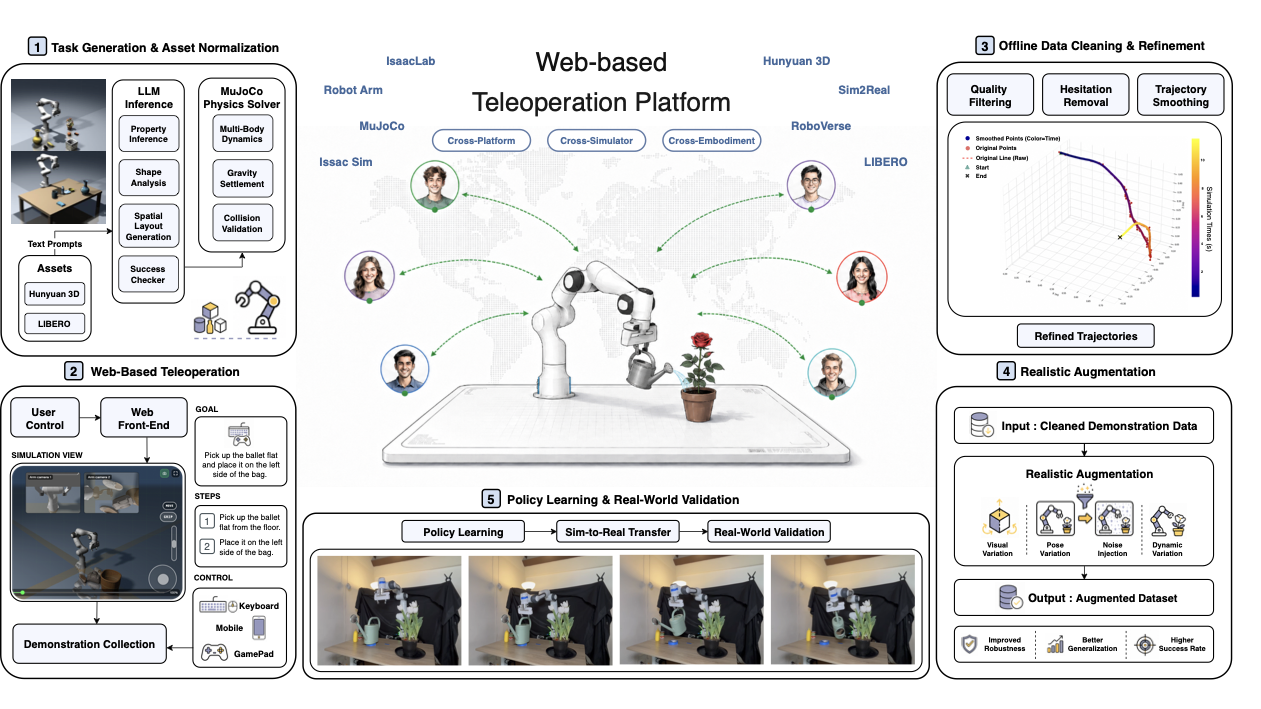
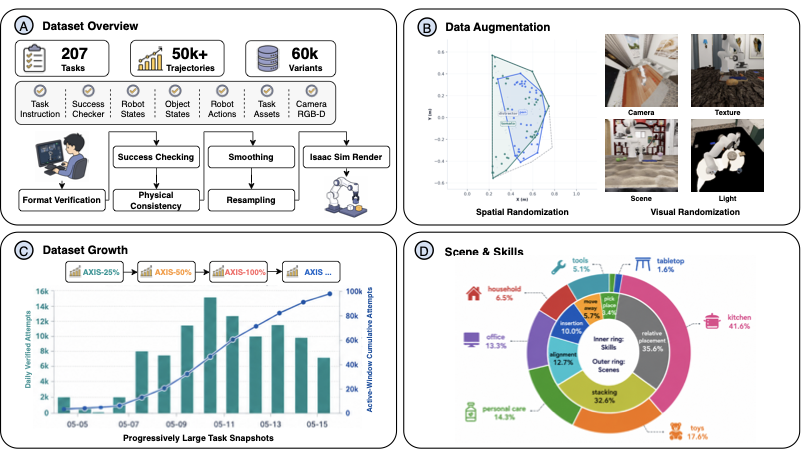
AXIS is a practical answer to a problem every manipulation team eventually hits: how do you create enough high-quality demonstrations for VLA training without buying many physical robots, building a complex teleoperation lab, or asking every contributor to install a heavy simulator? The original paper, AXIS: A Growable Community-Driven Data Engine for Scalable Robot Manipulation, proposes a growable data engine: tasks are generated and validated automatically, contributors teleoperate a Franka arm in the browser through MuJoCo-WASM, backend services run success checking, filtering, smoothing, resampling and IsaacSim augmentation, and the resulting data is used for continual pretraining and fine-tuning VLA models such as π0.5.
The important idea is not just "teleop in a web page." AXIS turns data collection into a lifecycle: generate tasks, collect demonstrations, clean them, normalize them, augment the domain, train policies, evaluate under a fixed protocol, then grow the dataset again with new snapshots. The official AXIS-V1 project page reports the paper snapshot as 207 tasks and 50K+ trajectories, while the live project page shows larger real-time platform numbers because collection continues after the paper release. The controlled-access dataset is hosted as axisrobotics/Franka-Dataset, and the Axis-V1-Training repository provides the training infrastructure for fine-tuning OpenPI π0.5 on AXIS-format LeRobot data.
If you already know LeRobot teleoperation data collection, you can view AXIS as a browser/cloud, benchmarked, data-cleaning-heavy version of the same core idea. If you care about π0.5 specifically, online RL work for VLA gives useful background on why a strong pretrained model still needs task-specific adaptation. For a broader manipulation VLA comparison, FineVLA-style instruction alignment is a useful companion because it focuses on more detailed task descriptions.
What Problem Does AXIS Solve?
Robot learning depends heavily on demonstrations. For manipulation, a useful demonstration must include image observations, robot state, object state, actions, language instructions, and success or failure information. Real robot data is accurate but expensive: you need the robot, cameras, an operator, safety space, calibration, and maintenance. Simulation data is cheaper, but if the tasks are fixed and the policies are scripted too cleanly, the resulting model learns a narrow distribution. AXIS chooses a middle ground: browser-based simulation teleoperation lets a broad contributor base create diverse demonstrations, while backend processing turns raw data into training-ready trajectories.
The paper describes three integrated layers. The infrastructure layer combines task generation with browser-based MuJoCo-WASM teleoperation. The dataset layer standardizes raw demonstrations, runs success validation, filters broken episodes, removes idle segments, smooths trajectories, resamples them, and rerenders or augments them through IsaacSim. The model layer trains and evaluates both conventional visuomotor imitation learning policies and modern VLA models using shared task definitions and success checkers. This is the key difference from a one-off demo repository: AXIS tries to make the dataset growable while keeping evaluation reproducible.
For a beginner, the pipeline is easiest to remember as:
Task specification
  -> browser teleoperation in MuJoCo-WASM
  -> raw trajectory upload
  -> success checking and filtering
  -> smoothing, resampling, trajectory normalization
  -> IsaacSim visual / physics augmentation
  -> LeRobot-style export
  -> OpenPI π0.5 continual pretraining or fine-tuning
  -> LIBERO-Plus and real-world rollout evaluation
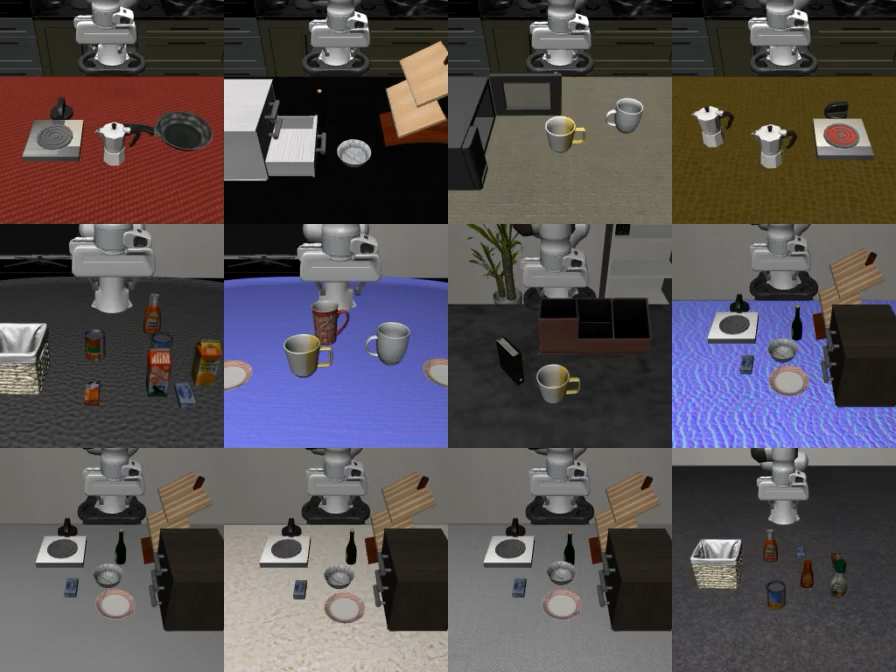
AXIS currently centers on a Franka Research 3 arm with a parallel-jaw gripper, so the tasks are tabletop manipulation: pick-and-place, stacking, pushing, pouring, articulated-object manipulation, and tool use. Each task has a language instruction, a parameterized scene configuration, task assets, and a structured success checker. That last item matters: without a success checker, you only have a nice-looking video; with a success checker, you can reject failed trajectories and evaluate policies with the same criterion.
Data Architecture
AXIS does not store only video. A useful episode needs enough information for replay, training, debugging, and evaluation:
| Component | Role |
|---|---|
| Language instruction | VLA prompt, such as "pick up the mug and place it on the tray" |
| Task metadata | Task id, scene variant, object assets, simulator version |
| Robot state | Joint positions, gripper state, pose or normalized state vector |
| Object state | Object poses and states for replay and success checking |
| Actions | Commands or target actions over a short horizon |
| Third-view RGB-D | External camera view of the full scene layout |
| Wrist RGB-D | Close-up camera view near contact and grasping |
| Success label | Automatic validation result or post-filtering label |
In the training repository, AXIS-format data is exported as LeRobot-v3 task folders named like task_*_isaac_state_train. The OpenPI patch reads those tasks from AXIS_CLEAN_ROOT. The source state/action representation is described as a 9D vector with two gripper qpos values and seven arm joints. The loader converts it online into a DROID-style interface: observation/joint_position, observation/gripper_position, third-view image, wrist image, prompt, and action. This is a pragmatic design choice. Instead of building a brand-new π0.5 policy stack for AXIS, the authors map AXIS data into a schema that OpenPI already handles well.
Installation Path
You do not need to clone the full AXIS website to understand or run the training path. There are four places to know:
- The paper and project page for the system design and reported results.
- The Hugging Face dataset card for access to the controlled dataset.
- The
Axis-V1-Trainingrepository for OpenPI π0.5 fine-tuning. - The
Physical-Intelligence/openpirepository for model code, policy serving, and training scripts.
The AXIS training environment uses conda and Python 3.10:
conda env create -f environment.yml
conda activate axis-train-infra
pip install -e .
python -m pytest -q
Then install OpenPI under third_party/openpi and apply the AXIS patch. The training README pins OpenPI to a specific commit so the patch applies cleanly:
mkdir -p third_party
git clone https://github.com/physical-intelligence/openpi.git third_party/openpi
cd third_party/openpi
git checkout c23745b5ad24e98f66967ea795a07b2588ed6c79
git apply --check ../../openpi_patches/axis_train_openpi.patch
git apply ../../openpi_patches/axis_train_openpi.patch
uv sync
If you are learning the stack for the first time, do not start with the full dataset. Run a smoke test with one task and a small sample count:
cd /path/to/Axis-V1-Training
export OPENPI_ROOT="$PWD/third_party/openpi"
export AXIS_CLEAN_ROOT="/path/to/axis/lerobot/root"
export OPENPI_AXIS_CLEAN_MAX_TASKS=1
export OPENPI_AXIS_CLEAN_MAX_SAMPLES_PER_TASK=64
The last two variables are not just conveniences. They help you catch dataset path issues, video decoding errors, state/action shape mismatches, timestamp problems, and normalization bugs before you spend real GPU time.
Browser Teleoperation Data Collection
From the contributor side, AXIS tries to keep the workflow lightweight: open the browser, choose a task, control the robot in a MuJoCo-WASM simulation with a commodity input device, watch simulator feedback, finish the task, and upload the trajectory. The contributor does not need a local GPU or an IsaacSim installation. This is why AXIS can be called community-driven: the bottleneck shifts from "who has a robot and workstation" to "who can spend time collecting useful demonstrations in a browser."
However, beginners should not interpret teleoperation as simply dragging the gripper to the goal. A good demonstration has clear intent and smooth motion:
- Start from an observable initial state instead of a messy reset.
- Move the end-effector along a short path while avoiding collisions.
- Close the gripper only when contact is reasonable.
- Avoid long pauses between subtasks.
- Avoid rapid back-and-forth jitter.
- End in a state the success checker can verify.
AXIS fixes part of this through backend processing: uploaded trajectories are validated, corrupted records are removed, idle segments are cut, and motion is smoothed and resampled. But input quality still matters. On the project page's trajectory refinement table, raw 5 Hz teleoperation has high jerk. After smoothing and resampling to 20 Hz, mean acceleration and mean jerk drop substantially, although replay success decreases from 100% to 86.2%. That is an important tradeoff: smoothing makes trajectories easier for learning, but overly aggressive smoothing can alter contact-sensitive behavior.
Cleaning and Augmentation
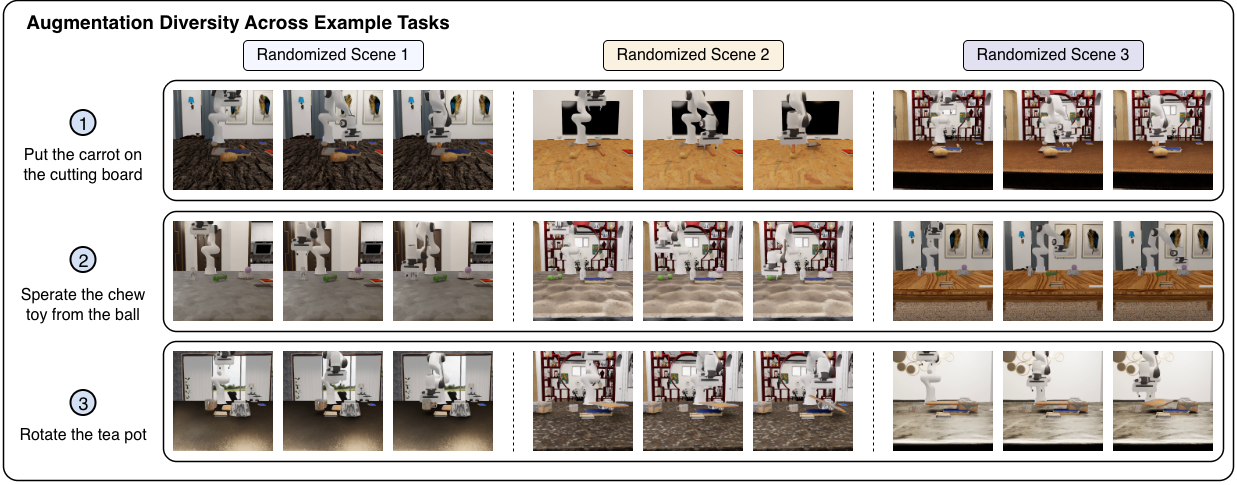
The data cleaning stage is one of the most useful parts of AXIS for teams building their own pipeline. Raw teleoperation naturally includes operator hesitation, camera/frame timestamp mismatch, low action sampling rate, gripper jitter, missing files, extra lead-in motion, and failed tasks that still look plausible in video. If you feed that directly into behavioral cloning, the policy learns the noise along with the skill.
AXIS uses success checkers first, then converts trajectories into a unified representation. The training patch shows that the loader selects valid task folders, reads meta/info.json, episode parquet files, data parquet files, third-person videos, and wrist videos. It downsamples frames, forms an action horizon, converts qpos into DROID-style state/action arrays, and computes normalization statistics specifically for the AXIS clean dataset. Debug controls such as OPENPI_AXIS_CLEAN_TASK_IDS, OPENPI_AXIS_CLEAN_MAX_TASKS, and OPENPI_AXIS_CLEAN_MAX_SAMPLES_PER_TASK let you shrink the dataset while debugging.
After cleaning comes augmentation. The project page describes randomization over scene, camera, lighting, texture, object pose, friction, mass, and dynamics. The paper appendix lists IsaacSim/IsaacLab rendering, ray-traced lighting, 256 x 256 resolution, a third-view camera, and a wrist camera. The camera randomization is not merely tiny jitter; the scene and randomization levels include USD scene composition, material variation, lighting shifts, and viewpoint changes. For a VLA policy, this is useful because the model must stay robust to camera shifts, sensor noise, background changes, and layout variation.
Fine-Tuning π0.5 With OpenPI
OpenPI provides base and fine-tuned checkpoints for π0, π0-FAST, and π0.5. Its README gives useful memory guidance: inference needs more than 8 GB VRAM, LoRA fine-tuning needs more than 22.5 GB, and full fine-tuning needs more than 70 GB, typically an A100 80GB or H100. A beginner should start with LoRA, run one small task, confirm that the loader works and loss moves in the right direction, then scale the data volume.
The AXIS training repository adds four important config names:
| Config | Use case |
|---|---|
pi05_axis_clean_local_droid_lora |
LoRA fine-tuning π0.5 on AXIS-format LeRobot data |
pi05_axis_clean_local_droid_full |
Full / continued-pretraining-style fine-tuning on AXIS |
pi05_libero_lora |
LoRA fine-tuning π0.5 on LIBERO |
pi05_libero |
Full fine-tuning or post-training on LIBERO |
A LoRA smoke test looks like this:
OPENPI_TRAIN_MODE=overwrite \
bash training/run_train_openpi.sh \
  pi05_axis_clean_local_droid_lora \
  axis_lora_smoke \
  --num-train-steps 100 \
  --checkpoint-base-dir "$PWD/checkpoints"
After the smoke test succeeds, increase the data gradually:
export OPENPI_AXIS_CLEAN_MAX_TASKS=10
export OPENPI_AXIS_CLEAN_MAX_SAMPLES_PER_TASK=1024

OPENPI_TRAIN_MODE=overwrite \
bash training/run_train_openpi.sh \
  pi05_axis_clean_local_droid_lora \
  axis_lora_v001 \
  --num-train-steps 5000 \
  --checkpoint-base-dir "$PWD/checkpoints"
For full or continued-pretraining-style fine-tuning:
OPENPI_TRAIN_MODE=overwrite \
bash training/run_train_openpi.sh \
  pi05_axis_clean_local_droid_full \
  axis_full_v001 \
  --num-train-steps 20000 \
  --checkpoint-base-dir "$PWD/checkpoints"
The distinction matters. LoRA freezes most of the backbone and trains adapters, so it uses less memory and is less likely to damage π0.5's visual-language prior. Full fine-tuning opens more parameters and is more appropriate when you have a large dataset and strong GPUs, but it is easier to overfit or weaken generalization if the recipe is poor.
Inference and Deployment
After training, load the checkpoint with the matching config and the matching normalization assets. A common mistake is copying only model weights and forgetting dataset-specific normalization statistics; this causes action scale errors. OpenPI supports creating a trained policy and calling policy.infer(example)["actions"]. For real deployment, OpenPI also supports policy serving: the model runs on a GPU server, while the robot runtime sends observations and receives action chunks remotely.
A practical inference loop has three layers:
Robot / simulator runtime
  -> collect third-view image, wrist image, robot state, prompt
  -> send observation to policy server
  -> receive short-horizon action chunk
  -> convert to controller command
  -> execute first action or small chunk
  -> repeat at control frequency
π0.5 often predicts a short action chunk instead of a single action. In Physical Intelligence's π0.5 blog, the model can predict a high-level semantic step in text and then a low-level motor command chunk. In the AXIS/OpenPI patch, the AXIS π0.5 config uses action horizon 15; in the paper appendix, LIBERO post-training uses action horizon 10. Do not assume every checkpoint has the same horizon, state dimension, or action semantics.
Results
The headline result is that continual pretraining on AXIS improves π0.5 on LIBERO-Plus. The project page reports:
| Pretraining | Overall LIBERO-Plus success |
|---|---|
| π0.5 vanilla | 83.9 |
| π0.5 + AXIS-25% | 84.7 |
| π0.5 + AXIS-50% | 85.7 |
| π0.5 + AXIS-100% | 88.8 |
| π0.5 + RoboCasa-matched | 57.5 |
Compared with vanilla π0.5, AXIS-100% improves the overall table score by about 4.9 points; the paper abstract describes the gain as 5.8% and reports that AXIS outperforms the RoboCasa365-matched baseline by 37.3%. The largest improvements show up under sensor noise, camera perturbations, robot pose changes, and background variation. That makes sense: AXIS adds not only more trajectories, but also controlled visual and physical perturbations.
The paper also includes qualitative real-world Franka rollouts for grasping and pick-and-place. During real-time inference, the policy receives RGB observations from a global camera and a wrist camera, plus continuous robot state, then predicts a short-horizon action chunk for the Franka controller. This does not mean sim-to-real is solved; the paper explicitly lists simulated Franka tabletop manipulation and sim-to-real transfer as current limitations. But it does show that browser-teleop data, after cleaning and augmentation, can produce checkpoints that are executable on a real robot setup.
Beginner Checklist
If you want to try the AXIS path without getting overwhelmed, follow this order:
- Read the project page and watch the browser collection and dataset overview media.
- Request access to the Hugging Face dataset if your use case is non-commercial research or education.
- Install
Axis-V1-Trainingand run its tests. - Install OpenPI at the pinned commit and apply the AXIS patch.
- Point
AXIS_CLEAN_ROOTto a few downloaded LeRobot-v3 task folders. - Run a smoke test with
OPENPI_AXIS_CLEAN_MAX_TASKS=1andOPENPI_AXIS_CLEAN_MAX_SAMPLES_PER_TASK=64. - Check video keys, state/action shapes, prompts, and normalization stats.
- Fine-tune LoRA for 100-1000 steps first.
- Increase dataset size and train steps only after save/load works.
- During inference, always use the matching config and normalization assets.
Common Pitfalls
The first pitfall is confusing raw teleoperation with training-ready data. The AXIS paper emphasizes backend refinement because raw demonstrations contain jitter, idle time, and corrupted records. If you collect browser data but skip filtering, the model will learn noisy operator behavior.
The second pitfall is action-space mismatch. AXIS source qpos is converted into DROID-style 8D actions. If your own robot uses end-effector pose, joint velocity, or a different delta action convention, you need a real transform, not just renamed columns.
The third pitfall is missing normalization. For VLA policies, state/action normalization controls command scale. AXIS and LIBERO post-training use separate normalization statistics, and those assets must travel with the checkpoint.
The fourth pitfall is expecting browser teleoperation to replace real robot evaluation. AXIS is excellent for scaling data and pretraining, but real deployment still requires camera calibration, latency control, safety limits, gripper tuning, and task-level evaluation on the physical robot.