A1 VLA: Deploy SOTA Vision-Language-Action on Franka/AgiBot with 72% Lower Latency
Imagine a robot arm trying to pick up an object. The robot's "brain" — the AI model — needs to think fast to command the arm. If it takes too long to decide, the arm has already moved past the target position. This is the VLA latency problem that researchers have struggled with for years.
In April 2026, ATeam Research published A1 on arXiv (2604.05672) — a fully open-source VLA model with a clever technical innovation: Inter-Layer Truncated Flow Matching. The results speak for themselves: up to 72% lower per-episode latency, up to 76.6% backbone computation reduction, while still achieving state-of-the-art performance on standard benchmarks.
This guide covers everything from A to Z: why A1 matters, how the architecture works, and how to install and run it on Franka Panda and AgiBot robots.
Background: Why Are VLA Models Still Slow?
Before diving into A1, it helps to understand why current VLA models are so slow in the first place.
A modern VLA typically uses a two-stage architecture:
- VLM backbone (7B params, e.g. PaliGemma or Qwen): processes camera images and language instructions → generates context embeddings
- Action head (usually Diffusion Policy or Flow Matching): takes embeddings → generates robot control sequences
The bottleneck is the iterative denoising in the action head. To generate one action sequence, the model must repeatedly run through denoising steps — and each step needs to run through the VLM backbone again. With 10 denoising steps and a 7B model on GPU, that's about 35ms × 10 = 350ms just to decide a single action. Way too slow for real-time robot control.
Previous solutions all have drawbacks:
- Fewer denoising steps: reduces action quality
- Consistency models: requires retraining from scratch
- Distillation: complex pipeline with information loss
A1 takes a completely different approach, exploiting the internal structure of the VLM backbone itself.
A1 VLA: The Core Idea
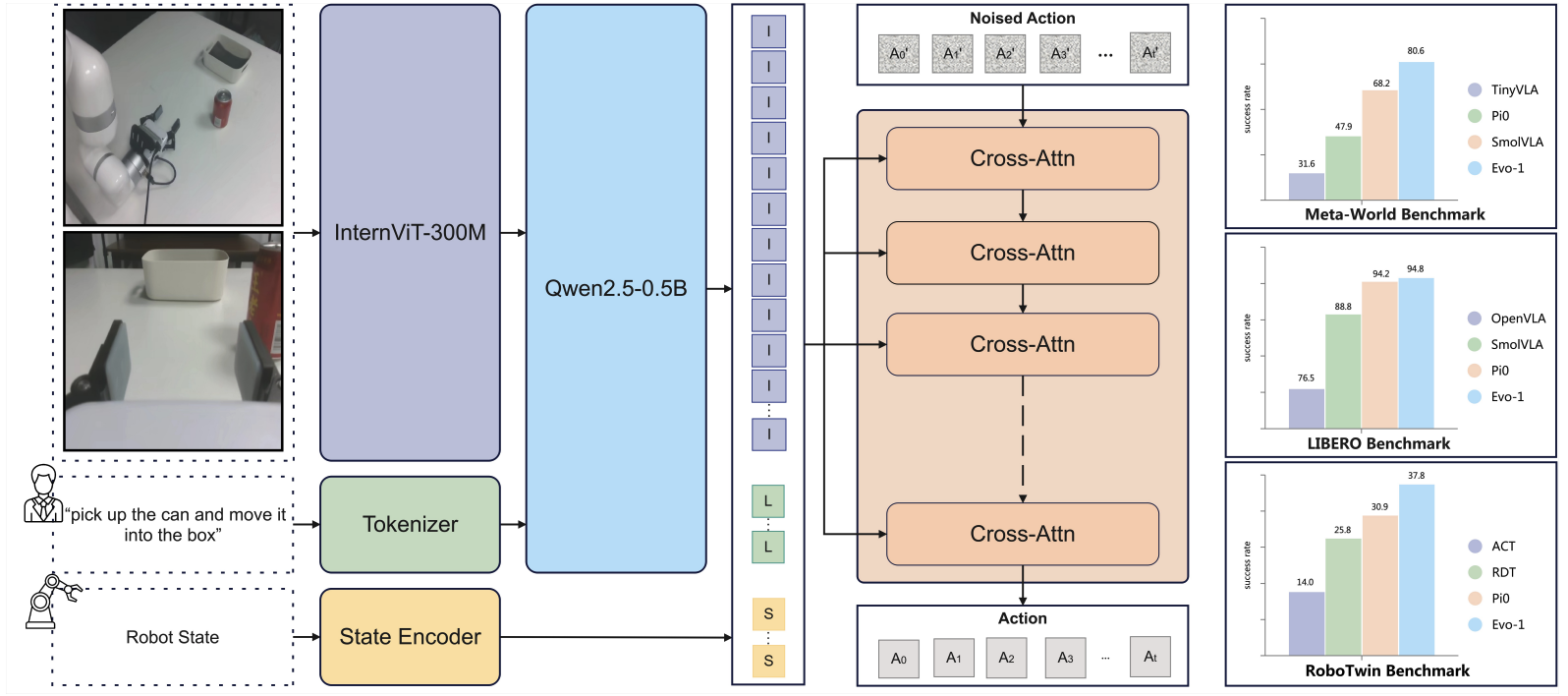
Figure 1: A1 exploits representations from intermediate VLM layers rather than always running the full backbone
Key Insight: Intermediate Layers Are Good Enough
When a 7B VLM processes an image and language instruction, it passes through 32–40 transformer layers. The final layer produces the best embedding — but embeddings at layer 16, 20, or 24 already contain sufficient affordance information (understanding of what can be done with objects) to guide the action head toward a correct action.
This is the key insight A1 exploits: you don't need to run the full backbone at every denoising step. Instead:
- First denoising step: run backbone to the final layer → high-quality embedding → start denoising
- Subsequent steps: only run backbone to an intermediate layer → "good enough" embedding → continue denoising from where you left off (warm-start)
This is the "Inter-Layer" part: using representations from different layers, not just the last one. And "Truncated": cutting backbone computation short — instead of 32 layers, running only 16–20 layers for subsequent steps, saving ~50–70% of backbone compute.
The intuition is like reading a problem statement: after you've read the full problem (first step, full backbone), subsequent glances at partial context are enough to keep solving it.
Architecture Deep Dive: 3 Key Components
1. Inter-Layer Truncated Flow Matching
Flow Matching (as opposed to DDPM Diffusion) learns a straight-line path from noise to the target action, rather than the complex curved trajectory of DDPM. It's faster and requires fewer steps.
A1 extends Flow Matching with warm-starting: instead of beginning each denoising step from pure noise, A1 initializes from the previous step's intermediate output, combined with an embedding from an intermediate VLM layer.
Formally, if we define:
h_L= embedding from the final layer L of the VLMh_k= embedding from intermediate layer k (k < L)a_t= action at denoising step t
Then A1 computes:
step 1: a_0 = FlowMatch(noise, h_L)    # full backbone
step 2: a_1 = FlowMatch(a_0, h_k)     # intermediate layer, warm-started from a_0
step 3: a_2 = FlowMatch(a_1, h_k')    # continue, k' can differ from k
This reduces backbone computation by up to 76.6% compared to running the full backbone at every step.
2. Action Consistency Monitoring
How do you know when to stop denoising early?
A1 tracks the consistency of predicted actions across consecutive denoising steps. When the cosine similarity between a_t and a_{t-1} exceeds a threshold, the action has converged — no further denoising needed.
consistency = cosine_similarity(a_t, a_t_prev)
if consistency > threshold:
    break  # Action has converged, stop early
In practice, many simple tasks (picking an unoccluded object, placing on a fixed target) converge in 3–5 steps instead of the standard 10. Early stopping = less computation = faster robot response.
3. Budget-aware Adaptive Inference
Users or systems can set a latency budget — for example: "action must be ready within 100ms". A1 automatically adjusts three parameters:
- Backbone depth: how many VLM layers to run
- Max denoising steps: upper bound on iterations
- Consistency threshold: early stopping sensitivity
This flexibility is something other VLAs lack: you can explicitly trade off accuracy for speed depending on your use case and hardware.
Installation and Setup
System Requirements
# Minimum hardware
# GPU: NVIDIA with ≥16GB VRAM (A100, 4090, 3090 Ti)
# RAM: ≥32GB system RAM
# Storage: ≥100GB (dataset + checkpoints)

# Software
# Python 3.10+, CUDA 11.8+ or 12.1+, PyTorch 2.1+
Clone and Install
git clone https://github.com/ATeam-Research/A1.git
cd A1

conda create -n a1-vla python=3.10 -y
conda activate a1-vla

pip install -e .
pip install flash-attn --no-build-isolation

python -c "import a1_vla; print('A1 VLA ready!')"
Download Pretrained Checkpoints
from huggingface_hub import snapshot_download

snapshot_download(
    repo_id="ATeam-Research/A1-7B",
    local_dir="./checkpoints/a1-7b"
)
A1 releases multiple model sizes: 1B (runs on a 16GB GPU), 7B (standard, needs 24GB+), and 34B (research, requires multi-GPU). For most practical use cases, the 7B model is the right choice.
Training and Fine-tuning
Data Preparation
A1 uses the RLDS (Robot Learning Dataset) format, compatible with Open X-Embodiment (OpenX). If you have teleoperation data from a LeRobot-based system, convert it to RLDS first:
python scripts/convert_lerobot_to_rlds.py \
    --input_dir ./data/lerobot_episodes/ \
    --output_dir ./data/rlds_episodes/ \
    --robot franka
Training with PyTorch FSDP
A1 uses PyTorch FSDP (Fully Sharded Data Parallel) to train 7B models across multiple GPUs.
Single A100 80GB:
torchrun --nproc_per_node=1 vla-scripts/train.py \
    --base_model "ATeam-Research/A1-7B" \
    --dataset_dir ./data/rlds_episodes/ \
    --output_dir ./checkpoints/a1-franka-custom \
    --batch_size 8 \
    --learning_rate 2e-5 \
    --num_epochs 10 \
    --gradient_checkpointing true
Multi-GPU (4× A100):
torchrun --nproc_per_node=4 vla-scripts/train.py \
    --base_model "ATeam-Research/A1-7B" \
    --dataset_dir ./data/rlds_episodes/ \
    --output_dir ./checkpoints/a1-franka-custom \
    --batch_size 32 \
    --learning_rate 5e-5 \
    --fsdp true \
    --fsdp_sharding_strategy FULL_SHARD
Important: A1 releases intermediate checkpoints every 1000 steps, enabling you to resume interrupted training and evaluate model quality at different training stages to select the best checkpoint.
Fine-tuning Configuration
# configs/finetune_franka.yaml
base_model: "ATeam-Research/A1-7B"
robot: "franka"
task: "pick_place"

# Truncated flow matching config
flow_matching:
  num_steps: 10
  min_steps: 3            # Stop early when consistency is high enough
  consistency_threshold: 0.95

# Backbone truncation
backbone:
  full_layers: 32         # Final layer used for first denoising step
  truncated_layers: 18    # Layers used for warm-start steps

# Training
training:
  batch_size: 8
  lr: 2e-5
  epochs: 20
  warmup_steps: 100
Inference on Real Robots

Figure 2: With 100ms adaptive inference budget, A1 responds 3.5× faster than full backbone inference
Franka Panda
from a1_vla import A1Policy
from a1_vla.robots import FrankaRobot
import cv2

policy = A1Policy.from_pretrained(
    "./checkpoints/a1-7b",
    device="cuda",
    adaptive_inference=True,
    latency_budget_ms=100
)

robot = FrankaRobot(
    ip="192.168.1.100",
    use_gripper=True
)

cap = cv2.VideoCapture(0)
instruction = "Pick up the red cup and place it on the tray"

while True:
    ret, frame = cap.read()
    if not ret:
        break

    joint_pos = robot.get_joint_positions()

    action = policy.predict(
        image=frame,
        instruction=instruction,
        robot_state=joint_pos
    )

    robot.execute(action, blocking=False)
AgiBot
from a1_vla.robots import AgiBotRobot

robot = AgiBotRobot(
    config_path="./configs/agibot_world.yaml"
)

# Same interface as Franka — A1 uses a robot-agnostic API
action = policy.predict(
    image=frame,
    instruction=instruction,
    robot_state=robot.get_state()
)
robot.execute(action)
Tuning the Latency Budget
# Low latency mode — prioritize speed
policy.set_budget(latency_ms=80)

# High quality mode — prioritize accuracy
policy.set_budget(latency_ms=300)

# Inspect current inference statistics
stats = policy.get_inference_stats()
print(f"Avg latency: {stats['avg_latency_ms']:.1f}ms")
print(f"Backbone layers used: {stats['avg_backbone_layers']}")
print(f"Denoising steps: {stats['avg_denoising_steps']:.1f}")
Benchmark Results
VLA Model Comparison
| Model | LIBERO | VLABench | RoboChallenge | Latency (est.) |
|---|---|---|---|---|
| A1 (Full) | 96.6% | 53.5% | 29.0% | ~350ms |
| A1 (Adaptive 100ms) | 94.1% | 51.2% | 27.8% | ~100ms |
| π₀ (Pi-Zero) | ~93% | ~48% | 28.3% | ~400ms |
| X-VLA | ~89% | ~44% | 21.3% | ~500ms |
| RDT-1B | ~85% | ~40% | 15.0% | ~600ms |
The key finding: A1 Adaptive at 100ms still outperforms full π₀ on LIBERO and VLABench, while being 4× faster. This is an excellent trade-off for real-world deployment.
The deeper implication: most of a VLA's "intelligence" doesn't come from running the full backbone at every denoising step. It comes from the quality of the denoising trajectory — which can be adequately guided by intermediate layer representations.
For more context on the VLA landscape and comparison with other architectures, see Overview of VLA Models: From RT-2 to OpenVLA.
Task Category Breakdown
A1 performs particularly well on:
- Simple pick-and-place: 98%+ (fast convergence, few denoising steps)
- Multi-step manipulation: 91% (requires more denoising steps)
- Tasks with occluded objects: 85% (requires full backbone for first step)
- Language-conditioned grasping: 96% (VLM backbone excels at language understanding)
Relative weaknesses:
- Tasks requiring precise force control (compliant / deformable environments)
- High-noise lighting conditions
Why A1 Matters for the Community
This is what genuinely sets A1 apart from many other SOTA papers:
1. Zero closed-source dependencies. Many SOTA VLAs depend on proprietary datasets or pretrained models not released publicly. A1 releases everything: training code, data processing pipeline, intermediate checkpoints, evaluation scripts. Nothing is hidden.
2. Full reproducibility. You can reproduce the paper's results from A to Z. This is a high standard that robotics research often skips because "robot experiments are hard to reproduce."
3. Scalable from 1B to 34B. The training code supports multiple model sizes — you don't need an 80GB A100. The 1B model trains on a 24GB 4090 with small batch size.
4. Standard RLDS data format. Compatible with Open X-Embodiment and the LeRobot ecosystem → easy integration with existing pipelines without rewriting data loaders from scratch.
When Should You Use A1?
Use A1 if you:
- Need fast VLA inference for real-time robot control (sub-150ms latency)
- Want to fine-tune on your own robot and tasks with full control over the training stack
- Need reproducibility and transparency for research or demos
- Have limited hardware and need flexible speed/accuracy trade-offs
Think twice if you:
- Need high dexterity (complex multi-finger manipulation) — specialized models may perform better
- Already have a stable Diffusion Policy pipeline — switching to A1 requires retraining from scratch
- Don't have a GPU with ≥16GB VRAM — you'll lose the latency advantage entirely
Summary
A1 VLA solves one of the biggest pain points of VLA in practice: latency too high for real-time robot control. By exploiting that intermediate VLM layers already contain sufficient information to guide flow matching denoising, A1 saves up to 76.6% of backbone computation without sacrificing much performance.
What makes this project stand out beyond the technical contribution is its fully open-source and transparent approach — no closed-source dependencies, full training stack released, intermediate checkpoints available. This sets a benchmark that robotics research should follow more broadly.
If you're building a robot manipulation system and struggling with VLA latency, A1 is the first thing worth trying.
Resources: