Why a realistic image is not enough to teach reaching
A wrist camera can show a motherboard screw clearly while the policy still lacks the action needed to reach it. If the image and robot state refer to different moments, or the camera coordinates do not match the robot base, a convincing demonstration can provide incorrect supervision. Small errors along the approach direction become especially consequential around thin components.
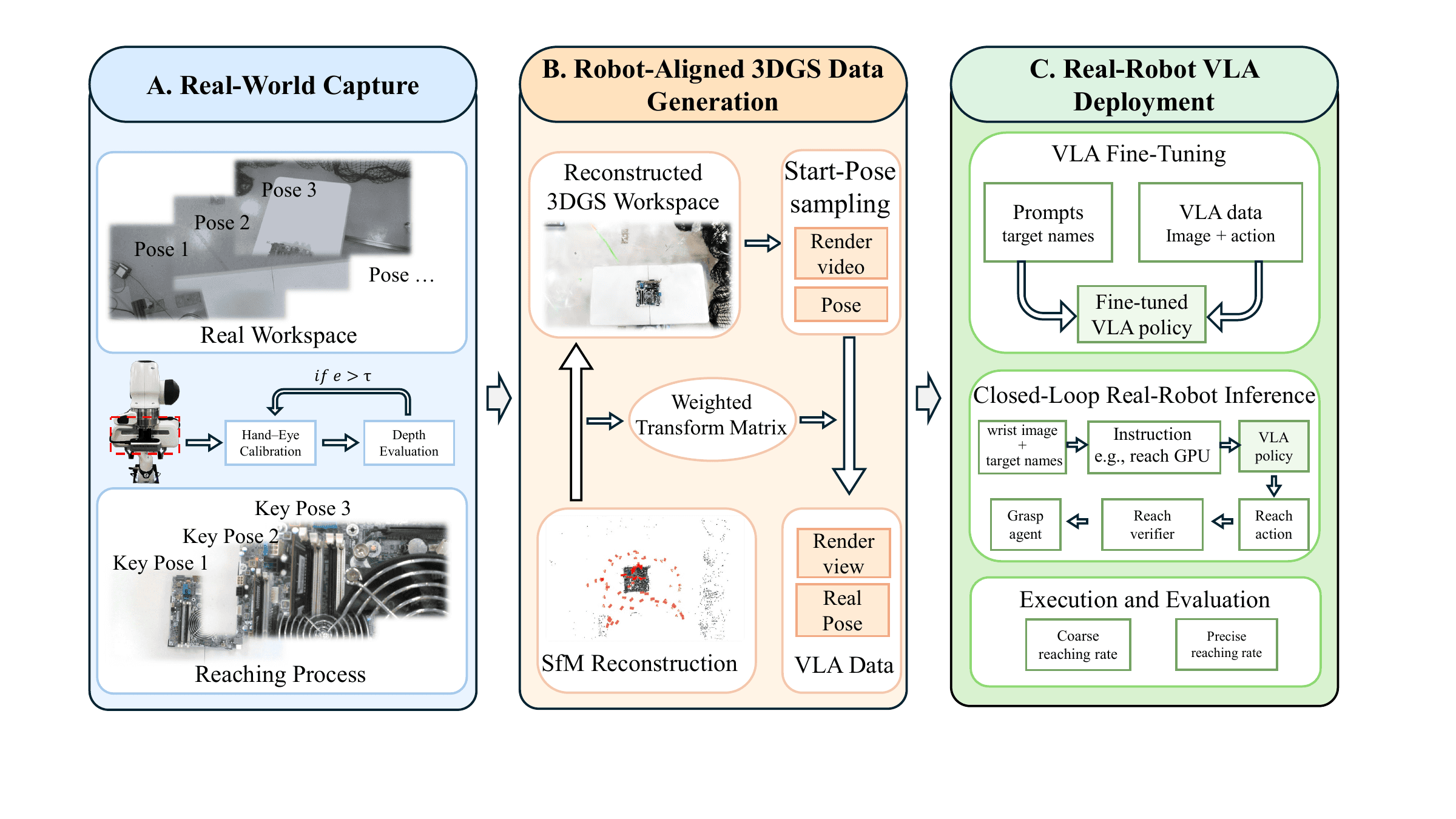
PrecisionReach-GS addresses data collection for pre-contact reaching: moving the end effector into a configuration where physical interaction can begin. The original preprint, Robot-Aligned 3D Gaussian Splatting for Precise Reaching with Wrist-Camera VLA Policies, was published on October 26, 2026, by Zuoxu Wang and Xiao Liang at Texas A&M University. Its central idea is to reconstruct the workspace with 3D Gaussian Splatting, align that representation with the robot, and generate wrist observations paired with reaching actions.
This tutorial checks the official repository and project website as of October 29, 2026. Installation and conversion commands below use actual released scripts and arguments. Fine-tuning is described as integration work because the repository does not release the complete policy-training stack, datasets, or trained checkpoints. We have not independently reproduced these experiments on a Franka robot.
1. Understand the three stages
Treat the system as three connected workflows rather than a single training command:
| Stage | Required input | Output to inspect |
|---|---|---|
| Capture and reconstruction | Workspace images, intrinsics, robot poses, hand–eye calibration | Sparse reconstruction and a Gaussian scene |
| Alignment and generation | Scene, camera poses, target keyframes | Wrist videos synchronized with end-effector poses |
| Learning and deployment | Images, instructions, states, actions | Reaching policy and a termination mechanism |
3DGS represents a scene using Gaussian primitives with positions, sizes, orientations, opacity, and appearance attributes. A renderer synthesizes images from new camera viewpoints. This is useful when a clean object mesh would discard visual detail, but it does not automatically provide the contact dynamics of the reconstructed components.
Consequently, do not expect the Gaussian scene to simulate unscrewing a fastener or the force needed to extract RAM. The learned stage approaches the interaction region; another controller handles subsequent manipulation. That division reduces the modeling burden while also limiting what the experiments establish.
If observation and action schemas are new to you, start with our SmolVLA training guide. Dataset alignment and normalization are transferable concepts, although PrecisionReach-GS is not a complete LeRobot training recipe.
2. Install the utilities and prepare real data
Download the main branch ZIP using Code → Download ZIP on GitHub, extract it, and open a terminal in the directory containing requirements.txt. Python 3.10 or newer is recommended. On a Linux machine where the interpreter is named python3, run:
python3 -m venv .venv
source .venv/bin/activate
python -m pip install -r requirements.txt
python tools/align_colmap_to_robot.py --help
python tools/prepare_fastgs_robot_dataset.py --help
The requirements currently list NumPy and Pillow. Installing them does not install COLMAP, a Gaussian-training backend, or the environment required to fine-tune π0.5. Install COLMAP separately using its official installation documentation, and choose a compatible 3DGS reconstruction pipeline.
Before capturing images, secure the camera mount, record intrinsics at the intended resolution, and log robot poses with image timestamps. Moving the mount after calibration invalidates the relationship between camera and end effector. Each pose record must include rgb_path and a 4×4 base_T_camera matrix.
The repository expects this input layout:
dataset/
  image/
    rgb_000000.png
    rgb_000001.png
  frame_poses.jsonl
  sparse/0/
    cameras.bin
    images.bin
    points3D.bin
The JSONL file contains one JSON record per line. Image names must correspond to registered images in the sparse reconstruction. An identity matrix inserted merely to satisfy the parser is not a substitute for a measured camera pose: the tool may accept the format while producing physically meaningless alignment.
For an initial capture, keep the scene static, move slowly enough to avoid severe motion blur, and maintain overlap between views. Reconstruct a small textured region before attempting reflective parts and cables. These are practical recommendations for your first experiment, rather than capture thresholds reported by the authors.
3. Establish the camera-to-robot relationship
Use base_T_camera to mean the transform mapping coordinates from the camera frame into the robot base frame. Given base_T_ee and the fixed hand–eye transform ee_T_camera, the relationship is:
base_T_camera = base_T_ee @ ee_T_camera
Changing the direction of a transform requires taking its inverse. Renaming a matrix does not change what it maps. Also distinguish the optical frame from the camera housing frame: their axes may differ even when their origins look close in a CAD model.
The released camera-path converter uses camera_T_gripper from run_metadata.json:
base_T_gripper = base_T_camera @ camera_T_gripper
This relationship is documented directly in camera_path_to_ee_poses.py. Read its comments before preparing metadata, especially if your robot software distinguishes the flange, tool center point, and gripper center.
A useful calibration check is to observe a reference plane from poses not used during calibration, transform the points into the robot base, and inspect their consistency. Errors that change substantially with wrist orientation suggest a hand–eye, timing, or frame-convention problem. Fix that before generating hundreds of episodes. Our UMI guide to SLAM and robot data explains related geometric consistency issues in demonstration pipelines.
4. Align COLMAP with the robot base
COLMAP reconstructs the scene in a structure-from-motion coordinate system. Its scale, origin, and orientation are not automatically the robot's metric coordinate system. The alignment utility matches camera centers and estimates scale, rotation, and translation. Task-relevant anchor frames can receive extra weight near important interaction regions.
The README provides this example; replace the paths with your actual dataset:
python tools/align_colmap_to_robot.py \
  --colmap-model /path/to/dataset/sparse/0 \
  --robot-poses /path/to/dataset/frame_poses.jsonl \
  --output-model ./results/aligned \
  --mode similarity_plus_camera_rotation \
  --anchor-frames 66,69 \
  --anchor-weight 50
Frame indices 66 and 69 are repository examples, not universal calibration anchors. Select frames that exist in your recording and have trustworthy target-region poses. If you have not identified suitable anchors, inspect --help and the available alignment modes before using a large weight.
The viewer uses alignment.json and cameras_colmap_world.json from the output directory. Keep the sparse model, splat, and alignment associated with the same reconstruction. Rebuilding the scene and reusing an older transform can produce incorrect labels even when individual rendered frames look plausible.
Prepare robot-aware FastGS inputs
A separate utility prepares the reconstruction inputs using robot poses. Once you have an aligned model and undistorted images, its actual arguments are:
python tools/prepare_fastgs_robot_dataset.py \
  --aligned-model ./results/aligned \
  --robot-poses /path/to/dataset/frame_poses.jsonl \
  --undistorted-images /path/to/undistorted/images \
  --source-images /path/to/dataset/image \
  --output-root ./results/fastgs_robot
See the dataset preparation source for the expected fields and processing. This script prepares data; it does not train Gaussian primitives. You still need an external 3DGS trainer and an exported .splat or compatible .ply file. PLY is a container format, and different Gaussian implementations may store different properties, so test a small export before investing in a large reconstruction.
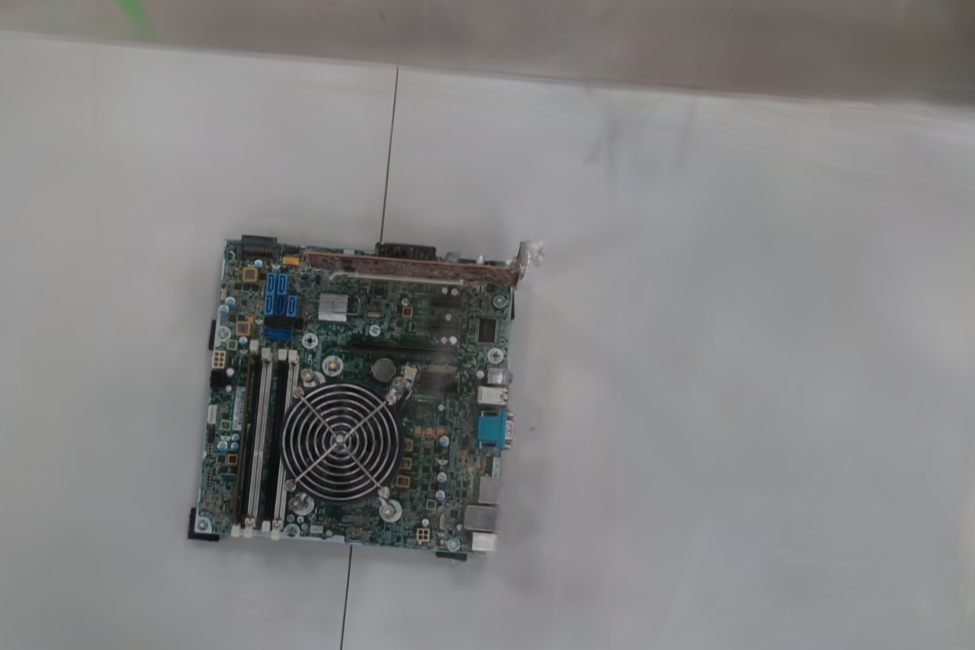
Inspect surrounding clutter as well as the target. Peripheral visual context can matter when the target starts away from the center of the wrist image.
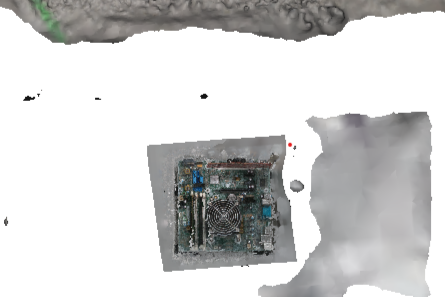
These project images illustrate the representation choice. They do not establish that every Gaussian reconstruction will outperform every mesh: missing viewpoints can still produce blur, floating artifacts, and unstable appearance.
5. Generate trajectories in the browser viewer
Serve the repository root locally:
python -m http.server 8765 --bind 127.0.0.1
Open the two views in the same browser:
http://127.0.0.1:8765/gs_dual_viewer/index.html?role=ee
http://127.0.0.1:8765/gs_dual_viewer/index.html?role=side
The EE view provides policy observations. The side view is an inspection tool showing the moving camera frustum in the reconstructed scene. Its presence during data generation does not imply that deployment requires an external observation camera.
The released viewer guide describes the following workflow:
- Load the trained splat and its
alignment.json. - Choose an initial viewpoint and inspect
Check Reachability. - Prepare a path containing a pre-approach pose and a target pose, and save it for reuse.
- Select
Smoothundermotion, then useLoad Path. - Choose
Record Start + Pathto record the current start followed by the saved path. - After inspecting a single clip, select
Output Folderand try a smallBatch Startsrun.
Each batch clip comes with pose logs. Typical filenames are 000.webm, 000_ee_poses.json, 000_ee_poses.csv, and 000_camera_path_keyframes.json. Inspect several clips before increasing the batch count. More episodes cannot repair a systematic alignment error.
Record WebM + EE Poses exports frame_index, video_time_sec, timestamp_ms, and base_T_gripper, among other fields. Use these indices and timestamps when pairing decoded images with poses. Directory listing order is not a synchronization mechanism.
The public prototype explicitly prioritizes gripper-position IK and does not yet constrain wrist orientation to match the camera exactly. A small IKerr also does not certify singularity avoidance or collision clearance. Validate orientation, joint limits, and intermediate configurations with your robot stack before treating a recorded clip as an executable demonstration.
6. Convert poses into policy supervision
A training sample needs a wrist image, target instruction, robot state, and action. A video and pose log provide the raw ingredients, but they are not automatically a dataset in the format expected by your policy configuration.
For saved camera keyframes, the repository provides:
python tools/camera_path_to_ee_poses.py \
  --path-json ./camera_path_keyframes.json \
  --run-metadata /path/to/run_metadata.json \
  --output-json ./ee_keyframes.json \
  --output-csv ./ee_keyframes.csv
This utility converts keyframes. It does not export a complete LeRobot dataset or generate all joint-space labels for you. The metadata must contain the measured camera_T_gripper. If the saved path lacks robot_camera_to_world, return to the viewer, load alignment, and export again.
For joint-space supervision, one possible representation solves IK at each end-effector pose and uses the difference between consecutive joint configurations. Keep the IK solution continuous: switching between valid solutions can create a large joint jump along an otherwise smooth camera path.
Do not assume every π0.5 configuration consumes or produces joint deltas. Action semantics belong to the selected adapter and training configuration. A controller interpreting deltas as absolute positions will execute the wrong motion immediately. Record joint order, radians versus degrees, the gripper channel, and the sampling cadence explicitly.
7. Integrate fine-tuning and the reach verifier
The released repository does not include a complete π0.5 training entry point, fine-tuned checkpoint, or end-to-end dataset exporter. There is therefore no single command here that reproduces the policy benchmark. Connect your inspected data to an appropriate stack, such as the official OpenPI repository, using the action contract of your chosen configuration.
For a first integration, use these engineering checks:
- Finalize observation and action schemas before converting the full dataset.
- Split training and validation by episode, keeping neighboring frames from one clip together.
- Compute normalization statistics from the training split and preserve them with the configuration.
- Inspect one batch for color order, state order, instruction correctness, and action timing.
- Attempt to overfit a small subset to expose adapter errors before scaling training.
These are tutorial recommendations, not author-reported hyperparameters. The public release does not justify inventing a learning rate, batch size, GPU requirement, or training duration and presenting it as the paper's recipe.
The research system also uses a separately trained reach verifier. It estimates target distance from the wrist image, instruction, and robot state. Language conditions the visual representation through FiLM and spatial attention before fusion with state; Smooth-L1 provides the regression objective. State masking discourages shortcuts based mainly on absolute robot coordinates.
For your implementation, include validation examples that are close to the target but incorrectly aligned. Average distance error alone can hide a dangerous false stop. Evaluate stopping behavior directly for every target and after plausible changes in workspace position.
8. Run inference with visual feedback
An inference loop acquires a fresh image and robot state, queries the policy, limits the predicted action, executes part of the action chunk, and observes again. As the robot approaches the target, executing fewer steps between queries gives visual feedback more opportunities to correct residual error. A verifier then determines when to hand control to the manipulation routine.
The following is an integration checklist, not a released PrecisionReach-GS API:
| Item | Question to resolve |
|---|---|
| Camera | Do crop, resize, and intrinsics match training? |
| State | Are joints and gripper readings associated with the current image? |
| Action | Does the controller expect deltas or absolute positions? |
| Chunk | How many steps run before the next observation? |
| Termination | Has the verifier been evaluated in this workspace? |
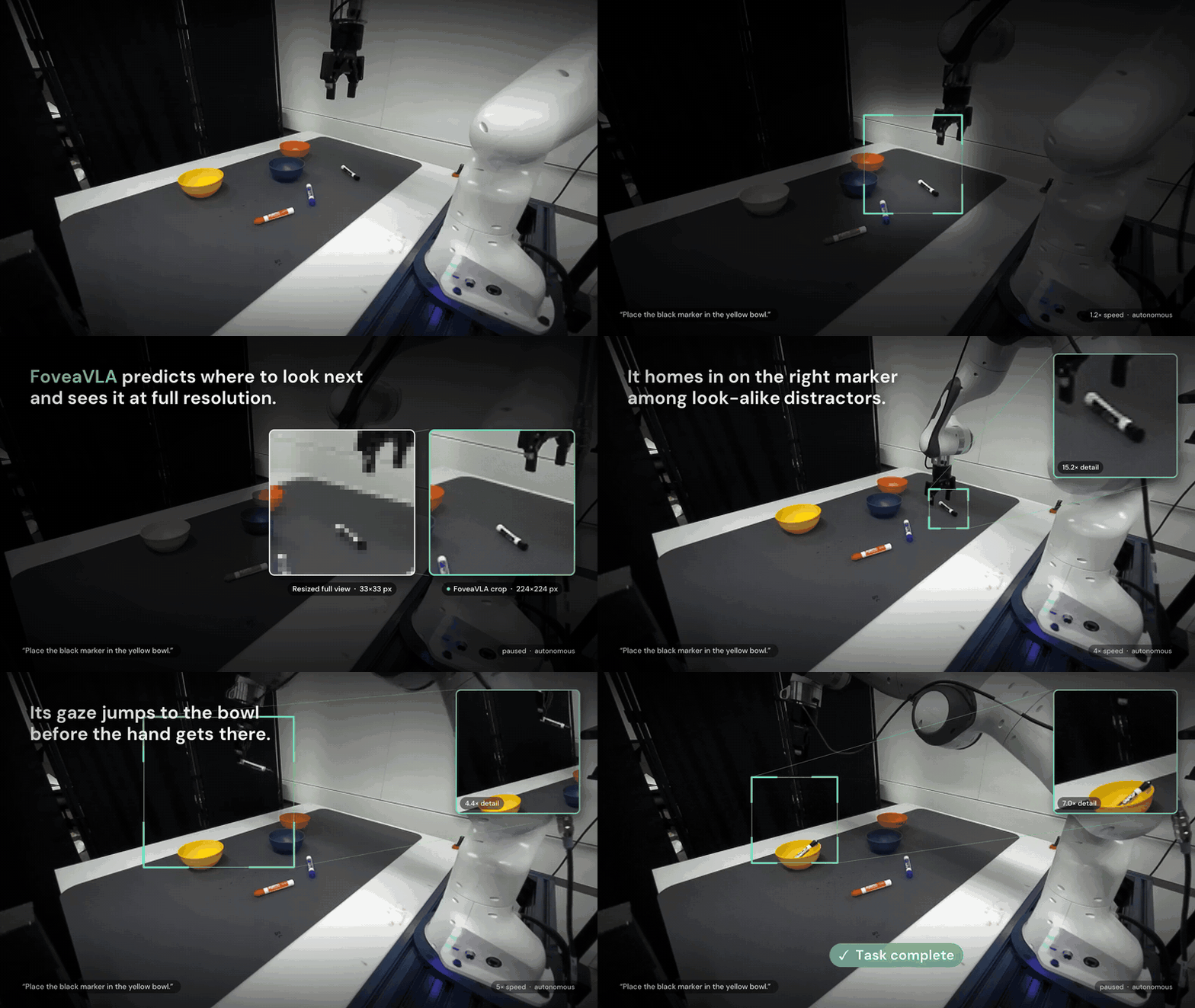
For another perspective on allocating visual detail, see FoveaVLA and external-camera observations. Changing the sensor arrangement is a separate design decision; a wrist-view dataset should not be assumed compatible with a different observation setup.
This is the authors' demonstration. Accelerated playback does not directly reveal policy latency or the control frequency available on your hardware.
9. Interpret the results and their limits
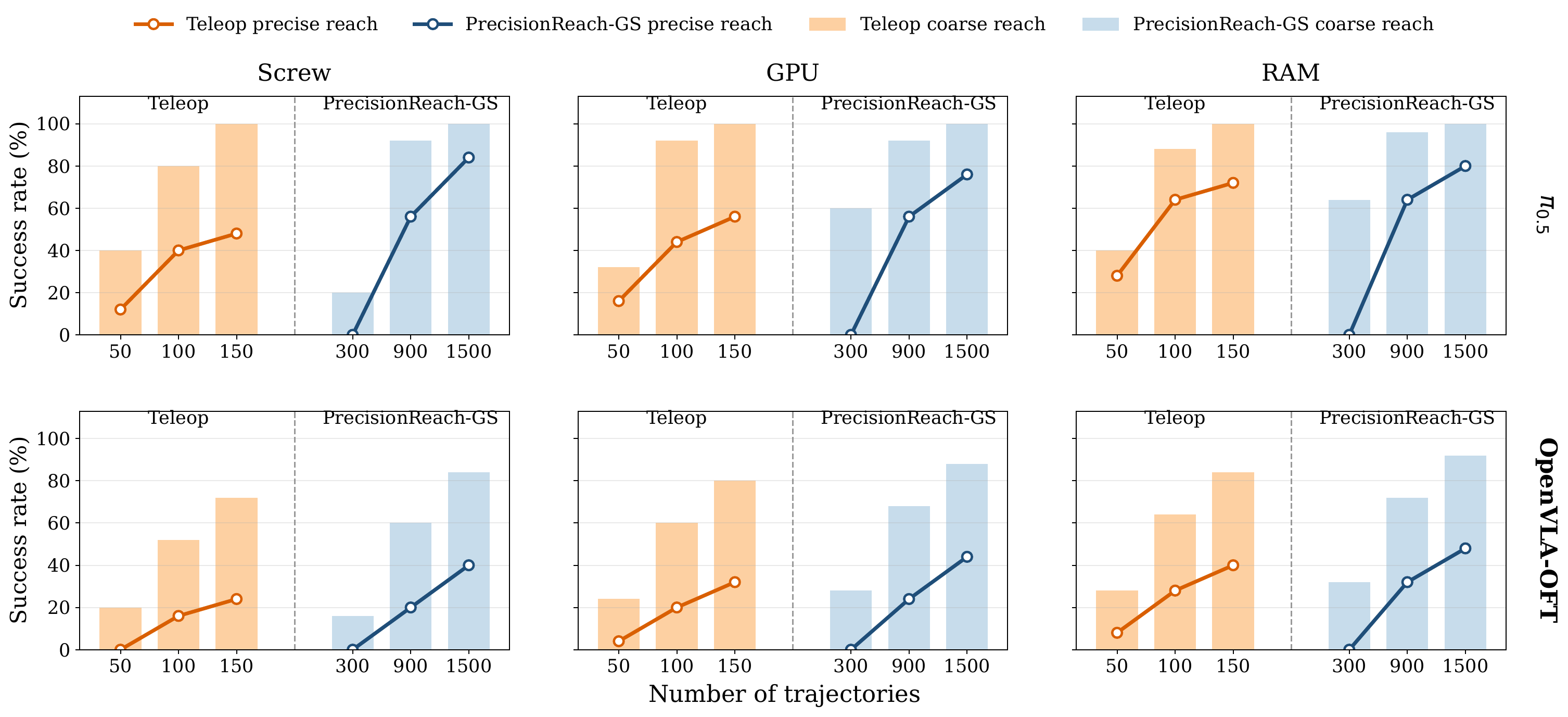
The repository results summary reports these precise-reaching counts:
| π0.5 with 1,500 generated trajectories | Precise reach |
|---|---|
| Screw | 21/25 |
| GPU | 19/25 |
| RAM | 20/25 |
Together these are 60 successes in 75 trials, or 80%. The paper compares this with 58.7% from 150 teleoperated demonstrations. Episode counts are unequal, and the main teleoperation baseline uses wrist and side views while the generated setting uses wrist observations. Read this as a practical data-collection comparison rather than an isolated equal-data ablation.
Precise reaching is checked by running a fixed grasp-and-lift routine from the terminal pose. It tests whether reaching supplies a manipulation-ready pose; it does not show that the VLA learned the entire disassembly operation or contact-force control.
The README reports generated-trajectory RMS jerk of 0.2353 m/s³ versus 3.2657 m/s³ for teleoperation. Jerk measures how quickly acceleration changes. Lower jerk describes smoother supervision under this metric, but smoothness alone does not establish collision clearance.
The under-ten-minute figure refers to active human capture. The paper's timing table reports roughly 200 minutes of total time for 1,500 generated trajectories in a single generation window. It should not be advertised as a ten-minute reconstruction, generation, and fine-tuning pipeline.
The practical limits remain scene coverage, static appearance, calibration, and trajectory feasibility. A replaced component or shifted camera mount may require new reconstruction or calibration. A useful first milestone is one correctly synchronized clip, verified keyframe conversion, and a valid training batch. Scale the dataset and robot experiments only after those relationships are understood.