PoseVLA is one of the more useful open-source releases in the current Vision-Language-Action wave because it asks a very concrete robotics question: before asking a model to output robot actions, does the model actually understand 3D pose? The RSS 2026 paper Universal Pose Pretraining for Generalizable Vision-Language-Action Policies, by Haitao Lin, Hanyang Yu, Jingshun Huang, He Zhang, Yonggen Ling, Ping Tan, Xiangyang Xue, and Yanwei Fu, ships with a project page, source code, Stage-1 checkpoints, RoboTwin checkpoints, pre-training scripts, post-training scripts, 3D grounding inference, and RoboTwin evaluation adapters.
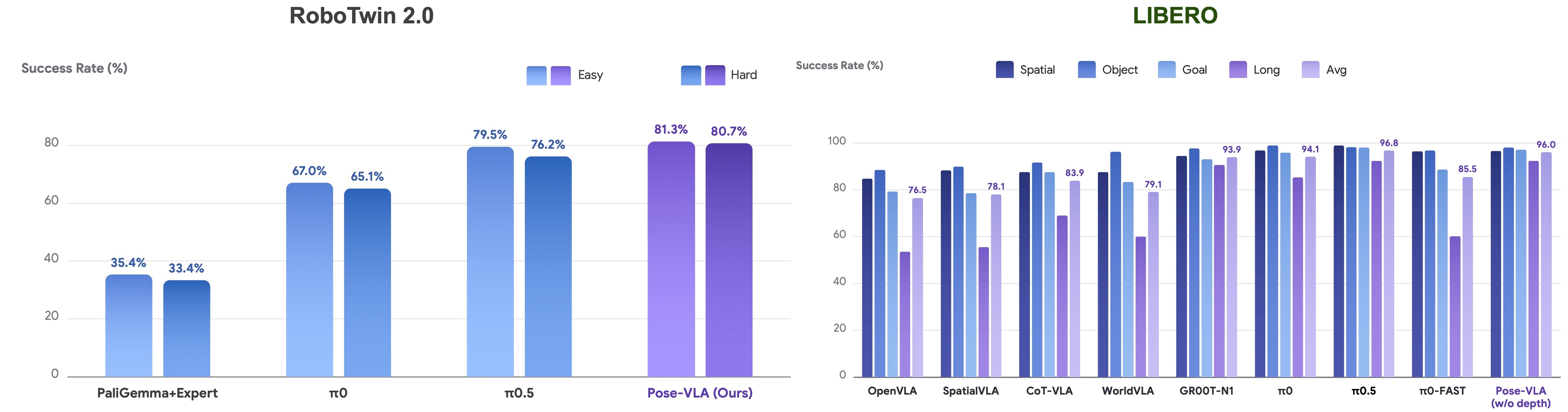
This article is a practical guide for readers who know basic Python and PyTorch but are new to PoseVLA. It explains the paper idea, the architecture, the installation path, how pre-training differs from post-training, how the π0.5 branch and PI0.5 baseline fit into the repo, how to run 3D grounding inference, and how to evaluate on RoboTwin. The result numbers must be read carefully: the paper reports around 79.5% average success on RoboTwin 2.0 and 96.0% on LIBERO; the project page and repository later report a stronger scaled/released RoboTwin checkpoint at 89.4% Clean and 88.6% Random across the 50-task suite. When this guide says "89%", it refers to that stronger released/scaled checkpoint, not the strict 80k-step paper checkpoint.
What problem does PoseVLA solve?
Many modern robot VLA systems start from a VLM such as PaliGemma, Qwen-VL, or a similar vision-language backbone. These models are good at semantic identification: they can recognize a cup, parse an instruction, or describe a scene. Manipulation, however, is not only semantic. If a cup is rotated slightly, the grasp approach may change. If a bottle is close to the table edge, the trajectory should be different. If a laptop is partially open, the policy needs to reason about the articulated pose. These differences can be subtle in pixels but decisive for action.
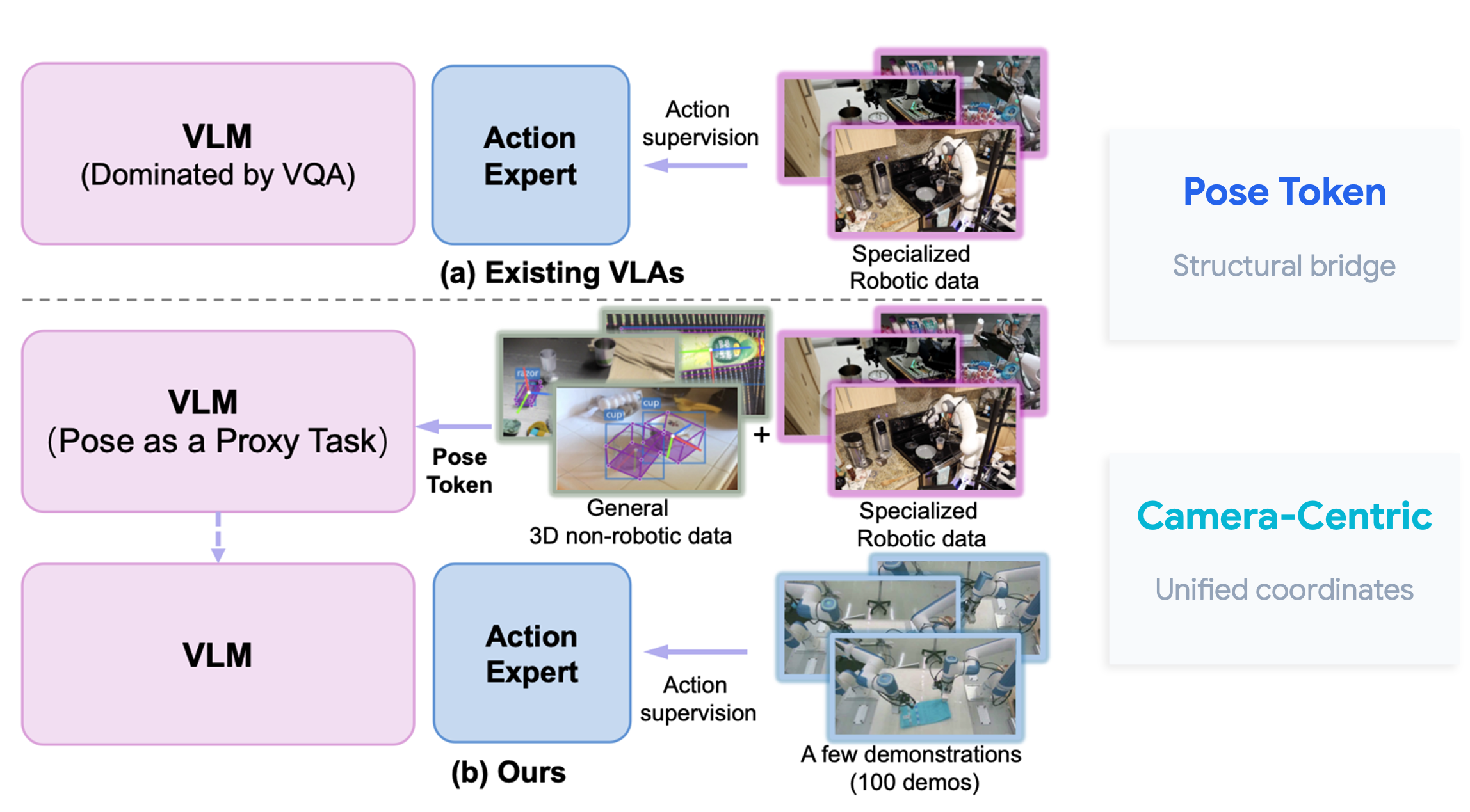
The PoseVLA paper describes the failure mode as feature collapse and inefficient training caused by mixing high-level perception with sparse, embodiment-specific action supervision too early. A standard VLM has been optimized mostly for VQA-like tasks. If you fine-tune it directly on a limited number of robot demonstrations, the action gradient may not be strong enough to create robust metric 3D representations. The model may learn that the instruction involves a bottle, but still miss the exact orientation, position, and contact geometry needed for reliable control.
PoseVLA separates the problem into two stages:
| Stage | Goal | Data | What the model learns |
|---|---|---|---|
| Pre-training | Learn camera-centric 3D spatial priors | Omni3D, Omni6D, BOP, GraspClutter6D, Agibot, DROID, RDT, UMI, Xtrainer, InternData-A1 | Object pose, 2D boxes, 3D grounding, and trajectory geometry |
| Post-training | Align with a target embodiment | RoboTwin or a custom HDF5/LeRobot robot dataset | Robot-specific action generation |
The key abstraction is the pose token. PoseVLA turns 3D pose into a discrete token interface that a VLM can learn with next-token prediction. Instead of representing numeric coordinates as long digit strings, it uses a non-uniform discretization strategy. Dense regions of the data distribution receive narrower bins, and tail regions receive wider bins. For a beginner, the simple version is: PoseVLA teaches a language-style model a compact vocabulary for physical geometry.
Architecture overview
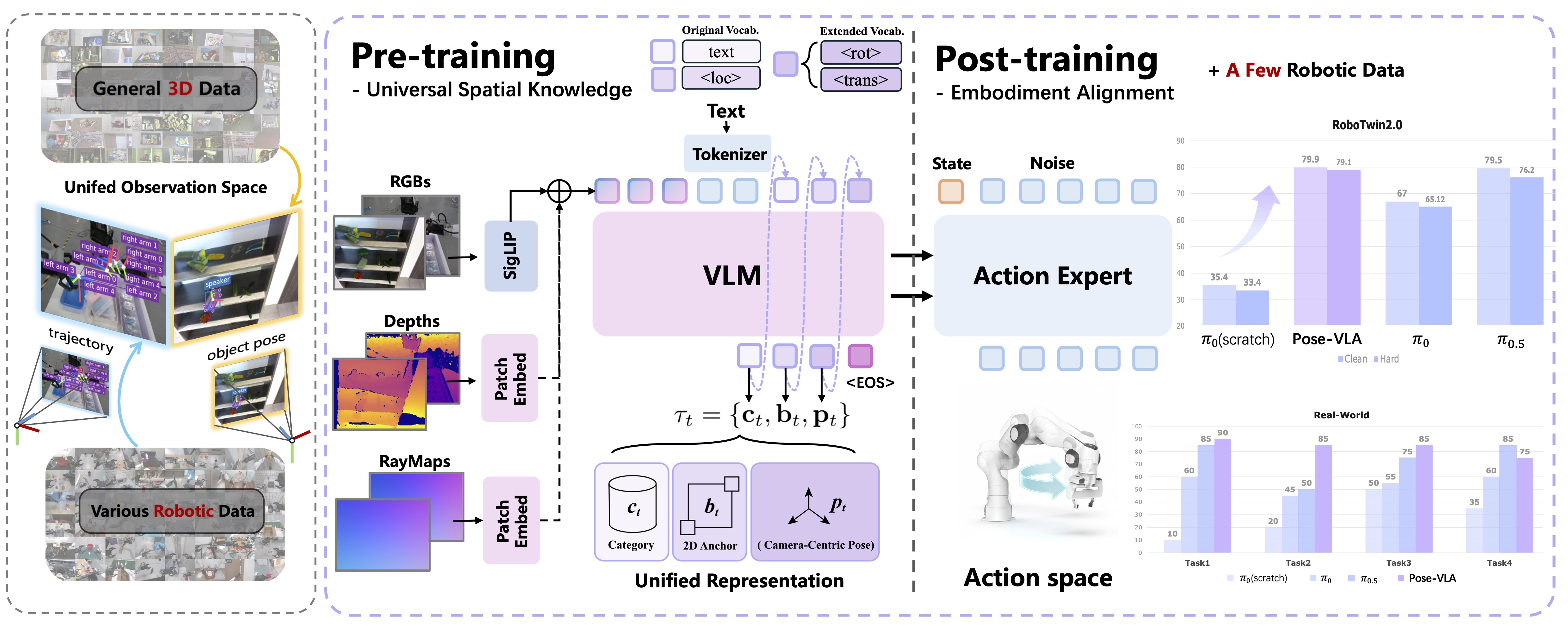
PoseVLA follows the dual-system pattern used by π0 and π0.5: a VLM backbone handles image-language understanding, while an Action Expert trained with Flow Matching generates continuous robot actions. In the codebase, the model implementation lives under posevla/. modeling_posevla.py defines PoseVLAPolicy, paligemma_with_expert.py contains the PaliGemma-plus-expert dual-stream architecture, patch_embed.py handles visual patch embedding and prior fusion, and _lerobot_compat.py keeps compatibility with LeRobot-style policies.
There are three design choices to understand first.
The first is camera-centric pose representation. PoseVLA does not force every label into a robot base frame during the pre-training stage. It learns object pose in the observation camera frame. This matters because many useful 3D datasets are not robot datasets, yet they still contain object pose, depth, camera calibration, or 3D boxes. PoseVLA can learn spatial grounding from those sources before it ever sees a target robot's action space.
The second is auxiliary 3D geometry prior fusion. The project page describes depth and raymap priors being added to RGB embeddings in a way similar to positional encodings. RGB tells the model what is visible; depth and ray structure help tell the model where objects are in space. The ablations show that RGB-only can already work well on Objectron, but the full model with depth and raymap gives the best overall grounding behavior, especially on SUN RGB-D.
The third is decoupled training. The VLM branch learns 3D object grounding through next-token prediction. The action branch learns robot action generation through flow matching. The repo exposes this as configurable switches: co_training.vlm_training, co_training.action_training, data_3d, training.pi05, training.is_knowledge_insulation, training.use_lora, and training.add_prior. This makes the project useful both as a released model and as a research framework.
3D grounding results
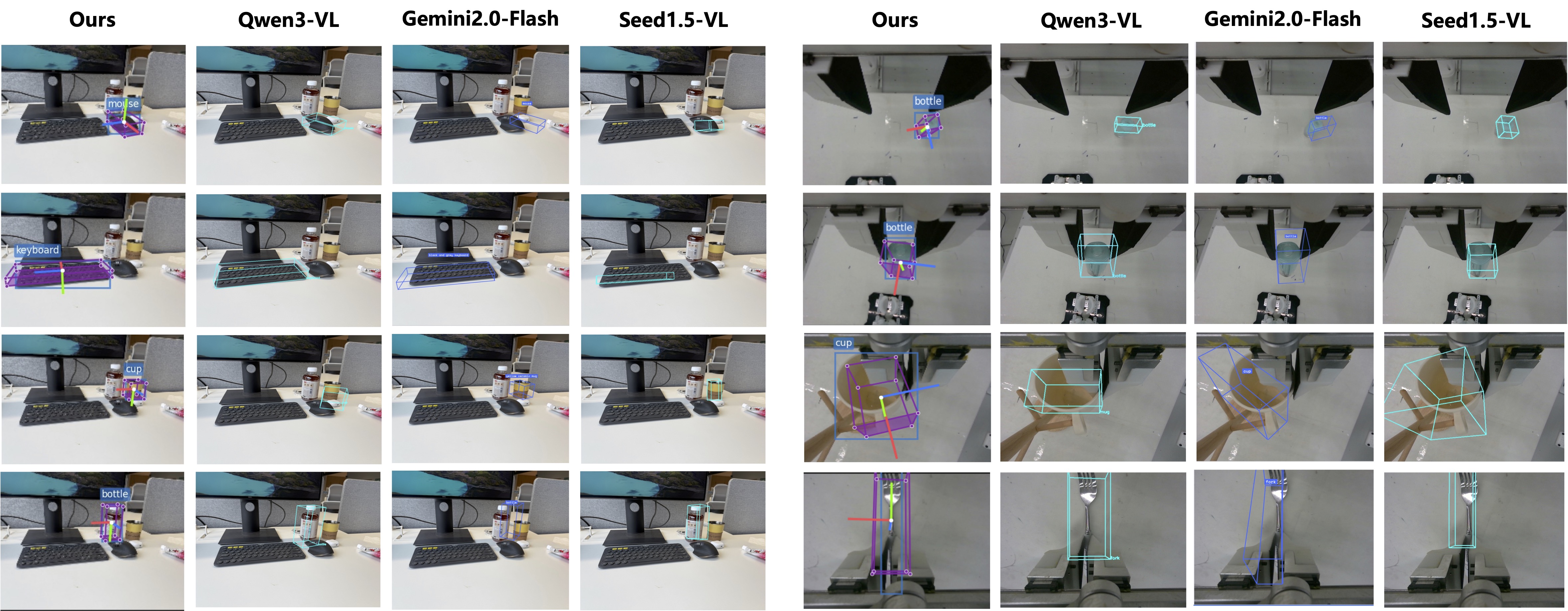
Before looking at robot action, look at the 3D grounding task. The paper evaluates on SUN RGB-D and Objectron from Omni3D using mAP at IoU threshold 0.15. PoseVLA reaches 45.5 AP15 on SUN RGB-D and 87.3 AP15 on Objectron. On Objectron, the paper reports a large margin over the strongest open-source baseline in its table, including Qwen3-VL 235B Thinking at 71.2.
This result is not just a perception benchmark detail. Objectron contains common tabletop objects such as bottles, cups, and cameras. These are exactly the kinds of objects robots need to grasp, place, pour, hang, or avoid. A policy that only knows "there is a bottle" is not enough; it must know where the bottle is, how it is oriented, and which approach direction is feasible. PoseVLA tries to make that spatial representation available before action fine-tuning.
Install the repository
The main repository is https://github.com/hetolin/PoseVLA. The README recommends Python 3.10.12, PyTorch 2.7.0 with CUDA 12.6, and bf16/TF32 on Ampere or Hopper GPUs. For lightweight inference and 3D grounding tests, a 16-24 GB GPU may be enough depending on checkpoint and batch size. For serious RoboTwin post-training, plan for multiple GPUs. Full pre-training is a cluster-scale job.
Start with a clean environment:
git clone [email protected]:hetolin/PoseVLA.git
cd PoseVLA

conda create -n vla python==3.10.12
conda activate vla

pip install torch==2.7.0 torchvision==0.22.0 torchaudio==2.7.0 \
  --index-url https://download.pytorch.org/whl/cu126
The repo pins LeRobot to a specific commit and applies two dependency fixes: rename pyav to av, and remove rerun-sdk to avoid a NumPy conflict.
git clone https://github.com/huggingface/lerobot.git third_party/lerobot
cd third_party/lerobot
git checkout 638d411cd3acf32c28d8c2120f3c41bda8bb15d4
sed -i 's/pyav/av/' pyproject.toml
sed -i '/rerun-sdk/d' pyproject.toml
pip install -e .
cd ../..

pip install -r requirements.txt
If you plan to use BOP for 3D pre-training, install the BOP toolkit:
git clone https://github.com/thodan/bop_toolkit.git third_party/bop_toolkit
cd third_party/bop_toolkit
pip install -e .
cd ../..
Create a pretrain/ directory and place the weights you need:
pretrain/
├── paligemma-3b-pt-224/
├── lerobot_pi0/
└── pi05_base/
The README links these to Google PaliGemma-3B, hetolin/lerobot_pi0, and hetolin/pi05_base. If you are experimenting with π0.5-style action experts, pi05_base is the weight folder to watch. Then set the project parent:
export DEV_PATH="/path/to/parent/of/PoseVLA"
export HYDRA_FULL_ERROR=1
Before running any training, verify CUDA:
nvidia-smi
python - <<'PY'
import torch
print(torch.__version__)
print(torch.cuda.is_available())
print(torch.cuda.get_device_name(0) if torch.cuda.is_available() else "no cuda")
PY
If CUDA is not available, fix the driver, container runtime, or PyTorch wheel first. Training logs are much harder to interpret when the foundation environment is wrong.
Pre-training: learn 3D pose before robot action
The main pre-training document is docs/PRETRAIN.md. The entry script is train_pretrain.py, and the main config is config/base.yaml. PoseVLA supports three common modes:
| Mode | Main switches | Use case |
|---|---|---|
| VLM training | co_training.vlm_training=True, action_training=False, data_3d=True |
Learn 3D grounding and pose tokens from Omni3D, Omni6D, BOP, and GraspClutter6D |
| Action training | vlm_training=False, action_training=True |
Train the action expert on robot datasets |
| Co-training | Enable both VLM and action branches | Keep geometry and action alignment in one optimization run |
For local single-node multi-GPU debugging:
accelerate launch \
  --multi_gpu --num_machines 1 --num_processes 8 \
  --mixed_precision=bf16 \
  --main_process_ip 127.0.0.1 --main_process_port 56789 \
  --machine_rank 0 \
  train_pretrain.py
On a cluster, use:
bash scripts/launch/pretrain.sh False
The launch script reads RANK, MASTER_ADDR, MASTER_PORT, WORLD_SIZE, and GPU_NUM from the cluster environment before dispatching accelerate launch. To resume:
python train_pretrain.py resume_ckpt=/path/to/exp/29999
The checkpoint layout is:
ckpt/<exp_name>/<step>/
├── model/
└── state/training_state.pth/
LoRA is available through training.use_lora=True plus the lora.* config block. The π0.5 branch is controlled by training.pi05=True. Keep one naming detail straight: the repo also contains an isolated PI0.5 RoboTwin Baseline under pi05_baseline/. That baseline is not the same thing as a PoseVLA method run initialized with a π0.5 action expert. Use "PoseVLA-PI0.5" only for experiments that intentionally train the PoseVLA backbone as part of the method.
Prepare RoboTwin data
RoboTwin post-training uses train_posttrain.py, config/base_posttrain.yaml, and config/dataset/robotwin.yaml. Raw RoboTwin episodes must be converted to the HDF5 layout expected by the dataset reader:
python utils/process_data_all.py
Then compute normalization:
python scripts/stats/norm_robotwin.py --mode eep
The important output is qpos_mean_std_online.pkl. In robotwin.yaml, check hdf5_dir, mean_std_path, action_type, action_chunk_size, img_history_size, image_size, and dataset_list. The released PoseVLA RoboTwin checkpoint uses the EEP action path; the evaluation config uses left_arm_dim: 8 and right_arm_dim: 8, for a 16D action interface.
Before launching training, run the dataloader smoke test:
python data/ds_train/robot/dataset_hdf5_action.py
It writes all_images.png and all_joints.png. Inspect them. If cameras are swapped, instructions are inconsistent, action curves jump, or normalization is wrong, a training run may still show decreasing loss while producing a useless policy.
Post-train on RoboTwin
The post-training guide in docs/POSTTRAIN.md describes an action-only setup:
| Field | Important value |
|---|---|
defaults.dataset |
robotwin |
model.pretrained_model_path |
PoseVLA checkpoint after pre-training |
model.action_expert_path |
π0 or π0.5 action expert |
co_training.vlm_training |
False |
co_training.action_training |
True |
data_3d |
False |
training.pi05 |
True when using the π0.5 branch |
training.max_training_steps |
Repo default is 200k for post-training |
Single-GPU debug:
python train_posttrain.py
Single node, eight GPUs:
CUDA_VISIBLE_DEVICES=0,1,2,3,4,5,6,7 \
accelerate launch --main_process_port 29504 --num_processes=8 train_posttrain.py
Cluster:
bash scripts/launch/posttrain.sh
Resume:
python train_posttrain.py resume_ckpt=/path/to/exp/29999
For a beginner, the mental model is this: pre-training gives the model a strong spatial prior; post-training aligns that prior with a robot's action contract. The ablation table shows why this matters. A vanilla PaliGemma plus action expert baseline reaches about 35.4% Easy and 33.4% Hard on RoboTwin. Adding 3D data lifts the result to roughly 70.2% Easy and 69.1% Hard. Changing the post-training representation from joint space to end-effector pose then helps reach the paper's 79% range.
3D grounding inference
The repo includes infer_grounding3d.py for real-world RGB-D or HDF5 input. Run the default example:
python infer_grounding3d.py
The script uses example images under assets/. Edit these fields for your own setup:
| Field | Meaning |
|---|---|
ckpt_path |
PoseVLA pretrained checkpoint |
img_path |
RGB input image |
depth_path |
Depth input |
cam_K |
Camera intrinsic matrix |
task_text |
Open-vocabulary query, such as detect the bottle |
The output includes predicted 3D scene text, decoded structured results, infer_rgb.png, infer_depth_raw.png, and 2D/3D detection visualizations. This is a useful sanity check before using the same perception backbone inside a control policy.
Evaluate in RoboTwin
RoboTwin evaluation usually uses two environments: a PoseVLA training environment and a RoboTwin simulation environment. Symlink the repository into RoboTwin's policy folder:
ln -s /path/to/PoseVLA /path/to/RoboTwin/policy/PoseVLA
Copy the compatible evaluation entry:
cp /path/to/RoboTwin/policy/PoseVLA/robotwin/PoseVLA/eval_policy.py \
  /path/to/RoboTwin/script/eval_policy.py
Download the released checkpoint:
pip install modelscope
export MODELSCOPE_DOMAIN=www.modelscope.ai

cd /path/to/PoseVLA
mkdir -p ckpt_robotwin/model
modelscope download hanyangyu1021/PoseVLA-robotwin \
  config.json model.safetensors \
  --local_dir ckpt_robotwin/model
Set the key fields in robotwin/PoseVLA/deploy_policy.yml:
checkpoint_path: policy/PoseVLA/ckpt_robotwin/model
action_type: eep
norm_path: policy/PoseVLA/robotwin/PoseVLA/norm_stats/qpos_mean_std_online.pkl
left_arm_dim: 8
right_arm_dim: 8
Run evaluation:
cd /path/to/RoboTwin
conda activate RoboTwin
python script/eval_policy.py --config policy/PoseVLA/robotwin/PoseVLA/deploy_policy.yml
For parallel evaluation, edit GPU_IDS, TASK_CONFIG, SEED, and TASKS in run_auto_eval_posevla.sh, then run it from the RoboTwin root:
bash run_auto_eval_posevla.sh
Logs are written under RoboTwin/eval_result/auto_eval_YYYYMMDD_HHMMSS/. Each task has an individual log, and the final success-rate summary is saved as evaluation_summary.txt.
How the PI0.5 baseline fits in
The August 2026 repo update adds pi05_baseline/, a self-contained entry for the PI0.5 RoboTwin Baseline. It does not modify the default PoseVLA config. This baseline uses a 14D qpos/action contract, 48-step action horizon, its own normalization file, and the ModelScope checkpoint hanyangyu1021/PoseVLA-pi05-robotwin.
Set up the environment:
export DEV_PATH=/path/to/parent/of/PoseVLA
export ROBOTWIN_HDF5_DIR=/path/to/robotwin/hdf5/root
export HYDRA_FULL_ERROR=1
The dataset root should contain:
robotwin_processed/
robotwin_processed_random/
Prepare stats:
python pi05_baseline/prepare_stats.py \
  --dataset-root "$ROBOTWIN_HDF5_DIR" \
  --output /path/to/pi05_stats/qpos_hybrid_stats.pkl

export PI05_NORM_PATH=/path/to/pi05_stats/qpos_hybrid_stats.pkl
Run a tiny training smoke test:
python -m pi05_baseline.train \
  debug=True \
  training.max_training_steps=10 \
  training.max_evaluation_steps=1
Eight-GPU training:
CUDA_VISIBLE_DEVICES=0,1,2,3,4,5,6,7 \
accelerate launch \
  --main_process_port 29504 \
  --num_processes 8 \
  pi05_baseline/train.py
The important fixed contract is:
training.pi05=true
training.add_extra_token=false
training.add_prior=false
dataset.action_type=qpos
dataset.action_chunk_size=48
To evaluate the released checkpoint:
pip install modelscope
cd /path/to/PoseVLA
modelscope download \
  --model hanyangyu1021/PoseVLA-pi05-robotwin \
  --local_dir ckpt_robotwin/pi05_baseline
Run one task:
cd /path/to/RoboTwin
bash policy/PoseVLA/pi05_baseline/eval.sh \
  beat_block_hammer demo_clean 0
Randomized evaluation:
bash policy/PoseVLA/pi05_baseline/eval.sh \
  beat_block_hammer demo_randomized 0
The naming rule from the README is useful. Call this historical/released checkpoint PI0.5 RoboTwin Baseline or a baseline reproduction. Reserve PoseVLA-PI0.5 for experiments that initialize and train a PoseVLA backbone as part of the method.
Results and interpretation
The core numbers are:
| Benchmark | Result |
|---|---|
| RoboTwin 2.0 paper checkpoint | 79.91% Easy, 79.10% Hard |
| RoboTwin 2.0 released/scaled checkpoint | 89.40% Clean, 88.60% Random |
| LIBERO average | 96.0% |
| Objectron 3D grounding | 87.3 AP15 |
| SUN RGB-D 3D grounding | 45.5 AP15 |
| Paper real-world average | 81.25% |
The takeaway is not simply that PoseVLA uses a strong checkpoint. The ablations show where the improvement comes from. Adding non-robotic 3D data brings a large jump over the PaliGemma-plus-action baseline. Adding robotic data helps further. Using end-effector pose for post-training adds another step up. A Qwen3-VL-based baseline, called Qwen3PI in the paper, still trails PoseVLA by more than 20 percentage points when it lacks the same pose-centric pre-training.
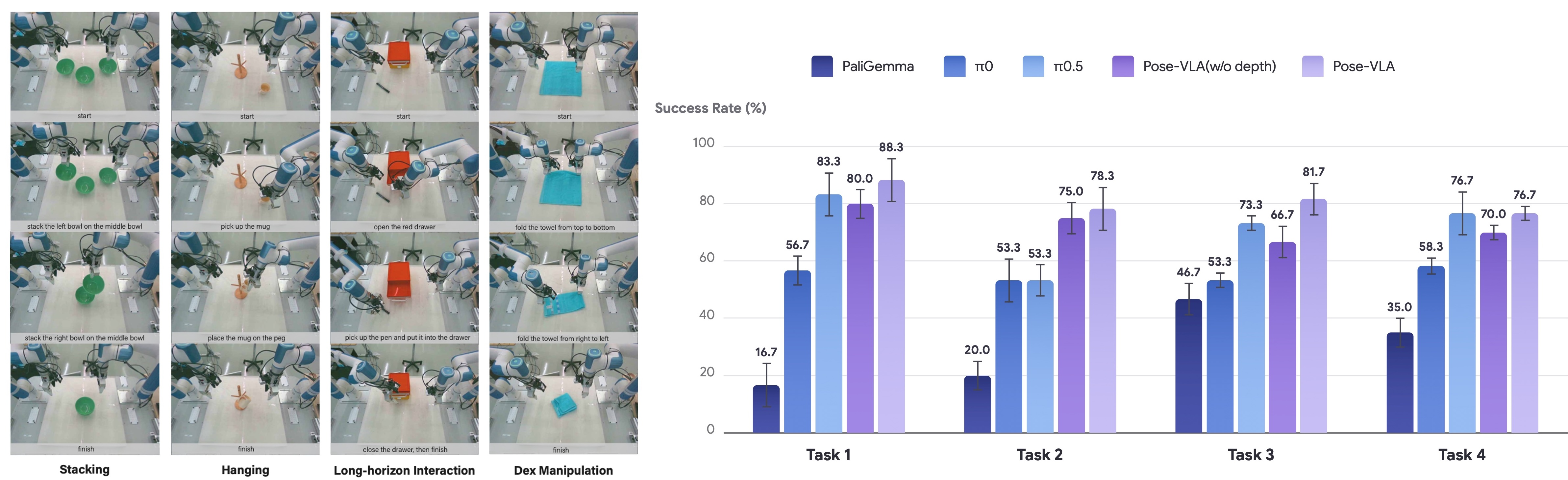
For a real lab, this suggests a practical recipe: do not spend all your budget collecting more robot demonstrations before checking representation and data contracts. First, use large 3D datasets to teach geometry. Then use a smaller amount of robot data to align the model with the target embodiment. In the paper's real-world experiments, PoseVLA uses a dual-arm Xtrainer platform with a RealSense D455 head camera and a D405 wrist camera, and reports strong performance using about 100 demonstrations per task on stacking, hanging a mug, drawer interaction, and towel folding.
Beginner checklist
Follow this order if you are testing PoseVLA for the first time:
- Install the repo and verify CUDA.
- Download a released Stage-1 or RoboTwin checkpoint instead of pre-training from scratch.
- Run
infer_grounding3d.pyon the provided example. - Replace the example with your own RGB-D image, camera intrinsics, and query.
- Convert a small RoboTwin subset to HDF5.
- Run the dataloader smoke test and inspect
all_images.pngandall_joints.png. - Run a 10-100 step post-training debug job.
- Evaluate one RoboTwin task before running the full 50-task suite.
- If using the PI0.5 baseline, keep it isolated under
pi05_baseline/and do not mix EEP normalization with qpos normalization. - For real hardware, lock camera mapping, action frame, normalization, speed limits, and emergency stop behavior before testing at full speed.
The most common mistake is mixing coordinate and action contracts. PoseVLA pre-training learns camera-centric pose. The released RoboTwin PoseVLA checkpoint uses a 16D EEP action path. The isolated PI0.5 baseline uses a 14D qpos path. These are not interchangeable. A correct checkpoint with the wrong normalization or adapter will behave like a bad model.
Sources
- Paper:
arXiv:2602.19710, Universal Pose Pretraining for Generalizable Vision-Language-Action Policies. - Project page:
https://hetolin.github.io/PoseVLA/. - Code:
https://github.com/hetolin/PoseVLA. - Checkpoints:
hetolin/PoseVLA-stage1,hanyangyu1021/PoseVLA-robotwin,hanyangyu1021/PoseVLA-pi05-robotwin.