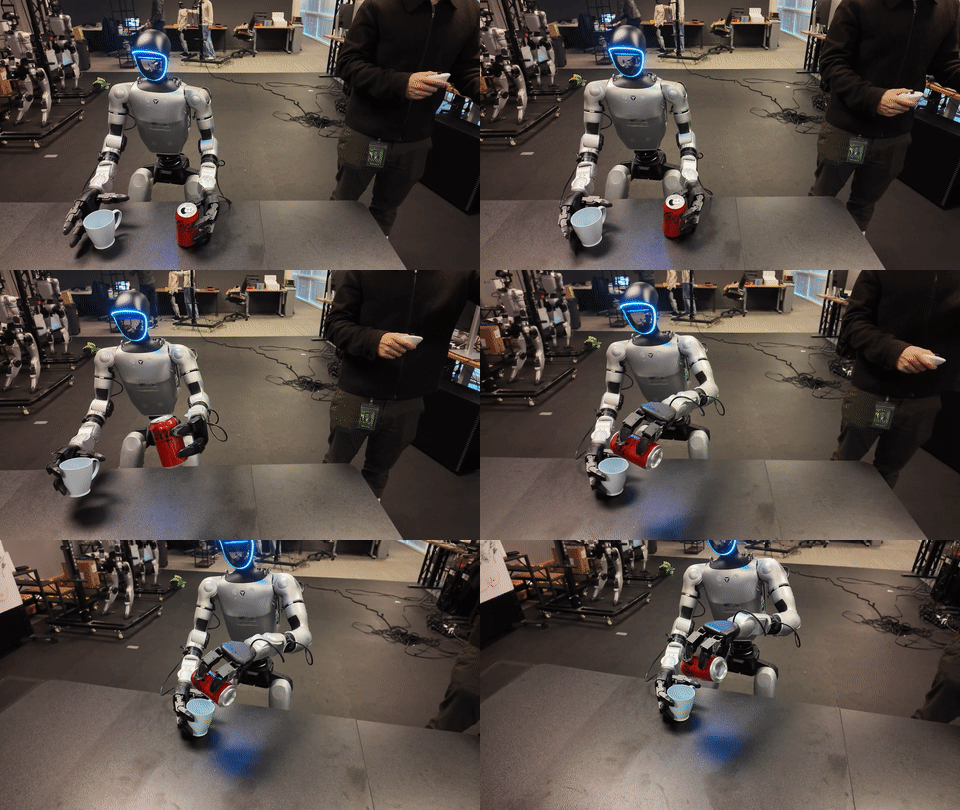
The official NVIDIA name is GR00T, with two zeros, although many robotics developers casually type "Groot". This guide focuses on the practical question: how do you create synthetic data for a whole-body VLA in the GR00T style, what should the data format look like, and how do you use that data for fine-tuning and inference?
The technical base comes from three sources. The first is the paper GR00T N1: An Open Foundation Model for Generalist Humanoid Robots, which introduces the dual-system VLA architecture for humanoids. The second is the NVIDIA/Isaac-GR00T repository, which contains the data format, fine-tuning scripts, and deployment code. The third is NVIDIA/GR00T-Dreams and the DreamGen paper, which describe a pipeline for generating synthetic robot trajectories with a video world model and recovering pseudo-actions for policy training.
For beginners, the most important point is this: synthetic data for GR00T is not just extra rendered images. A useful VLA trajectory needs video observations, robot state, actions, language instructions, episode metadata, and a file that explains how state and action arrays are split into named modalities. If you only have video, you have a visual reference. You do not yet have a policy training dataset.
The GR00T Paper Idea
GR00T N1 was introduced by NVIDIA as an open foundation model for humanoid robots. The paper describes a Vision-Language-Action model with two connected systems:
- System 2: a vision-language module that interprets images and language instructions.
- System 1: a diffusion transformer action head that generates real-time motor actions.
In simple terms, System 2 answers, "What am I seeing, what was I asked to do, and where is the goal?" System 1 answers, "What should the hands, arms, torso, base, or legs do right now?" For whole-body VLA, System 1 is not limited to a single arm end-effector. It must coordinate body posture, bimanual manipulation, hands, and sometimes locomotion through a whole-body controller.
Minimal architecture view:
Camera frames + language + proprioception
        |
        v
+--------------------+       visual-language tokens
| System 2: VLM      | -----------------------------+
| scene + task       |                              |
+--------------------+                              v
        |                                  +---------------------+
        |                                  | System 1: DiT       |
        +---- robot state + noisy action ->| diffusion actions   |
                                           +---------------------+
                                                     |
                                                     v
                                      action chunk / latent actions
                                                     |
                                                     v
                                  robot controller / whole-body WBC
The current Isaac-GR00T repository presents GR00T N1.7 3B checkpoints, but the data logic follows the same line as N1 and N1.5: collect or generate trajectories, normalize them into a GR00T-flavored LeRobot v2 dataset, and fine-tune with an embodiment tag. For a whole-body humanoid such as Unitree G1 with SONIC, the repository describes a workflow where the VLA predicts compact latent action tokens and a whole-body controller decodes those tokens into joint commands for legs, arms, and hands.
What Synthetic Data Means in GR00T-Dreams
DreamGen and GR00T-Dreams target the most expensive bottleneck in robot learning: collecting teleoperation demonstrations for every behavior in every environment. The pipeline uses a video world model to "dream" new robot videos from an initial image and a text prompt, then converts those videos into trajectories with actions.
The four-stage pipeline is:
1. Seed real robot demos
   -> a small amount of real data teaches embodiment and camera style

2. Fine-tune a video world model
   -> an image-to-video model learns the target robot motion prior

3. Generate synthetic videos
   -> prompts such as "robot hammers a peg" or "robot wipes a table"

4. Recover actions
   -> IDM / latent action model turns video into pseudo-actions
   -> save the result as a LeRobot/GR00T dataset
NVIDIA's technical blog reports that GR00T-Dreams was used to generate synthetic training data for GR00T N1.5 in about 36 hours, compared with nearly three months of manual collection. The same blog says the open Physical AI Dataset collection includes real Unitree G1 data, 24,000 simulated teleoperation trajectories, and synthetic simulation data for manipulation tasks. On the GR00T N1.5 project page, NVIDIA reports that DreamGen helped N1.5 reach a 38.3% success rate across 12 new DreamGen tasks, compared with 13.1% for N1. That does not mean synthetic data replaces real robot data. It means neural trajectories can expand behavior coverage when real demonstrations are scarce.
Required Data Fields
A usable GR00T episode usually contains these groups:
| Group | Examples | Purpose |
|---|---|---|
| Video | observation.images.ego_view, observation.images.wrist_left |
Visual input for the VLA |
| State | joint positions, gripper width, base pose, IMU, latent WBC state | Proprioceptive context |
| Action | joint targets, end-effector delta, gripper command, latent action | Supervision for the policy |
| Language | "pick up the red cup", "wipe the table" | Task conditioning |
| Metadata | episode length, fps, robot type, task index | Loading, splitting, validation |
GR00T currently expects a format compatible with LeRobot v2, plus an extra meta/modality.json file. A dataset should look like this:
my_groot_dataset/
  meta/
    info.json
    episodes.jsonl
    tasks.jsonl
    modality.json
  data/
    chunk-000/
      episode_000000.parquet
      episode_000001.parquet
  videos/
    chunk-000/
      observation.images.ego_view/
        episode_000000.mp4
        episode_000001.mp4
      observation.images.wrist_left/
        episode_000000.mp4
        episode_000001.mp4
Each parquet file stores timestep-level numeric data. Think of one row as one control frame:
timestep 0:
  observation.state = [ ... float32 ... ]
  action            = [ ... float32 ... ]
  task_index        = 0

timestep 1:
  observation.state = [ ... float32 ... ]
  action            = [ ... float32 ... ]
  task_index        = 0
Video is not embedded directly inside the parquet file. Videos are stored as mp4 files, one per episode and camera. The parquet file stores numeric state/action arrays and language indices. tasks.jsonl stores the natural-language instruction.
Example tasks.jsonl:
{"task_index": 0, "task": "pick up the red block and place it in the bowl"}
{"task_index": 1, "task": "wipe the table with the sponge"}
Example episodes.jsonl:
{"episode_index": 0, "tasks": [0], "length": 416}
{"episode_index": 1, "tasks": [1], "length": 470}
Why modality.json Matters
modality.json is where many first attempts fail. In parquet, observation.state and action are often concatenated float32 arrays. The model does not automatically know that elements 0-6 are the left arm, 7-13 are the right arm, 14 is the left gripper, or that a certain slice is a latent whole-body action. modality.json is the map.
Example for a simple bimanual robot:
{
  "state": {
    "left_arm": { "start": 0, "end": 7 },
    "right_arm": { "start": 7, "end": 14 },
    "left_gripper": { "start": 14, "end": 15 },
    "right_gripper": { "start": 15, "end": 16 },
    "base": { "start": 16, "end": 19 }
  },
  "action": {
    "left_arm": { "start": 0, "end": 7 },
    "right_arm": { "start": 7, "end": 14 },
    "left_gripper": { "start": 14, "end": 15 },
    "right_gripper": { "start": 15, "end": 16 },
    "base": { "start": 16, "end": 19 }
  },
  "video": {
    "ego_view": {
      "original_key": "observation.images.ego_view"
    },
    "wrist_left": {
      "original_key": "observation.images.wrist_left"
    }
  }
}
For a whole-body VLA such as Unitree G1 with SONIC, the action may not be direct joint targets. It can be a smaller latent action:
{
  "state": {
    "proprio": { "start": 0, "end": 64 },
    "wbc_context": { "start": 64, "end": 96 }
  },
  "action": {
    "sonic_latent": { "start": 0, "end": 16 }
  },
  "video": {
    "ego_view": {
      "original_key": "observation.images.ego_view"
    }
  }
}
This is the key difference between a manipulation-only VLA and a whole-body VLA. If the output is raw joint commands, the model has to learn many details of stability and dynamics. If the output is a latent action for a whole-body controller, the model learns a higher-level movement intent while the controller handles balance, foot placement, kinematic constraints, and low-level safety.
Step-by-Step Synthetic Data Pipeline
Step 1: Define the Task and Embodiment
Do not start by generating many videos. Start with a task table:
| Field | Example |
|---|---|
| Robot | Unitree G1, Fourier GR-1, SO-100, custom dual-arm robot |
| Cameras | ego view, left wrist, right wrist |
| Control rate | 10 Hz policy, 50-200 Hz low-level controller |
| Action space | joint targets, EEF delta, gripper, WBC latent |
| Task verbs | pick, place, wipe, hammer, open, close, transfer |
| Success metric | object in bowl, door angle, contact force, no fall |
For a beginner pipeline, choose one to three verbs first. Examples: "pick and place", "wipe", and "open drawer". Synthetic data is useful for expanding object, background, camera, and initial-state variation. It is weaker when you ask for behavior that is far outside the seed demonstrations.
Step 2: Collect Seed Real Demonstrations
You need some real demonstrations so the world model and inverse dynamics model understand your embodiment. Good seed demonstrations include:
- Video from the same camera setup you will deploy.
- State and action synchronized by timestamp.
- Clear task language.
- Smooth motion with minimal occlusion.
- Successful executions, not just visually pleasing clips.
If you use Isaac Sim or Isaac Lab, you can start with simulated teleoperation or scripted rollouts. If you use a real robot, log ROS bags and convert them to LeRobot. The critical detail is timestamp alignment: video frame N must match state/action N, or your resampling convention must be explicit and consistent.
Step 3: Fine-Tune the Video World Model
In GR00T-Dreams, this stage uses Cosmos Predict-2. You fine-tune an image-to-video model on robot footage so it learns the robot shape, camera viewpoint, motion prior, and environment style. The typical input is an initial image plus a text prompt, and the output is a generated robot video.
Pseudo-command:
# inside the GR00T-Dreams workflow, following the Cosmos Predict-2 docs
python train_video_world_model.py \
  --train-data /data/seed_robot_videos \
  --output-dir /checkpoints/world_model_g1 \
  --robot unitree_g1 \
  --num-gpus 8
Script names can change across repository versions, so in a real project you should follow cosmos-predict2/documentations/training_gr00t.md. The important point is that the output of this stage is not yet an action dataset. It is a video generator adapted to your robot.
Step 4: Generate Synthetic Videos
Prepare prompts with structure:
- task: "pick up the red cup and place it on the tray"
  init_image: "scene_0001.png"
  variations:
    object_color: ["red", "blue", "green"]
    object_pose: "random_on_table"
    camera_jitter: true
    background: ["lab", "factory_bench", "kitchen_counter"]
When you generate videos, save the prompt, random seed, initial image, model checkpoint, and generator version. When a policy fails later, you will want to trace the synthetic episode back to the prompt that created it.
Step 5: Recover Pseudo-Actions with IDM
A video model generates pixels. A policy needs actions. GR00T-Dreams therefore uses an inverse dynamics model or a latent action model to recover an action sequence from consecutive observations.
frame_t, frame_t+1, state_t
        |
        v
Inverse Dynamics Model
        |
        v
action_t or latent_action_t
For whole-body control, use an action representation that your controller can execute robustly. If the robot uses a whole-body controller, ask the IDM to predict latent actions or task-space targets rather than every low-level torque or joint command. Then run a simulator or validator to reject trajectories that make the robot fall, exceed joint limits, penetrate objects, or produce impossible motion.
Step 6: Convert to GR00T LeRobot
Once you have synthetic video and pseudo-actions, convert them into LeRobot v2 structure. Checklist:
- MP4 files exist for every episode and camera key.
- Parquet has
observation.state,action,timestampif needed, andtask_index. tasks.jsonlcontains the language instructions.episodes.jsonlhas lengths matching parquet row counts.modality.jsonslices state/action arrays correctly.info.jsonrecords fps, robot type, and feature schema.
A common bug is a one-step action offset. If action_t commands the transition from state_t to state_t+1, keep that convention for every episode. Do not mix absolute actions in one episode and delta actions in another.
Installing Isaac-GR00T
The repository uses uv. The minimal setup flow is:
git clone https://github.com/NVIDIA/Isaac-GR00T
cd Isaac-GR00T
uv sync
For custom datasets:
uv run python gr00t/experiment/launch_finetune.py --help
If your data is already in LeRobot v3, the repository provides a conversion script to v2:
python scripts/lerobot_conversion/convert_v3_to_v2.py \
  --input /data/my_lerobot_v3 \
  --output /data/my_groot_lerobot_v2
Then add meta/modality.json. NVIDIA's data preparation guide summarizes the GR00T-specific requirement simply: if you already have LeRobot v2, the key addition is meta/modality.json with state, action, video, and optional annotation schema.
Fine-Tuning GR00T
For a new robot, use NEW_EMBODIMENT and a Python modality config. A typical command from the Isaac-GR00T workflow looks like this:
export NUM_GPUS=1
CUDA_VISIBLE_DEVICES=0 uv run python \
  gr00t/experiment/launch_finetune.py \
  --base-model-path nvidia/GR00T-N1.7-3B \
  --dataset-path /data/my_groot_dataset \
  --embodiment-tag NEW_EMBODIMENT \
  --modality-config-path examples/MY_ROBOT/my_robot_config.py \
  --num-gpus $NUM_GPUS \
  --output-dir /checkpoints/my_robot_gr00t \
  --save-total-limit 5 \
  --save-steps 2000 \
  --max-steps 2000 \
  --global-batch-size 32 \
  --color-jitter-params brightness 0.3 contrast 0.4 saturation 0.5 hue 0.08 \
  --dataloader-num-workers 4
For hardware, NVIDIA's N1.7 guidance recommends at least 40 GB of VRAM for fine-tuning. One H100, L40, or A100 is enough for demo-scale work; four to eight GPUs are more realistic for larger datasets. Inference can start around 16 GB of VRAM, but real-time whole-body control benefits from stronger GPUs or TensorRT acceleration.
For a first run, do not train for days. Train 500-2000 steps to verify the data loader, loss curve, checkpoint saving, and open-loop plots. Once the pipeline is clean, scale the data and training steps.
Inference and Evaluation
Open-loop evaluation compares predicted actions with ground truth:
uv run python gr00t/eval/open_loop_eval.py \
  --dataset-path /data/my_groot_dataset \
  --embodiment-tag NEW_EMBODIMENT \
  --model-path /checkpoints/my_robot_gr00t/checkpoint-2000 \
  --traj-ids 0 1 2 \
  --action-horizon 16 \
  --steps 400 \
  --modality-keys left_arm right_arm left_gripper right_gripper
Server-client inference is the deployment pattern:
# Terminal 1
uv run python gr00t/eval/run_gr00t_server.py \
  --model-path /checkpoints/my_robot_gr00t/checkpoint-2000 \
  --embodiment-tag NEW_EMBODIMENT \
  --device cuda:0

# Terminal 2
uv run python gr00t/eval/open_loop_eval.py \
  --dataset-path /data/my_groot_dataset \
  --embodiment-tag NEW_EMBODIMENT \
  --host 127.0.0.1 \
  --port 5555 \
  --traj-ids 0 \
  --action-horizon 8
On a real robot, the client reads observations from a camera/state bridge, sends them to the policy server, receives an action chunk, and passes that chunk into the controller. Whole-body deployment also needs a safety wrapper: joint limits, velocity limits, fall detection, E-stop, collision checking, and a watchdog for slow policy responses.
How to Read the Results
Published results should be interpreted in context:
| Source | Main result | Practical meaning |
|---|---|---|
| GR00T N1 paper/blog | GR00T N1 outperforms imitation baselines on simulation benchmarks and GR-1 real tasks | A large mixed-data VLA can learn more efficiently than narrow baselines |
| NVIDIA technical blog | 750K synthetic trajectories in 11 hours, equivalent to 6.5K hours of demonstrations; 40% improvement over real-only training | Synthetic simulation scale can improve coverage |
| GR00T N1.5 page | 83.0% overall success on GR-1 language following; 38.3% on 12 DreamGen tasks | Better grounding and DreamGen improve language following and novel behavior |
| Isaac-GR00T hardware docs | N1.7 TensorRT inference exceeds 30 Hz on H100/RTX Pro 6000; Orin is much slower | Hardware choice must match latency requirements |
Do not treat these numbers as a promise that your synthetic data will work immediately. Quality depends on seed demonstrations, camera setup, action representation, the inverse dynamics model, filtering, and sim-to-real gap. The pattern is still useful: when real data is limited, validated synthetic trajectories are a practical way to expand task verbs, object variation, and environment variation.
Final Checklist
Before serious training, verify:
- Videos play correctly, with the right camera and no frame shift.
episodes.jsonl.lengthequals the parquet row count.task_indexpoints to the correcttasks.jsonlrow.- State/action dimensions match
modality.json. - Action convention is consistent: absolute, delta, joint, EEF, or latent.
- Synthetic episodes were filtered by rules or simulator validation.
- A small training run completes without loader errors.
- Open-loop plots do not show exploding scale or NaN values.
- Deployment has a safety wrapper.
If you already understand the LeRobot data pipeline, the hardest part of GR00T is not the command syntax. It is choosing the right state/action representation for the embodiment. For whole-body VLA, also study training pipelines and VLA for humanoids to see why controller design, latency, and safety matter as much as the model.