Introduction: Why LeRobot Is a Game Changer
In the world of robotics, training robots to perform manipulation tasks has always been a major challenge. Each lab has its own framework, data format, and pipeline — making it extremely difficult to reproduce and reuse research results. LeRobot was created to solve exactly this problem.
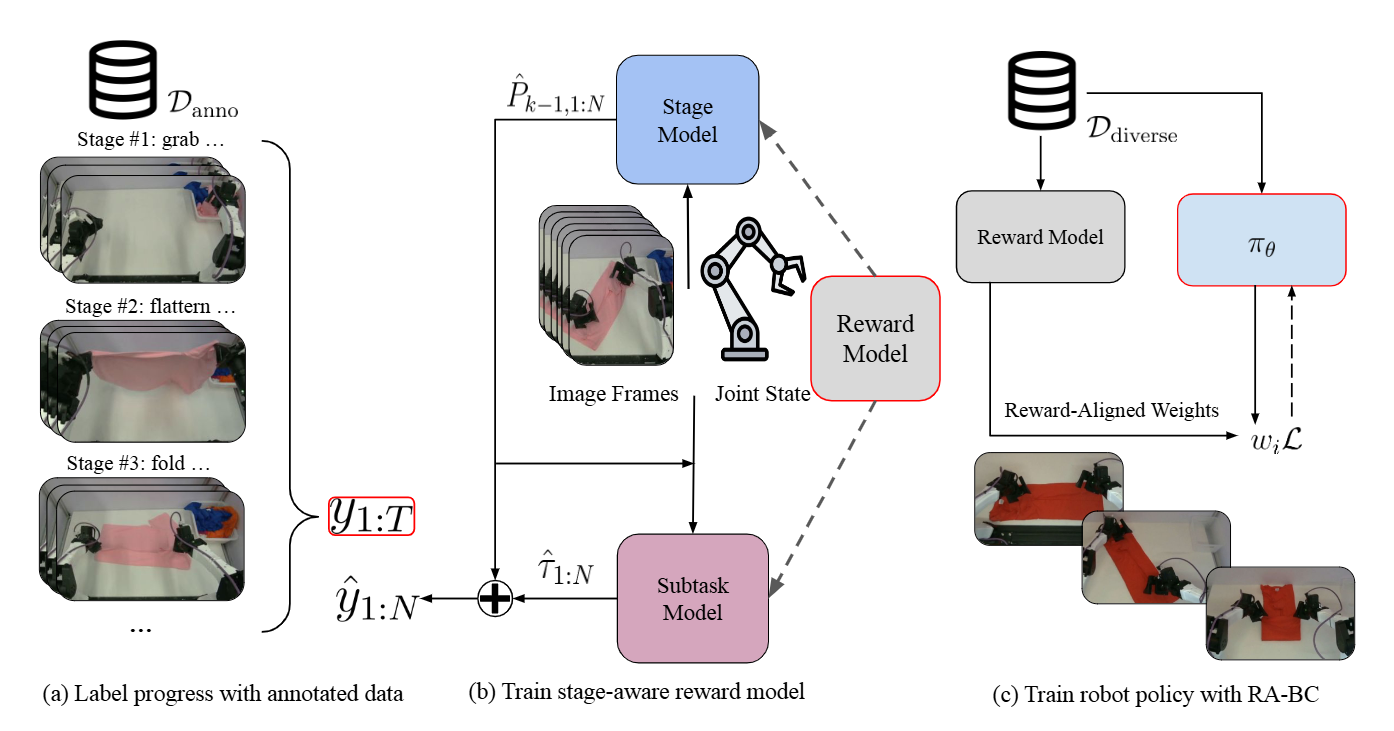
LeRobot is an open-source framework from HuggingFace that provides a unified ecosystem for robot learning — from data collection, policy training, to deployment on real robots. If you're familiar with the HuggingFace ecosystem for NLP (Transformers, Datasets, Hub), LeRobot brings the same philosophy to robotics.

In this post — the first in the VLA & LeRobot Mastery series — we'll dive deep into LeRobot's architecture, understand each component, and write practical code to start working with the framework.
Overall Architecture of LeRobot
LeRobot is designed with a modular architecture, consisting of 4 main components:
| Component | Description | Module |
|---|---|---|
| Dataset | Unified data format, HuggingFace Hub integration | lerobot.common.datasets |
| Policy | Zoo of learning algorithms (ACT, Diffusion, VLA...) | lerobot.common.policies |
| Environment | Interface with simulators (MuJoCo, robosuite) | lerobot.common.envs |
| Robot | Interface with real robot hardware | lerobot.common.robot_devices |
The strength of this design is separation of concerns: you can change the policy without modifying dataset code, or switch from simulation to a real robot without retraining from scratch.
Installing LeRobot
# Install from source (recommended for latest version)
git clone https://github.com/huggingface/lerobot.git
cd lerobot
pip install -e ".[dev]"

# Or install from PyPI
pip install lerobot

# Verify installation
python -c "import lerobot; print(lerobot.__version__)"
LeRobotDataset: Unified Data Format
At the heart of LeRobot is LeRobotDataset — a standardized format for robot demonstration data. It solves the biggest problem in robot learning: every lab uses a different format.
Data Structure
A LeRobotDataset contains:
from lerobot.common.datasets.lerobot_dataset import LeRobotDataset

# Load dataset from HuggingFace Hub
dataset = LeRobotDataset("lerobot/pusht")

# View dataset info
print(f"Number of frames: {dataset.num_frames}")
print(f"Number of episodes: {dataset.num_episodes}")
print(f"FPS: {dataset.fps}")
print(f"Features: {dataset.features}")

# Access a single frame
frame = dataset[0]
print(frame.keys())
# dict_keys(['observation.image', 'observation.state', 'action',
#             'episode_index', 'frame_index', 'timestamp'])
Each frame contains:
- observation.image: Camera image (can be multiple cameras)
- observation.state: Robot state (joint positions, gripper state)
- action: Corresponding action (joint velocities or positions)
- episode_index: Episode number
- frame_index: Frame number within the episode
- timestamp: Real-world timestamp
Loading and Exploring Datasets
import torch
from lerobot.common.datasets.lerobot_dataset import LeRobotDataset

# Load ALOHA dataset from Hub
dataset = LeRobotDataset("lerobot/aloha_sim_transfer_cube_human")

# View observation structure
print("Observation keys:")
for key in dataset.features:
    if key.startswith("observation"):
        shape = dataset[0][key].shape if hasattr(dataset[0][key], 'shape') else type(dataset[0][key])
        print(f"  {key}: {shape}")

# Get all frames from episode 0
episode_0 = dataset.filter(lambda x: x["episode_index"] == 0)
print(f"\nEpisode 0 has {len(episode_0)} frames")

# Visualize action distribution
actions = torch.stack([dataset[i]["action"] for i in range(min(1000, len(dataset)))])
print(f"\nAction shape: {actions.shape}")
print(f"Action mean: {actions.mean(dim=0)}")
print(f"Action std: {actions.std(dim=0)}")
Creating Your Own Dataset
from lerobot.common.datasets.lerobot_dataset import LeRobotDataset

# Create a new dataset
dataset = LeRobotDataset.create(
    repo_id="my-username/my-robot-dataset",
    fps=30,
    robot_type="so100",
    features={
        "observation.image": {
            "dtype": "video",
            "shape": (480, 640, 3),
            "names": ["height", "width", "channels"],
        },
        "observation.state": {
            "dtype": "float32",
            "shape": (6,),
            "names": ["joint_positions"],
        },
        "action": {
            "dtype": "float32",
            "shape": (6,),
            "names": ["joint_velocities"],
        },
    },
)

# Add data frame by frame
for episode_idx in range(num_episodes):
    for frame in episode_frames:
        dataset.add_frame({
            "observation.image": frame["image"],
            "observation.state": frame["state"],
            "action": frame["action"],
        })
    dataset.save_episode()  # End episode

# Upload to HuggingFace Hub
dataset.push_to_hub()
Policy Zoo: From ACT to VLA
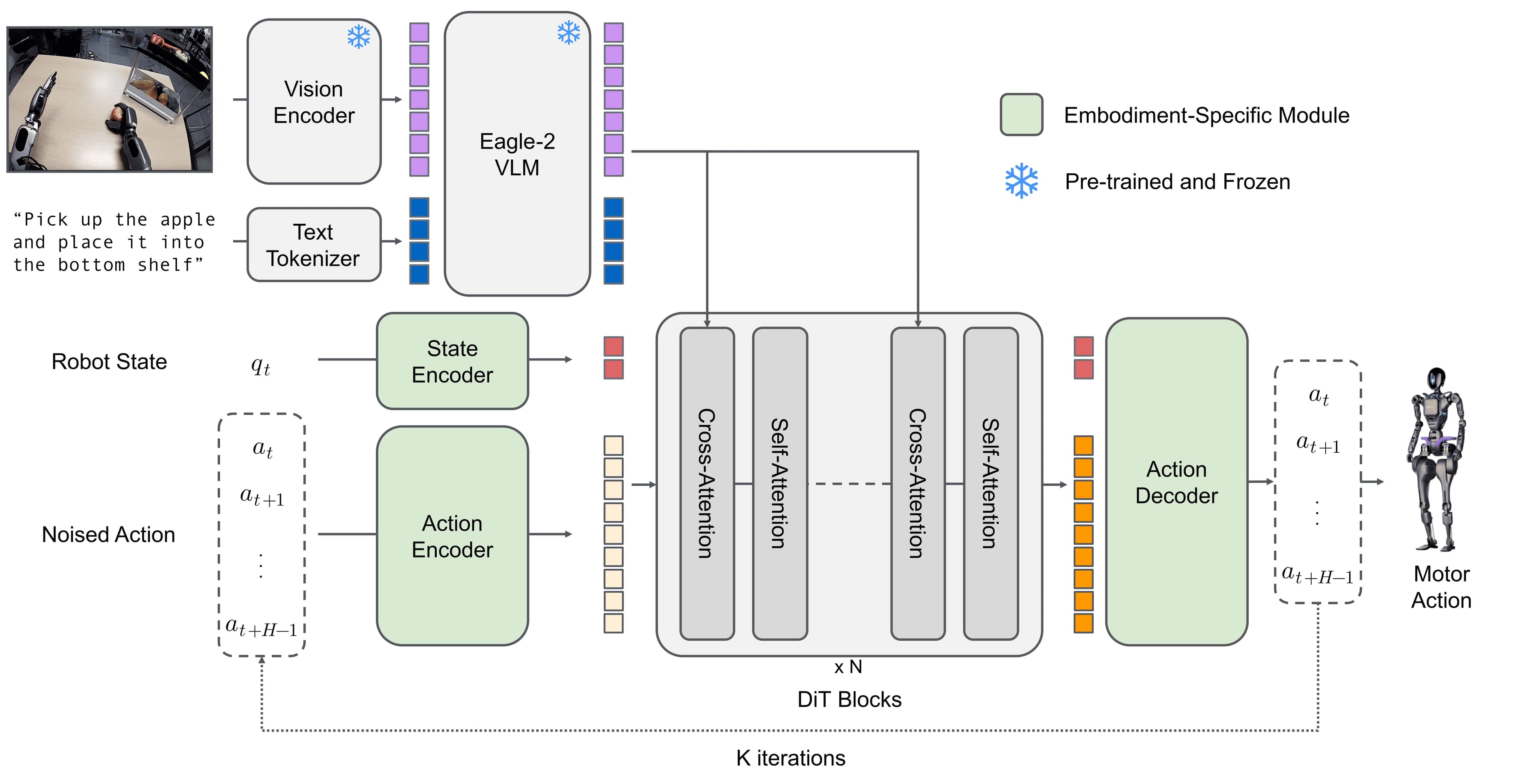
LeRobot provides a "zoo" of pre-implemented policies. This is a major differentiator compared to other frameworks — you can experiment with multiple algorithms on the same dataset simply by changing the config.
Available Policies
| Policy | Paper | Strengths | Weaknesses |
|---|---|---|---|
| ACT | Zhao et al. 2023 | Fast, stable, action chunking | Needs many high-quality demos |
| Diffusion Policy | Chi et al. RSS 2023 | Multi-modal, robust | Slower inference than ACT |
| TDMPC | Hansen et al. 2024 | Model-based, sample efficient | More complex to tune |
| VLA | Kim et al. 2024 | Language-conditioned, zero-shot | Requires powerful GPU |
| SmolVLA | HuggingFace 2024 | Lighter than VLA, edge-friendly | Less powerful than full VLA |
| pi0 | Black et al. 2024 | Flow matching, fast inference | New, fewer benchmarks |
Instantiating and Using Policies
from lerobot.common.policies.act.configuration_act import ACTConfig
from lerobot.common.policies.act.modeling_act import ACTPolicy

# Configure ACT policy
config = ACTConfig(
    input_shapes={
        "observation.image": [3, 480, 640],
        "observation.state": [6],
    },
    output_shapes={
        "action": [6],
    },
    input_normalization_modes={
        "observation.image": "mean_std",
        "observation.state": "min_max",
    },
    output_normalization_modes={
        "action": "min_max",
    },
    chunk_size=100,      # Number of actions predicted at once
    n_action_steps=100,  # Number of actions to execute
    dim_model=512,       # Transformer dimension
    n_heads=8,           # Number of attention heads
    n_layers=6,          # Number of transformer layers
)

# Create policy
policy = ACTPolicy(config)
print(f"Number of parameters: {sum(p.numel() for p in policy.parameters()):,}")
Switching Between Policies
# Simply change imports and config
from lerobot.common.policies.diffusion.configuration_diffusion import DiffusionConfig
from lerobot.common.policies.diffusion.modeling_diffusion import DiffusionPolicy

diffusion_config = DiffusionConfig(
    input_shapes={
        "observation.image": [3, 480, 640],
        "observation.state": [6],
    },
    output_shapes={
        "action": [6],
    },
    num_inference_steps=100,  # Diffusion steps during inference
    down_dims=[256, 512, 1024],
)

diffusion_policy = DiffusionPolicy(diffusion_config)
Training Pipeline
LeRobot uses Hydra for configuration management, making hyperparameter tuning extremely flexible.
Basic Training
# Train ACT on PushT dataset
python lerobot/scripts/train.py \
    --policy.type=act \
    --dataset.repo_id=lerobot/pusht \
    --training.num_epochs=100 \
    --training.batch_size=64 \
    --training.lr=1e-4 \
    --output_dir=outputs/act_pusht

# Train Diffusion Policy on the same dataset
python lerobot/scripts/train.py \
    --policy.type=diffusion \
    --dataset.repo_id=lerobot/pusht \
    --training.num_epochs=200 \
    --training.batch_size=64 \
    --output_dir=outputs/diffusion_pusht
Training with Python API
from lerobot.common.datasets.lerobot_dataset import LeRobotDataset
from lerobot.common.policies.act.configuration_act import ACTConfig
from lerobot.common.policies.act.modeling_act import ACTPolicy
import torch

# Load dataset
dataset = LeRobotDataset("lerobot/pusht")

# Create dataloader
dataloader = torch.utils.data.DataLoader(
    dataset,
    batch_size=64,
    shuffle=True,
    num_workers=4,
    pin_memory=True,
)

# Create policy
config = ACTConfig(
    input_shapes={
        "observation.image": [3, 96, 96],
        "observation.state": [2],
    },
    output_shapes={"action": [2]},
    chunk_size=100,
)
policy = ACTPolicy(config)
policy.train()

# Training loop
optimizer = torch.optim.AdamW(policy.parameters(), lr=1e-4)
device = torch.device("cuda" if torch.cuda.is_available() else "cpu")
policy.to(device)

for epoch in range(100):
    total_loss = 0
    for batch in dataloader:
        batch = {k: v.to(device) for k, v in batch.items()}
        loss_dict = policy.forward(batch)
        loss = loss_dict["loss"]

        optimizer.zero_grad()
        loss.backward()
        optimizer.step()

        total_loss += loss.item()

    avg_loss = total_loss / len(dataloader)
    print(f"Epoch {epoch}: loss = {avg_loss:.4f}")
Evaluation: Assessing Policy Performance
After training, you need to evaluate the policy in a simulation environment.
import gymnasium as gym
import torch
from lerobot.common.policies.act.modeling_act import ACTPolicy

# Load trained policy
policy = ACTPolicy.from_pretrained("outputs/act_pusht/checkpoints/last")
policy.eval()
device = torch.device("cuda")
policy.to(device)

# Create environment
env = gym.make("lerobot/pusht")

success_count = 0
n_episodes = 50

for ep in range(n_episodes):
    obs, info = env.reset()
    done = False

    while not done:
        # Convert observation to tensor
        obs_tensor = {
            k: torch.tensor(v).unsqueeze(0).to(device)
            for k, v in obs.items()
        }

        # Predict action
        with torch.no_grad():
            action = policy.select_action(obs_tensor)

        # Execute action
        obs, reward, terminated, truncated, info = env.step(
            action.squeeze(0).cpu().numpy()
        )
        done = terminated or truncated

    if info.get("is_success", False):
        success_count += 1

print(f"Success rate: {success_count/n_episodes*100:.1f}%")
Robot Interfaces: Hardware Connections
LeRobot supports multiple hardware robots through integrated drivers:
| Robot | Type | DOF | Notes |
|---|---|---|---|
| SO-100 | Single arm | 6 | Budget-friendly, Feetech servos |
| Moss v1 | Single arm | 6 | Koch v1.1 compatible |
| ALOHA | Dual arm | 2x6 | Bimanual manipulation |
| Stretch RE1 | Mobile manip | 7+ | Hello Robot, mobile base |
| LeKiwi | Mobile base | 3 | Holonomic, budget |
from lerobot.common.robot_devices.robots.manipulator import ManipulatorRobot
from lerobot.common.robot_devices.motors.feetech import FeetechMotorsBus

# Connect SO-100 robot
robot = ManipulatorRobot(
    robot_type="so100",
    leader_arms={"main": FeetechMotorsBus(port="/dev/ttyACM0", ...)},
    follower_arms={"main": FeetechMotorsBus(port="/dev/ttyACM1", ...)},
    cameras={"laptop": OpenCVCamera(camera_index=0, fps=30, width=640, height=480)},
)

robot.connect()
# Calibrate if first time
robot.home()
Comparing LeRobot with Other Frameworks
| Criteria | LeRobot | robomimic | robosuite | RLBench |
|---|---|---|---|---|
| Purpose | End-to-end platform | Policy training | Simulation | Benchmarks |
| Dataset Hub | HuggingFace Hub | Local | N/A | Local |
| Policy zoo | ACT, Diffusion, VLA, pi0 | BC, BC-RNN, HBC | N/A | N/A |
| Real robot | Built-in support | No | No | No |
| Community | Large (HF ecosystem) | Research | Research | Research |
| Ease of use | High | Medium | Medium | Low |
LeRobot stands out for its end-to-end connectivity: from collecting data on a real robot, uploading to the Hub for sharing, training different policies, and deploying back to the robot. No other framework provides such a seamless experience.

Key Papers
To gain deeper understanding of LeRobot's components, you should read these papers:
- LeRobot — HuggingFace, 2024 — Framework paper describing the overall architecture
- ACT: Action Chunking with Transformers — Zhao et al., 2023 — Core policy for manipulation
- Diffusion Policy — Chi et al., RSS 2023 — Diffusion-based policy for multi-modal actions
- TDMPC2 — Hansen et al., 2024 — Model-based approach for robot learning
Conclusion and Next Steps
LeRobot is a powerful and accessible framework for robot learning. With its modular architecture, rich policy zoo, and HuggingFace Hub integration, it's becoming the standard for the robotics research and application community.
In the next post in this series — Data Collection via Teleoperation in Simulation — we'll practice collecting demonstration data using teleop, building the dataset needed to train the policies introduced above.
If you want to learn more about VLA models before diving deeper into LeRobot, check out the VLA Models overview and the LeRobot hands-on tutorial.
Related Posts
- VLA Models: Vision-Language-Action for Robots — Overview of modern VLA models
- LeRobot Hands-on: Getting Started from Zero — Quick start guide for LeRobot
- Diffusion Policy: From Theory to Practice — Deep dive into Diffusion Policy for robotics