From Theory to Practice: Running SimpleVLA-RL on a GPU Cluster
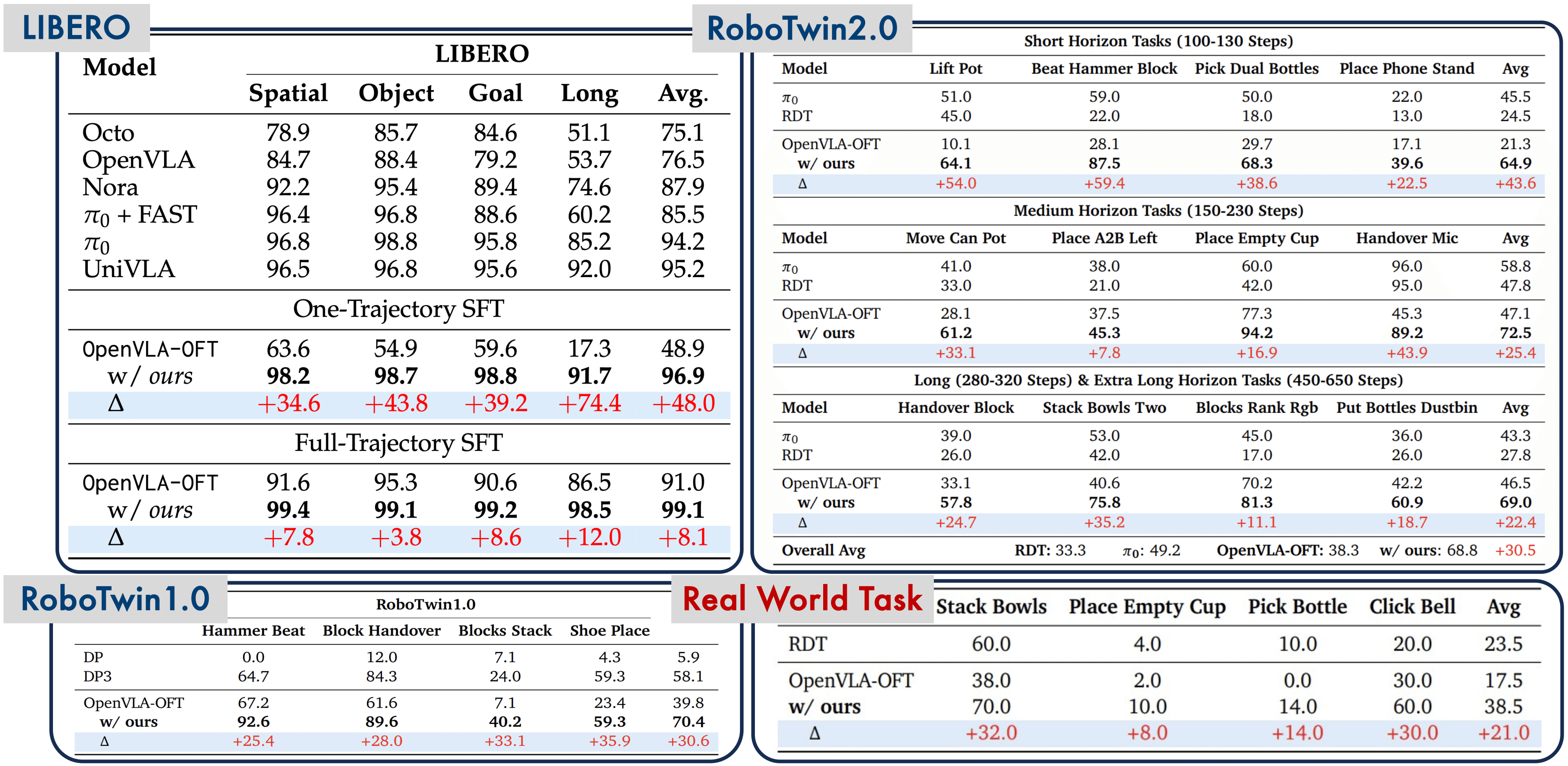
In the previous post, we analyzed SimpleVLA-RL's architecture — how it combines GRPO with VLA models to create a complete RL pipeline for robot manipulation. This post dives into practice: setting up the environment from scratch, running SFT, and training RL on two of the most popular benchmarks — LIBERO and RoboTwin.
This is a hands-on tutorial for anyone who wants to reproduce the results or apply SimpleVLA-RL to custom tasks. I'll share every step in detail, including common pitfalls that the paper doesn't mention.

Hardware Requirements
SimpleVLA-RL is not a project you can run on a laptop. Here are the minimum hardware requirements used by the authors:
| Component | Requirement |
|---|---|
| GPU | 8x NVIDIA A800 80GB (or equivalent A100 80GB) |
| CUDA | 12.4 |
| RAM | 256GB+ (512GB recommended) |
| Storage | 2TB+ NVMe SSD (checkpoints + datasets) |
| OS | Ubuntu 20.04/22.04 |
Why so many GPUs? RL training for VLA models demands:
- Large model: OpenVLA-OFT has 7B parameters — model weights alone occupy ~28GB at FP32 or ~14GB at BF16.
- Parallel rollouts: Each query samples 8 trajectories in parallel for advantage estimation — each trajectory runs in a separate simulator instance.
- Large batch size: 64 queries x 8 samples = 512 trajectories per iteration, distributed across 8 GPUs.
If you only have 4 GPUs, you can try with a smaller batch size, but results will be worse due to higher variance in gradient estimation.
Environment Setup from Scratch
Step 1: Create Conda Environment
# Create a new environment with Python 3.10
conda create -n simplevla python==3.10 -y
conda activate simplevla

# Install PyTorch with CUDA 12.4
pip3 install torch==2.4.0 --index-url https://download.pytorch.org/whl/cu124
Why Python 3.10? It's the most thoroughly tested version with both veRL and openvla-oft. Python 3.11+ may cause dependency conflicts.
Step 2: Install veRL (RL Framework)
veRL (Volcano Engine Reinforcement Learning) is an RL framework developed by ByteDance, chosen by SimpleVLA-RL as the backbone for the entire training pipeline.
# Clone veRL v0.2 — MUST use the v0.2.x branch
git clone -b v0.2.x https://github.com/volcengine/verl.git
cd verl
pip3 install -e .
cd ..
Important note: You must use branch v0.2.x, not main. The main branch may have breaking changes relative to SimpleVLA-RL.
Step 3: Install OpenVLA-OFT (VLA Model)
OpenVLA-OFT is a fine-tuned version of OpenVLA that supports action chunking — predicting multiple actions at once instead of one at a time.
# Clone OpenVLA-OFT
git clone https://github.com/moojink/openvla-oft.git
cd openvla-oft
pip install -e .
cd ..
Step 4: Install Flash Attention
Flash Attention is essential for accelerating attention computation and significantly reducing memory footprint when training 7B models.
# Flash Attention — needs to build from source, takes ~10-15 minutes
pip3 install flash-attn --no-build-isolation
The --no-build-isolation flag is mandatory — without it, the build will fail because it can't find torch in the isolated build environment.
Step 5: Clone SimpleVLA-RL
git clone https://github.com/PRIME-RL/SimpleVLA-RL.git
cd SimpleVLA-RL
Step 6: Install Benchmark (LIBERO or RoboTwin)
Depending on which benchmark you want to run, install one of the following:
Option A — LIBERO:
# Clone and install LIBERO
cd SimpleVLA-RL
pip install -e LIBERO
pip install -r experiments/robot/libero/libero_requirements.txt
Option B — RoboTwin 2.0:
# RoboTwin needs Vulkan for rendering
sudo apt install libvulkan1

# Install RoboTwin
cd SimpleVLA-RL
bash script/_install.sh
bash script/_download_assets.sh
RoboTwin 2.0 uses a Vulkan-based renderer, so your GPU must support Vulkan. If running on a cloud instance, ensure the NVIDIA driver includes Vulkan support.
Final Directory Structure
After installation, your workspace should look like this:
workspace/
├── SimpleVLA-RL/          # Main repo
│   ├── examples/          # Training scripts
│   ├── experiments/       # Experiment configs
│   ├── LIBERO/            # LIBERO benchmark (if used)
│   └── align.json         # Config file for training
├── verl/                  # veRL framework
└── openvla-oft/           # OpenVLA-OFT model

SFT Stage: Building the Foundation Before RL
Before running RL, the model needs minimum task competence. This is the role of the SFT (Supervised Fine-Tuning) stage — training the model on expert demonstrations first.
Option 1: Download Pre-trained SFT Checkpoints (Recommended)
The authors have published SFT checkpoints on HuggingFace, saving hours of training:
# Download checkpoints from HuggingFace collection
# Collection: Haozhan72/simplevla-rl
# Multiple checkpoints available for different tasks:
# - LIBERO Spatial, Object, Goal, Long
# - RoboTwin tasks
pip install huggingface_hub
python -c "
from huggingface_hub import snapshot_download
snapshot_download(
    repo_id='Haozhan72/simplevla-rl-libero-spatial-sft',
    local_dir='./checkpoints/sft/libero-spatial'
)
"
Option 2: Train SFT from Scratch
If you want to train SFT for custom tasks, you'll need:
- 500 demonstrations per task (or fewer — even 1 demo can work, see the results post)
- Format: sequences of (image, action) pairs
- Standard supervised fine-tuning on OpenVLA-OFT
# SFT training using the standard OpenVLA-OFT pipeline
cd openvla-oft
python scripts/finetune.py \
    --model_name openvla-7b \
    --dataset_path /path/to/your/demos \
    --output_dir ./checkpoints/sft-custom \
    --num_epochs 50 \
    --batch_size 16 \
    --learning_rate 2e-5
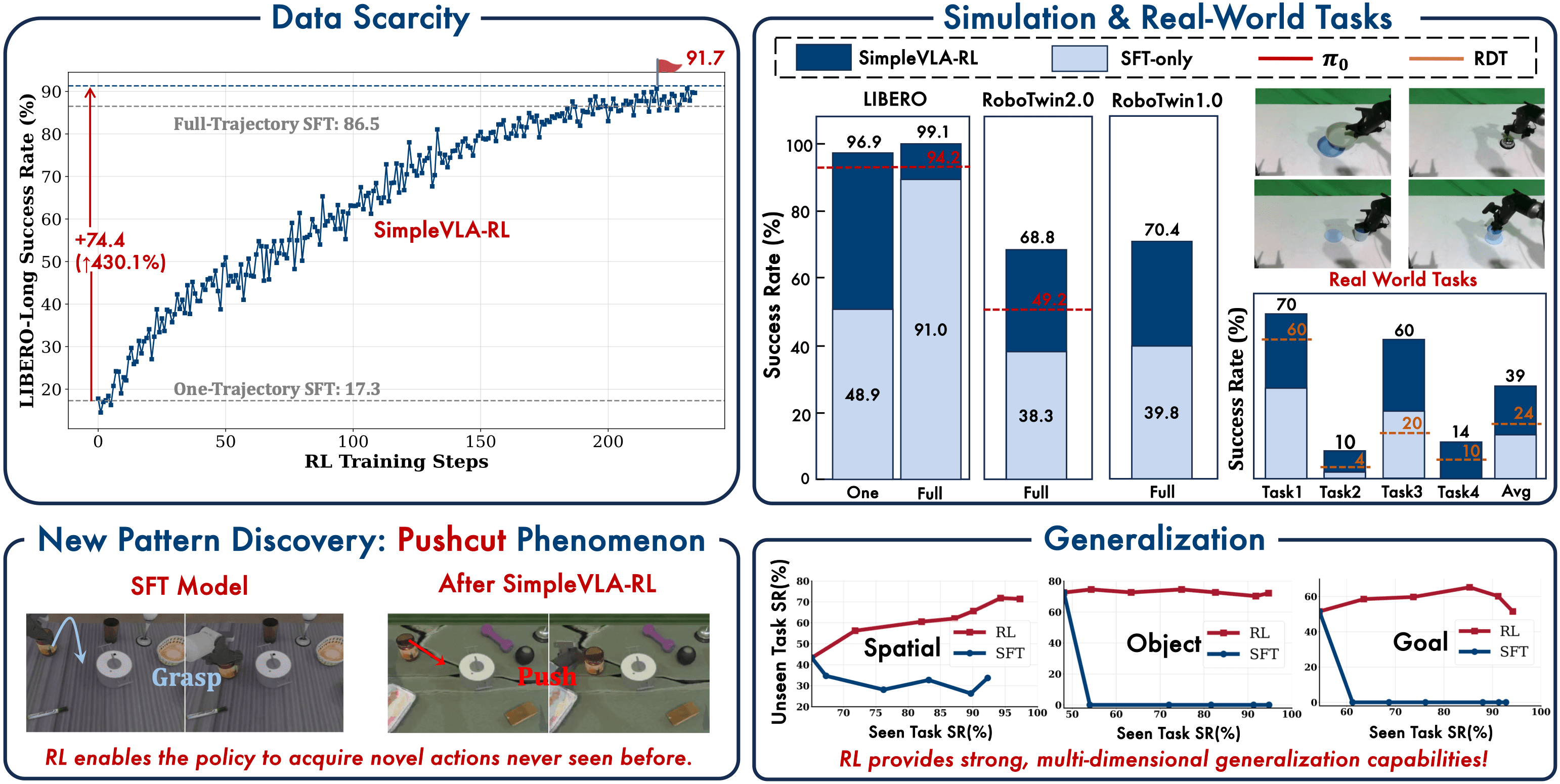
Key insight: Results in the paper show that even 1 demonstration is enough for SFT to give the model minimum competence, after which RL raises performance close to the 500-demo level. But 0 demos doesn't work — the model needs to see the task at least once.
RL Training: Configuration and Execution
Step 1: Configure Environment Variables
Edit the align.json file in the SimpleVLA-RL directory:
{
    "WANDB_API_KEY": "your-wandb-api-key-here",
    "WANDB_PROJECT": "simplevla-rl",
    "WANDB_ENTITY": "your-username"
}
Weights & Biases (W&B) is the default training monitoring tool. If you don't have an account, sign up for free at wandb.ai.
Step 2: Configure the Training Script
Open the shell script for your benchmark (e.g., examples/run_openvla_oft_rl_libero.sh) and set these variables:
# Path to the SFT checkpoint (downloaded or self-trained)
SFT_MODEL_PATH="/workspace/checkpoints/sft/libero-spatial"

# Path to save RL checkpoints
CKPT_PATH="/workspace/checkpoints/rl/libero-spatial"

# Dataset name in LIBERO
DATASET_NAME="libero_spatial"

# Number of GPUs (default 8)
NUM_GPUS=8
Step 3: Hyperparameter Reference Table
Here is the complete hyperparameter table used by the authors:
| Hyperparameter | LIBERO | RoboTwin | Explanation |
|---|---|---|---|
| Learning rate | 5e-6 | 5e-6 | Much lower than SFT — RL needs gentle updates |
| Batch size | 64 | 64 | Number of queries per iteration |
| Samples per query | 8 | 8 | Trajectories sampled per query (for GRPO) |
| Mini-batch size | 128 | 128 | For gradient accumulation |
| Clip range | (0.2, 1.28) | (0.2, 1.28) | Asymmetric — allows larger probability increases than decreases |
| Temperature | 1.6 | 1.6 | Higher than normal to encourage exploration |
| Action chunks | 8 | 25 | Number of actions predicted simultaneously |
| Max steps per episode | 512 | varies | Maximum trajectory length |
Key hyperparameter explanations:
- Clip range (0.2, 1.28): This is an asymmetric clip — unlike standard PPO which uses symmetric (0.8, 1.2). The higher upper clip (1.28 vs 1.2) allows the model to more aggressively increase probability for successful actions compared to decreasing probability for failing ones. This helps RL quickly amplify effective behaviors.
- Temperature 1.6: Significantly higher than the default (typically 0.7-1.0). High temperature encourages exploration — the model tries many different strategies instead of just exploiting the current best. After training, inference uses a lower temperature.
- Action chunks: LIBERO uses 8 because tasks are simpler, RoboTwin uses 25 because tasks are more complex and require longer-horizon planning.
Step 4: Run Training
cd SimpleVLA-RL

# Run RL training on LIBERO
bash examples/run_openvla_oft_rl_libero.sh

# Or on RoboTwin
bash examples/run_openvla_oft_rl_robotwin.sh
Training takes approximately 12-24 hours depending on the task and hardware. On 8x A800, LIBERO Spatial typically converges after ~300-500 iterations.
Monitoring Training with W&B
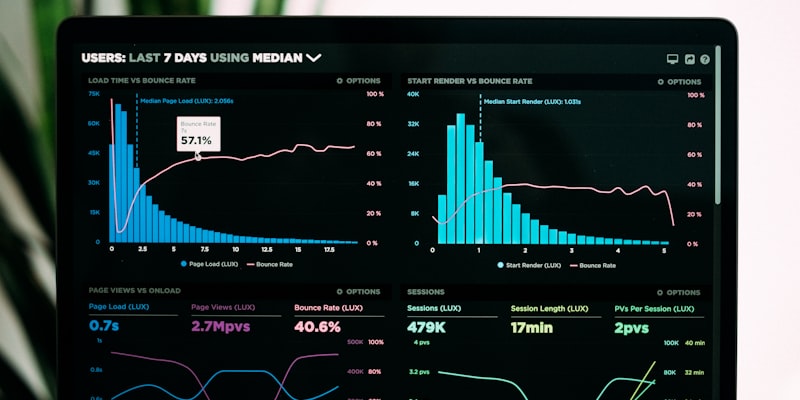
When training starts, open the W&B dashboard to monitor key metrics:
Metrics to Watch
- Success rate (most important): Task completion rate — with binary reward, this is easy to track.
- Average reward: Mean reward value. With binary reward, this equals the success rate.
- KL divergence: Measures how much the model has changed from the SFT checkpoint. If KL gets too high (>10), the model may have diverged.
- Entropy: Measures exploration level. Gradually decreasing entropy is normal — the model is converging toward exploitation.
- Gradient norm: If it explodes (>100), reduce the learning rate.
Expected Training Curves
For LIBERO Spatial (easiest suite):
- Iteration 0-50: Success rate increases slightly from SFT baseline (~95%)
- Iteration 50-200: Strongest gains, reaching ~98%
- Iteration 200-500: Gradual convergence, reaching ~99%+
For RoboTwin (harder):
- Training takes longer, curves are noisier
- Don't panic if success rate drops temporarily — this is normal in RL
Checkpoint Management
Saving Checkpoints
SimpleVLA-RL automatically saves checkpoints at intervals configured in the script. Each checkpoint includes:
- Model weights (BF16)
- Optimizer state
- Training metadata (iteration, metrics)
Each checkpoint takes about 15-20GB, so ensure you have enough storage. Over 500 iterations, you may need 100GB+ for checkpoints.
Selecting the Best Checkpoint
The final checkpoint isn't always the best. Use W&B to find the iteration with the highest success rate, then evaluate that checkpoint:
# Evaluate a specific checkpoint
# In the script: set trainer.val_only=True
# Then run with the corresponding checkpoint
bash examples/run_openvla_oft_rl_libero.sh
Evaluation
To evaluate the model after training, simply change one config flag:
# In the shell script, set:
# trainer.val_only=True

# Then run the script normally
bash examples/run_openvla_oft_rl_libero.sh
Evaluation runs the model through all test episodes and reports average success rate. Each LIBERO suite has 10 tasks x 50 evaluation episodes = 500 total episodes.
Troubleshooting: Common Issues
1. CUDA Out of Memory
RuntimeError: CUDA out of memory. Tried to allocate 2.00 GiB
Cause: Insufficient GPU memory for the current batch size.
Solution: Reduce samples_per_query from 8 to 4, or reduce batch_size. Note that results will be worse due to higher gradient estimation variance.
2. Flash Attention Build Failure
error: command 'gcc' failed
Cause: Missing CUDA toolkit or version mismatch.
Solution: Ensure nvcc --version returns CUDA 12.4, and gcc --version >= 9.0.
3. LIBERO Import Error
ImportError: cannot import name 'LIBERO' from 'libero'
Cause: LIBERO installed with pip install instead of pip install -e . (editable mode).
Solution: cd LIBERO && pip install -e .
4. Vulkan Error (RoboTwin)
RuntimeError: Failed to initialize Vulkan
Cause: GPU lacks Vulkan driver or running on headless server.
Solution: sudo apt install libvulkan1 mesa-vulkan-drivers. For headless setups: use EGL rendering fallback.
5. Training Divergence (Reward Keeps Dropping)
Cause: SFT checkpoint is too weak — the model lacks basic task completion ability. Solution: Check that SFT checkpoint has success rate >= 30%. If below that, train SFT longer or add more demonstrations.
6. W&B Connection Timeout
wandb: ERROR Error communicating with wandb process
Cause: Firewall blocking outbound connections.
Solution: Set WANDB_MODE=offline to log locally, then wandb sync when internet is available.
Adapting for Different Hardware
If you don't have exactly 8x A800, here's how to adjust:
| Hardware | Required Changes |
|---|---|
| 4x A100 80GB | Reduce batch_size to 32, keep samples_per_query at 8 |
| 8x A100 40GB | Enable gradient checkpointing, reduce max_steps to 256 |
| 4x A6000 48GB | Reduce batch_size to 16, enable DeepSpeed ZeRO-3 |
| 2x H100 80GB | Batch 32, use tensor parallelism |
Note: Reducing batch size affects gradient estimation quality in GRPO. Smaller batch = higher variance = less stable training = need proportionally lower learning rate.
What's Next
In the next post — SimpleVLA-RL (4): Results & Key Takeaways, we'll analyze the experimental results in detail: from the impressive LIBERO numbers (99%+ success rate) to the fascinating "pushcut" phenomenon — where RL discovers strategies that humans never taught. And most importantly: 5 key lessons for anyone applying RL to robot learning.
If you haven't read the architecture post, go back to SimpleVLA-RL (2): Architecture & Algorithm to understand why these hyperparameters were chosen. And if you want to understand VLA model fundamentals, the AI for Robots series is a great starting point.
Related Posts
- SimpleVLA-RL (1): Overview — RL for VLA Models — Introduction to the idea and motivation behind SimpleVLA-RL
- SimpleVLA-RL (2): Architecture & Algorithm — Deep dive into GRPO adaptation for robotics
- AI Series (5): VLA Models — Vision-Language-Action — VLA model foundations for robot manipulation