What is Micro-ROS?
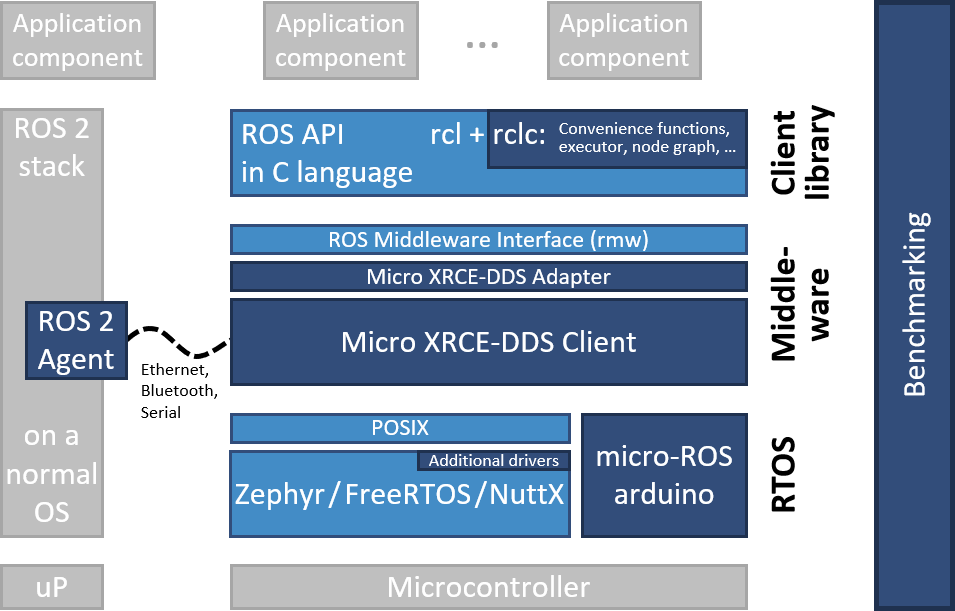
Micro-ROS brings ROS 2 to microcontroller world. Instead of running ROS 2 on Linux, create ROS 2 nodes directly on ESP32, STM32, or Arduino — microcontrollers with only few hundred KB RAM.
Micro-ROS uses DDS-XRCE (DDS for eXtremely Resource Constrained Environments) — lightweight DDS version that ROS 2 uses. A micro-ROS agent running on Linux acts as bridge between microcontroller and ROS 2 system.
Architecture
┌──────────────────┐      Serial/WiFi/USB      ┌─────────────────┐
│  Microcontroller │ ◄──────────────────────► │  micro-ROS      │
│  (ESP32/STM32)   │      DDS-XRCE             │  Agent (Linux)  │
│  micro-ROS client│                            │                 │
└──────────────────┘                            └────────┬────────┘
                                                         │ DDS
                                                ┌────────▼────────┐
                                                │  ROS 2 System   │
                                                │  (Nav2, MoveIt) │
                                                └─────────────────┘

Installing Micro-ROS for ESP32
1. Install Micro-ROS Agent
# Create ROS 2 workspace
mkdir -p ~/microros_ws/src && cd ~/microros_ws/src
git clone -b humble https://github.com/micro-ROS/micro_ros_setup.git
cd ~/microros_ws

colcon build
source install/setup.bash

# Create agent
ros2 run micro_ros_setup create_agent_ws.sh
ros2 run micro_ros_setup build_agent.sh
2. ESP32 Firmware with PlatformIO
; platformio.ini
[env:esp32]
platform = espressif32
board = esp32dev
framework = arduino
lib_deps =
    https://github.com/micro-ROS/micro_ros_platformio
board_microros_transport = wifi
3. ESP32 Code — Publish Sensor Data
#include <micro_ros_arduino.h>
#include <rcl/rcl.h>
#include <rclc/rclc.h>
#include <sensor_msgs/msg/imu.h>

rcl_publisher_t imu_publisher;
sensor_msgs__msg__Imu imu_msg;
rclc_executor_t executor;
rcl_timer_t timer;

void timer_callback(rcl_timer_t *timer, int64_t last_call_time) {
    // Read IMU (example MPU6050)
    imu_msg.linear_acceleration.x = read_accel_x();
    imu_msg.linear_acceleration.y = read_accel_y();
    imu_msg.linear_acceleration.z = read_accel_z();
    imu_msg.angular_velocity.x = read_gyro_x();
    imu_msg.angular_velocity.y = read_gyro_y();
    imu_msg.angular_velocity.z = read_gyro_z();

    // Publish to topic /imu/data
    rcl_publish(&imu_publisher, &imu_msg, NULL);
}

void setup() {
    // Connect WiFi to agent
    set_microros_wifi_transports("WIFI_SSID", "WIFI_PASS", "192.168.1.100", 8888);

    rcl_allocator_t allocator = rcl_get_default_allocator();
    rclc_support_t support;
    rclc_support_init(&support, 0, NULL, &allocator);

    rcl_node_t node;
    rclc_node_init_default(&node, "esp32_imu", "", &support);

    // Create IMU data publisher
    rclc_publisher_init_default(
        &imu_publisher, &node,
        ROSIDL_GET_MSG_TYPE_SUPPORT(sensor_msgs, msg, Imu),
        "/imu/data"
    );

    // Timer 100Hz
    rclc_timer_init_default(&timer, &support, RCL_MS_TO_NS(10), timer_callback);
    rclc_executor_init(&executor, &support.context, 1, &allocator);
    rclc_executor_add_timer(&executor, &timer);
}

void loop() {
    rclc_executor_spin_some(&executor, RCL_MS_TO_NS(10));
}
Subscribe to Control Commands from ROS 2
rcl_subscription_t cmd_subscriber;
geometry_msgs__msg__Twist cmd_msg;

void cmd_callback(const void *msgin) {
    const geometry_msgs__msg__Twist *msg = (const geometry_msgs__msg__Twist *)msgin;
    float linear = msg->linear.x;   // m/s
    float angular = msg->angular.z; // rad/s

    // Convert to PWM for motors
    int left_pwm = (int)((linear - angular * WHEEL_BASE / 2) * PWM_SCALE);
    int right_pwm = (int)((linear + angular * WHEEL_BASE / 2) * PWM_SCALE);
    set_motors(left_pwm, right_pwm);
}
Running Agent and Connecting
# Run agent over WiFi (UDP)
ros2 run micro_ros_agent micro_ros_agent udp4 --port 8888

# Or over Serial
ros2 run micro_ros_agent micro_ros_agent serial --dev /dev/ttyUSB0

# Check topic from ESP32
ros2 topic list
ros2 topic echo /imu/data

Which MCU to Choose?
| MCU | RAM | Flash | WiFi | Price | Rating |
|---|---|---|---|---|---|
| ESP32 | 520KB | 4MB | Yes | ~80K VND | Best for prototype, WiFi built-in |
| STM32F4 | 192KB | 1MB | No | ~120K VND | Better real-time, FreeRTOS |
| STM32H7 | 1MB | 2MB | No | ~250K VND | High performance, many peripherals |
| Teensy 4.1 | 1MB | 8MB | No | ~700K VND | 600MHz clock, USB host |
Important Notes
- WiFi connection unstable — use Serial/USB for safety-critical applications
- Limited memory — each publisher/subscriber consumes ~2-5KB RAM, calculate carefully
- No callback queue —
spin_somemust be called frequently, avoid blocking code - QoS must match: micro-ROS node QoS must be compatible with Linux ROS 2 node
Micro-ROS is important bridge between embedded world and ROS 2, allowing you to build complete robot systems from lowest sensor layer to top-level Nav2 navigation, all within one ecosystem. With Python and serial communication, you can also communicate with microcontroller without micro-ROS.