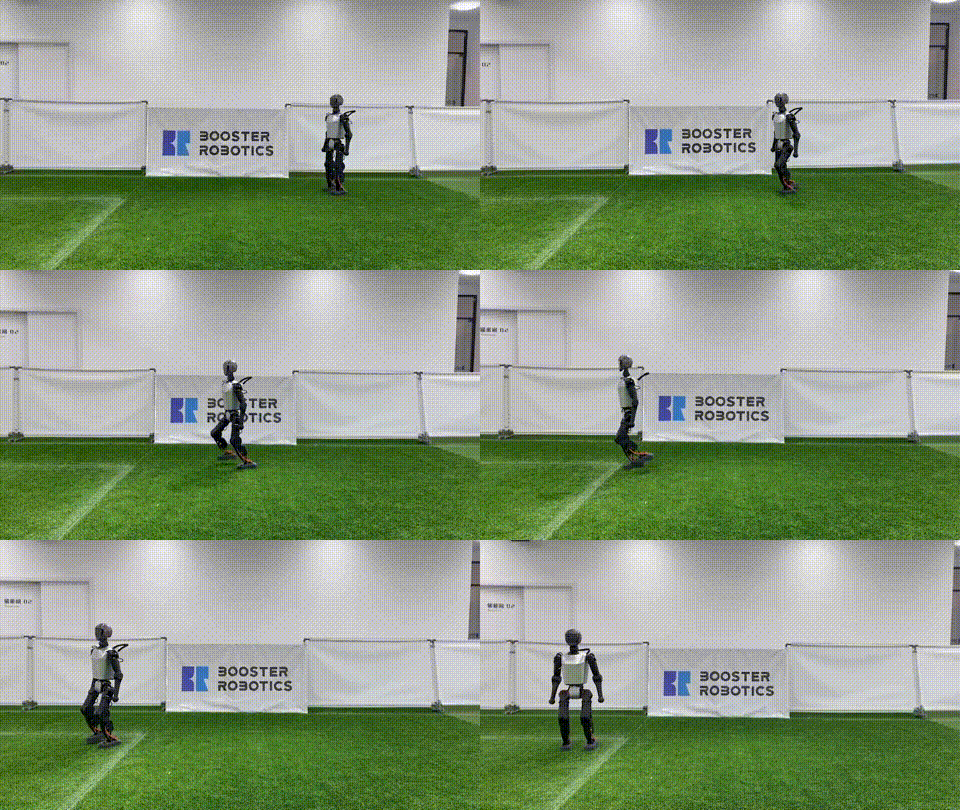
RL for Humanoids — From Simulation to Reality
In Part 3, we learned about MPC — a powerful model-based approach but computationally expensive. Reinforcement Learning (RL) is another path: train policies in simulation, then deploy directly to real robots.
Key RL advantages over MPC:
- Fast inference: Only 0.1-1 ms (vs 5-50 ms for MPC)
- Robust to variations: Policy learns from millions of scenarios with different friction, mass, disturbances
- No explicit model needed: Works when accurate simulation is difficult
The main disadvantage: sim-to-real gap — policies trained in simulation may fail on real robots. This is the core problem that Humanoid-Gym is designed to solve.

Humanoid-Gym — The Standard Framework
Humanoid-Gym (arXiv:2404.05695) is an RL framework designed specifically for humanoid locomotion, developed by RobotEra and Tsinghua University.
Key Features
- Built on NVIDIA Isaac Gym: Leverages GPU parallelism — train 4,096 robots simultaneously
- Sim-to-sim verification: Transfer policy from Isaac Gym to MuJoCo before deployment
- Zero-shot sim-to-real: Verified on RobotEra XBot-S (1.2m) and XBot-L (1.65m)
- Modular design: Easy to swap robot models, reward functions, and terrain
Installation
# Clone repo
git clone https://github.com/roboterax/humanoid-gym.git
cd humanoid-gym

# Install Isaac Gym (requires NVIDIA GPU)
pip install isaacgym  # Download from NVIDIA

# Install Humanoid-Gym
pip install -e .
Project Structure
humanoid-gym/
├── humanoid/
│   ├── envs/
│   │   ├── base/               # Base environment
│   │   ├── humanoid/
│   │   │   ├── humanoid_config.py    # Config (reward, domain rand, ...)
│   │   │   └── humanoid_env.py       # Environment logic
│   │   └── custom/              # For your own robot
│   ├── scripts/
│   │   ├── train.py             # Training script
│   │   └── play.py              # Evaluation script
│   └── utils/
├── resources/
│   └── robots/                  # URDF/MJCF models
└── logs/                        # Training logs
Reward Engineering — The Most Critical Part
The reward function determines what the robot learns. Design the reward wrong and the robot learns bizarre behaviors (reward hacking).
Reward Components for Humanoid Walking
class HumanoidRewardConfig:
    class rewards:
        # === Tracking rewards (positive) ===
        # Follow desired velocity
        tracking_lin_vel = 1.5      # Track linear velocity command
        tracking_ang_vel = 0.8      # Track angular velocity command

        # === Regularization (negative, penalties) ===
        lin_vel_z = -2.0            # Penalize vertical oscillation (bouncing)
        ang_vel_xy = -0.05          # Penalize excessive lateral rocking
        orientation = -1.0          # Penalize non-upright torso
        base_height = -10.0         # Penalize wrong height

        # === Smooth motion (negative) ===
        torques = -0.0001           # Penalize large torques (energy efficiency)
        dof_vel = -0.001            # Penalize high joint velocity
        dof_acc = -2.5e-7           # Penalize joint acceleration (smooth motion)
        action_rate = -0.01         # Penalize sudden action changes

        # === Contact rewards ===
        feet_air_time = 1.0         # Reward foot being airborne (no dragging)
        feet_stumble = -1.0         # Penalize feet hitting obstacles
        collision = -1.0            # Penalize body collisions

        # === Survival ===
        alive = 0.5                 # Reward each survival step
        termination = -200.0        # Penalize falling
Reward Shaping Tips
- Start simple: Only
tracking_lin_vel+alive+termination. Add other rewards gradually. - Normalize: Rewards should have similar magnitudes. If
termination = -200buttorques = -0.0001, they need adjustment. - Curriculum: Increase difficulty gradually — start on flat ground, add terrain after walking is stable.
- Observation noise: Add noise to observations to make the policy more robust.
Training Pipeline
Step 1: Configuration
# humanoid/envs/custom/my_robot_config.py

from humanoid.envs.base.legged_robot_config import LeggedRobotCfg

class MyHumanoidCfg(LeggedRobotCfg):
    class env:
        num_envs = 4096          # Parallel robot count
        num_observations = 47     # Observation dimension
        num_actions = 12          # Controlled joints count
        episode_length_s = 20     # Max episode length

    class terrain:
        mesh_type = 'plane'       # Start with flat ground
        # mesh_type = 'trimesh'   # More complex terrain
        curriculum = True         # Gradually increase difficulty

    class init_state:
        pos = [0.0, 0.0, 0.95]   # Initial position (standing)
        default_joint_angles = {  # Default joint angles
            'left_hip_pitch': -0.1,
            'left_knee': 0.3,
            'left_ankle': -0.2,
            'right_hip_pitch': -0.1,
            'right_knee': 0.3,
            'right_ankle': -0.2,
            # ... add remaining joints
        }

    class control:
        # PD gains
        stiffness = {'hip': 80, 'knee': 80, 'ankle': 40}
        damping = {'hip': 2, 'knee': 2, 'ankle': 1}
        action_scale = 0.25       # Scale action output
        decimation = 4            # Control frequency = sim_freq / decimation

    class domain_rand:
        randomize_friction = True
        friction_range = [0.5, 1.5]
        randomize_base_mass = True
        added_mass_range = [-1.0, 3.0]     # kg
        push_robots = True
        push_interval_s = 7                 # Push robot every 7 seconds
        max_push_vel_xy = 1.0              # m/s

    class noise:
        add_noise = True
        noise_level = 1.0
        class noise_scales:
            dof_pos = 0.01
            dof_vel = 1.5
            lin_vel = 0.1
            ang_vel = 0.2
            gravity = 0.05
Step 2: Train
# Train with PPO (Proximal Policy Optimization)
python humanoid/scripts/train.py \
    --task my_humanoid \
    --num_envs 4096 \
    --max_iterations 5000 \
    --headless
Training typically takes 2-8 hours on an RTX 4090, depending on task complexity.
Step 3: Evaluate
# Watch policy in simulation
python humanoid/scripts/play.py \
    --task my_humanoid \
    --load_run <run_name> \
    --checkpoint <iteration>

Sim-to-Sim Verification
Before deploying to real robot, verify policy in MuJoCo (a different simulator from Isaac Gym). If the policy performs well in both simulators, there is a high probability it will work in the real world.
import mujoco
import numpy as np
import torch

class MuJoCoVerifier:
    def __init__(self, model_path, policy_path):
        self.model = mujoco.MjModel.from_xml_path(model_path)
        self.data = mujoco.MjData(self.model)

        # Load trained policy
        self.policy = torch.jit.load(policy_path)
        self.policy.eval()

    def get_observation(self):
        """Build observation matching Isaac Gym format."""
        obs = np.concatenate([
            self.data.qpos[7:],         # Joint positions (skip root)
            self.data.qvel[6:],         # Joint velocities (skip root)
            self.data.qvel[:3],         # Base linear velocity
            self.data.qvel[3:6],        # Base angular velocity
            self.get_projected_gravity(),
            self.command,               # Velocity command
            self.prev_action,           # Previous action
        ])
        return obs

    def get_projected_gravity(self):
        """Gravity vector in body frame."""
        quat = self.data.qpos[3:7]
        rot = np.zeros(9)
        mujoco.mju_quat2Mat(rot, quat)
        rot = rot.reshape(3, 3)
        return rot.T @ np.array([0, 0, -1])

    def run(self, command=[0.5, 0.0, 0.0], steps=1000):
        """Run policy in MuJoCo."""
        self.command = np.array(command)
        self.prev_action = np.zeros(self.model.nu)

        for step in range(steps):
            obs = self.get_observation()
            obs_tensor = torch.FloatTensor(obs).unsqueeze(0)

            with torch.no_grad():
                action = self.policy(obs_tensor).squeeze().numpy()

            # Apply action (position targets)
            self.data.ctrl[:] = action * 0.25  # action_scale

            # Step MuJoCo
            for _ in range(4):  # decimation
                mujoco.mj_step(self.model, self.data)

            self.prev_action = action
Zero-Shot Sim-to-Real Transfer
Zero-shot means deploying directly from simulation to real robot without fine-tuning. To achieve this:
1. Domain Randomization (DR)
Randomize everything possible:
- Friction: 0.5-1.5x
- Mass: +/- 3 kg
- Motor strength: 80-120%
- Sensor noise: Gaussian noise on observations
- Push perturbations: Push robot randomly every 5-10 seconds
- Terrain: Flat, slopes, rough, stairs
2. Observation Design
Only use observations available on real robot:
- Joint positions (encoders)
- Joint velocities (encoders)
- IMU (angular velocity, projected gravity)
- Velocity command
Do NOT use: ground truth position (no indoor GPS), contact forces (expensive sensors), terrain height maps (requires perception).
3. Action Space
Use position targets instead of torques:
target_position = default_angle + action * action_scale
The on-robot PD controller tracks the target position. This is more stable than sending torques directly.
4. Latency Compensation
Real robots have latency (~20-50 ms) from observation to action. Add latency to simulation:
class domain_rand:
    observation_delay_range = [0, 3]  # 0-3 timesteps delay
RL vs MPC Comparison for Humanoids
| Criterion | MPC (Part 3) | RL (Humanoid-Gym) |
|---|---|---|
| Inference time | 5-50 ms | 0.1-1 ms |
| Training time | 0 (model-based) | 2-8 hours |
| Robustness | Medium | High (after DR) |
| Optimality | High (receding horizon) | Medium |
| Sim-to-real | Good (when model accurate) | Requires careful DR |
| Terrain adaptation | Needs perception | Learned (proprioception) |
| Compute hardware | CPU (real-time) | GPU (training), CPU (deploy) |
| Customization | Modify cost function | Modify reward function |
| State of art | Boston Dynamics, MuJoCo MPC | Unitree, RobotEra, Agility |
2026 trend: Most companies (Unitree, Tesla, Figure) use RL for locomotion and MPC or learned control for manipulation. RL has proven to be the most effective method for humanoid locomotion in complex environments.
Practical Tips
Training Not Converging?
- Check reward function: Log each reward component to identify which one dominates
- Reduce learning rate: From 3e-4 to 1e-4
- Increase entropy bonus: Encourage more exploration
- Simplify terrain: Train on flat ground first
Policy Showing Strange Behavior?
- Check reward hacking: Robot may find shortcuts — e.g., hopping instead of walking
- Add regularization: Increase penalties for torques, action rate
- Video logging: Watch the robot in simulation to spot issues early
Sim-to-Real Failing?
- Increase domain randomization: Add more parameter variation
- Check observation mismatch: Compare observations in sim vs real robot
- Calibrate actuator model: PD gains, motor delays, deadzones
- Sim-to-sim first: Verify in MuJoCo before deploying to real robot
Next in Series
- Part 3: Whole-Body MPC: Real-Time Full-Body Control
- Part 5: Loco-Manipulation: Walking and Manipulating Simultaneously
- Part 6: The Future of Humanoids: Opportunities for Robotics Engineers
Related Articles
- RL for Bipedal Walking — RL basics for two-legged robots
- RL Basics for Robotics: From Markov to PPO — Foundations of reinforcement learning
- Sim-to-Real Transfer: Techniques and Best Practices — Domain randomization best practices
- NVIDIA Isaac Lab: GPU-Accelerated RL Training — Isaac Lab tutorial