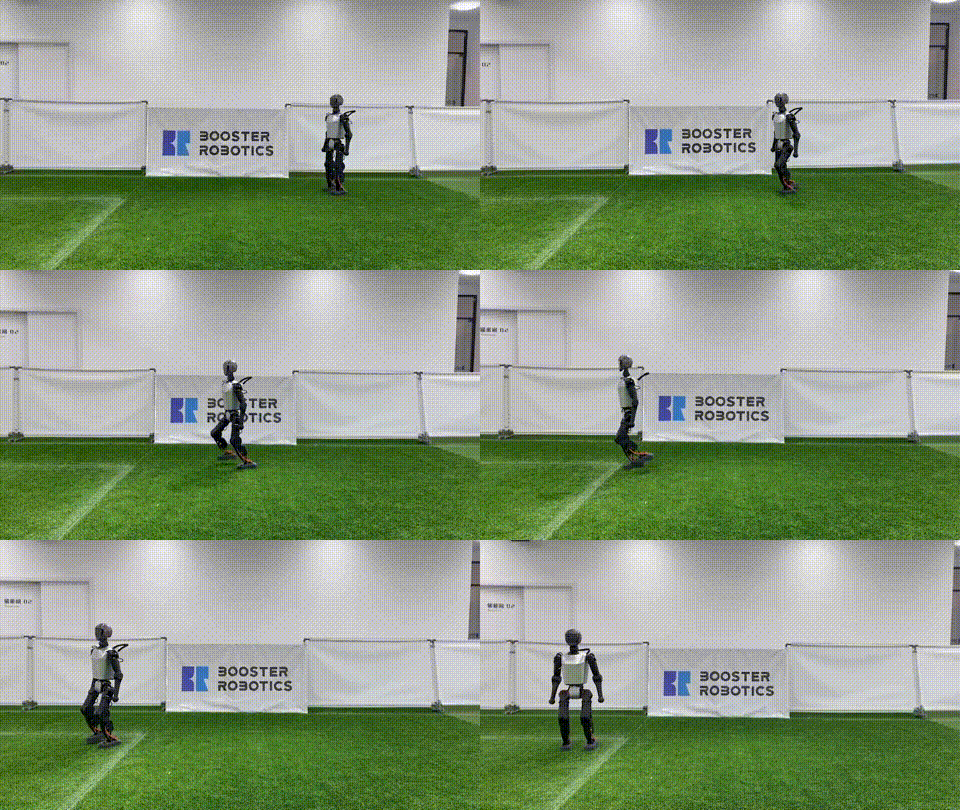
RL cho Humanoid -- Từ simulation đến thực tế
Trong Part 3, chúng ta đã học về MPC -- phương pháp model-based mạnh mẽ nhưng đòi hỏi nhiều computation. Reinforcement Learning (RL) là hướng tiếp cận khác: train policy trong simulation, rồi deploy trực tiếp lên robot thật.
Ưu điểm chính của RL so với MPC:
- Inference nhanh: Chỉ 0,1-1 ms (vs 5-50 ms cho MPC)
- Robust hơn: Policy đã "học" qua hàng triệu tình huống khác nhau
- Không cần model chính xác: RL có thể học từ experience, không cần dynamics model
Nhược điểm: sim-to-real gap -- policy train trong sim có thể không hoạt động ngoài thực tế. Đây là vấn đề chính mà Humanoid-Gym giải quyết.

Humanoid-Gym -- Framework tiêu chuẩn
Humanoid-Gym (arXiv:2404.05695) là framework RL được thiết kế riêng cho humanoid locomotion, phát triển bởi RobotEra và Tsinghua University.
Đặc điểm chính
- Xây dựng trên NVIDIA Isaac Gym: Tận dụng GPU parallelism -- train 4.096 robots song song
- Sim-to-sim verification: Chuyển policy từ Isaac Gym sang MuJoCo để verify trước khi deploy
- Zero-shot sim-to-real: Đã verified trên RobotEra XBot-S (1,2m) và XBot-L (1,65m)
- Modular design: Dễ thay đổi robot model, reward function, terrain
Cài đặt
# Clone repo
git clone https://github.com/roboterax/humanoid-gym.git
cd humanoid-gym

# Cài đặt Isaac Gym (cần NVIDIA GPU)
pip install isaacgym  # Từ NVIDIA download

# Cài đặt Humanoid-Gym
pip install -e .
Cấu trúc project
humanoid-gym/
├── humanoid/
│   ├── envs/
│   │   ├── base/               # Base environment
│   │   ├── humanoid/
│   │   │   ├── humanoid_config.py    # Config (reward, domain rand, ...)
│   │   │   └── humanoid_env.py       # Environment logic
│   │   └── custom/              # Cho robot của bạn
│   ├── scripts/
│   │   ├── train.py             # Training script
│   │   └── play.py              # Evaluation script
│   └── utils/
├── resources/
│   └── robots/                  # URDF/MJCF models
└── logs/                        # Training logs
Reward Engineering -- Phần quan trọng nhất
Reward function quyết định robot học gì. Thiết kế reward sai = robot học hành vi kỳ lạ (reward hacking).
Reward components cho humanoid walking
class HumanoidRewardConfig:
    class rewards:
        # === Tracking rewards (dương) ===
        # Theo dõi vận tốc mong muốn
        tracking_lin_vel = 1.5      # Track linear velocity command
        tracking_ang_vel = 0.8      # Track angular velocity command

        # === Regularization rewards (âm, phạt) ===
        lin_vel_z = -2.0            # Phạt dao động theo z (nhảy lên xuống)
        ang_vel_xy = -0.05          # Phạt lắc ngang quá nhiều
        orientation = -1.0          # Phạt khi thân không thẳng
        base_height = -10.0         # Phạt khi độ cao sai

        # === Smooth motion (âm) ===
        torques = -0.0001           # Phạt torque lớn (tiết kiệm năng lượng)
        dof_vel = -0.001            # Phạt joint velocity lớn
        dof_acc = -2.5e-7           # Phạt joint acceleration (smooth motion)
        action_rate = -0.01         # Phạt thay đổi action đột ngột

        # === Contact rewards ===
        feet_air_time = 1.0         # Thưởng khi chân ở trên không (không kéo lê)
        feet_stumble = -1.0         # Phạt khi chân va vào obstacle
        collision = -1.0            # Phạt va chạm thân

        # === Survival ===
        alive = 0.5                 # Thưởng mỗi bước sống sót
        termination = -200.0        # Phạt khi ngã
Reward shaping tips
- Bắt đầu đơn giản: Chỉ
tracking_lin_vel+alive+termination. Thêm dần các reward khác sau. - Normalize: Các reward nên có cùng bậc độ lớn. Nếu
termination = -200màtorques = -0.0001, cần điều chỉnh. - Curriculum: Tăng độ khó dần -- bắt đầu trên mặt phẳng, thêm terrain sau khi đã đi được.
- Observation noise: Thêm noise vào observations để policy robust hơn.
Training Pipeline
Bước 1: Config
# humanoid/envs/custom/my_robot_config.py

from humanoid.envs.base.legged_robot_config import LeggedRobotCfg

class MyHumanoidCfg(LeggedRobotCfg):
    class env:
        num_envs = 4096          # Số robot song song
        num_observations = 47     # Observation dimension
        num_actions = 12          # Số joints điều khiển
        episode_length_s = 20     # Max episode length

    class terrain:
        mesh_type = 'plane'       # Bắt đầu với mặt phẳng
        # mesh_type = 'trimesh'   # Terrain phức tạp hơn
        curriculum = True         # Tăng độ khó dần

    class init_state:
        pos = [0.0, 0.0, 0.95]   # Vị trí ban đầu (đứng)
        default_joint_angles = {  # Góc mặc định
            'left_hip_pitch': -0.1,
            'left_knee': 0.3,
            'left_ankle': -0.2,
            'right_hip_pitch': -0.1,
            'right_knee': 0.3,
            'right_ankle': -0.2,
            # ... thêm các khớp khác
        }

    class control:
        # PD gains
        stiffness = {'hip': 80, 'knee': 80, 'ankle': 40}
        damping = {'hip': 2, 'knee': 2, 'ankle': 1}
        action_scale = 0.25       # Scale action output
        decimation = 4            # Control frequency = sim_freq / decimation

    class domain_rand:
        randomize_friction = True
        friction_range = [0.5, 1.5]
        randomize_base_mass = True
        added_mass_range = [-1.0, 3.0]     # kg
        push_robots = True
        push_interval_s = 7                 # Đẩy robot mỗi 7 giây
        max_push_vel_xy = 1.0              # m/s

    class noise:
        add_noise = True
        noise_level = 1.0
        class noise_scales:
            dof_pos = 0.01
            dof_vel = 1.5
            lin_vel = 0.1
            ang_vel = 0.2
            gravity = 0.05
Bước 2: Train
# Train với PPO (Proximal Policy Optimization)
python humanoid/scripts/train.py \
    --task my_humanoid \
    --num_envs 4096 \
    --max_iterations 5000 \
    --headless
Training thường mất 2-8 giờ trên RTX 4090, tùy độ phức tạp của task.
Bước 3: Evaluate
# Xem policy trong simulation
python humanoid/scripts/play.py \
    --task my_humanoid \
    --load_run <run_name> \
    --checkpoint <iteration>

Sim-to-Sim Verification
Trước khi deploy lên robot thật, verify policy trong MuJoCo (simulator khác với Isaac Gym). Nếu policy hoạt động tốt trong cả 2 simulator, khả năng cao nó sẽ hoạt động ngoài thực tế.
import mujoco
import numpy as np
import torch

class MuJoCoVerifier:
    def __init__(self, model_path, policy_path):
        self.model = mujoco.MjModel.from_xml_path(model_path)
        self.data = mujoco.MjData(self.model)

        # Load trained policy
        self.policy = torch.jit.load(policy_path)
        self.policy.eval()

    def get_observation(self):
        """Tạo observation tương tự Isaac Gym."""
        obs = np.concatenate([
            self.data.qpos[7:],         # Joint positions (bỏ root)
            self.data.qvel[6:],         # Joint velocities (bỏ root)
            self.data.qvel[:3],         # Base linear velocity
            self.data.qvel[3:6],        # Base angular velocity
            self.get_projected_gravity(),
            self.command,               # Velocity command
            self.prev_action,           # Action trước đó
        ])
        return obs

    def get_projected_gravity(self):
        """Gravity vector trong body frame."""
        quat = self.data.qpos[3:7]
        rot = np.zeros(9)
        mujoco.mju_quat2Mat(rot, quat)
        rot = rot.reshape(3, 3)
        return rot.T @ np.array([0, 0, -1])

    def run(self, command=[0.5, 0.0, 0.0], steps=1000):
        """Chạy policy trong MuJoCo."""
        self.command = np.array(command)
        self.prev_action = np.zeros(self.model.nu)

        for step in range(steps):
            obs = self.get_observation()
            obs_tensor = torch.FloatTensor(obs).unsqueeze(0)

            with torch.no_grad():
                action = self.policy(obs_tensor).squeeze().numpy()

            # Apply action (position targets)
            self.data.ctrl[:] = action * 0.25  # action_scale

            # Step MuJoCo
            for _ in range(4):  # decimation
                mujoco.mj_step(self.model, self.data)

            self.prev_action = action
Zero-Shot Sim-to-Real Transfer
Zero-shot có nghĩa là deploy trực tiếp từ sim lên robot thật không cần fine-tuning. Để đạt được điều này:
1. Domain Randomization (DR)
Randomize mọi thứ có thể:
- Friction: 0,5-1,5x
- Mass: +/- 3 kg
- Motor strength: 80-120%
- Sensor noise: Gaussian noise trên observations
- Push perturbations: Đẩy robot ngẫu nhiên mỗi 5-10 giây
- Terrain: Mặt phẳng, dốc, gồ ghề, cầu thang
2. Observation design
Chỉ dùng các observation có trên robot thật:
- Joint positions (encoders)
- Joint velocities (encoders)
- IMU (angular velocity, projected gravity)
- Velocity command
KHÔNG dùng: Ground truth position (không có GPS indoor), contact forces (sensor đắt), terrain height map (cần perception).
3. Action space
Dùng position targets thay vì torques:
target_position = default_angle + action * action_scale
PD controller trên robot sẽ tracking target position. Điều này stable hơn việc gửi torques trực tiếp.
4. Latency compensation
Robot thật có latency (~20-50 ms) từ observation đến action. Thêm latency vào sim:
class domain_rand:
    observation_delay_range = [0, 3]  # 0-3 timesteps delay
So sánh RL vs MPC cho Humanoid
| Tiêu chí | MPC (Part 3) | RL (Humanoid-Gym) |
|---|---|---|
| Inference time | 5-50 ms | 0,1-1 ms |
| Training time | 0 (model-based) | 2-8 giờ |
| Robustness | Trung bình | Cao (sau DR) |
| Optimality | Cao (receding horizon) | Trung bình |
| Sim-to-real | Tốt (model accurate) | Cần DR kỹ lưỡng |
| Terrain adaption | Cần perception | Learned (proprioception) |
| Compute hardware | CPU (real-time) | GPU (training), CPU (deploy) |
| Customization | Thay đổi cost function | Thay đổi reward function |
| State of art | Boston Dynamics, MuJoCo MPC | Unitree, RobotEra, Agility |
Xu hướng 2026: Hầu hết các company (Unitree, Tesla, Figure) dùng RL cho locomotion và MPC hoặc learned control cho manipulation. RL đã chứng minh là phương pháp hiệu quả nhất cho humanoid locomotion trong môi trường phức tạp.
Tips thực tế
Training không hội tụ?
- Kiểm tra reward: Log từng reward component để xem cái nào dominant
- Giảm learning rate: Từ 3e-4 xuống 1e-4
- Tăng entropy bonus: Khuyến khích exploration
- Đơn giản hóa terrain: Train trên flat ground trước
Policy biểu hiện hành vi kỳ lạ?
- Kiểm tra reward hacking: Robot có thể tìm "shortcut" -- ví dụ nhảy thay vì đi
- Thêm regularization: Tăng phạt cho torques, action rate
- Video logging: Xem robot trong sim để phát hiện vấn đề
Sim-to-real fail?
- Tăng domain randomization: Nhiều randomization hơn
- Kiểm tra observation mismatch: So sánh observations trong sim và real
- Calibrate actuator model: PD gains, motor delay
- Sim-to-sim trước: Verify trong MuJoCo trước khi ra robot thật
Tiếp theo trong series
- Part 3: Whole-Body MPC: Điều khiển toàn thân real-time
- Part 5: Loco-Manipulation: Robot vừa đi vừa thao tác -- Kết hợp locomotion và manipulation
- Part 6: Tương lai Humanoid: Cơ hội cho kỹ sư robotics
Bài viết liên quan
- RL cho Bipedal Walking -- RL cơ bản cho robot 2 chân
- RL cơ bản cho Robotics -- Nền tảng reinforcement learning
- Sim-to-Real Transfer -- Domain randomization và best practices
- NVIDIA Isaac Lab: GPU-accelerated RL training -- Isaac Lab tutorial