W²-VLA World-to-Wrist is a useful direction for robot manipulation: instead of relying only on third-person images and directly predicting actions, the policy receives extra supervision around wrist views and wrist-focused reasoning. For practical VLA work, this connects three lines of research that are becoming increasingly important: world models that predict future observations, visual chain-of-thought for robots, and LeRobot-format datasets that make training and deployment repeatable.
The main sources for this guide are WristWorld arXiv 2510.07313, the WristWorld project page, the XuWuLingYu/WristWorld GitHub repository, the yuuu94/W2-VLA-Training-Data dataset, the yuuu94/W2-VLA-CoT annotation release, and LeRobot. As of this article, the public W2-VLA release is primarily a Hugging Face dataset and annotation package; the WristWorld repository is the public world-to-wrist generation codebase, with inference code, released weights, reconstruction stage, and generation stage.
If you are new to VLA training, read the LeRobot ecosystem guide, the VLA fine-tuning and deployment guide, and our InternVLA-A1.5 latent foresight guide first. This guide assumes you understand that a robot dataset contains observations, instructions, state, and actions, but it still walks through the workflow slowly enough for a beginner to reproduce.
Core Idea: From World View to Wrist Intent
In manipulation, an external camera gives the robot the global layout: where the object is, where the arm is, and whether the target is a drawer, cup, plug, cloth, or tool. But once the robot approaches contact, success often depends on a few centimeters around the gripper: whether the rim of a cup is between the fingers, whether a plug is aligned with the socket, whether a cloth has folded under itself, or whether the object is slipping. This is why wrist cameras often improve grasping, insertion, wiping, tool use, and bimanual tasks.
The problem is that wrist-view data is expensive. You need to mount a camera on the end effector, calibrate extrinsics, handle vibration, synchronize frames, and manage occlusions caused by the gripper itself. Many large robot datasets contain rich anchor views but limited wrist views, or wrist views for only a subset of episodes. World-to-Wrist asks the reverse question: if we already have external camera videos, can a world model synthesize plausible wrist observations? If it can generate a future wrist view or a wrist-view proxy, a VLA policy receives a stronger signal around contact without recollecting the whole dataset.
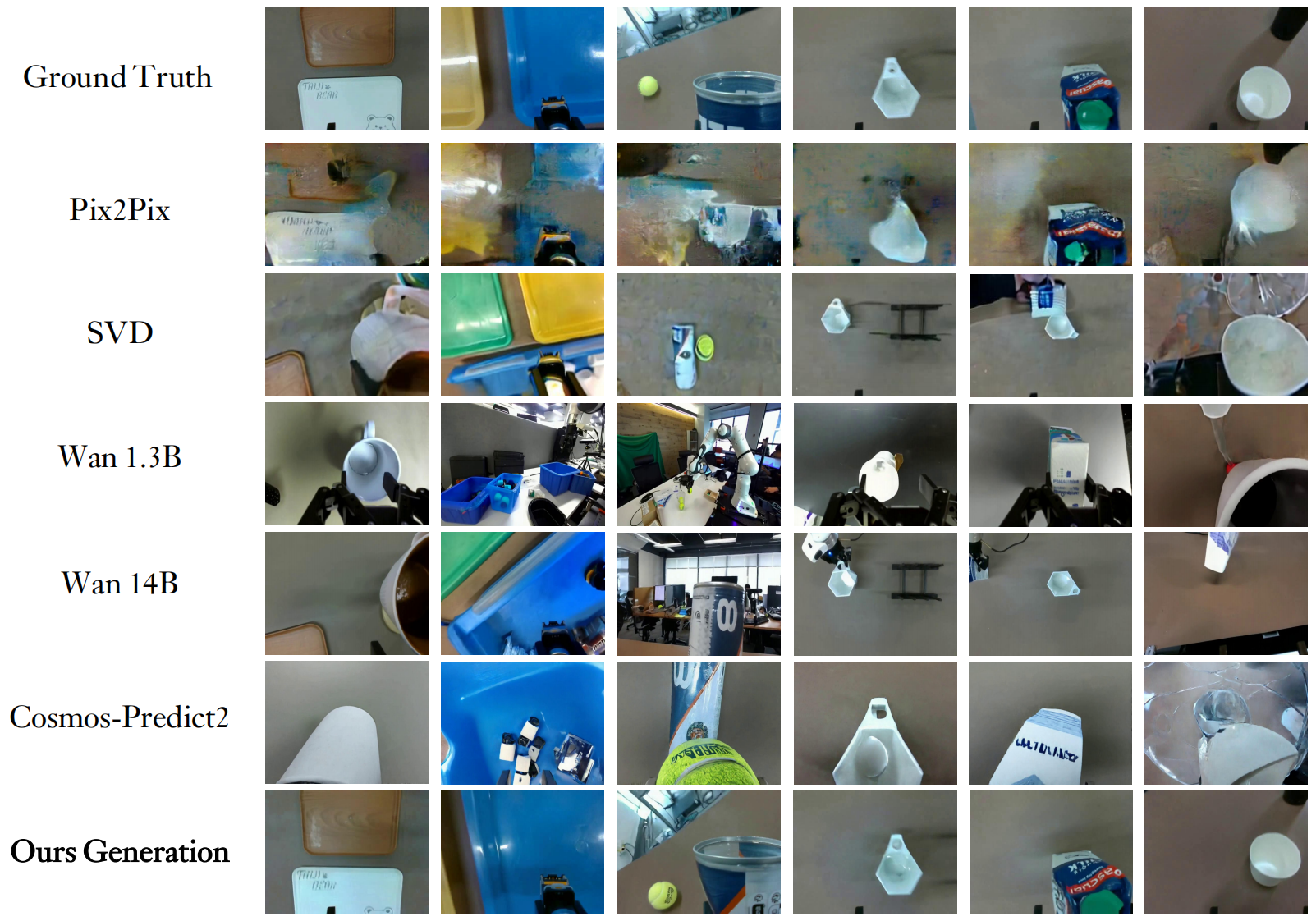
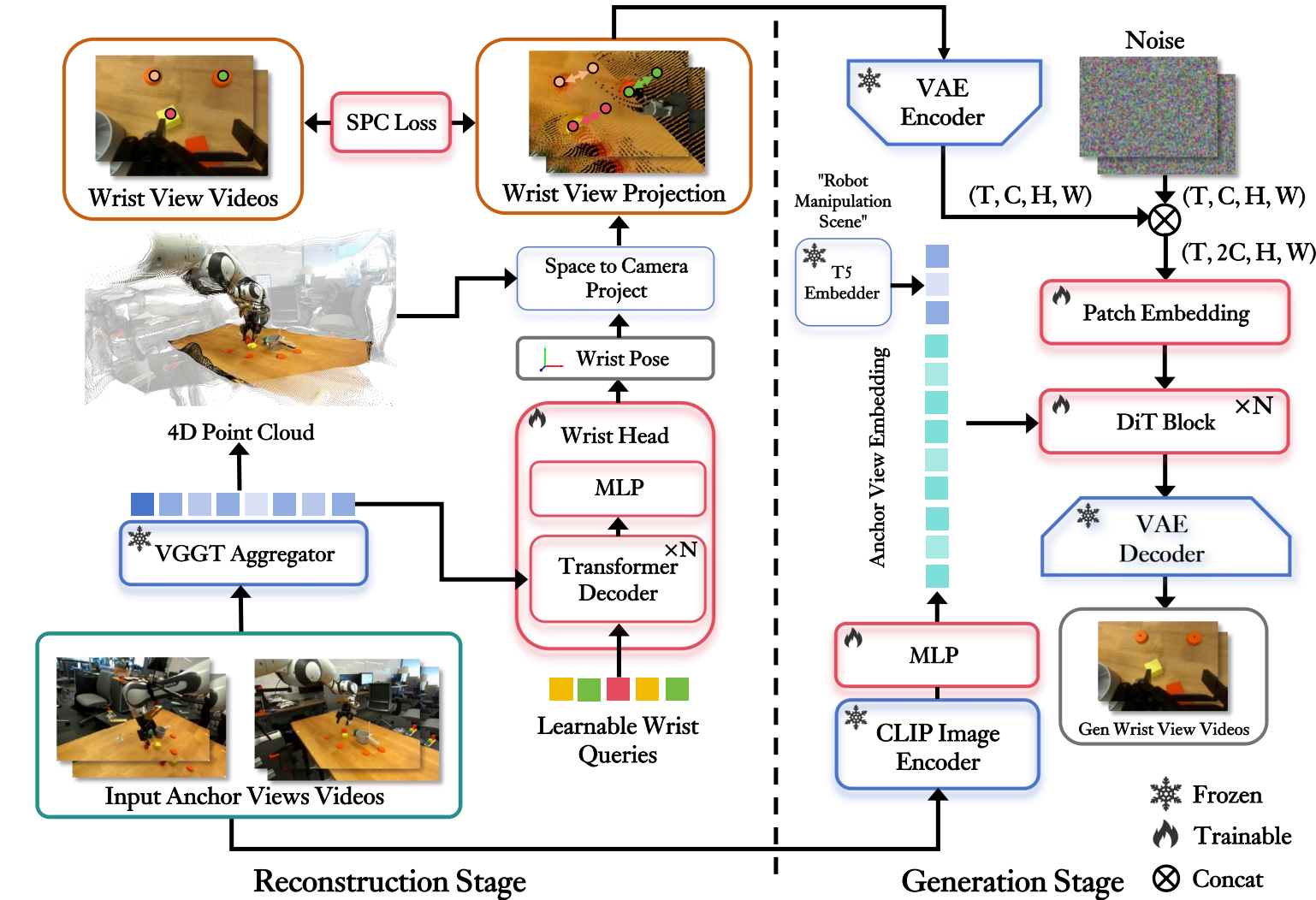
WristWorld answers this with a two-stage pipeline. Stage 1 is Reconstruction: it extends VGGT with a wrist head to estimate wrist-view pose and temporally consistent 4D point clouds. The paper adds Spatial Projection Consistency (SPC) loss to align 2D projection correspondences with the recovered 3D/4D geometry. Stage 2 is Generation: a diffusion-transformer-style video generator synthesizes wrist-view videos, conditioned on wrist-view projections and CLIP semantic features from the anchor views. Crucially, WristWorld does not require a first wrist frame; it generates the wrist view from anchor views alone.
For W²-VLA in this guide, WristWorld provides the world-to-wrist visual prior, while the W2-VLA-CoT release provides wrist-focused textual supervision. Each frame has a compact text record with Subtask, Reasoning, and Wrist. For example, in plug_in_socket, one frame can say that the left gripper is approaching the socket board, the reasoning is that the left arm should stabilize the board before the right arm inserts the plug, and the wrist focus is left=closed gripper approaching socket board; right=keeps still. This supervision is simple but useful: the policy learns not only actions, but also which wrist, which hand, and which manipulation phase matter at the current timestep.
A Practical W²-VLA Architecture
A LeRobot implementation of W²-VLA can be split into four blocks. The first block is the observation encoder: RGB encoders for external cameras, an optional wrist camera encoder, a proprioception encoder for joint/TCP/gripper state, and a text encoder for the instruction. If you use SmolVLA, an OpenVLA-style model, or an internal policy, this block may be a VLM backbone or a smaller vision transformer.
The second block is the world-to-wrist module. If you use WristWorld directly, this module takes anchor-view frames, reconstructs wrist pose and projections, then generates wrist-view video. During training, you can store the generated wrist video as an additional camera stream in LeRobot, or use only latent features from the video generator as auxiliary targets. If running the generator during every training epoch is too expensive, the pragmatic solution is to precompute wrist-view assets once and train the policy on the expanded dataset.
The third block is the wrist CoT head. W2-VLA-CoT does not provide only one episode-level description. It provides frame-aligned annotations with cot_train_text, cot_subtask, cot_reasoning, and cot_wrist_focus. You can train the model to generate this text as an auxiliary language loss, or encode the text into an embedding and condition the action head on it. For beginners, the auxiliary-loss version is easier to debug: feed observation and instruction to the model, ask it to predict cot_train_text, and simultaneously train the action head to predict the action chunk.
The fourth block is the action head. In LeRobot, actions are typically continuous vectors: delta end-effector pose, joint targets, gripper commands, or a robot-specific action layout. The head can be diffusion-based, flow-matching-based, ACT-style chunking, or a simpler MLP depending on the policy. The key point is that the action head should not see only global scene features. It should receive wrist-aware features or wrist CoT tokens, so it can separate nearby phases such as "approach socket", "align plug", "insert", "hold", and "retract".
anchor camera + optional wrist camera + robot state + instruction
        |
        v
VLM / visual encoder
        |
        |----> world-to-wrist feature or generated wrist stream
        |
        |----> wrist CoT auxiliary head: Subtask / Reasoning / Wrist
        |
        v
action head: action chunk or next action
Data: W2-VLA Training Data and CoT Labels
W2-VLA-Training-Data is released in expanded LeRobot format, with meta, data, and videos directories. It contains 58 dataset/task groups, 4,573 episodes, and 1,043,400 frames. The split is practical for experimentation: LIBERO has 4 suites with 1,693 episodes and 273,465 frames; RoboTwin has 50 tasks with 2,500 episodes and 549,787 frames; the real-world split has 4 tasks, place_bag, put_mango, table_clean, and plug_in_socket, with 380 episodes and 220,148 frames.
W2-VLA-CoT contains frame-aligned .npz annotations and intentionally does not duplicate videos or action files. The public schema includes:
schema_version
episode_index
num_frames
task
task_description
task_name
cot_train_text
cot_subtask
cot_reasoning
cot_wrist_focus
Inside each episode, the four CoT arrays have length num_frames. This matters during training: the text is aligned to timesteps, not only to the episode. With an action chunk of 10 or 50 steps, you can use the CoT at the current frame as a prompt, or use a near-future CoT window as an auxiliary target. The second option is closer to "future wrist latent prediction": the model learns the upcoming wrist-centered phase, not just the current frame description.
Installation
You need two pieces: WristWorld for wrist-view generation, and a LeRobot/VLA stack for policy training. The WristWorld repository is split into stage 1 and stage 2. Stage 1 reconstruction follows the VGGT training branch. Stage 2 generation uses DiffSynth Studio and the released WristWorld checkpoints.
git clone https://github.com/XuWuLingYu/WristWorld.git
cd WristWorld

# Stage 1 follows the VGGT training setup.
sudo apt-get update
sudo apt-get install -y libgl1

# Main Stage 2 requirements.
pip install torch torchvision
pip install cupy-cuda12x transformers==4.46.2 controlnet-aux==0.0.7
pip install imageio "imageio[ffmpeg]" safetensors einops sentencepiece protobuf modelscope ftfy
Download the WristWorld checkpoints from Hugging Face into checkpoints/:
checkpoints/
├─ BaseModel/
├─ VGGT/
├─ VideoModel/
└─ README.md
The stage 2 inference command in the repository has this shape:
python examples/wanvideo/rgb_ext_to_gen_video_droid.py \
  --input_root ../examples/ \
  --vggt_checkpoint ../checkpoints/VGGT/checkpoint.pt \
  --image_encoder_path /path/to/Wan2.1/models_clip_open-clip-xlm-roberta-large-vit-huge-14.pth \
  --text_encoder_path /path/to/Wan2.1/models_t5_umt5-xxl-enc-bf16.pth \
  --vae_path /path/to/Wan2.1/Wan2.1_VAE.pth \
  --pretrained_lora_path ../checkpoints/VideoModel/video_dit_lora.safetensors \
  --gpus 0
For LeRobot, create a separate environment:
conda create -n w2vla python=3.10 -y
conda activate w2vla
pip install -U "lerobot[all]" datasets huggingface_hub
pip install torch torchvision transformers accelerate einops opencv-python
Download both action data and CoT labels:
hf download yuuu94/W2-VLA-Training-Data \
  --repo-type dataset \
  --local-dir playground/Datasets/W2-VLA-Training-Data

hf download yuuu94/W2-VLA-CoT \
  --repo-type dataset \
  --local-dir playground/Datasets/W2-VLA-CoT
Keep the roots paired:
LIBERO action:     W2-VLA-Training-Data/libero
LIBERO CoT:        W2-VLA-CoT/libero
RoboTwin action:   W2-VLA-Training-Data/robotwin
RoboTwin CoT:      W2-VLA-CoT/robotwin
Real-world action: W2-VLA-Training-Data/real_world
Real-world CoT:    W2-VLA-CoT/real_world
Beginner Training Recipe
Step 1 is dataset inspection. Open meta/info.json, a few parquet files under data/chunk-000, and videos under videos/chunk-000. In real-world tasks, you will see camera keys such as cam_high, cam_left_wrist, and cam_right_wrist. In LIBERO, you will typically see observation.images.image and observation.images.wrist_image. Do not start a long training run until the action frame count, video frame count, and num_frames in the CoT file agree.
Step 2 is a dataset wrapper that returns a complete sample:
sample = {
    "observation": {
        "image": image_t,
        "wrist_image": wrist_image_t,
        "state": state_t,
    },
    "instruction": task_text,
    "cot_text": cot_train_text[t],
    "cot_wrist": cot_wrist_focus[t],
    "action": action_t_to_t_plus_h,
}
Step 3 is the training loss. A simple starting point is:
L = L_action
  + 0.1 * L_cot_text
  + 0.05 * L_wrist_focus
  + optional L_wrist_latent
L_action is the main objective, such as MSE for continuous actions, diffusion loss, or flow matching loss. L_cot_text teaches the model to predict the Subtask/Reasoning/Wrist text. L_wrist_focus can be a classification loss or a short language loss for left hand, right hand, and manipulation phase. L_wrist_latent is useful only if you have precomputed features from WristWorld or a video encoder.
Step 4 is a small overfit run before a large run. Pick one real-world task such as plug_in_socket, train for 5-10 epochs on a small set of episodes, and run open-loop visualization. The first goal is not state-of-the-art performance. The goal is to confirm that action scaling is correct, CoT targets align to the correct frames, and the wrist stream has not swapped left and right.
Inference and Deployment
In real deployment, you do not need to run the full WristWorld generator online. For a small lab robot, the safest version is to use a real wrist camera if available, or use WristWorld offline for training augmentation. The runtime policy receives the current observation, instruction, and state, then outputs an action chunk. If you still want online world-to-wrist prediction, run it at low frequency as a planning aid, not inside the servo loop.
A minimal deployment loop looks like this:
while True:
    obs = robot.get_observation()
    batch = preprocess(obs, instruction)
    action_chunk, aux = policy.select_action(batch)
    for action in action_chunk[:execute_horizon]:
        robot.send_action(action)
        if safety_stop():
            robot.stop()
            break
During debugging, log the predicted cot_wrist_focus. If a socket-insertion task fails, you need to know whether the model believes the right hand should align the plug, whether it is still in the approach phase, or whether it is retracting too early. This log is what makes W²-VLA easier to analyze than a completely opaque action-only policy.
Results and Why They Matter
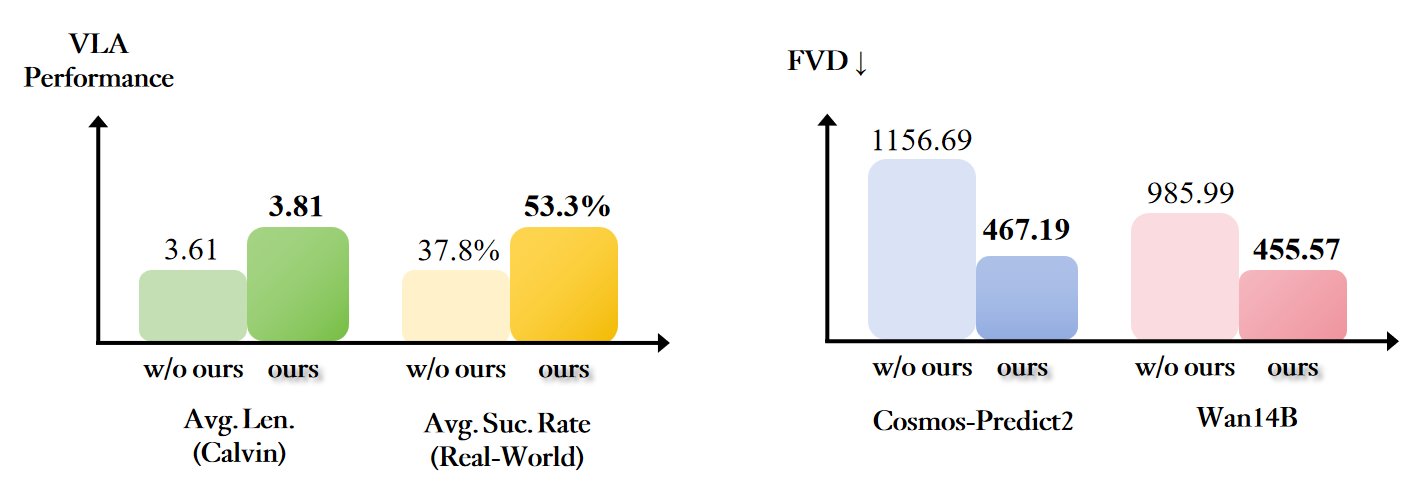
WristWorld reports experiments on DROID, Calvin, and Franka Panda. The generated videos show better spatial consistency, and for downstream VLA on Calvin, the average task completion length improves by 3.81% while closing 42.4% of the anchor-to-wrist performance gap. This does not mean every small W²-VLA implementation will automatically gain exactly those numbers. It means wrist-view generation can help when the bottleneck is missing close-range contact perception.
On the W2-VLA dataset side, the important result is a trainable release: over one million frames, 58 task groups, LeRobot video/action structure, and frame-aligned CoT labels. For a small team, the value is not cloning every detail of a paper-scale model. The value is learning how to structure data so a policy sees three things together: the external world, the wrist near contact, and a compact reasoning trace of the manipulation phase.
Common Mistakes
The first mistake is treating World-to-Wrist as simple camera augmentation. If you add a wrist stream but do not align timesteps and actions, the model will learn noise. Always inspect episodes with a viewer before long training.
The second mistake is making the CoT too verbose. A robot policy does not need an essay. A stable Subtask, Reasoning, and Wrist format is better than long text that changes style from frame to frame.
The third mistake is putting a heavy generator inside the control loop. Video generation is useful for precomputation, visualization, and auxiliary supervision. The servo loop needs low latency and clear safety boundaries.
The final mistake is evaluating only loss. W²-VLA is a manipulation policy, so measure success rate, completion length, contact failures, recovery after pose perturbations, and the number of human resets.