The first post in this series introduced the 4-axis framework for reading any end-to-end driving paper: input representation, planning output, supervision signal, and evaluation protocol. This post is where we get our hands dirty: we will walk through OpenDriveVLA, a model accepted at AAAI 2026 and the best choice for a first hands-on experiment.
Why OpenDriveVLA over flashier alternatives? Three practical reasons:
- Open LLM backbone: Qwen2.5-0.5B — no API lock-in, no commercial license
- Only needs nuScenes: the community-standard dataset, no custom sensor hardware
- Has actual documentation: the github.com/DriveVLA/OpenDriveVLA repo ships installation guides, data prep steps, and an eval script — something many academic papers skip entirely
Upfront transparency: the commands in this tutorial come from the official repository documentation. I have not personally run the full pipeline on my own hardware, so all benchmark numbers are taken from the original paper (arXiv:2503.23463v2) and are clearly attributed as such.
What is OpenDriveVLA?
OpenDriveVLA: Towards End-to-end Autonomous Driving with Large Vision Language Action Model — Xingcheng Zhou, Xuyuan Han, Feng Yang, Yunpu Ma, Volker Tresp, Alois Knoll (TU Munich), AAAI 2026. Submitted to arXiv in March 2025, revised in November 2025; the repo records acceptance on 2025/11/08.
The core problem they tackle is the modality gap between driving visuals and language. A camera sees a lane, a pedestrian, a traffic light — but those visual tokens and a language navigation command ("turn right in 200 meters") live in completely different embedding spaces. Without a good bridge, the model either ignores the visual stream or ignores the language instruction.
Their solution: hierarchical vision-language alignment — not a single alignment step, but a two-level alignment covering both 2D (camera perspective) and 3D (metric world space around the ego vehicle).
Architecture: Two-Level Visual-Language Alignment
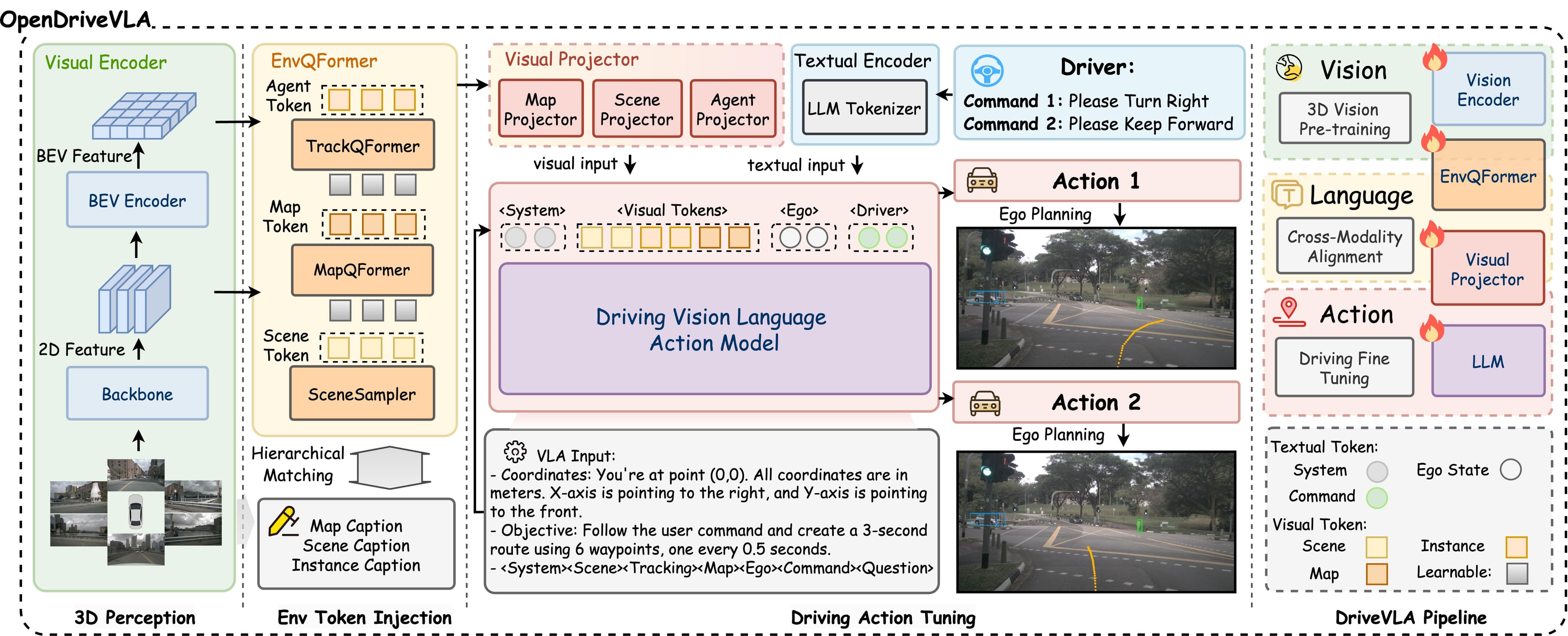
The system has three main components:
1. Visual Encoder — reading the scene
OpenDriveVLA inherits from LLaVA-NeXT to process multi-camera imagery from nuScenes. Each frame from the 6 cameras (front, front-left, front-right, back, back-left, back-right) is encoded into 2D visual tokens — essentially slicing the image into patches and embedding each one.
In parallel, a 3D vision branch (built on mmdet3d, inspired by UniAD) aggregates cross-camera information and produces 3D visual tokens — a metric-space representation of the world: relative positions of vehicles, pedestrians, and obstacles in ego-vehicle coordinates.
2. Hierarchical Alignment — bridging two worlds
This is the central technical contribution. Both 2D and 3D visual tokens are projected into a shared semantic space alongside language tokens, through two separate projection heads, then aligned hierarchically:
Camera images  →  2D visual tokens  ─┐
                                      ├→  Unified semantic space  →  LLM
BEV 3D repr.   →  3D visual tokens  ─┘

Ego state      →  state tokens       ─→  (concatenated with above)
This lets the model implicitly ask: "The object I see in the upper-left of the front camera (2D) — where is it in metric space and how fast is it moving (3D)?" — rather than relying on just one modality.
3. Autoregressive Trajectory Decoder — making the plan
Language backbone: Qwen2.5 (Alibaba, open-weight) in three sizes: 0.5B, 3B, and 7B parameters.
The trajectory is generated autoregressively: the model predicts each subsequent waypoint (x, y coordinate) conditioned on all previously generated waypoints plus the full scene context. During decoding, structured agent-environment ego interaction is embedded at each step — meaning the model continuously receives ego vehicle state (speed, steering angle) and surrounding agent information, grounding the final trajectory in actual vehicle dynamics rather than pure language reasoning.
Setting Up the Environment
GPU requirements: Training used 4× NVIDIA H100 80GB, batch size 1 per GPU, approximately 2 days for the 0.5B variant. For inference, the 0.5B checkpoint is ~1.4GB of model weights (0.7B parameters × 2 bytes at FP16), but the full 3D pipeline with mmdet3d and multi-camera processing likely pushes total VRAM to 16–24GB. An RTX 3090/4090 (24GB) or A100 40GB should be sufficient for inference. I have not confirmed the exact minimum — start with 24GB if possible.
Step 1: Create the Conda environment
conda create -n drivevla python=3.10 -y
conda activate drivevla
pip install --upgrade pip
Step 2: Install PyTorch
pip install torch==2.1.2 torchvision torchaudio --index-url https://download.pytorch.org/whl/cu121
Make sure gcc >= 5 and CUDA home are set correctly:
export CUDA_HOME=/usr/local/cuda   # adjust to your CUDA path
export PATH=$CUDA_HOME/bin:$PATH
Step 3: Install the custom mmcv (important — do not use standard pip install mmcv)
The repo ships a modified mmcv build in third_party/:
git clone https://github.com/DriveVLA/OpenDriveVLA.git
cd OpenDriveVLA

# Install custom mmcv
cd third_party/mmcv_1_7_2
MMCV_WITH_OPS=1 pip install .
cd ../..

# Install mmdet ecosystem
pip install mmdet==2.26.0 mmsegmentation==0.29.1 mmengine==0.9.0 motmetrics==1.4.0 casadi==3.6.0

# Install custom mmdet3d
cd third_party/mmdetection3d_1_0_0rc6
pip install .
cd ../..

# Remaining dependencies
pip install scipy==1.10.1 scikit-image==0.19.3 fsspec deepspeed
Common install errors:
# Missing libGL (common on headless servers)
apt-get update && apt-get install -y libgl1

# Missing libgfortran
sudo apt-get install libgfortran5
Preparing the nuScenes Dataset
OpenDriveVLA uses the nuScenes V1.0 full dataset — approximately 700GB, covering 1000 driving scenes with 6 cameras and 1 LiDAR. This is the de facto standard dataset in the autonomous driving research community.
Download the main dataset
Register at nuscenes.org and download:
nuScenes V1.0 full dataset(train and val splits)CAN bus extension(speed, steering angle signals)Map v1.3
Place them under data/nuscenes/ following this structure:
data/
├── nuscenes/
│   ├── can_bus/
│   ├── maps/
│   ├── samples/
│   ├── sweeps/
│   └── v1.0-trainval/
└── infos/
    ├── nuscenes_infos_temporal_train.pkl
    └── nuscenes_infos_temporal_val.pkl
Download the UniAD info files
OpenDriveVLA reuses pickle annotation files from the UniAD project (OpenDriveLab):
mkdir -p data/infos && cd data/infos

wget https://github.com/OpenDriveLab/UniAD/releases/download/v1.0/nuscenes_infos_temporal_train.pkl
wget https://github.com/OpenDriveLab/UniAD/releases/download/v1.0/nuscenes_infos_temporal_val.pkl

cd ../..
Download the cached info file
pip install gdown
cd data/nuscenes
gdown 16X0_-v-iXP9hVLNaDMmIiGhZKj24YOnb  # downloads cached_nuscenes_info.pkl
cd ../..
Ground truth files for evaluation (gt_traj.pkl, gt_traj_mask.pkl) are also available via Google Drive — see docs/2_DATA_PREP.md for the links.
Downloading the Checkpoint and Running Inference
Step 1: Download the 0.5B checkpoint
The checkpoint was released on Hugging Face in November 2025:
mkdir -p checkpoints
pip install huggingface_hub
python -c "
from huggingface_hub import snapshot_download
snapshot_download(
    repo_id='OpenDriveVLA/OpenDriveVLA-0.5B',
    local_dir='checkpoints/DriveVLA-Qwen2.5-0.5B-Instruct'
)
"
Note: The model card requires agreeing to share contact information — you will need to log in to Hugging Face before downloading.
Step 2: Run evaluation
conda activate drivevla

# Single GPU
bash scripts/eval_drivevla.sh checkpoints/DriveVLA-Qwen2.5-0.5B-Instruct 1

# Multi-GPU (if available)
bash scripts/eval_drivevla.sh checkpoints/DriveVLA-Qwen2.5-0.5B-Instruct 4
This runs open-loop evaluation on the nuScenes validation set: for each scene, the model receives multi-camera input, a navigation command, and ego state, then predicts a future trajectory which is compared against the recorded ground truth.
Reading the Results: What Do the Numbers Mean?
L2 Displacement Error
The primary metric for open-loop planning: the Euclidean distance (in meters) between predicted waypoints and ground truth, averaged across time horizons (typically 1s, 2s, 3s). Lower is better.
Results from the paper (arXiv:2503.23463v2):
| Model | Average L2 Error (m) | Average Collision Rate (%) |
|---|---|---|
| GPT-Driver | 0.44 | — |
| DriveVLM | 0.40 | — |
| OpenDriveVLA-0.5B | 0.35 | ~0.09 |
| OpenDriveVLA-3B | 0.33 | ~0.09 |
| OpenDriveVLA-7B | 0.33 | ~0.09 |
Source: AAAI 2026 paper, arXiv:2503.23463v2. These numbers were not measured personally.
The notable result: the 0.5B variant matches the 3B and 7B variants almost exactly. This suggests the hierarchical alignment architecture matters more than raw model scale — at least for this benchmark.
Collision Rate
The fraction of predicted trajectories that overlap with other objects in the scene (measured in simulation). Lower is better. At 0.09% this is very low — but remember this is an open-loop metric: the model predicts trajectory from recorded logs, not from actually controlling a vehicle in a dynamic environment.
Driving QA — BLEU-4
Part of the evaluation measures the model's ability to describe and explain driving decisions in natural language. OpenDriveVLA-7B achieves BLEU-4 = 27.6 on the nuCaption test set, outperforming LiDAR-LLM and general-purpose VLMs — showing that vision-language alignment also helps with explainability, not just trajectory accuracy.
Known Limitations
1. Training code is not yet released (as of August 2026). If you want to fine-tune on your own data or experiment with different backbones, there is no official path for that yet.
2. Open-loop ≠ Closed-loop: All numbers above are open-loop. The model is never actually controlling a vehicle; it is predicting what the recorded human driver did. This makes results more optimistic than real deployment. Post 3 (Benchmark: NavSim and Bench2Drive) digs into why this distinction matters and what closed-loop benchmarks look like.
3. 700GB dataset commitment: nuScenes full is a significant bandwidth and disk investment. If you just want to test the pipeline, a mini-split (~4GB) exists, but the released checkpoint was evaluated against the full val set.
4. Inference VRAM: I estimate 16–24GB as a safe range for the complete pipeline, but the actual number depends on batch size and input resolution. Monitor nvidia-smi on the first run.
Where OpenDriveVLA Fits in the Series
Mapping back to the 4-axis framework from Post 1:
| Axis | What OpenDriveVLA does |
|---|---|
| Input representation | 2D + 3D visual tokens from multi-camera, ego state |
| Planning output | Autoregressive waypoints (x, y) — not direct control |
| Supervision signal | Behavior cloning on nuScenes ground truth trajectories |
| Evaluation | Open-loop L2 error + Collision rate + Driving QA BLEU |
OpenDriveVLA exemplifies the vision-language integration school: the entire pipeline from cameras to waypoints flows through a single LLM, rather than separating perception and planning into distinct modules. This is the direct counterpart to the dual-system approach that Post 4 will explore through Alpamayo.
Next Steps
Now that you have seen how a driving VLA works from the inside, the next question is: how do we compare models fairly? Post 3 explains NavSim and Bench2Drive — two benchmarks designed to measure closed-loop performance, answering "how well does this model actually drive?" rather than just "does it match the recorded trajectory?"
Related Posts
- From UniAD to VLA: the end-to-end driving map 2026 — The 4-axis framework for reading any autonomous driving paper
- Benchmark: NavSim and Bench2Drive — Why open-loop is not enough, and what closed-loop benchmarks offer
- Alpamayo and language reasoning in driving — NVIDIA's 10B multi-camera model and what scale buys you